
Re: [open-phd-guiding] Unable to open/read log files in PHD Log Viewer - need help analyzing my guiding

Brian Valente
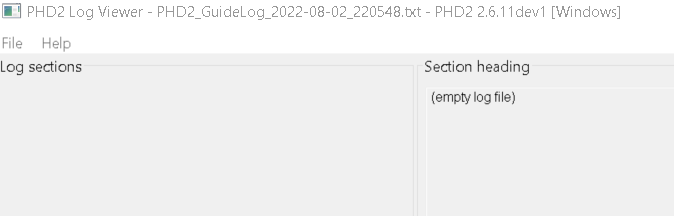
As stated in the subject line, I go to File->Open and select the log file however the data does not load??? I'm trying to analyze and trouble shoot my guiding from the first night out with my CEM70EC. I would appreciate any help solving the file/open issue, even more so any help in analyzing the attached the Log and Debug files.Thanks in advance,Mike--
You received this message because you are subscribed to the Google Groups "Open PHD Guiding" group.
To unsubscribe from this group and stop receiving emails from it, send an email to open-phd-guidi...@googlegroups.com.
To view this discussion on the web visit https://groups.google.com/d/msgid/open-phd-guiding/3b726cb2-87a3-4d92-8ec1-90ad5093fcd0n%40googlegroups.com.

mj.w...@gmail.com

MikeSchi
Brian Valente
To view this discussion on the web visit https://groups.google.com/d/msgid/open-phd-guiding/fc77a180-19a7-4839-844f-4013bb153e08n%40googlegroups.com.

Ana Ta
To view this discussion on the web visit https://groups.google.com/d/msgid/open-phd-guiding/fc77a180-19a7-4839-844f-4013bb153e08n%40googlegroups.com.

Bryan

bw_m...@earthlink.net
Hi Mike. No offense, but based on how much trouble you’re having with this, I doubt you’ll be able to quickly learn how to use LogViewer. Why don’t you simply upload the correct log files and we can look at them for you. Open this link and follow the procedures:
https://openphdguiding.org/getting-help/
The ‘Help/Upload Logs’ feature lets you select and upload the correct log files. You should use that PHD2 feature, don’t try to do it manually or you’ll end up with the mess you’re already in. Pay close attention to the information displayed in the dialog and select the logs for the time and date range that you want us to look at. If you pay attention to what you’re doing, you won’t be uploading empty log files.
Good luck,
Bruce
MikeSchi
bw_m...@earthlink.net
Hi Mike. PHD2 estimates polar alignment error by measuring the rate of drift in declination. Look at what your mount does when guiding is disabled – Dec is in green:

The dec motor isn’t running at all here. So if it isn’t caused by polar alignment error what is it? I suspect there’s something wrong with the results you’re getting from your iPolar procedure or your guide scope is moving around. I think you should try the various polar alignment procedures in PHD2 and see what results you get with those – those will be “looking” through the same optical system that you use for guiding. Another thing to consider is whether the mechanical alt/az mount fasteners you use for polar alignment aren’t tightened enough and allow the mount to shift around as the scope is slewed to different areas of the sky.
Good luck,
Bruce
From: open-phd...@googlegroups.com <open-phd...@googlegroups.com> On Behalf Of MikeSchi
Sent: Monday, August 22, 2022 11:31 AM
To: Open PHD Guiding <open-phd...@googlegroups.com>
Subject: Re: [open-phd-guiding] Unable to open/read log files in PHD Log Viewer - need help analyzing my guiding
I had a chance to get out last night and attempt to image. I have a valid log file to share (attached). Once again my guiding for RA and DEC was wonky (mount is the CEM70EC) - you'll see that in the log file. More confusing was the fact that when I ran the Guiding Assistant to assess, PHD2 stated my polar alignment was off by 147 arc-mins!!! Doubting this, I fired up iPolar to check and was was off perhaps 25 arc-sec (plus sign and the circle were out off alignment by a fraction of an inch - but it was red). I fined tuned the polar alignment, green - all good. I reviewed the alignment between my guide scope and imaging camera - spot on. I confirmed the mount time/loc - all good (iOptron GPS provided). I then re-ran the Guiding Assistance and polar align showed that I was still off by over 140 arc-mins!!!
I would love to know what could be causing this wild variation in polar align data. I appreciate all insights and assistance - thank you.
Mike
On Monday, August 15, 2022 at 11:40:46 PM UTC-5 Bryan wrote:
As Michael indicated, whenever you open PHD2, it will create new Guide and Debug log files. Assuming you did that after a session with the CEM70EC, then there should be AT LEAST two sets of files when you click Help -> Open Log Folder. One for your actual session and one for the instance of PHD2 that you just opened. The latter will be empty.
Bryan
On Monday, August 15, 2022 at 6:23:29 PM UTC-6 MikeSchi wrote:
Thanks Brian and Michael. I'm not sure why the log file is empty - does the box 'Enable diagnostic image logging' need to be checked? If so that would explain why. There was a debug file created on the same night. Is there any value in reviewing this file?
Thanks again,
Mike
On Monday, August 15, 2022 at 3:25:18 AM UTC-5 mj.w...@gmail.com wrote:
Hi Mike
When you open PHD2 to search for Logs, PHD2 will have just now created new (empty) Logs, ready for guiding data.
Before uploading you have to pick the relevant files, based on the date and time in the filename.
Michael
Wiltshire UK
On Monday, 15 August 2022 at 06:11:04 UTC+1 bval...@gmail.com wrote:
Hi Mike
there's nothing in your guidelog. Are you sure it doesn't open? WHen i open it in Log Viewer it reports "empty log file"
On Sun, Aug 14, 2022 at 10:09 PM MikeSchi <mjschi...@gmail.com> wrote:
As stated in the subject line, I go to File->Open and select the log file however the data does not load??? I'm trying to analyze and trouble shoot my guiding from the first night out with my CEM70EC. I would appreciate any help solving the file/open issue, even more so any help in analyzing the attached the Log and Debug files.
Thanks in advance,
Mike
--
You received this message because you are subscribed to the Google Groups "Open PHD Guiding" group.
To unsubscribe from this group and stop receiving emails from it, send an email to open-phd-guidi...@googlegroups.com.
To view this discussion on the web visit https://groups.google.com/d/msgid/open-phd-guiding/3b726cb2-87a3-4d92-8ec1-90ad5093fcd0n%40googlegroups.com.
--
Brian
Brian Valente
astro portfolio https://www.brianvalentephotography.com/astrophotography/
portfolio brianvalentephotography.com
--
You received this message because you are subscribed to the Google Groups "Open PHD Guiding" group.
To unsubscribe from this group and stop receiving emails from it, send an email to open-phd-guidi...@googlegroups.com.
To view this discussion on the web visit https://groups.google.com/d/msgid/open-phd-guiding/d4171890-74dc-4d87-9336-cce10ea3cd64n%40googlegroups.com.

Ron sieloff
On Aug 22, 2022, at 3:19 PM, <bw_m...@earthlink.net> <bw_m...@earthlink.net> wrote:
Hi Mike. PHD2 estimates polar alignment error by measuring the rate of drift in declination. Look at what your mount does when guiding is disabled – Dec is in green:
<image001.png>
To view this discussion on the web visit https://groups.google.com/d/msgid/open-phd-guiding/002a01d8b65c%242a0ed050%247e2c70f0%24%40earthlink.net.