
MODBUS TCP/IP Float Values
4,247 views
Skip to first unread message

TridiumControls
Sep 23, 2016, 10:41:55 PM9/23/16
to Node-RED
Hi, I have installed http://flows.nodered.org/node/node-red-contrib-modbus and I cannot find an area to change the value type for modbus. Seems like the node is a somewhat complete, but is missing few things. Primarily the value type. There are signed and unsigned integers as well as floats. The Modbus node is able to talk to unsigned integers just fine, but I have a current sensing energy monitoring CT's that use floats as their registers. I assume I need to use a function inorder to achieve what I need to do, but I just today i found out about node-red and learning the ropes. Can someome assist in the function or what needs to happen to get the value I am looking for.
Here's the CT documentation
https://www.ccontrols.com/support/dp/EnerceptMeterInstallationGuide.pdf starts on page 17 for the addresses.
THank you.
Here's the CT documentation
https://www.ccontrols.com/support/dp/EnerceptMeterInstallationGuide.pdf starts on page 17 for the addresses.
THank you.

Dave C-J
Sep 24, 2016, 3:58:41 AM9/24/16
to node...@googlegroups.com
Have you tried contacting the author or raising an issue on that nodes project site ? https://github.com/biancode/node-red-contrib-modbus
I don't know that the author hangs around this mailing list...
TridiumControls
Sep 24, 2016, 5:35:16 AM9/24/16
to Node-RED
I did just that. Thx
TridiumControls
Sep 24, 2016, 1:54:18 PM9/24/16
to Node-RED
Alright, So I contacted the author, and he posted this as a response.
I tried to install the npm package but its not available on npm.
How do you go about cloning git and installing it through npm?
He mentioned about bit shifting, does make sense, but can't figure out how to go about this
Dave C-J
Sep 24, 2016, 3:31:04 PM9/24/16
to node...@googlegroups.com
Well bit shifting is a fairly standard thing when using bits rather than bytes... eg see https://developer.mozilla.org/en/docs/Web/JavaScript/Reference/Operators/Bitwise_Operators
The pdf you had seems to tell you what type each register value is (mostly floating point)
Sorry - but I think you will need to do some more exploring to find out the magic you need as it's not something I've come across yet.

Mika Karaila
Sep 25, 2016, 9:23:36 AM9/25/16
to Node-RED
You have to take care of byte order:
Mika Karaila
Sep 25, 2016, 10:52:59 AM9/25/16
to Node-RED
Here are needed functions:
lauantai 24. syyskuuta 2016 5.41.55 UTC+3 TridiumControls kirjoitti:

Jesper Bødewadt Møller
Oct 16, 2016, 5:17:19 AM10/16/16
to Node-RED
Hi did you solve this issue??
I also struggle to get the float values from the response from the mobdus: So if someone knows how to write a function to takes the feedback from a modbus response, and convert them to float 32bit values.
Example i read 40 16 bit registers with dummy values from 0 to 40.
The msg.payload looks like this
[ 0, 1, 2, 3, 4, 5, 6, 7, 8, 9, 10, 11, 12, 13, 14, 15, 16, 17, 18, 19, 20, 21, 22, 23, 24, 25, 26, 27, 28, 29, 30, 31, 32, 33, 34, 35, 36, 37, 38, 39 ]
0 and 1 need to be combined/converted to a 32 bit float
2 and 3 need to be combined/converted to a 32 bit float
and so on so finally i get 20 floating points values i then can work with
Hope that there i someone can help out here
Jesper
Dave C-J
Oct 16, 2016, 5:47:39 AM10/16/16
to node...@googlegroups.com
I think a strong coffee and a good read of this may help
and maybe have a play here
Jesper Bødewadt Møller
Oct 16, 2016, 6:36:32 AM10/16/16
to Node-RED
I have seen that page regarding the arrayType, i know plc programming and can do the function the hard way.
i just hoped for some easy and nice functions in JS to do it more efficient and nice..
Dave C-J
Oct 16, 2016, 8:20:34 AM10/16/16
to node...@googlegroups.com
well some variation on these then...
// 16bit int buffer
var ui16 = new Uint16Array([ 0, 1, 2, 3, 4, 5, 6, 7, 8, 9, 10, 11, 12, 13, 14, 15, 16, 17, 18, 19, 20, 21, 22, 23, 24, 25, 26, 27, 28, 29, 30, 31, 32, 33, 34, 35, 36, 37, 38, 39 ]);
// 32bit int buffer
var ui32 = new Uint32Array(ui16.buffer, ui16.byteOffset, ui16.byteLength / Uint32Array.BYTES_PER_ELEMENT);
// 32bit float array
var fl32 = new Float32Array(ui16.buffer, ui16.byteOffset, ui16.byteLength / Float32Array.BYTES_PER_ELEMENT);
console.log(ui16);
console.log(ui32);
console.log(fl32);
Jesper Bødewadt Møller
Oct 16, 2016, 1:01:09 PM10/16/16
to Node-RED
Hi Dave.
You are the best ;o))) thanks for the help.
It's different to be a PLC developer and coding in java ;)
I got almost everything working now.
I just need to get the part with Azure IoT to work.
The problem is that i get a error from the Azure IoT hub function SyntaxError: Unexpected number. Probably be cures some formatting, but I'm lost here.
here is some debug data.
Here is the payload i send to the Azure IoT function. I really appreciate if someone can help out here.
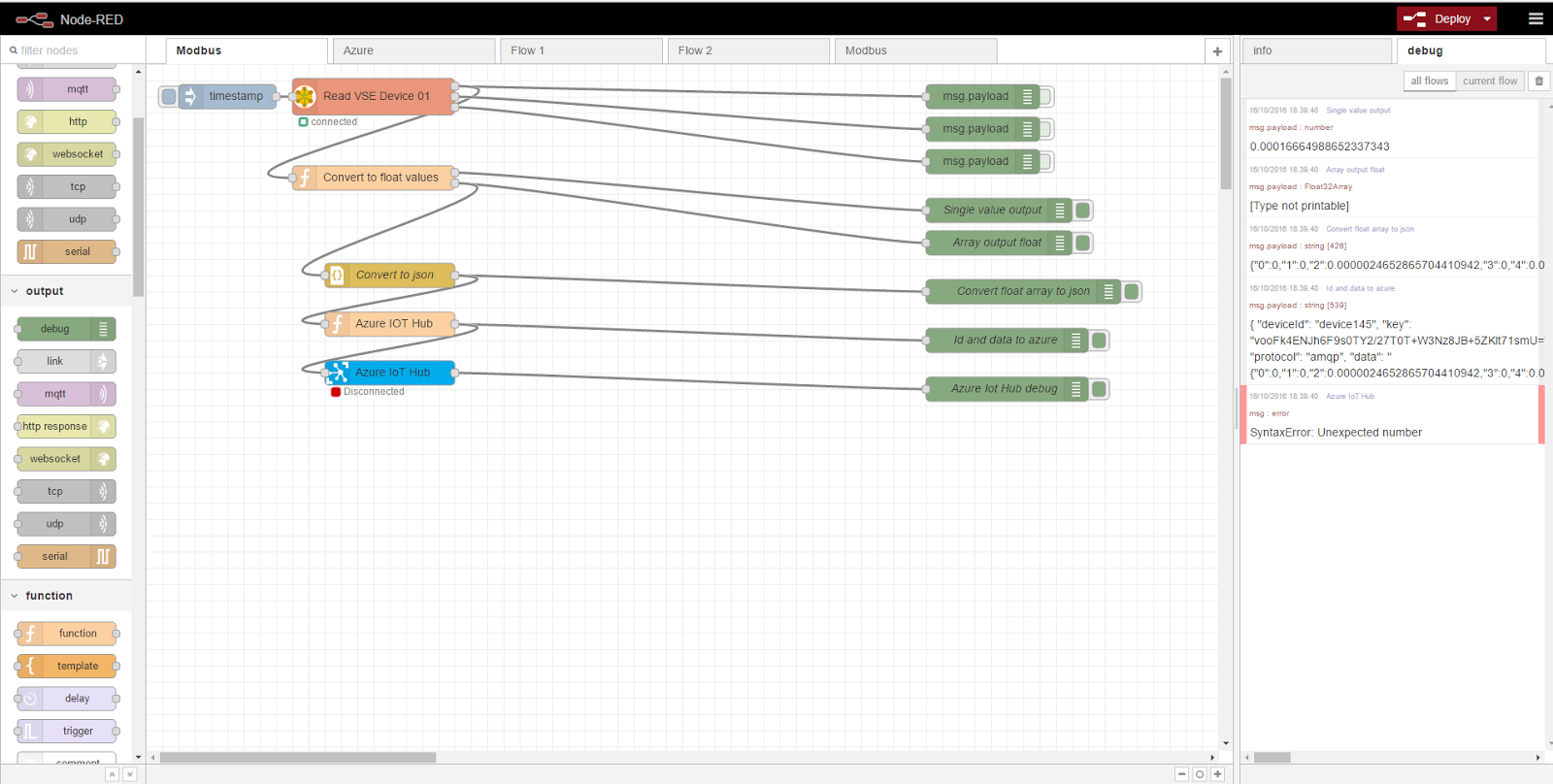
{ "deviceId": "device145", "key": "vooFk4ENJh6F9s0TY2/27T0T+W3Nz8JB+5ZKlt71smU=", "protocol": "amqp", "data": "{"0":0,"1":0,"2":0.0000024652865704410942,"3":0,"4":0.00016664988652337343,"5":6000,"6":0.12693434953689575,"7":6000,"8":0,"9":0,"10":0.04199865087866783,"11":6000,"12":0,"13":0,"14":0.00019180713570676744,"15":6000,"16":0.1253332495689392,"17":6000,"18":0,"19":0,"20":0.041686054319143295,"21":6000,"22":0,"23":0,"24":0,"25":0,"26":0,"27":0,"28":0,"29":0,"30":0,"31":0,"32":0,"33":0,"34":0,"35":0,"36":0,"37":0,"38":0,"39":0}"}
And the code to do this is the code for the flow.
[{"id":"2a5c9c2a.54c284","type":"tab","label":"Modbus"},{"id":"690190fd.4805c","type":"modbus-getter","z":"2a5c9c2a.54c284","name":"Read VSE Device 01","dataType":"HoldingRegister","adr":"0","quantity":"80","server":"2f99874b.476318","x":280,"y":40,"wires":[["fdb011af.ae881","c7c0994c.f66548"],["e287bfd5.14206"],["479453bb.a8256c"]]},{"id":"ed051b69.a82bb8","type":"inject","z":"2a5c9c2a.54c284","name":"","topic":"","payload":"","payloadType":"date","repeat":"","crontab":"","once":false,"x":100,"y":40,"wires":[["690190fd.4805c"]]},{"id":"fdb011af.ae881","type":"debug","z":"2a5c9c2a.54c284","name":"","active":false,"console":"false","complete":"false","x":1030,"y":40,"wires":[]},{"id":"e287bfd5.14206","type":"debug","z":"2a5c9c2a.54c284","name":"","active":false,"console":"false","complete":"false","x":1030,"y":80,"wires":[]},{"id":"479453bb.a8256c","type":"debug","z":"2a5c9c2a.54c284","name":"","active":false,"console":"false","complete":"false","x":1030,"y":120,"wires":[]},{"id":"c7c0994c.f66548","type":"function","z":"2a5c9c2a.54c284","name":"Convert to float values","func":"// Thx to Dave C-J \nvar msg1;\nvar msg2;\nvar ui16 = new Uint16Array(msg.payload);\nvar fl32 = new Float32Array(ui16.buffer, ui16.byteOffset, ui16.byteLength / Float32Array.BYTES_PER_ELEMENT);\n msg1 = {payload: fl32[4]};\n msg2 = {payload: fl32};\nreturn [msg1,msg2];\n","outputs":"2","noerr":0,"x":280,"y":140,"wires":[["3a38c0af.56fbd"],["4d8b3e4b.ad6a6","a3d868a7.030a58"]]},{"id":"3a38c0af.56fbd","type":"debug","z":"2a5c9c2a.54c284","name":"Single value output","active":true,"console":"false","complete":"payload","x":1050,"y":180,"wires":[]},{"id":"4d8b3e4b.ad6a6","type":"debug","z":"2a5c9c2a.54c284","name":"Array output float","active":true,"console":"false","complete":"payload","x":1050,"y":220,"wires":[]},{"id":"15e3a202.2969de","type":"debug","z":"2a5c9c2a.54c284","name":"Convert float array to json","active":true,"console":"false","complete":"payload","x":1080,"y":280,"wires":[]},{"id":"a3d868a7.030a58","type":"json","z":"2a5c9c2a.54c284","name":"Convert to json","x":300,"y":260,"wires":[["15e3a202.2969de","8ca42ec0.97e73"]]},{"id":"8ca42ec0.97e73","type":"function","z":"2a5c9c2a.54c284","name":"Azure IOT Hub","func":"msg1 = '{ \"deviceId\": \"device145\", '\nmsg1 = msg1 + '\"key\": \"vooFk4ENJh6F9s0TY2/27T0T+W3Nz8JB+5ZKlt71smU=\", ' \nmsg1 = msg1 + '\"protocol\": \"amqp\", '\nmsg1 = msg1 + '\"data\": \"' + msg.payload + '\"}'\n\nnewMsg = { payload: msg1 };\nreturn newMsg;","outputs":1,"noerr":0,"x":300,"y":320,"wires":[["7892a31c.53674c","3b999763.bbd3f8"]]},{"id":"7892a31c.53674c","type":"debug","z":"2a5c9c2a.54c284","name":"Id and data to azure","active":true,"console":"false","complete":"payload","x":1060,"y":340,"wires":[]},{"id":"3b999763.bbd3f8","type":"azureiothub","z":"2a5c9c2a.54c284","name":"Azure IoT Hub","protocol":"amqp","x":300,"y":380,"wires":[["e0b88eba.04326"]]},{"id":"e0b88eba.04326","type":"debug","z":"2a5c9c2a.54c284","name":"Azure Iot Hub debug","active":true,"console":"false","complete":"payload","x":1060,"y":400,"wires":[]},{"id":"2f99874b.476318","type":"modbus-client","z":"","name":"VSE_001","clienttype":"tcp","tcpHost":"127.0.0.1","tcpPort":"1502","serialPort":"/dev/ttyS0","serialBaudrate":"9600","serialDatabits":"8","serialStopbits":"1","serialParity":"none","unit_id":"1","clientTimeout":"5000","reconnectTimeout":"5000"}]
Mika Karaila
Oct 16, 2016, 2:52:37 PM10/16/16
to node...@googlegroups.com
Load this utility to check and validate values:
http://www.61131.com/download.htm
--
http://nodered.org
Join us on Slack to continue the conversation: http://nodered.org/slack
---
You received this message because you are subscribed to a topic in the Google Groups "Node-RED" group.
To unsubscribe from this topic, visit https://groups.google.com/d/topic/node-red/Nt_Y7egwuio/unsubscribe.
To unsubscribe from this group and all its topics, send an email to node-red+unsubscribe@googlegroups.com.
To post to this group, send email to node...@googlegroups.com.
Visit this group at https://groups.google.com/group/node-red.
To view this discussion on the web, visit https://groups.google.com/d/msgid/node-red/1d6b0330-44e6-4c51-ab8e-3ee2543393bc%40googlegroups.com.
For more options, visit https://groups.google.com/d/optout.
Jesper Bødewadt Møller
Oct 16, 2016, 3:22:04 PM10/16/16
to Node-RED
Hi Mika
Thanks for the tool a very nice and handy tool to have when playing with drivers and conversions.
To unsubscribe from this group and all its topics, send an email to node-red+u...@googlegroups.com.
Jesper Bødewadt Møller
Oct 16, 2016, 4:27:44 PM10/16/16
to Node-RED
But the problem is not the validate values, but when i convert the conversion to JSON then it add " like "{"0":0,"1":0}" } and the right is "{0: 0, 1: 0}" }:.
i can replace the " but just hope there is some other nice solution. so if someone has a solution let me know
Dave C-J
Oct 16, 2016, 4:34:11 PM10/16/16
to node...@googlegroups.com
errm no - if they are json then the property names (0 and 1 in your case) should correctly be in quotes.... you can use sites like jsonlint.com to check. so {"0":0,"1":0} is a correct json object.
Jesper Bødewadt Møller
Oct 16, 2016, 4:47:13 PM10/16/16
to Node-RED
humm Dave strange regarding your post
Test
{ "deviceId": "OptimiZeArlaBra", "key": "tFxkKpQWmP2+x4bXfvMUNhUW4GX5rE4qJ3X2k+bx4+w=", "protocol": "amqp", "data": "{0: 0, 1: 0}"} -----message send ok manual formal remove "
{ "deviceId": "OptimiZeArlaBra", "key": "tFxkKpQWmP2+x4bXfvMUNhUW4GX5rE4qJ3X2k+bx4+w=", "protocol": "amqp", "data": "{"0":0,"1":0}"} -----message send not ok json format
Jesper Bødewadt Møller
Oct 16, 2016, 4:54:25 PM10/16/16
to Node-RED
THX i found the fault in my code ;o) and removed the " to this msg1 = msg1 + '"data": ' + msg.payload + '}'
Dave C-J
Oct 16, 2016, 5:31:23 PM10/16/16
to node...@googlegroups.com
I hope that wasn't your real key....
If so change it...
Jesper Bødewadt Møller
Oct 16, 2016, 5:56:07 PM10/16/16
to Node-RED
It was a test account and don't exist anymore ;o) but thx anyway

kartheek koka
Apr 15, 2017, 3:42:51 AM4/15/17
to Node-RED
Hi Dave,
I started using raspberry pi3 recently to get data (Irradiance and Temperature) from a Weather station. Unfortunately the modbus registers (1355 and1357 ) are in float format and the node-red is pulling values in integer. I tried your program as shown below in the function node connected to Modbus TCP node. I am getting an error as data "undefined". I am not understanding where I went wrong. Can you please help me.
Note: When I use modscan32 to pull data. I cam getting correct values when I do it in float.
var msg1;
var msg2;
var ui16 = new Uint16Array(msg.payload);
var fl32 = new Float32Array(ui16.buffer, ui16.byteOffset, ui16.byteLength / Float32Array.BYTES_PER_ELEMENT);
msg1 = {payload: fl32[4]};
msg2 = {payload: fl32};
return [msg1,msg2];
Thanks,
KK

iggirex
May 24, 2017, 1:09:03 PM5/24/17
to Node-RED
@Mika Karaila
thank you for the link to the functions to get this done!! --- http://stackoverflow.com/questions/6887003/convert-32bit-unsigned-real-data-type-splitted-into-two-16-bit-signed-words
Really helped me out!!

Csongor Varga
Jun 1, 2017, 6:09:18 AM6/1/17
to Node-RED
Hi Guys,
In case somebody is still having issues, I had the same problem on a Modbus RTU energy meter. All values were coming in float, and I did the conversion using the below flow:
I don't have access to my node-red righ now, I think I copied the correct piece of function code from the above flow:
var rawData = new ArrayBuffer(4);
var intView = new Uint16Array(rawData);
var fltView = new Float32Array(rawData);
intView[0] = msg.payload[1]; //low
intView[1] = msg.payload[0]; //high
msg.payload = parseFloat(fltView[0].toFixed(1));
msg.topic = \"current\";
node.status({fill:\"blue\",shape:\"ring\",text:msg.topic + \":\" + msg.payload});
return msg;
The above code expects a 4 byte array which is 2 Modbus registers. If you are reading multiple registers at the same time, just adjust the array indexes when reading the low and high values. The node.status line just prints the current value, so you don't need to use a debug to see the actual data.
I hope this helps.
Regards,
Csongor

DJ S
Aug 5, 2017, 6:34:27 AM8/5/17
to Node-RED
Hi Dave.
Do you do private consulting on NR systems ?
Can you email me at daniel...@ngservices.org.au.
Would love to be able to use your services.
Kind regards
Dan
Do you do private consulting on NR systems ?
Can you email me at daniel...@ngservices.org.au.
Would love to be able to use your services.
Kind regards
Dan

Michael Hogan
Aug 5, 2017, 5:03:18 PM8/5/17
to Node-RED
I have done a fair amount of this for interfacing to some brushless motor control stuff.
I initially used the Typed Array classes for my stuff, but then reverted to using the slightly older Buffer functions like buffer.readFloatLE() and so forth. Here's one reference:
The reason that I did that is that we are using a Raspberry Pi as an edge gateway. While you can upgrade the Pi to use more recent versions of node.js and node-red, I found that it was dicey enough that it was better to use the versions that get installed with default Raspbian. Those versions do not support the typed array classes .. but they do support the various buffer.read* methods.
At any rate, figured I'd put that out there for whatever it might be worth to folks converting raw bytes to typed values.

Trevor Morris
Mar 8, 2018, 2:55:56 PM3/8/18
to Node-RED
You sir are a gentleman and a scholar. I figured out how to do this the super janky way with the functions posted in the previous comments and some other threads. I knew there had to be a better way! Anyone figure out how to reverse this and write to the float registers? I assume I do the same thing but backwards? Been trying with no luck. The 16 but unsigned are also giving me probs but figured the bools out quickly with the bit node.
Reply all
Reply to author
Forward
0 new messages