
More Mods with MinecraftEdu

Maize
Here are some mods that work well with MinecraftEdu. Installation instructions are included with the zip files.
Download the Server.zip and Client.zip from here:
https://drive.google.com/folderview?id=0B4sZS8sZhpOPQTBiSDMtN2Y0Qms&usp=sharing
For the most part it is an easy install, just copy and paste into the mod folders.
Only Biomes o’ Plently needs a bit of setup to get working, but it’s well worth the extra couple of steps.
I have included information about all of the mods along with links to the original files.

I am putting together a biomes activity to teach ecology and conservation with these mods. When I first encountered Minecraft my first thought was how useful it would be in teaching earth sciences. This biomes project has been in the planning stage for some time as my focus has been mainly on reinforcing grade 2 -5 math concepts (distance, measurement, fractions, arithmetic, equations and problem solving). Now with all the available mods out there I can no longer leave the idea on the shelf. At the moment I am keeping things simple, in the future I would like to incorporate more science lessons in geology, biology, chemistry, physics, astronomy, etc.
Super Biomes Lesson Plan:
Subject: Science - Ecology
Grades: For elementary or middle school students
Learning Objectives:
Students demonstrate understanding of what is a biome and how they differ from each other.
Students will learn about the many biomes of the world, what the conditions are and what kinds of plants and animals live there.
Conservation and sustainability are topics of discussion as students learn that every biome is vulnerable.
Skills:
Observation and writing skills as students make notes in their field journal during the activity.
Cartography and orienteering skills are taught while exploring and charting the world.
Student exercise their research skills as they use online resources to learn more about the biomes they have found in Minecraft.
Activities:
The goal is to create a Biome Garden. Students explore the world looking a new biome, when one is found they will write observations in their field journal and collect samples.
This is made easier with the the backpacks mod as students can organize their specimens and label their backpacks with the names of the biomes. (displayed with F3 button)
The Biome Garden is a large enclosure divided into many sections. In each area students will build a biome exhibit using the samples collected while exploring.
For example, a desert biome exhibit would include sand, sandstone and cacti, a forest biome would include indigenous trees along with flowers and plants.
Using information from their field journals students will create a sign for each exhibit describing the biome.
To increase the challenge have the students talk to in-game characters to acquire the tools they need to collect samples.
Eg.: Find the dwarf who has a superior digging tool, find a shepherd with sheers - great for leaves and sheep.
Students are rewarded as they complete each exhibit. They can work together or individually.
Extra prizes are available when students create maps and label the biomes (bibliocraft mod). This will result in a large seamless wall map with waypoints that can be found in the world by using compasses calibrated from the map.
Outside of the game student can write a report comparing real world biomes with the ones found in Minecraft.
They can also discuss the impact of logging, strip-mining, pollution and other human activities have on these environments.
This lesson is intended to be an “ever-growing” project. As students find more biomes and complete exhibits they earn rewards that enable them to explore the world further to find more biomes and complete more exhibits.
Students can periodically film virtual tours for a Youtube series showcasing their work.
Mo’Biomes

Biomes o’ Plenty - adds new biomes, many are accurate and some are fantasy - new foods and mobs along with a whole new dimension
MC Forum: http://www.minecraftforum.net/topic/1495041-16x-forge-biomes-o-plenty-v112-1-year-anniversary/
Wiki: http://biomesoplenty.wikia.com/wiki/Biomes_O%27_Plenty_Wiki
*To make sure new biomes generate: Launch server, then goto MinecraftEdu/ServerTool/server folder, open server.properties file, set level-type=BIOMESOP
*Turn on achievements to motivate exploration: on client computers goto MinecraftEdu/minecraft folder, open minecraftedusettings.ini and set showachievements=true
Then create a new single player world on the client computer, this is required to get the achievements to show on multiplayer.
ExtrabiomesXL - adds new biomes with trees (like Redwood forest) and flowers (make dye)
MC Forum: http://www.minecraftforum.net/topic/1090288-164-extrabiomesxl-3142/
Wiki: https://github.com/ExtrabiomesXL/ExtrabiomesXL/wiki
*If there is a server error with Biome ID conflict - Replace the current config file with the one included in the Extrabiomes Config folder.
Goto: MinecraftEdu/ServerTool/server/config/extrabiomes folder and replace the extrabiomes.cfg file with the new one from the this file.
Or you can edit the config file (always make a backup first): open extrabiomes.cfg file, change Biome IDs to higher numbers, such as 255, etc. this will also resolve a conflicts
Natura - adds new biomes, “craft-able” wood to make coloured items and different door styles. New trees (even in the nether), weapons, armour and mobs
MC Forum: http://www.minecraftforum.net/topic/1753754-16xnatura/
Wiki: http://ftbwiki.org/Natura
*all mods can be configured to turn on or disable different Biomes. Goto: MinecraftEdu/ServerTool/server/config/ and open a config file with a text editor. e.g.: MinecraftEdu/ServerTool/server/config/
biomesoplenty folder, open terraingen.cfg to edit where villages can spawn, open biomgen.cfg to adjust biome generation settings. This works for other mods as well - you can “tweak” any different settings. For changes to take effect, reload minecraft on server and client computers.
Mo’Stuff: Bibliocraft
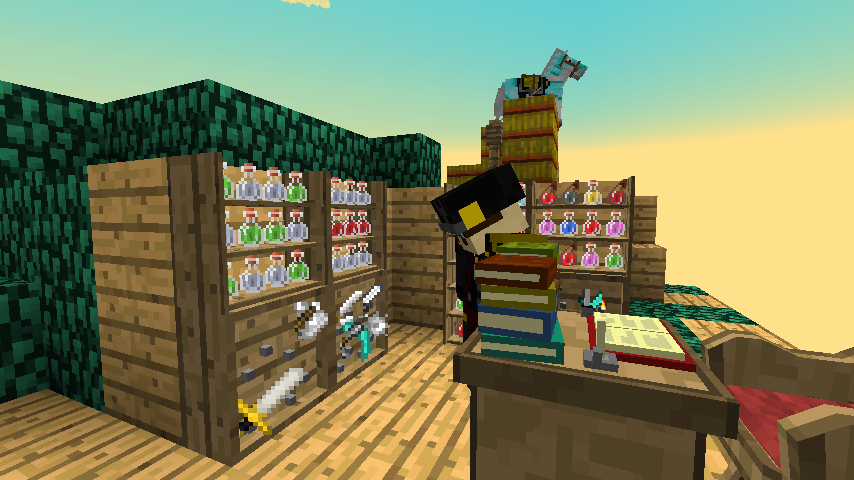
Functional furniture and shelves - Decorate buildings, shelves to organize potions, equipment and of course books!
Printing Press - save and load written books - create plates and print copies on a working press
Tape measure that works in meters or blocks - great for math activities or planing build (or both). Students can measure the depths of an ocean, how tall a tree is or how thick is a glacial ice sheet
Map tools for hanging maps - create huge seamless wall maps, mark waypoints and use a new compass to find them. Students can chart their explorations and share them with others.
Clipboards & More - Multipage lists (like books) with checkboxes of three states (blank, check and x)
Bibliocraft Website: http://www.bibliocraftmod.com/
Bibliowoods - Biome woods addon - add support for biome mods, craft furniture from exotic woods
Bibliowoods webpage: http://www.bibliocraftmod.com/?page_id=50#bibliowoods
Mo’Paintings

Painting Selection Gui - Easily select paintings, just type /painting while the cursor is over the artwork and a selection screen will pop up.
MC Forum: http://www.minecraftforum.net/topic/1897999-164forge-painting-selection-gui-hassle-free-paintings/
*Requires Gui Lib to be installed on Client computers ONLY:
Paintings ++: More paintings to choose from. Different layouts available in the settings, customize templates to include student artwork or famous paintings.
MC Forum: http://www.minecraftforum.net/topic/1617109-162-subarakis-paintings-no-more-bugs/
This mod uses a different artwork file located outside of the resource pack - to use custom paintings: unzip Paintings ++ 1.6.4 v1.zip, goto to assets/subaraki/art/ folder, choose the png file that matches the layout settings in the configuration file. The default used is gib.png, other templates are available in the same folder. They can be opened and modified in with a graphics editor. Re-zip the mod folder and replace the old version of the mod on both the client and server computers. Reload minecraft (client and server) to reflect the new changes.
To change the layout style of the artwork on the Client computers goto: MinecraftEdu/minecraft/config folder, open PaintingsMod.cfg with text editor, change one of the options under paintingsmode to true, set all others to false.
The default is Gibea=true - only change this if you have made a custom art pack using a different layout (like Insane, Sphax, or TinePics)
Mo’ Enhancements

Craft Guide - Look up recipes for everything, uses filters to make searching easier - set key config to open craft guide, e.g.. “R” key - client only mod
MC Forum: http://www.minecraftforum.net/topic/731133-162164-craftguide-v1674/

Backpacks - adds backpacks to the game - Open Backpack: right-click, Name Backpack: shift+right-click, Wear Backpack: shift+B (or whatever the backpack key is set to in the options)
MC Forum: http://www.minecraftforum.net/topic/1492661-15x-16x-backpacks-v-11817/

Rei’s MiniMap - adds corner map with waypoints - customizable - goto: MinecraftEdu/minecraft/mods/rei_minimap/
Change localhost.DIM0.points to the server IP to get labels to work on multiplayer - e.g.: 123.456.789.DIM0.points
Change key-config and other settings in the options file
Client only mod
MC Forum: http://www.minecraftforum.net/topic/482147-162-jul08-reis-minimap-v34-01/

CustomNPCs - add interactive characters, create quests, item shops, etc.
Developer's Website: http://www.kodevelopment.nl/minecraft/customnpcs/

Animal Bikes - ridable pets make great rewards - edit the config file to enable more bikes.
Developer's Website: http://www.kodevelopment.nl/minecraft/animalbikes/

Treecapitator - Add more natural behaviour when “logging” - chop one block with an ax and the whole tree falls. This mod makes it easy to see the affects of clear-cutting and conservation. Adjustable settings in the config file, can also edit extra biomes config file to increase the chance of automatic sapling replanting. Very useful with biome mods as it quickly takes down huge trees.

Shaders - Adds GLSL shaders to client computers, different shaders can be selected the options screen. Even slower computers are capable of some enhancements. Client only mod
MC Forum: http://www.minecraftforum.net/topic/1924484-162-glsl-shaders-for-minecraft-162/
Mo’Shaders
On client computers copy to MinecratEdu/minecraft/shaderpacks folder (all shaders go here)
Water Fix - Sometimes fixes the outlines on waving water - includes two versions, one with no waving leaves to reduce lag (and nausea)
Chocopic13-WaterFix.zip: https://drive.google.com/file/d/0B4sZS8sZhpOPZ2NhYWE2RktwVUk/edit?usp=sharing
WOH Shaders - shaders that come with World of Humanities installation
Shaders from WOH.zip: https://drive.google.com/file/d/0B4sZS8sZhpOPa2kzYV9SX0szd1U/edit?usp=sharing
Shader Packs - Many different shaders to choose from
Shader Pack 1: https://drive.google.com/file/d/0B4sZS8sZhpOPRlJXc2lsUVM0Y3M/edit?usp=sharing
Shader Pack 2: https://drive.google.com/file/d/0B4sZS8sZhpOPaVJMZm9sTHFEc0k/edit?usp=sharing
Any thoughts or suggestions for additional mods would be appreciated. Let me know if there is any problem getting things setup.
Maize

Matt Coia
--
You received this message because you are subscribed to the Google Groups "Minecraft Teachers" group.
To unsubscribe from this group and stop receiving emails from it, send an email to minecraft-teach...@googlegroups.com.
For more options, visit https://groups.google.com/groups/opt_out.

Eric
Maize
Thank you! Sorry for the typos, it turned into a long post.
I realize the wiki would have been a more suitable place, but I wasn’t sure where to put it.
Perhaps its time for a "FTBEdu" wiki?

Rick M

Scott Pollmann
Rick M
--
You received this message because you are subscribed to a topic in the Google Groups "Minecraft Teachers" group.
To unsubscribe from this topic, visit https://groups.google.com/d/topic/minecraft-teachers/dWz8-nu6vtk/unsubscribe.
To unsubscribe from this group and all its topics, send an email to minecraft-teach...@googlegroups.com.
Maize
The biomes seem to spawn next to each other without without overlapping. Natura doesn’t really add new biomes like the other mods, rather it adds flora to exiting ones. There is a disabler section in the config file now so you can turn off individual trees.
Treecapitator is a really useful mod in a number of ways, for education and general server upkeep…no more floating trees! I forgot to mention that it needs the supporting mod bspkrsCore to function. The file is in the mod pack, but if your adding things individually, make sure to copy both of them to your mod directory.
I usually do not have conflicts installing the mod pack, though on one server I had a biome id issue with BoP and ExtraBiomes. I included an extrabiomes config file in the mod pack incase this happens, just copy it over. I can help if there are other id issues - yup its a pain.... <_>
Maize
Rick,
I haven’t tried FTB with MinecraftEdu, I’ve just been adding individual mods as I need them. A regular server would work too I suppose.
I was thinking a knowledge base could be put together for using mods in the classroom, specifically ones that are compatible with MinecraftEdu. Maybe not just FTB mods, since there are so many out there, but it would be helpful with the server project.
Rick M
--

Andrew Pelz
Rick M
Just poked through the list, was wondering if EDU can run something like Towny?
--
Rick M
On Thursday, November 14, 2013 1:33:15 PM UTC-5, Rick M wrote:
Look for the thread here about MyTown, I think it's similar. Towny is a Bukkit mod, and MCEdu runs on Forge, so they're not compatible.
On Thu, Nov 14, 2013 at 1:20 PM, Andrew Pelz <andre...@gmail.com> wrote:
Just poked through the list, was wondering if EDU can run something like Towny?
--
You received this message because you are subscribed to a topic in the Google Groups "Minecraft Teachers" group.
To unsubscribe from this topic, visit https://groups.google.com/d/topic/minecraft-teachers/dWz8-nu6vtk/unsubscribe.
To unsubscribe from this group and all its topics, send an email to minecraft-teachers+unsub...@googlegroups.com.
Maize
Sorry for the late reply, thanks Rick for the awesome info!
I was able to get MyTown working with 1.6.4 build 6. It has the same basic features of Towny.
Download link:
https://drive.google.com/file/d/0B4sZS8sZhpOPc0NGV0NUQ0FYVU0/edit?usp=sharing
Copy the files into the appropriate folders (mods and config).
As per Craig’s post - open the allowedstudentcommands.txt in the ServerTool/setting folder
Add the following:
/help
/home
/town
/sethome

Craig Merrick
Maize

Joel S.
- Do I just generate a random world to start with the server tool?
- How do I know if the Biomes mods are working? What will I see in the game that I didn’t see before? I changed the text file to BIOMESOPO as per the instructions.
- Recipe Guide: When I am in crafting mode, and press R, nothing happens. How can I troubleshoot?
- In the server folder, there was no “mods” folder so I created one and copied items from the .zip file. Is that correct?
Maize
Hello Joel,
I would agree, mods can be intimidating when you first start using them. I’m hoping they will not “break” you or your MCEdu. :)
It's great you got the achievements working and changed the level-type to BIOMESOP in the server.properties file, that’s probably the hardest part.
To answer your questions:
Q1. Do I just generate a random world to start with the server tool?
A1. Yes, its best to create a new world since the biomes are added as the world generates. Of course it can be used with existing worlds, but you would have to wander pretty far to get Minecraft to generate a new chunk. It’s much easier to create a new world.
Q2. How do I know if the Biomes mods are working? What will I see in the game that I didn’t see before? I changed the text file to BIOMESOPO as per the instructions.
A2. There are a few ways to tell if the mod is loaded and working. When the server starts, in the Advanced window, Minecraft will tell you what mods are being loaded. Here is a screenshot…I have a big stack of mods and I can check to make sure they have loaded properly with this window:

Once the server has started up, you can log on the world and look for new biomes.
Pressing the F3 button (or fn + F3) will bring up info like co-ordinates and the name of the Biome you are in.

If you switch to creative mode you should be able to see all the mod items under different tabs.

Because you have the achievements working, you can check this screen to see if the Biomes O’ Plenty section is there. By clicking the “Minecraft” button, it will toggle the BOP achievement screen:

After clicking the Minecraft button:

Click the Biomes O'Plenty button to return to regular Minecraft achievements.
While exploring the world, if the new biomes are generating they should be recognizably different than regular Minecraft biomes. Plus an achievement will pop up on your screen when you wander into a BOP biome. “Achievement get! Mystic Grove” or something like that…

Q3. Recipe Guide: When I am in crafting mode, and press R, nothing happens. How can I troubleshoot?
A3. You do not need to be in crafting mode to use the recipe guide. It works in regular game play, not at the crafting bench…I probably should have clarified that.. :)
If nothing happens when you press R, check the Controls settings in the options screen and try changing R to a different key. If the crafting guide does not appear to be installed at all, make sure the mod file CraftGuide-Mod-1.6.4.zip is in the client’s folder only…not the server’s mod folder.

Q4. In the server folder, there was no “mods” folder so I created one and copied items from the .zip file. Is that correct?
A4. Yes, mods folder should be created if it is not there already. The new folder should be: mods/1.6.4/
Create a new folder called “mods” then create a “1.6.4” folder inside of it. All mods go in here. The structure should look like this:
Server

Client

Don't worry about the rei_minimap folder, it is created automatically if you install the mod.
As for testing, I also start with my Macbook then install things on the main server once the bugs have been ironed out. Hopefully your experiments are successful.
Good luck!
Maize
Joel S.

Justin Eames
Craig Merrick
Justin Eames
--
You received this message because you are subscribed to a topic in the Google Groups "Minecraft Teachers" group.
To unsubscribe from this topic, visit https://groups.google.com/d/topic/minecraft-teachers/dWz8-nu6vtk/unsubscribe.
To unsubscribe from this group and all its topics, send an email to minecraft-teach...@googlegroups.com.
Joel S.

Halligator1
Justin Eames
Seconded
I think the group should pin a post called MODS as well, copying Maizes post with all these other addiditions.
EduElfie

DustinF
However the data.db is there in the correct location, which is also correctly defined in the MyTown.cfg. If I remove it, or start with a vanilla installation with MCEDU 1.6.4 & MyTown MyTown-1.6.1.13.jar, no data.db file is created.
So far i've tried various versions of MyTown, a fresh MCEDU 1.6.4 install, copying a data.db from another server, creating a new data.db, starting MCEDU without a data.db file, changing the path (didn't like that much), changing the permissions on the minecraftedu directory...and each time I get the same error,except when I changed the path, which complained abotut he path not existing. So now I'm out of ideas.
Any ideas?
Cheers,
Dustin
-----------------------------
Jennifer Krouse
--
Matt Coia
--
You received this message because you are subscribed to the Google Groups "Minecraft Teachers" group.
To unsubscribe from this group and stop receiving emails from it, send an email to minecraft-teach...@googlegroups.com.
Maize
Maize
For the MyTown problem, I breifly had the same problem with the data.db error...but for the life of me I can't remember how I fixed it....
Maize
Maize
Mods: CustomNPCs - Crafting Guide - Backpacks
Hi Joel,
Sorry its been awhile! Have you made any progress? The NPCs don’t spawn naturally, you have to create each one. Once you have made once character you can place as many of them in the world as you like. Its a very in-depth mod, the dialogues and quests can take some time to setup. I would suggest starting with some basic characters like a bard or item-giver. SCMowns has made a full tutorial with annotations so you can jump to the part you want to know more about…the movie is over an hour and a half…yup its a big mod. Really makes me appreciate the work it took to build WOH…awesomeness!
http://www.youtube.com/watch?v=xAHirklwArA
The developer also has some instructions on his website:
http://www.kodevelopment.nl/minecraft/customnpcs/dialog
I have yet to find a comprehensive written tutorial, it would take some time to put together…
I also can’t figure out how to make character creation any easier. It would be great if we could edit the files directly instead of having to go through the game interface…If anyone has found anything like this? Maybe just wishful thinking on my part…
For the other mods I made some short videos to explain things…and practice using my headset..be kind, I’m a recording newb!

Mr Mills
I have tried just the mod installs
I have tried the full package including the config files
I am about to try copying the database from the config folder on the working server
But this seems to be very weird, why does it install on one server and not another???
Hmmm....
Mr Mills
WHen I add it to the Super duper iMac with i7 processor.... no joy....
WIll have a look again next week!
Hopefully there might be some more info by then too
Thanks for working on it Miaze.... It is great, (if a little slow) on our white iMac server.
Joel (m)
Justin Eames
Mr Mills
I did try that but again, no joy.
Still weird!
Joel (m)
Jennifer Krouse
Joel (m)
Mr Mills
It is strange as my Macbook Air is running the mods just fine (running on Mavericks), but when I try and run it on the iMac which is the same age as the macbook Air and also running Mavericks, it is crashing...
java.lang.runtimeexception: no sqlite library found
I'll get the detailed logs on Monday...
Joel (m)
Maize
Creative Mods
Tis the season for creative mods! Last weekend I tried a mod pack out with a small play group ages 9-10. We had so much fun I thought I would share:
MusicCraft

This mod adds musical instruments to the game. Our session was very noisy until the novelty wore off. Then we set up a stage and tried to play some songs. Afterwards everyone scattered to the four winds, but there were spontaneous serenades throughout the session. A Minecraft orchestra or rock band would be really cool! Next time maybe we will play Jingle Bells. :)
All the items are craftable which can be a lesson in itself. To build an instrument you have to craft each component first then combine them on the crafting bench.

One thing to note...key configs. Its recommend to check the options screen and mini-map options to make sure the following keys are not being used: G, B, N, H
Instrument Gui:

Piano, Keyboard, Organ, Cello: Right Click
-Piano Pedals: Hold Shift - elongates notes
-Electric Keyboard Modes: Press Space - toggles through 4 styles
Drum Kit & Xylophone: Right Click with Drumstick

Violin: Right Click with Bow
Guitar: Press G to play
- use within 4 blocks of an amplifier for distortion (if the amp is on)
- Like a real guitar, use keyboard to make chords and num pad plucks the strings. The base guitar and cello are also played this way.

Base Guitar: Press B
Trumpet: Press N
Saxophone: Press H
In multiplayer you can only play instruments on stands, not from inventory. For example a trumpet from creative inventory held in your hand will not work.

The trumpet stand must be be placed in the world first, then right click on the top part of the stand to pick up the trumpet (and put it back).

More information and download is available from the developers website:
(warning - the site has pop-ups and adfly advertising)
http://musiccraft.neq3.com/index.html

Time to practice my holiday songs,
Have fun!
Maize
Mr Mills
I have the server crash log. This is on the iMac, running Mavericks - same as my Macbook Air which runs the mods just fine...
Thanks for any help and advice.
Joel
---- Minecraft Crash Report ----
// Don't do that.
Time: 09/12/13 09:13
Description: Exception in server tick loop
java.lang.RuntimeException: no SQLite library found
at ee.lutsu.alpha.mc.mytown.MyTown.modsLoaded(MyTown.java:124)
at sun.reflect.NativeMethodAccessorImpl.invoke0(Native Method)
at sun.reflect.NativeMethodAccessorImpl.invoke(NativeMethodAccessorImpl.java:57)
at sun.reflect.DelegatingMethodAccessorImpl.invoke(DelegatingMethodAccessorImpl.java:43)
at java.lang.reflect.Method.invoke(Method.java:606)
at cpw.mods.fml.common.FMLModContainer.handleModStateEvent(FMLModContainer.java:545)
at sun.reflect.GeneratedMethodAccessor3.invoke(Unknown Source)
at sun.reflect.DelegatingMethodAccessorImpl.invoke(DelegatingMethodAccessorImpl.java:43)
at java.lang.reflect.Method.invoke(Method.java:606)
at com.google.common.eventbus.EventHandler.handleEvent(EventHandler.java:74)
at com.google.common.eventbus.SynchronizedEventHandler.handleEvent(SynchronizedEventHandler.java:45)
at com.google.common.eventbus.EventBus.dispatch(EventBus.java:313)
at com.google.common.eventbus.EventBus.dispatchQueuedEvents(EventBus.java:296)
at com.google.common.eventbus.EventBus.post(EventBus.java:267)
at cpw.mods.fml.common.LoadController.sendEventToModContainer(LoadController.java:194)
at cpw.mods.fml.common.LoadController.propogateStateMessage(LoadController.java:174)
at sun.reflect.NativeMethodAccessorImpl.invoke0(Native Method)
at sun.reflect.NativeMethodAccessorImpl.invoke(NativeMethodAccessorImpl.java:57)
at sun.reflect.DelegatingMethodAccessorImpl.invoke(DelegatingMethodAccessorImpl.java:43)
at java.lang.reflect.Method.invoke(Method.java:606)
at com.google.common.eventbus.EventHandler.handleEvent(EventHandler.java:74)
at com.google.common.eventbus.SynchronizedEventHandler.handleEvent(SynchronizedEventHandler.java:45)
at com.google.common.eventbus.EventBus.dispatch(EventBus.java:313)
at com.google.common.eventbus.EventBus.dispatchQueuedEvents(EventBus.java:296)
at com.google.common.eventbus.EventBus.post(EventBus.java:267)
at cpw.mods.fml.common.LoadController.distributeStateMessage(LoadController.java:105)
at cpw.mods.fml.common.Loader.serverStarted(Loader.java:758)
at cpw.mods.fml.common.FMLCommonHandler.handleServerStarted(FMLCommonHandler.java:319)
at net.minecraft.server.MinecraftServer.run(MinecraftServer.java:524)
at net.minecraft.server.ThreadMinecraftServer.run(SourceFile:583)
Caused by: java.sql.SQLException: no SQLite library found
at org.sqlite.Conn.open(Conn.java:136)
at org.sqlite.Conn.<init>(Conn.java:57)
at org.sqlite.JDBC.createConnection(JDBC.java:77)
at org.sqlite.JDBC.connect(JDBC.java:64)
at ee.lutsu.alpha.mc.mytown.sql.Database.connect(Database.java:184)
at ee.lutsu.alpha.mc.mytown.MyTownDatasource.init(MyTownDatasource.java:39)
at ee.lutsu.alpha.mc.mytown.MyTown.modsLoaded(MyTown.java:122)
... 29 more
A detailed walkthrough of the error, its code path and all known details is as follows:
---------------------------------------------------------------------------------------
-- System Details --
Details:
Minecraft Version: 1.6.4
Operating System: Mac OS X (x86_64) version 10.9
Java Version: 1.7.0_45, Oracle Corporation
Java VM Version: Java HotSpot(TM) 64-Bit Server VM (mixed mode), Oracle Corporation
Memory: 241772656 bytes (230 MB) / 376963072 bytes (359 MB) up to 1431830528 bytes (1365 MB)
JVM Flags: 1 total; -Xmx1536M
AABB Pool Size: 0 (0 bytes; 0 MB) allocated, 0 (0 bytes; 0 MB) used
Suspicious classes: FML and Forge are installed
IntCache: cache: 0, tcache: 0, allocated: 1, tallocated: 63
FML: MCP v8.11 FML v6.4.20.1?337 Minecraft Forge 9.11.1.0 9 mods loaded, 9 mods active
mcp{8.09} [Minecraft Coder Pack] (minecraft.jar) Unloaded->Constructed->Pre-initialized->Initialized->Post-initialized->Available->Available->Available->Available
FML{6.4.20.1?337} [Forge Mod Loader] (minecraftedu_server.jar) Unloaded->Constructed->Pre-initialized->Initialized->Post-initialized->Available->Available->Available->Available
Forge{9.11.1.0} [Minecraft Forge] (minecraftedu_server.jar) Unloaded->Constructed->Pre-initialized->Initialized->Post-initialized->Available->Available->Available->Available
animalbikes{2} [AnimalBikes] (AnimalBikes.zip) Unloaded->Constructed->Pre-initialized->Initialized->Post-initialized->Available->Available->Available->Available
customnpcs{0.8} [CustomNpcs] (CustomNPCs.zip) Unloaded->Constructed->Pre-initialized->Initialized->Post-initialized->Available->Available->Available->Available
MyTown{1.6.1.10} [MyTown] (MyTown-1.6.1.12.jar) Unloaded->Constructed->Pre-initialized->Initialized->Post-initialized->Available->Available->Available->Errored
Backpack{1.18.17} [Backpack] (backpack.zip) Unloaded->Constructed->Pre-initialized->Initialized->Post-initialized->Available->Available->Available->Available
ForgePerms{1.0.0} [ForgePerms] (forgeperms-1.6.1.5.jar) Unloaded->Constructed->Pre-initialized->Initialized->Post-initialized->Available->Available->Available->Available
PermissionsEx{1.5.0.0} [PermissionsEx] (forgeperms-1.6.1.5.jar) Unloaded->Constructed->Pre-initialized->Initialized->Post-initialized->Available->Available->Available->Available
Profiler Position: N/A (disabled)
Vec3 Pool Size: 0 (0 bytes; 0 MB) allocated, 0 (0 bytes; 0 MB) used
Player Count: 0 / 25; []
Is Modded: Definitely; Server brand changed to 'fml,forge'
Type: Dedicated Server (map_server.txt)

Noppes
Did you install the database correctly? There should be some sort of .sqlite or .db file somewhere
Mr Mills
Copying an entire working MinecraftEDU folder
Copying over the working DB file from a working server
Just installing the mods without the permissions and the config files (as per Maize's test) to a vanilla installation
Stumped... Truely am!!!
Joel (m)
Mr Mills
I am basically wanting to set up a single Admin user with full access, then several Moderators who can kick, invite and allow towns etc.. then residents then non-residents. etc...
I have copied a permissions.YML file from here http://www.minecraftforum.net/topic/1650110-146-151mytown-aperf-server-protection-and-performance-mods/ , but I don't seem to have full access to all commands....
all very new to me!
joel

Brian Westbrook
I had the same issue trying to run MyTown with MCEdu 1.6.4 - for whatever reason, it works fine on Windows but crashes the server on OS X. I spoke with the current developer of MyTown a few weeks back and he hasn't been able to figure out the cause as of yet.
Maize
Mr. Mills,
I think I'm stumped with the server crash...the only way I can recreate the error from the log is to launch without the MyTown.lib file in the mods directory. <_>
I have tried this install method on a MacOSX server with mavericks, another OSX server without and also on Windows 7:
- Install fresh copy of MinecraftEdu Server
- Launch server and generate new world
- Save world and stop server
- Add 3 mod files to the server/mods directory:
MyTown-1.6.1.12.jar
MyTownLib.jar
forgeperms-1.6.1.5.jar - Launch Server and load saved world
I am using the the 3 files available here: MyTown-Just the Mods.zip
I wish I could offer more support, this mod is great when it works.
For permissions.yml here is an example with the groups you requested:
groups:
default:
default: true
permissions:
- mytown.cmd
- mytown.ecmd.home
- mytown.ecmd.spawn
- mytown.cmd.spawn
- mytown.ecmd.sethome
- mytown.ecmd.homes
- mytown.ecmd.delhome
- mytown.cmd.list
- mytown.cmd.res
- mytown.cmd.accept
- mytown.cmd.deny
- mytown.cmd.leave
- mytown.cmd.nationinfo
- mytown.cmd.nationlist
- mytown.cmd.nationaccept
- mytown.cmd.nationdeny
- mytown.cmd.nationleave
moderator:
permissions:
- mytown.cmd
- mytown.cmd.*
- mytown.ecmd.home
- mytown.ecmd.spawn
- mytown.ecmd.sethome
- mytown.ecmd.homes
- mytown.ecmd.delhome
admin:
permissions:
- mytown.*
users:
teacher:
group:
- admin
student1:
group:
- moderator
student2:
group:
- moderator
To use the commands they must be added to the ServerTool/settings/allowedstudentcommands.ini file:
/ch
/g
/tr
/h
/l
/tc
/nc
/home
/sethome
/delhome
/spawn
/t
/town
This permission set allows the moderator to create towns and nations, assign plots, invite and kick, etc. The default user can only set their home and teleport to different town spawns. They can get info about existing towns, accept or deny invitations or leave a town/nation.
If the moderators group is still to “powerful” you can remove the line mytown.cmd.* and add only the permissions you want (like kick, invite, etc.) Let me know if you run into problems or make any headway with launching that server!
Maize
Mr Mills
Love the Mod... It IS WORKING on the old iMac, and I love it...
I will keep trying and trying on the i7 iMac as the extra processing power will reduce dreaded LAG.
You are very very helpful and I really appreciate the support in getting it working.
Going to spend a productive morning trying all solutions again and see if I can get it working.
Happy days...!
And thanks for the permissions settings... I'll try them on the working server too!!.
Joel (m)
(I'll let you know how I get on!)
Mr Mills
Failing that, i'll wipe the mac, start from scratch on a new build and work on that.
or just wait and see if the mac mini server i requested gets purchased by my work!!! (early christmas present!)
LOL.
Maize
More Creativity
To continue the theme of creative mods, here is a mod that is both useful and fun:
OpenBlocks
This was probably the most popular mod at the weekend session. It allows students to be creative without having to put them in creative mode. OpenBlocks is full of “odd and ends” that make many things easier. There are two videos by Direwolf20 on the Minecraft forum page, the first one goes through all the items in detail and the second highlights the creative elements of the mod.
Paint Brushes & Paint Mixer
The paint mixer has a colour picker that works from CMYK values. By adding milk and dye to the machine you can mix any colour of the rainbow. The amount of dye consumed is proportional to the colour made. Mixing a dark colour will use more black (K), making orange uses more yellow than mixing purple, etc. The machine actually shakes the paint can when mixing, just like the real thing!

After a paint can is made it can be placed in the world. Right-click the can with a paint brush to us the colour.
Canvas Blocks & Stencil
Canvas Blocks are made for painting. Stencils can be made at the drawing table then placed on the canvas.


Rotate stencils by holding shift and right-click to create interesting effects. This mod is still in development, right now there is a sketching pencil that is not yet implemented. Freehand drawing may be in the works, perhaps custom stencils as well. The Squeegie can be used to wipe the paint from blocks. The stencils and paint work on vanilla blocks as well as canvas, even glass.

Magic Pencil & Crayons
Draws “imaginary” blocks in the world that can only be seen with the glasses. The pencil draws solid blocks, but the crayon blocks are only solid when wearing the glasses. Rainbow Glasses can see all blocks, but cannot interact with them. BadA** Glasses (“Boss Glasses”) can see and interact with all imaginary blocks.
Imaginary blocks can be created and destroyed in one click making it easy to plan structures and build creatively while in survival mode. Invisible mazes, bridges and secret entrances are some other possibilities.

Of course they can lead to mischief, so establishing ground rules beforehand would be a good idea. If griefing does become an issue, the crayons can be disabled in the config file. The number of uses is set to 10 by default. Setting it to zero will make them useless even when newly crafted. But that would spoil the fun as they are great for 3D art and can be easily broken if your wearing the right glasses.

Building Guide
Create shapes without typing commands. This block projects a guide that makes building difficult shapes faster and easier.

Right click the sides of the block to adjust the size, shift+ right click the block to cycle through the various templates.

Students can build the shapes themselves but a teacher can also use this mod to generate shapes without using world edit commands. The auto-build feature is triggered by placing an obsidian block on top of the guide (shift+right-click) then right-click the guide block with the material of your choice. Poof! An Igloo!


Other Really Cool Items:
Elevator Blocks
Simple blocks that transport players vertically within a set range (adjustable in the config). Stand on the block and press the spacebar to go up or shift to go down. There are limits to how many blocks it can travel through, by default the maximum is 4. This solves the “Too Many Transporters” problem that can happen in large worlds, also they are easy to craft so students can make their own.

The Jaded Ladder solves that “stuck at the top of a ladder with a trap door” problem. This has always been an annoying difficulty...no more! Finally a “climbable” trapdoor! The Rope Ladder is also a great addition. It can be extended down from any height and unlike vines it does not need to be against a solid surface to climb.
Redstone Archery Targets
Targets that emit a redstone signal when hit, accuracy determines the signal strength. They also flip up and down when connected to a circuit - fun way to use XOR gates and repeaters.

Sonic Glasses
Allows the wearer to see sounds. The world appears dark and icons show noises within hearing range. Footsteps are represented by boots, mobs are shown by hearts, actions by their tool icon, etc.
Cartographer
A cute hovering bot that follows you around. If you give it a map module it will create a 3D height map of the area that can be viewed on the map projector.

Holding Tanks
Store fluids for later use or just for decoration. The capacity can be set in the config file, by default each tank holds 16 buckets. Aside from water and lava it can store liquid XP. This makes dispensing experience to players much easier.
Mini-Crane
Crane you wear on your back - control it with a remote to pick up mobs and blocks. Fun for a Crane Mini Game where you grab an item and move it to the prize area
Item Cannon

Used in combination with Vacuum hoppers they are great for homework delivery systems:
(It easy to get carried away with these...:)
Vacuum Hopper
Like a regular hopper but can vacuum up items within close range. Right-click to open the GUI, on the right side of the screen click the box icon. A widow will expand showing the hopper, left click to set the output side, holding right-click and dragging the cube will adjust the viewing angle. 
Note: The hang glider does not work in multiplayer but the rest of the items work perfectly.
This mod it both functional and fun - like a big box of toys and some very useful tools!
Enjoy,
Maize
Maize
Secure Chests with the Carpenter's Blocks Mod
This mod adds locked chests alongs with other great items.
I have been building a website in an effort to organize information and resources for MinecraftEdu. It is an extreme work in progress right now and likely to change, plus the MinecraftEdu Wiki needs some updating too. As a new member of the EduCrew I see there is a lot of work to do! I am going to be posting more tutorials soon, and there is a working Dynmap for my server. Please check out the site and share your ideas.
Mod page at MaizeEdu:
Joel S.

MisterA
Joel S.
MisterA
Joel S.
MisterA
Jennifer Krouse
--
You received this message because you are subscribed to a topic in the Google Groups "Minecraft Teachers" group.
To unsubscribe from this topic, visit https://groups.google.com/d/topic/minecraft-teachers/dWz8-nu6vtk/unsubscribe.
To unsubscribe from this group and all its topics, send an email to minecraft-teach...@googlegroups.com.
To post to this group, send email to minecraft...@googlegroups.com.
Visit this group at http://groups.google.com/group/minecraft-teachers.
To view this discussion on the web visit https://groups.google.com/d/msgid/minecraft-teachers/ad9fa58a-35f2-4a52-a30e-e1f77c70fc95%40googlegroups.com.
Joel S.
MisterA

Lisa Anderson
On Monday, November 11, 2013 7:52:08 PM UTC-5, Maize wrote:
Here are some mods that work well with MinecraftEdu. Installation instructions are included with the zip files.
Download the Server.zip and Client.zip from here:
https://drive.google.com/folderview?id=0B4sZS8sZhpOPQTBiSDMtN2Y0Qms&usp=sharing
For the most part it is an easy install, just copy and paste into the mod folders.
Only Biomes o’ Plently needs a bit of setup to get working, but it’s well worth the extra couple of steps.
I have included information about all of the mods along with links to the original files.
I am putting together a biomes activity to teach ecology and conservation with these mods. When I first encountered Minecraft my first thought was how useful it would be in teaching earth sciences. This biomes project has been in the planning stage for some time as my focus has been mainly on reinforcing grade 2 -5 math concepts (distance, measurement, fractions, arithmetic, equations and problem solving). Now with all the available mods out there I can no longer leave the idea on the shelf. At the moment I am keeping things simple, in the future I would like to incorporate more science lessons in geology, biology, chemistry, physics, astronomy, etc.
Super Biomes Lesson Plan:
Subject: Science - Ecology
Grades: For elementary or middle school students
Learning Objectives:
Students demonstrate understanding of what is a biome and how they differ from each other.
Students will learn about the many biomes of the world, what the conditions are and what kinds of plants and animals live there.
Conservation and sustainability are topics of discussion as students learn that every biome is vulnerable.
Skills:
Observation and writing skills as students make notes in their field journal during the activity.
Cartography and orienteering skills are taught while exploring and charting the world.
Student exercise their research skills as they use online resources to learn more about the biomes they have found in Minecraft.
Activities:
The goal is to create a Biome Garden. Students explore the world looking a new biome, when one is found they will write observations in their field journal and collect samples.
This is made easier with the the backpacks mod as students can organize their specimens and label their backpacks with the names of the biomes. (displayed with F3 button)
The Biome Garden is a large enclosure divided into many sections. In each area students will build a biome exhibit using the samples collected while exploring.
For example, a desert biome exhibit would include sand, sandstone and cacti, a forest biome would include indigenous trees along with flowers and plants.
Using information from their field journals students will create a sign for each exhibit describing the biome.
To increase the challenge have the students talk to in-game characters to acquire the tools they need to collect samples.
Eg.: Find the dwarf who has a superior digging tool, find a shepherd with sheers - great for leaves and sheep.
Students are rewarded as they complete each exhibit. They can work together or individually.
Extra prizes are available when students create maps and label the biomes (bibliocraft mod). This will result in a large seamless wall map with waypoints that can be found in the world by using compasses calibrated from the map.
Outside of the game student can write a report comparing real world biomes with the ones found in Minecraft.
They can also discuss the impact of logging, strip-mining, pollution and other human activities have on these environments.
This lesson is intended to be an “ever-growing” project. As students find more biomes and complete exhibits they earn rewards that enable them to explore the world further to find more biomes and complete more exhibits.
Students can periodically film virtual tours for a Youtube series showcasing their work.
Mo’Biomes
Biomes o’ Plenty - adds new biomes, many are accurate and some are fantasy - new foods and mobs along with a whole new dimension
MC Forum: http://www.minecraftforum.net/topic/1495041-16x-forge-biomes-o-plenty-v112-1-year-anniversary/
Wiki: http://biomesoplenty.wikia.com/wiki/Biomes_O%27_Plenty_Wiki
*To make sure new biomes generate: Launch server, then goto MinecraftEdu/ServerTool/server folder, open server.properties file, set level-type=BIOMESOP
*Turn on achievements to motivate exploration: on client computers goto MinecraftEdu/minecraft folder, open minecraftedusettings.ini and set showachievements=true
Then create a new single player world on the client computer, this is required to get the achievements to show on multiplayer.
ExtrabiomesXL - adds new biomes with trees (like Redwood forest) and flowers (make dye)
MC Forum: http://www.minecraftforum.net/topic/1090288-164-extrabiomesxl-3142/
Wiki: https://github.com/ExtrabiomesXL/ExtrabiomesXL/wiki
*If there is a server error with Biome ID conflict - Replace the current config file with the one included in the Extrabiomes Config folder.
Goto: MinecraftEdu/ServerTool/server/config/extrabiomes folder and replace the extrabiomes.cfg file with the new one from the this file.
Or you can edit the config file (always make a backup first): open extrabiomes.cfg file, change Biome IDs to higher numbers, such as 255, etc. this will also resolve a conflicts
Natura - adds new biomes, “craft-able” wood to make coloured items and different door styles. New trees (even in the nether), weapons, armour and mobs
MC Forum: http://www.minecraftforum.net/topic/1753754-16xnatura/
Wiki: http://ftbwiki.org/Natura
*all mods can be configured to turn on or disable different Biomes. Goto: MinecraftEdu/ServerTool/server/config/ and open a config file with a text editor. e.g.: MinecraftEdu/ServerTool/server/config/
biomesoplenty folder, open terraingen.cfg to edit where villages can spawn, open biomgen.cfg to adjust biome generation settings. This works for other mods as well - you can “tweak” any different settings. For changes to take effect, reload minecraft on server and client computers.
Mo’Stuff: Bibliocraft
Functional furniture and shelves - Decorate buildings, shelves to organize potions, equipment and of course books!
Printing Press - save and load written books - create plates and print copies on a working press
Tape measure that works in meters or blocks - great for math activities or planing build (or both). Students can measure the depths of an ocean, how tall a tree is or how thick is a glacial ice sheet
Map tools for hanging maps - create huge seamless wall maps, mark waypoints and use a new compass to find them. Students can chart their explorations and share them with others.
Clipboards & More - Multipage lists (like books) with checkboxes of three states (blank, check and x)
Bibliocraft Website: http://www.bibliocraftmod.com/
Bibliowoods - Biome woods addon - add support for biome mods, craft furniture from exotic woods
Bibliowoods webpage: http://www.bibliocraftmod.com/?page_id=50#bibliowoods
Mo’Paintings
Painting Selection Gui - Easily select paintings, just type /painting while the cursor is over the artwork and a selection screen will pop up.
MC Forum: http://www.minecraftforum.net/topic/1897999-164forge-painting-selection-gui-hassle-free-paintings/
*Requires Gui Lib to be installed on Client computers ONLY:
Paintings ++: More paintings to choose from. Different layouts available in the settings, customize templates to include student artwork or famous paintings.
MC Forum: http://www.minecraftforum.net/topic/1617109-162-subarakis-paintings-no-more-bugs/
This mod uses a different artwork file located outside of the resource pack - to use custom paintings: unzip Paintings ++ 1.6.4 v1.zip, goto to assets/subaraki/art/ folder, choose the png file that matches the layout settings in the configuration file. The default used is gib.png, other templates are available in the same folder. They can be opened and modified in with a graphics editor. Re-zip the mod folder and replace the old version of the mod on both the client and server computers. Reload minecraft (client and server) to reflect the new changes.
To change the layout style of the artwork on the Client computers goto: MinecraftEdu/minecraft/config folder, open PaintingsMod.cfg with text editor, change one of the options under paintingsmode to true, set all others to false.
The default is Gibea=true - only change this if you have made a custom art pack using a different layout (like Insane, Sphax, or TinePics)
Mo’ Enhancements
Craft Guide - Look up recipes for everything, uses filters to make searching easier - set key config to open craft guide, e.g.. “R” key - client only mod
MC Forum: http://www.minecraftforum.net/topic/731133-162164-craftguide-v1674/
Backpacks - adds backpacks to the game - Open Backpack: right-click, Name Backpack: shift+right-click, Wear Backpack: shift+B (or whatever the backpack key is set to in the options)
MC Forum: http://www.minecraftforum.net/topic/1492661-15x-16x-backpacks-v-11817/
Rei’s MiniMap - adds corner map with waypoints - customizable - goto: MinecraftEdu/minecraft/mods/rei_minimap/
Change localhost.DIM0.points to the server IP to get labels to work on multiplayer - e.g.: 123.456.789.DIM0.points
Change key-config and other settings in the options file
Client only mod
MC Forum: http://www.minecraftforum.net/topic/482147-162-jul08-reis-minimap-v34-01/
CustomNPCs - add interactive characters, create quests, item shops, etc.
Developer's Website: http://www.kodevelopment.nl/minecraft/customnpcs/
Animal Bikes - ridable pets make great rewards - edit the config file to enable more bikes.
Developer's Website: http://www.kodevelopment.nl/minecraft/animalbikes/
Treecapitator - Add more natural behaviour when “logging” - chop one block with an ax and the whole tree falls. This mod makes it easy to see the affects of clear-cutting and conservation. Adjustable settings in the config file, can also edit extra biomes config file to increase the chance of automatic sapling replanting. Very useful with biome mods as it quickly takes down huge trees.
Shaders - Adds GLSL shaders to client computers, different shaders can be selected the options screen. Even slower computers are capable of some enhancements. Client only mod
MC Forum: http://www.minecraftforum.net/topic/1924484-162-glsl-shaders-for-minecraft-162/
Mo’Shaders
On client computers copy to MinecratEdu/minecraft/shaderpacks folder (all shaders go here)
Water Fix - Sometimes fixes the outlines on waving water - includes two versions, one with no waving leaves to reduce lag (and nausea)
Chocopic13-WaterFix.zip: https://drive.google.com/file/d/0B4sZS8sZhpOPZ2NhYWE2RktwVUk/edit?usp=sharing
WOH Shaders - shaders that come with World of Humanities installation
Shaders from WOH.zip: https://drive.google.com/file/d/0B4sZS8sZhpOPa2kzYV9SX0szd1U/edit?usp=sharing
Shader Packs - Many different shaders to choose from
Shader Pack 1: https://drive.google.com/file/d/0B4sZS8sZhpOPRlJXc2lsUVM0Y3M/edit?usp=sharing
Shader Pack 2: https://drive.google.com/file/d/0B4sZS8sZhpOPaVJMZm9sTHFEc0k/edit?usp=sharing
Any thoughts or suggestions for additional mods would be appreciated. Let me know if there is any problem getting things setup.
Maize
Lisa Anderson
Rick M
Michael Harvey
EduElfie

Liam O'Donnell
Liam
Lisa Anderson
EduElfie
EduElfie
Lisa Anderson
Maize


XP Storage Station


Authors can publish and share their work! WOOT!


Furniture Mod with Carpenter's Mod Beds


Lisa Anderson
To: minecraft...@googlegroups.com
Sent: Saturday, March 1, 2014 11:15:15 PM
Subject: {Minecraft Teachers} Re: More Mods with MinecraftEdu
You received this message because you are subscribed to a topic in the Google Groups "Minecraft Teachers" group.
To unsubscribe from this topic, visit https://groups.google.com/d/topic/minecraft-teachers/dWz8-nu6vtk/unsubscribe.
To unsubscribe from this group and all its topics, send an email to minecraft-teach...@googlegroups.com.
To post to this group, send email to minecraft...@googlegroups.com.
Visit this group at http://groups.google.com/group/minecraft-teachers.
Maize
EduElfie
On Wednesday, 5 March 2014 14:24:44 UTC+11, Maize wrote:
Galacticraft - You have to give yourself permission to use the myTown commands that teleport you between dimensions...sorry I forgot that part! :)In the server config folder open PermissionsEx.cfg and change this setting to true:B:allowOps=trueThen when logged into the server, you have to OP yourself:/op YourNameThen all the commands will work. My apologies to anyone one who tried and got the "You do not have permission to use this command message"
...
</di
Maize
Halligator1
Halligator1
Maize
Eric
On Sunday, March 9, 2014 7:28:50 PM UTC+3, Maize wrote:
Hi Halligator,The mailbox in mrCrayfish Furniture functions like a "real" one, you have to deposit the envelopes/parcel to each student's mailbox. Thats what I mean by personal delivery only. Run to each box, in survival shift+right-click to deposit items.Interacting with the mailboxes takes some getting used to. Jumping in and out of creative mode is easier if you assign the command to a hot-key.You can open your mailbox by right-clicking (without holding shift) to access the inventory. Anyone can access it (like a chest) if set to "public" (shift+right-click with empty hand). Students own the mailboxes that they have placed and can access them the same way.I have yet to find a quick deployment system for rewards other than using the CustomNPCs mod. It also has a mailbox that ties into quests, but I don't think you can e-mail diamonds yet...Even though this delivery method takes some "leg work", its great that I can give custom items to each student.Have fun,Maize
On Sunday, 9 March 2014 08:15:21 UTC-5, Halligator1 wrote:Just since you wrote that last line... :)I am having trouble with mrCrayfishs mailsystem. Have you gotten this to work with Edu?I do not quite understand how to use first of all, but here is what I tried.I put the signed envol
...

Daniel Bell
Any advice on how to get this working
Thanks
Daniel
Jennifer Krouse
--
You received this message because you are subscribed to a topic in the Google Groups "Minecraft Teachers" group.
To unsubscribe from this topic, visit https://groups.google.com/d/topic/minecraft-teachers/dWz8-nu6vtk/unsubscribe.
To unsubscribe from this group and all its topics, send an email to minecraft-teach...@googlegroups.com.
To post to this group, send email to minecraft...@googlegroups.com.
Visit this group at http://groups.google.com/group/minecraft-teachers.
To view this discussion on the web visit https://groups.google.com/d/msgid/minecraft-teachers/4222c045-fd3c-4195-abc0-07c770fb8550%40googlegroups.com.
Daniel Bell
The server is hosted externally by allgamer, hopefully with you advice we should get it working
Many thanks
Daniel
Joel S.

Maize
Joel S.
Jennifer Krouse
Do I have to copy ALL of the files, or can I pick and choose which ones to add?
--
You received this message because you are subscribed to a topic in the Google Groups "Minecraft Teachers" group.
To unsubscribe from this topic, visit https://groups.google.com/d/topic/minecraft-teachers/dWz8-nu6vtk/unsubscribe.
To unsubscribe from this group and all its topics, send an email to minecraft-teach...@googlegroups.com.
To post to this group, send email to minecraft...@googlegroups.com.
Visit this group at http://groups.google.com/group/minecraft-teachers.
To view this discussion on the web visit https://groups.google.com/d/msgid/minecraft-teachers/e7ee71fb-19a8-4946-a725-501a733fefa6%40googlegroups.com.
Joel S.
http://www.planetminecraft.com/texture_pack/authentic-chinese/download/m...
Rick M
--
You received this message because you are subscribed to a topic in the Google Groups "Minecraft Teachers" group.
To unsubscribe from this topic, visit https://groups.google.com/d/topic/minecraft-teachers/dWz8-nu6vtk/unsubscribe.
To unsubscribe from this group and all its topics, send an email to minecraft-teach...@googlegroups.com.
To post to this group, send email to minecraft...@googlegroups.com.
Visit this group at http://groups.google.com/group/minecraft-teachers.
To view this discussion on the web visit https://groups.google.com/d/msgid/minecraft-teachers/d039cf18-5b3d-416c-ac6c-70274f0be735%40googlegroups.com.
Jennifer Krouse
--
You received this message because you are subscribed to a topic in the Google Groups "Minecraft Teachers" group.
To unsubscribe from this topic, visit https://groups.google.com/d/topic/minecraft-teachers/dWz8-nu6vtk/unsubscribe.
To unsubscribe from this group and all its topics, send an email to minecraft-teach...@googlegroups.com.
To post to this group, send email to minecraft...@googlegroups.com.
Visit this group at http://groups.google.com/group/minecraft-teachers.
Jennifer Krouse
Thanks for the help. The file I downloaded automatically unzipped into a folder (see screenshot). Do I copy this folder into the resource pack section, or put a .zip version of the folder in there?

On Thursday, May 8, 2014 1:40:01 PM UTC-6, Maize wrote:
Hi Joel,You don't need to unzip the file, you can just copy it to the resourcepacks folder on the client computers. In general resource packs do not function the same way as mods. They only change the appearance of the world, not the actual function. A resource pack will make existing items look different, it will not add new items or change how the game functions. Hope that makes sense!Maize
Hi,I have a texture pack question. I saw there's a cool world on the sharing site called "Forbidden City" and they recommend adding a texture pack (see below)It is strongly recommended that you use this custom texture pack which adds authentic details to the world:
http://www.planetminecraft.com/texture_pack/authentic-chinese/download/m...
My question is: Once I download, it creates a folder called "AC v4" do I just place this folder in the mods section of client and server? Is there some other place it should go? Are texture packs treated the same as mods?thanks,Joel
--
You received this message because you are subscribed to a topic in the Google Groups "Minecraft Teachers" group.
To unsubscribe from this topic, visit https://groups.google.com/d/topic/minecraft-teachers/dWz8-nu6vtk/unsubscribe.
To unsubscribe from this group and all its topics, send an email to minecraft-teachers+unsub...@googlegroups.com.
To post to this group, send email to minecraft...@googlegroups.com.
To view this discussion on the web visit https://groups.google.com/d/msgid/minecraft-teachers/d039cf18-5b3d-416c-ac6c-70274f0be735%40googlegroups.com.
--
You received this message because you are subscribed to a topic in the Google Groups "Minecraft Teachers" group.
To unsubscribe from this topic, visit https://groups.google.com/d/topic/minecraft-teachers/dWz8-nu6vtk/unsubscribe.
To unsubscribe from this group and all its topics, send an email to minecraft-teach...@googlegroups.com.
To post to this group, send email to minecraft...@googlegroups.com.
Visit this group at http://groups.google.com/group/minecraft-teachers.
To view this discussion on the web visit https://groups.google.com/d/msgid/minecraft-teachers/4623eb14-9b2b-4608-b3f4-9708235715c5%40googlegroups.com.
Joel S.

Jennifer Krouse
--
You received this message because you are subscribed to a topic in the Google Groups "Minecraft Teachers" group.
To unsubscribe from this topic, visit https://groups.google.com/d/topic/minecraft-teachers/dWz8-nu6vtk/unsubscribe.
To unsubscribe from this group and all its topics, send an email to minecraft-teach...@googlegroups.com.
To post to this group, send email to minecraft...@googlegroups.com.
Visit this group at http://groups.google.com/group/minecraft-teachers.
To view this discussion on the web visit https://groups.google.com/d/msgid/minecraft-teachers/a80ee6a3-4641-4010-a934-944c590bc6e6%40googlegroups.com.
Matt Coia
--
You received this message because you are subscribed to the Google Groups "Minecraft Teachers" group.
To unsubscribe from this group and stop receiving emails from it, send an email to minecraft-teach...@googlegroups.com.
To post to this group, send email to minecraft...@googlegroups.com.
Visit this group at http://groups.google.com/group/minecraft-teachers.
To view this discussion on the web visit https://groups.google.com/d/msgid/minecraft-teachers/a80ee6a3-4641-4010-a934-944c590bc6e6%40googlegroups.com.

Joel Solomon

Lisa Douthit
Jennifer Krouse
--
You received this message because you are subscribed to a topic in the Google Groups "Minecraft Teachers" group.
To unsubscribe from this topic, visit https://groups.google.com/d/topic/minecraft-teachers/dWz8-nu6vtk/unsubscribe.
To unsubscribe from this group and all its topics, send an email to minecraft-teach...@googlegroups.com.
To post to this group, send email to minecraft...@googlegroups.com.
Visit this group at http://groups.google.com/group/minecraft-teachers.
To view this discussion on the web visit https://groups.google.com/d/msgid/minecraft-teachers/4a530a93-4eba-4fb8-acfd-fa1865e523b4%40googlegroups.com.


Snail NZ
On Saturday, May 24, 2014 4:36:39 AM UTC+12, Maize wrote:
There are lots of resource packs to choose from depending on theme and preference. The Minecraft Forums and Planet Minecraft have a huge variety.
To suggest a few:Sphax PureBDcraft is a very popular "cartoony" pack.Vattic's Faithful Pack is similar to the original Minecraft textures with double (32x) resolution.Dokucraft is a popular pack that has a sort of "medieval" themeOne thing to keep in mind is resolution. An HD pack may have beautiful graphics, but it may cause performance issues or require an additional mod for it to run properly. To avoid this I generally stick to either the 16x or 32x resolution version, but if your computers can handle it, the 64x versions are really nice! I'm partial to Soartex Fanver.If you take a look at the contents of an unzipped resource pack, notice the textures are separate image files. These can be opened and modified with a graphic editor to create your own custom pack. You can also add sound files that will replace the default sounds in Minecraft. This feature is on my list to explore further..but its a long list! ;)The Minecraft Wiki Resource Pack article has more info on making custom packs, but simply opening (unzipping) an existing pack for reference is a great way to get started.Good luck,Maize
On Wed, May 14, 2014 at 3:27 PM, Lisa Douthit <ndsgrades...@gmail.com> wrote:
FlowsHD. It is a little realistic and softer smoother colors. A fews blocks are a little too dark but overall I like it. Kids seem to prefer it on certain builds.
On Thursday, May 8, 2014 3:59:47 PM UTC-5, Joel Solomon wrote:AHA! I didn't realized I had to choose the resource pack once in the game. THANKS!Are there any favorite texture packs you use that you'd recommend? The Chinese pack that they suggested for Forbidden City is pretty cool. I just wanted to get your recommendations about any others.
You guys are awesome, BTW. Fast, helpful support EVERY time I post!!
--
You received this message because you are subscribed to a topic in the Google Groups "Minecraft Teachers" group.
To unsubscribe from this topic, visit https://groups.google.com/d/topic/minecraft-teachers/dWz8-nu6vtk/unsubscribe.
To unsubscribe from this group and all its topics, send an email to minecraft-teachers+unsub...@googlegroups.com.
To post to this group, send email to minecraft...@googlegroups.com.
Visit this group at http://groups.google.com/group/minecraft-teachers.