
Skip to first unread message

rsjaffe
Jun 18, 2016, 11:42:06 AM6/18/16
to MIDI2LR
If you have any comments or additions to the following list, please reply to this posting.
- I would like to send only the control key without any additional keys, it seems it is not possible. if I only check "control" at the Shortcut Keys and press okay the checkbox will be unchecked automatically and there is no special command for the control / alt / shift key. I would like to use the crop Straighten Tool with this key.
- Local adjustment preset selection.
- Support other types of controllers (e.g., Logitech G13). For this, someone else will need to write the code. You should have one of those controllers and knowledge of c++, along with knowledge of an SDK that can bridge between the controller and the MIDI2LR Juce SDK. If you need instructions on how to contribute code, see the github help pages.
- As of right now I Midi2Lr reports back to the controller when the sliders are changed in Lr, so I can use that value to update the display on the controller. The problem I am having, is that I Midi2Lr is not sending a message back (note) to the controller when the color, rating, or star is changed in Lightroom. I would like to have indicator lights on the controller for each one of these but have to be able to get the changes from lr when moving to another photo.
- Possibility to define a group of buttons exclusively to switch between profiles (assigned to profile 1, 2, 3, 4, 5 ...) independently of the active profile. -> "profiles' switchboard" When a profile is active, the button assigned to that profile remains with light ON while buttons assigned to inactive profiles remain with light OFF. This way, by quickly looking to the "profiles' switchboard" in your MIDI controller, it is easy to know which profile is active.
- Assign sequence of actions to button
- Assign calculated values to buttons (e.g., increase clarity by 2)
- Use off button signal for turning a value off. I will look into this--may interfere with current use of button to select an action with the on signal.
- Add the ability to move zoomed image, if possible. In TouchOSC would be a great control for it XY Pad.
- NRPN messages. Great news December 17, 2015: the Juce library, which is used by MIDI2LR to process MIDI messages, finally supports NRPN messages. That should accelerate progress here.
- Behringer synch noise of motor
- Toggle button light when entering mode (Such as crop tool)
- Dialog to request to save mapping (if changed) when shutting down app.
- Detect whether MIDI device connected or not. Stop plugin activity when not connected.
- The ability for the program to send back on/off or user set signals (value/channel) would allow the indicator LEDs to change to indicate their current status/what they are controlling.

noalorama
Jun 18, 2016, 3:10:12 PM6/18/16
to MIDI2LR
I don't know how easy this would be to implement, but it would be nice to have the ability to add a custom name (description) to shortcuts and presets. Right now when assigning commands, we have to memorize these or Options dialog has to be opened.
Message has been deleted

Lukáš Řádek
Jun 19, 2016, 2:32:59 PM6/19/16
to MIDI2LR
Ad 2: Would be helpful if I can with one click (button) open brush
adjustments (or other local adj) and select present. It can be solved
either by adding combination of each local tool with each preset to the
menu, or even better allow two or more actions for one button (bridge to
point 6.)
New feature: In the develop mode - tranform tab, there is an Update button (showing only if there has been a change in any of the corrections, to recalc the upright). This "update upright" however is missing in available commands.
New feature: In the develop mode - tranform tab, there is an Update button (showing only if there has been a change in any of the corrections, to recalc the upright). This "update upright" however is missing in available commands.

Ian Essendon
Jun 23, 2016, 12:54:36 PM6/23/16
to MIDI2LR
Dehaze limits - it would be helpful to have a Dehaze limits option on the Options... tab of LR's Plugin Extras>Options dialog.
It has the default range if -100/+100, meaning that very small movements of the dial on my BCF2000 have a significant effect on the value chosen.
Thanks
It has the default range if -100/+100, meaning that very small movements of the dial on my BCF2000 have a significant effect on the value chosen.
Thanks

Mark Simons
Jun 23, 2016, 2:02:03 PM6/23/16
to MIDI2LR
I'd like to get informed about what profile i selected via the "Show status and activity"-option. So i just could define one button with "next Profile" and instantly know which on i'm in right now
rsjaffe
Jun 23, 2016, 3:24:18 PM6/23/16
to MIDI2LR
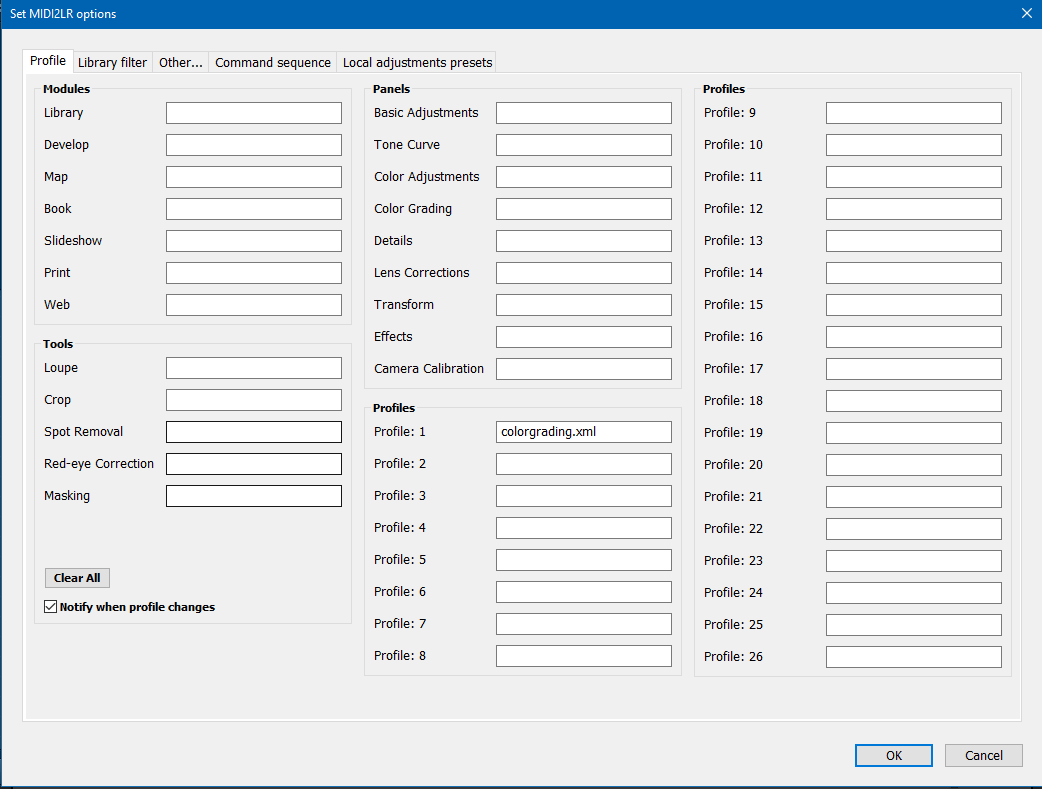
There's already that feature. Go to the Profiles tab. Just below the "Clear All" button is the checkbox for "Notify when profile changes." Check that box, press OK, and you're set.
On Thursday, June 23, 2016 at 11:02:03 AM UTC-7, Mark Simons wrote:
I'd like to get informed about what profile i selected via the "Show status and activity"-option. So i just could define one button with "next Profile" and instantly know which on i'm in right now
rsjaffe
Jun 23, 2016, 3:29:27 PM6/23/16
to MIDI2LR
The wiki has instructions on how to add new parameters to the limits. Unfortunately, you'll have to do that every time the plugin is upgraded. If enough people want dehaze in the limits, I'll add it to the plugin permanently. One feature coming up soon (NRPN) will make the limits unnecessary for certain controllers, including the BCF2000 and BCR2000. In the meantime, following the instructions in the wiki, you'll want to change to
local DisplayOrder = {'Temperature','Tint','Exposure'}
local DisplayOrder = {'Temperature','Tint','Exposure','Dehaze'}
Zsolt Gera
Jun 24, 2016, 5:26:10 PM6/24/16
to MIDI2LR
A custom curve for non-linear value interpreter would be nice. eg. for white balance at the beginning the values are set by 10 for about 3000, then for the same controller movement the value changes by 50 or so.. and at the end above 10000 the value changes by 1000. For example. But the custom curve setup would be the best :)
The other idea is to be able to change the "speed / resolution" of a (group of ) encoder, depending on an other (mapped for this feature) fader.
The fader(s) should be set to wich encoder(s) to be affected. So if I want huge leaps in value I do not have to turn the encoder so much.
Thank Your for reading. :)

Jefferson Ogata
Jul 3, 2016, 12:53:08 AM7/3/16
to MIDI2LR
Wacky question: have you thought about using the framework of MIDI2LR to control Premiere Pro, another Adobe product? Maybe the APIs are similar.
Would love to be able to, for example, use a mod wheel as a shuttle control.
Would love to be able to, for example, use a mod wheel as a shuttle control.
Premiere Pro has some rudimentary control surface support, but it doesn't appear to do what i want it to do, or else the documentation sucks.
Also, it might be nice to be able to select which controllers MIDI2LR monitors. I have an M-Audio that sends spurious events sometimes; would like to be able to make MIDI2LR ignore it. (Or can i already?)
Thanks. This is a great piece of work!
Also, it might be nice to be able to select which controllers MIDI2LR monitors. I have an M-Audio that sends spurious events sometimes; would like to be able to make MIDI2LR ignore it. (Or can i already?)
Thanks. This is a great piece of work!
Jefferson Ogata
Jul 3, 2016, 3:11:25 PM7/3/16
to MIDI2LR
I also would like this, particularly for keyboard shortcuts. Key 1, Key 2, etc. are confusing.
Rory Jaffe
Jul 3, 2016, 9:17:53 PM7/3/16
to MIDI2LR
That's been suggested. See https://groups.google.com/forum/#!topic/midi2lr/CDA7QeIxamg. If someone is interested in taking a shot, they're welcome to try. I did take a look at the API documentation. It's horrible, but a determined person who knows Premiere Pro well could make it work.

Diko Jelev
Jul 6, 2016, 11:19:04 AM7/6/16
to MIDI2LR
I guess new MIDI controllers do support it like nanoKONTROL2 (many people use it, since it's cheap and with a descent number of faders and buttons?
On Thursday, June 23, 2016 at 10:29:27 PM UTC+3, Rory Jaffe wrote:
On Thursday, June 23, 2016 at 10:29:27 PM UTC+3, Rory Jaffe wrote:
.... One feature coming up soon (NRPN) will make the limits unnecessary for certain controllers, including the BCF2000 and BCR2000......
Rory Jaffe
Jul 6, 2016, 11:15:03 PM7/6/16
to MIDI2LR
And some older controllers. BCF2000 is at least 10 years old.
Mark Simons
Jul 7, 2016, 1:26:34 AM7/7/16
to MIDI2LR
I really like to see that values were updated when switching profiles or layers (Behringer X-Touch Mini). Maybe with a button that forces lightroom to readout the assigned values?
Rory Jaffe
Jul 7, 2016, 8:32:51 PM7/7/16
to MIDI2LR
In the next release, there will be a command that you can assign to a button that forces a complete readout to the MIDI controller to address the layers issue. Also, if you can program the controller to send a MIDI signal when changing layers, you could have the refresh occur automatically. (that is, the layer change would signal to the app to refresh all values).
Mark Simons
Jul 8, 2016, 1:26:08 AM7/8/16
to MIDI2LR
I'll try if the X-Touch Editor can do this, thank you!
... Also, if you can program the controller to send a MIDI signal when changing layers, you could have the refresh occur automatically.
... Also, if you can program the controller to send a MIDI signal when changing layers, you could have the refresh occur automatically.

Matti Savoila bubla.fi
Jul 12, 2016, 6:31:07 PM7/12/16
to MIDI2LR
On Saturday, June 18, 2016 at 6:42:06 PM UTC+3, Rory Jaffe wrote:
If you have any comments or additions to the following list, please reply to this posting.
I actually do but some might think it is silly :)
Don't add too many features! I was devastated when paddy broke and never got fixed again. So I wish you to keep yourself interested in this project so that feature creep will not kill the motivation to keep the app up and running.
I myself need just the basics, sliders and knobs with my behringer. Just one layer and half of the buttons are unused, still my workflow is superduper fast thanks to midi2lr! So obviously I wish these features to be available to me now and always and as my programming skills are rudimentary, a perl course in uni some fifteen years ago, that means I can't support a program like this and if it breaks all I can do is to remember it fondly and be sad.
So what I'm saying is that i luuurve your program!
Best regards
Matti Savoila
BUBLA
http://www.bubla.fi
http://www.facebook.com/pintaasyvemmalle
Rory Jaffe
Jul 13, 2016, 1:12:18 AM7/13/16
to MIDI2LR
Well, MIDI2LR already has all the features I need. I don't even use the keystrokes or profiles features--both of which were difficult to code. I'm one of those who believes in minimal processing and editing, trying to get everything right in the camera, so I don't even use the development controls of MIDI2LR for about 95% of my photographs.
One big difference from Paddy--this is an open source freely licensed project. Anyone can take it over if they want to, when they want to. So this should last beyond when I lose interest, or get sick, or ...
I'm mostly cleaning up the code these days and stamping out bugs when I can. Much of the future development will depend upon others contributing code and debugging assistance, as there's a definite limit to what I can do. For example, debugging on the Mac has to be done by someone else, which explains the slower development and debugging of some features on the mac (keystrokes, for example, and closing LR before closing the app causes the app to use 100% of the CPU for some unknown reason). And the documentation isn't great, but I'm not interested in working on the documentation.
And my interest does wax and wane. I only got into this because the prior software programs for MIDI controllers broke when LR 6/CC came out, and I was stuck with a controller without a way of using it.
And this is not a money maker--I average about $20 per month of donations, which barely covers the books I've had to buy to learn Lua and modern C++ (I last used C++ in the 1980s). Not that I need the money--I make enough at work. And I have to make sure I have time for my photography and other hobbies and work. But, yeah, this is a hobby, and I'm sure some day I'll stop doing it.
Mark Simons
Jul 18, 2016, 7:45:44 AM7/18/16
to MIDI2LR
May i help translating the button values into german language?
Rory Jaffe
Jul 18, 2016, 10:16:36 AM7/18/16
to MIDI2LR
For the app? Yes. I'd appreciate it. There's also a small amount of translation needed for the plugin. For the plugin, look at the file TranslatedStrings_de.txt. The translation is to the right of the equals sign. There is only one item not yet translated, although the translation for "Key" is my guess, so that may be wrong.
For the app, we don't need translations for the actions. Those are translated by the plugin, but I haven't yet found a way to transmit those to the app. The other buttons and messages could use translations.
Thanks.
Mark Simons
Jul 19, 2016, 1:22:44 AM7/19/16
to MIDI2LR
Fine :-) I primarily thought of the LR-actions and button values in the Midi2LR-app. When one works with german localized version of Adobe app it's not easy sometimes to quickly find the english equation when selecting actions. But i think it's harder for them to describe problems with specific functions here when their app is completely localized...

Luke Kroeker
Aug 4, 2016, 12:15:18 PM8/4/16
to MIDI2LR
Loving having the extra control with midi. Would love to see:
- Options for "Auto" settings, such as "Auto - Straighten (Crop)" (to assign to a button and be able to quickly auto straighten photos)
- Options to show/hide 'Highlight Clipping' or 'Shadow Clipping' in the Develop module. (I only need it enabled temporarily when adjusting White/Black levels)
Message has been deleted

G M
Aug 5, 2016, 6:27:21 AM8/5/16
to MIDI2LR
Am Freitag, 8. Juli 2016 07:26:08 UTC+2 schrieb Mark Simons:
I'll try if the X-Touch Editor can do this, thank you!
... Also, if you can program the controller to send a MIDI signal when changing layers, you could have the refresh occur automatically.
hi mark
did you manage to get that functionality via x-touch editor?
this man seems to have found a solution, at least he advertises layered functionality:
http://peltmade.com/lrplugins-control-xtouchmini.html
thanks and best
Rory Jaffe
Aug 5, 2016, 8:35:07 AM8/5/16
to MIDI2LR
MIDI2LR now sends a total refresh to the controller when it detects that the controls are out of sync with the program. This should take care of most of the issues with layers.

Terry Hewitt
Aug 5, 2016, 2:47:51 PM8/5/16
to MIDI2LR
Rory
A couple of things....
a) When I change from Basic in Develop to say Tone Curve, I'd like to be able to send "select preset number x" or even "select encoder set x"
b) Ability to use more than one MIDI devices, e.g., iPAd/TouchOSC and BCF2000 at the same time
I've also got a spreadsheet and python program that createx a defaults.xml.
The spreadsheet - each row corresponds to a CC channel. Then each column cotnains the textname that you need, Column2 corresponds to preset 2 (BCF2000), column 3 preset 3 ...
I've also got some word files that display the settings. I'll integrate them with the spreadsheet/Python script so everything is made from the spreadsheet....
Print, cut them out and stick them on the BCF 2000...
I'll let you have these when I've integrated them.
Best wishes
Terry
On Saturday, 18 June 2016 16:42:06 UTC+1, Rory Jaffe wrote:
If you have any comments or additions to the following list, please reply to this posting.
Diko Jelev
Aug 7, 2016, 11:01:08 AM8/7/16
to MIDI2LR
Hi Rory.
I am very eager for 2/. CUSTOM Local adjustment preset selection. Please note that the default presets are AFAIK un-editable. Ergo I guess they are not widely used.
Perhaps MIDI2LR can use the same logic/code as with the dev. presets and check on start for available custom local adjustment presets and list them for key assignment in a new MIDI2LR > Options > Loc. Adj. Presets tab? :-)
Currently investigating the work with 2 midi controllers KORG nanoKONTROL2 & AKAI MIDIMIX. When done and when the feature is available will make an extensive video review on your plugin.
BTW I feel a huge improvement on slider responsiveness. Great progress there.
Thank you!
Diko Jelev
Aug 7, 2016, 11:02:04 AM8/7/16
to MIDI2LR
I will make a video anytime soon and will make a simple tutorial that would include its usage.
Diko Jelev
Aug 7, 2016, 11:06:36 AM8/7/16
to MIDI2LR
The cheap midi controllers don't support (NRPN). :-(
G M
Aug 7, 2016, 12:47:53 PM8/7/16
to MIDI2LR
just got started, looks and feels great.
so far i used vsco keys, which i find very useful because it doesn't switch to the develop module to show changes.
when i am in grid or loupe view and hit the button for [-10 exposure], that change is instantly visible in the image without leaving the view mode that i am in.
that's extremly handy for a rough first edit of images that need to match, because you see them side by side while editing. and also you are still able to browse around folders and not just collections.
so feature request: don't automatically change module on parameter change (if it is instantly visible in another module than develop)
so far i used vsco keys, which i find very useful because it doesn't switch to the develop module to show changes.
when i am in grid or loupe view and hit the button for [-10 exposure], that change is instantly visible in the image without leaving the view mode that i am in.
that's extremly handy for a rough first edit of images that need to match, because you see them side by side while editing. and also you are still able to browse around folders and not just collections.
so feature request: don't automatically change module on parameter change (if it is instantly visible in another module than develop)
Rory Jaffe
Aug 7, 2016, 9:56:53 PM8/7/16
to MIDI2LR
It's a limitation of the Lightroom SDK for adjusting develop--the program has to change to the develop module before adjusting any of the develop parameters. AFAIK, VSCO keys did it by sending mouse movements and keystrokes to Lightroom, not by interacting with the Lightroom SDK. The benefit of using the SDK is that it is more responsive and reliable. The drawback is that we have to follow Adobe's rules that they set in the construction of the SDK.
Rory Jaffe
Aug 7, 2016, 9:58:51 PM8/7/16
to MIDI2LR
Lightroom SDK doesn't have an interface to the local adjustment preset selection. I guess we could store a set of local adjustment parameter settings in the plugin and throw them all at Lightroom at once to simulate a preset. I'll think on that one.
Diko Jelev
Aug 10, 2016, 5:25:03 AM8/10/16
to MIDI2LR
I am sure there's no API on that.
I remember in Paddy (at least a year ago, if not 2 or 3) there was some work-around which was used, but I can't remember what was it. I even don't know how did the author made it without the proper API.
Diko Jelev
Sep 7, 2016, 8:06:37 AM9/7/16
to MIDI2LR
BTW. Your idea is awesome. Any update eventually? :-)
On Monday, August 8, 2016 at 4:58:51 AM UTC+3, Rory Jaffe wrote:
Rory Jaffe
Sep 10, 2016, 12:52:27 PM9/10/16
to MIDI2LR
I'm working on it. Right now I'm swamped with work (my real job) so this will have to wait, but it's high on the to-do list.

Ben J
Nov 12, 2016, 12:09:45 AM11/12/16
to MIDI2LR
Would love to see a "fluid" zoom similar to what you get through the pinch action on a smartphone or even in LR itself with the trackpad on a Macbook. Not sure if that's available through the API but having a slider tied to a smooth, variable zoom rather than a stepped one at pre-defined levels would be very cool.
Awesome plugin so far. Still getting my feet wet.
Awesome plugin so far. Still getting my feet wet.

William Dixon
Nov 12, 2016, 5:20:34 PM11/12/16
to MIDI2LR
9a - I'd like the ability to pan when zoomed (the hand/drag) by mapping X/Y to a pair of rotary encoders
William Dixon
Nov 14, 2016, 10:16:01 AM11/14/16
to MIDI2LR
I'd like to see support for increment/decrement on rotary encoder.
This could allow navigation and potentially activation is the encoder supports a button as well.
A great use case is navigation with selection: M2LR could map increment to Next and decrement to Prev for navigation. Combine this with push to toggle Selection or perhaps Pick, and culling in Library requires a single control.
As a bonus, supported multiple increment part of the message could allow faster navigation (increment/decrement 3,5 etc.)

paul smith
Nov 14, 2016, 5:14:24 PM11/14/16
to MIDI2LR
6 Assign sequence of actions to button
That is the only thing i really need as i still can t make the crop be used on its own profile. :)

Mathieu Carbou
Nov 14, 2016, 8:19:10 PM11/14/16
to paul smith, MIDI2LR
|
As I can see, this enhancement is already logged: https://github.com/rsjaffe/MIDI2LR/issues/283 (multi commands for 1 mapping) 
|
On Mon, Nov 14, 2016 5:14 PM, paul smith almost...@gmail.com
wrote:
6 Assign sequence of actions to buttonThat is the only thing i really need as i still can t make the crop be used on its own profile. :)
--
You received this message because you are subscribed to the Google Groups "MIDI2LR" group.
To unsubscribe from this group and stop receiving emails from it, send an email to midi2lr+u...@googlegroups.com.
To post to this group, send email to mid...@googlegroups.com.
Visit this group at https://groups.google.com/group/midi2lr.
To view this discussion on the web visit https://groups.google.com/d/msgid/midi2lr/151c88d0-6a68-4597-a288-3ad5e3b85047%40googlegroups.com.
For more options, visit https://groups.google.com/d/optout.

Brian Lovelace
Nov 18, 2016, 7:58:08 PM11/18/16
to MIDI2LR, almost...@gmail.com
Hey there! I'm using a couple of the Behringer XTouch Mini Controllers. I'd love the lights to "solo" themselves so that when I go to different "Profiles" I can tell which one I'm in without having to turn off the light on the board for the last preset I was using. Is this possible in a future update?
Your work is incredible. Thank you all for your hard work and dedication to this awesome plugin.
-- Brian Lovelace

Benjamin
Nov 24, 2016, 12:47:00 PM11/24/16
to MIDI2LR
it will be good if MIDI2LR work with Photos on mac os
it's possible or planed ?
Rory Jaffe
Nov 24, 2016, 8:41:14 PM11/24/16
to MIDI2LR
Sorry, the program only works with Lightroom.

Glauco Castro
Nov 27, 2016, 4:47:54 PM11/27/16
to MIDI2LR
Hi. I'll start using MIDI2LR next week, when my BCF2000 arrives, but I've read a lot latelly and this software seems to be excellent!
So, I'd like to have the hability to execute a series of keyboard shortcuts in sequence with a press of a button.
Besides, I'm from Brasil and speak portuguese. So, if you need any help translating something, you can count on me.
Great job!
Em sábado, 18 de junho de 2016 12:42:06 UTC-3, Rory Jaffe escreveu:
If you have any comments or additions to the following list, please reply to this posting.
- I would like to send only the control key without any additional keys, it seems it is not possible. if I only check "control" at the Shortcut Keys and press okay the checkbox will be unchecked automatically and there is no special command for the control / alt / shift key. I would like to use the crop Straighten Tool with this key.
- Local adjustment preset selection.
- Support other types of controllers (e.g., Logitech G13). For this, someone else will need to write the code. You should have one of those controllers and knowledge of c++, along with knowledge of an SDK that can bridge between the controller and the MIDI2LR Juce SDK. If you need instructions on how to contribute code, see the github help pages.
- As of right now I Midi2Lr reports back to the controller when the sliders are changed in Lr, so I can use that value to update the display on the controller. The problem I am having, is that I Midi2Lr is not sending a message back (note) to the controller when the color, rating, or star is changed in Lightroom. I would like to have indicator lights on the controller for each one of these but have to be able to get the changes from lr when moving to another photo.
- Possibility to define a group of buttons exclusively to switch between profiles (assigned to profile 1, 2, 3, 4, 5 ...) independently of the active profile. -> "profiles' switchboard" When a profile is active, the button assigned to that profile remains with light ON while buttons assigned to inactive profiles remain with light OFF. This way, by quickly looking to the "profiles' switchboard" in your MIDI controller, it is easy to know which profile is active.
- Assign sequence of actions to button
Rory Jaffe
Nov 27, 2016, 5:27:40 PM11/27/16
to MIDI2LR
That request is in the queue, so we'll work on it.
As to translations, we'd love your help. There are only a few strings that need translation, as Lightroom handles most of it. Following are two sets: first, the English, then the Portuguese (currently done by machine translation). If you could improve the Portuguese translation I'd appreciate it. Ignore everything before the = sign--that's there to provide a key to the phrase when looking it up. Thanks. Rory
"$$$/MIDI2LR/About/about=How to use: connect a MIDI controller, launch MIDI2LR, and begin editing! See https://github.com/rsjaffe/MIDI2LR/wiki for details."
"$$$/MIDI2LR/Info/BuildFiles=Build files (development use only)"
"$$$/MIDI2LR/Limits/Limits=Limits"
"$$$/MIDI2LR/Options/RevealAdjustedControls=Reveal adjusted controls"
"$$$/MIDI2LR/Options/TrackingDelay=Tracking Delay"
"$$$/MIDI2LR/Options/dlgtitle=Set MIDI2LR options"
"$$$/MIDI2LR/Options/pastesel=Paste selections"
"$$$/MIDI2LR/Preferences/cantload=Unable to load preferences. Using default settings."
"$$$/MIDI2LR/Profiles/NotifyWhenChanged=Notify when profile changes"
"$$$/MIDI2LR/Shortcuts/Key=Key"
"$$$/MIDI2LR/About/about=Como usar: conectar um controlador MIDI, lançar MIDI2LR, e começar a editar! Veja https://github.com/rsjaffe/MIDI2LR/wiki para mais detalhes."
"$$$/MIDI2LR/Info/BuildFiles=Build files (development use only)"
"$$$/MIDI2LR/Limits/Limits=Limite"
"$$$/MIDI2LR/Options/RevealAdjustedControls=Revelar controles ajustados"
"$$$/MIDI2LR/Options/TrackingDelay=Retardo de acompanhamento"
"$$$/MIDI2LR/Options/dlgtitle=Definir MIDI2LR opções"
"$$$/MIDI2LR/Options/pastesel=Colar seleções"
"$$$/MIDI2LR/Preferences/cantload=Não é possível carregar preferências. Usando as configurações padrão."
"$$$/MIDI2LR/Profiles/NotifyWhenChanged=Notify when profile changes"
"$$$/MIDI2LR/Shortcuts/Key=Tecla"

Thomas Bauer
Nov 28, 2016, 12:59:06 PM11/28/16
to MIDI2LR
I activated "Notify when profile changes". The result is: <profileA>.xml is changing to <profileB>.xml
Is it possible to remove the ".xml" from this message? It's only a technical information which does not make any sense in LR - at least for me.
If you then label your profiles meaningful, the message would be very "clean", e.g.: Basic Adjustments is changing to Saturation.
Glauco Castro
Nov 28, 2016, 1:08:28 PM11/28/16
to MIDI2LR
Here it is.
Regards
"$$$/MIDI2LR/About/about=Como usar: conecte um controlador MIDI, inicialize o MIDI2LR e comece a editar! Veja mais detalhes em https://github.com/rsjaffe/MIDI2LR/wiki."
"$$$/MIDI2LR/Info/BuildFiles=Compilar arquivos (apenas para desenvolvedores)"
"$$$/MIDI2LR/Limits/Limits=Limite"
"$$$/MIDI2LR/Options/RevealAdjustedControls=Mostrar controles ajustados"
"$$$/MIDI2LR/Options/TrackingDelay=Retardo de acompanhamento"
"$$$/MIDI2LR/Options/dlgtitle=Definir preferências do MIDI2LR"
"$$$/MIDI2LR/Options/pastesel=Colar seleções"
"$$$/MIDI2LR/Preferences/cantload=Não foi possível carregar as preferências. Usando as configurações padrão."
"$$$/MIDI2LR/Profiles/NotifyWhenChanged=Notificar quando o perfil for alterado"
"$$$/MIDI2LR/Shortcuts/Key=Tecla"
Translators are getting better every day!
Mathieu Carbou
Nov 28, 2016, 7:11:59 PM11/28/16
to MIDI2LR
I think we could even remove the profile where we were to only keep the name of the profile that is loaded. Because it will take less space on screen and I think the previous profile name does not bring any additional information either because you already loaded it and it is highly likely that you were anyway in a view that required the previous profile. |

Romain
Nov 29, 2016, 9:48:31 AM11/29/16
to MIDI2LR
Hi,
I have a feature request. Maybe I did not find the correct shortcut in LR or way to setup LR so my apologize that.
I don't manage to filter pictures with midi2Lr.
My first actions to sort picts are (as example): flag the "going to be used" pictures, and put 1 star to good ones.
When done, I would like to filter flagued picts. I found CTRL/command L to toggle filters on/off, but it always shows the Text filter, as I only want the Attribute filters. I tried to lock/unlock filter, or CTRL/Command click on attributes , but every time I fall on Text Filters.
To summ up, i'm looking for a way to change filter from "Tagued and Neutral" to "Tagued only". Idem for stars.
Thanks and bravo for the simple and clear plugin
Thomas Bauer
Nov 29, 2016, 9:54:55 AM11/29/16
to MIDI2LR
I agree. The "target" profile (without the extension .xml) would be sufficient.
Rory Jaffe
Nov 30, 2016, 12:04:08 AM11/30/16
to MIDI2LR
It looks like that is possible. I'm going to have to dig into the documentation a bit more, but this does sound like a useful addition to MIDI2LR
Diko Jelev
Dec 22, 2016, 4:26:13 PM12/22/16
to MIDI2LR
Hi.
I see great development on the software. If you need Bulgarian localization. Let me know. :-)
As for the Local Adjustment presets - any update? :-)
Rory Jaffe
Dec 22, 2016, 6:38:37 PM12/22/16
to MIDI2LR
I need a decent block of time to work on that--it's complicated. It is in the work queue.
LR supports only a few languages. Sorry, Bulgarian isn't one of them. :-(
Message has been deleted

Tchoy
Jan 25, 2017, 12:21:55 AM1/25/17
to MIDI2LR
Hi Rory!
I have no words to thank you for the plugin creation! So, i already make a donation for the cause. ;)
I have also a new feature suggestion:
Add, in the "MIDI2LR options", "Profile" tab, a new profile option for Black & White.
This way, when Black & White is active, i can set a xml profile for it and config the knobs to Black & White Mix.
Like all the "Tools" in "MIDI2LR options/Profiles", when "Black & White" is set, Lightroom changes layout. In this case, disabling "HSL" and "Color" and enabling "B & W".
Make sense?
With my X-Tocuh Mini i have to make a lot of profiles for the 8 knobs. ;)
Thanks again.

Michael Grigoriev
Sep 15, 2017, 12:55:49 PM9/15/17
to MIDI2LR
On Monday, November 14, 2016 at 10:16:01 AM UTC-5, William Dixon wrote:
I'd like to see support for increment/decrement on rotary encoder.
I think this idea has massive potential!
To generalize, I think the feature would be to be able to assign symmetric action pairs to increment and decrement events.
Some possible applications:
- navigation or selection (left/right, prev/next, etc)
- undo/redo
- zoom in/out
- rating up/down
I'm not very familiar with the midi protocol, so apologies if this is wildly off-base, but perhaps we could do this by treating the encoder as "positionless", i.e. always send a reset to mid value event to the surface after a change event, and chose the action based on the delta from the mid value.
Rory, does this sound remotely feasible?
Rory Jaffe
Sep 15, 2017, 10:48:37 PM9/15/17
to MIDI2LR
It can be done, but there are some real problems with the MIDI protocol that would create challenges. Initially I tried something like this for certain of the controls.
Acting on each increment/decrement would be too sensitive, as you'd barely rotate the control a little bit and go through multiple actions.Then you have the problem that the controls have fixed endpoints at 0 and 127, so you'd stop seeing changes when rotating in a particular direction and have to rotate the other way for a while. If you could truly recenter the control through the software (which you can do with some controllers) you could deal with the endpoint issue.
Relative controls might be nice, but many MIDI controllers only send out +1 and -1 signals, so each small movement sends a shower of signals that you'd have to keep adding up until you hit your threshold. But still, it would be more practical with relative controls than with absolute controls.

Valters Boze
Sep 28, 2017, 9:43:57 PM9/28/17
to MIDI2LR
"VSCO keys did it by sending mouse movements and keystrokes to Lightroom, not by interacting with the Lightroom SDK"
how would it be possible to send such mouse/key movements in grid/library when there is no such panel? i also love vscokeys for just that simple reason - edit everything from grid, my screen is big enough and its much easier to get an overall feel of other images temps and brightness around the one i edit. since i started using xtouchmini i keep finding myself lost and go back and forth to library and see if the image even fits the whole set mood and they dont because looking at just one photo throws me off
another vote for this - edit right from library. vscokeys is open source btw, not sure if that helps but maybe its easy to find out how they did it
thanks for great software!
On Sunday, August 7, 2016 at 9:56:53 PM UTC-4, Rory Jaffe wrote:
On Sunday, August 7, 2016 at 9:56:53 PM UTC-4, Rory Jaffe wrote:
It's a limitation of the Lightroom SDK for adjusting develop--the program has to change to the develop module before adjusting any of the develop parameters. AFAIK, VSCO keys did it by sending mouse movements and keystrokes to Lightroom, not by interacting with the Lightroom SDK. The benefit of using the SDK is that it is more responsive and reliable. The drawback is that we have to follow Adobe's rules that they set in the construction of the SDK.
so feature request: don't automatically change module on parameter change (if it is instantly visible in another module than develop)

Max Elfner
Oct 24, 2017, 10:05:22 AM10/24/17
to MIDI2LR
I would like to pick up on that. isnt there a way to add (software) debouncing? E.g zooming with a fader / encoder (CC) is registered only every second? That would still allow using those for the task even if its in (temporal) steps
Diko Jelev
Mar 8, 2019, 3:38:51 PM3/8/19
to MIDI2LR
On Friday, December 23, 2016 at 1:38:37 AM UTC+2, Rory Jaffe wrote:
I need a decent block of time to work on that--it's complicated. It is in the work queue.LR supports only a few languages. Sorry, Bulgarian isn't one of them. :-(
I see there is installation in Bulgarian.... Who did it? How to change the language from the already installed plugin?
Reply all
Reply to author
Forward
0 new messages