
MEX-file error
294 views
Skip to first unread message

tayebeh ebrahimi
Aug 7, 2019, 2:27:54 PM8/7/19
to medi-...@googlegroups.com
Dear MEDI experts,
I've been attempting to run runme.m in MEDI-toolbox (new version 2019) on my laptop for 2 weeks (win 10, 64 bit, Matlab 2019). but it always gives this error:
Invalid MEX-file 'E:\drive E\for use in thesis\OEF\MEDI_toolbox\functions\dicomparse.mexw64': Missing dependent shared
libraries:
'icudt61.dll' required by 'C:\Program Files\Polyspace\R2019a/bin/win64\icuuc61.dll->C:\Program
Files\Polyspace\R2019a/bin/win64\icuin61.dll->C:\Program Files\Polyspace\R2019a/bin/win64\libmwi18n.dll->C:\Program
Files\Polyspace\R2019a/bin/win64\libmwfl.dll->C:\Program Files\Polyspace\R2019a/bin/win64\libmex.dll->E:\drive E\for
use in thesis\OEF\MEDI_toolbox\functions\dicomparse.mexw64'
'libmwimages_res.dll' required by 'E:\drive E\for use in thesis\OEF\MEDI_toolbox\functions\dicomparse.mexw64'
Missing symbol '?do_legacy_mx_error@detail@matrix@@YAXAEBVIUserException@except@fl@@@Z' in 'C:\Program
Files\Polyspace\R2019a/bin/win64\libmx.dll' required by 'E:\drive E\for use in
thesis\OEF\MEDI_toolbox\functions\dicomparse.mexw64'
Missing symbol
libraries:
'icudt61.dll' required by 'C:\Program Files\Polyspace\R2019a/bin/win64\icuuc61.dll->C:\Program
Files\Polyspace\R2019a/bin/win64\icuin61.dll->C:\Program Files\Polyspace\R2019a/bin/win64\libmwi18n.dll->C:\Program
Files\Polyspace\R2019a/bin/win64\libmwfl.dll->C:\Program Files\Polyspace\R2019a/bin/win64\libmex.dll->E:\drive E\for
use in thesis\OEF\MEDI_toolbox\functions\dicomparse.mexw64'
'libmwimages_res.dll' required by 'E:\drive E\for use in thesis\OEF\MEDI_toolbox\functions\dicomparse.mexw64'
Missing symbol '?do_legacy_mx_error@detail@matrix@@YAXAEBVIUserException@except@fl@@@Z' in 'C:\Program
Files\Polyspace\R2019a/bin/win64\libmx.dll' required by 'E:\drive E\for use in
thesis\OEF\MEDI_toolbox\functions\dicomparse.mexw64'
Missing symbol
.
.
.
.
.
.
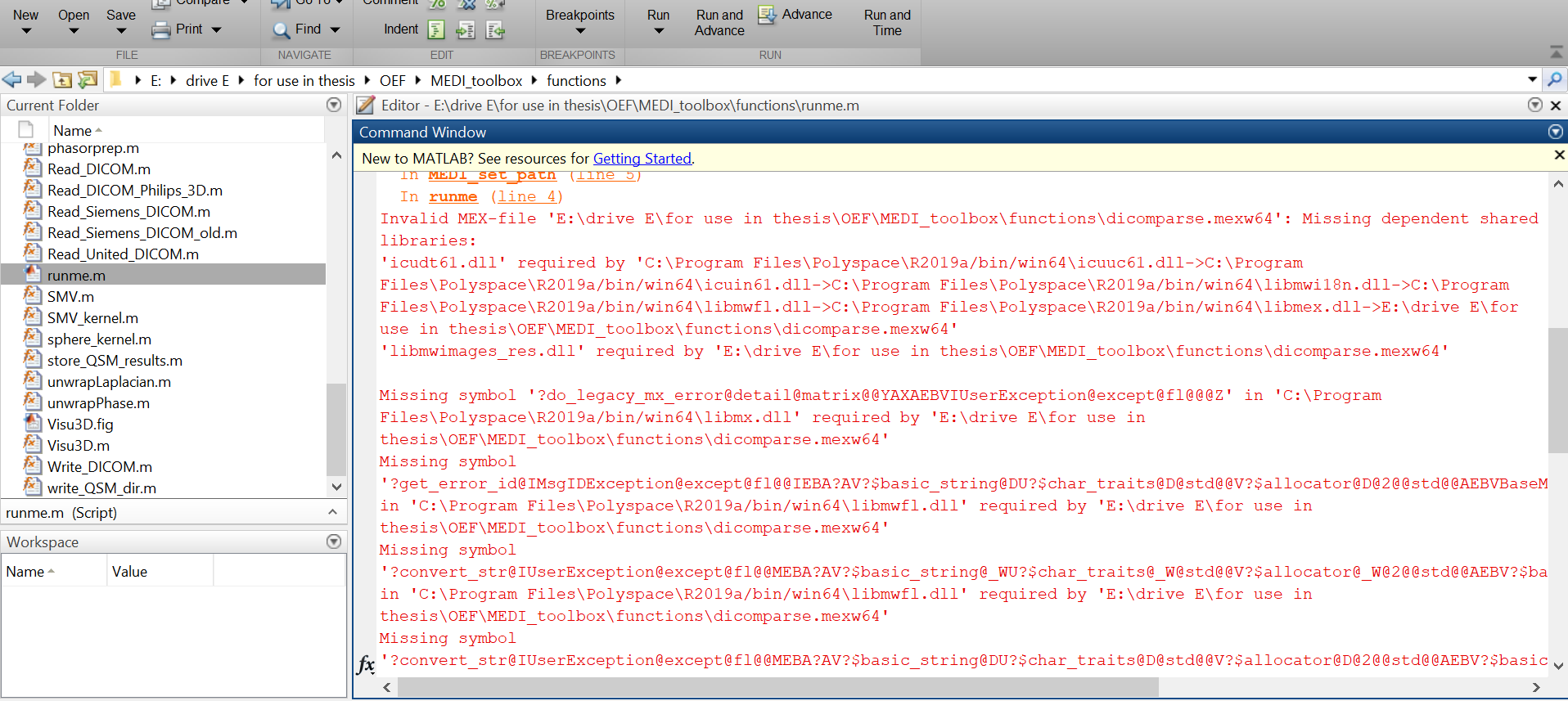
I've attached photo of my error. Thanks anyone who can help me.
Best,
Tina


Pascal Spincemaille
Aug 7, 2019, 2:57:31 PM8/7/19
to medi-users
This error can happen when upgrading Matlab. Please delete the following files in the MEDI_toolbox\functions directory and try again.
dicom_findActualFilename.m
dicom_getFileDetails.m
dicomattrs.m
dicomparse.mexw64
dicom_getFileDetails.m
dicomattrs.m
dicomparse.mexw64
tayebeh ebrahimi
Aug 12, 2019, 10:39:07 AM8/12/19
to medi-...@googlegroups.com
Hi every one,
Please help me to solve this problem and eliminate this error.
kind regards,
Tina
---------- Forwarded message ---------
From: tayebeh ebrahimi <tayebehe...@gmail.com>
Date: Fri, Aug 9, 2019 at 12:39 PM
Subject: Re: [medi-users] Re: MEX-file error
To: Pascal Spincemaille <spince...@gmail.com>
From: tayebeh ebrahimi <tayebehe...@gmail.com>
Date: Fri, Aug 9, 2019 at 12:39 PM
Subject: Re: [medi-users] Re: MEX-file error
To: Pascal Spincemaille <spince...@gmail.com>
Dear MEDI experts and developers,
There were not any dicom_findActualFilename.m and dicom_getFileDetails.m files in functions directory in the first place. But after deleting others two files, dicomattrs.m and dicomparse.mexw64, it still gives another error (I've attached it).'dicomattrs' is not found in the current folder or on the MATLAB path, but exists in:
E:\drive E\for use in thesis\MEDI_toolbox\functions
Change the MATLAB current folder or add its folder to the MATLAB path.
Error in Read_Siemens_DICOM>get_dcm_tags (line 186)
attrs=dicomattrs(filename);
Error in Read_Siemens_DICOM (line 43)
info2 = get_dcm_tags(filename, {'EchoNumber'});
Error in runme (line 6)
There were not any dicom_findActualFilename.m and dicom_getFileDetails.m files in functions directory in the first place. But after deleting others two files, dicomattrs.m and dicomparse.mexw64, it still gives another error (I've attached it).
E:\drive E\for use in thesis\MEDI_toolbox\functions
Change the MATLAB current folder or add its folder to the MATLAB path.
Error in Read_Siemens_DICOM>get_dcm_tags (line 186)
attrs=dicomattrs(filename);
Error in Read_Siemens_DICOM (line 43)
info2 = get_dcm_tags(filename, {'EchoNumber'});
Error in runme (line 6)
[iField,voxel_size,matrix_size,CF,delta_TE,TE,B0_dir]=Read_Siemens_DICOM('D:\drive_F\my_cases\my_patient-NBML\Feizi_roya\SWI'
Could you possibly do me a favour to get ride of this error.
Sincerely,
Tina
--
You received this message because you are subscribed to the Google Groups "medi-users" group.
To unsubscribe from this group and stop receiving emails from it, send an email to medi-users+...@googlegroups.com.
To view this discussion on the web visit https://groups.google.com/d/msgid/medi-users/4a015990-b336-4166-a99c-a4372dc58cd8%40googlegroups.com.

Pascal Spincemaille
Aug 12, 2019, 10:51:30 AM8/12/19
to medi-users
Please use the Read_DICOM function instead.
On Wednesday, August 7, 2019 at 2:27:54 PM UTC-4, tayebeh ebrahimi wrote:
Reply all
Reply to author
Forward
0 new messages