
Issues with heating using a 0-10v controlled gas boiler
728 views
Skip to first unread message

Gert Stalpaert
Sep 22, 2022, 6:04:27 AM9/22/22
to Loxone English
Hi,
But this does not work: the temp. in the house is lower than the requested temp, but the 0-10V in AQl remains at 0.

I have a Vaillant Ecotec Pro VCW 286/5-3 boiler that can be modulated with a 0-10V analog input using an external Vaillant TR34 module.
This all working well: a 10V current does indeed starts heating the boiler.
In config, I have:
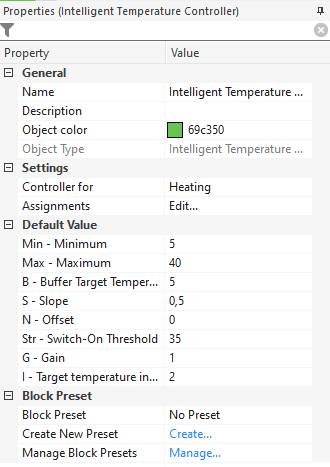
- an Intelligent temperature Controller:
- the AQl output goes to the 0-10V output
- Controller is set to Heating
- the block is assigned to my
Intelligent Room Controller

- an Intelligent Room Controller:
- receives its Current temperature via the Loxone Touch temp sensors.


- receives its Current temperature via the Loxone Touch temp sensors.
But this does not work: the temp. in the house is lower than the requested temp, but the 0-10V in AQl remains at 0.
Looking in the App, it looks like Loxone thinks I have a Cooling system instead... The Heating Season system variable is active.
Do I need to setup anything else?
I did not connnect (yet) any TRVs for individual room control, but I read on another forum that should be fine.
Thanks!
Gert

Ewan Tait
Sep 22, 2022, 12:17:44 PM9/22/22
to Loxone English
Gert,
I'm not sure what the issue is (you've got the operating modes with the correct calendars?), but your comfort temperature for heating is set to 20C and your comfort cooling temperature is set to 22C (first two entries in the config for the IRC), so there won't be any heating demand.
As an aside, if you want to have more than one temperature sensor attached to your IRC, you need to put them through an "Average" function block. If you them directly into the IRC, the IRC will read the most recently changed value. Hence why the App shows the temperature as 20.2C, despite your two sensors giving an average of 20.1C.
Have you had a look at Loxone's documentation? https://www.loxone.com/enen/kb/overview-indoor-climate/
Cheers,
Cheers,
Gert Stalpaert
Sep 22, 2022, 2:42:07 PM9/22/22
to Loxone English
Hey Ewan,


Thank you for pointing me in the right direction!
The Mode of the Intelligent Room Controller was set to "2" (=cooling) if I checked it in LiveView, for some reason. So, in Config, I've added a constant to overrule it to "0", being automatic, and now the heating works when the temp drops under the target temp ;-)
Although this works, I do not understand why this mode is by default on "2"...
What I still don't understand is why I can't find a way to set the Eco-min from the App:
Overview page:
Here it shows 19.5° = 2° below Comfort temp, as set in Config
But in the Temperatures detail page, I don't see it anymore and can not set it... Why?
Your remark about the Comfort heating and cooling seems incorrect to me, because it is almost the same as the default values now and the docs make it clear:
Comfort heating = 21.5 (default 21)
Comfort cooling = 23 (default 23)
So I don't think this is wrong.
The docs explain this as so:
- ϑch: Temperature comfort heating: Absolute Comfort temperature in heating mode.
- ϑcc: Temperature comfort cooling: Absolute Comfort temperature in cooling mode.
The Average block for the temp sensors is a good idea: works as expected now ;-)
Ewan Tait
Sep 22, 2022, 3:37:07 PM9/22/22
to Loxone English
Gert,
I've got the IRCs are set to automatic mode and configured with a Climate Controller. The Climate Controller is set for heating only, the Heating Period is set all year, and the Cooling Period for March to September (I think). Within the App it shows the heating temperatures, but doesn't show the cooling temperatures.
Cheers,
Ewan
Gert Stalpaert
Sep 22, 2022, 3:46:14 PM9/22/22
to Loxone English
Sorry, I didn't get that.
But still, it's strange that I cant see/set the Eco Min temp.
I see you also use the Climate Controller. May be that's the missing link, although I don't have to link it to any output, in my situation. Let's try it this WE.
Gert
Gert Stalpaert
Sep 27, 2022, 2:35:37 PM9/27/22
to Loxone English
All cleared out now!
- I could not see any Heating ... because ... I had the Climate Controller set to Cooling in stead of Heating :(
- Adding an Intelligent Temperature Controller fixed the other issues ;-)

Vidor Lakatos
Sep 28, 2022, 3:37:56 AM9/28/22
to Loxone English
Hi !
I do not wish to hijack the conversation, but seems like a good one to ask a simple question.
I have a "stupid heat pump" , I can only regulate the pump for heating and some valve when it should be cooling.
Can I use the same function block ? Inteligent room controller or, should I program everything identical and use cooling mode.
Can I use the same function block ? Inteligent room controller or, should I program everything identical and use cooling mode.
Now I have set identical as above, heating mode only.
Will they "collide" or ?
What would be your suggestion ? I do not have any experience with this so far.
Thank you all in advance.
Gert Stalpaert
Sep 28, 2022, 1:28:12 PM9/28/22
to Loxone English
Hi Ivi,
I don't have any cooling connected to Loxone yet, but I think you should create a separate Climate Controller for Cooling and Heating.
In the intelligent Room Controller, you can then select the right sourrce for Heating and Cooling. Depending on the target temperature and curent temperature, the IRC will call the right source.
I hope that helps.
Gert
Vidor Lakatos
Sep 28, 2022, 1:49:38 PM9/28/22
to Loxone English
THX
That was my logic also, but I do not know the logic of Loxone. I see that there is a date set for cooling and heating separation.
I will test it tomorrow, and revert.
Thank you for replying.
Rgds,
I will test it tomorrow, and revert.
Thank you for replying.
Rgds,
Vidor

Steve Joyner
Oct 14, 2022, 4:25:21 AM10/14/22
to Gert Stalpaert, Loxone English
Hi Gert,
I’ve been experimenting with my valiant boiler and the VR34/Loxone. The loxone part of the system seems to be doing what I’d expect and outputting the right voltage to the VR34, but I’m seeing some odd results with the boiler.
Can I ask you, are you running the VR34 in ‘output setpoint’ mode (ie with the wire link on x1 removed), or in 'flow temperature setpoint’ mode (with the X1 link in place) ?
I have my VR34 in flow temperature set point mode (X1 link in place) and I can see from my ebus monitor which interrogates the boiler's parameters, and from the installer display on the boiler that the flow temp target is indeed being altered by the loxone 0-10v output. The strange thing is that even with a very high flow temp target (75deg), the boiler is only ever running at low power (ie its modulating itself right down) this means it takes 30 mins or so to get to the 75degree flow temp - this means when its on and trying to heat the hot water tank, its taking around 45 mins to heat the tank to the desired temp. (Before I installed the VR34, with flow temp set manually to 75deg on the boiler console, the boiler would fire up at max power and get to 75deg flow temp in about 60s.
My boiler is quote old and so I’m wondering if its not really working with the v34 correctly, but I’d be interested to know your experience.
Regards
Steve
On 22 Sep 2022, at 11:04, Gert Stalpaert <ger...@gmail.com> wrote:
Hi,I have a Vaillant Ecotec Pro VCW 286/5-3 boiler that can be modulated with a 0-10V analog input using an external Vaillant TR34 module.This all working well: a 10V current does indeed starts heating the boiler.In config, I have:
- an Intelligent temperature Controller:
- the AQl output goes to the 0-10V output
- Controller is set to Heating
- the block is assigned to my Intelligent Room Controller
- <temp controller.png>
- <temp controller settings.png>
- an Intelligent Room Controller:
- receives its Current temperature via the Loxone Touch temp sensors.
- <room controller.png>
<room controller settings.png>
But this does not work: the temp. in the house is lower than the requested temp, but the 0-10V in AQl remains at 0.Looking in the App, it looks like Loxone thinks I have a Cooling system instead... The Heating Season system variable is active.
<app.png>Do I need to setup anything else?I did not connnect (yet) any TRVs for individual room control, but I read on another forum that should be fine.Thanks!Gert
--
You received this message because you are subscribed to the Google Groups "Loxone English" group.
To unsubscribe from this group and stop receiving emails from it, send an email to loxone-englis...@googlegroups.com.
To view this discussion on the web visit https://groups.google.com/d/msgid/loxone-english/ee553715-03b6-4bf1-b663-102e3e7675e5n%40googlegroups.com.
<room controller.png><temp controller settings.png><app.png><temp controller.png><room controller settings.png>
Gert Stalpaert
Oct 14, 2022, 7:37:14 AM10/14/22
to Steve Joyner, Loxone English
Hi Steve,
I've been using the setpoint temperature mode (X1 bridge in place) and I have exactly the same experience as you are describing.
It takes 7 hours to increase the temperature from 20°C to 21°C! To do that, Loxone sends a Flow target temperature around 38 degrees (my boiler is set to 50° max), but it constantly goes into 'waiting' mode, so it takes 6 hours :(
I don't know why, so I was thinking to reverse to "target output value" to see if that would help.
I hope to try this setup this weekend and keep you posted!
Best regards,
Gert
Steve Joyner
Oct 14, 2022, 7:59:21 AM10/14/22
to Gert Stalpaert, Loxone English
Hi Gert
Be interesting to see what effect that (removing X1 link) has.
At the moment (since I've just started experimenting with this) I’m just using a virtual output slider in the loxone App to set the output voltage sent to the VR34 directly, this way I can try to see what the boiler’s response is for various voltages and how it translates them into flow temp targets (I’m using D.005 in there installer menu on the boiler to see what the boiler thinks its current flow temp is set to). It seems what ever the flow temp target is (boiler D.005 confirms that 2v on the VR34=20Deg and 10v = 75Deg(which is the max Flow Temp set through the boiler’s console), the boiler is only ever running at low power - hence taking ages for it to reach 75Deg flow temp.
I’ve just altered the D.000 value for 'Heating Partial load', this was set to Auto, I’ve now changed it to 30KW (max for my boiler) to see what effect that has - I’ll let you know.
All my experiments so far have lead me to realise that (regardless of if I can get Loxone and Valiant to play nicely) I don't really understand what I’m aiming at in this respect: Loxone can provide a FlowTemp output (from ITC, or maybe even from a heating curve block) that mimics the idea of a traditional weather compensating control - ie it uses the curve to lower the flow temp when its warmer outside to mean the boiler is condensing for more of the time. Loxone can also provide (from the ITC block) a %power output that is a form of ‘load compensation’ ie higher power requested when there is a greater space hearing requirement (space * temp difference). So question is: Is it better to use a flow temp to control the boiler, or a %power, or some combination of both ??
Anyone got any thoughts?
Regards
Steve
Gert Stalpaert
Oct 17, 2022, 2:35:46 PM10/17/22
to Loxone English
Hi Steve,
As explained in my previous post, I switched the Vaillant VR34 from "flow temperature setpoint" to "target output value", by removing the X1 bridge. Then I've used the output "AQI" (Heating / Cooling Load 0-100%) of the Intelligent Temperature Controller to feed the 0-10V output of the VR34. This is done by adding a correction to convert 100% to 1023, the max value of the 0-10V output of my Denkovi SmartDEN controller.


After testing it for 2 days, it looks like the result is better than before: I did not see the boiler going to 'idle'/'waiting' mode anymore, witch was slowing down the heating by a lot.
If the voltage is set to the maximum 10V, the boiler goes up to the max boiler temperature a lot faster than before, so that's promising.
However, since it's quite warm outside last days, I can not test what the result will be when the boiler has to heat the room for let say 4 degrees. Now it had to increase for only 0.4°C ... Far too low of a delta for a decent test :(
Loxones fuzzy logic to warm up the room still has to learn after 2 days, but at least it already shows its behaviour: it slows down when target temp is almost reached, but then failed anyway by overshooting 0.1°C ...
But I guess this is part of the learning process. Will post later how it evolves.
Target temp was set to 21°C from 8:30 AM until 10 AM. Here are the stats:
The room temp:
The ITC AQI output in percent:
It started to heat up at 4 AM, then had a break from 5 to 6:30, and heated again from 6:30 to almost 7 AM:
The day before the results were about the same, but it started too early. So some progress was already made on day 2.
Gert
Steve Joyner
Oct 18, 2022, 3:03:54 AM10/18/22
to Gert Stalpaert, Loxone English
Hi Gert
Sounds like the target output setpoint is working a lot better for you.
I’ve seen some similar results via a different method, I’ve left the CR34 in flow temperature setpoint mode, but I’ve altered the D.000 setting on the boiler for 'Heating Partial load', this was set to Auto, I’ve now changed it to 30KW (max for my boiler). This seems to have ad a similar effect in that the boiler gets up to target flow temperature really quickly and then modulates itself down to maintain that temperature.
From this result and your experience, it seems like installing the VR34 in Target Flow Temperature mode donsn’t work well if the D.000 setting is left at ‘Auto’ - I guess the boiler is only applying partial power - which does mean it can respect the maximum flow temp setting generated by the VR34, but also seems to mean it can take a long time to reach that set point. It would appear that either using the VR34 in target output power mode, or changing the value of D.000 removes this effect and seems to produce ‘better’ outcomes.
I’m left wondering what the Vailant eningeers had in mind when they designed the firmware to behave like this, seems unlikely this is an error, but rather a pattern of behaviour they thought would be desirable, at the moment I can’t quite see what they had in mind.
Regards
Steve
On 17 Oct 2022, at 19:35, Gert Stalpaert <ger...@gmail.com> wrote:
Hi Steve,
As explained in my previous post, I switched the Vaillant VR34 from "flow temperature setpoint" to "target output value", by removing the X1 bridge. Then I've used the output "AQI" (Heating / Cooling Load 0-100%) of the Intelligent Temperature Controller to feed the 0-10V output of the VR34. This is done by adding a correction to convert 100% to 1023, the max value of the 0-10V output of my Denkovi SmartDEN controller.
After testing it for 2 days, it looks like the result is better than before: I did not see the boiler going to 'idle'/'waiting' mode anymore, witch was slowing down the heating by a lot.If the voltage is set to the maximum 10V, the boiler goes up to the max boiler temperature a lot faster than before, so that's promising.However, since it's quite warm outside last days, I can not test what the result will be when the boiler has to heat the room for let say 4 degrees. Now it had to increase for only 0.4°C ... Far too low of a delta for a decent test :(Loxones fuzzy logic to warm up the room still has to learn after 2 days, but at least it already shows its behaviour: it slows down when target temp is almost reached, but then failed anyway by overshooting 0.1°C ...But I guess this is part of the learning process. Will post later how it evolves.Target temp was set to 21°C from 8:30 AM until 10 AM. Here are the stats:The room temp:
<Screenshot 2022-10-17 at 19.42.25.png>The ITC AQI output in percent:It started to heat up at 4 AM, then had a break from 5 to 6:30, and heated again from 6:30 to almost 7 AM:
To view this discussion on the web visit https://groups.google.com/d/msgid/loxone-english/5b336eee-e0d2-498a-831e-75167beca11bn%40googlegroups.com.
<Screenshot 2022-10-17 at 19.42.25.png><Screenshot 2022-10-17 at 20.26.35.png>
Gert Stalpaert
Oct 18, 2022, 2:05:47 PM10/18/22
to Steve Joyner, Loxone English
Steve said:
"I’m left wondering what the Vailant eningeers had in mind when they designed the firmware to behave like this, seems unlikely this is an error, but rather a pattern of behaviour they thought would be desirable, at the moment I can’t quite see what they had in mind."
This is indeed a good question.
Maybe we have to contact Vaillant and just ask that question ;-)
I'll give it a try!
Gert

Tom Bernaerd
Oct 21, 2022, 4:45:45 AM10/21/22
to Gert Stalpaert, Loxone English
Apparently I was emailing Gert directly and left out the mailing group :-)
So for whoever is interested, below are my findings on why my particular setup is acting weird. TL;DR: overshoots and restarts when low temperatures are requested.
In the mean time I have added AQR and AQI to my monitoring so I will keep it for a bit, then try to think of the best way to control the heater with the proportional control method.

So for whoever is interested, below are my findings on why my particular setup is acting weird. TL;DR: overshoots and restarts when low temperatures are requested.
In the mean time I have added AQR and AQI to my monitoring so I will keep it for a bit, then try to think of the best way to control the heater with the proportional control method.
Tom
On Thu, Oct 20, 2022 at 8:57 PM Tom Bernaerd <t...@bernaerd.be> wrote:
Hello Gert,
In my case, it's because my gas heater is simply too powerful, intentionally to make sure it can generate hot water passing through fast enough. It does mean the minimum power possible is still 6kW which is too much.
This is not an issue for radiators as the temperatures you need for that require enough power. Underfloor heating requires a very low temperature for a longer time, so then I get this issue. As you can see when it initially started heating last night the first hour it calmly climbed up before it started the automatic cutoffs.
Should also note there is an installer level parameter for the time delay before restarting. Not sure if I tweaked it much but in any case I don't want to lower it even further too.
The data is captured with 1wire sensors and the Loxone 1wire extension, then fed into a TimescaleDB database through NodeRed and visualized in Grafana. All of those services run in docker containers on an Odroid low power mini server thingy, basically a raspberry pi on steroids. Takes a bit of time to get right but now I can start adding in basically anything I want easily.
My bright idea for tonight: I have added AQR and AQI to the monitoring so I can see what the values are while still running in temperature setpoint mode.
Ideally I want to avoid having to add a buffer tank before I move over to a heat pump. We'll see.TomOn Thu, Oct 20, 2022 at 8:42 PM Gert Stalpaert <ger...@gmail.com> wrote:Thank you Tom, these charts help a lot to understand what's going on!I don't have any measurement on the boiler whatsoever. How did you measure and store these values? Seeing this, I also need proper data myself to better understand my situation.
But I can't believe that the boiler overshoots so quickly... Any idea what the reason would be?GertOp do 20 okt. 2022 7:50 p.m. schreef Tom Bernaerd <t...@bernaerd.be>:Some graphs as promisedTop graph shows buffer temperature, this is my Vaillant open collector where the radiator pump and the underfloor heating mixvalve + pump draw from.Also shows both departure and return temps for both.
Bottom graph is temperature setpoint vs actual temp for UFH. You can clearly see my gas heater is overshooting very quickly.
Am now thinking to switch to proportional control as well, but that gives me less temperature control. Not quite sure yet how I need to approach this in Loxone.On Wed, Oct 19, 2022 at 10:44 PM Tom Bernaerd <t...@bernaerd.be> wrote:Hello Gert,I think I do know why, I think your gas heater is too powerful and instantly overshoots your temperature setpoint, triggering the built in delay before restarting. Because of this, you are getting almost no heat in the system. Explains why the power output works better, it keeps heating but will likely reach higher temps than loxone would deem optimal in the ITC controller.I know this because I have the same issue and 1wire sensors. Have normal radiators and underfloor heating with a mixing valve, and I notice no issues when radiators have heating demand because the heater can modulate to an appropriate level to sustain the 55 (for example) output temp.When only underfloor heating is generating demand, it asks for temps in the 28-35 range and this causes the issue for me.So you may be on the right track with the power output control instead. I was already considering a buffer tank to solve the "pendelen". Which may still not be too stupid of an idea knowing i am moving to a heat pump at some point :-)Food for thought, will send over some screenshots of my monitoring tomorrowTom

To view this discussion on the web visit https://groups.google.com/d/msgid/loxone-english/CAJZnPRsWB5JXn-vMs-_sHD5gAEuP6pe%2B4GjrGoB4saprD4L5OA%40mail.gmail.com.
SteveJ
Nov 28, 2023, 9:10:19 AM11/28/23
to Loxone English
Hello Gert,
Resurecting and old thread as i'm still experimentling with 0-10v control of my Vaillant boiler.......
I've just been tinkering with the setup of by boiler/vr34/loxone again - I left it alone for most of last winter as I got distracted by other things, but I've been noticing recently that my boiler is going into timeout mode quote frequently, which leads me to think i've not got the control via the VR34/Loxone tuned correctly yet
Can I ask how you are getting on with the VR34? is your system working OK? are you still in temperature setpoint mode on the VR34 or did you switch to %output setpoint ? Did you ever manage to speak to abyone at Vailant about the two different modes ?
Steve
Gert Stalpaert
Nov 28, 2023, 2:33:31 PM11/28/23
to SteveJ, Loxone English
Hi Steve,
It's funny how heating seems to capture everyone's attention as soon as the temperatures starts dropping again. :)
At least, that's what I was doing, also :)
I have my VR34 in flow temperature setpoint (with plug X1), but I must say that the boiler still goes way too soon in timeout mode ...
As long as there is not too much of a gap between the actual and target temperature, this causes not much of a problem, but as soon as it has to warm up a cold house (eg from 16°C to 21.5), it takes more than half a day to reach target temp!
Last winter, I did some tests by switching to "output setpoint" (without plug X1), but that had no better results, so I switched back.
In fact, while reading back this whole post, I saw that you tried setting the D.000 value for 'Heating Partial load' to its max power. Did that do anything better than the default Auto? I would expect it should rather be on a very minimal power?
I also put D.001 (Pump overrun) to only 1 min and D.002 (Max. anti-cycl. time) to only 2 min. That improved the situation quite wel, but is probably not that good for the boiler.
Last year, I reached out to Vaillant (sent 2 emails), but never got an answer!
So I'm still struggling with it.
My only solution is keeping the temp difference between eco and comfort mode rather low, so I don't have too much of a gap to heat up... Not ideal.
In fact, I'm thinking about finding a good professional that has experience with Vaillant and home automation/loxone in the Antwerp/BE area. But those are not easy to find.
Although not ideal, I still prefer having Loxone controlling my boiler. I don't want to go back to only a single, dumb thermostat with no remote access and no knowledge of outside temperatures ;-)
I hope you had more success?
Gert
To view this discussion on the web visit https://groups.google.com/d/msgid/loxone-english/affdc477-1569-4c5d-b3b7-636616c0864bn%40googlegroups.com.
Steve Joyner
Dec 7, 2023, 10:44:55 AM12/7/23
to Gert Stalpaert, Loxone English
Hi Gert
I’ve continued to tinker with my heating (you are right - this only comes into focus when its cold outside and I’m sat in the house working at my desk all day wondering how I can just heat one room efficiently)
I'm still on temperature setting mode on the VR34
Following on from what you said below about d.000 below, I’ve tried setting this to 20KW (I have a 30KW boiler) - I picked 20KW arbitrarily as an experiment, but is does seem to have improved things. My boiler is hardly ever going in to timeout mode now. I guess there may be an even more optimal setting for this some where I between 0 and 30KW
I’ve also got ebusd up and running now to interrogate the boiler properties and status (rather than a homemade PERL script I was using before). This has enabled me to record the history of what run mode (the S.x codes) the boiler in in every minute so via MQTT and Graffana I can see historically what has been happening its going nicely from mode 4 (running) to mode 7 (pump overrun) to mode 30 (no demand) without going to mode 8 (anticyle) or mode 54(to little difference between flow and return).
Ebusd allow all sort of interesting insight into to what the boiler is thinking, For instance I can see the messages from the VR34 going to the boiler that are used to set the target flow temp. I’m wondering what these would look like if I switched the VR34 to 'output setpoint’ - but I haven’t experimented with that yet.
Steve
Reply all
Reply to author
Forward
Message has been deleted
Message has been deleted
0 new messages