
How to make a time picker in kivy ?

Tony


Elliot Garbus
You might be interested in using a Roulette Scroll effect, see: https://github.com/kivymd/KivyMD/tree/master/kivymd/effects/roulettescroll
Or from the kivy garden: https://github.com/kivy-garden/garden.roulettescroll
When the ScrollStops, you would have your selected time.
From: Tony
Sent: Sunday, March 6, 2022 7:43 AM
To: Kivy users support
Subject: [kivy-users] How to make a time picker in kivy ?
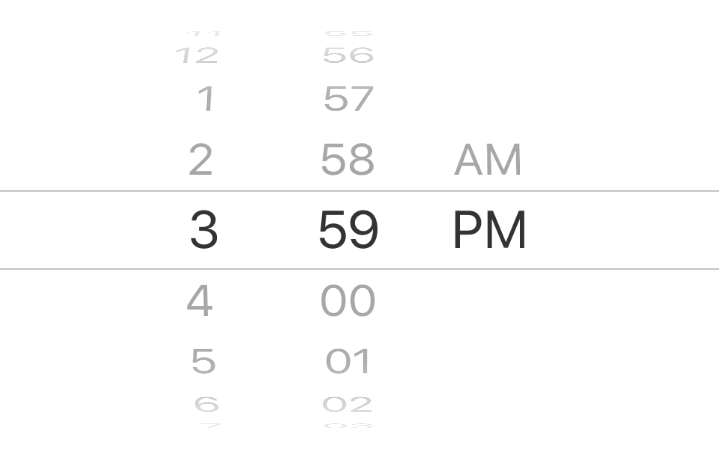
I am wondering how can we make a time picker like this.
I'm trying to do that at the moment. Below is my source code. But the problem is that I can't figure out how to choose the time just by stopping scrolling like the above. I came up with using ScrollView's effect but it didn't work. My plan now is to change the text brightness from outside to inside so that I can use if-else to select the time. For now, I can print out the date when clicking but it's not what I actually want to. Tks for your help
--
You received this message because you are subscribed to the Google Groups "Kivy users support" group.
To unsubscribe from this group and stop receiving emails from it, send an email to kivy-users+...@googlegroups.com.
To view this discussion on the web visit https://groups.google.com/d/msgid/kivy-users/6e0c626b-dfef-4a5d-a7af-744b69b0262an%40googlegroups.com.
Thanh Hai Nguyen
To view this discussion on the web visit https://groups.google.com/d/msgid/kivy-users/6224cf3f.1c69fb81.16cb4.2bcaSMTPIN_ADDED_MISSING%40gmr-mx.google.com.
Elliot Garbus
Both of the references include an example.
From: Thanh Hai Nguyen
Sent: Sunday, March 6, 2022 9:22 AM
To: kivy-...@googlegroups.com
Subject: Re: [kivy-users] How to make a time picker in kivy ?
Can you give me an example of how to use it ? It's not very clear on the internet : )
Vào CN, 6 thg 3, 2022 vào lúc 22:12 Elliot Garbus <elli...@cox.net> đã viết:
You might be interested in using a Roulette Scroll effect, see: https://github.com/kivymd/KivyMD/tree/master/kivymd/effects/roulettescroll
Or from the kivy garden: https://github.com/kivy-garden/garden.roulettescroll
When the ScrollStops, you would have your selected time.
From: Tony
Sent: Sunday, March 6, 2022 7:43 AM
To: Kivy users support
Subject: [kivy-users] How to make a time picker in kivy ?
I am wondering how can we make a time picker like this.
I'm trying to do that at the moment. Below is my source code. But the problem is that I can't figure out how to choose the time just by stopping scrolling like the above. I came up with using ScrollView's effect but it didn't work. My plan now is to change the text brightness from outside to inside so that I can use if-else to select the time. For now, I can print out the date when clicking but it's not what I actually want to. Tks for your help
--
You received this message because you are subscribed to the Google Groups "Kivy users support" group.
To unsubscribe from this group and stop receiving emails from it, send an email to kivy-users+...@googlegroups.com.
To view this discussion on the web visit https://groups.google.com/d/msgid/kivy-users/6e0c626b-dfef-4a5d-a7af-744b69b0262an%40googlegroups.com.
--
You received this message because you are subscribed to the Google Groups "Kivy users support" group.
To unsubscribe from this group and stop receiving emails from it, send an email to kivy-users+...@googlegroups.com.
To view this discussion on the web visit https://groups.google.com/d/msgid/kivy-users/6224cf3f.1c69fb81.16cb4.2bcaSMTPIN_ADDED_MISSING%40gmr-mx.google.com.
--
You received this message because you are subscribed to the Google Groups "Kivy users support" group.
To unsubscribe from this group and stop receiving emails from it, send an email to kivy-users+...@googlegroups.com.
To view this discussion on the web visit https://groups.google.com/d/msgid/kivy-users/CAEObe9C6FwDKJWa0bwgnXzbF6KUj7JcUvDvfzJJ_Z_1cMHz3LQ%40mail.gmail.com.
Thanh Hai Nguyen
To view this discussion on the web visit https://groups.google.com/d/msgid/kivy-users/6224e029.1c69fb81.d10e8.2023SMTPIN_ADDED_MISSING%40gmr-mx.google.com.
Elliot Garbus
It runs fine for me:
'''
RouletteScrollEffect
===================

This is a subclass of :class:`kivy.effects.ScrollEffect` that simulates the
motion of a roulette, or a notched wheel (think Wheel of Fortune). It is
primarily designed for emulating the effect of the iOS and android date pickers.

Usage
-----

Here's an example of using :class:`RouletteScrollEffect` for a
:class:`kivy.uix.scrollview.ScrollView`::

    if __name__ == '__main__':
        # example modified from the scrollview example

        from kivy.uix.gridlayout import GridLayout
        from kivy.uix.button import Button
        from kivy.uix.scrollview import ScrollView

        # preparing a gridlayout inside a scrollview
        layout = GridLayout(cols=1, padding=10,
                size_hint=(None, None), width=500)

        layout.bind(minimum_height=layout.setter('height'))

        for i in range(30):
            btn = Button(text=str(i), size=(480, 40),
                         size_hint=(None, None))
            layout.add_widget(btn)

        root = ScrollView(size_hint=(None, None), size=(500, 320),
                pos_hint={'center_x': .5, 'center_y': .5}
                , do_scroll_x=False)
        root.add_widget(layout)

        # preparation complete. Now add the new scroll effect!
        root.effect_y = RouletteScrollEffect(anchor=20, interval=40)

        runTouchApp(root)

Here the :class:`ScrollView` scrolls through a series of buttons with height
40. We then attached a :class:`RouletteScrollEffect` with interval 40,
corresponding to the button heights. This allows the scrolling to stop at
the same offset no matter where it stops. The :attr:`RouletteScrollEffect.anchor`
adjusts this offset.

Customizations
--------------

Other settings that can be played with include
:attr:`RouletteScrollEffect.pull_duration`,
:attr:`RouletteScrollEffect.coasting_alpha`,
:attr:`RouletteScrollEffect.pull_back_velocity`, and
:attr:`RouletteScrollEffect.terminal_velocity`. See their module documentations
for details.

:class:`RouletteScrollEffect` has one event ``on_coasted_to_stop`` that
is fired when the roulette stops, "making a selection". It can be listened to
for handling or cleaning up choice making.
'''

from kivy.animation import Animation
from kivy.clock import Clock
from kivy.effects.scroll import ScrollEffect
from kivy.properties import NumericProperty, AliasProperty, ObjectProperty
from math import ceil, floor, exp


class RouletteScrollEffect(ScrollEffect):
    __events__ = ('on_coasted_to_stop',)

    drag_threshold = NumericProperty(0)
    '''overrides :attr:`ScrollEffect.drag_threshold` to abolish drag threshold.

    .. note::
        If using this with a :class:`Roulette` or other :class:`Tickline`
        subclasses, what matters is :attr:`Tickline.drag_threshold`, which
        is passed to this attribute in the end.
    '''

    min = NumericProperty(-float('inf'))
    max = NumericProperty(float('inf'))

    interval = NumericProperty(50)
    '''the interval of the values of the "roulette".'''

    anchor = NumericProperty(0)
    '''one of the valid stopping values.'''

    pull_duration = NumericProperty(.2)
    '''when movement slows around a stopping value, an animation is used
    to pull it toward the nearest value. :attr:`pull_duration` is the duration
    used for such an animation.'''

    coasting_alpha = NumericProperty(.5)
    '''When within :attr:`coasting_alpha` * :attr:`interval` of the
    next notch and velocity is below :attr:`terminal_velocity`,
    coasting begins and will end on the next notch.'''

    pull_back_velocity = NumericProperty('50sp')
    '''the velocity below which the scroll value will be drawn to the
    *nearest* notch instead of the *next* notch in the direction travelled.'''

    _anim = ObjectProperty(None)

    def get_term_vel(self):
        return (exp(self.friction) * self.interval *
                self.coasting_alpha / self.pull_duration)

    def set_term_vel(self, val):
        self.pull_duration = (exp(self.friction) * self.interval *
                              self.coasting_alpha / val)

    terminal_velocity = AliasProperty(get_term_vel, set_term_vel,
                                      bind=['interval',
                                            'coasting_alpha',
                                            'pull_duration',
                                            'friction'],
                                      cache=True)
    '''if velocity falls between :attr:`pull_back_velocity` and
    :attr:`terminal velocity` then the movement will start to coast
    to the next coming stopping value.

    :attr:`terminal_velocity` is computed from a set formula given
    :attr:`interval`, :attr:`coasting_alpha`, :attr:`pull_duration`,
    and :attr:`friction`. Setting :attr:`terminal_velocity` has the
    effect of setting :attr:`pull_duration`.
    '''

    def start(self, val, t=None):
        if self._anim:
            self._anim.stop(self)
        return ScrollEffect.start(self, val, t=t)

    def on_notch(self, *args):
        return (self.scroll - self.anchor) % self.interval == 0

    def nearest_notch(self, *args):
        interval = float(self.interval)
        anchor = self.anchor
        n = round((self.scroll - anchor) / interval)
        return anchor + n * interval

    def next_notch(self, *args):
        interval = float(self.interval)
        anchor = self.anchor
        round_ = ceil if self.velocity > 0 else floor
        n = round_((self.scroll - anchor) / interval)
        return anchor + n * interval

    def near_notch(self, d=0.01):
        nearest = self.nearest_notch()
        if abs((nearest - self.scroll) / self.interval) % 1 < d:
            return nearest
        else:
            return None

    def near_next_notch(self, d=None):
        d = d or self.coasting_alpha
        next_ = self.next_notch()
        if abs((next_ - self.scroll) / self.interval) % 1 < d:
            return next_
        else:
            return None

    def update_velocity(self, dt):
        if self.is_manual:
            return
        velocity = self.velocity
        t_velocity = self.terminal_velocity
        next_ = self.near_next_notch()
        pull_back_velocity = self.pull_back_velocity
        if pull_back_velocity < abs(velocity) < t_velocity and next_:
            duration = abs((next_ - self.scroll) / self.velocity)
            anim = Animation(scroll=next_,
                             duration=duration,
                             )
            self._anim = anim
            anim.on_complete = self._coasted_to_stop
            anim.start(self)
            return
        if abs(velocity) < pull_back_velocity and not self.on_notch():
            anim = Animation(scroll=self.nearest_notch(),
                             duration=self.pull_duration,
                             t='in_out_circ')
            self._anim = anim
            anim.on_complete = self._coasted_to_stop
            anim.start(self)
        else:
            self.velocity -= self.velocity * self.friction
            self.apply_distance(self.velocity * dt)
            self.trigger_velocity_update()

    def on_coasted_to_stop(self, *args):
        '''this event fires when the roulette has stopped, "making a selection".
        '''
        pass

    def _coasted_to_stop(self, *args):
        self.velocity = 0
        self.dispatch('on_coasted_to_stop')


if __name__ == '__main__':
    # example modified from the scrollview example

    from kivy.uix.gridlayout import GridLayout
    from kivy.uix.button import Button
    from kivy.uix.scrollview import ScrollView
    from kivy.base import runTouchApp

    layout = GridLayout(cols=1, padding=10,
                        size_hint=(None, None), width=500)

    layout.bind(minimum_height=layout.setter('height'))

    for i in range(30):
        btn = Button(text=str(i), size=(480, 40),
                     size_hint=(None, None))
        layout.add_widget(btn)

    root = ScrollView(size_hint=(None, None), size=(500, 320),
                      pos_hint={'center_x': .5, 'center_y': .5}
                      , do_scroll_x=False)
    root.add_widget(layout)

    root.effect_y = RouletteScrollEffect(anchor=20, interval=40)
    runTouchApp(root)
To view this discussion on the web visit https://groups.google.com/d/msgid/kivy-users/CAEObe9AcEubjWHp-MNYu96JZdmjNyYjSsvPs%2B4ywpAkNtq53mA%40mail.gmail.com.
Thanh Hai Nguyen
Thanh Hai Nguyen
Elliot Garbus
The effect provide an event, on_coasted_stop, that indicates the effect has stopped. When the event fires, read the data.
To view this discussion on the web visit https://groups.google.com/d/msgid/kivy-users/CAEObe9CGx5GoWWjSVkgzJCu8Au1onVQ-y7U%3DeRpxcmo%3DQTKaAg%40mail.gmail.com.

Elton Sibara
To view this discussion on the web visit https://groups.google.com/d/msgid/kivy-users/CAEObe9CGx5GoWWjSVkgzJCu8Au1onVQ-y7U%3DeRpxcmo%3DQTKaAg%40mail.gmail.com.
Tony
Elliot Garbus
runTouchApp

    def stopped(obj):
        print(f'stopped')

    layout = GridLayout(cols=1, padding=10,
                        size_hint=(None, None), width=500)

    layout.bind(minimum_height=layout.setter('height'))

    for i in range(30):
        btn = Button(text=str(i), size=(480, 40),
                     size_hint=(None, None))
        layout.add_widget(btn)

    root = ScrollView(size_hint=(None, None), size=(500, 320),
                      pos_hint={'center_x': .5, 'center_y': .5}
                      , do_scroll_x=False)
    root.add_widget(layout)

    rse = RouletteScrollEffect(anchor=20, interval=40)
    rse.bind(on_coasted_to_stop=stopped)
    root.effect_y = rse
    runTouchApp(root)
To view this discussion on the web visit https://groups.google.com/d/msgid/kivy-users/bda518a5-8904-4e80-b287-2b12b1c65e0en%40googlegroups.com.
Thanh Hai Nguyen
To view this discussion on the web visit https://groups.google.com/d/msgid/kivy-users/622a17ce.1c69fb81.e0b7f.29beSMTPIN_ADDED_MISSING%40gmr-mx.google.com.
Elliot Garbus
Remove the spacing in the GridLayout, set the anchor to 0 and the interval to 32.
from kivy.app import App
from kivy.core.window import Window
from kivy.lang import Builder
from kivy.uix.boxlayout import BoxLayout
from kivy.uix.button import Button
from kivy.uix.label import Label
from kivy.uix.scrollview import ScrollView

from __init__ import RouletteScrollEffect

Window.size = (300, 100)
Minute = ""
Hour = ""
cnt = 0
Builder.load_string('''
<TimePicker>
    ScrollView:
        do_scroll_x:False
        do_scroll_y:True
        smooth_scroll_end : 7
        bar_color:[1,1,1,0]
        id:MyView1
        GridLayout:
            id:vl1
            size_hint_y:None
            rows: 0  #change this to set the number of Ev_rows
            height: self.minimum_height
            row_default_height: 32
            # spacing: 2.5
    Label:
        text:":"
        size_hint_x:0.2
    MyView:
        id:MyView2
        do_scroll_x:False
        do_scroll_y:True
        smooth_scroll_end : 10
        bar_color:[1,1,1,0]
        GridLayout:
            id:vl2
            size_hint_y:None
            rows: 0  #change this to set the number of Ev_rows
            height: self.minimum_height
            row_default_height: 32
            # spacing: 2.5
    BoxLayout:
        orientation:"vertical"
        pos_hint:{'center_x':.8,'center_y':.5}
        GridLayout:
            id:vl3
            rows:2
    Button:
        text:"Click me"
        #size_hint_x:.2
        on_press:root.btn2_press()
    ''')


class MyView(ScrollView):
    pass

class TimePicker(BoxLayout):
    def __init__(self, **kwargs):
        super(TimePicker, self).__init__(**kwargs)

        rse1 = RouletteScrollEffect(anchor=0, interval=32)
        rse2 = RouletteScrollEffect(anchor=0, interval=32)
        self.ids.MyView1.effect_y = rse1
        self.ids.MyView1.scroll_wheel_distance = 28

        self.ids.MyView2.effect_y = rse2
        self.ids.MyView2.scroll_wheel_distance = 19
        self.ids.vl1.rows = 2
        self.ids.vl2.rows = 2
        self.ids.vl1.add_widget(Label(text=""))
        self.ids.vl2.add_widget(Label(text=""))

        for i in range(1, 13):
            btn = Button(text=str(i), on_press=self.btn_press, background_color=[1, 1, 1, 0])
            if (i <= 9):
                btn.text = str(0) + str(i)
            self.ids.vl1.rows += 1
            self.ids.vl1.add_widget(btn)

        for i in range(1, 61):
            btn = Button(text=str(i), on_press=self.btn_press, background_color=[1, 1, 1, 0])
            if (i <= 9):
                btn.text = str(0) + str(i)
            self.ids.vl2.rows += 1
            self.ids.vl2.add_widget(btn)

        AM = Button(text="AM", on_press=self.btn_press, background_color=[1, 1, 1, 0])
        PM = Button(text="PM", on_press=self.btn_press, background_color=[1, 1, 1, 0])
        self.ids.vl3.add_widget(AM)
        self.ids.vl3.add_widget(PM)

        self.ids.vl1.add_widget(Label(text=""))
        self.ids.vl2.add_widget(Label(text=""))
        self.cnt = 0

    def btn_press(self, instance):
        print(instance.text)
        print(f'size: {instance.size}')

    def btn2_press(self):
        print("Hello")
        print(f"Hour : {round(self.ids.MyView1.scroll_y, 4)}")
        print(f"Minute: {round(self.ids.MyView2.scroll_y, 4)}")

        if self.ids.vl2.children[round(60 * round(self.ids.MyView2.scroll_y, 4))].text != '':
            Minute = self.ids.vl2.children[round(60 * round(self.ids.MyView2.scroll_y, 4))].text
            if int(Minute) > 33:
                Minute = self.ids.vl2.children[round(60 * round(self.ids.MyView2.scroll_y, 4)) + 1].text

            if int(Minute) == 32:  # Doesn't work with 32
                Minute = 32
            elif int(Minute) <= 33:
                Minute = self.ids.vl2.children[round(60 * round(self.ids.MyView2.scroll_y, 4))].text
        else:
            Minute = 60
        if self.ids.vl1.children[round(12 * round(self.ids.MyView1.scroll_y, 4))].text != '':
            Hour = self.ids.vl1.children[round(12 * round(self.ids.MyView1.scroll_y, 4))].text
            if int(Hour) >= 7:
                Hour = self.ids.vl1.children[round(12 * round(self.ids.MyView1.scroll_y, 4)) + 1].text
        else:
            Hour = "12"
        print(f"Complete :{Hour}:{Minute}")


class MyApp(App):
    def build(self):
        return TimePicker()


if __name__ == "__main__":
    MyApp().run()
To view this discussion on the web visit https://groups.google.com/d/msgid/kivy-users/CAEObe9BWemjGwYbNpnQdeUVapHBYMrAxy6TOFGEp7S%2BJvoOz7w%40mail.gmail.com.