
Use of Execute Windows batch command step to trigger google chrome(or in general any app that can be triggered from command prompt)
356 views
Skip to first unread message

Zed Kay
Jun 28, 2017, 8:33:10 AM6/28/17
to Jenkins Users
Hi,
When i build the job, it builds successfully, but the result on the control output is the following:
I have been trying to use the Execute Windows Batch Command step (as I use Windows) in order to trigger a new chrome window from Jenkins. From what I knew, if a something could be triggered from the command line, it would work the same way from Jenkins. The command that I put in the command window (which works at the command prompt) is the following:
Enter code here..."c:\program files (x86)\google\chrome\application\chrome.exe" --new-window "http://localhost:8080:/debug?port=5858"When i build the job, it builds successfully, but the result on the control output is the following:
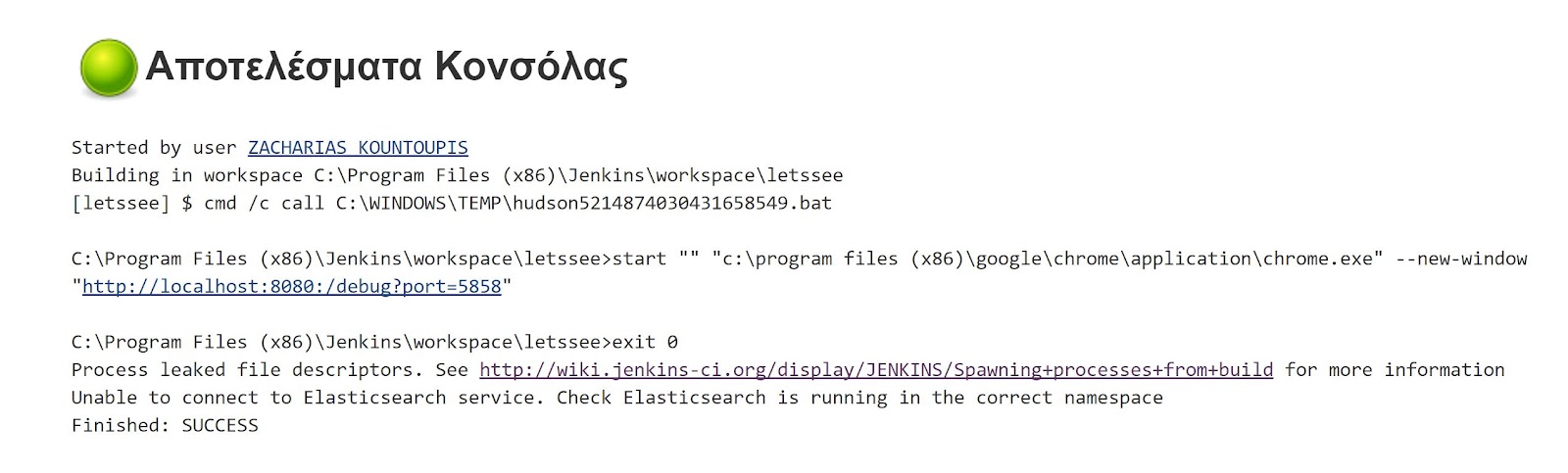
Chrome is not triggered and I get this result. I have no idea what the message regarding the Elasticsearch service means. Any ideas on how this issue can be resolved? Thank you in advance for your time!

Richard Bywater
Jun 29, 2017, 2:19:50 AM6/29/17
to Jenkins Users
Running Chrome will return control to the batch script straight away and, without anything else to run, the script will exit. You'll need to look at a way of waiting for Chrome to finish (although its not clear what it is trying to do from the example).
Richard.
--
You received this message because you are subscribed to the Google Groups "Jenkins Users" group.
To unsubscribe from this group and stop receiving emails from it, send an email to jenkinsci-use...@googlegroups.com.
To view this discussion on the web visit https://groups.google.com/d/msgid/jenkinsci-users/44cb8c31-eaf2-4afb-9332-409c23a1e6c8%40googlegroups.com.
For more options, visit https://groups.google.com/d/optout.
Reply all
Reply to author
Forward
0 new messages