
Jenkins-cli never respond
402 views
Skip to first unread message

spg...@gmail.com
Jun 24, 2015, 5:31:35 AM6/24/15
to jenkins...@googlegroups.com
Hello
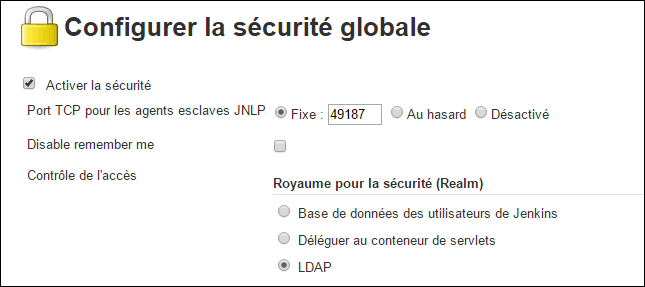
I am working with Jenkins 1.617 installed on a windows 2003 server. My pc is windows7. From my pc i have check that the tcp port 49187 is listening.
When I run a command from the command prompt I have no answer, no informations. The windows stay like that.

On the server log I see that I'm connected (picture 3)

When i do CTR-C on the command prompt, on the jenkins log we can see "closed by remote host"

What am i doing wrong!!!
Thank you for your help
Regards

Richard Bywater
Jun 24, 2015, 5:38:05 AM6/24/15
to jenkins...@googlegroups.com
The CLI doesn't use the JNLP port - you need to point it at the normal web port (e.g. 8080)
Richard.
--
You received this message because you are subscribed to the Google Groups "Jenkins Users" group.
To unsubscribe from this group and stop receiving emails from it, send an email to jenkinsci-use...@googlegroups.com.
To view this discussion on the web visit https://groups.google.com/d/msgid/jenkinsci-users/8b9844cb-f684-4c7a-a714-0414370f8c7f%40googlegroups.com.
For more options, visit https://groups.google.com/d/optout.
Stephane Polit
Jun 24, 2015, 6:26:39 AM6/24/15
to jenkins...@googlegroups.com
I have done what is explained in the wiki
If i try with port 8080 i have no response on command prompt but i think that i am not connected because on the server log i found

Stephane

Anthony Green
Jun 25, 2015, 1:50:51 PM6/25/15
to jenkins...@googlegroups.com
On Wednesday, 24 June 2015 10:38:05 UTC+1, Richard Bywater wrote:
The CLI doesn't use the JNLP port - you need to point it at the normal web port (e.g. 8080)
Are you sure? What I've read regarding setting up Jenkins in a Docker suggests that's exactly what it uses.

Christopher Orr
Jun 25, 2015, 4:25:19 PM6/25/15
to jenkins...@googlegroups.com
port and communicates via that. So, as Richard mentions, you don't need
to know the JNLP port — you just provide the regular Jenkins web URL
when running the CLI client command.
Regarding the posted error message, check the comments on this
(seemingly identical) issue:
https://issues.jenkins-ci.org/browse/JENKINS-24385
Regards,
Chris
Anthony Green
Jun 26, 2015, 5:00:54 AM6/26/15
to jenkins...@googlegroups.com
Everybody is right :) The CLI client automatically discovers the JNLP
port and communicates via that. So, as Richard mentions, you don't need
to know the JNLP port — you just provide the regular Jenkins web URL
when running the CLI client command.
Except perhaps your containerising it with Docker and then you have to port forward from the host to the container ?
Reply all
Reply to author
Forward
0 new messages