[JIRA] (JENKINS-60008) Build fails due to Distribution Group in AppCenter not having Correct Permissions

21 views
Skip to first unread message

josh.brozen@nbcuni.com (JIRA)

unread,
Oct 31, 2019, 5:42:02 PM10/31/19
to jenkinsc...@googlegroups.com
Josh Brozen created an issue
 
Jenkins / Improvement JENKINS-60008
Build fails due to Distribution Group in AppCenter not having Correct Permissions
Issue Type: Improvement Improvement
Assignee: Mez Pahlan
Attachments: Screen Shot 2019-10-31 at 2.33.51 PM.png
Components: appcenter-plugin
Created: 2019-10-31 21:41
Environment: Jenkins Version 2.176.3
App Center Plug-In Version: 0.6.2
Priority: Major Major
Reporter: Josh Brozen

Since App Center has seemingly changed the Distribution Group and permissions model (not for the best and much different than HockeyApp - see issue raised here with App Center team: https://github.com/microsoft/appcenter/issues/1272), it is pretty hard to manage the App to Distribution Group relationships within App Center (especially after migration from Hockey App)

We have noticed that the Jenkins builds are failing when the App Center plugin is configured with Distribution Groups that are not available/accessible for a specific application.

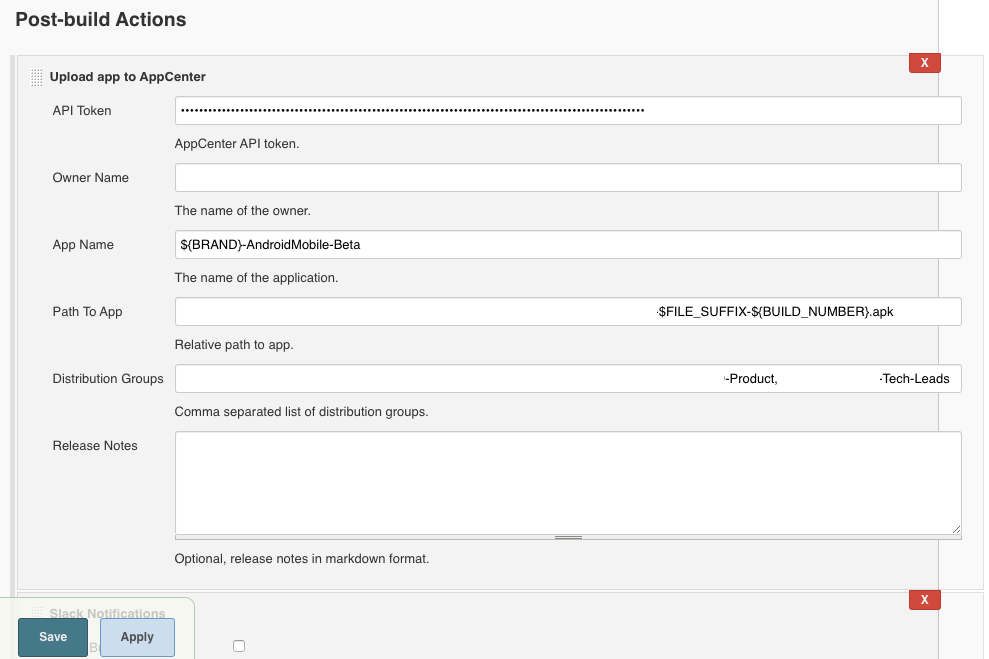
So, for example:

If the "Product" group does have access to that specific app in that specific Organization, the jenkins job will build fine and return a success. However, when you add "Tech-Leads" which does not have access (again, for example), the Jenkins build will report as failed.

Except, the job won't actually fail - it will just fail to distribute that build/release to that specific distribution group - we get an error like this in the console output:

Creating an upload resource.
Create upload resource successful.
Uploading app to resource.
Upload app to resource successful.
Committing resource.
Committing resource successful.
Distributing resource.
io.jenkins.plugins.appcenter.AppCenterException: Distributing resource unsuccessful: 
	at io.jenkins.plugins.appcenter.task.internal.DistributeResourceTask.lambda$execute$1(DistributeResourceTask.java:59)
	at java.util.concurrent.CompletableFuture.uniWhenComplete(CompletableFuture.java:760)
	at java.util.concurrent.CompletableFuture$UniWhenComplete.tryFire(CompletableFuture.java:736)
	at java.util.concurrent.CompletableFuture.postComplete(CompletableFuture.java:474)
	at java.util.concurrent.CompletableFuture.completeExceptionally(CompletableFuture.java:1977)
	at retrofit2.CompletableFutureCallAdapterFactory$BodyCallAdapter$2.onResponse(CompletableFutureCallAdapterFactory.java:81)
	at retrofit2.OkHttpCall$1.onResponse(OkHttpCall.java:129)
	at okhttp3.RealCall$AsyncCall.execute(RealCall.java:174)
	at okhttp3.internal.NamedRunnable.run(NamedRunnable.java:32)
	at java.util.concurrent.ThreadPoolExecutor.runWorker(ThreadPoolExecutor.java:1149)
	at java.util.concurrent.ThreadPoolExecutor$Worker.run(ThreadPoolExecutor.java:624)
	at java.lang.Thread.run(Thread.java:748)
Caused by: retrofit2.HttpException: HTTP 400 Bad Request
	... 7 more
io.jenkins.plugins.appcenter.AppCenterException: Upload to AppCenter failed.
	at io.jenkins.plugins.appcenter.task.UploadTask.call(UploadTask.java:56)
	at io.jenkins.plugins.appcenter.task.UploadTask.call(UploadTask.java:17)
	at hudson.remoting.UserRequest.perform(UserRequest.java:212)
	at hudson.remoting.UserRequest.perform(UserRequest.java:54)
	at hudson.remoting.Request$2.run(Request.java:369)
	at hudson.remoting.InterceptingExecutorService$1.call(InterceptingExecutorService.java:72)
	at java.util.concurrent.FutureTask.run(FutureTask.java:266)
	at java.util.concurrent.ThreadPoolExecutor.runWorker(ThreadPoolExecutor.java:1149)
	at java.util.concurrent.ThreadPoolExecutor$Worker.run(ThreadPoolExecutor.java:624)
	at java.lang.Thread.run(Thread.java:748)
	Suppressed: hudson.remoting.Channel$CallSiteStackTrace: Remote call to Android Slave
		at hudson.remoting.Channel.attachCallSiteStackTrace(Channel.java:1743)
		at hudson.remoting.UserRequest$ExceptionResponse.retrieve(UserRequest.java:357)
		at hudson.remoting.Channel.call(Channel.java:957)
		at hudson.FilePath.act(FilePath.java:1160)
		at io.jenkins.plugins.appcenter.AppCenterRecorder.uploadToAppCenter(AppCenterRecorder.java:131)
		at io.jenkins.plugins.appcenter.AppCenterRecorder.perform(AppCenterRecorder.java:118)
		at hudson.tasks.BuildStepCompatibilityLayer.perform(BuildStepCompatibilityLayer.java:79)
		at hudson.tasks.BuildStepMonitor$1.perform(BuildStepMonitor.java:20)
		at hudson.model.AbstractBuild$AbstractBuildExecution.perform(AbstractBuild.java:741)
		at hudson.model.AbstractBuild$AbstractBuildExecution.performAllBuildSteps(AbstractBuild.java:690)
		at hudson.model.Build$BuildExecution.post2(Build.java:186)
		at hudson.model.AbstractBuild$AbstractBuildExecution.post(AbstractBuild.java:635)
		at hudson.model.Run.execute(Run.java:1843)
		at hudson.model.FreeStyleBuild.run(FreeStyleBuild.java:43)
		at hudson.model.ResourceController.execute(ResourceController.java:97)
		at hudson.model.Executor.run(Executor.java:429)
Caused by: java.util.concurrent.ExecutionException: io.jenkins.plugins.appcenter.AppCenterException: Distributing resource unsuccessful: 
	at java.util.concurrent.CompletableFuture.reportGet(CompletableFuture.java:357)
	at java.util.concurrent.CompletableFuture.get(CompletableFuture.java:1895)
	at io.jenkins.plugins.appcenter.task.UploadTask.call(UploadTask.java:54)
	... 9 more
Caused by: io.jenkins.plugins.appcenter.AppCenterException: Distributing resource unsuccessful: 
	at io.jenkins.plugins.appcenter.task.internal.DistributeResourceTask.lambda$execute$1(DistributeResourceTask.java:59)
	at java.util.concurrent.CompletableFuture.uniWhenComplete(CompletableFuture.java:760)
	at java.util.concurrent.CompletableFuture$UniWhenComplete.tryFire(CompletableFuture.java:736)
	at java.util.concurrent.CompletableFuture.postComplete(CompletableFuture.java:474)
	at java.util.concurrent.CompletableFuture.completeExceptionally(CompletableFuture.java:1977)
	at retrofit2.CompletableFutureCallAdapterFactory$BodyCallAdapter$2.onResponse(CompletableFutureCallAdapterFactory.java:81)
	at retrofit2.OkHttpCall$1.onResponse(OkHttpCall.java:129)
	at okhttp3.RealCall$AsyncCall.execute(RealCall.java:174)
	at okhttp3.internal.NamedRunnable.run(NamedRunnable.java:32)
	... 3 more
Caused by: retrofit2.HttpException: HTTP 400 Bad Request
	... 7 more

It would be a lot better if the console output mentioned which specific Distribution Groups weren't allowed (and potentially stills succeed)


We see the APK (in this case) is still uploaded to App Center and distributed to the Distribution Groups that have access to this.


I honestly think they need to have feature parity with HockeyApp and remove the need to specify which Distribution Group is needed for each specific version/release - this seems un-necessary and creates overhead for teams to manage the distribution groups in both the Jenkins Plug-in and App Center


Please let me know if any of the above was unclear or if you have any questions. Thank you

Add Comment Add Comment
 
This message was sent by Atlassian Jira (v7.13.6#713006-sha1:cc4451f)
Atlassian logo

josh.brozen@nbcuni.com (JIRA)

unread,
Oct 31, 2019, 5:46:04 PM10/31/19
to jenkinsc...@googlegroups.com
Josh Brozen updated an issue
Change By: Josh Brozen
Since App Center has seemingly changed the Distribution Group and permissions model (not for the best and much different than HockeyApp - see issue raised here with App Center team: [https://github.com/microsoft/appcenter/issues/1272]), it is pretty hard to manage the App to Distribution Group relationships within App Center (especially after migration from Hockey App)


We have noticed that the Jenkins builds are failing when the App Center plugin is configured with Distribution Groups that are not available/accessible for a specific application (within the App Center permission model) .


So, for example:

!Screen Shot 2019-10-31 at 2.33.51 PM.png|thumbnail!


If the "Product" group does have access to that specific app in that specific Organization, the jenkins job will build fine and return a success. However, when you add "Tech-Leads" which does not have access (again, for example), the Jenkins build will report as failed.

Except, the job won't actually fail - it will just fail to distribute that build/release to that specific distribution group - we get an error like this in the console output:
{code:java}
{code}

It would be a lot better if the console output mentioned which specific Distribution Groups weren't allowed (and potentially stills succeed)


We see the APK (in this case) is still uploaded to App Center and distributed to the Distribution Groups that have access to this.


I honestly think they need to have feature parity with HockeyApp and remove the need to specify which Distribution Group is needed for each specific version/release - this seems un-necessary and creates overhead for teams to manage the distribution groups in both the Jenkins Plug-in and App Center


Please let me know if any of the above was unclear or if you have any questions. Thank you

josh.brozen@nbcuni.com (JIRA)

unread,
Oct 31, 2019, 5:48:03 PM10/31/19
to jenkinsc...@googlegroups.com
We see the APK (in this case) is still uploaded to App Center and distributed to the Distribution Groups that have the correct access to this in App Center .


I honestly think they need to have feature parity with HockeyApp and remove the need to specify which Distribution Group is needed for each specific version/release - this seems un-necessary and creates overhead for teams to manage the distribution groups in both the Jenkins Plug-in and App Center


Please let me know if any of the above was unclear or if you have any questions. Thank you

mez.pahlan@gmail.com (JIRA)

unread,
Nov 18, 2019, 3:58:04 AM11/18/19
to jenkinsc...@googlegroups.com
Mez Pahlan commented on Improvement JENKINS-60008
 
Re: Build fails due to Distribution Group in AppCenter not having Correct Permissions

Hi Josh Brozen thanks for reporting this. And thanks for the very clear explanation.

I'm not really sure what to do here. I am undecided whether this is something the user should cater for (i.e. give the distribution group the appropriate permissions) or if this plugin should be more aware somehow.

What are your thoughts? I think from your description you'd be happy with some information type messages but otherwise resolve the issue in AppCenter itself?

josh.brozen@nbcuni.com (JIRA)

unread,
Nov 18, 2019, 12:42:02 PM11/18/19
to jenkinsc...@googlegroups.com

Mez Pahlan - I honestly think Microsoft should fill the gap and figure out distribution groups strategy - it seems very backwards right now (also so that it is in feature parity with HockeyApp - why provide a Distribution Group access to the app to only force the build process to then set the specific distribution again?)


In terms of the Jenkins plug-in, can you please (at least) output to console log whatever Distribution Groups failed to gain access to the build via distribution? I don't even know if that should mark the Jenkins build as a "failure" - it just failed to distribute but the job was successful and did actually upload the build to AppCenter (it just didn't get distributed properly due to an issue with AppCenter).


Thanks and please let me know if you have any other questions.


-Josh Brozen

mez.pahlan@gmail.com (JIRA)

unread,
Nov 22, 2019, 5:57:03 AM11/22/19
to jenkinsc...@googlegroups.com

I've just merged in a change (still unreleased) that means we are able to get extra information in failure scenarios. So hopefully I can at least print out what went wrong.

As for what to mark the build as....... I'm still torn. I think I should mark the build as a failure. From the plugin's point of view the configuration is incorrect so the entire build should fail. But I do accept that at this point 99% of the upload and distribution process has worked. Nevertheless with the correct information printed back to the user hopefully the configuration can be fixed and the appropriate permissions assigned or the configuration changed.

Anyway, I'll start working on this soon.

josh.brozen@nbcuni.com (JIRA)

unread,
Nov 22, 2019, 11:48:03 AM11/22/19
to jenkinsc...@googlegroups.com

Thanks Mez Pahlan ! I agree its a hard decision on the build success vs. failure...I'm fine leaving it a failure so someone has to take action when a Distribution Group doesn't have the right access....

I still think Microsoft should make parity with HockeyApp on the release distribution methodology - or give the ability to distribute to ALL Distribution groups without NAMING each of them


Thanks again

-Josh Brozen

mez.pahlan@gmail.com (JIRA)

unread,
Nov 26, 2019, 2:19:02 PM11/26/19
to jenkinsc...@googlegroups.com
Mez Pahlan started work on Improvement JENKINS-60008
 
Change By: Mez Pahlan
Status: Open In Progress

mez.pahlan@gmail.com (JIRA)

unread,
Feb 2, 2020, 6:42:03 PM2/2/20
to jenkinsc...@googlegroups.com

mez.pahlan@gmail.com (JIRA)

unread,
Feb 2, 2020, 6:42:03 PM2/2/20
to jenkinsc...@googlegroups.com

mez.pahlan@gmail.com (JIRA)

unread,
Feb 2, 2020, 6:47:03 PM2/2/20
to jenkinsc...@googlegroups.com
Mez Pahlan commented on Improvement JENKINS-60008
 
Re: Build fails due to Distribution Group in AppCenter not having Correct Permissions

Hi Josh Brozen apologies for the slow movement of this over the Christmas period and the New Year. I'm releasing 0.8.1 that will at least point you in the right direction regarding permissions and API errors. It's not going to automatically fix the missing permission in AppCenter but at least it will be more obvious now.

mez.pahlan@gmail.com (JIRA)

unread,
Feb 2, 2020, 7:24:02 PM2/2/20
to jenkinsc...@googlegroups.com

doug.marques@gmail.com (JIRA)

unread,
Feb 25, 2020, 11:20:03 PM2/25/20
to jenkinsc...@googlegroups.com
Douglas Marques closed an issue as Fixed
 

I am using the Jenkins Appcenter plugin to upload Android binaries but everytime I include the releaseNotes parameter I have errors on the Appcenter dashboard and I can't find the file that I've just upload but Jenkins console shows that the upload was successful 


Error on appcenter dashboard

Change By: Douglas Marques
Status: Resolved Closed
Assignee: Mez Pahlan

mez.pahlan@gmail.com (JIRA)

unread,
Mar 4, 2020, 3:37:03 PM3/4/20
to jenkinsc...@googlegroups.com
Change By: Mez Pahlan
Status: Closed Fixed but Unreleased
This message was sent by Atlassian Jira (v7.13.12#713012-sha1:6e07c38)
Atlassian logo

mez.pahlan@gmail.com (JIRA)

unread,
Mar 4, 2020, 3:38:03 PM3/4/20
to jenkinsc...@googlegroups.com
Reply all
Reply to author
Forward
0 new messages