[JIRA] (JENKINS-58299) Pencil icon removed from Blue Ocean top bar

28 views
Skip to first unread message

mark.earl.waite@gmail.com (JIRA)

unread,
Jul 2, 2019, 8:07:03 AM7/2/19
to jenkinsc...@googlegroups.com
Mark Waite created an issue
 
Jenkins / Bug JENKINS-58299
Pencil icon removed from Blue Ocean top bar
Issue Type: Bug Bug
Assignee: Unassigned
Attachments: blue-ocean-with-pencil-icon.png, click-branches-link.png, hover-over-specific-branch-row.png
Components: blueocean-plugin
Created: 2019-07-02 12:06
Environment: Jenkins 2.176.1
Blue Ocean plugins 1.10.2 thru 1.17.0
Priority: Major Major
Reporter: Mark Waite

Blue Ocean plugin versions some time prior to 1.10.2 provided a "pencil" icon in the top bar that allowed the user to invoke the Blue Ocean editor to edit the Pipeline. Instructions to see the Pipeline are included in the "Pipeline Basics" section of the "Jenkins Fundamentals" class and in the "Pipeline Fundamentals" class.

Note that the hyperlinks in the steps will be broken the next time I clean the storage, since it is intentionally an outdated copy of the instructions (in order to show the bug).

The steps are:

  1. Click on "Open Blue Ocean" from the left frame of the Jenkins dashboard
  2. Copy the URL of a git repository into the cut buffer
  3. Choose "Git" as the repository to answer "Where do you store your code?"
  4. Paste the URL of a git repository without a Jenkinsfile into the "Repository URL" field
  5. Press the "Create Pipeline" button
  6. Wait for the "Create Pipeline" button to complete, then press the "New Pipeline" button to enter the Pipeline editor
  7. When the Pipeline editor prompts that there are no branches containing a Jenkinsfile, press the "Create Pipeline" button
  8. Add a stage with the Blue Ocean Editor (name it as you wish, the example calls it "Buzz Build")
  9. Add a step to the stage
  10. Save the Pipeline to a new branch (example uses branch 'buzz-trivial')
  11. Confirm the Pipeline runs
  12. View the Pipeline run details by clicking the row that represents that run

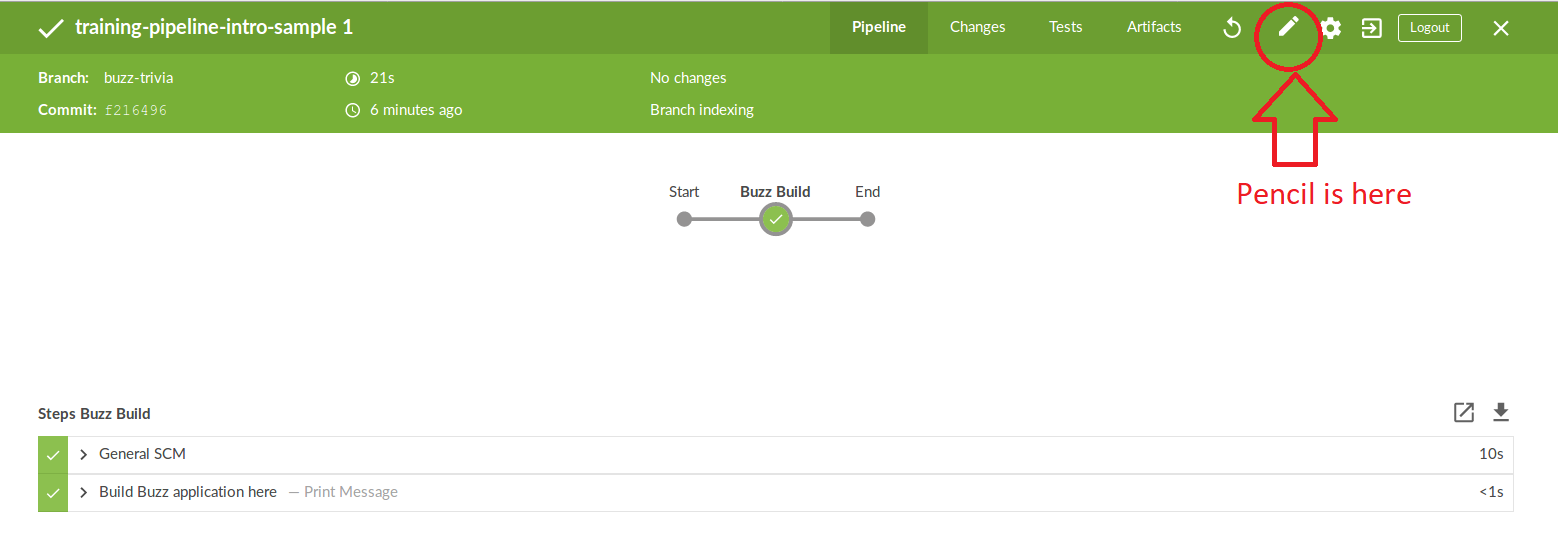
After that series of steps, the screen will include a pencil icon as shown in

That is a nice result, but that only works with some version of Blue Ocean older than 1.10.2. It does not work with Blue Ocean versions 1.10.2 through 1.17.0.

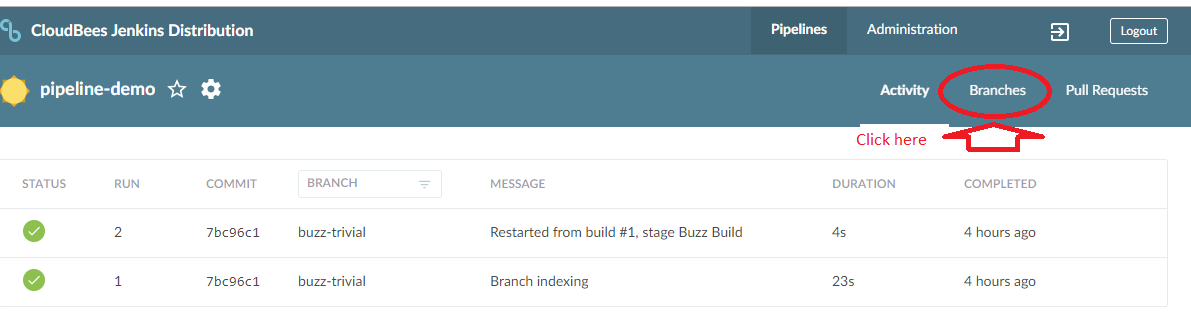
The workaround is to use the "Branches" view of the Pipeline and hover over the right end of the row which represents the branch containing the Pipeline to be edited.

The workaround looks like this:

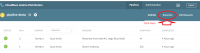
  • Click the branches link
  • Hover over the right side of the specific branch row
  • Click the pencil icon
Add Comment Add Comment
 
This message was sent by Atlassian Jira (v7.11.2#711002-sha1:fdc329d)

mark.earl.waite@gmail.com (JIRA)

unread,
Jul 2, 2019, 8:08:02 AM7/2/19
to jenkinsc...@googlegroups.com
Mark Waite updated an issue
Change By: Mark Waite
Blue Ocean plugin versions some time prior to 1.10.2 provided a "pencil" icon in the top bar that allowed the user to invoke the Blue Ocean editor to edit the Pipeline.  Instructions to see the Pipeline are included in the "[Pipeline Basics|https://cloudbees-training-materials.s3.amazonaws.com/training-jenkins-fundamentals/PR-91/slides-Section+04+-+Pipeline+Basics.html#/trivial_pipeline]" section of the "Jenkins Fundamentals" class and in the "Pipeline Fundamentals" class.


Note that the hyperlinks in the steps will be broken the next time I clean the storage, since it is intentionally an outdated copy of the instructions (in order to show the bug).

The steps are:
# Click on "[Open Blue Ocean|https://cloudbees-training-materials.s3.amazonaws.com/training-jenkins-fundamentals/PR-91/slides-Section+04+-+Pipeline+Basics.html#/initialize_blue_ocean]" from the left frame of the Jenkins dashboard
# Copy the URL of a git repository into the cut buffer
# Choose "Git" as the repository to answer "Where do you store your code?"
# Paste the URL of a git repository without a Jenkinsfile into the "Repository URL" field
# Press the "[Create Pipeline|https://cloudbees-training-materials.s3.amazonaws.com/training-jenkins-fundamentals/PR-91/slides-Section+04+-+Pipeline+Basics.html#/identify_git_repo]" button
# Wait for the "Create Pipeline" button to complete, then press the "[New Pipeline|https://cloudbees-training-materials.s3.amazonaws.com/training-jenkins-fundamentals/PR-91/slides-Section+04+-+Pipeline+Basics.html#/entering_blue_ocean]" button to enter the Pipeline editor
# When the Pipeline editor prompts that there are no branches containing a Jenkinsfile, press the "[Create Pipeline|https://cloudbees-training-materials.s3.amazonaws.com/training-jenkins-fundamentals/PR-91/slides-Section+04+-+Pipeline+Basics.html#/blue_ocean_screen]" button
# [Add a stage|https://cloudbees-training-materials.s3.amazonaws.com/training-jenkins-fundamentals/PR-91/slides-Section+04+-+Pipeline+Basics.html#/blue_ocean_pipeline_editor_2] with the Blue Ocean Editor (name it as you wish, the example calls it "[Buzz Build|https://cloudbees-training-materials.s3.amazonaws.com/training-jenkins-fundamentals/PR-91/slides-Section+04+-+Pipeline+Basics.html#/add_buzz_build_stage]")
# [Add a step|https://cloudbees-training-materials.s3.amazonaws.com/training-jenkins-fundamentals/PR-91/slides-Section+04+-+Pipeline+Basics.html#/add_step_to_stage] to the stage
# [Save the Pipeline to a new branch|https://cloudbees-training-materials.s3.amazonaws.com/training-jenkins-fundamentals/PR-91/slides-Section+04+-+Pipeline+Basics.html#/save_pipeline] (example uses branch 'buzz-trivial')
# Confirm the Pipeline runs
# [View the Pipeline run details|https://cloudbees-training-materials.s3.amazonaws.com/training-jenkins-fundamentals/PR-91/slides-Section+04+-+Pipeline+Basics.html#/view_pipeline_run_details] by clicking the row that represents that run


After that series of steps, the screen will include a pencil icon as shown in

!blue-ocean-with-pencil-icon.png|thumbnail!

That is a nice result, but that only works with some version of Blue Ocean older than 1.10.2.  It does not work with Blue Ocean versions 1.10.2 through 1.17.0.

The workaround is to use the "Branches" view of the Pipeline and hover over the right end of the row which represents the branch containing the Pipeline to be edited.

The workaround looks like this:
* Click the branches link
!click-branches-link.png|thumbnail!
* Hover over the right side of the specific branch row
  
  !hover-over-specific-branch-row.png|thumbnail!
* Click the pencil icon

mark.earl.waite@gmail.com (JIRA)

unread,
Jul 2, 2019, 8:10:03 AM7/2/19
to jenkinsc...@googlegroups.com
Mark Waite updated an issue
Blue Ocean plugin versions some time prior to 1.10.2 provided a "pencil" icon in the top bar that allowed the user to invoke the Blue Ocean editor to edit the Pipeline.  Instructions to see the Pipeline are included in the "[Pipeline Basics|https://cloudbees-training-materials.s3.amazonaws.com/training-jenkins-fundamentals/PR-91/slides-Section+04+-+Pipeline+Basics.html#/trivial_pipeline]" section of the "Jenkins Fundamentals" class and in the "Pipeline Fundamentals" class.

Note that the hyperlinks in the steps will be broken the next time I clean the storage, since it is intentionally an outdated copy of the instructions (in order to show the bug).

The steps are:
# Click on "[Open Blue Ocean|https://cloudbees-training-materials.s3.amazonaws.com/training-jenkins-fundamentals/PR-91/slides-Section+04+-+Pipeline+Basics.html#/initialize_blue_ocean]" from the left frame of the Jenkins dashboard
# Copy the URL of a git repository into the cut buffer
# Choose "Git" as the repository to answer "Where do you store your code?"
# Paste the URL of a git repository without a Jenkinsfile into the "Repository URL" field
# Press the "[Create Pipeline|https://cloudbees-training-materials.s3.amazonaws.com/training-jenkins-fundamentals/PR-91/slides-Section+04+-+Pipeline+Basics.html#/identify_git_repo]" button
# Wait for the "Create Pipeline" button to complete, then press the "[New Pipeline|https://cloudbees-training-materials.s3.amazonaws.com/training-jenkins-fundamentals/PR-91/slides-Section+04+-+Pipeline+Basics.html#/entering_blue_ocean]" button to enter the Pipeline editor
# When the Pipeline editor prompts that there are no branches containing a Jenkinsfile, press the "[Create Pipeline|https://cloudbees-training-materials.s3.amazonaws.com/training-jenkins-fundamentals/PR-91/slides-Section+04+-+Pipeline+Basics.html#/blue_ocean_screen]" button
# [Add a stage|https://cloudbees-training-materials.s3.amazonaws.com/training-jenkins-fundamentals/PR-91/slides-Section+04+-+Pipeline+Basics.html#/blue_ocean_pipeline_editor_2] with the Blue Ocean Editor (name it as you wish, the example calls it "[Buzz Build|https://cloudbees-training-materials.s3.amazonaws.com/training-jenkins-fundamentals/PR-91/slides-Section+04+-+Pipeline+Basics.html#/add_buzz_build_stage]")
# [Add a step|https://cloudbees-training-materials.s3.amazonaws.com/training-jenkins-fundamentals/PR-91/slides-Section+04+-+Pipeline+Basics.html#/add_step_to_stage] to the stage
# [Save the Pipeline to a new branch|https://cloudbees-training-materials.s3.amazonaws.com/training-jenkins-fundamentals/PR-91/slides-Section+04+-+Pipeline+Basics.html#/save_pipeline] (example uses branch 'buzz-trivial')
# Confirm the Pipeline runs
# [View the Pipeline run details|https://cloudbees-training-materials.s3.amazonaws.com/training-jenkins-fundamentals/PR-91/slides-Section+04+-+Pipeline+Basics.html#/view_pipeline_run_details] by clicking the row that represents that run

After that series of steps, the screen will include a pencil icon as shown in

!blue-ocean-with-pencil-icon.png|thumbnail!

That is a nice result, but that only works with some version of Blue Ocean older than 1.10.2.  It does not work with Blue Ocean versions 1.10.2 through 1.17.0.

h2. Workaround

The workaround is to use the "Branches" view of the Pipeline and hover over the right end of the row which represents the branch containing the Pipeline to be edited.

The workaround looks like this:
* Click the branches link
!click-branches-link.png|thumbnail!
* Hover over the right side of the specific branch row  
!hover-over-specific-branch-row.png|thumbnail!
* Click the pencil icon

mark.earl.waite@gmail.com (JIRA)

unread,
Jul 8, 2019, 11:05:02 AM7/8/19
to jenkinsc...@googlegroups.com
Mark Waite assigned an issue to Romen Rodriguez-Gil
Change By: Mark Waite
Assignee: Romen Rodriguez-Gil

romen@romenrg.com (JIRA)

unread,
Jul 20, 2019, 8:48:02 AM7/20/19
to jenkinsc...@googlegroups.com
Romen Rodriguez-Gil updated an issue
Change By: Romen Rodriguez-Gil
Attachment: Screen Shot 2019-07-20 at 13.40.25.png

romen@romenrg.com (JIRA)

unread,
Jul 20, 2019, 8:50:02 AM7/20/19
to jenkinsc...@googlegroups.com
Romen Rodriguez-Gil updated an issue
Change By: Romen Rodriguez-Gil
Attachment: Screen Shot 2019-07-20 at 13.39.52.png

romen@romenrg.com (JIRA)

unread,
Jul 20, 2019, 8:51:37 AM7/20/19
to jenkinsc...@googlegroups.com
Romen Rodriguez-Gil commented on Bug JENKINS-58299
 
Re: Pencil icon removed from Blue Ocean top bar

Yesterday and today I have been running some diagnostics on this and following traces, with the following findings:

  • The pencil in the top navbar is rendered as part of the "RunDetails.jsx" component (in "blueocean-dashboard" plugin)
    • The array "iconsButtons" renders a few components (e.g. Replay Button, RunButton, LoginButton,...)
    • The Pencil button is a special case, rendered as an extension from the "blueocean-pipeline-editor" module ("PipelineEditorLink.jsx" class)
      • However, after assuming that the issue was related to the extenison load, I have come to the conclusion that the extension load is working fine. Not only there have not been changes there, but also I have proved the "PipelineEditorLink" is executed sometimes
  • After running various experiments, both with the training VM and by running blueocean locally through the sources ("mvn -f blueocean/pom.xml hpi:run") it seems sometimes it runs fine:
    • However, there are other times in which the pencil is not displayed
      • In some of those cases in which the pencil is not displayed, I have been able to see that the "render" or "_canSavePipeline" methods in the "PipelineEditorLink" class were not being called
      • In those cases, I am also seeing an error seeming to come from an API call:
        • Maybe that error is causing the execution to interrupt, not loading the buttons?

romen@romenrg.com (JIRA)

unread,
Jul 20, 2019, 8:52:01 AM7/20/19
to jenkinsc...@googlegroups.com
Romen Rodriguez-Gil edited a comment on Bug JENKINS-58299
Yesterday and today I have been running some diagnostics on this and following traces, with the following findings:
* The pencil in the top navbar is rendered as part of the "RunDetails.jsx" component (in "blueocean-dashboard" plugin)
** The array "iconsButtons" renders a few components (e.g. Replay Button, RunButton, LoginButton,...)
** The Pencil button is a special case, rendered as an extension from the "blueocean-pipeline-editor" module ("PipelineEditorLink.jsx" class)
*** However, after assuming that the issue was related to the extenison load, I have come to the conclusion that the extension load is working fine. Not only there have not been changes there, but also I have proved the "PipelineEditorLink" is executed sometimes
* After running various experiments, both with the training VM and by running blueocean locally through the sources ("mvn -f blueocean/pom.xml hpi:run") it seems sometimes it runs fine:
** !Screen Shot 2019-07-20 at 13.40.25.png
|width=333,height=430 !


*
* * However, there are other times in which the pencil is not displayed
*** In some of those cases in which the pencil is not displayed, I have been able to see that the "render" or "_canSavePipeline" methods in the "PipelineEditorLink" class were not being called
*** In those cases, I am also seeing an error seeming to come from an API call:
**** !Screen Shot 2019-07-20 at 13.39.52.png
|width=470,height=253 !


*
**
* **
****
Maybe that error is causing the execution to interrupt, not loading the buttons?

romen@romenrg.com (JIRA)

unread,
Jul 20, 2019, 8:52:02 AM7/20/19
to jenkinsc...@googlegroups.com

Yesterday and today I have been running some diagnostics on this and following traces, with the following findings:

  • The pencil in the top navbar is rendered as part of the "RunDetails.jsx" component (in "blueocean-dashboard" plugin)
      • The array "iconsButtons" renders a few components (e.g. Replay Button, RunButton, LoginButton,...)
      • The Pencil button is a special case, rendered as an extension from the "blueocean-pipeline-editor" module ("PipelineEditorLink.jsx" class)
        • However, after assuming that the issue was related to the extenison load, I have come to the conclusion that the extension load is working fine. Not only there have not been changes there, but also I have proved the "PipelineEditorLink" is executed sometimes
    • After running various experiments, both with the training VM and by running blueocean locally through the sources ("mvn -f blueocean/pom.xml hpi:run") it seems sometimes it runs fine:
      • However, there are other times in which the pencil is not displayed
        • In some of those cases in which the pencil is not displayed, I have been able to see that the "render" or "_canSavePipeline" methods in the "PipelineEditorLink" class were not being called
        • In those cases, I am also seeing an error seeming to come from an API call:
          • Maybe that error is causing the execution to interrupt, not loading the buttons?

    romen@romenrg.com (JIRA)

    unread,
    Jul 20, 2019, 8:53:02 AM7/20/19
    to jenkinsc...@googlegroups.com
    Romen Rodriguez-Gil edited a comment on Bug JENKINS-58299
    Yesterday and today I have been running some diagnostics on this and following traces, with the following findings:
    * The pencil in the top navbar is rendered as part of the "RunDetails.jsx" component (in "blueocean-dashboard" plugin)
    ** The array "iconsButtons" renders a few components (e.g. Replay Button, RunButton, LoginButton,...)
    ** The Pencil button is a special case, rendered as an extension from the "blueocean-pipeline-editor" module ("PipelineEditorLink.jsx" class)
    *** However, after assuming that the issue was related to the extenison load, I have come to the conclusion that the extension load is working fine. Not only there have not been changes there, but also I have proved the "PipelineEditorLink" is executed sometimes
    * After running various experiments, both with the training VM and by running blueocean locally through the sources ("mvn -f blueocean/pom.xml hpi:run") it seems sometimes it runs fine:
    ** !Screen Shot 2019-07-20 at 13.40.25.png|width=456,height=244,thumbnail!

    *
    ** However, there are other times in which the pencil is not displayed

    *** In some of those cases in which the pencil is not displayed, I have been able to see that the "render" or "_canSavePipeline" methods in the "PipelineEditorLink" class were not being called
    *** In those cases, I am also seeing an error seeming to come from an API call:
    **** !Screen Shot 2019-07-20 at 13.39.52.png|width=470,height=253!


    *
    **
    * **
    ****
    Maybe that error is causing the execution to interrupt, not loading the buttons?

    romen@romenrg.com (JIRA)

    unread,
    Jul 20, 2019, 8:53:03 AM7/20/19
    to jenkinsc...@googlegroups.com
    Romen Rodriguez-Gil edited a comment on Bug JENKINS-58299
    Yesterday and today I have been running some diagnostics on this and following traces, with the following findings:
    * The pencil in the top navbar is rendered as part of the "RunDetails.jsx" component (in "blueocean-dashboard" plugin)
    ** The array "iconsButtons" renders a few components (e.g. Replay Button, RunButton, LoginButton,...)
    ** The Pencil button is a special case, rendered as an extension from the "blueocean-pipeline-editor" module ("PipelineEditorLink.jsx" class)
    *** However, after assuming that the issue was related to the extenison load, I have come to the conclusion that the extension load is working fine. Not only there have not been changes there, but also I have proved the "PipelineEditorLink" is executed sometimes
    * After running various experiments, both with the training VM and by running blueocean locally through the sources ("mvn -f blueocean/pom.xml hpi:run") it seems sometimes it runs fine:
    ** !Screen Shot 2019-07-20 at 13.40.25.png|width= 333 456 ,height= 430 244,thumbnail !


    *
    ** However, there are other times in which the pencil is not displayed
    *** In some of those cases in which the pencil is not displayed, I have been able to see that the "render" or "_canSavePipeline" methods in the "PipelineEditorLink" class were not being called
    *** In those cases, I am also seeing an error seeming to come from an API call:
    **** !Screen Shot 2019-07-20 at 13.39.52.png|width=470,height=253!

    *
    **
    ***
    **** Maybe that error is causing the execution to interrupt, not loading the buttons?

    romen@romenrg.com (JIRA)

    unread,
    Jul 20, 2019, 8:55:02 AM7/20/19
    to jenkinsc...@googlegroups.com
    Romen Rodriguez-Gil edited a comment on Bug JENKINS-58299
    Yesterday and today I have been running some diagnostics on this and following traces, with the following findings:
    * The pencil in the top navbar is rendered as part of the "RunDetails.jsx" component (in "blueocean-dashboard" plugin)
    ** The array "iconsButtons" renders a few components (e.g. Replay Button, RunButton, LoginButton,...)
    ** The Pencil button is a special case, rendered as an extension from the "blueocean-pipeline-editor" module ("PipelineEditorLink.jsx" class)
    *** However, after assuming that the issue was related to the extenison load, I have come to the conclusion that the extension load is working fine. Not only there have not been changes there, but also I have proved the "PipelineEditorLink" is executed sometimes
    * After running various experiments, both with the training VM and by running blueocean locally through the sources ("mvn -f blueocean/pom.xml hpi:run") it seems sometimes it runs fine:
    ** !Screen Shot 2019-07-20 at 13.40.25.png|width=456,height=244,thumbnail!


    *
    ** However, there are other times in which the pencil is not displayed
    *** In some of those cases in which the pencil is not displayed, I have been able to see that the "render" or "_canSavePipeline" methods in the "PipelineEditorLink" class were not being called
    *** In those cases, I am also seeing an error seeming to come from an API call:
    **** !Screen Shot 2019-07-20 at 13.39.52.png|width=470,height=253!


    **** Maybe that error is causing the execution to interrupt, not loading the buttons
    ?

    Will try to see if I can keep tracing the issue to the API, but it seems a bit challenging.

    mark.earl.waite@gmail.com (JIRA)

    unread,
    Jul 20, 2019, 2:08:02 PM7/20/19
    to jenkinsc...@googlegroups.com

    Oddly enough, I've recently been using Blue Ocean 1.17.0 and have seen cases where the pencil icon seems to reappear. That seems to support your observation that the display of the pencil icon is inconsistent. Thanks for your ongoing research!

    mark.earl.waite@gmail.com (JIRA)

    unread,
    Nov 28, 2019, 11:56:01 AM11/28/19
    to jenkinsc...@googlegroups.com
    Mark Waite closed an issue as Fixed
     

    Confirmed it is working as expected in the Declarative Pipeline with Jenkins webinar

    Change By: Mark Waite
    Status: Open Closed
    Resolution: Fixed
    This message was sent by Atlassian Jira (v7.13.6#713006-sha1:cc4451f)
    Atlassian logo
    Reply all
    Reply to author
    Forward
    0 new messages