[JIRA] (JENKINS-56969) Unable to connect to slave via ssh

7 views
Skip to first unread message

nicks9188@gmail.com (JIRA)

unread,
Apr 11, 2019, 6:46:03 AM4/11/19
to jenkinsc...@googlegroups.com
Nicketa Kumar created an issue
 
Jenkins / Bug JENKINS-56969
Unable to connect to slave via ssh
Issue Type: Bug Bug
Assignee: Matt Sicker
Attachments: slave-screenshot.JPG, slave.log, slave.log.1, slave.log.10, slave.log.2, slave.log.3, slave.log.4, slave.log.5, slave.log.6, slave.log.7, slave.log.8, slave.log.9
Components: ssh-agent-plugin, ssh-credentials-plugin, ssh-plugin, ssh-slaves-plugin
Created: 2019-04-11 10:45
Environment: Jenkins Jenkins ver. 2.164.2
Plugins:
* ssh 2.6.1
* ssh-agent 1.17
* ssh-credentials 1.15
* ssh-slaves 1.29.4
Master:
OS: Amazon Linux 2 AMI (HVM), SSD Volume Type - ami-0889b8a448de4fc44
Java: openjdk version "1.8.0_201"
Slave:
Ubuntu Server 18.04 LTS (HVM), SSD Volume Type - ami-007d5db58754fa284
Java: openjdk version "10.0.2" 2018-07-17
Labels: slave
Priority: Major Major
Reporter: Nicketa Kumar
  • My Jenkins exists on Amazon EC2 engine.
  •  I'm trying to add ubuntu slave via ssh.
  • While creating an instance, a <filename>.pem file is generated for storing .ssh keys which is a private key. No separate pub ssh key is there. 
  • I can ssh directly from my master to slave and vice versa using that key file
    ssh -i "/home/ubuntu/.ssh/scarlet.pem" ec2-...@ec2-52-66-241-52.ap-south-1.compute.amazonaws.com
    ssh i "/home/ec2user/.ssh/scarlet.pem" ubu...@ec2-52-66-241-52.ap-south-1.compute.amazonaws.com

    But when I try to configure my slave via any of the ssh method, it gives me error.

  • How I've configured (one of the method)?
    • I've saved slave machine credentials as "ssh key username with private key"
    • Launch method: Launch agents via SSH
    • Hostname: slave machine private ip address, as it is the hostname.
    • Host Key Verification Strategy: Manually trusted key Verification Strategy

Note:

  • I cannot regenerate ssh keys as I'll not be able to access my machines again. 
  • I cannot use credentials as username/password as either there is no password or I'm not that much linux expert. They only method offered in amazon.aws seems to be the ssh key
  • I've tried everything whatever mentioned in other jenkins tickets for same issue or on internet, but my issue is not getting resolved.

Please see attachment for log details.

I'm literally blocked right now, need assistance asap.

Add Comment Add Comment
 
This message was sent by Atlassian Jira (v7.11.2#711002-sha1:fdc329d)

nicks9188@gmail.com (JIRA)

unread,
Apr 11, 2019, 6:48:02 AM4/11/19
to jenkinsc...@googlegroups.com
Nicketa Kumar updated an issue
Change By: Nicketa Kumar
* My Jenkins exists on Amazon EC2 engine.
*  I'm trying to add ubuntu slave via ssh.
* While creating an instance, a <filename>.pem file is generated for storing .ssh keys which is a private key. No separate pub ssh key is there. 
* I can ssh directly
using terminal from my master to slave and vice versa using that key file

{code:java}
ssh -i "/home/ubuntu/.ssh/scarlet.pem" ec2-...@ec2-52-66-241-52.ap-south-1.compute.amazonaws.com{code}
{code:java}
ssh i "/home/ec2user/.ssh/scarlet.pem" ubu...@ec2-52-66-241-52.ap-south-1.compute.amazonaws.com{code}

But when I try to configure my slave via any of the ssh method, it gives me error.

* How I've configured (one of the method)?
** I've saved slave machine credentials as "ssh key username with private key"
** Launch method: Launch agents via SSH
** Hostname: slave machine private ip address, as it is the hostname.
** Host Key Verification Strategy: Manually trusted key Verification Strategy

Note:
* I cannot regenerate ssh keys as I'll not be able to access my machines again. 
* I cannot use credentials as username/password as either there is no password or I'm not that much linux expert. They only method offered in amazon.aws seems to be the ssh key
* I've tried everything whatever mentioned in other jenkins tickets for same issue or on internet, but my issue is not getting resolved.


Please see attachment for log details.

I'm literally blocked right now, need assistance asap.

nicks9188@gmail.com (JIRA)

unread,
Apr 11, 2019, 6:49:03 AM4/11/19
to jenkinsc...@googlegroups.com
Nicketa Kumar updated an issue
* My Jenkins exists on Amazon EC2 engine.
*  I'm trying to add ubuntu slave via ssh.
* While creating an instance, a <filename>.pem file is generated for storing .ssh keys which is a private key. No separate pub ssh key is there. 
* I can ssh directly using terminal from my master to slave and vice versa using that key file
{code:java}
ssh -i "/home/ubuntu/.ssh/scarlet.pem" ec2-...@ec2-52-66-241-52.ap-south-1.compute.amazonaws.com{code}
{code:java}
ssh i "/home/ec2user/.ssh/scarlet.pem" ubuntu@ec2-52-66- 241 103 - 52 201 .ap-south-1.compute.amazonaws.com{code}

But when I try to configure my slave via any of the ssh method, it gives me error.

* How I've configured (one of the method)?
** I've saved slave machine credentials as "ssh key username with private key"
** Launch method: Launch agents via SSH
** Hostname: slave machine private ip address, as it is the hostname.
** Host Key Verification Strategy: Manually trusted key Verification Strategy

Note:
* I cannot regenerate ssh keys as I'll not be able to access my machines again. 
* I cannot use credentials as username/password as either there is no password or I'm not that much linux expert. They only method offered in amazon.aws seems to be the ssh key
* I've tried everything whatever mentioned in other jenkins tickets for same issue or on internet, but my issue is not getting resolved.

Please see attachment for log details.

I'm literally blocked right now, need assistance asap.

nicks9188@gmail.com (JIRA)

unread,
Apr 11, 2019, 7:01:02 AM4/11/19
to jenkinsc...@googlegroups.com
Nicketa Kumar updated an issue
* My Jenkins exists on Amazon EC2 engine.
*  I'm trying to add ubuntu slave via ssh.
* While creating an instance, a <filename>.pem file is generated for storing .ssh keys which is a private key. No separate pub ssh key is there. 
* I can ssh directly using terminal from my master to slave and vice versa using that key file
{code:java}
ssh -i "/home/ubuntu/.ssh/scarlet.pem" ec2-...@ec2-52-66-241-52.ap-south-1.compute.amazonaws.com{code}
{code:java}
ssh i "/home/ec2user/.ssh/scarlet.pem" ubu...@ec2-52-66-103-201.ap-south-1.compute.amazonaws.com{code}

But when I try to configure my slave via any of the ssh method, it gives me error.

* How I've configured (one of the method)?
** I've saved slave machine credentials as "ssh key username with private key"
** Launch method: Launch agents via SSH
** Hostname: slave machine private ip address, as it is the hostname.
** Host Key Verification Strategy: Manually trusted key Verification Strategy

Note:
* I cannot regenerate ssh keys as I'll not be able to access my machines again. 
* I cannot use credentials as username/password as either there is no password or I'm not that much linux expert. They only method offered in amazon.aws seems to be the ssh key (.pem ssh key file)
* I've tried everything whatever mentioned in other jenkins tickets for same issue or on internet, but my issue is not getting resolved.

Please see attachment for log details.

I'm literally blocked right now, need assistance asap.

nicks9188@gmail.com (JIRA)

unread,
Apr 11, 2019, 7:29:02 AM4/11/19
to jenkinsc...@googlegroups.com
Nicketa Kumar updated an issue
Change By: Nicketa Kumar
Attachment: image-2019-04-11-16-58-51-295.png

nicks9188@gmail.com (JIRA)

unread,
Apr 11, 2019, 7:30:01 AM4/11/19
to jenkinsc...@googlegroups.com
Nicketa Kumar updated an issue
Change By: Nicketa Kumar
Attachment: image-2019-04-11-16-59-00-182.png

nicks9188@gmail.com (JIRA)

unread,
Apr 11, 2019, 7:30:01 AM4/11/19
to jenkinsc...@googlegroups.com
Nicketa Kumar updated an issue
* My Jenkins exists on Amazon EC2 engine.
*  I'm trying to add ubuntu slave via ssh.
* While creating an instance, a <filename>.pem file is generated for storing .ssh keys which is a private key. No separate pub ssh key is there. 
* I can ssh directly using terminal from my master to slave and vice versa using that key file
{code:java}
ssh -i "/home/ubuntu/.ssh/scarlet.pem" ec2-...@ec2-52-66-241-52.ap-south-1.compute.amazonaws.com{code}
{code:java}
ssh i "/home/ec2user/.ssh/scarlet.pem" ubu...@ec2-52-66-103-201.ap-south-1.compute.amazonaws.com{code}
But when I try to configure my slave via any of the ssh method, it gives me error.

* How I've configured (one of the method)?
** I've saved slave machine credentials as "ssh key username with private key"
** Launch method: Launch agents via SSH
** Hostname: slave machine private ip address, as it is the hostname.
** Host Key Verification Strategy: Manually trusted key Verification Strategy
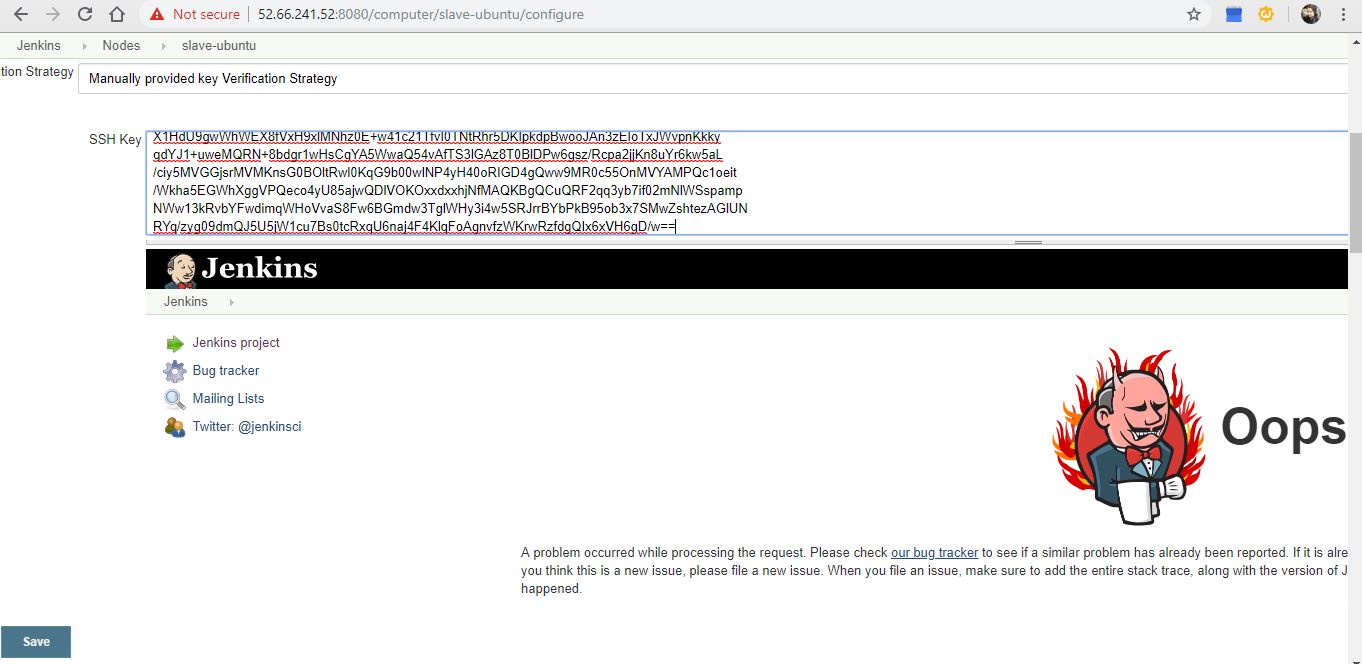
* If I try "Manually provided key verification strategy", it gives me bug. see (bug-screenshot attached).

Note:
* I cannot regenerate ssh keys as I'll not be able to access my machines again. 
* I cannot use credentials as username/password as either there is no password or I'm not that much linux expert. They only method offered in amazon.aws seems to be the ssh key (.pem ssh key file)
* I've tried everything whatever mentioned in other jenkins tickets for same issue or on internet, but my issue is not getting resolved.

Please see attachment for log details.

I'm literally blocked right now, need assistance asap.

nicks9188@gmail.com (JIRA)

unread,
Apr 11, 2019, 7:30:02 AM4/11/19
to jenkinsc...@googlegroups.com
Nicketa Kumar updated an issue
Change By: Nicketa Kumar
Attachment: bug-screenshot.JPG

nicks9188@gmail.com (JIRA)

unread,
Apr 11, 2019, 7:31:02 AM4/11/19
to jenkinsc...@googlegroups.com
Nicketa Kumar updated an issue
Change By: Nicketa Kumar
Attachment: image-2019-04-11-16-59-00-182.png

nicks9188@gmail.com (JIRA)

unread,
Apr 11, 2019, 7:31:02 AM4/11/19
to jenkinsc...@googlegroups.com
Nicketa Kumar updated an issue
Change By: Nicketa Kumar
Attachment: image-2019-04-11-16-58-51-295.png

boards@gmail.com (JIRA)

unread,
Apr 11, 2019, 11:06:02 AM4/11/19
to jenkinsc...@googlegroups.com
Matt Sicker commented on Bug JENKINS-56969
 
Re: Unable to connect to slave via ssh

What key type is your private key? I do recall seeing some Trilead classes removed from Jenkins not that long ago, so it's possible you found a regression. There was also an upgrade for JSch which disabled some insecure key types and parameters, though I don't believe that's used in any of the plugins you listed.

nicks9188@gmail.com (JIRA)

unread,
Apr 11, 2019, 10:52:03 PM4/11/19
to jenkinsc...@googlegroups.com

It is .PEM. This is the type of key being generated by aws.

Also as you can see in log, the error is "Caused by: java.io.IOException: PEM problem: it is of unknown type" which means jenkins is unable to read it as per my understanding.

The second issue is, if I try Host Key Verification Strategy as Manually trusted key Verification Strategy, then there is a bug in jenkins. you can see here bug-screenshot.JPG

kuisathaverat@gmail.com (JIRA)

unread,
Jul 21, 2019, 6:47:02 AM7/21/19
to jenkinsc...@googlegroups.com

about the screenshot, the key you've pasted there is the private key, that it is not correct, on verification strategies you have to use the public key, because of that you can not connect to your EC2 instance, it is not possible to verify the key.

kuisathaverat@gmail.com (JIRA)

unread,
Jul 21, 2019, 8:18:02 AM7/21/19
to jenkinsc...@googlegroups.com

nicks9188@gmail.com (JIRA)

unread,
Jul 22, 2019, 6:02:02 AM7/22/19
to jenkinsc...@googlegroups.com

Thanks. I've found a workaround. I converted the keys using putty again and used that. that is working well. You can close the ticket. Thanks for help.

kuisathaverat@gmail.com (JIRA)

unread,
Jul 22, 2019, 7:35:04 AM7/22/19
to jenkinsc...@googlegroups.com
Ivan Fernandez Calvo closed an issue as Not A Defect
 
Change By: Ivan Fernandez Calvo
Status: Open Closed
Resolution: Not A Defect
Reply all
Reply to author
Forward
0 new messages