[JIRA] (JENKINS-56375) custom jnlp not working

4 views
Skip to first unread message

sushantlogs@gmail.com (JIRA)

unread,
Mar 3, 2019, 5:15:03 PM3/3/19
to jenkinsc...@googlegroups.com
Sushant Pradhan created an issue
 
Jenkins / Bug JENKINS-56375
custom jnlp not working
Issue Type: Bug Bug
Assignee: Carlos Sanchez
Components: kubernetes-plugin
Created: 2019-03-03 22:14
Environment: Jenkins: 2.150.3
Kubernetes: 1.14.3
Priority: Major Major
Reporter: Sushant Pradhan

I have this in my pipeline:

def label = "mypod-${UUID.randomUUID().toString()}"
podTemplate(label: label, yaml: """
apiVersion: v1
kind: Pod
metadata:
  labels:
    some-label: some-label-value
spec:
  containers:
  - name: jnlp
    image: 1234567890.dkr.ecr.us-east-1.amazonaws.com/jenkins-slave:1.0.0
    command:
    - /usr/local/bin/jenkins-slave
    tty: true
    securityContext:
      runAsUser: 10000
      allowPrivilegeEscalation: false
"""
) {
    node (label) {
      container('jnlp') {
        sh "hostname"
        sh "mvn --version"
      }
    }
}

When I execute this, i expect that the maven version from my custom jnlp image gets printed, instead I get the following error:


[Pipeline] node
Agent mypod-6cf91ebc-71db-4c56-80c8-8f332d796ccf-413hd-m09jd is provisioned from template Kubernetes Pod Template
Agent specification [Kubernetes Pod Template] (mypod-6cf91ebc-71db-4c56-80c8-8f332d796ccf): 
* [jnlp] jenkins/jnlp-slave:alpine
yaml:

apiVersion: v1
kind: Pod
metadata:
  labels:
    some-label: some-label-value
spec:
  containers:
  - name: jnlp
    image: 1234567890.dkr.ecr.us-east-1.amazonaws.com/jenkins-slave:1.0.0
    command:
    - /usr/local/bin/jenkins-slave
    tty: true
    securityContext:
      runAsUser: 10000
      allowPrivilegeEscalation: false


Running on mypod-6cf91ebc-71db-4c56-80c8-8f332d796ccf-413hd-m09jd in /home/jenkins/workspace/TDP/builds/test-slaves
[Pipeline] {
[Pipeline] container
[Pipeline] {
[Pipeline] sh
+ hostname
mypod-6cf91ebc-71db-4c56-80c8-8f332d796ccf-413hd-m09jd
[Pipeline] sh
+ mvn --version
/home/jenkins/workspace/TDP/builds/test-slaves@tmp/durable-ef4c2933/script.sh: line 1: mvn: not found
[Pipeline] }
[Pipeline] // container
[Pipeline] }
[Pipeline] // node
[Pipeline] }
[Pipeline] // podTemplate
[Pipeline] End of Pipeline
[Office365connector] No webhooks to notify
ERROR: script returned exit code 127
Finished: FAILURE

If you see the message above, it is still provisiong the jnlp:alpine image and using that as default.


Can you please correct me if my usage is incorrect and the right way to override jnlp

Add Comment Add Comment
 
This message was sent by Atlassian Jira (v7.11.2#711002-sha1:fdc329d)

jenkins-ci@carlossanchez.eu (JIRA)

unread,
Mar 4, 2019, 3:24:02 AM3/4/19
to jenkinsc...@googlegroups.com
Carlos Sanchez commented on Bug JENKINS-56375
 
Re: custom jnlp not working

check the logs for entries {{containers=[ContainerTemplate ... }}
https://github.com/jenkinsci/kubernetes-plugin/#debugging

sushantlogs@gmail.com (JIRA)

unread,
Mar 4, 2019, 1:10:02 PM3/4/19
to jenkinsc...@googlegroups.com

This is what i see in logs:

$ kubectl logs pods/mypod-d5965026-b597-4fe9-88d6-cd2d1679d039-4fj65-0897x                                                                                             
Warning: JnlpProtocol3 is disabled by default, use JNLP_PROTOCOL_OPTS to alter the behavior                                                                                         
Mar 04, 2019 5:56:29 PM hudson.remoting.jnlp.Main createEngine                                                                                                                      
INFO: Setting up agent: mypod-d5965026-b597-4fe9-88d6-cd2d1679d039-4fj65-0897x                                                                                                      
Mar 04, 2019 5:56:29 PM hudson.remoting.jnlp.Main$CuiListener                                                                                                                 
INFO: Jenkins agent is running in headless mode.                                                                                                                                    
Mar 04, 2019 5:56:29 PM hudson.remoting.Engine startEngine                                                                                                                          
INFO: Using Remoting version: 3.27                                                                                                                                                  
Mar 04, 2019 5:56:29 PM hudson.remoting.Engine startEngine                                                                                                                          
WARNING: No Working Directory. Using the legacy JAR Cache location: /home/jenkins/.jenkins/cache/jars                                                                               
Mar 04, 2019 5:56:30 PM hudson.remoting.jnlp.Main$CuiListener status                                                                                                                
INFO: Locating server among [http://xxx.cje.svc.cluster.local/xxx/]                                                                                           
Mar 04, 2019 5:56:30 PM org.jenkinsci.remoting.engine.JnlpAgentEndpointResolver resolve                                                                                             
INFO: Remoting server accepts the following protocols: [JNLP4-connect, Ping, Diagnostic-Ping, OperationsCenter2]                                                                    
Mar 04, 2019 5:56:30 PM hudson.remoting.jnlp.Main$CuiListener status                                                                                                                
INFO: Agent discovery successful                                                                                                                                                    
  Agent address: xxx.cje.svc.cluster.local                                                                                                                               
  Agent port:    50001                                                                                                                                                              
  Identity:      a3:5c:32:24:ef:55:c5:ec:20:1d:04:a5:f2:4e:96:31                                                                                                                    
Mar 04, 2019 5:56:30 PM hudson.remoting.jnlp.Main$CuiListener status                                                                                                                
INFO: Handshaking                                                                                                                                                                   
Mar 04, 2019 5:56:30 PM hudson.remoting.jnlp.Main$CuiListener status                                                                                                                
INFO: Connecting to xxx.cje.svc.cluster.local:50001                                                                                                                      
Mar 04, 2019 5:56:30 PM hudson.remoting.jnlp.Main$CuiListener status                                                                                                                
INFO: Trying protocol: JNLP4-connect                                                                                                                                                
Mar 04, 2019 5:56:30 PM hudson.remoting.jnlp.Main$CuiListener status                                                                                                                
INFO: Remote identity confirmed: a3:5c:32:24:ef:55:c5:ec:20:1d:04:a5:f2:4e:96:31                                                                                                    
Mar 04, 2019 5:56:32 PM hudson.remoting.jnlp.Main$CuiListener status                                                                                                                
INFO: Connected
$ kubectl logs pods/mypod-d5965026-b597-4fe9-88d6-cd2d1679d039-4fj65-0897x jnlp                                                                                        
Warning: JnlpProtocol3 is disabled by default, use JNLP_PROTOCOL_OPTS to alter the behavior                                                                                         
Mar 04, 2019 5:56:29 PM hudson.remoting.jnlp.Main createEngine                                                                                                                      
INFO: Setting up agent: mypod-d5965026-b597-4fe9-88d6-cd2d1679d039-4fj65-0897x                                                                                                      
Mar 04, 2019 5:56:29 PM hudson.remoting.jnlp.Main$CuiListener                                                                                                                 
INFO: Jenkins agent is running in headless mode.                                                                                                                                    
Mar 04, 2019 5:56:29 PM hudson.remoting.Engine startEngine                                                                                                                          
INFO: Using Remoting version: 3.27                                                                                                                                                  
Mar 04, 2019 5:56:29 PM hudson.remoting.Engine startEngine                                                                                                                          
WARNING: No Working Directory. Using the legacy JAR Cache location: /home/jenkins/.jenkins/cache/jars                                                                               
Mar 04, 2019 5:56:30 PM hudson.remoting.jnlp.Main$CuiListener status                                                                                                                
INFO: Locating server among [http://xxx.cje.svc.cluster.local/xxx/]                                                                                           
Mar 04, 2019 5:56:30 PM org.jenkinsci.remoting.engine.JnlpAgentEndpointResolver resolve                                                                                             
INFO: Remoting server accepts the following protocols: [JNLP4-connect, Ping, Diagnostic-Ping, OperationsCenter2]                                                                    
Mar 04, 2019 5:56:30 PM hudson.remoting.jnlp.Main$CuiListener status                                                                                                                
INFO: Agent discovery successful                                                                                                                                                    
  Agent address: xxx.cje.svc.cluster.local                                                                                                                               
  Agent port:    50001                                                                                                                                                              
  Identity:      a3:5c:32:24:ef:55:c5:ec:20:1d:04:a5:f2:4e:96:31                                                                                                                    
Mar 04, 2019 5:56:30 PM hudson.remoting.jnlp.Main$CuiListener status                                                                                                                
INFO: Handshaking                                                                                                                                                                   
Mar 04, 2019 5:56:30 PM hudson.remoting.jnlp.Main$CuiListener status                                                                                                                
INFO: Connecting to xxx.cje.svc.cluster.local:50001                                                                                                                      
Mar 04, 2019 5:56:30 PM hudson.remoting.jnlp.Main$CuiListener status                                                                                                                
INFO: Trying protocol: JNLP4-connect                                                                                                                                                
Mar 04, 2019 5:56:30 PM hudson.remoting.jnlp.Main$CuiListener status                                                                                                                
INFO: Remote identity confirmed: a3:5c:32:24:ef:55:c5:ec:20:1d:04:a5:f2:4e:96:31                                                                                                    
Mar 04, 2019 5:56:32 PM hudson.remoting.jnlp.Main$CuiListener status                                                                                                                
INFO: Connected             


And the describe pod:

ubectl describe pods/mypod-d5965026-b597-4fe9-88d6-cd2d1679d039-4fj65-0897x 
Name:               mypod-d5965026-b597-4fe9-88d6-cd2d1679d039-4fj65-0897x
Namespace:          cje
Priority:           0
PriorityClassName:  <none>
Node:               ip-10-89-3-11.us-east-1.compute.internal/10.89.3.11
Start Time:         Mon, 04 Mar 2019 17:56:28 +0000
Labels:             jenkins=slave
                    jenkins/mypod-d5965026-b597-4fe9-88d6-cd2d1679d039=true
                    some-label=some-label-value
Annotations:        <none>
Status:             Running
IP:                 10.89.7.185
Containers:
  jnlp:
    Container ID:  docker://352643427c7fb9790eefafa962e9dc700ba670a93988ae15a75c5b82881ea507
    Image:         jenkins/jnlp-slave:alpine
    Image ID:      docker-pullable://jenkins/jnlp-slave@sha256:8e330d8bc461440c797d543b9872e54b328da3ef3b052180bb5aed33204d4384
    Port:          <none>
    Host Port:     <none>
    Command:
      /bin/sh
    Args:
      /var/jenkins_config/jenkins-agent
    State:          Running
      Started:      Mon, 04 Mar 2019 17:56:29 +0000
    Ready:          True
    Restart Count:  0
    Environment:
      JENKINS_SECRET:      d3b20e203b3166858e18be08fb8a167132997e8e0dafafbfb76944225b425252
      JENKINS_AGENT_NAME:  mypod-d5965026-b597-4fe9-88d6-cd2d1679d039-4fj65-0897x
      JENKINS_NAME:        mypod-d5965026-b597-4fe9-88d6-cd2d1679d039-4fj65-0897x
      JENKINS_URL:         http://xxx.cje.svc.cluster.local/xxx/
      HOME:                /home/jenkins
    Mounts:
      /home/jenkins from workspace-volume (rw)
      /var/jenkins_config from volume-0 (rw)
      /var/run/secrets/kubernetes.io/serviceaccount from default-token-cprnd (ro)
Conditions:
  Type              Status
  Initialized       True
  Ready             True
  ContainersReady   True
  PodScheduled      True
Volumes:
  volume-0:
    Type:      ConfigMap (a volume populated by a ConfigMap)
    Name:      jenkins-agent
    Optional:  false
  workspace-volume:
    Type:    EmptyDir (a temporary directory that shares a pod's lifetime)
    Medium:
  default-token-cprnd:
    Type:        Secret (a volume populated by a Secret)
    SecretName:  default-token-cprnd
    Optional:    false
QoS Class:       BestEffort
Node-Selectors:  <none>
Tolerations:     node.kubernetes.io/not-ready:NoExecute for 300s
                 node.kubernetes.io/unreachable:NoExecute for 300s
Events:          <none>                                                                                                                                                        


It is not overriding my jnlp.

May be my usage is incorrect. Can you share me a pipeline usage?

sushantlogs@gmail.com (JIRA)

unread,
Mar 4, 2019, 3:12:02 PM3/4/19
to jenkinsc...@googlegroups.com
Sushant Pradhan updated an issue
Change By: Sushant Pradhan
I have this in my pipeline:
{code:java}

def label = "mypod-${UUID.randomUUID().toString()}"
podTemplate(label: label, yaml: """
apiVersion: v1
kind: Pod
metadata:
  labels:
    some-label: some-label-value
spec:
  containers:
  - name: jnlp
    image: 1234567890.dkr.ecr.us-east-1.amazonaws.com/jenkins-slave:1.0.0
    command:
    - /usr/local/bin/jenkins-slave
    tty: true
    securityContext:
      runAsUser: 10000
      allowPrivilegeEscalation: false
"""
) {
    node (label) {
      container('jnlp') {
        sh "hostname"
        sh "mvn --version"
      }
    }
}

{code}

When I execute this, i expect that the maven version from my custom jnlp image gets printed, instead I get the following error:

 
{code:java}
/home/jenkins/workspace/ TDP ABC /builds/test-slaves@tmp/durable-ef4c2933/script.sh: line 1: mvn: not found

[Pipeline] }
[Pipeline] // container
[Pipeline] }
[Pipeline] // node
[Pipeline] }
[Pipeline] // podTemplate
[Pipeline] End of Pipeline
[Office365connector] No webhooks to notify
ERROR: script returned exit code 127
Finished: FAILURE
{code}

If you see the message above, it is still provisiong the jnlp:alpine image and using that as default.


Can you please correct me if my usage is incorrect and the right way to override jnlp

sushantlogs@gmail.com (JIRA)

unread,
Mar 4, 2019, 3:13:03 PM3/4/19
to jenkinsc...@googlegroups.com
Sushant Pradhan edited a comment on Bug JENKINS-56375
This is what i see in logs:
{code:java}
{code}
 

And the describe pod:
{code:java}

ubectl describe pods/mypod-d5965026-b597-4fe9-88d6-cd2d1679d039-4fj65-0897x
Name:               mypod-d5965026-b597-4fe9-88d6-cd2d1679d039-4fj65-0897x
Namespace:          cje
Priority:           0
PriorityClassName:  <none>
Node:               ip-10- 89 19 -3-11.us-east-1.compute.internal/10. 89 19 .3.11

Start Time:         Mon, 04 Mar 2019 17:56:28 +0000
Labels:             jenkins=slave
                    jenkins/mypod-d5965026-b597-4fe9-88d6-cd2d1679d039=true
                    some-label=some-label-value
Annotations:        <none>
Status:             Running
IP:                 10. 89 19 . 7 3 . 185 11
Containers:
  jnlp:
    Container ID:  docker://352643427c7fb9790eefafa962e9dc700ba670a93988ae15a75c5b82881ea507
    Image:         jenkins/jnlp-slave:alpine
    Image ID:      docker-pullable://jenkins/jnlp-slave@sha256:8e330d8bc461440c797d543b9872e54b328da3ef3b052180bb5aed33204d4384
    Port:          <none>
    Host Port:     <none>
    Command:
      /bin/sh
    Args:
      /var/jenkins_config/jenkins-agent
    State:          Running
      Started:      Mon, 04 Mar 2019 17:56:29 +0000
    Ready:          True
    Restart Count:  0
    Environment:
      JENKINS_SECRET:       d3b20e203b3166858e18be08fb8a167132997e8e0dafafbfb76944225b425252       d3b20e203b3166858e18be08fb8a167132997e8e0dafafbfb76944225b56763454
{code}


It is not overriding my jnlp.

May be my usage is incorrect. Can you share me a pipeline usage?

jenkins-ci@carlossanchez.eu (JIRA)

unread,
Mar 4, 2019, 3:18:02 PM3/4/19
to jenkinsc...@googlegroups.com

sushantlogs@gmail.com (JIRA)

unread,
Mar 4, 2019, 4:44:02 PM3/4/19
to jenkinsc...@googlegroups.com

All I can see in the time range when the job was running is:


Mar 04, 2019 5:56:28 PM com.cloudbees.jenkins.plugins.kube.ListenableKubernetesLauncher launch
INFO: Created Pod: mypod-d5965026-b597-4fe9-88d6-cd2d1679d039-4fj65-0897x in namespace cje
Mar 04, 2019 5:56:28 PM hudson.slaves.NodeProvisioner$2 run
INFO: Kubernetes Pod Template provisioning successfully completed. We have now 2 computer(s)
Mar 04, 2019 5:56:28 PM okhttp3.internal.platform.Platform log
INFO: ALPN callback dropped: HTTP/2 is disabled. Is alpn-boot on the boot class path?
Mar 04, 2019 5:56:30 PM hudson.TcpSlaveAgentListener$ConnectionHandler run
WARNING: Connection #27 failed
java.io.EOFException
 at java.io.DataInputStream.readFully(DataInputStream.java:197)
 at java.io.DataInputStream.readFully(DataInputStream.java:169)
 at hudson.TcpSlaveAgentListener$ConnectionHandler.run(TcpSlaveAgentListener.java:244)
Mar 04, 2019 5:56:30 PM hudson.TcpSlaveAgentListener$ConnectionHandler run
INFO: Accepted JNLP4-connect connection #28 from /10.19.3.11:60710
Mar 04, 2019 5:56:40 PM org.csanchez.jenkins.plugins.kubernetes.pipeline.ContainerExecDecorator$1 doLaunch
INFO: Created process inside pod: [mypod-d5965026-b597-4fe9-88d6-cd2d1679d039-4fj65-0897x], container: [jnlp] with pid:[-1]
Mar 04, 2019 6:26:41 PM okhttp3.internal.platform.Platform log
INFO: ALPN callback dropped: HTTP/2 is disabled. Is alpn-boot on the boot class path?
Mar 04, 2019 6:26:41 PM okhttp3.internal.platform.Platform log
INFO: ALPN callback dropped: HTTP/2 is disabled. Is alpn-boot on the boot class path?
Mar 04, 2019 6:26:43 PM org.csanchez.jenkins.plugins.kubernetes.pipeline.ContainerExecDecorator$1 doLaunch
INFO: Created process inside pod: [mypod-d5965026-b597-4fe9-88d6-cd2d1679d039-4fj65-0897x], container: [jnlp] with pid:[-1]
Mar 04, 2019 6:26:43 PM org.csanchez.jenkins.plugins.kubernetes.KubernetesSlave _terminate
INFO: Terminating Kubernetes instance for agent mypod-d5965026-b597-4fe9-88d6-cd2d1679d039-4fj65-0897x


Can you please provide me sample of how to configure bring your own jnlp both ui and pipeline?


jenkins-ci@carlossanchez.eu (JIRA)

unread,
Mar 5, 2019, 3:43:02 AM3/5/19
to jenkinsc...@googlegroups.com

You have to increase the logging level as explained in https://github.com/jenkinsci/kubernetes-plugin/#debugging to see the detailed logs

your template should work, you have the examples in https://github.com/jenkinsci/kubernetes-plugin/#pipeline-support

sushantlogs@gmail.com (JIRA)

unread,
Mar 5, 2019, 5:53:07 PM3/5/19
to jenkinsc...@googlegroups.com
Sushant Pradhan updated an issue
Change By: Sushant Pradhan
Attachment: short-logs.txt

sushantlogs@gmail.com (JIRA)

unread,
Mar 5, 2019, 5:59:15 PM3/5/19
to jenkinsc...@googlegroups.com

short-logs.txt

The samples do not cover custom jnlp scenario,

I have no luck making it work. Here is a quick snapshot from logs. It tries to merge both 

Parsed pod template from yaml: Pod(..., containers=[Container(args=[], command=[/usr/local/bin/jenkins-slave], ... , image=1234567890.dkr.ecr.us-east-1.amazonaws.com/jenkins-slave:1.0.0, ...)
Combining pod templates, parent: PodTemplate{..., containers=[ContainerTemplate{name='jnlp', image='jenkins/jnlp-slave:alpine', ...}
Parsed pod template from yaml: Pod(..., containers=[Container(args=[], command=[/usr/local/bin/jenkins-slave], env=[], envFrom=[], image=1234567890.dkr.ecr.us-east-1.amazonaws.com/jenkins-slave:1.0.0, ...)
Combining pods, parent: Pod(..., containers=[Container(args=[], command=[/usr/local/bin/jenkins-slave], env=[], envFrom=[], image=1234567890.dkr.ecr.us-east-1.amazonaws.com/jenkins-slave:1.0.0, ...)
Combining pods, template: Pod(..., image=jenkins/jnlp-slave:alpine, ...)
Pods combined: Pod(..., image=jenkins/jnlp-slave:alpine, ...)
Pod built: Pod(..., image=jenkins/jnlp-slave:alpine, ...)

and boom my jnlp is overwritten. Please see detailed log attached

jenkins-ci@carlossanchez.eu (JIRA)

unread,
Mar 6, 2019, 4:00:02 AM3/6/19
to jenkinsc...@googlegroups.com

so have you configured a parent pod template in Jenkins settings for all your pods that includes a jnlp container?

sushantlogs@gmail.com (JIRA)

unread,
Mar 6, 2019, 9:44:02 AM3/6/19
to jenkinsc...@googlegroups.com
Sushant Pradhan updated an issue
Change By: Sushant Pradhan
Attachment: image-2019-03-06-08-43-05-008.png

sushantlogs@gmail.com (JIRA)

unread,
Mar 6, 2019, 9:47:06 AM3/6/19
to jenkinsc...@googlegroups.com

I had the attached template with a name/label: alpine_small (different that the one used in my pipeline)


I removed this template. Now I have no pod template in gui and still not able to make it work.


My humble request: can you please share me configuration (both UI and pipeline) on how to make a custom jnlp (eg cloudbees/jnlp-slave-with-java-build-tools ) work with this pipeline? 

Adding the reference/example will go long way. 


Global K8s pod template:

None

Pipeline:

def label = "mypod-${UUID.randomUUID().toString()}"
podTemplate(label: label, yaml: """
apiVersion: v1
kind: Pod
metadata:
  labels:
    some-label: some-label-value
spec:
  containers:
  - name: jnlp
    image: cloudbees/jnlp-slave-with-java-build-tools
    args: ['\$(JENKINS_SECRET)', '\$(JENKINS_NAME)']
"""
) {
    node (label) {
      container('jnlp') {
        sh "hostname"
        sh "mvn --version"
      }
    }
}

Error:


[Pipeline] node
Agent mypod-6b0f095c-4deb-4b1d-b318-cfa240f1aec6-grqzn-4xlpt is provisioned from template Kubernetes Pod Template
Agent specification [Kubernetes Pod Template] (mypod-6b0f095c-4deb-4b1d-b318-cfa240f1aec6): 
* [jnlp] jenkins/jnlp-slave:alpine
yaml:

apiVersion: v1
kind: Pod
metadata:
  labels:
    some-label: some-label-value
spec:
  containers:
  - name: jnlp
    image: cloudbees/jnlp-slave-with-java-build-tools
    args: ['$(JENKINS_SECRET)', '$(JENKINS_NAME)']


Running on mypod-6b0f095c-4deb-4b1d-b318-cfa240f1aec6-grqzn-4xlpt in /home/jenkins/workspace/XXX/builds/test-slave-inline
[Pipeline] {
[Pipeline] container
[Pipeline] {
[Pipeline] sh
+ hostname
mypod-6b0f095c-4deb-4b1d-b318-cfa240f1aec6-grqzn-4xlpt
[Pipeline] sh
+ mvn --version
/home/jenkins/workspace/XXX/builds/test-slave-inline@tmp/durable-7653f8c5/script.sh: line 1: mvn: not found
[Pipeline] }
[Pipeline] // container
[Pipeline] }
[Pipeline] // node
[Pipeline] }
[Pipeline] // podTemplate
[Pipeline] End of Pipeline
[Office365connector] No webhooks to notify
ERROR: script returned exit code 127
Finished: FAILURE

sushantlogs@gmail.com (JIRA)

unread,
Mar 6, 2019, 10:02:02 AM3/6/19
to jenkinsc...@googlegroups.com
Sushant Pradhan edited a comment on Bug JENKINS-56375
I had the attached template with a name/label: alpine_small (different that the one used in my pipeline)

!image-2019-03-06-08-43-05-008.png!


I removed this template. Now I have no pod template in gui and still not able to make it work.


My humble request: can you please share me configuration (both UI and pipeline) on how to make a custom jnlp (eg cloudbees/jnlp-slave-with-java-build-tools ) work with this pipeline plugin


Adding the reference/example will go long way. 


Global K8s pod template:
{code:java}
None
{code}
Pipeline:
{code:java}

def label = "mypod-${UUID.randomUUID().toString()}"
podTemplate(label: label, yaml: """
apiVersion: v1
kind: Pod
metadata:
  labels:
    some-label: some-label-value
spec:
  containers:
  - name: jnlp
    image: cloudbees/jnlp-slave-with-java-build-tools
    args: ['\$(JENKINS_SECRET)', '\$(JENKINS_NAME)']
"""
) {
    node (label) {
      container('jnlp') {
        sh "hostname"
        sh "mvn --version"
      }
    }
}
{code}
Error:

 
{code:java}
{code}
 

jenkins-ci@carlossanchez.eu (JIRA)

unread,
Mar 6, 2019, 10:39:03 AM3/6/19
to jenkinsc...@googlegroups.com

Your example works fine.
Do you have something in setting "Defaults Provider Template Name"

sushantlogs@gmail.com (JIRA)

unread,
Mar 6, 2019, 1:54:17 PM3/6/19
to jenkinsc...@googlegroups.com
Sushant Pradhan updated an issue
Change By: Sushant Pradhan
Attachment: image-2019-03-06-12-53-17-500.png

sushantlogs@gmail.com (JIRA)

unread,
Mar 6, 2019, 1:55:02 PM3/6/19
to jenkinsc...@googlegroups.com
Sushant Pradhan updated an issue
Change By: Sushant Pradhan
Attachment: image-2019-03-06-12-54-40-898.png

sushantlogs@gmail.com (JIRA)

unread,
Mar 6, 2019, 1:55:02 PM3/6/19
to jenkinsc...@googlegroups.com

Hi Carlos, If you mean Kubernetes cloud configuration under Manage Jenkins > Configure System. I have global configuration specified:

sowasdummes@gmail.com (JIRA)

unread,
Apr 24, 2019, 6:07:02 AM4/24/19
to jenkinsc...@googlegroups.com
Martin M commented on Bug JENKINS-56375

I am having the same problem as Carlos. 

Agent k8s-docker-pod-rn3k8 is provisioned from template Kubernetes Pod Template
Agent specification [Kubernetes Pod Template] (docker): 
* [jnlp] jenkins/jnlp-slave:alpine
yaml:
---
apiVersion: "v1"
kind: "Pod"
metadata:
  annotations: {}
  labels:
    jenkins/docker: "true"
spec:
  containers:
  - name: jnlp
    args: ['\$(JENKINS_SECRET)', '\$(JENKINS_NAME)']
    image: "jenkins/jnlp-agent-docker:latest"
    imagePullPolicy: "Always"
    securityContext:
      privileged: true
      runAsGroup: 0
    tty: true
    volumeMounts:
    - mountPath: "/var/run/docker.sock"
      name: "docker-sock"
      readOnly: false
  restartPolicy: "Never"
  volumes:
  - hostPath:
      path: "/var/run/docker.sock"
    name: "docker-sock"

Building remotely on k8s-docker-pod-rn3k8 (docker) in workspace /home/jenkins/workspace/Playground/test
+ ls -lrt /var/run/
total 4
srw-rw----    1 root     117              0 Apr 15 11:18 docker.sock
drwxr-xr-x    3 root     root          4096 Apr 24 09:53 secrets
+ ls -lrt /usr/local/bin/
total 8
-rwxr-xr-x    1 root     root            87 Feb  5 20:39 docker-java-home
-rwxr-xr-x    1 root     root          3741 Mar 11 14:17 jenkins-slave

As you can see the /usr/local/bin folder does not contain the expected docker binary.

sowasdummes@gmail.com (JIRA)

unread,
Apr 24, 2019, 6:18:02 AM4/24/19
to jenkinsc...@googlegroups.com
Martin M edited a comment on Bug JENKINS-56375
I am having the same problem as Carlos. 
{code:java}
{code}


As you can see the {{/usr/local/bin}} folder does not contain the expected {{docker}} binary.


I think the problem occurs at the moment you provide a raw pod template. Unfortunately I cannot use the fields since I need to set specific options in the security context.

sowasdummes@gmail.com (JIRA)

unread,
Apr 24, 2019, 7:49:02 AM4/24/19
to jenkinsc...@googlegroups.com
Martin M updated an issue
Change By: Martin M
Attachment: Screenshot 2019-04-24 at 13.47.32.png

sowasdummes@gmail.com (JIRA)

unread,
Apr 24, 2019, 7:50:02 AM4/24/19
to jenkinsc...@googlegroups.com
Martin M updated an issue
Change By: Martin M
Attachment: Screenshot 2019-04-24 at 13.49.09.png

sowasdummes@gmail.com (JIRA)

unread,
Apr 24, 2019, 7:51:01 AM4/24/19
to jenkinsc...@googlegroups.com
Martin M commented on Bug JENKINS-56375

Ok, I got it working now. This seems to be a bug actually.

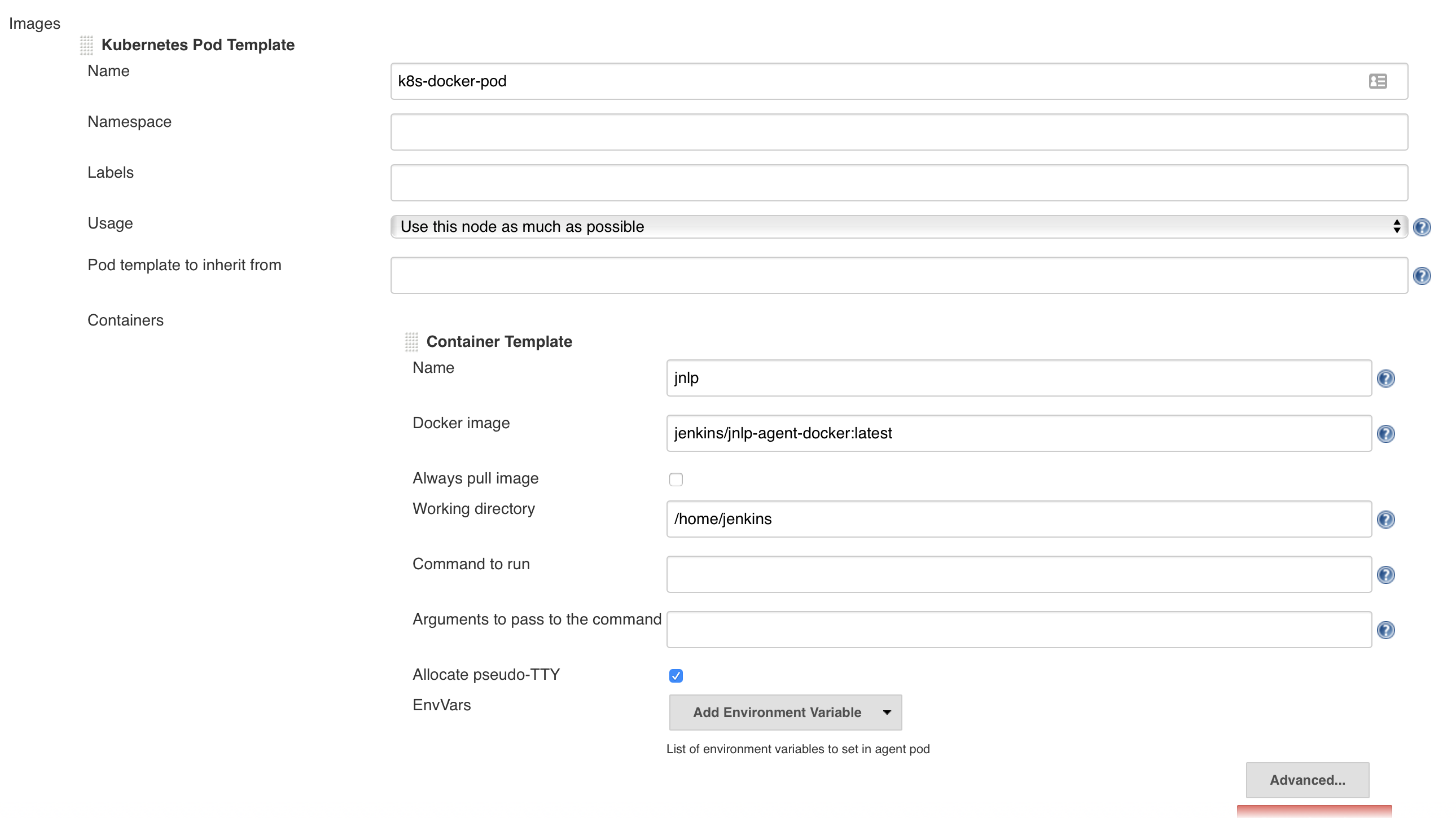
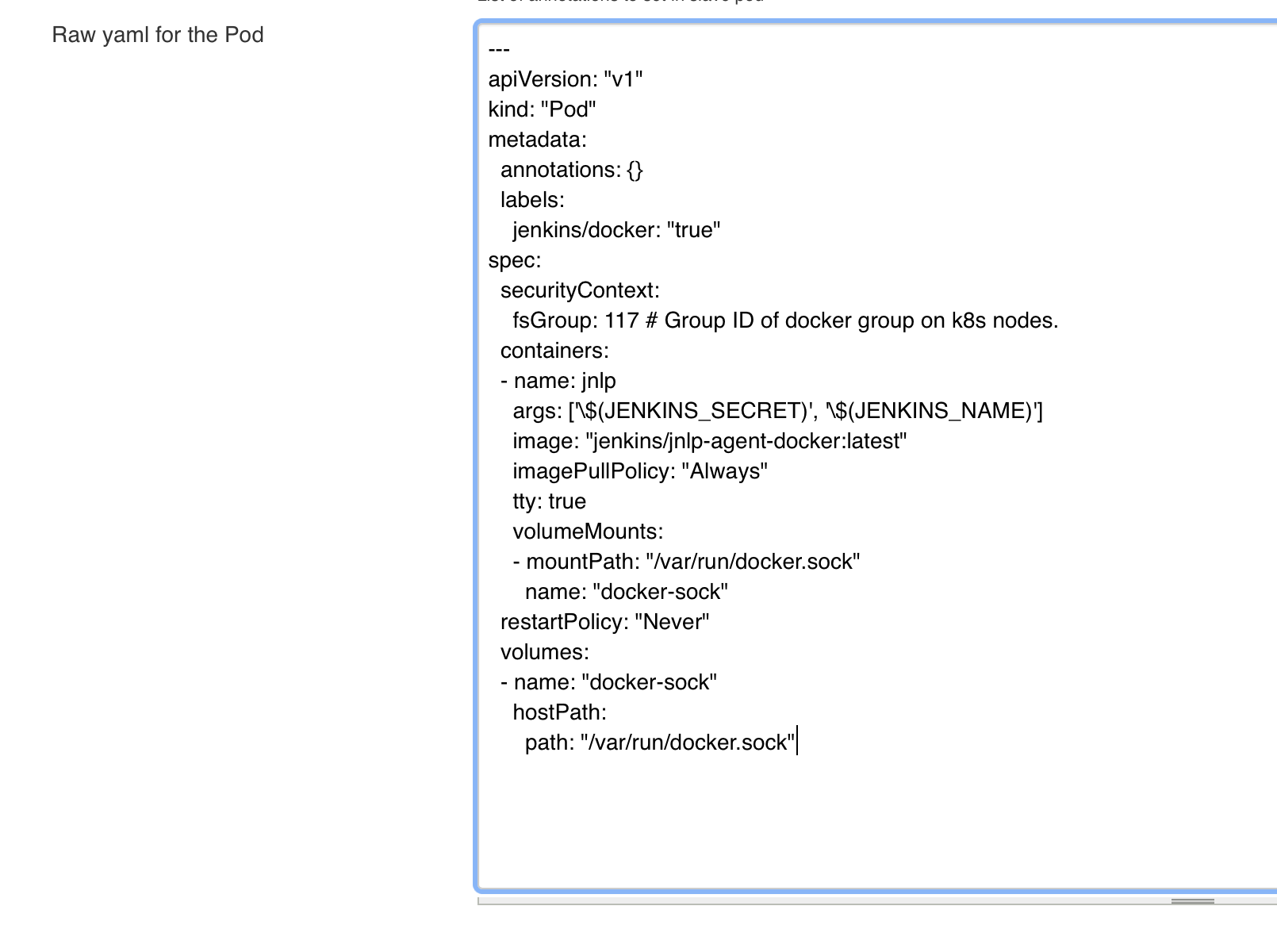
So what I did now is I filled out only the "Container template" field "Docker Image" and "Name"

and added additionally the raw pod template

So the key here is to define the name and image in the fields.

jglick@cloudbees.com (JIRA)

unread,
Jun 13, 2019, 4:54:01 PM6/13/19
to jenkinsc...@googlegroups.com
Jesse Glick assigned an issue to Jesse Glick
Change By: Jesse Glick
Assignee: Carlos Sanchez Jesse Glick

jglick@cloudbees.com (JIRA)

unread,
Jun 13, 2019, 4:55:02 PM6/13/19
to jenkinsc...@googlegroups.com
Jesse Glick resolved as Cannot Reproduce
 

Working for me in the automated test attached. Perhaps reporter/commenters were using an older version of the plugin that lacked some fixes reported elsewhere?

Change By: Jesse Glick
Status: Open Resolved
Resolution: Cannot Reproduce
Reply all
Reply to author
Forward
0 new messages