[JIRA] (JENKINS-52896) Jenkins windows service does not launch Run time GUI of Browser

46 views
Skip to first unread message

ishah5677@gmail.com (JIRA)

unread,
Aug 6, 2018, 9:28:02 AM8/6/18
to jenkinsc...@googlegroups.com
Ishita Shah created an issue
 
Jenkins / Bug JENKINS-52896
Jenkins windows service does not launch Run time GUI of Browser
Issue Type: Bug Bug
Assignee: Unassigned
Components: core
Created: 2018-08-06 13:27
Environment: JDK 9.0.4
Jenkins 2.135
Chrome 67
Windows 10 64
Labels: windows configuration
Priority: Major Major
Reporter: Ishita Shah

Is there any settings under Jenkins configuration, From which we can enable GUI running by Jenkins ?

Jenkins is executing internally, Console is running for Web services. What it is executing on Web browser is not showing, as it didn't launch browser. 

I have tried many solution, But it didn't worked.
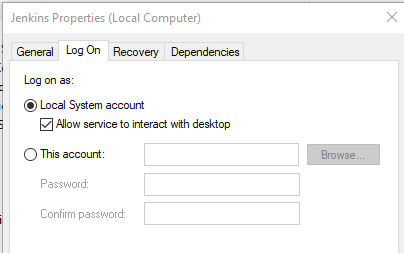
I do not use war to get up Jenkins. Its Windows Installer package.   


Some of the Errors: 

    [INFO]     [INFO] — maven-surefire-plugin:2.22.0:test (default-test) @ SR-Normalized ---    [INFO]     [INFO] -------------------------------------------------------    [INFO]  T E S T S    [INFO] -------------------------------------------------------    [INFO] Running notification_Rules.editNRule09_AllDevice_AllUser    Starting ChromeDriver 2.40.565498 (ea082db3280dd6843ebfb08a625e3eb905c4f5ab) on port 40916    Only local connections are allowed.    Aug 02, 2018 6:10:19 PM org.openqa.selenium.remote.ProtocolHandshake createSession    INFO: Detected dialect: OSS
    <Working Job>
    Test Termination    [INFO] Tests run: 1, Failures: 0, Errors: 0, Skipped: 0, Time elapsed: 190.686 s - in         [INFO]     [INFO] Results:    [INFO]     [INFO] Tests run: 1, Failures: 0, Errors: 0, Skipped: 0    [INFO]     [INFO] ------------------------------------------------------------------------    [INFO] BUILD SUCCESS    [INFO] ------------------------------------------------------------------------    [INFO] Total time: 03:14 min    [INFO] Finished at: 2018-08-02T18:13:27+05:30    [INFO] ------------------------------------------------------------------------    Finished: SUCCESS
    System.exit() or native command error interrupted process checker.    java.lang.IllegalStateException: error [STOPPED] to read process 5044    at org.apache.maven.surefire.booter.PpidChecker.checkProcessInfo(PpidChecker.java:145)    at org.apache.maven.surefire.booter.PpidChecker.isProcessAlive(PpidChecker.java:116)    at org.apache.maven.surefire.booter.ForkedBooter$2.run(ForkedBooter.java:213)    at java.base/java.util.concurrent.Executors$RunnableAdapter.call(Executors.java:514)    at java.base/java.util.concurrent.FutureTask.runAndReset(FutureTask.java:305)    at java.base/java.util.concurrent.ScheduledThreadPoolExecutor$ScheduledFutureTask.run(ScheduledThreadPoolExecutor.java:300)    at java.base/java.util.concurrent.ThreadPoolExecutor.runWorker(ThreadPoolExecutor.java:1167)    at java.base/java.util.concurrent.ThreadPoolExecutor$Worker.run(ThreadPoolExecutor.java:641)    at java.base/java.lang.Thread.run(Thread.java:844)

Same script is working independent from IDE. 

https://stackoverflow.com/questions/51631735/jenkins-is-not-launching-browser-but-its-running-internally

Looking Forward.


Add Comment Add Comment
 
This message was sent by Atlassian JIRA (v7.10.1#710002-sha1:6efc396)

o.v.nenashev@gmail.com (JIRA)

unread,
Aug 6, 2018, 10:33:03 AM8/6/18
to jenkinsc...@googlegroups.com

ishah5677@gmail.com (JIRA)

unread,
Aug 7, 2018, 12:50:02 AM8/7/18
to jenkinsc...@googlegroups.com
Ishita Shah updated an issue
 
Change By: Ishita Shah
Attachment: image-2018-08-07-10-19-16-775.png

ishah5677@gmail.com (JIRA)

unread,
Aug 7, 2018, 1:02:02 AM8/7/18
to jenkinsc...@googlegroups.com
Ishita Shah commented on Bug JENKINS-52896
 
Re: Jenkins windows service does not launch Run time GUI of Browser

Oleg Nenashev I think it can work. But How to configure it ? 

Can I configure it in Jenkins.xml file ? It looks something like this:

ishah5677@gmail.com (JIRA)

unread,
Aug 7, 2018, 1:02:03 AM8/7/18
to jenkinsc...@googlegroups.com
Ishita Shah updated an issue
Change By: Ishita Shah
Attachment: image-2018-08-07-10-19-16-775.png

ishah5677@gmail.com (JIRA)

unread,
Aug 7, 2018, 1:02:03 AM8/7/18
to jenkinsc...@googlegroups.com
Ishita Shah updated an issue
Change By: Ishita Shah
Attachment: image-2018-08-07-10-31-40-787.png

o.v.nenashev@gmail.com (JIRA)

unread,
Aug 7, 2018, 4:52:02 AM8/7/18
to jenkinsc...@googlegroups.com

ishah5677@gmail.com (JIRA)

unread,
Aug 7, 2018, 4:59:01 AM8/7/18
to jenkinsc...@googlegroups.com

Can you please share correct syntax for it,  

What is parameter for it, 

 <interactive />

nayangogoi744@gmail.com (JIRA)

unread,
Jul 15, 2019, 6:29:04 AM7/15/19
to jenkinsc...@googlegroups.com

Hi Ishita,

If I am getting it correctly.

I also faced the same issue earlier in my local machine. 
My test was running perfectly from the eclipse but when I moved to Jenkins it was only running in console mode. I was unable to view the UI.

So for that, you just need to make your local machine as a Jenkins slave by creating a new slave node in your Jenkins and select that node to execute the Jenkins job.

This message was sent by Atlassian Jira (v7.11.2#711002-sha1:fdc329d)
Reply all
Reply to author
Forward
0 new messages