[JIRA] (JENKINS-52150) High CPU sys time consumption after upgrade to 2.107.3

164 views
Skip to first unread message

dkoryavov@yandex.ru (JIRA)

unread,
Jun 23, 2018, 8:28:03 AM6/23/18
to jenkinsc...@googlegroups.com
Denis Koryavov created an issue
 
Jenkins / Bug JENKINS-52150
High CPU sys time consumption after upgrade to 2.107.3
Issue Type: Bug Bug
Assignee: Unassigned
Attachments: 2.txt, 3.txt, 4.txt, 5.txt, image-2018-06-23-14-49-03-404.png, perf-jenkins-master-002-16-41.PNG, strace-output.png
Components: core
Created: 2018-06-23 12:27
Priority: Blocker Blocker
Reporter: Denis Koryavov

We have several heavily loaded instances of Jenkins. The most biggest of them builds around 30 000 jobs per day (two others - around 6000).

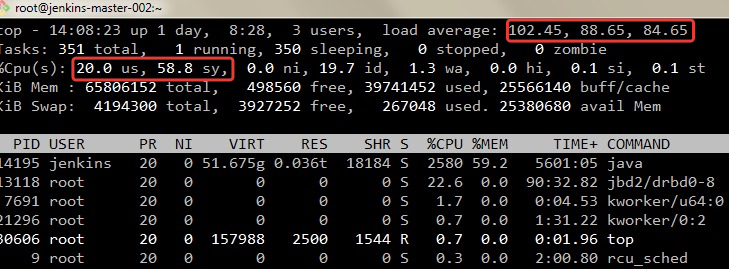
After upgrade to Jenkins 2.107.3 on the most heavily loaded instance we see a hight CPU sys time consumption.

After some investigation we have found that the processes, who consume CPU sys time most of all, are hanging on "futext" system call:

% time     seconds  usecs/call     calls    errors syscall
------ ----------- ----------- --------- --------- ----------------
 74.31 13168.872885       68562    192072     38348 futex
 19.97 3539.132374     5998529       590       440 restart_syscall
  1.98  351.174121       24197     14513        18 recvfrom
  1.75  310.265366         865    358527      1466 write
  1.05  185.451445       59325      3126           poll
  0.18   31.986477        1823     17547      1006 read
  0.15   26.976110       33100       815           accept
  0.11   19.407311         982     19760      2760 stat

In strace output for such processes we can see something like that:

 futex(0x7fc42800ba54, FUTEX_WAIT_BITSET_PRIVATE, 1, {5161981, 228340395}, ffffffff) = -1 ETIMEDOUT (Connection timed out)
futex(0x7fc42800ba28, FUTEX_WAKE_PRIVATE, 1) = 0
futex(0x7fc42800ba54, FUTEX_WAIT_BITSET_PRIVATE, 1, {5161981, 278655215}, ffffffff) = -1 ETIMEDOUT (Connection timed out)
futex(0x7fc42800ba28, FUTEX_WAKE_PRIVATE, 1) = 0
futex(0x7fc42800ba54, FUTEX_WAIT_BITSET_PRIVATE, 1, {5161981, 328848067}, ffffffff) = -1 ETIMEDOUT (Connection timed out)
futex(0x7fc42800ba28, FUTEX_WAKE_PRIVATE, 1) = 0
futex(0x7fc42800ba54, FUTEX_WAIT_BITSET_PRIVATE, 1, {5161981, 379185329}, ffffffff) = -1 ETIMEDOUT (Connection timed out)

corresponding Java-process:

"MVStore background writer nio:/u01/jenkins/jenkins_home/jenkins-jobs/jenkins-jobs.mv.db" #96324 daemon prio=5 os_prio=0 tid=0x00007fc3500a4000 nid=0x6048 in Object.wait() [0x
   java.lang.Thread.State: TIMED_WAITING (on object monitor)
<------>at java.lang.Object.wait(Native Method)
<------>at org.h2.mvstore.MVStore$BackgroundWriterThread.run(MVStore.java:2715)
<------>- locked <0x00000001d78dfc88> (a java.lang.Object)

   Locked ownable synchronizers:
<------>- None

Environment: RHEL 7.5 with the latest updates (except of kernel). DRBD+ext4. OpenStack KVM. 32 CPU 64 GB RAM.

JENKINS_JAVA_OPTIONS="-Djava.awt.headless=true -Dgroovy.use.classvalue=true -Xms32g -Xmx32g -XX:MaxGCPauseMillis=200 -XX:ParallelGCThreads=20 -XX:ConcGCThreads=5 -XX:InitiatingHeapOccupancyPercent=75 -XX:MaxMetaspaceSize=3024m -XX:+HeapDumpOnOutOfMemoryError -XX:HeapDumpPath=/u01/jenkins -XX:+UnlockDiagnosticVMOptions -Djenkins.model.Jenkins.logStartupPerformance=true -Dhudson.plugins.git.GitStatus.allowNotifyCommitParameters=true -Dhudson.model.ParametersAction.keepUndefinedParameters=true -Dhudson.model.DirectoryBrowserSupport.CSP=\"default-src 'self'; img-src 'self'; script-src 'self' 'unsafe-inline' 'unsafe-eval'; style-src 'self' 'unsafe-inline'; child-src 'self'; frame-src 'self';\" -Djenkins.model.DirectoryBrowserSupport.CSP=\"default-src 'self'; img-src 'self'; script-src 'self' 'unsafe-inline' 'unsafe-eval'; style-src 'self' 'unsafe-inline'; child-src 'self'; frame-src 'self';\" -Dorg.apache.commons.jelly.tags.fmt.timeZone=\"Europe/Moscow\" -Dhudson.model.User.SECURITY_243_FULL_DEFENSE=false -Dcom.cloudbees.workflow.rest.external.ChangeSetExt.resolveCommitAuthors=false -server -XX:+UseG1GC -XX:+ExplicitGCInvokesConcurrent -XX:+ParallelRefProcEnabled -XX:+UseStringDeduplication -Xloggc:${JENKINS_HOME}/gc_logs/gc-%t.log -XX:NumberOfGCLogFiles=5 -XX:+UseGCLogFileRotation -XX:GCLogFileSize=20m -XX:+PrintGC -XX:+PrintGCDateStamps -XX:+PrintGCDetails -XX:+PrintTenuringDistribution -XX:+PrintAdaptiveSizePolicy -Dcom.sun.management.jmxremote.port=3333 -Dcom.sun.management.jmxremote.authenticate=false -Dcom.sun.management.jmxremote.ssl=false -Djava.io.tmpdir=/u01/jenkins/tmp -Dhudson.remoting.ClassFilter=org.jenkinsci.lib.xtrigger.AbstractTrigger"
root@jenkins-master-002:~$  uname -a
Linux jenkins-master-002.vm.mos.cloud.sbrf.ru 3.10.0-514.el7.x86_64 #1 SMP Wed Oct 19 11:24:13 EDT 2016 x86_64 x86_64 x86_64 GNU/Linux

root@jenkins-master-002:~$  java -version
java version "1.8.0_151"
Java(TM) SE Runtime Environment (build 1.8.0_151-b12)
Java HotSpot(TM) 64-Bit Server VM (build 25.151-b12, mixed mode)

More diagnostic information in the attachments (we have created screenshots and ThreadDumps not at the same time, but at a time when we have seen the problem).

Add Comment Add Comment
 
This message was sent by Atlassian JIRA (v7.3.0#73011-sha1:3c73d0e)
Atlassian logo

dkoryavov@yandex.ru (JIRA)

unread,
Jun 23, 2018, 11:38:03 AM6/23/18
to jenkinsc...@googlegroups.com
Denis Koryavov updated an issue
Change By: Denis Koryavov
We have several heavily loaded instances of Jenkins. The most biggest of them builds around 30 000 jobs per day (two others - around 6000).

After upgrade to Jenkins 2.107.3 on the most heavily loaded instance we see a hight CPU sys time consumption.
  
  For users this looks like that the Jenkins works fast, but jobs build slow and the last step "Waiting for Jenkins to finish collecting data" takes a very long time.

!image-2018-06-23-14-49-03-404.png|thumbnail!

Moreover, some jobs simply looped at random steps.

After some investigation we have found that the processes, who consume CPU sys time most of all, are hanging on "futext" system call:

{noformat}

% time     seconds  usecs/call     calls    errors syscall
------ ----------- ----------- --------- --------- ----------------
74.31 13168.872885       68562    192072     38348 futex
19.97 3539.132374     5998529       590       440 restart_syscall
  1.98  351.174121       24197     14513        18 recvfrom
  1.75  310.265366         865    358527      1466 write
  1.05  185.451445       59325      3126           poll
  0.18   31.986477        1823     17547      1006 read
  0.15   26.976110       33100       815           accept
  0.11   19.407311         982     19760      2760 stat
{noformat}


In strace output for such processes we can see something like that:

{noformat}

futex(0x7fc42800ba54, FUTEX_WAIT_BITSET_PRIVATE, 1, {5161981, 228340395}, ffffffff) = -1 ETIMEDOUT (Connection timed out)
futex(0x7fc42800ba28, FUTEX_WAKE_PRIVATE, 1) = 0
futex(0x7fc42800ba54, FUTEX_WAIT_BITSET_PRIVATE, 1, {5161981, 278655215}, ffffffff) = -1 ETIMEDOUT (Connection timed out)
futex(0x7fc42800ba28, FUTEX_WAKE_PRIVATE, 1) = 0
futex(0x7fc42800ba54, FUTEX_WAIT_BITSET_PRIVATE, 1, {5161981, 328848067}, ffffffff) = -1 ETIMEDOUT (Connection timed out)
futex(0x7fc42800ba28, FUTEX_WAKE_PRIVATE, 1) = 0
futex(0x7fc42800ba54, FUTEX_WAIT_BITSET_PRIVATE, 1, {5161981, 379185329}, ffffffff) = -1 ETIMEDOUT (Connection timed out)
{noformat}

corresponding Java-process:

{noformat}

"MVStore background writer nio:/u01/jenkins/jenkins_home/jenkins-jobs/jenkins-jobs.mv.db" #96324 daemon prio=5 os_prio=0 tid=0x00007fc3500a4000 nid=0x6048 in Object.wait() [0x
   java.lang.Thread.State: TIMED_WAITING (on object monitor)
<------>at java.lang.Object.wait(Native Method)
<------>at org.h2.mvstore.MVStore$BackgroundWriterThread.run(MVStore.java:2715)
<------>- locked <0x00000001d78dfc88> (a java.lang.Object)

   Locked ownable synchronizers:
<------>- None
{noformat}


Environment: RHEL 7.5 with the latest updates (except of kernel).  DRBD+ext4. OpenStack KVM. 32 CPU 64 GB RAM.


{noformat}

JENKINS_JAVA_OPTIONS="-Djava.awt.headless=true -Dgroovy.use.classvalue=true -Xms32g -Xmx32g -XX:MaxGCPauseMillis=200 -XX:ParallelGCThreads=20 -XX:ConcGCThreads=5 -XX:InitiatingHeapOccupancyPercent=75 -XX:MaxMetaspaceSize=3024m -XX:+HeapDumpOnOutOfMemoryError -XX:HeapDumpPath=/u01/jenkins -XX:+UnlockDiagnosticVMOptions -Djenkins.model.Jenkins.logStartupPerformance=true -Dhudson.plugins.git.GitStatus.allowNotifyCommitParameters=true -Dhudson.model.ParametersAction.keepUndefinedParameters=true -Dhudson.model.DirectoryBrowserSupport.CSP=\"default-src 'self'; img-src 'self'; script-src 'self' 'unsafe-inline' 'unsafe-eval'; style-src 'self' 'unsafe-inline'; child-src 'self'; frame-src 'self';\" -Djenkins.model.DirectoryBrowserSupport.CSP=\"default-src 'self'; img-src 'self'; script-src 'self' 'unsafe-inline' 'unsafe-eval'; style-src 'self' 'unsafe-inline'; child-src 'self'; frame-src 'self';\" -Dorg.apache.commons.jelly.tags.fmt.timeZone=\"Europe/Moscow\" -Dhudson.model.User.SECURITY_243_FULL_DEFENSE=false -Dcom.cloudbees.workflow.rest.external.ChangeSetExt.resolveCommitAuthors=false -server -XX:+UseG1GC -XX:+ExplicitGCInvokesConcurrent -XX:+ParallelRefProcEnabled -XX:+UseStringDeduplication -Xloggc:${JENKINS_HOME}/gc_logs/gc-%t.log -XX:NumberOfGCLogFiles=5 -XX:+UseGCLogFileRotation -XX:GCLogFileSize=20m -XX:+PrintGC -XX:+PrintGCDateStamps -XX:+PrintGCDetails -XX:+PrintTenuringDistribution -XX:+PrintAdaptiveSizePolicy -Dcom.sun.management.jmxremote.port=3333 -Dcom.sun.management.jmxremote.authenticate=false -Dcom.sun.management.jmxremote.ssl=false -Djava.io.tmpdir=/u01/jenkins/tmp -Dhudson.remoting.ClassFilter=org.jenkinsci.lib.xtrigger.AbstractTrigger"
{noformat}

{noformat}

root@jenkins-master-002:~$  uname -a
Linux jenkins-master-002.vm.mos.cloud.sbrf.ru 3.10.0-514.el7.x86_64 #1 SMP Wed Oct 19 11:24:13 EDT 2016 x86_64 x86_64 x86_64 GNU/Linux

root@jenkins-master-002:~$  java -version
java version "1.8.0_151"
Java(TM) SE Runtime Environment (build 1.8.0_151-b12)
Java HotSpot(TM) 64-Bit Server VM (build 25.151-b12, mixed mode)
{noformat}


More diagnostic information in the attachments (we have created screenshots and ThreadDumps not at the same time, but at a time when we have seen the problem).

dkoryavov@yandex.ru (JIRA)

unread,
Jun 23, 2018, 11:40:03 AM6/23/18
to jenkinsc...@googlegroups.com
Denis Koryavov updated an issue
We have several heavily loaded instances of Jenkins. The most biggest of them builds around 30 000 jobs per day (two others - around 6000).

After upgrade to Jenkins 2.107.3 on the most heavily loaded instance we see a hight CPU sys time consumption.  For users this looks like that the Jenkins works fast, but jobs build slow and the last step "Waiting for Jenkins to finish collecting data" takes a very long time (very similar to https://issues . jenkins-ci.org/browse/JENKINS-19712).

dkoryavov@yandex.ru (JIRA)

unread,
Jun 23, 2018, 11:47:02 AM6/23/18
to jenkinsc...@googlegroups.com
Denis Koryavov updated an issue
We have several heavily loaded instances of Jenkins. The most biggest of them builds around 30 000 jobs per day (two others - around 6000).

After upgrade to Jenkins 2.107.3 on the most heavily loaded instance we see a hight CPU sys time consumption. For users this looks like that the Jenkins works fast, but jobs build slow and the last step "Waiting for Jenkins to finish collecting data" takes a very long time (very similar to https://issues.jenkins-ci.org/browse/JENKINS-19712).

!image-2018-06-23-14-49-03-404.png|thumbnail!   !fingerprint-add.png|thumbnail!

dkoryavov@yandex.ru (JIRA)

unread,
Jun 23, 2018, 11:47:02 AM6/23/18
to jenkinsc...@googlegroups.com
Denis Koryavov updated an issue
Change By: Denis Koryavov
Attachment: fingerprint-add.png

dkoryavov@yandex.ru (JIRA)

unread,
Jun 23, 2018, 12:18:03 PM6/23/18
to jenkinsc...@googlegroups.com
Denis Koryavov updated an issue
or that:
{noformat}
clock_gettime(CLOCK_THREAD_CPUTIME_ID, {10, 798549532}) = 0
stat("/var/cache/jenkins/war/WEB-INF/classes/hudson/maven/MavenModuleSet.class", 0x7f4168ac8540) = -1 ENOENT (No such file or directory)
stat("/var/cache/jenkins/war/WEB-INF/classes/hudson/maven/MavenModuleSet.class", 0x7f4168ac8560) = -1 ENOENT (No such file or directory)
lstat("/u01", {st_mode=S_IFDIR|0755, st_size=4096, ...}) = 0
{noformat}

Environment: RHEL 7.5 with the latest updates (except of kernel).  DRBD+ext4. OpenStack KVM. 32 CPU 64 GB RAM.


{noformat}
JENKINS_JAVA_OPTIONS="-Djava.awt.headless=true -Dgroovy.use.classvalue=true -Xms32g -Xmx32g -XX:MaxGCPauseMillis=200 -XX:ParallelGCThreads=20 -XX:ConcGCThreads=5 -XX:InitiatingHeapOccupancyPercent=75 -XX:MaxMetaspaceSize=3024m -XX:+HeapDumpOnOutOfMemoryError -XX:HeapDumpPath=/u01/jenkins -XX:+UnlockDiagnosticVMOptions -Djenkins.model.Jenkins.logStartupPerformance=true -Dhudson.plugins.git.GitStatus.allowNotifyCommitParameters=true -Dhudson.model.ParametersAction.keepUndefinedParameters=true -Dhudson.model.DirectoryBrowserSupport.CSP=\"default-src 'self'; img-src 'self'; script-src 'self' 'unsafe-inline' 'unsafe-eval'; style-src 'self' 'unsafe-inline'; child-src 'self'; frame-src 'self';\" -Djenkins.model.DirectoryBrowserSupport.CSP=\"default-src 'self'; img-src 'self'; script-src 'self' 'unsafe-inline' 'unsafe-eval'; style-src 'self' 'unsafe-inline'; child-src 'self'; frame-src 'self';\" -Dorg.apache.commons.jelly.tags.fmt.timeZone=\"Europe/Moscow\" -Dhudson.model.User.SECURITY_243_FULL_DEFENSE=false -Dcom.cloudbees.workflow.rest.external.ChangeSetExt.resolveCommitAuthors=false -server -XX:+UseG1GC -XX:+ExplicitGCInvokesConcurrent -XX:+ParallelRefProcEnabled -XX:+UseStringDeduplication -Xloggc:${JENKINS_HOME}/gc_logs/gc-%t.log -XX:NumberOfGCLogFiles=5 -XX:+UseGCLogFileRotation -XX:GCLogFileSize=20m -XX:+PrintGC -XX:+PrintGCDateStamps -XX:+PrintGCDetails -XX:+PrintTenuringDistribution -XX:+PrintAdaptiveSizePolicy -Dcom.sun.management.jmxremote.port=3333 -Dcom.sun.management.jmxremote.authenticate=false -Dcom.sun.management.jmxremote.ssl=false -Djava.io.tmpdir=/u01/jenkins/tmp -Dhudson.remoting.ClassFilter=org.jenkinsci.lib.xtrigger.AbstractTrigger"
{noformat}

{noformat}
root@jenkins-master-002:~$  uname -a
Linux jenkins-master-002.vm.mos.cloud.sbrf.ru 3.10.0-514.el7.x86_64 #1 SMP Wed Oct 19 11:24:13 EDT 2016 x86_64 x86_64 x86_64 GNU/Linux

root@jenkins-master-002:~$  java -version
java version "1.8.0_151"
Java(TM) SE Runtime Environment (build 1.8.0_151-b12)
Java HotSpot(TM) 64-Bit Server VM (build 25.151-b12, mixed mode)
{noformat}

More diagnostic information in the attachments (we have created screenshots and ThreadDumps not at the same time, but at a time when we have seen the problem).

dkoryavov@yandex.ru (JIRA)

unread,
Jun 23, 2018, 3:58:02 PM6/23/18
to jenkinsc...@googlegroups.com
Denis Koryavov updated an issue
We have several heavily loaded instances of Jenkins. The most biggest of them builds around 30 000 jobs per day (two others - around 6000).

After upgrade to Jenkins 2.107.3 on the most heavily loaded instance we see a hight CPU sys time consumption. For users this looks like that the Jenkins works fast, but jobs build slow and the last step "Waiting for Jenkins to finish collecting data" takes a very long time (very similar to https://issues.jenkins-ci.org/browse/JENKINS-19712).

!image-2018-06-23-14-49-03-404.png|thumbnail!  !fingerprint-add.png|thumbnail!

Moreover, some jobs simply looped at random steps :

{noformat}
[FS_PR_INIT] Running shell script
Cannot contact jenkins-agent-linux-007: java
.
lang.InterruptedException
+ curl --user '****:****' -s -k -m 60 https://sbt-jenkins.ca.sbrf.ru/jenkins/queue/api/json
{noformat}


o.v.nenashev@gmail.com (JIRA)

unread,
Jun 23, 2018, 5:19:01 PM6/23/18
to jenkinsc...@googlegroups.com
Oleg Nenashev commented on Bug JENKINS-52150
 
Re: High CPU sys time consumption after upgrade to 2.107.3

In all provided stacktraces Fingerprinting I/O comes from the Maven plugin which generates heavy fingerprinting load.
I will reassign the issue to the plugin maintainer, so far I do not see issue in the core implementation (although there are some discussions about changing the fingerprint storage in long-term).

   java.lang.Thread.State: BLOCKED (on object monitor)
	at hudson.model.Fingerprint.add(Fingerprint.java:1014)
	- waiting to lock <0x00007f6124c61050> (a hudson.model.Fingerprint)
	at hudson.maven.reporters.MavenFingerprinter$1.call(MavenFingerprinter.java:125)
	at hudson.maven.reporters.MavenFingerprinter$1.call(MavenFingerprinter.java:112)
	at hudson.maven.MavenBuild$ProxyImpl.execute(MavenBuild.java:452)
	at hudson.maven.MavenBuild$ProxyImpl2.execute(MavenBuild.java:584)
	at sun.reflect.GeneratedMethodAccessor1033.invoke(Unknown Source)
	at sun.reflect.DelegatingMethodAccessorImpl.invoke(DelegatingMethodAccessorImpl.java:43)
	at java.lang.reflect.Method.invoke(Method.java:498)
	at hudson.model.Executor$2.call(Executor.java:911)
	at hudson.util.InterceptingProxy$1.invoke(InterceptingProxy.java:23)
	at com.sun.proxy.$Proxy117.execute(Unknown Source)
	at hudson.maven.MavenBuildProxy$Filter$AsyncInvoker.call(MavenBuildProxy.java:294)
	at hudson.remoting.UserRequest.perform(UserRequest.java:210)
	at hudson.remoting.UserRequest.perform(UserRequest.java:53)
	at hudson.remoting.Request$2.run(Request.java:364)
	at hudson.remoting.InterceptingExecutorService$1.call(InterceptingExecutorService.java:72)
	at org.jenkinsci.remoting.CallableDecorator.call(CallableDecorator.java:19)
	at hudson.remoting.CallableDecoratorList$1.call(CallableDecoratorList.java:21)
	at jenkins.util.ContextResettingExecutorService$2.call(ContextResettingExecutorService.java:46)
	at java.util.concurrent.FutureTask.run(FutureTask.java:266)
	at java.util.concurrent.ThreadPoolExecutor.runWorker(ThreadPoolExecutor.java:1149)
	at java.util.concurrent.ThreadPoolExecutor$Worker.run(ThreadPoolExecutor.java:624)
	at java.lang.Thread.run(Thread.java:748)

o.v.nenashev@gmail.com (JIRA)

unread,
Jun 23, 2018, 5:20:02 PM6/23/18
to jenkinsc...@googlegroups.com

o.v.nenashev@gmail.com (JIRA)

unread,
Jun 23, 2018, 5:20:02 PM6/23/18
to jenkinsc...@googlegroups.com

o.v.nenashev@gmail.com (JIRA)

unread,
Jun 23, 2018, 5:20:02 PM6/23/18
to jenkinsc...@googlegroups.com
Oleg Nenashev updated an issue
Change By: Oleg Nenashev
Component/s: maven-plugin
Component/s: core

dkoryavov@yandex.ru (JIRA)

unread,
Jun 23, 2018, 6:21:03 PM6/23/18
to jenkinsc...@googlegroups.com
Denis Koryavov updated an issue
Change By: Denis Koryavov
We have several heavily loaded instances of Jenkins. The most biggest of them builds around 30 000 jobs per day (two others - around 6000).

After upgrade to Jenkins 2.107.3 on the most heavily loaded instance we see a hight CPU sys time consumption. For users this looks like that the Jenkins works fast, but jobs build slow and the last step "Waiting for Jenkins to finish collecting data" takes a very long time (very similar to https://issues.jenkins-ci.org/browse/JENKINS-19712).

!image-2018-06-23-14-49-03-404.png|thumbnail!  !fingerprint-add.png|thumbnail!

Moreover, some jobs simply looped at random steps:

{noformat}
[FS_PR_INIT] Running shell script
Cannot contact jenkins-agent-linux-007: java.lang.InterruptedException
+ curl --user '****:****' -s -k -m 60 https://sbt-jenkins.ca.sbrf.ru/jenkins/queue/api/json
{noformat}


After some investigation we have found that the processes, who consume CPU sys time most of all, are hanging on " futext futex " system call:

aheritier@apache.org (JIRA)

unread,
Jul 10, 2018, 8:07:02 AM7/10/18
to jenkinsc...@googlegroups.com
Arnaud Héritier commented on Bug JENKINS-52150
 
Re: High CPU sys time consumption after upgrade to 2.107.3

Not sure what we can do here

We can probably diagnose it more but not sure why it could impact only few users.

For sure Fingerprints are consuming a lot of IOs (resources) and are activated by default in maven jobs

Maybe it can impact only big instances but not sure which change in core or in the maven plugin could have increased this problem

This message was sent by Atlassian JIRA (v7.10.1#710002-sha1:6efc396)

aheritier@apache.org (JIRA)

unread,
Jul 10, 2018, 8:07:02 AM7/10/18
to jenkinsc...@googlegroups.com
Arnaud Héritier assigned an issue to Unassigned
 
Change By: Arnaud Héritier
Assignee: Arnaud Héritier

carsten.pfeiffer@gebit.de (JIRA)

unread,
Aug 9, 2018, 6:59:02 AM8/9/18
to jenkinsc...@googlegroups.com
Carsten Pfeiffer commented on Bug JENKINS-52150
 
Re: High CPU sys time consumption after upgrade to 2.107.3

We're also suffering from this, since we updated one jenkins from 2.89.4 to 2.121.2.
It looks like the I/O pattern for writing a single fingerprint could be improved quite a bit, but this is probably not the only cause for the performance degradation.

[pid  8789] stat("/var/jenkins_home/fingerprints/bf/e4", {st_mode=S_IFDIR|0755, st_size=4096, ...}) = 0
[pid  8789] access("/var/jenkins_home/fingerprints/bf/e4", F_OK) = 0
[pid  8789] stat("/var/jenkins_home/fingerprints/bf/e4", {st_mode=S_IFDIR|0755, st_size=4096, ...}) = 0
[pid  8789] lstat("/var/jenkins_home/fingerprints/bf/e4", {st_mode=S_IFDIR|0755, st_size=4096, ...}) = 0
[pid  8789] mkdir("/var/jenkins_home/fingerprints/bf/e4", 0777) = -1 EEXIST (File exists)
[pid  8789] lstat("/var/jenkins_home/fingerprints/bf/e4", {st_mode=S_IFDIR|0755, st_size=4096, ...}) = 0
[pid  8789] stat("/var/jenkins_home/fingerprints/bf/e4/atomic8576544207056275611tmp", 0x7fe62a3e3f00) = -1 ENOENT (No such file or directory)
[pid  8789] open("/var/jenkins_home/fingerprints/bf/e4/atomic8576544207056275611tmp", O_RDWR|O_CREAT|O_EXCL, 0666) = 5
[pid  8789] open("/var/jenkins_home/fingerprints/bf/e4/atomic8576544207056275611tmp", O_WRONLY) = 5
[pid  8789] rename("/var/jenkins_home/fingerprints/bf/e4/atomic8576544207056275611tmp", "/var/jenkins_home/fingerprints/bf/e4/c7f5648f164d878a47abeebea260.xml") = 0
[pid  8789] lstat("/var/jenkins_home/fingerprints/bf/e4/atomic8576544207056275611tmp", 0x7fe62a3e4020) = -1 ENOENT (No such file or directory)

The problem really only shows up when you have lots of fingerprints. In our case, this is around 330k, stored in 6,5k directories in the fingerprints directory.

carsten.pfeiffer@gebit.de (JIRA)

unread,
Aug 9, 2018, 7:45:01 AM8/9/18
to jenkinsc...@googlegroups.com

The real cause is the use of AtomicFileWriter in https://github.com/jenkinsci/jenkins/blob/jenkins-2.121.2/core/src/main/java/hudson/model/Fingerprint.java#L1256
The backing FileChannelWriter has an option to force flush (FileChannel.force(true)) and AtomicFileWriter does this by default.

Luckily there is a system property that you can set in order to revert to the previous less safe, but better performing behavior:

-Dhudson.util.AtomicFileWriter.DISABLE_FORCED_FLUSH=true

(See https://github.com/jenkinsci/jenkins/blob/jenkins-2.121.2/core/src/main/java/hudson/util/AtomicFileWriter.java#L57)

Setting this brings back the previous performance.

carsten.pfeiffer@gebit.de (JIRA)

unread,
Aug 9, 2018, 7:46:02 AM8/9/18
to jenkinsc...@googlegroups.com

carsten.pfeiffer@gebit.de (JIRA)

unread,
Aug 9, 2018, 7:47:02 AM8/9/18
to jenkinsc...@googlegroups.com
 
Re: High CPU sys time consumption after upgrade to 2.107.3

So this is rather unrelated to the maven plugin and more of a Jenkins core issue. The maven plugin only brings up the issue because it creates fingerprints by default.

dkoryavov@yandex.ru (JIRA)

unread,
Aug 9, 2018, 9:00:03 AM8/9/18
to jenkinsc...@googlegroups.com

We disabled automatic fingerprint archiving for all maven jobs and it worked. I thinks the priority can be changed to Critical, because we have a simply workaround.

We'll try to use -Dhudson.util.AtomicFileWriter.DISABLE_FORCED_FLUSH=true, but I think the problem should be fixed, because this behaviour of Jenkins is real issue for a large instances.

dkoryavov@yandex.ru (JIRA)

unread,
Aug 9, 2018, 9:00:05 AM8/9/18
to jenkinsc...@googlegroups.com

carsten.pfeiffer@gebit.de (JIRA)

unread,
Aug 10, 2018, 4:59:04 AM8/10/18
to jenkinsc...@googlegroups.com
Carsten Pfeiffer commented on Bug JENKINS-52150
 
Re: High CPU sys time consumption after upgrade to 2.107.3

One option would be to call FileChannel.force(false) instead of FileChannel.force(true) for the fingerprints in https://github.com/jenkinsci/jenkins/blame/jenkins-2.121.2/core/src/main/java/hudson/util/FileChannelWriter.java#L89 in order not to force-write all metadata. The manpage of fdatasync on Linux says: "The aim of fdatasync() is to reduce disk activity for applications that do not require all metadata to be synchronized with the disk.".
Not sure how much this would help, though.

mjacob@union06.de (JIRA)

unread,
Sep 25, 2018, 6:23:05 AM9/25/18
to jenkinsc...@googlegroups.com

I'm not quite sure if this is a related problem:

14 of 14 Build jobs in our Jenkins 2.107.3 are blocked in Fingerprint.add during collecting data from slaves.
Both, master and two slaves running on Solaris.


This message was sent by Atlassian Jira (v7.11.2#711002-sha1:fdc329d)

ashok.mohanty@oracle.com (JIRA)

unread,
Feb 14, 2019, 2:21:02 AM2/14/19
to jenkinsc...@googlegroups.com

We are using Jenkins v.2.121.3 (upgraded couple of months back from v.2.73.3 ). We have around ~1000 MBranch + ~200 pipeline + ~200FreeStyle projects.
Post upgrade we are seeing CPU spike in the master server. We are not running any builds in master (primarily only MB indexings runs in master box). 

Master Server - Linux 7.x (100+ cpu). We have gitLab* plugins for "SCM - GitLab" integration. GitLab hosted in separate Linux server. Can you please provide some tips to debug the issue !!

lance.johnson@8x8.com (JIRA)

unread,
Jun 24, 2019, 3:11:02 PM6/24/19
to jenkinsc...@googlegroups.com

We are seeing the same behavior with v2.180


# time strace -c -f -p 25129
% time     seconds  usecs/call     calls    errors syscall
------ ----------- ----------- --------- --------- ----------------
 64.24  325.772507        2399    135794     17935 futex
 21.78  110.426436      800192       138        61 restart_syscall
  9.17   46.523219       35898      1296           epoll_wait
  3.97   20.126873         972     20705        29 recvfrom
  0.52    2.624930       27631        95           accept
  0.13    0.642494          22     29615           getrusage
  0.05    0.272781          24     11607           write
[pid 25189] futex(0x7fa0814d3a54, FUTEX_WAIT_BITSET_PRIVATE, 1, {372183, 895437760}, ffffffff) = -1 ETIMEDOUT (Connection timed out)
[pid 25189] futex(0x7fa0814d3a28, FUTEX_WAKE_PRIVATE, 1) = 0
[pid 25189] futex(0x7fa0814d3a54, FUTEX_WAIT_BITSET_PRIVATE, 1, {372183, 945599747}, ffffffff) = -1 ETIMEDOUT (Connection timed out)
[pid 25189] futex(0x7fa0814d3a28, FUTEX_WAKE_PRIVATE, 1) = 0
[pid 25189] futex(0x7fa0814d3a54, FUTEX_WAIT_BITSET_PRIVATE, 1, {372183, 995774240}, ffffffff) = -1 ETIMEDOUT (Connection timed out)
[pid 25189] futex(0x7fa0814d3a28, FUTEX_WAKE_PRIVATE, 1) = 0
[pid 25189] futex(0x7fa0814d3a54, FUTEX_WAIT_BITSET_PRIVATE, 1, {372184, 45936909}, ffffffff) = -1 ETIMEDOUT (Connection timed out)
[pid 25189] futex(0x7fa0814d3a28, FUTEX_WAKE_PRIVATE, 1) = 0

# java -jar /usr/lib/jenkins/jenkins.war --version
2.180


Reply all
Reply to author
Forward
0 new messages