| Hi the docker image is out the scope of the plugin and with other mantainers.
I had a look on the docker image (it is not a Ubuntu but an alpine image JAVA_ALPINE_VERSION='8.181.13-r0').
- the PATH environment variable is correctly setup PATH='/var/jenkins_home/tools/jenkins.plugins.nodejs.tools.NodeJSInstallation/node_10/bin:/usr/local/sbin:/usr/local/bin:/usr/sbin:/usr/bin:/sbin:/bin:/usr/lib/jvm/java-1.8-openjdk/jre/bin:/usr/lib/jvm/java-1.8-openjdk/bin'
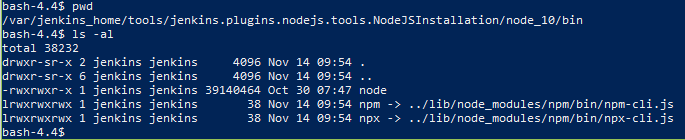
- the node is download and place in the correct folder and the bin folder have the execute (+x) attribute setup correctly

anyway the node command does not work, not only in jenkins but also if you run the node command from a shell it give the same error. I had a look around and seems the alpine image have a limited symbolic library needed by nodejs. The official nodejs image does not use the distribution archive but compile in place the source code. This could not be done by the plugin |