[JIRA] (JENKINS-36195) Pipeline polling ignores special polling rules

686 views
Skip to first unread message

dvader@inbox.com (JIRA)

unread,
Jun 23, 2016, 11:59:04 AM6/23/16
to jenkinsc...@googlegroups.com
Darth Vader created an issue
 
Jenkins / Bug JENKINS-36195
Pipeline polling ignores special polling rules
Issue Type: Bug Bug
Assignee: Mark Waite
Components: git-plugin, workflow-plugin
Created: 2016/Jun/23 3:58 PM
Environment: Jenkins LTS Latest
Windows 7 x64
Priority: Major Major
Reporter: Darth Vader

The git plugin currently offers several special rules on polling:

  1. Polling ignores commits from certain users
  2. Polling ignores commits from certain paths (Included/Excluded regions)
  3. Polling ignores commits with certain messages
  4. Branch specifier

For example:
checkout([$class: 'GitSCM', branches: [[name: '*/master']], doGenerateSubmoduleConfigurations: false, extensions: [[$class: 'UserExclusion', excludedUsers: 'dvader'], [$class: 'PathRestriction', excludedRegions: 'One/.*', includedRegions: 'Test/.*'], [$class: 'MessageExclusion', excludedMessage: '.*\\[maven-release-plugin\\].*']], gitTool: 'Default', submoduleCfg: [], userRemoteConfigs: [[credentialsId: '...', url: 'ssh://g...@bitbucket.org/test.git']]])

If a commit is committed to bitbucket.org/test.git, regardless of the user, location, branch or message, the step that includes the checkout will be run.

Similar issue has been reported in:

Add Comment Add Comment
 
This message was sent by Atlassian JIRA (v7.1.7#71011-sha1:2526d7c)
Atlassian logo

mark.earl.waite@gmail.com (JIRA)

unread,
Jun 23, 2016, 9:58:01 PM6/23/16
to jenkinsc...@googlegroups.com
Mark Waite assigned an issue to Unassigned
Change By: Mark Waite
Assignee: Mark Waite

mark.earl.waite@gmail.com (JIRA)

unread,
Jun 23, 2016, 10:01:01 PM6/23/16
to jenkinsc...@googlegroups.com
Mark Waite commented on Bug JENKINS-36195
 
Re: Pipeline polling ignores special polling rules

Since the git plugin doesn't read the contents of Jenkinsfile when performing polling, I'm not sure how it would honor the polling settings inside the Jenkinsfile in the repository. It seems like it would be even more challenging in a repository with more than one branch, since the polling settings might differ between branches within the same repository.

I wonder if Jesse Glick has any ideas how to handle this case and JENKINS-35988 (and others like it).

daryl.piffre@kosmos.fr (JIRA)

unread,
Jun 30, 2016, 9:52:01 PM6/30/16
to jenkinsc...@googlegroups.com

I'm having the same problem as well.
Poll still triggers after setting excluded messages/users
It's kinda important to us and probably others because we use maven-release-plugin, as shown in the example in the snippet generator.

dvader@inbox.com (JIRA)

unread,
Jul 5, 2016, 2:25:01 PM7/5/16
to jenkinsc...@googlegroups.com

dvader@inbox.com (JIRA)

unread,
Jul 5, 2016, 2:37:01 PM7/5/16
to jenkinsc...@googlegroups.com
Darth Vader commented on Bug JENKINS-36195
 
Re: Pipeline polling ignores special polling rules

Jesse Glick Any comment on this issue? I can't imagine being the only one with this problem. This is really the only thing preventing us to move to a pipeline/multi-branch workflow. I know that pipelines are the future of Jenkins so we really want to make the switch so we can benefit from all the recent improvements in Jenkins.

prestonj@gmail.com (JIRA)

unread,
Jul 20, 2016, 4:05:01 PM7/20/16
to jenkinsc...@googlegroups.com

+1

For me, it's the polling ignores that are configured in the job itself and not the Jenkinsfile.

mark.earl.waite@gmail.com (JIRA)

unread,
Jul 20, 2016, 4:43:02 PM7/20/16
to jenkinsc...@googlegroups.com

Preston Jennings you're describing a condition which has a very different root case compared to the conditions which cause this bug report. Please find an existing bug report which describes cases where a job ignores polling exclusion rules which are defined within the job, or submit a new bug.

prestonj@gmail.com (JIRA)

unread,
Jul 20, 2016, 5:30:01 PM7/20/16
to jenkinsc...@googlegroups.com

Mark Waite Understood. I've created a separate defect as I couldn't find anything specific to my case: https://issues.jenkins-ci.org/browse/JENKINS-36836

jglick@cloudbees.com (JIRA)

unread,
Aug 29, 2016, 7:04:04 PM8/29/16
to jenkinsc...@googlegroups.com
Jesse Glick updated an issue
 
Change By: Jesse Glick
Component/s: workflow-job-plugin
Component/s: workflow-scm-step-plugin
Component/s: pipeline

jglick@cloudbees.com (JIRA)

unread,
Aug 29, 2016, 7:04:06 PM8/29/16
to jenkinsc...@googlegroups.com

I'm not sure how it would honor the polling settings inside the Jenkinsfile in the repository.

This is automatic, based on the checkout done in the last build.

Not sure offhand, should work, since Pipeline supports workspace-based polling, but perhaps there is some bug, Git-specific or not, and missing test coverage.

Generally speaking, polling exclusions are discouraged for Git since the plugin does not currently support them without reverting to workspace-based polling, which is always bad. AbstractGitSCMSource does define a caching system which could be used to fix that, but non-multibranch parts of the Git plugin do not currently take advantage of it.

jglick@cloudbees.com (JIRA)

unread,
Aug 29, 2016, 7:05:02 PM8/29/16
to jenkinsc...@googlegroups.com

Not to be confused with JENKINS-35988: multibranch indexing does not use SCM.compareRemoteRevisionWith at all.

dvader@gmx.us (JIRA)

unread,
Oct 14, 2016, 5:45:01 PM10/14/16
to jenkinsc...@googlegroups.com

Jesse Glick Thanks for chiming in. I'm not sure I understand all the comments other than it should work. I use polling but in a sneaky way: I use Bitbucket server with an add-on that triggers Jenkins job git polling. The job is set to poll but on an infinite schedule (never). So I get job triggering only when the git repository is updated but with all the git polling rules being observed. I use the git caching too to speed up the data transfers (I fetch updates to the repository once daily using a Jenkins job).
Mark Waite Jesse has chimed in. Any comments on his remarks?

mark.earl.waite@gmail.com (JIRA)

unread,
Oct 14, 2016, 6:52:02 PM10/14/16
to jenkinsc...@googlegroups.com

No comments from me without a detailed investigation. There are higher priority bugs in the git plugin which will get my attention before this bug, and several pull requests which will get my attention before this bug. My apologies, but I won't do a detailed investigation of this bug report for a long time.

If it is crucial to you, you're encouraged to fork the git plugin source code, write a test which shows the failure, write the fix, and then submit the pull request.

skitch920@gmail.com (JIRA)

unread,
Nov 29, 2016, 8:52:02 PM11/29/16
to jenkinsc...@googlegroups.com

Mark Waite, this has been a fairly bothersome bug for my team. Most of our pipelines are set up to do maven releases, which can be a bit chatty with Git commit/push; one for the release version commit, a second for the dependency version bump. The two extra concurrent builds can create heavy load on the machine, sometimes causing the release build to fail which can leave our SCM and Nexus repos in a weird limbo state.

There are two potential workarounds we've identified to getting this down to a single extra build. Either we restrict the maven push til the very end or attempt to filter out webhook calls from our repo service. Both are a bit of a hack, and we were trying to gauge this bug, ultimately filtering out certain commits with particular messages/users.

Could you make a recommendation on any other potential solutions, or point me in the right direction of which projects/code would likely need to change to get this fixed?

skitch920@gmail.com (JIRA)

unread,
Nov 29, 2016, 9:04:03 PM11/29/16
to jenkinsc...@googlegroups.com
Matt Traynham edited a comment on Bug JENKINS-36195
[~markewaite], this has been a fairly bothersome bug for my team.  Most of our pipelines are set up to do maven releases, which can be a bit chatty with Git commit/push; one for the release version commit, a second for the dependency version bump.  The two extra concurrent builds can create heavy load on the machine, sometimes causing the release build to fail which can leave our SCM and Nexus repos in a weird limbo state.


There are two potential workarounds we've identified to getting this down to a single extra build.  Either we restrict the maven push til the very end or attempt to filter out webhook calls from our repo service.  Both are a bit of a hack, and we were trying to gauge this bug, ultimately filtering out certain commits with particular messages/users.

Could you make a recommendation on any other potential solutions, or point me in the right direction of which projects/code would likely need to change to get this fixed?   We are using multi-branch for this, so that may even complicate our position a bit further as mentioned above it doesn't really use workspace polling.

skitch920@gmail.com (JIRA)

unread,
Nov 29, 2016, 9:05:02 PM11/29/16
to jenkinsc...@googlegroups.com
Matt Traynham edited a comment on Bug JENKINS-36195
[~markewaite], this has been a fairly bothersome bug for my team.  Most of our pipelines are set up to do maven releases, which can be a bit chatty with Git commit/push; one for the release version commit, a second for the dependency version bump.  The two extra concurrent builds can create heavy load on the machine, sometimes causing the release build to fail which can leave our SCM and Nexus repos in a weird limbo state.

There are two potential workarounds we've identified to getting this down to a single extra build.  Either we restrict the maven push til the very end or attempt to filter out webhook calls from our repo service.  Both are a bit of a hack, and we were trying to gauge this bug, ultimately filtering out certain commits with particular messages/users.

Could you make a recommendation on any other potential solutions, or point me in the right direction of which projects/code would likely need to change to get this fixed?  We are using multi-branch for this, so that may even complicate our position a bit further as mentioned above , it doesn't really use workspace polling.

mark.earl.waite@gmail.com (JIRA)

unread,
Nov 30, 2016, 7:35:02 AM11/30/16
to jenkinsc...@googlegroups.com

Matt Traynham the git-plugin is the most likely place that needs the change. The AbstractGitSCMSource class is the one that is used by the pipeline code for its git operations. That seems like the first place to start looking. There are various guides to getting started as a Jenkins plugin developer, including plugin tutorial and Extending Jenkins. The jenkins-dev mailing list is also a good place for help.

jglick@cloudbees.com (JIRA)

unread,
Nov 30, 2016, 6:11:02 PM11/30/16
to jenkinsc...@googlegroups.com

Most of our pipelines are set up to do maven releases, which can be a bit chatty with Git commit/push; one for the release version commit, a second for the dependency version bump. The two extra concurrent builds can create heavy load

Ultimately the Maven release plugin is not really compatible with CI workflows.

We are using multi-branch for this, so that may complicate our position

This bug is about regular polling, which is supposed to support polling rules. Multibranch scanning definitely does not support polling rules. See JENKINS-35988.

vorobievalex@yandex.ru (JIRA)

unread,
Dec 26, 2016, 3:51:02 AM12/26/16
to jenkinsc...@googlegroups.com

Can this functionality be moved to later stages?
So some steps can be skipped in case there are no appropriate changes as described in JENKINS-37978.

jukka.lehtniemi@gmail.com (JIRA)

unread,
Feb 6, 2017, 6:16:02 AM2/6/17
to jenkinsc...@googlegroups.com

At least Included/Excluded regions actually works ok if you also specify Disable Remote Poll, e.g.:

     checkout(
        scm: [
            extensions: [[$class: 'DisableRemotePoll'], [$class: 'PathRestriction', excludedRegions: '', includedRegions: 'foo/.*']]
        ])

jukka.lehtniemi@gmail.com (JIRA)

unread,
Feb 6, 2017, 6:17:02 AM2/6/17
to jenkinsc...@googlegroups.com
Jukka Lehtniemi edited a comment on Bug JENKINS-36195
At least _Included/Excluded regions_ actually works ok if you also specify _Disable Remote Poll_, e.g.:

{code}
     checkout(

        scm: [ ... ,
            extensions: [[$class: 'DisableRemotePoll'], [$class: 'PathRestriction', excludedRegions: '', includedRegions: 'foo/.*']]
, ...
        ])
{code}

Michael.Andrews@me.com (JIRA)

unread,
Feb 8, 2017, 10:15:02 AM2/8/17
to jenkinsc...@googlegroups.com

Yes. polling REGION inclusion/exclusion is working. The USER inclusion/exclusion is not working. We too have the issue of automatic releases where the release is tagged and the version is bumped by Jenkins. This results in a builds after the push. In Jenkins 1.x this was easily remedied using the user exclusions. Hoping a fix is in the works.

mark.earl.waite@gmail.com (JIRA)

unread,
Feb 8, 2017, 10:17:03 AM2/8/17
to jenkinsc...@googlegroups.com

No fix is in the works as far as I know. This particular use case is quite far down my priority list (behind large file support, submodule bug fixes, and authentication issues).

Michael.Andrews@me.com (JIRA)

unread,
Feb 8, 2017, 10:22:02 AM2/8/17
to jenkinsc...@googlegroups.com

k.wolny@gmail.com (JIRA)

unread,
Feb 14, 2017, 5:52:17 AM2/14/17
to jenkinsc...@googlegroups.com

Can we also make it possible to pass properties (like excludedUsers) from git step to checkout step, as currently git step allows only for url, branch and credentialsId. It would make life a lot easier, as we wouldn't have to switch from git to checkout (which is less readable) just to pass some property.

hafizullah@hotmail.com (JIRA)

unread,
Mar 16, 2017, 1:35:10 PM3/16/17
to jenkinsc...@googlegroups.com

Desperately need this feature working

This message was sent by Atlassian JIRA (v7.3.0#73011-sha1:3c73d0e)
Atlassian logo

jglick@cloudbees.com (JIRA)

unread,
Mar 29, 2017, 11:02:05 AM3/29/17
to jenkinsc...@googlegroups.com

Krzysztof Wolny the git step is only for the most simplistic use cases. Use checkout.

jglick@cloudbees.com (JIRA)

unread,
Mar 29, 2017, 11:04:05 AM3/29/17
to jenkinsc...@googlegroups.com
Jesse Glick assigned an issue to Unassigned
 

To be clear, from the description I am assuming this is a bug not a feature. Would require someone to take time to do the analysis. Offhand I have no idea where the problem lies.

Change By: Jesse Glick
Assignee: Jesse Glick

k.wolny@gmail.com (JIRA)

unread,
Mar 29, 2017, 4:27:06 PM3/29/17
to jenkinsc...@googlegroups.com
Krzysztof Wolny commented on Bug JENKINS-36195
 
Re: Pipeline polling ignores special polling rules

Jesse Glick I know that. But that's the point of using git - simplicity. If you go this way you proposed further, we can remove git - and use checkout, right?

k.wolny@gmail.com (JIRA)

unread,
Mar 29, 2017, 4:27:06 PM3/29/17
to jenkinsc...@googlegroups.com
Krzysztof Wolny edited a comment on Bug JENKINS-36195
[~jglick] I know that , and I think it should be easy to pass properties to "parent" . But that's the point of using {{git}} - simplicity. If you go this way you proposed further, we can remove {{git}} - and use {{checkout}}, right?

sidhaye.nikhil@gmail.com (JIRA)

unread,
May 31, 2018, 2:04:02 PM5/31/18
to jenkinsc...@googlegroups.com

Do we have any way to git with include / exclude path for polling in pipeline? Because from pipeline syntax, I could not able to add exclude / include path behavior. Is this functionality is missing in pipeline? Even in simple scripted pipeline? 

sidhaye.nikhil@gmail.com (JIRA)

unread,
May 31, 2018, 2:08:03 PM5/31/18
to jenkinsc...@googlegroups.com
Nikhil Sidhaye edited a comment on Improvement JENKINS-36195
Do we have any way to git with include / exclude path for polling in pipeline? Because from pipeline syntax, I could not able to add exclude / include path behavior. Is this functionality is missing in pipeline? Even in simple scripted pipeline? 


[~killdash9]: Did you able to test this with pipeline? How did you configure it? Can you share your working pipeline syntax? 

sidhaye.nikhil@gmail.com (JIRA)

unread,
May 31, 2018, 2:10:04 PM5/31/18
to jenkinsc...@googlegroups.com
Nikhil Sidhaye edited a comment on Improvement JENKINS-36195
Do we have any way to git with include / exclude path for polling in pipeline? Because from pipeline syntax, I could not able to add exclude / include path behavior. Is this functionality is missing in pipeline? Even in simple scripted pipeline? 


[~killdash9]: Did you able to test this with pipeline with git ? How did you configure it? Can you share your working pipeline syntax? 

Michael.Andrews@me.com (JIRA)

unread,
May 31, 2018, 2:11:03 PM5/31/18
to jenkinsc...@googlegroups.com

Nikhil Sidhaye It is not missing. You just need to use the full SCM step, and then use the extensions attribute.


checkout([
    $class: 'GitSCM',
    branches: [
        [
            name: gitBranch
        ]
    ],
    doGenerateSubmoduleConfigurations: false,
    extensions: [
        [
            $class: 'UserExclusion',
            excludedUsers: """${scmPollingUserExclusions}"""
        ],
        [
            $class: 'PathRestriction',
            excludedRegions: scmPollingPathExclusions, 
            includedRegions: scmPollingPathInclusions
        ]
    ],

    ...


Michael.Andrews@me.com (JIRA)

unread,
May 31, 2018, 2:12:03 PM5/31/18
to jenkinsc...@googlegroups.com
Michael Andrews edited a comment on Improvement JENKINS-36195
[~nsidhaye] It is not missing. You just need to use the full SCM step, and then use the extensions attribute.


checkout([
    $class: 'GitSCM',
    branches: [
        [
            name: gitBranch
        ]
    ],
    doGenerateSubmoduleConfigurations: false,
    extensions: [
        [
            $class: 'UserExclusion',
            excludedUsers: """$\{scmPollingUserExclusions}"""
        ],
        [
            $class: 'PathRestriction',
            excludedRegions: scmPollingPathExclusions, 
            includedRegions: scmPollingPathInclusions
        ]
    ],

    ...


Where in this example,   scmPollingUserExclusions,  scmPollingPathExclusions, and  scmPollingPathInclusions are pipeline parameters.


Michael.Andrews@me.com (JIRA)

unread,
May 31, 2018, 2:13:03 PM5/31/18
to jenkinsc...@googlegroups.com
Michael Andrews edited a comment on Improvement JENKINS-36195
[~nsidhaye] It is not missing. You just need to use the full SCM step, and then use the extensions attribute.

checkout([
    $class: 'GitSCM',
    branches: [
        [
            name: gitBranch
        ]
    ],
    doGenerateSubmoduleConfigurations: false,
    extensions: [
        [
            $class: 'UserExclusion',
            excludedUsers: """$\{scmPollingUserExclusions}"""
        ],
        [
            $class: 'PathRestriction',
            excludedRegions: scmPollingPathExclusions, 
            includedRegions: scmPollingPathInclusions
        ]
    ],

    ...


Where in this example ,  scmPollingUserExclusions,  scmPollingPathExclusions, and  scmPollingPathInclusions are pipeline parameters.


scui@illumina.com (JIRA)

unread,
Jun 28, 2018, 9:10:03 PM6/28/18
to jenkinsc...@googlegroups.com
Xiaohui Cui updated an issue
 
Jenkins / Improvement JENKINS-36195
Change By: Xiaohui Cui
Attachment: image-2018-06-28-18-09-30-343.png
This message was sent by Atlassian JIRA (v7.10.1#710002-sha1:6efc396)

scui@illumina.com (JIRA)

unread,
Jun 28, 2018, 9:13:10 PM6/28/18
to jenkinsc...@googlegroups.com
Xiaohui Cui commented on Improvement JENKINS-36195
 
Re: Pipeline polling ignores special polling rules

Using v3.9.1 version of this plugin, I tried Michael Andrews suggestion about using pipeline parameters (scmPollingPathInclusions, "$scmPollingPathInclusions", "${scmPollingPathInclusions}", '$scmPollingPathInclusions'), and no luck so far. Also tried adding [$class: 'DisableRemotePoll'], job was still triggered on a region outside of the specified IncludedRegion.

However, the region inclusion/exclusion works in freestyle jobs. Any plan to have this fixed soon? 


Pipeline - does not work

[$class: 'PathRestriction', [$class: 'PathRestriction', excludedRegions: '', includedRegions: 'src/.*']]


Freestyle - works


mark.earl.waite@gmail.com (JIRA)

unread,
Jun 29, 2018, 4:16:02 AM6/29/18
to jenkinsc...@googlegroups.com

Xiaohui Cui no plans from me to fix it soon. There were discussions between Jesse Glick and Stephen Connolly of techniques that might work to add region exclusion to the SCM API and then allow that region exclusion to be used by the git plugin and other SCM plugins. However, there has been no implementation of those discussions and I don't expect any implementation of those discussions in the near future.

Michael.Andrews@me.com (JIRA)

unread,
Jun 29, 2018, 8:56:07 AM6/29/18
to jenkinsc...@googlegroups.com

You need to use regular expressions - not glob style pattern matching. E.g., ^foo\/bar\/.*$ for all files in the /foo/bar directory. 

Michael.Andrews@me.com (JIRA)

unread,
Jun 29, 2018, 8:57:02 AM6/29/18
to jenkinsc...@googlegroups.com

...and be sure to escape the separator as shown in the previous comment.

scui@illumina.com (JIRA)

unread,
Jun 29, 2018, 5:46:04 PM6/29/18
to jenkinsc...@googlegroups.com
Xiaohui Cui updated an issue
Change By: Xiaohui Cui
Attachment: image-2018-06-29-14-45-17-341.png

scui@illumina.com (JIRA)

unread,
Jun 29, 2018, 6:07:03 PM6/29/18
to jenkinsc...@googlegroups.com
Xiaohui Cui commented on Improvement JENKINS-36195
 
Re: Pipeline polling ignores special polling rules

Mark Waite and Michael Andrews, thanks for the reply.


FYI, I did more testing and seems like the regular expression does not make any difference. To simplify the paths to include, I limited to the README.md in the root folder. Again, the freestyle job was triggered correctly but pipeline job did not trigger correctly (as in changing to any file in the repo would trigger).


Works:


Does not work:

[$class: 'PathRestriction', excludedRegions: '', includedRegions: 'README.md']

[$class: 'PathRestriction', excludedRegions: '', includedRegions: "README.md"]

[$class: 'PathRestriction', excludedRegions: '', includedRegions: '^README.md\$']

[$class: 'PathRestriction', excludedRegions: '', includedRegions: "^README.md\$"]


I even tried to use the pipeline syntax function on jenkins to make sure that I get the syntax correct. And I got exactly this line which did not work.

[$class: 'PathRestriction', excludedRegions: '', includedRegions: 'README.md']

No luck finding a workaround yet...


Michael.Andrews@me.com (JIRA)

unread,
Jun 29, 2018, 6:32:03 PM6/29/18
to jenkinsc...@googlegroups.com

Did you try escaping the dot?  

README\.md

or

^README\.md$


M

Michael.Andrews@me.com (JIRA)

unread,
Jun 29, 2018, 6:33:13 PM6/29/18
to jenkinsc...@googlegroups.com

You should use an online regex tester to make sure your expressions is correct before attempting to use the pattern in Jenkins.  https://regex101.com 

scui@illumina.com (JIRA)

unread,
Jun 29, 2018, 6:33:13 PM6/29/18
to jenkinsc...@googlegroups.com
Xiaohui Cui edited a comment on Improvement JENKINS-36195
[~markewaite] and [~killdash9], thanks for the reply.


FYI, I did more testing and seems like the regular expression does not make any difference. To simplify the paths to include, I limited to the README.md in the root folder. Again, the freestyle job was triggered correctly but pipeline job did not trigger correctly (as in changing to any file in the repo would trigger).


Works:

!image-2018-06-29-14-45-17-341.png!


Does not work:

[$class: 'PathRestriction', excludedRegions: '', includedRegions: 'README.md']

[$class: 'PathRestriction', excludedRegions: '', includedRegions: "README.md"]

[$class: 'PathRestriction', excludedRegions: '', includedRegions: '^README.md\$']

[$class: 'PathRestriction', excludedRegions: '', includedRegions: "^README.md\$"]


I even tried to use the pipeline syntax function on jenkins to make sure that I get got the syntax correct. And I got exactly this line which did not work.


[$class: 'PathRestriction', excludedRegions: '', includedRegions: 'README.md']

No luck finding a workaround yet...


scui@illumina.com (JIRA)

unread,
Jun 29, 2018, 6:37:03 PM6/29/18
to jenkinsc...@googlegroups.com
Xiaohui Cui updated an issue
Change By: Xiaohui Cui
Attachment: image-2018-06-29-15-36-13-977.png

scui@illumina.com (JIRA)

unread,
Jun 29, 2018, 6:42:04 PM6/29/18
to jenkinsc...@googlegroups.com
Xiaohui Cui commented on Improvement JENKINS-36195
 
Re: Pipeline polling ignores special polling rules

Need to double escape the backslash. Just tried the following and all triggered by change to another file file in the repo.

'README
.md'

"README
.md"

'^README
.md$'

'^README\\.md\$'

scui@illumina.com (JIRA)

unread,
Jun 29, 2018, 6:43:02 PM6/29/18
to jenkinsc...@googlegroups.com
Xiaohui Cui edited a comment on Improvement JENKINS-36195
Need to double escape the backslash. Just tried the following and all triggered by change to another file file in the repo.

 
{code:java}
'README\\.md'

"README\\.md"

'^README\\.md$'

'^README\\.md\$'

{code}
 

scui@illumina.com (JIRA)

unread,
Jun 29, 2018, 6:52:03 PM6/29/18
to jenkinsc...@googlegroups.com
Xiaohui Cui edited a comment on Improvement JENKINS-36195
Need to double escape the backslash. Just tried the following and all triggered by change to another file file in the repo.

 
{code:java}
'README\\.md'
"README\\.md"
'^README\\.md$'
'^README\\.md\$'
{code}
  [~killdash9], and thanks for the reminder about the dot. But the dot in regex would match "." anyways?

scui@illumina.com (JIRA)

unread,
Jun 29, 2018, 6:53:15 PM6/29/18
to jenkinsc...@googlegroups.com

shauli10@gmail.com (JIRA)

unread,
Jul 17, 2018, 9:54:03 AM7/17/18
to jenkinsc...@googlegroups.com

shauli10@gmail.com (JIRA)

unread,
Jul 26, 2018, 7:32:03 AM7/26/18
to jenkinsc...@googlegroups.com
Shaul Lahav commented on Improvement JENKINS-36195
 
Re: Pipeline polling ignores special polling rules

What is causing the problem is that when the Git CLI client calls the "git log" command giving it a range of revisions to filter by (last build's most recent revision to the latest committed revision), all files in the repo/tree are returned instead of just the newly committed file(s).

Example:
I committed a file named "dir2/README8", and when Jenkins polled the SCM, it invoked:

git log --full-history --no-abbrev --format=raw -M -m --raw 645221fb9fb8b752db7736d40c4c311e032482bb..d36267d8d88bdd085c894f35b1585a9f1ee9d755 # timeout=10

Which resulted in the following output:

commit d36267d8d88bdd085c894f35b1585a9f1ee9d755
tree 6efc76859dbd9dee1afd6881f81d2c0aad574168
parent 645221fb9fb8b752db7736d40c4c311e032482bb
author Shaul Lahav <sla...@ziprecruiter.com> 1532602858 +0300
committer Shaul Lahav <sla...@ziprecruiter.com> 1532602858 +0300
    new file8
:000000 100644 0000000000000000000000000000000000000000 576c717174a2f49675f4b57429424e3d54cf2a07 A README.md
:000000 100644 0000000000000000000000000000000000000000 e69de29bb2d1d6434b8b29ae775ad8c2e48c5391 A dir1/README2
:000000 100644 0000000000000000000000000000000000000000 e69de29bb2d1d6434b8b29ae775ad8c2e48c5391 A dir2/README8

Notice that other, unchanged files, also appear in the output.

However, When I ran the same command not from Jenkins, I got:

{{}}


commit d36267d8d88bdd085c894f35b1585a9f1ee9d755
tree 6efc76859dbd9dee1afd6881f81d2c0aad574168
parent 645221fb9fb8b752db7736d40c4c311e032482bb
author Shaul Lahav <sla...@ziprecruiter.com> 1532602858 +0300
committer Shaul Lahav <sla...@ziprecruiter.com> 1532602858 +0300
    new file8
:000000 100644 0000000000000000000000000000000000000000 e69de29bb2d1d6434b8b29ae775ad8c2e48c5391 A      dir2/README8

{{}}
Which is the expected result.

I verified that Jenkins is using the same git client I used in the command line, which is the one found in the path.
I can't think of any explanation for this.
Any ideas??

shauli10@gmail.com (JIRA)

unread,
Jul 26, 2018, 7:39:04 AM7/26/18
to jenkinsc...@googlegroups.com
Shaul Lahav edited a comment on Improvement JENKINS-36195
What is causing the problem is that when the Git CLI client calls the "{{git log}}" command giving it a range of revisions to filter by (last build's most recent revision to the latest committed revision), *all files* in the repo/tree are returned instead of just the newly committed file(s).


Example:
I committed a file named "dir2/README8", and when Jenkins polled the SCM, it invoked:

{code:java}

git log --full-history --no-abbrev --format=raw -M -m --raw 645221fb9fb8b752db7736d40c4c311e032482bb..d36267d8d88bdd085c894f35b1585a9f1ee9d755 # timeout=10
{code}

Which resulted in the following output:

{noformat}

commit d36267d8d88bdd085c894f35b1585a9f1ee9d755
tree 6efc76859dbd9dee1afd6881f81d2c0aad574168
parent 645221fb9fb8b752db7736d40c4c311e032482bb
author Shaul Lahav <sla...@ziprecruiter.com> 1532602858 +0300
committer Shaul Lahav <sla...@ziprecruiter.com> 1532602858 +0300
    new file8
:000000 100644 0000000000000000000000000000000000000000 576c717174a2f49675f4b57429424e3d54cf2a07 A README.md
:000000 100644 0000000000000000000000000000000000000000 e69de29bb2d1d6434b8b29ae775ad8c2e48c5391 A dir1/README2
:000000 100644 0000000000000000000000000000000000000000 e69de29bb2d1d6434b8b29ae775ad8c2e48c5391 A dir2/README8{noformat}

Notice that other, unchanged files, also appear in the output.

However, When I ran the same command not from Jenkins, I got:

{{}}

 
{noformat}

commit d36267d8d88bdd085c894f35b1585a9f1ee9d755
tree 6efc76859dbd9dee1afd6881f81d2c0aad574168
parent 645221fb9fb8b752db7736d40c4c311e032482bb
author Shaul Lahav <sla...@ziprecruiter.com> 1532602858 +0300
committer Shaul Lahav <sla...@ziprecruiter.com> 1532602858 +0300
    new file8
:000000 100644 0000000000000000000000000000000000000000 e69de29bb2d1d6434b8b29ae775ad8c2e48c5391 A      dir2/README8
{noformat}

{{}}
Which is the expected result.

This is turn causes the PathRestriction extension to iterate all these files instead of only the relevant ones, which means that if at least one of these files matches the "included" regions pattern ( I made it so only the "dir1/.*" path is included), it will return PollingResult.SIGNIFICANT instead of PollingResult.NO_CHANGES.

I
verified that Jenkins is using the same git client I used in the command line, which is the one found in the path.
I can't think of any explanation for this.
Any ideas??

shauli10@gmail.com (JIRA)

unread,
Jul 26, 2018, 7:45:03 AM7/26/18
to jenkinsc...@googlegroups.com
Shaul Lahav edited a comment on Improvement JENKINS-36195
What is causing the problem is that when the Git CLI client calls the "{{git log}}" command giving it a range of revisions to filter by (last build's most recent revision to the latest committed revision), *all files* in the repo/tree are returned instead of just the newly committed file(s).

Example:
I committed a file named "dir2/README8", and when Jenkins polled the SCM, it invoked:
{code:java}
git log --full-history --no-abbrev --format=raw -M -m --raw 645221fb9fb8b752db7736d40c4c311e032482bb..d36267d8d88bdd085c894f35b1585a9f1ee9d755 # timeout=10
{code}
Which resulted in the following output:
{noformat}
commit d36267d8d88bdd085c894f35b1585a9f1ee9d755
tree 6efc76859dbd9dee1afd6881f81d2c0aad574168
parent 645221fb9fb8b752db7736d40c4c311e032482bb
author Shaul Lahav <slahav@ ziprecruiter company .com> 1532602858 +0300
committer Shaul Lahav <slahav@
ziprecruiter company .com> 1532602858 +0300

    new file8
:000000 100644 0000000000000000000000000000000000000000 576c717174a2f49675f4b57429424e3d54cf2a07 A README.md
:000000 100644 0000000000000000000000000000000000000000 e69de29bb2d1d6434b8b29ae775ad8c2e48c5391 A dir1/README2
:000000 100644 0000000000000000000000000000000000000000 e69de29bb2d1d6434b8b29ae775ad8c2e48c5391 A dir2/README8{noformat}
Notice that other, unchanged files, also appear in the output.

However, When I ran the same command not from Jenkins, I got:

{{}}

 
{noformat}
commit d36267d8d88bdd085c894f35b1585a9f1ee9d755
tree 6efc76859dbd9dee1afd6881f81d2c0aad574168
parent 645221fb9fb8b752db7736d40c4c311e032482bb
author Shaul Lahav <slahav@ ziprecruiter company .com> 1532602858 +0300
committer Shaul Lahav <slahav@
ziprecruiter company .com> 1532602858 +0300

    new file8
:000000 100644 0000000000000000000000000000000000000000 e69de29bb2d1d6434b8b29ae775ad8c2e48c5391 A      dir2/README8
{noformat}
{{}}
Which is the expected result.

This is turn causes the PathRestriction extension to iterate all these files instead of only the relevant ones, which means that if at least one of these files matches the "included" regions pattern (I made it so only the "dir1/.*" path is included), it will return PollingResult.SIGNIFICANT instead of PollingResult.NO_CHANGES.


I verified that Jenkins is using the same git client I used in the command line, which is the one found in the path.
I can't think of any explanation for this.
Any ideas??

aburdajewicz@cloudbees.com (JIRA)

unread,
Aug 2, 2018, 10:02:04 AM8/2/18
to jenkinsc...@googlegroups.com
Allan BURDAJEWICZ updated an issue
 
Change By: Allan BURDAJEWICZ
Attachment: pipeline-without-userexclusion-not-working.png
Attachment: pipeline-with-userexclusion-working.png

aburdajewicz@cloudbees.com (JIRA)

unread,
Aug 2, 2018, 10:08:04 AM8/2/18
to jenkinsc...@googlegroups.com
Allan BURDAJEWICZ commented on Improvement JENKINS-36195
 
Re: Pipeline polling ignores special polling rules

I was able to reproduce this easily and also to find a workaround.

Reproduce

I have the repo "user/repoA" that have the following Jenkinsfile:

node {
    deleteDir()

    dir("repoA") {
        checkout scm: [$class: 'GitSCM', 
            branches: [[name: 'master']], 
            extensions: [[$class: 'UserExclusion', excludedUsers: 'jenkinsbot']], 
            userRemoteConfigs: [[credentialsId: 'mycredentials', url: 'https://1q2w3e4r5...@github.example.com/user/repoA.git']]]
    }
    
    dir("repoB") {
        checkout changelog: false, poll: false, scm: [$class: 'GitSCM', 
            branches: [[name: 'master']], 
            extensions: [[$class: 'IgnoreNotifyCommit']], 
            userRemoteConfigs: [[credentialsId: 'mycredentials', url: 'https://1q2w3e4r5...@github.example.com/user/repoB.git']]
        ]
    }
    
    dir('repoB') {
        try {
            sh "git checkout master"
            sh "git config --global user.name 'jenkinsbot'"
            sh "git config --global user.email 'jenki...@example.com'"
            sh "echo ${JOB_NAME}/${BUILD_NUMBER} > test.txt"
            sh "git add ."
            sh "git commit -m 'Automated: Updating test.txt during build'"
            sh "git push"
        } catch (err) {
            echo "No change in test.txt"
        }
    }
}

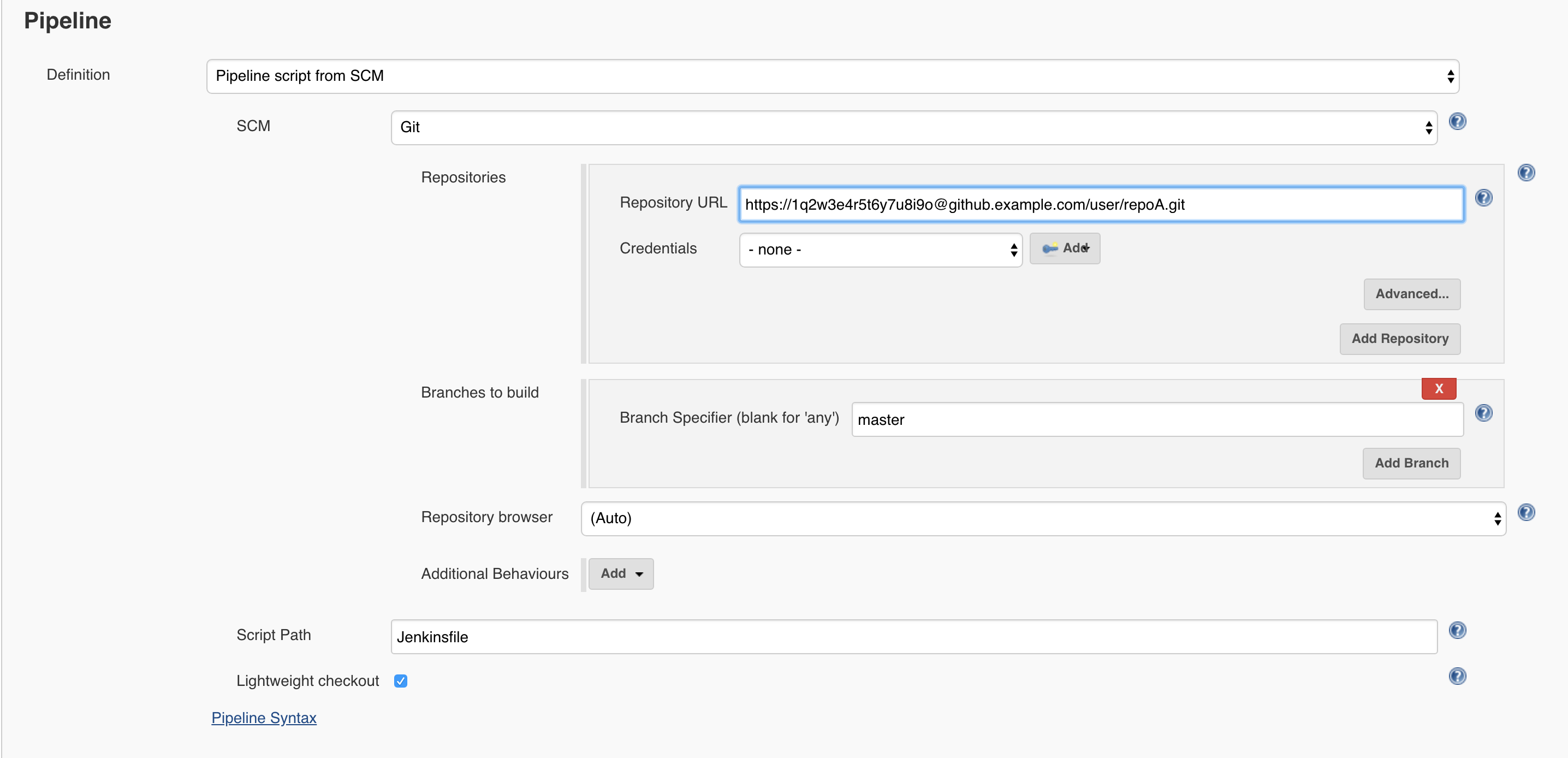
The Pipeline jobs looks like the following:

Expected Behavior

Achange to "repoA" and "repoB" should trigger polling.
Polling should ignore "repoA" commits from the "jenkinsbot" user.
Polling should ignore "repoB".

Actual Behavior

So a change to "repoA" and "repoB" should trigger polling.
Polling should ignore "repoA" commits from the "jenkinsbot" user.
Polling should ignore "repoB".

In that particular case, because the user exclusion doe snot work the job builds in loop...

Workaround

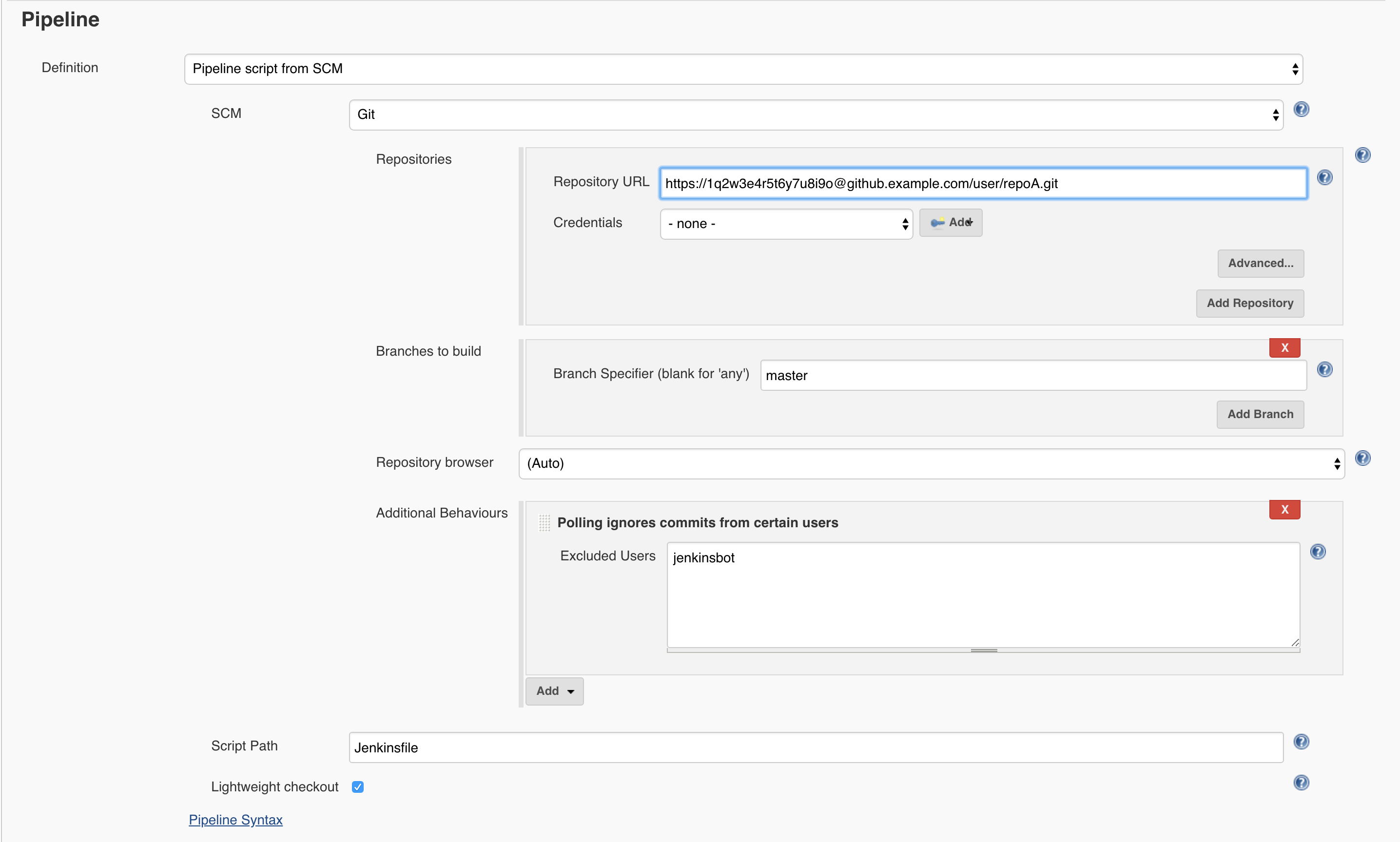
The workaround is to set the User Exclusion in the Pipeline Definition SCM instead of inside the Jenkinsfile. Doing the following fix this scenario:

Note: This is not required but in this case it makes sense anyway to use checkout scm in the Jenkinsfile.

****

So it seems that the problem come from polling rules of the SCMs defined in checkout steps (vs. SCM definition in the Pipeline job). This workaround works in a scenario where the the commits that must be ignored are from the repository holding the Jenkinsfile. I have not tested a scenario where the polling rules are set to "repoB" with "poll: true".

I am hoping this helps to find the root cause here.

aburdajewicz@cloudbees.com (JIRA)

unread,
Aug 2, 2018, 10:08:10 AM8/2/18
to jenkinsc...@googlegroups.com
Allan BURDAJEWICZ edited a comment on Improvement JENKINS-36195
I was able to reproduce this easily and also to find a workaround.

h3. Reproduce


I have the repo "user/repoA" that have the following Jenkinsfile:

{code}

node {
    deleteDir()

    dir("repoA") {
        checkout scm: [$class: 'GitSCM',
            branches: [[name: 'master']],
            extensions: [[$class: 'UserExclusion', excludedUsers: 'jenkinsbot']],
            userRemoteConfigs: [[credentialsId: 'mycredentials', url: 'https://1q2w3e4r5...@github.example.com/user/repoA.git']]]
    }
    
    dir("repoB") {
        checkout changelog: false, poll: false, scm: [$class: 'GitSCM',
            branches: [[name: 'master']],
            extensions: [[$class: 'IgnoreNotifyCommit']],
            userRemoteConfigs: [[credentialsId: 'mycredentials', url: 'https://1q2w3e4r5...@github.example.com/user/repoB.git']]
        ]
    }
    
    dir('repoB') {
        try {
            sh "git checkout master"
            sh "git config --global user.name 'jenkinsbot'"
            sh "git config --global user.email 'jenki...@example.com'"
            sh "echo ${JOB_NAME}/${BUILD_NUMBER} > test.txt"
            sh "git add ."
            sh "git commit -m 'Automated: Updating test.txt during build'"
            sh "git push"
        } catch (err) {
            echo "No change in test.txt"
        }
    }
}
{code}


The Pipeline jobs looks like the following:

!pipeline-without-userexclusion-not-working.png|thumbnail!

*Expected Behavior*

(+) Achange to "repoA" and "repoB" should trigger polling.
(+) Polling should ignore "repoA" commits from the "jenkinsbot" user.
(+) Polling should ignore "repoB".

*Actual Behavior*

(/) So a change to "repoA" and "repoB" should trigger polling.
(-) Polling should ignore "repoA" commits from the "jenkinsbot" user.
(
- / ) Polling should ignore "repoB".


In that particular case, because the user exclusion doe snot work the job builds in loop...

h3. Workaround

The workaround is to *set the User Exclusion in the Pipeline Definition SCM instead of inside the Jenkinsfile*. Doing the following fix this scenario:

!pipeline-with-userexclusion-working.png|thumbnail!

Note: This is not required but in this case it makes sense anyway to use {{checkout scm}} in the Jenkinsfile.

****

So it seems that the problem come from polling rules of the SCMs defined in checkout steps (vs. SCM definition in the Pipeline job). This workaround works in a scenario where the the commits that must be ignored are from the repository holding the Jenkinsfile. I have not tested a scenario where the polling rules are set to "repoB" with "poll: true".

I am hoping this helps to find the root cause here.

richard@japeoh.com (JIRA)

unread,
Sep 3, 2018, 9:00:03 AM9/3/18
to jenkinsc...@googlegroups.com

Are there plans to address this?

Working with a scripted pipeline it's possible to define polling as follows

properties(
    [ 
        pipelineTriggers([
            [$class: "SCMTrigger", scmpoll_spec: "H/5 * * * *"],
        ]) 
    ]
)

It would be very handy to be able to specify, includes / excludes at this level

This message was sent by Atlassian Jira (v7.11.2#711002-sha1:fdc329d)

shauli10@gmail.com (JIRA)

unread,
Sep 3, 2018, 10:25:03 AM9/3/18
to jenkinsc...@googlegroups.com
Shaul Lahav assigned an issue to Mark Waite
 
Change By: Shaul Lahav
Assignee: Shaul Lahav Mark Waite

mark.earl.waite@gmail.com (JIRA)

unread,
Sep 3, 2018, 12:12:03 PM9/3/18
to jenkinsc...@googlegroups.com
Mark Waite commented on Improvement JENKINS-36195
 
Re: Pipeline polling ignores special polling rules

There have been some brief discussions about it, but there are no plans to address it.

mark.earl.waite@gmail.com (JIRA)

unread,
Sep 25, 2018, 6:53:04 AM9/25/18
to jenkinsc...@googlegroups.com
Mark Waite assigned an issue to Unassigned
 
Change By: Mark Waite
Assignee: Mark Waite

jari.henrik.heikkila@gmail.com (JIRA)

unread,
Sep 28, 2018, 4:06:16 AM9/28/18
to jenkinsc...@googlegroups.com
Jari Heikkilä commented on Improvement JENKINS-36195
 
Re: Pipeline polling ignores special polling rules

Hi, I think I have the same issue, PathRestriction/includedRegions defined in Jenkinsfile does not work:
"[$class: 'PathRestriction', excludedRegions: '', includedRegions: '<included-directory>/.*']"
It seems that Jenkins Polling log says correctly that commit to other folder than 'includedRegions' is ignored, but still the build is started by scm change. Clip from Polling log:

"Ignored commit afa14f5970cdaa2d3d3a96f0c76cabf3aa2928dc: No paths matched included region whitelist"

However PathRestriction/includedRegions seems to work at least in Jenkins Freestyle project when configuring restriction in Jenkins GUI.
But why this issue type is "Improvement", I consider this a bug?

smekkley-1@gmx.com (JIRA)

unread,
May 9, 2019, 1:16:03 PM5/9/19
to jenkinsc...@googlegroups.com

Does this issue also aim to solve the issue where you can't poll multiple git repository with pipeline jobs?

kleinen@gmail.com (JIRA)

unread,
May 9, 2019, 1:23:03 PM5/9/19
to jenkinsc...@googlegroups.com

From reading the original ticket notes belong to the responses, I think this one is more in regard to special rules around a single repository and not multiple repos.

jackie.xiao@ebaotech.com (JIRA)

unread,
May 9, 2019, 10:49:09 PM5/9/19
to jenkinsc...@googlegroups.com

For multibranch pipeline jobs, are there any workarounds for Subversion with the 'checkout' step (includedRegions/excludedRegions)?

Something like: 

def scm = checkout scm: [

  $class:'SubversionSCM',
  extensions: [
    [$class: 'PathRestriction', excludedRegions: '', includedRegions: '.+\\.java']
  ]
]

kleinen@gmail.com (JIRA)

unread,
May 9, 2019, 11:01:03 PM5/9/19
to jenkinsc...@googlegroups.com
Kyle Leinen edited a comment on Improvement JENKINS-36195
From reading the original ticket notes belong to along with the responses, I think this one is more in regard to alignment with special rules around a single repository and not multiple repos.

babu.kishore26@gmail.com (JIRA)

unread,
Oct 25, 2019, 2:34:05 AM10/25/19
to jenkinsc...@googlegroups.com

Pipeline builds on every polling without any update in SCM

This message was sent by Atlassian Jira (v7.13.6#713006-sha1:cc4451f)
Atlassian logo

babu.kishore26@gmail.com (JIRA)

unread,
Oct 25, 2019, 3:03:04 AM10/25/19
to jenkinsc...@googlegroups.com
Kishore Babu Kavuru edited a comment on Improvement JENKINS-36195
Pipeline builds on every polling without any update in SCM ..

It seems if there any issue in the pipeline script, Then it is continuously building the pipeline as per polling.

babu.kishore26@gmail.com (JIRA)

unread,
Oct 25, 2019, 3:04:21 AM10/25/19
to jenkinsc...@googlegroups.com

passarinho4@gmail.com (JIRA)

unread,
Nov 14, 2019, 10:49:05 AM11/14/19
to jenkinsc...@googlegroups.com
Szymon Seget commented on Improvement JENKINS-36195
 
Re: Pipeline polling ignores special polling rules

Hi, any updates? I need this feature to work. Kishore Babu Kavuru are you trying to fix it?

passarinho4@gmail.com (JIRA)

unread,
Nov 14, 2019, 10:50:09 AM11/14/19
to jenkinsc...@googlegroups.com
Szymon Seget updated an issue
 
Jenkins / Bug JENKINS-36195
Change By: Szymon Seget
Issue Type: Improvement Bug

carollyl@gmail.com (JIRA)

unread,
Mar 6, 2020, 2:52:05 AM3/6/20
to jenkinsc...@googlegroups.com
Carol Lim commented on Bug JENKINS-36195
 
Re: Pipeline polling ignores special polling rules

Hi, does anyone able to get the excludedRegions and includedRegions to work?

This message was sent by Atlassian Jira (v7.13.12#713012-sha1:6e07c38)
Atlassian logo

carollyl@gmail.com (JIRA)

unread,
Mar 6, 2020, 2:53:04 AM3/6/20
to jenkinsc...@googlegroups.com
Carol Lim edited a comment on Bug JENKINS-36195
Hi, does anyone able to get the excludedRegions and includedRegions to work in a pipeline job ?
Reply all
Reply to author
Forward
0 new messages