
Add support for [PreCompile] and [PostCompile] as Inno Script Studio
1,782 views
Skip to first unread message

nige...@gmail.com
Apr 26, 2020, 2:51:15 PM4/26/20
to innosetup
Regards,
And to my face, inno setup started packing project files instead of building the entire solution first.
Which resulted in
Inno Script Studio help very simply describes the following two sections:
I've been using for ages Inno Setup (trough Inno Script Studio),
and today I've decided to try to run compile using command line for the first time.
Idea was to make fully automated builds that could be run on Build server to automatically produce last build from SVN, and I wanted to do it using ISCC.exe.
Created batch file with
"C:\Program Files (x86)\Inno Setup 5\ISCC.exe" /CC "build.iss"And to my face, inno setup started packing project files instead of building the entire solution first.
After reading Inno Setup documentation realized that [PreCompile] and [PostCompile] sections never existed in Inno Setup, and I am using them in all my ISS files :(
They are only the part of Inno Script Studio compile process.
Ok read Inno Script Studio command line docs, and made that one:
"C:\Program Files (x86)\Inno Script Studio\ISStudio.exe" -compile "build.iss"Console output log:
> The system cannot find the path specified.
Process Exit Code: 1
[PreCompile] Processing finished.
Compiler Error!Tried absolute path:
"C:\Program Files (x86)\Inno Script Studio\ISStudio.exe" -compile "c:\absolute_path\build.iss"Same error again:
Console output log:
  > The system cannot find the path specified.
Process Exit Code: 1
[PreCompile] Processing finished.

Compiler Error!Apparently when run from command line it can't resolve relative paths, unlike when run from Application.
Newer version of Inno Setup Studio unfortunately is no go for me, due small bug that never outputs the preprocess and postprocess command promths output.
So I've reverted to older version that works nice v2.1.0.20 (20130430-174118) and outputs during the build process so I can see actual output during the lengthy (5+ minutes) build processes.
I am facing now three possible solutions, and I know there might be other ways:
- to change all script file and add batch processing to support fully compile from code and pack install.
- build my own processor that would process this sections and call ISCC.exe from command line.
- or to suggest and wait for Inno Setup to support [PreCompile] and [PostCompile] sections (which is what I am doing by this post in hope for it).
Think using ISCC.exe would be the cleanest way to do it, one command line and redirect output to log file for later examinations.
Also think this would be very useful to the others as it would enabled both, from IDE, and from command line,
- to change all script file and add batch processing to support fully compile from code and pack install.
- build my own processor that would process this sections and call ISCC.exe from command line.
- or to suggest and wait for Inno Setup to support [PreCompile] and [PostCompile] sections (which is what I am doing by this post in hope for it).
Think using ISCC.exe would be the cleanest way to do it, one command line and redirect output to log file for later examinations.
Also think this would be very useful to the others as it would enabled both, from IDE, and from command line,
to execute fully automated builds from SVN as nightly builds or similar.
Inno Script Studio help very simply describes the following two sections:
[PreCompile] Section
The [PreCompile] section is optional, and
specifies any number of programs to execute before the Inno Setup compiler has
started it's compilation.
The following is an example of a [PreCompile] section.
[PreCompile]
Name: "Pre-Compile-Build.bat"; Parameters: ""/Build v1.3.33""; Flags: abortonerror cmdprompt
[PostCompile] Section
The [PostCompile] section is optional, and
specifies any number of programs to execute after the Inno Setup compiler has
successfully completed it's compilation.
The following is an example of a [PostCompile] section.
[PostCompile]
Name: "Post-Compile-Build.bat"; Flags: abortonerror cmdprompt redirectoutput
Yes I've notices that the first [PreCompile] is missing 'redirectoutput', but it simply works.
Output is redirected to Compile Window when both batch files execute.
thanks
best regards

T Slappy
Apr 27, 2020, 1:40:49 AM4/27/20
to innosetup
Hello.
Inno Script Studio is outdated and it looks like it is not anymore in development.
If you are using Visual Studio or Delphi/C++ Builder you can try my Visual Studio/RAD Studio extensions that integrate Inno Setup directly into these IDEs (sorry for little self promo :)
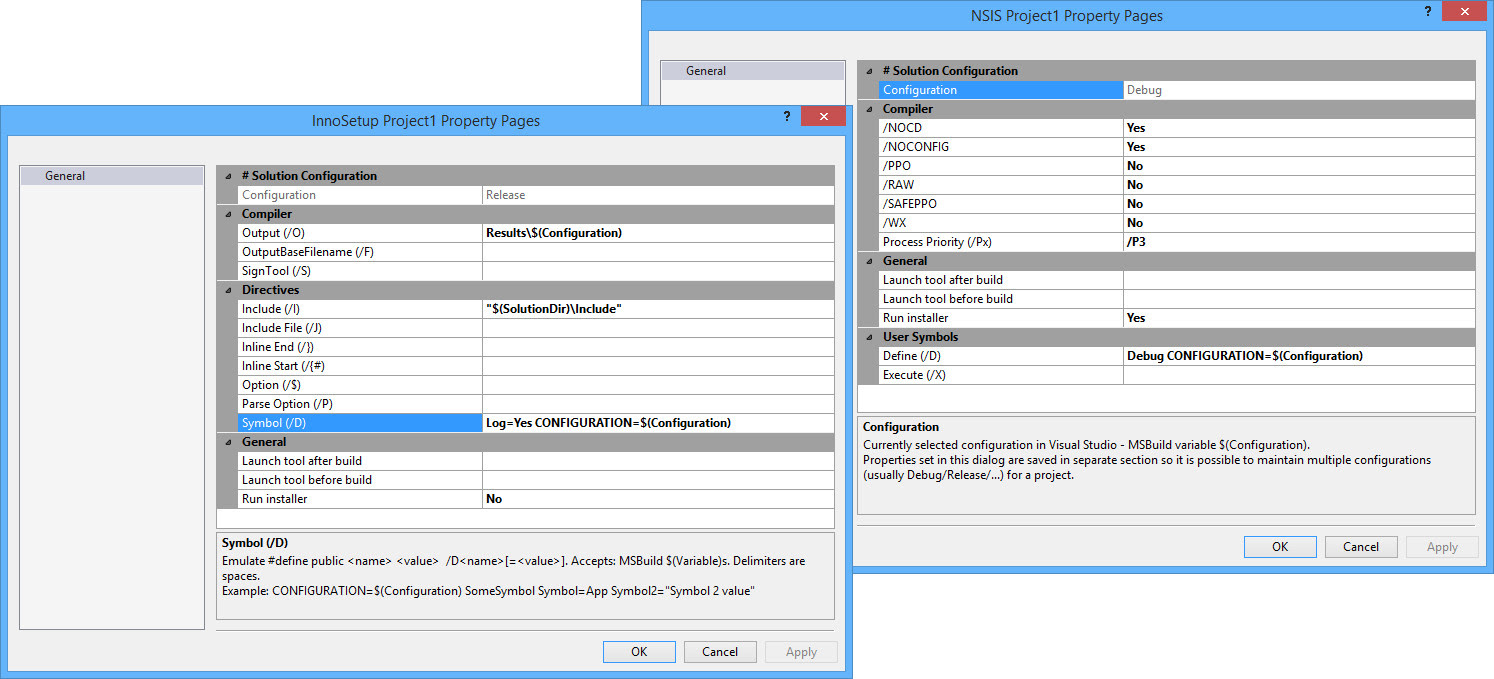
With it you can set PreCompile / PostCompile actions directly in project - see the picture below (these action are called Launch tool before / after build)

Eivind Bakkestuen
Apr 28, 2020, 3:59:05 AM4/28/20
to inno...@googlegroups.com
the rad-installer site throws an error regarding the certificate (using firefox).
--
You received this message because you are subscribed to the Google Groups "innosetup" group.
To unsubscribe from this group and stop receiving emails from it, send an email to innosetup+...@googlegroups.com.
To view this discussion on the web visit https://groups.google.com/d/msgid/innosetup/f3be683a-2d42-45aa-ad50-c6978c45973d%40googlegroups.com.
nige...@gmail.com
Apr 28, 2020, 4:50:54 AM4/28/20
to innosetup
please read the purpose of my suggestion (don't need another UI).
== automatic build task using only ISCC.EXE to be used on BUILD server for daily/nightly builds.
Also This VS Addon (already have looked it) and not command line tool.
That might incorporate it-self into MSBuild platform and run on build (or might not).
And would require of me to reconfigure all of my projects building process.
Also Kind-a do not want to pay for something that was available for decades for free.
It's like paying for water or air we breath after we have drank and breath since our birth for free.
IDEA is: Came to it, Seen it, Conquered it, and it's done, just want command line tool for it.
So the moment I've posted this I've wrote little command processor for PreCompile / PostCompile sections in C#.
So the moment I've posted this I've wrote little command processor for PreCompile / PostCompile sections in C#.
- run precompile tasks
- run iscc.exe
- run postcompile tasks
And I was able to build entire solution and setup from command line "ISCCPROC build.iss log\logfile.txt"
Tested only on one project so far but it promises ;)
Now I am looking how to forward colors from console commands, my build console commands have colors.
As it would be nice feature (not sure why .Net didn't did this, and why we must reinvent the wheel).
But still pipelining multiple tools are prone to error (as ISStudio.exe is), still have my hopes in ISCC.EXE.
Also I think others would like this as well to use single command instead coming up with pipelining tools or batch scripts to build entire projects from SVN.
here is an example of all my builds
[PreCompile]
name: "build\build-all.cmd"; flags: cmdprompt abortonerror redirectoutput runminimized

#include "XXX.iss"

[PostCompile]
name: "build\build-autosign-install.cmd"; flags: cmdprompt abortonerror redirectoutput runminimized
- build-all.cmd takes fresh code from SVN, and uses MSBuild platform to build entire project and sign binary files
- #include builds actual install.exe
- and last command signs the install.exe
- #include builds actual install.exe
- and last command signs the install.exe
after that I have "SetupOutput\xxx-setup.exe" file ready for deployment.
Yes I realise I could rewrite this all files to batch files, but then I could have two different vectors of building that could lead to errors (which I would like to avoid).
Each this project has its own building platform script in SVN so anyone can also just take the code from SVN and perform builds
Hello.Inno Script Studio is outdated and it looks like it is not anymore in development.If you are using Visual Studio or Delphi/C++ Builder you can try my Visual Studio/RAD Studio extensions that integrate Inno Setup directly into these IDEs (sorry for little self promo :)With it you can set PreCompile / PostCompile actions directly in project - see the picture below (these action are called Launch tool before / after build)

Андрей Максимов
Nov 17, 2020, 3:08:59 AM11/17/20
to innosetup
I agree with the topic starter. Why I have to use another tool if the better way is to use the original tool.
Of course we have a cmd that do the same but very often we need to compile one script from IDE. We use Inno Script Studio, but it updates slowly.
вторник, 28 апреля 2020 г. в 11:50:54 UTC+3, nige...@gmail.com:

Tim Chilvers (Kymoto)
Nov 17, 2020, 4:41:07 PM11/17/20
to innosetup
Hi,
Could you email a script and any additioonal files that reproduces the issue with the pre and post sections to sup...@kymoto.org and I will have a look at what is causing the problem.
Thanks
Tim
Kymoto
Tim Chilvers (Kymoto)
Nov 17, 2020, 4:43:13 PM11/17/20
to innosetup
Hi,
Version 2 or Inno Script Studio is in maintence with regards to development while I'm working on version 3 which will provide some additional benefits.
Thanks
Tim
Reply all
Reply to author
Forward
0 new messages