
How to avoid overlapping label's on the Bar in google bar charts?

Srikanth D
I'm creating a stacked bar graph and need to show the label inside the stack. But Few of the label's are getting overlapped. for reference
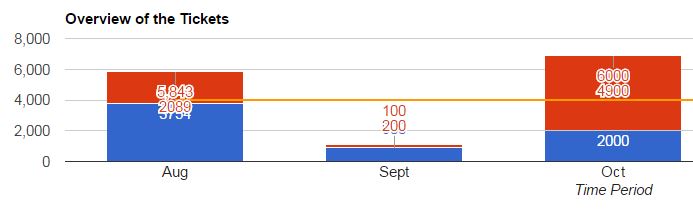
Can you please help me how to avoid overlapping using google charts ?
Source code :
<html>
<head>
<script type="text/javascript" src="https://www.gstatic.com/charts/loader.js"></script>
<div id="chart_div"></div>
<script type="text/javascript">
google.charts.load('current', {packages: ['corechart', 'bar']});
google.charts.setOnLoadCallback(drawStacked);
function drawStacked() {
var data = new google.visualization.arrayToDataTable([['Time Period','XYZ',{ role: 'annotation'},'ABC',{ role: 'annotation'},{ role: 'annotation'},'Average'],
['Aug', 3754,'3754', 2089,'2089','5,843',4000],
['Sept', 900,'900', 200,'200', '100',4000],
['Oct', 2000,'2000', 4900,'4900', '6000',4000],
['Nov', 1700,'1700', 2200,'2200', '3900',4000],
['Dec', 2400,'2400', 2089,'2200', '4600',4000]
]);
var options = {
title: 'Overview of the Tickets',
isStacked: true,
orientation: 'horizontal',
hAxis: {
title: 'Time Period',
annotations: {}
},
vAxis: {
title: 'Number of Tickets'
},
seriesType: 'bars',
series: {2: {type: 'line'}}
};
var chart = new google.visualization.ComboChart(document.getElementById('chart_div'));
chart.draw(data, options);
}
</script>
</head>
</html>
Regards,
Srikanth D