
Feature Request: Device mode ruler guides
993 views
Skip to first unread message

Владимир Кудрявцев
Mar 29, 2016, 1:41:50 AM3/29/16
to Google Chrome Developer Tools
Hello!
I think that very useful for web designers if you add ruler guides support, such as in popular design apps - Photoshop, Sketch and more others. Thank you!


Andrey Lushnikov
Mar 29, 2016, 2:16:11 AM3/29/16
to google-chrome-...@googlegroups.com
There's a "show rulers" option in Settings. When turned on, it shows rulers for the selected element. Does this work for you?
--
You received this message because you are subscribed to the Google Groups "Google Chrome Developer Tools" group.
To unsubscribe from this group and stop receiving emails from it, send an email to google-chrome-develo...@googlegroups.com.
To view this discussion on the web visit https://groups.google.com/d/msgid/google-chrome-developer-tools/e88d2f2a-06be-4f86-8281-7205d262520f%40googlegroups.com.
For more options, visit https://groups.google.com/d/optout.

Paul Bakaus
Mar 29, 2016, 2:18:03 AM3/29/16
to google-chrome-...@googlegroups.com
Hey!
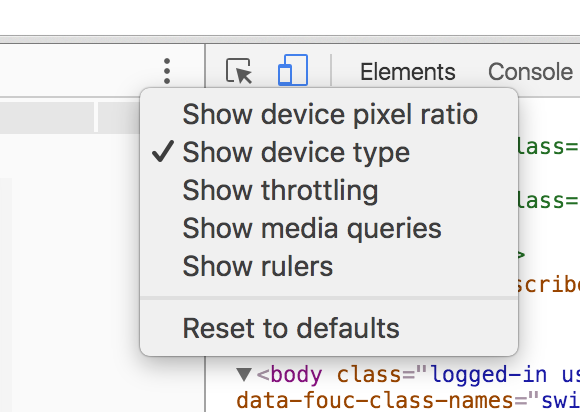
The feature you're mentioning is already available. When using the latest version of Chrome Canary, you'll find it in the three little dot menu of the Device Mode:
Cheers,
Paul
--
You received this message because you are subscribed to the Google Groups "Google Chrome Developer Tools" group.
To unsubscribe from this group and stop receiving emails from it, send an email to google-chrome-develo...@googlegroups.com.
To view this discussion on the web visit https://groups.google.com/d/msgid/google-chrome-developer-tools/e88d2f2a-06be-4f86-8281-7205d262520f%40googlegroups.com.
For more options, visit https://groups.google.com/d/optout.
Владимир Кудрявцев
Mar 29, 2016, 2:42:36 AM3/29/16
to Google Chrome Developer Tools, lush...@chromium.org
Hello Andrey! Thank you for reply.
Yes, its work for me, but I mean ruler guides (red lines on picture that I placed in first message), not just ruler.
Its useful if you need to measure relative elements positions between themselves, verify sizes and position with template, etc.
There's a "show rulers" option in Settings. When turned on, it shows rulers for the selected element. Does this work for you?
On Mon, Mar 28, 2016 at 10:41 PM Владимир Кудрявцев <ruz...@gmail.com> wrote:
Hello!
I think that very useful for web designers if you add ruler guides support, such as in popular design apps - Photoshop, Sketch and more others. Thank you!
--
You received this message because you are subscribed to the Google Groups "Google Chrome Developer Tools" group.
To unsubscribe from this group and stop receiving emails from it, send an email to google-chrome-developer-tools+unsub...@googlegroups.com.
Владимир Кудрявцев
Mar 29, 2016, 2:48:34 AM3/29/16
to Google Chrome Developer Tools
Hi Paul! Thank you for reply!
вторник, 29 марта 2016 г., 12:18:03 UTC+6 пользователь Paul Bakaus написал:
I mean guides (red lines on picture in first message), not only ruler. Its very useful when you need to measure positions or sizes and verify its with design template.
вторник, 29 марта 2016 г., 12:18:03 UTC+6 пользователь Paul Bakaus написал:
Hey!The feature you're mentioning is already available. When using the latest version of Chrome Canary, you'll find it in the three little dot menu of the Device Mode:
Cheers,Paul
On Mon, Mar 28, 2016 at 9:29 PM, Владимир Кудрявцев <ruz...@gmail.com> wrote:
Hello!
I think that very useful for web designers if you add ruler guides support, such as in popular design apps - Photoshop, Sketch and more others. Thank you!
--
You received this message because you are subscribed to the Google Groups "Google Chrome Developer Tools" group.
To unsubscribe from this group and stop receiving emails from it, send an email to google-chrome-developer-tools+unsub...@googlegroups.com.
To view this discussion on the web visit https://groups.google.com/d/msgid/google-chrome-developer-tools/e88d2f2a-06be-4f86-8281-7205d262520f%40googlegroups.com.
For more options, visit https://groups.google.com/d/optout.

Kayce Basques
Mar 29, 2016, 5:44:59 PM3/29/16
to Google Chrome Developer Tools
(Random Idea) It would be cool to be able to use a GUI to snap a resource to a specified element. After moving the resource, the CSS values would update to reflect the new position.
Kayce Basques
Mar 29, 2016, 5:47:50 PM3/29/16
to Google Chrome Developer Tools
ruzvert@
How would you define the guide? By pixels? Percentage? How would you expect to perform this task? Right-clicking on the ruler section? Adding some type of CSS-ish rule?
On Monday, March 28, 2016 at 10:41:50 PM UTC-7, Владимир Кудрявцев wrote:
Владимир Кудрявцев
Mar 30, 2016, 2:29:04 AM3/30/16
to Google Chrome Developer Tools
Hi Kayce!
среда, 30 марта 2016 г., 3:47:50 UTC+6 пользователь Kayce Basques написал:
1) I think that guide measurement units will be same as ruler.
2) Left mouse click on ruler or context menu called by right click on ruler -> Add Guide (vertical ruler - horizontal guide, horizontal ruler - vertical guide).
Thank you.
среда, 30 марта 2016 г., 3:47:50 UTC+6 пользователь Kayce Basques написал:
zeno.j...@fusion.com.au
Feb 8, 2018, 2:51:06 AM2/8/18
to Google Chrome Developer Tools
For anyone coming here from a google search:
Reply all
Reply to author
Forward
0 new messages