
Calling appscripts inside spreadsheet in a iframe
756 views
Skip to first unread message

lucas almeida
Mar 29, 2022, 4:35:24 AM3/29/22
to Google Apps Script Community
Hey guys. I have this iframe using a spreadsheet url in my index.html file. The ideia is opening the spreadsheet when accessing this app.
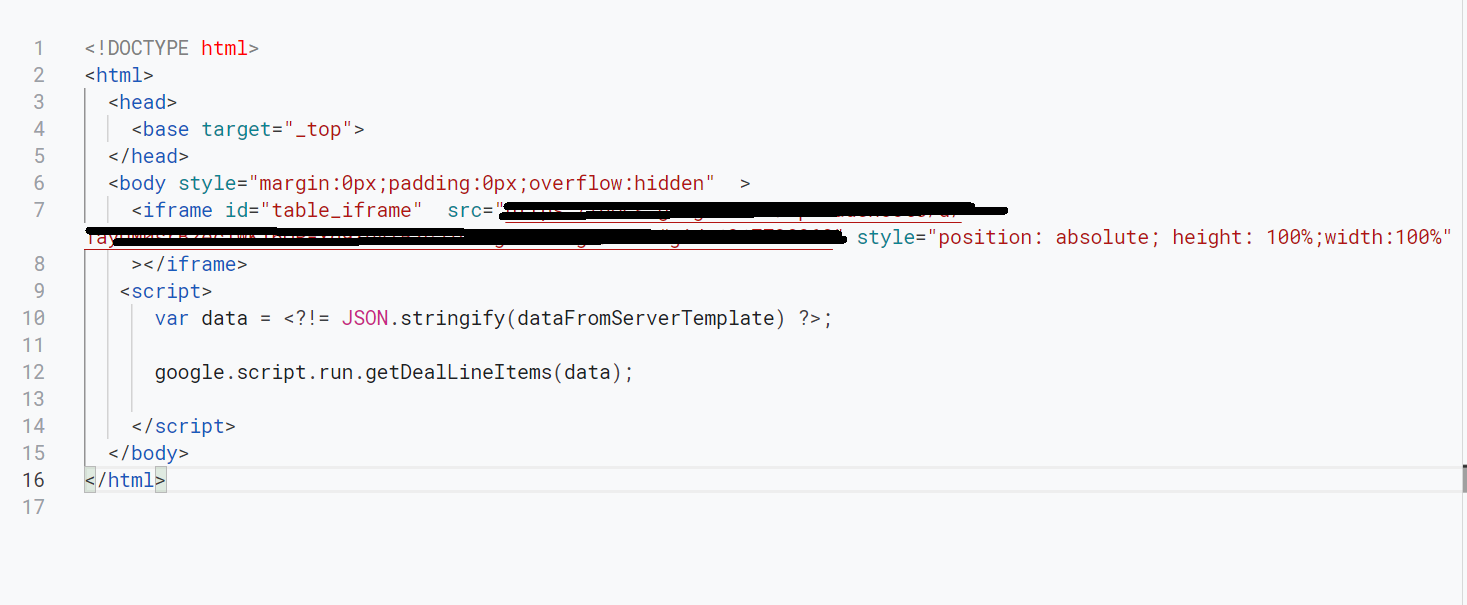

This spreadsheet has a sidebar that opens when i click on a button

The problem is, this sidebar only opens when i access it in the original spreadsheet. When i access the spreadsheet by the app's iframe, this shows up:
Is there any way to solve it? I have tried adding .setXFrameOptionsMode(HtmlService.XFrameOptionsMode.ALLOWALL) on both createTemplateFromFile variables but it didn't work
Esta mensagem e quaisquer arquivos transmitidos com ela são confidenciais e pessoais, destinados exclusivamente ao indivíduo ou à entidade a quem estão endereçados. Se você recebeu esta mensagem por engano, não poderá usar, copiar, divulgar ou tomar qualquer medida baseado nas informações nela contidas. Por gentileza, avise imediatamente o remetente e, em seguida, apague-a do sistema.
This message and any files transmitted with it are confidential and personal, intended solely for the individual or entity to whom they are addressed. If you have received this message in error, you should not copy, disclose or take any action based on the information contained therein. Please notify the sender immediately and then delete it from your system.
Este mensaje y cualquier archivo transmitido con él son confidenciales y personales, destinados exclusivamente a la persona o entidad a la que se dirigen. Si recibió este mensaje por error, no podrá usar, copiar, divulgar ni tomar ninguna medida en función de la información contenida en el mismo. Notifique al remitente de inmediato y luego bórrelo del sistema.

Clark Lind
Mar 29, 2022, 8:28:44 AM3/29/22
to Google Apps Script Community
I'm not understanding what you are trying to do. You can only interact with the Spreadsheet UI from within the spreadsheet itself, not externally. If you want the content of the sidebar in your App, you will have to code it/replicate it there, you can't use it externally since it is bound to the Spreadsheet UI. The HTML file runs/executes in the browser, not on the Google servers, so it is your browser trying to call the Sidebar and it can't access it. I believe that is the problem.
lucas almeida
Mar 29, 2022, 8:42:06 AM3/29/22
to Google Apps Script Community
Yes. I was trying to call the sidebar externally. I thought it was possible to call it on a web app.
What i'm trying to do is using the spreadsheet as an app and have access to the sidebar (or something else) to show that html content for the user interact with. Is there something like that i can do?
What i'm trying to do is using the spreadsheet as an app and have access to the sidebar (or something else) to show that html content for the user interact with. Is there something like that i can do?
Clark Lind
Mar 29, 2022, 9:05:54 AM3/29/22
to Google Apps Script Community
If you want your App (front-end) to access the spreadsheet (backend) the same way a sidebar would act, you have to create all that functionality within the frontend app.
Here is a partial example from an App I have. A user clicks on a button (front-end) to edit some content, then it sends the data to the backend sheet via google.script.run.backendFunctionNameI
//front-end javascript
async function editRemarks(gid) {
var remarks = $('#remarkSpan').text(); //using Jquery on frontend
var updatedRemarks = prompt("Enter new Remarks", remarks);
$('#remarkSpan').text(updatedRemarks);
await google.script.run
.withSuccessHandler(function(contents) {
// Respond to success conditions here.
loadSites(); //calls frontend function to reload the page
})
.withFailureHandler(function(msg) {
// Respond to failure conditions here.
$('#remarks').text(msg);
})
.updateRemarks(gid, updatedRemarks ); //pass new remark to spreadsheet
}
=======================================
//backend Apps script in Code.gs
function updateRemarks(gid, remarks) {
var ss = SpreadsheetApp.getActiveSpreadsheet();
var ws = ss.getSheetByName('sites');
var rawSites = ws.getRange(2, 10, ws.getLastRow() -1, 1).getValues();
var aRow = 1;
// var sites = rawSites.indexOf(gid);
// console.log( rawSites[0][0], rawSites[1][0] );
var blankRemark = "";
if (remarks === null || remarks === '') {
remarks = blankRemark;
}
rawSites.forEach( (site) => {
aRow++
if(site[0].toString() === gid) {
ws.getRange(aRow, 6).setValue(remarks);
}
})
}
Here is a partial example from an App I have. A user clicks on a button (front-end) to edit some content, then it sends the data to the backend sheet via google.script.run.backendFunctionNameI
//front-end javascript
async function editRemarks(gid) {
var remarks = $('#remarkSpan').text(); //using Jquery on frontend
var updatedRemarks = prompt("Enter new Remarks", remarks);
$('#remarkSpan').text(updatedRemarks);
await google.script.run
.withSuccessHandler(function(contents) {
// Respond to success conditions here.
loadSites(); //calls frontend function to reload the page
})
.withFailureHandler(function(msg) {
// Respond to failure conditions here.
$('#remarks').text(msg);
})
.updateRemarks(gid, updatedRemarks ); //pass new remark to spreadsheet
}
=======================================
//backend Apps script in Code.gs
function updateRemarks(gid, remarks) {
var ss = SpreadsheetApp.getActiveSpreadsheet();
var ws = ss.getSheetByName('sites');
var rawSites = ws.getRange(2, 10, ws.getLastRow() -1, 1).getValues();
var aRow = 1;
// var sites = rawSites.indexOf(gid);
// console.log( rawSites[0][0], rawSites[1][0] );
var blankRemark = "";
if (remarks === null || remarks === '') {
remarks = blankRemark;
}
rawSites.forEach( (site) => {
aRow++
if(site[0].toString() === gid) {
ws.getRange(aRow, 6).setValue(remarks);
}
})
}

Edward Ulle
Mar 29, 2022, 12:02:32 PM3/29/22
to Google Apps Script Community
cwi, I'm not sure what you mean by frontend/backend. It appears you are running from a Spreadsheet (
var ss = SpreadsheetApp.getActiveSpreadsheet(); ) most likely using HTMLService.

Jonathan Butler
Mar 29, 2022, 12:42:12 PM3/29/22
to google-apps-sc...@googlegroups.com
If I am understanding the goal correctly, try adding /edit to the end of the url.
--
You received this message because you are subscribed to the Google Groups "Google Apps Script Community" group.
To unsubscribe from this group and stop receiving emails from it, send an email to google-apps-script-c...@googlegroups.com.
To view this discussion on the web visit https://groups.google.com/d/msgid/google-apps-script-community/a413c419-472d-4dcd-ba9b-56d927360a0en%40googlegroups.com.

Emerson Maia
Mar 29, 2022, 12:56:14 PM3/29/22
to google-apps-sc...@googlegroups.com
try this on your doget
.evaluate().setXFrameOptionsMode(HtmlService.XFrameOptionsMode.ALLOWALL)
.evaluate().setXFrameOptionsMode(HtmlService.XFrameOptionsMode.ALLOWALL)
--
You received this message because you are subscribed to the Google Groups "Google Apps Script Community" group.
To unsubscribe from this group and stop receiving emails from it, send an email to google-apps-script-c...@googlegroups.com.
To view this discussion on the web visit https://groups.google.com/d/msgid/google-apps-script-community/7c393aea-5f71-49c2-b95e-3b613226bcfdn%40googlegroups.com.
Emerson Maia
Mar 29, 2022, 8:19:13 PM3/29/22
to google-apps-sc...@googlegroups.com

Matheus assi
Apr 14, 2023, 2:36:05 AM4/14/23
to Google Apps Script Community
I am facing the same problem as you did.
Did you find a solution for this?
Did you find a solution for this?

Web Dev
Apr 18, 2023, 8:56:16 PM4/18/23
to Google Apps Script Community
If you're looking for a way to communicate between iframe parent and child you can only do this using window.postMessage(). I built a product around this. Let m know if I can help.
Reply all
Reply to author
Forward
0 new messages