
How to setup GAM in GCP
4,659 views
Skip to first unread message

Bairam Hadzovic
Aug 2, 2018, 4:58:24 PM8/2/18
to GAM for G Suite
Hi All!
Just got a new machine and wanted to find an easier means to transfer GAM to another machine. Came across an old thread that set GAM can be setup in GCP but I am a little confused as to how to do this. Is it like a traditional setup?
Looking forward to any assistance or direction on this!
Best,
Bairam

Ross Scroggs
Aug 2, 2018, 5:01:38 PM8/2/18
to google-ap...@googlegroups.com
Bairam,
It's the same. Install Gam and then copy your client_secrets.json, oauth2service.json, oauth2.txt files to the Gam folder in GCP.
You don't need a new project.
Ross
--
You received this message because you are subscribed to the Google Groups "GAM for G Suite" group.
To unsubscribe from this group and stop receiving emails from it, send an email to google-apps-man...@googlegroups.com.
To post to this group, send email to google-ap...@googlegroups.com.
Visit this group at https://groups.google.com/group/google-apps-manager.
To view this discussion on the web visit https://groups.google.com/d/msgid/google-apps-manager/76aab738-242a-451f-be00-f0c2bb369b87%40googlegroups.com.
For more options, visit https://groups.google.com/d/optout.
Ross Scroggs
Bairam Hadzovic
Aug 2, 2018, 5:04:31 PM8/2/18
to google-ap...@googlegroups.com
Hey Ross!
Does Gam-adv work in GCP as well? That would be a deal breaker as I use its capabilities extensively. I would assume so, but just want to verify.
Hope you are well by the way!
You received this message because you are subscribed to a topic in the Google Groups "GAM for G Suite" group.
To unsubscribe from this topic, visit https://groups.google.com/d/topic/google-apps-manager/MKmqKplSoBE/unsubscribe.
To unsubscribe from this group and all its topics, send an email to google-apps-man...@googlegroups.com.
To post to this group, send email to google-ap...@googlegroups.com.
Visit this group at https://groups.google.com/group/google-apps-manager.
To view this discussion on the web visit https://groups.google.com/d/msgid/google-apps-manager/CAJkvRS8xaEKU2HiC8rx9LkOmFWqoWp0qP%3DaFB%3DUiADiqRtW%2Brg%40mail.gmail.com.
Ross Scroggs
Aug 2, 2018, 5:37:55 PM8/2/18
to google-ap...@googlegroups.com
Bairam,
Log in to Google Cloud Shell
Do the following command:
Basic Gam: bash <(curl -s -S -L https://git.io/install-gam) -l
GAMADV-X: bash <(curl -s -S -L https://git.io/vMHsV) -l
GAMADV-XTD: bash <(curl -s -S -L https://git.io/vAAj9) -l
The install will go into /home/username/bin/gam or gamadv-x or gamadv-xtd
Upload client_secrets.json, oauth2service.json and oauth2.txt to the Cloud Shell
For Basic Gam, move the files to the folder containing gam, by default this is /home/username/bin/gam
For GAMADV-X(TD) do gam version, then move the files to /home/username/.gam
Edit /home/username/.gam/gam.cfg and modify cache_dir, config_dir, drive_dir to have the correct path
Typical values:
cache_dir = /home/username/.gam/gamcache
config_dir = /home/username/.gam
drive_dir = /home/username/Downloads
Set an appropriate alias in /home/username/.bash_aliases
Basic: alias gam=/home/username/bin/gam/gam
GAMADV-X: alias gam=/home/username/bin/gamadv-x/gam
GAMADV-XTD: alias gam=/home/username/bin/gamadv-xtd/gam
You should be good to go.
Ross
To view this discussion on the web visit https://groups.google.com/d/msgid/google-apps-manager/CAFKFfftLpNg0v%2BYqpsUa8vF4ipU2kqh0VOHAQNbEud9KUVkPOQ%40mail.gmail.com.
For more options, visit https://groups.google.com/d/optout.
Ross Scroggs

Noor Shimul
May 22, 2019, 7:25:42 AM5/22/19
to GAM for G Suite
Great Ross,
This worked for me, however when I come out the shell session and went back after couple of hrs and tried again i get an error: ERROR: Client OAuth2 File: /home/"username"/.gam/oauth2.txt, Does not exist or has invalid format
How do I set it so it keeps for permanent in GCP.
Thanks,
Noor
On Thu, Aug 2, 2018 at 5:01 PM Ross Scroggs <ross....@gmail.com> wrote:
Bairam,It's the same. Install Gam and then copy your client_secrets.json, oauth2service.json, oauth2.txt files to the Gam folder in GCP.You don't need a new project.Ross
On Thu, Aug 2, 2018 at 1:58 PM Bairam Hadz <bhad...@gmail.com> wrote:
Hi All!--Just got a new machine and wanted to find an easier means to transfer GAM to another machine. Came across an old thread that set GAM can be setup in GCP but I am a little confused as to how to do this. Is it like a traditional setup?Looking forward to any assistance or direction on this!Best,Bairam
You received this message because you are subscribed to the Google Groups "GAM for G Suite" group.
To unsubscribe from this group and stop receiving emails from it, send an email to google-apps-manager+unsub...@googlegroups.com.
To post to this group, send email to google-ap...@googlegroups.com.
Visit this group at https://groups.google.com/group/google-apps-manager.
To view this discussion on the web visit https://groups.google.com/d/msgid/google-apps-manager/76aab738-242a-451f-be00-f0c2bb369b87%40googlegroups.com.
For more options, visit https://groups.google.com/d/optout.
--Ross Scroggs
--
You received this message because you are subscribed to a topic in the Google Groups "GAM for G Suite" group.
To unsubscribe from this topic, visit https://groups.google.com/d/topic/google-apps-manager/MKmqKplSoBE/unsubscribe.
To unsubscribe from this group and all its topics, send an email to google-apps-manager+unsub...@googlegroups.com.
To post to this group, send email to google-ap...@googlegroups.com.
Visit this group at https://groups.google.com/group/google-apps-manager.
To view this discussion on the web visit https://groups.google.com/d/msgid/google-apps-manager/CAJkvRS8xaEKU2HiC8rx9LkOmFWqoWp0qP%3DaFB%3DUiADiqRtW%2Brg%40mail.gmail.com.
For more options, visit https://groups.google.com/d/optout.
--
You received this message because you are subscribed to the Google Groups "GAM for G Suite" group.
To unsubscribe from this group and stop receiving emails from it, send an email to google-apps-manager+unsub...@googlegroups.com.
To post to this group, send email to google-ap...@googlegroups.com.
Visit this group at https://groups.google.com/group/google-apps-manager.
To view this discussion on the web visit https://groups.google.com/d/msgid/google-apps-manager/CAFKFfftLpNg0v%2BYqpsUa8vF4ipU2kqh0VOHAQNbEud9KUVkPOQ%40mail.gmail.com.
For more options, visit https://groups.google.com/d/optout.
--Ross Scroggs

Shawn Yohannan
May 31, 2019, 4:51:34 AM5/31/19
to GAM for G Suite
Hey Ross
Everytime I run any of these commands, I get this:
@cloudshell:~$ bash <(curl -s -S -L https://git.io/vMHsV) -l
Checking GitHub URL https://api.github.com/repos/taers232c/GAMADV-X/releases for latest GAM release...
Getting file and download URL...
ERROR: Attribute: browser_download_url for linux-x86_64.tar.xz version latest not found
Any ideas?
Thanks!
On Thu, Aug 2, 2018 at 5:01 PM Ross Scroggs <ross....@gmail.com> wrote:
Bairam,It's the same. Install Gam and then copy your client_secrets.json, oauth2service.json, oauth2.txt files to the Gam folder in GCP.You don't need a new project.Ross
On Thu, Aug 2, 2018 at 1:58 PM Bairam Hadz <bhad...@gmail.com> wrote:
Hi All!--Just got a new machine and wanted to find an easier means to transfer GAM to another machine. Came across an old thread that set GAM can be setup in GCP but I am a little confused as to how to do this. Is it like a traditional setup?Looking forward to any assistance or direction on this!Best,Bairam
You received this message because you are subscribed to the Google Groups "GAM for G Suite" group.
To unsubscribe from this group and stop receiving emails from it, send an email to google-apps-manager+unsub...@googlegroups.com.
To post to this group, send email to google-ap...@googlegroups.com.
Visit this group at https://groups.google.com/group/google-apps-manager.
To view this discussion on the web visit https://groups.google.com/d/msgid/google-apps-manager/76aab738-242a-451f-be00-f0c2bb369b87%40googlegroups.com.
For more options, visit https://groups.google.com/d/optout.
--Ross Scroggs
--
You received this message because you are subscribed to a topic in the Google Groups "GAM for G Suite" group.
To unsubscribe from this topic, visit https://groups.google.com/d/topic/google-apps-manager/MKmqKplSoBE/unsubscribe.
To unsubscribe from this group and all its topics, send an email to google-apps-manager+unsub...@googlegroups.com.
To post to this group, send email to google-ap...@googlegroups.com.
Visit this group at https://groups.google.com/group/google-apps-manager.
To view this discussion on the web visit https://groups.google.com/d/msgid/google-apps-manager/CAJkvRS8xaEKU2HiC8rx9LkOmFWqoWp0qP%3DaFB%3DUiADiqRtW%2Brg%40mail.gmail.com.
For more options, visit https://groups.google.com/d/optout.
--
You received this message because you are subscribed to the Google Groups "GAM for G Suite" group.
To unsubscribe from this group and stop receiving emails from it, send an email to google-apps-manager+unsub...@googlegroups.com.
To post to this group, send email to google-ap...@googlegroups.com.
Visit this group at https://groups.google.com/group/google-apps-manager.
To view this discussion on the web visit https://groups.google.com/d/msgid/google-apps-manager/CAFKFfftLpNg0v%2BYqpsUa8vF4ipU2kqh0VOHAQNbEud9KUVkPOQ%40mail.gmail.com.
For more options, visit https://groups.google.com/d/optout.
--Ross Scroggs

Steve Larsen
May 31, 2019, 9:14:13 AM5/31/19
to Google Apps Manager
Shawn - not that his will necessarily solve your issue but given that gamadv-x and xtd are being deprecated using xtd3 would be the ideal choice.
bash <(curl -s -S -L https://git.io/fhZWP) -l

Eric Dannewitz
May 31, 2019, 9:26:28 AM5/31/19
to google-ap...@googlegroups.com
Are they being deprecated or are you forcing it? Seems like Ross never weighed in on it?
And it seem sort of crazy to have two versions of gam. There is the “basic” one, that Ross seems to heavily commit time keeping up to date and the other versions “advanced gam”, which are arguably way better.
It would really be smarter to just have one version.....
—
Eric Dannewitz
Technology Assistant/District Tech
Acalanes Union High School District
District Office Technology Department
--
You received this message because you are subscribed to the Google Groups "GAM for G Suite" group.
To unsubscribe from this group and stop receiving emails from it, send an email to google-apps-man...@googlegroups.com.
To post to this group, send email to google-ap...@googlegroups.com.
Visit this group at https://groups.google.com/group/google-apps-manager.
To view this discussion on the web visit https://groups.google.com/d/msgid/google-apps-manager/CAA0XtT2gJjaa8j-v-NisZKL%3DVBCaBP%2BxsHYeGnF2ZqH75VpRpg%40mail.gmail.com.
Steve - DynTech
May 31, 2019, 9:28:52 AM5/31/19
to GAM for G Suite
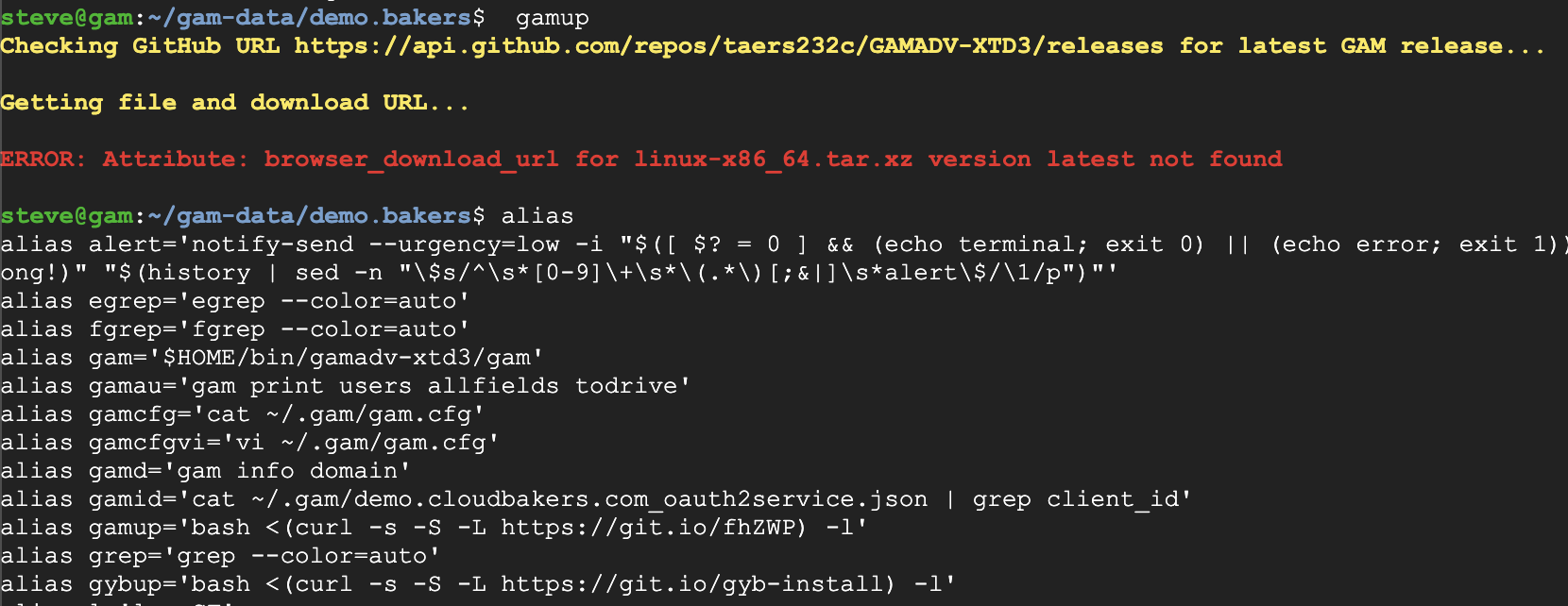
Just tried to upgrade gam and it failed
Ross Scroggs
May 31, 2019, 9:31:07 AM5/31/19
to google-ap...@googlegroups.com
Shawn's immediate problem is that my Linux development machine died with a dead power supply yesterday and will be repaired today; thus there is no current Linux version to download.
The server will be repaired today and the current linux version will be updated.
Rss
To view this discussion on the web visit https://groups.google.com/d/msgid/google-apps-manager/CAG-f%3DMEyt%2BR1Wz_Eso4MiiC%2Bq4oL6NBQ3SW5u9kfAqCrjsMAyw%40mail.gmail.com.
Steve - DynTech
May 31, 2019, 9:58:08 AM5/31/19
to GAM for G Suite
We should pick up any further discussion on deprecation on that thread though...
I think he has.
"I just want the one with all the features and a long life ahead of it. Sounds like gamadv-xtd3 is that one, so I'm standardizing on it." - Bri
"GAMADV-XTD3" - Ross
Also, gamadv-x and gamadv-xtd did not get the latest 4.83.13 update like xtd3 did.
Also, gamadv-x and gamadv-xtd did not get the latest 4.83.13 update like xtd3 did.
Noor Shimul
Jul 24, 2019, 2:40:44 PM7/24/19
to GAM for G Suite
Hi All,
I am trying to install GAM advance on gcp cloudshell/editor.
When I am trying to authorise the scpe and enter my domain username, it then gives me a link so when I copy and paste the link into the same profile chrome but on separate tab
I then go through the login and click confirm to authorise it give me an error messages below:
This site can’t be reached
localhost refused to connect.
Ross Scroggs
Jul 24, 2019, 3:07:39 PM7/24/19
to google-ap...@googlegroups.com
You should say: gam config no_browser true oauth create
The URL link will be designed to be pasted into another browser tab.
--
You received this message because you are subscribed to the Google Groups "GAM for G Suite" group.
To unsubscribe from this group and stop receiving emails from it, send an email to google-apps-man...@googlegroups.com.
To view this discussion on the web visit https://groups.google.com/d/msgid/google-apps-manager/ad1589d2-df38-4551-8c04-b98abc64dfcc%40googlegroups.com.
Noor Shimul
Jul 25, 2019, 2:31:41 PM7/25/19
to GAM for G Suite
Hi
I run the below command in gcp cloudshell:
GAMADV-X: bash <(curl -s -S -L https://git.io/vMHsV) -l
I have copied both the .json file into .gam locaton
but i get an error: ERROR: Client OAuth2 File: /home/"username"/.gam/oauth2.txt, Does not exist or has invalid format
or Config File: /home/username/.gam/gam.cfg, Section: DEFAULT, Item: oauth2_txt, Value: /home/username/.gam/oauth2.txt, Not Found
also when I manually go into gamadv-x location and run gam info user .......
i get error: /bin/gamadv-x/gam: No such file or directory
On Wednesday, 24 July 2019 20:07:39 UTC+1, Ross Scroggs wrote:
You should say: gam config no_browser true oauth createThe URL link will be designed to be pasted into another browser tab.
On Jul 24, 2019, at 11:40 AM, Noor Shimul <noor....@cabinetoffice.gov.uk> wrote:
Hi All,I am trying to install GAM advance on gcp cloudshell/editor.When I am trying to authorise the scpe and enter my domain username, it then gives me a link so when I copy and paste the link into the same profile chrome but on separate tabI then go through the login and click confirm to authorise it give me an error messages below:This site can’t be reached
localhost refused to connect.
On Thursday, 2 August 2018 21:58:24 UTC+1, Bairam Hadz wrote:Hi All!Just got a new machine and wanted to find an easier means to transfer GAM to another machine. Came across an old thread that set GAM can be setup in GCP but I am a little confused as to how to do this. Is it like a traditional setup?Looking forward to any assistance or direction on this!Best,Bairam--
You received this message because you are subscribed to the Google Groups "GAM for G Suite" group.
To unsubscribe from this group and stop receiving emails from it, send an email to google-apps-manager+unsub...@googlegroups.com.
Ross Scroggs
Jul 25, 2019, 2:34:05 PM7/25/19
to google-ap...@googlegroups.com
From my previous reply:
You should say: gam config no_browser true oauth createThe URL link will be designed to be pasted into another browser tab.
Ross
To unsubscribe from this group and stop receiving emails from it, send an email to google-apps-man...@googlegroups.com.
To view this discussion on the web visit https://groups.google.com/d/msgid/google-apps-manager/e07e9fae-849f-46bb-9637-7d630a03bc80%40googlegroups.com.
Noor Shimul
Jul 25, 2019, 2:53:56 PM7/25/19
to GAM for G Suite
thanks, I have follow the command but still getting an error:
On Thursday, 25 July 2019 19:34:05 UTC+1, Ross Scroggs wrote:
From my previous reply:
You should say: gam config no_browser true oauth createThe URL link will be designed to be pasted into another browser tab.Ross
To view this discussion on the web visit https://groups.google.com/d/msgid/google-apps-manager/e07e9fae-849f-46bb-9637-7d630a03bc80%40googlegroups.com.

+KimNilsson
Jul 26, 2019, 10:55:35 AM7/26/19
to GAM for G Suite
Noor,
In that exact spot, try this,
./gam config no_browser true oauth createBairam Hadzovic
Aug 28, 2019, 3:45:46 PM8/28/19
to GAM for G Suite
Hey Ross!
Hope you're doing well. I tried following these steps again to install GAM into my new jobs GCP environment but running into a bevy of issues:


Let me know how I can proceed or if we should/can take offline.
Appreciate you and everything you do for the community!
On Thu, Aug 2, 2018 at 5:01 PM Ross Scroggs <ross....@gmail.com> wrote:
Bairam,It's the same. Install Gam and then copy your client_secrets.json, oauth2service.json, oauth2.txt files to the Gam folder in GCP.You don't need a new project.Ross
On Thu, Aug 2, 2018 at 1:58 PM Bairam Hadz <bhad...@gmail.com> wrote:
Hi All!--Just got a new machine and wanted to find an easier means to transfer GAM to another machine. Came across an old thread that set GAM can be setup in GCP but I am a little confused as to how to do this. Is it like a traditional setup?Looking forward to any assistance or direction on this!Best,Bairam
You received this message because you are subscribed to the Google Groups "GAM for G Suite" group.
To unsubscribe from this group and stop receiving emails from it, send an email to google-apps-manager+unsub...@googlegroups.com.
To post to this group, send email to google-ap...@googlegroups.com.
Visit this group at https://groups.google.com/group/google-apps-manager.
To view this discussion on the web visit https://groups.google.com/d/msgid/google-apps-manager/76aab738-242a-451f-be00-f0c2bb369b87%40googlegroups.com.
For more options, visit https://groups.google.com/d/optout.
--Ross Scroggs
--
You received this message because you are subscribed to a topic in the Google Groups "GAM for G Suite" group.
To unsubscribe from this topic, visit https://groups.google.com/d/topic/google-apps-manager/MKmqKplSoBE/unsubscribe.
To unsubscribe from this group and all its topics, send an email to google-apps-manager+unsub...@googlegroups.com.
To post to this group, send email to google-ap...@googlegroups.com.
Visit this group at https://groups.google.com/group/google-apps-manager.
To view this discussion on the web visit https://groups.google.com/d/msgid/google-apps-manager/CAJkvRS8xaEKU2HiC8rx9LkOmFWqoWp0qP%3DaFB%3DUiADiqRtW%2Brg%40mail.gmail.com.
For more options, visit https://groups.google.com/d/optout.
--
You received this message because you are subscribed to the Google Groups "GAM for G Suite" group.
To unsubscribe from this group and stop receiving emails from it, send an email to google-apps-manager+unsub...@googlegroups.com.
To post to this group, send email to google-ap...@googlegroups.com.
Visit this group at https://groups.google.com/group/google-apps-manager.
To view this discussion on the web visit https://groups.google.com/d/msgid/google-apps-manager/CAFKFfftLpNg0v%2BYqpsUa8vF4ipU2kqh0VOHAQNbEud9KUVkPOQ%40mail.gmail.com.
For more options, visit https://groups.google.com/d/optout.
--Ross Scroggs

Tony Nelson
May 10, 2024, 8:01:24 AM5/10/24
to GAM for Google Workspace
I'm curious is it possible to setup GAM for multiple Domains in GCP


✉ Kevin Melillo
May 10, 2024, 8:17:02 AM5/10/24
to google-ap...@googlegroups.com
I go through the GAM install as normal. After it installs the files, and asks me if I am ready to begin config, I ctrl-c at that point to break out.
I then copy over the client_secrets.json and the oauth2service.json files to the new ~/bin/gam directory.
I then run gam info domain, and it goes through the oauth2 authentication, and BLAMMO, up and running.
Make sense?
--
You received this message because you are subscribed to the Google Groups "GAM for Google Workspace" group.
To unsubscribe from this group and stop receiving emails from it, send an email to google-apps-man...@googlegroups.com.
To view this discussion on the web visit https://groups.google.com/d/msgid/google-apps-manager/eb4a19ea-b9b5-494c-970b-4298a0e72db4n%40googlegroups.com.
Kim Nilsson
May 10, 2024, 6:33:01 PM5/10/24
to GAM for Google Workspace
With regular GAM, this topic explains how you can use one GAM binary and several OAUTH dirs (or differently named JSONs.
With GAMADV-XTD3 there is a feature called "gam select" which lets you manage any number of domains.
Reply all
Reply to author
Forward
0 new messages