
FEED API. How do I add feeds, main title, individual feed titles, and increase number of entries-results?
87 views
Skip to first unread message

SingularityUtopia
Jun 15, 2013, 9:22:01 AM6/15/13
to google-ajax...@googlegroups.com
<!DOCTYPE html PUBLIC "-//W3C//DTD XHTML 1.0 Strict//EN" "http://www.w3.org/TR/xhtml1/DTD/xhtml1-strict.dtd">
<html xmlns="http://www.w3.org/1999/xhtml">
<head>
<meta http-equiv="Content-Type" content="text/html; charset=utf-8"/>
<script src="http://www.google.com/jsapi/" type="text/javascript"></script>
<script src="http://www.google.com/uds/solutions/dynamicfeed/gfdynamicfeedcontrol.js" type="text/javascript"></script>
<style type="text/css"> @import url("http://www.google.com/uds/solutions/dynamicfeed/gfdynamicfeedcontrol.css");
#feedControl { margin-top : 20px; margin-left: auto; margin-right: auto; width : 440px; font-size: 16px; color: #9CADD0;}</style>
<script type="text/javascript">
function load()
{var feed ="http://www.wired.com/gadgetlab/feed/";
new GFdynamicFeedControl(feed, "feedControl"); }
google.load("feeds", "1"); google.setOnLoadCallback(load);
</script>
</head>
<body>
<div id="body">
<div id="feedControl">Loading...</div></div></body></html>
========================================================
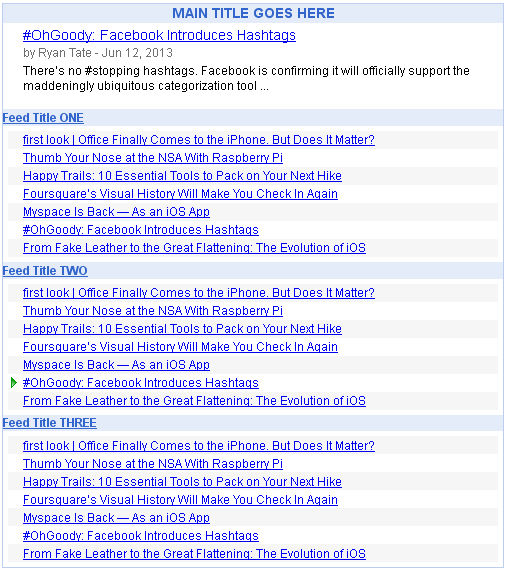
BTW, the image of what I want to do was acquired via the Google Feed Code Playground (http://code.google.com/apis/ajax/playground/#dynamic_feed_control_-_vertical) but I don't know hoe to transcribe that Playground-code into the above code, here is the code I used in the playground to obtain the image:
google.load('feeds', '1');
function OnLoad() {
var feeds = [
{
title: 'Feed Title ONE',
url: 'http://www.wired.com/gadgetlab/feed/'
},
{
title: 'Feed Title TWO',
url: 'http://www.wired.com/gadgetlab/feed/'
},
{
title: 'Feed Title THREE',
url: 'http://www.wired.com/gadgetlab/feed/'
}
];
var options = {
stacked : true,
horizontal : false,
numResults : 7,
title : "MAIN TITLE GOES HERE"
};
new GFdynamicFeedControl(feeds, 'content', options);
document.getElementById('content').style.width = "500px";
}
google.setOnLoadCallback(OnLoad);

Jeremy Geerdes
Jun 15, 2013, 9:48:08 AM6/15/13
to google-ajax...@googlegroups.com
Here's what you need to do:
--
Jeremy R. Geerdes
1. In your code, locate the line reading function load()
2. Delete everything from that line to the blank line just below the line starting google.load("feeds"...
3. In the Playground code, locate the line reading google.load('feeds', '1');
4. Copy everything from that line through (i.e., including) the line reading google.setOnLoadCallback(OnLoad);
5. Paste the Playground code into your page exactly where you deleted all the other stuff.
6. Locate the line reading new GFdynamicFeedControl(feeds, 'content', options);
7. Change 'content' to 'feedControl'
If you have further problems, please post a link to your page, working or not. For a variety of reasons, it's dramatically easier for us to help when we can see what you're actually working on rather than just code pasted, particularly code pasted into a Groups post.
jg
--
--
You received this message because you are subscribed to the Google
Groups "Google AJAX APIs" group.
To post to this group, send email to
google-ajax...@googlegroups.com
To unsubscribe from this group, send email to
google-ajax-searc...@googlegroups.com
To view this message on the web, visit
https://groups.google.com/d/msgid/google-ajax-search-api/1e197f1d-b136-4336-b90e-14efc87ec3e1%40googlegroups.com
For more options, visit this group at
http://groups.google.com/group/google-ajax-search-api?hl=en?hl=en
---
You received this message because you are subscribed to the Google Groups "Google AJAX APIs" group.
To unsubscribe from this group and stop receiving emails from it, send an email to google-ajax-searc...@googlegroups.com.
For more options, visit https://groups.google.com/groups/opt_out.
Jeremy R. Geerdes
Generally Cool Guy
Des Moines, IA
If you're in the Des Moines, IA, area, check out Debra Heights Wesleyan Church!
SingularityUtopia
Jun 16, 2013, 1:25:01 AM6/16/13
to google-ajax...@googlegroups.com
Excellent Jeremy that works perfectly now, I see after your explanation what I was doing wrong or what I needed to do.
To view this message on the web, visit
https://groups.google.com/d/msgid/google-ajax-search-api/1e197f1d-b136-4336-b90e-14efc87ec3e1%40googlegroups.com
For more options, visit this group at
http://groups.google.com/group/google-ajax-search-api?hl=en?hl=en
---
You received this message because you are subscribed to the Google Groups "Google AJAX APIs" group.
To unsubscribe from this group and stop receiving emails from it, send an email to google-ajax-search-api+unsub...@googlegroups.com.
For more options, visit https://groups.google.com/groups/opt_out.
Reply all
Reply to author
Forward
0 new messages