Problem with "identify" service using "tolerance" (was working before)

156 views
Skip to first unread message

Roger Schaer

unread,
Aug 11, 2022, 6:26:16 AM8/11/22
to GeoAdminCh API
Hello,

I was wondering if something changed in the definition of the "identify" service of the GeoAdmin API (https://api3.geo.admin.ch/services/sdiservices.html#identify-features). I couldn't find anything in the release notes sadly.

Until yesterday, August 10, I was able to query for hiking path segments (ch.swisstopo.swisstlm3d-wanderwege layer) located within a given radius around a point using a URL such as this (I set the tolerance very low to illustrate the problem):

https://api3.geo.admin.ch/rest/services/all/MapServer/identify?geometry=7.948975084048936%2C46.48690468596904&geometryType=esriGeometryPoint&layers=all%3Ach.swisstopo.swisstlm3d-wanderwege&mapExtent=0%2C0%2C100%2C100&imageDisplay=100%2C100%2C100&tolerance=5&returnGeometry=true&geometryFormat=geojson&sr=4326

This was correctly returning me the segments located in that radius only (I followed https://api3.geo.admin.ch/services/sdiservices.html#simulate-a-search-radius for the simulation of the search radius).

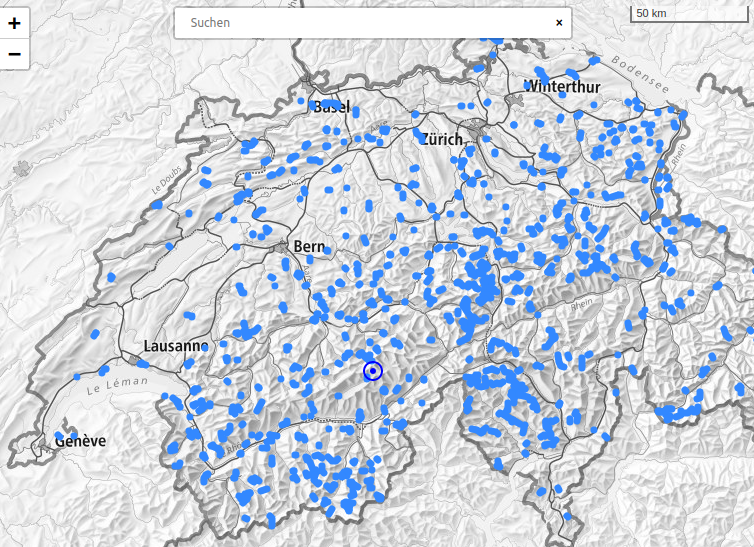
But today, the query above returns >200 results and in my application I see that it retrieves segments from all over Switzerland:

segments-problem.png

Could you shed some light on why this might be happening, do I need to adjust something in my query?

I am surprised because it has worked perfectly until now.

Best regards and thank you in advance for your help,
Roger Schaer

David...@swisstopo.ch

unread,
Aug 11, 2022, 7:23:18 AM8/11/22
to geoadm...@googlegroups.com

Thanks for reaching out


We are currently migrating the infrastructure --- and this seems to be related to the migration work


We will come back as soon as possible with a proposal/solution


David

--
You received this message because you are subscribed to the Google Groups "GeoAdminCh API" group.
To unsubscribe from this group and stop receiving emails from it, send an email to geoadmin-api...@googlegroups.com.
To view this discussion on the web visit https://groups.google.com/d/msgid/geoadmin-api/769104bc-64df-4320-84ec-97b950e0d935n%40googlegroups.com.

Roger Schaer

unread,
Aug 11, 2022, 7:37:44 AM8/11/22
to GeoAdminCh API
Thank you very much for the prompt response and for looking into the issue!

Best, Roger

David...@swisstopo.ch

unread,
Aug 11, 2022, 7:50:44 AM8/11/22
to geoadm...@googlegroups.com

Hi

-          Can you get us a second example which does return a wrong result?

-          Can you test the following approach

o   A possible issue: it uses the following mapExtent=0,0,100,100 mapExtent should be in the same spatial reference as the geometry and the sr parameter, in this case it is invalid mapExtent for WSG84.

o   In the past the identify service with tolerance and WSG84 did not worked and had been fixed we think if you correct the mapExtent and imageDisplay to correct value it will work again

Roger Schaer

unread,
Aug 11, 2022, 8:27:27 AM8/11/22
to GeoAdminCh API
Of course, here is an example with the search radius I was using normally (5km):

https://api3.geo.admin.ch/rest/services/all/MapServer/identify?geometry=6.975977314591986,46.10681395091318&geometryType=esriGeometryPoint&layers=all:ch.swisstopo.swisstlm3d-wanderwege&mapExtent=0,0,100,100&imageDisplay=100,100,100&tolerance=5000&returnGeometry=true&geometryFormat=geojson&sr=4326

I can try modifying the mapExtent, although the documentation uses these values (without specifying the SR), and is it true that 0,0,100,100 would also not be correct for the LV03 representation for example? In the examples of the "identify" method, the mapExtent looks more like "312250,-77500,1007750,457500" for example.

Could you then assist me in defining the correct values for mapExtent & imageDisplay, as these parameters have always been confusing for me and the only example of simulating a search radius is the one I found in the documentation above.

I simply want to give a coordinate and find segments that are within a certain radius (in meters) around that point, I don't know if the mapExtent should cover the whole of Switzerland and how the imageDisplay should then be adapted to make it work.

Thanks again for your help!

Best, Roger

Brice Schaffner

unread,
Aug 11, 2022, 9:16:18 AM8/11/22
to GeoAdminCh API
Hello

Here is how to setup the correct values:

geometry : = coordinate of the point that you want to search for feature
mapExtent := bounding box of the map area that cover the imageDisplay
imageDisplay := size in pixel and dpi of the displayed map
tolerance := tolerance in pixel to search around the point

NOTE: the identify service was originally designed for a web map viewer which would search for features on a map click with some pixel tolerances.

The tolerance in meter is computed as follow := max(mapExtent_width_meter / imageDisplay_witdh_pixel, mapExtent_height_meter / imageDisplay_height_pixel) * tolerance_pixel

mapExtent_width_meter := mapExtent_lv95[0] - mapExtent_lv95[2]
mapExtent_height_meter := mapExtent_lv95[1] - mapExtent_lv95[3]

mapExtent_lv95 := mapExtent converted into LV95 by the service.

So for a radius of 1km you can use
geometry := coordinate of the radius center
mapExtent := bbox of the 1km radius of the geometry
imageDisplay := 1,1,1
tolerance := 1

Using LV95 or LV03 would probably simplify as the unit are already in meter as opposed to WGS84.

Hope this helps

Best regards
Brice

Roger Schaer

unread,
Aug 12, 2022, 3:35:11 AM8/12/22
to GeoAdminCh API
Hello,

Thank you for the explanation, I was able to make it work simply by using the LV95 projection instead of WGS84 (I'm using https://github.com/proj4js/proj4js to convert back and forth between the two formats, as my map library doesn't support LV95).


However, I haven't modified the mapExtent & imageDisplay parameter values, still keeping 0,0,100,100 & 100,100,100, respectively.

I would like to understand why this works, as according to the documentation (apart from the search radius explanation) and your previous message, real coordinates should be required for the mapExtent parameter.

Thank you very much for your assistance and best regards,
Roger

Brice Schaffner

unread,
Aug 12, 2022, 4:20:03 AM8/12/22
to GeoAdminCh API
Hello

If you look at the formula from doc "SearchRadius = Max(MapWidthInMeters / ScreenWidthInPx, MapHeightInMeters / ScreenHeightInPx) * toleranceInPx" which is basically the same that I gave you, you will see that the mapExtent is used as a difference so, you don't need to provide a mapExtent within switzerland and it would work for a radius within switzerland. Currently the mapExtent is just used to convert the tolerance from pixel to meters. However mapExtent is by definition a bounding box with real coordinates and refer to the displayed map on a web viewer in which you click a pixel to get the features. So for consistency it should have the same spatial reference as the geometry. 
If you want to avoid converting coordinates back and forth between LV94 and WGS84 you could provide a real bounding box in WGS84 anywhere in the world which would  be in in size of 100 meters by 100 meters and use imageDisplay=100,100,100, you could simply convert LV95 0,0,100,100 bbox to WGS84 for your mapExtent.


Best regards

Brice

Roger Schaer

unread,
Aug 16, 2022, 9:41:04 AM8/16/22
to GeoAdminCh API
Hello,

Thank you once again for the explanation, indeed I was now able to create a bounding box of 100x100m in WGS84 coordinates like so:

"8.225000043, 46.815000098, 8.226323416, 46.815890570" (I used the central coordinates of Switzerland as a starting point in LV95 and added 100m to both East & North values, then converted both coordinates to WGS84).

And it now works perfectly without the need for any additional conversion of coordinates.

Thank you very much for your assistance!

Best, Roger

Parbat Pithiya

unread,
Sep 15, 2022, 7:51:15 AM9/15/22
to geoadm...@googlegroups.com
Still this is not world for me
Anymore please suggest how/when it will fix 

Sent from my iPhone
Reply all
Reply to author
Forward
0 new messages