
Error updating information on Firebase
686 views
Skip to first unread message

Alvaro Gonzalez Rico
Feb 25, 2021, 10:03:35 AM2/25/21
to Flutter Development (flutter-dev)
Hello! I want to update information on the database on Firebase with the following code:
class _PostXXXState extends State<PostStatsXXX> {
var _isLiked = false;
var likesCount;
var key;
int getLikesCount(likes) {
var likes = this.widget.likes;
var key = this.widget.key.toString();
if (likes != null && _isLiked == true) {
likesCount = likes + 1;
FirebaseFirestore.instance.collection('post').doc('Post XXX').collection('posts').doc(key).update({'likes': likesCount});
return likesCount;
}
}
}
When I type the code above, I keep getting the same error on my debug console:
"[VERBOSE-2:ui_dart_state.cc(177)] Unhandled Exception: [cloud_firestore/not-found] Some requested document was not found.
#0 MethodChannelDocumentReference.update
package:cloud_firestore_platform_interface/…/method_channel/method_channel_document_reference.dart:59
<asynchronous suspension>
#1 DocumentReference.update
package:cloud_firestore/src/document_reference.dart:98
#2 _PostStatsXXXState.getLikesCount
package:projectXXX/…/post_xxx/post_stats_xxx.dart:79
#3 _PostStatsXXXState.build
package:projectXXX/…/post_xxx/post_stats_xxx.dart:114
#4 StatefulElement.build
package:flutter/…/widgets/framework.dart:4744
#5 ComponentElement.performRebuild
package:flutter/…/widgets/framework.dart:4627
#6 StatefulElement.performRebuild
package:flutter/…/widgets/framework.dart:4800
#7 Element.rebuild
package:flutter/…/widgets/framework.dart:4343
#8 BuildOwner.buildScope (package:flutter/src/wid<…>"
From my understanding, the problem is the "doc(key)", where flutter cannot identify which document to update. How do I fix this?
Thanks!

Suzuki Tomohiro
Feb 25, 2021, 10:25:16 AM2/25/21
to Flutter Development (flutter-dev)
I think your analysis is right. Then what do you expect to happen by the update operation when the document with the “key” does not exist?
--
You received this message because you are subscribed to the Google Groups "Flutter Development (flutter-dev)" group.
To unsubscribe from this group and stop receiving emails from it, send an email to flutter-dev...@googlegroups.com.
To view this discussion on the web visit https://groups.google.com/d/msgid/flutter-dev/ec09bb15-c121-43bc-bd66-9780ceb496cdn%40googlegroups.com.
Alvaro Gonzalez Rico
Feb 26, 2021, 8:46:13 AM2/26/21
to Flutter Development (flutter-dev)
Hello! Thanks for the quick response. The problem is that the document already exists, I only need to update the number of likes every time a user clicks on the "like" button. When I replace the "key" for the actual path for a specific document, it does work, but for some reason when I put the "key" = path (so that it is done dynamically each document that has been pressed "like"), it does not recognize that there is a valid path. So my question, is how can I fix this? Thanks
Suzuki Tomohiro
Feb 26, 2021, 9:18:00 AM2/26/21
to Flutter Development (flutter-dev)
From my point of view, the document does not exist. Something is wrong with your logic to bring the key.
Can you check whether the document exists or not before updating it?
To view this discussion on the web visit https://groups.google.com/d/msgid/flutter-dev/b132ebf7-a604-4f7f-a2a1-95db13e07222n%40googlegroups.com.
Alvaro Gonzalez Rico
Feb 26, 2021, 9:33:02 AM2/26/21
to Flutter Development (flutter-dev)
Hello, the document does exist before updating it. Yes, I agree, I think the problem is in my logic to bring the key (I must have done something wrong). I just checked, the problem is that actual "key" of the document is KQWB9MLzWkYHMgLH1r0v (this the actual existing key of one of the docs), but when I use the "key" in my code, the "key" is [<'KQWB9MLzWkYHMgLH1r0v'>] , which makes flutter think that the document does not exist. Do you know how I can get rid of the [<' does is placed before and after the actual key? Thanks
Suzuki Tomohiro
Feb 26, 2021, 9:42:54 AM2/26/21
to Flutter Development (flutter-dev)
Nice. You got the root cause of the problem.
Next step is why these braces are there (rather than trying to get rid of it). My guess is you’re implicitly converting a list of key object to String. Use debugger to trace this.
To view this discussion on the web visit https://groups.google.com/d/msgid/flutter-dev/959cadb4-37ba-4ccd-9709-f54a9cac5eafn%40googlegroups.com.
Alvaro Gonzalez Rico
Feb 26, 2021, 9:51:59 AM2/26/21
to Flutter Development (flutter-dev)
Hello! Yes, I think that might be the case because in order for the code to accept the "key", I had to convert the "key" to String, because the "doc" only accepts a String path (this is what it said when I clicked on "doc": "DocumentReference doc([String path])"). Below you can see how I converted the "key" to String. What should I do now?
var key = this.widget.key.toString();
FirebaseFirestore.instance.collection('post').doc('Post XXX').collection('posts').doc(key).update({'likes': likesCount})
Suzuki Tomohiro
Feb 26, 2021, 10:35:40 AM2/26/21
to Flutter Development (flutter-dev)
What’s the data type of the key?
Then would you share URL of the document of the data type?
To view this discussion on the web visit https://groups.google.com/d/msgid/flutter-dev/5ff37bb4-96c6-42a5-941d-e32e45feed6cn%40googlegroups.com.
Message has been deleted
Alvaro Gonzalez Rico
Feb 26, 2021, 11:18:00 AM2/26/21
to Flutter Development (flutter-dev)
Hello, I’m not sure I understand your question correctly, but based on my understanding, here is the information:
-the first time I use it —> key: ValueKey(postDocs[index].id), it says “ValueKey<String> ValueKey(String value)” when I click on ValueKey
-from there on I have it as “{Key key}”
-when I use —> var key = this.widget.key.toString(), the key becomes “String key”
Also,
FirebaseFirestore.instance.collection('post').doc('Post XXX').collection('posts').doc(key).update({'likes': likesCount}) —> the key corresponds to the name of the document, which for the specific example, the name of the document selected is KQWB9MLzWkYHMgLH1r0v
-the document named KQWB9MLzWkYHMgLH1r0v has a field called likes, which is of type number. This field is the one that should be updated when the button “likes” is used.
I don’t know if this answers your question, but let me know. Thanks
Suzuki Tomohiro
Feb 26, 2021, 1:31:24 PM2/26/21
to Alvaro Gonzalez Rico, Flutter Development (flutter-dev)
Good. If the key's type is ValueKey backed by a String. then use key.value.
https://api.flutter.dev/flutter/foundation/ValueKey/value.htmlTo view this discussion on the web visit https://groups.google.com/d/msgid/flutter-dev/7259fecf-749b-44c8-9266-258977415c07n%40googlegroups.com.
Alvaro Gonzalez Rico
Feb 26, 2021, 2:29:29 PM2/26/21
to Flutter Development (flutter-dev)
Hello, thanks! So do you mean writing "key.value" instead of "key"?
class _PostXXXState extends State<PostStatsXXX> {
var _isLiked = false;
var likesCount;
var key;
int getLikesCount(likes) {
var likes = this.widget.likes;
var key = this.widget.key.toString();
if (likes != null && _isLiked == true) {
likesCount = likes + 1;
FirebaseFirestore.instance.collection('post').doc('Post XXX').collection('posts').doc(key.value).update({'likes': likesCount});
return likesCount;
}
}
}
If not, how do I implement it? Thanks
Suzuki Tomohiro
Feb 26, 2021, 6:36:09 PM2/26/21
to Alvaro Gonzalez Rico, Flutter Development (flutter-dev)
Do this (Use "final" rather than "var". Don't mix different types on one variable name ("key" in this case)):
final documentId = this.widget.key.value;
...
FirebaseFirestore.instance.collection('post').doc('Post XXX').collection('posts').doc(documentId).update({'likes': likesCount});
To view this discussion on the web visit https://groups.google.com/d/msgid/flutter-dev/f3130a63-168f-4f3d-a054-ae5778d4c421n%40googlegroups.com.
Alvaro Gonzalez Rico
Feb 26, 2021, 6:57:17 PM2/26/21
to Flutter Development (flutter-dev)
Thanks for the input! However, it gives me an error when for "final documentId = this.widget.key.value;" The error says: "The getter 'value' isn't defined for the type 'Key'.
Try importing the library that defines 'value', correcting the name to the name of an existing getter, or defining a getter or field named 'value'.dart(undefined_getter)"
I'm pretty sure, I am doing something wrong, but how could I fix this? Thanks
Suzuki Tomohiro
Feb 26, 2021, 7:40:29 PM2/26/21
to Alvaro Gonzalez Rico, Flutter Development (flutter-dev)
Declare the key as ValueKey. (You wrote the variable has type ValueKey, didn’t you?)
To view this discussion on the web visit https://groups.google.com/d/msgid/flutter-dev/b21b2688-f2a4-4d85-a19e-970cfdca9ac2n%40googlegroups.com.
Alvaro Gonzalez Rico
Mar 1, 2021, 9:07:09 AM3/1/21
to Flutter Development (flutter-dev)
Hello! Perfect thanks, it worked! I just have another very quick question: when I click on "like" on my user interface, the number of likes goes to infinity (unless I click on "like" again). You can see my code below. What is it that I am doing wrong?
I really appreciate your help!
class _PostStatsXState extends State<PostStatsX> {
var _isLiked = false;
var likesCount;
int getLikesCount(likes) {
var likes = this.widget.likes;
final documentId = this.widget.key.value;
if (likes == null) {
likesCount = 0;
return likesCount;
}
if (likes != null && _isLiked == false) {
likesCount = likes;
return likesCount;
}
if (likes != null && _isLiked == true) {
likesCount = likes + 1;
FirebaseFirestore.instance.collection('post').doc('Post in X').collection('posts').doc(documentId).update({'likes': likesCount});
return likesCount;
}}
Further below, for onPressed:
onPressed: () {
setState(() {
_isLiked = !_isLiked;
});},
Suzuki Tomohiro
Mar 1, 2021, 9:13:07 AM3/1/21
to Alvaro Gonzalez Rico, Flutter Development (flutter-dev)
Glad to hear it worked.
For infinite likes, use the debugger and breakpoint to check what logic goes wrong.
To view this discussion on the web visit https://groups.google.com/d/msgid/flutter-dev/93c2cfaa-60fb-417d-aedf-722fe64c1724n%40googlegroups.com.
Alvaro Gonzalez Rico
Mar 1, 2021, 9:24:16 AM3/1/21
to Flutter Development (flutter-dev)
Hello! Thanks. The line at the center of the issue is "likesCount = likes + 1;", but when I use a breakpoint, from my understanding nothing seems out of place. It just seems that the process of adding +1 to the # of likes is infinite. I just do not understand how it can go to infinite based on the code that I have, which seems pretty simple.
Suzuki Tomohiro
Mar 1, 2021, 9:33:19 AM3/1/21
to Alvaro Gonzalez Rico, Flutter Development (flutter-dev)
What’s the type and value of “likes” variable?
> likesCount = likes + 1;
To view this discussion on the web visit https://groups.google.com/d/msgid/flutter-dev/6bfbc0a9-916d-46ae-b10b-dbfc081db92cn%40googlegroups.com.
Alvaro Gonzalez Rico
Mar 1, 2021, 9:53:00 AM3/1/21
to Flutter Development (flutter-dev)
Here:
"likes" --> dynamic likes"likesCount" --> dynamic likesCount
Suzuki Tomohiro
Mar 1, 2021, 9:58:45 AM3/1/21
to Alvaro Gonzalez Rico, Flutter Development (flutter-dev)
Dynamic does not give any information. Can you declare them as a concrete types?
And what’s the values for the variables (use debugger)?
To view this discussion on the web visit https://groups.google.com/d/msgid/flutter-dev/c3ee3510-c126-4701-bfa8-5da50fed832fn%40googlegroups.com.
Alvaro Gonzalez Rico
Mar 1, 2021, 10:32:19 AM3/1/21
to Flutter Development (flutter-dev)
Yes, I declared them as "int" instead of "var", so now they are integers (instead of dynamic).
Here is what I get for the variables when using the debugger:
variables --> locals -->
this: _PostStatsXState (_PostStatsXState#2d6f5)
likes: 112
likes: 112
documentId: 68bLr8vpa3kBAXg4Am5R
Suzuki Tomohiro
Mar 1, 2021, 10:44:03 AM3/1/21
to Alvaro Gonzalez Rico, Flutter Development (flutter-dev)
Nice.
So now you're saying that 112 + 1 (both int type) becomes infinity in your debugger?
To view this discussion on the web visit https://groups.google.com/d/msgid/flutter-dev/6c29c609-b361-400b-b5cf-c2696e405cd9n%40googlegroups.com.
Alvaro Gonzalez Rico
Mar 1, 2021, 11:17:15 AM3/1/21
to Flutter Development (flutter-dev)
What I mean is that once I get 112 + 1, I click on "continue", and then it becomes 113 + 1, and then I click on "continue", and then it becomes 114 + 1, and so one, it continues infinitely. So the process never ends, and I do not know why.
Suzuki Tomohiro
Mar 1, 2021, 11:27:48 AM3/1/21
to Alvaro Gonzalez Rico, Flutter Development (flutter-dev)
Nice. The problem is getting clear.
Read the stack trace in the debugger. It tells some function is calling that function. You’ll know why the line is called multiple times.
By the way, Firebase charges you 💸 for read/write operations. Very very small amount for one operation, but you don’t want infinite loop to update a document :)
On Mon, Mar 1, 2021 at 11:17 Alvaro Gonzalez Rico <ajgonza...@gmail.com> wrote:
What I mean is that once I get 112 + 1, I click on "continue", and then it becomes 113 + 1, and then I click on "continue", and then it becomes 114 + 1, and so one, it continues infinitely. So the process never ends, and I do not know why.
--
You received this message because you are subscribed to the Google Groups "Flutter Development (flutter-dev)" group.
To unsubscribe from this group and stop receiving emails from it, send an email to flutter-dev...@googlegroups.com.
To view this discussion on the web visit https://groups.google.com/d/msgid/flutter-dev/d23499a6-c628-4f70-acbd-7e1abee3036an%40googlegroups.com.
Alvaro Gonzalez Rico
Mar 1, 2021, 1:04:27 PM3/1/21
to Flutter Development (flutter-dev)
Hello! Thanks for the info.
The 1st step on the CallStack is "FirebaseFirestore.instance.collection('post').doc('Post in X Feed').collection('posts').doc(documentId).update({'likes': likesCount});" the following step is "Text( '${getLikesCount(likesCount)}')" (this is code that makes the # of likes show on the screen); and after that the other ones seem to be things that happen on the background by flutter. To be honest with you, I still do not know where the issue is. Any suggested solutions?
Also, thanks for the info regarding Firebase, I will make sure to keep an eye for that!
Suzuki Tomohiro
Mar 1, 2021, 1:10:18 PM3/1/21
to Alvaro Gonzalez Rico, Flutter Development (flutter-dev)
From reading your words, your code (getLikesCount method) adds 1 to the like count when it tries to show the the count. Is this expected behavior?
To view this discussion on the web visit https://groups.google.com/d/msgid/flutter-dev/1d1f4e31-f776-4414-8762-3d1426a96b28n%40googlegroups.com.
Alvaro Gonzalez Rico
Mar 1, 2021, 8:47:01 PM3/1/21
to Flutter Development (flutter-dev)
Hello! So the expected behavior is that when you click on the "like" button, you have a +1 in the # of likes. And when you "unlike" (after "liking" it) you have a -1 in the # of likes.
The problem is that when you click on the "like" button, the # of likes goes to infinity, and only stops once you "unlike" it (after "liking" it).
Suzuki Tomohiro
Mar 1, 2021, 9:15:11 PM3/1/21
to Flutter Development (flutter-dev)
Good. Why is getLikesCount calling the logic to increment the like count? (You saw that in the stack trace)
To view this discussion on the web visit https://groups.google.com/d/msgid/flutter-dev/0f45b676-a20d-42de-9ca0-b73fc9e70db0n%40googlegroups.com.
Alvaro Gonzalez Rico
Mar 1, 2021, 10:20:13 PM3/1/21
to Flutter Development (flutter-dev)
To be honest, what I am trying to do is this: when you click on the "like" button, you have a +1 in the # of likes. And when you "unlike" (after "liking" it) you have a -1 in the # of likes. There is probably something wrong with my code that is preventing me from doing so. Do you have any suggestions?
Suzuki Tomohiro
Mar 2, 2021, 12:23:17 AM3/2/21
to Flutter Development (flutter-dev)
My suggestion is to use the debugger to identify why the addition is called multiple times. The stack trace tells (already told?) you the answer.
Screenshots of the debugging might be helpful.
To view this discussion on the web visit https://groups.google.com/d/msgid/flutter-dev/f07c9fd5-7793-4f4d-9aaa-dea02ea8008an%40googlegroups.com.
Alvaro Gonzalez Rico
Mar 2, 2021, 12:56:20 AM3/2/21
to Suzuki Tomohiro, Flutter Development (flutter-dev)
Hello, thanks! But what exactly does the stack trace tell me? Because I looked at it I was not able to get much from it. Thanks
Le 2 mars 2021 à 00:23, Suzuki Tomohiro <suz...@gmail.com> a écrit :
You received this message because you are subscribed to a topic in the Google Groups "Flutter Development (flutter-dev)" group.
To unsubscribe from this topic, visit https://groups.google.com/d/topic/flutter-dev/mmCh9JqxDL4/unsubscribe.
To unsubscribe from this group and all its topics, send an email to flutter-dev...@googlegroups.com.
To view this discussion on the web visit https://groups.google.com/d/msgid/flutter-dev/CAHWORbrM2J2rSbi-3gYmGCPuXDK0VF_pyJyjCZOy8ryioNtuEA%40mail.gmail.com.
Alvaro Gonzalez Rico
Mar 2, 2021, 8:34:24 AM3/2/21
to Flutter Development (flutter-dev)
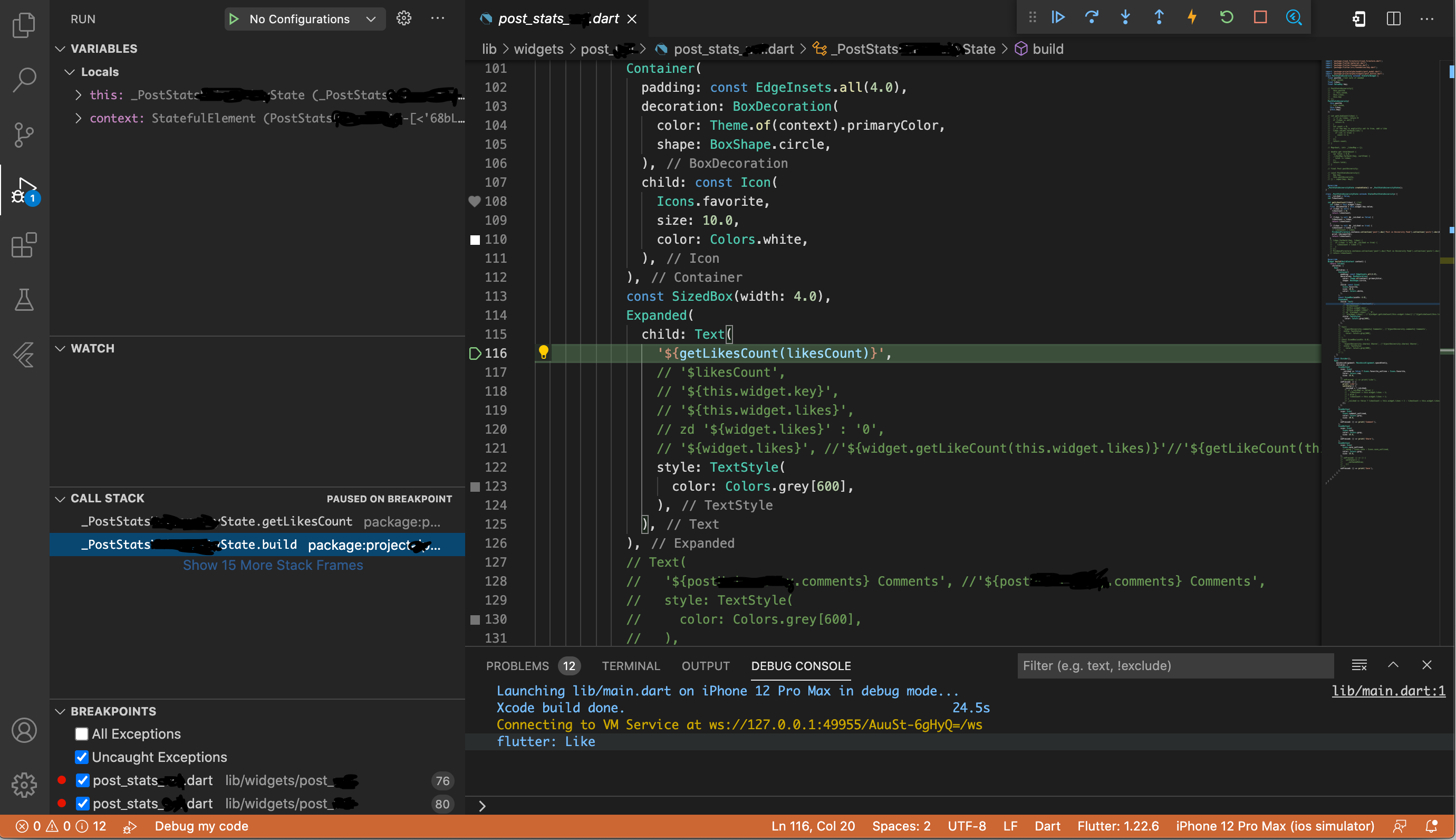
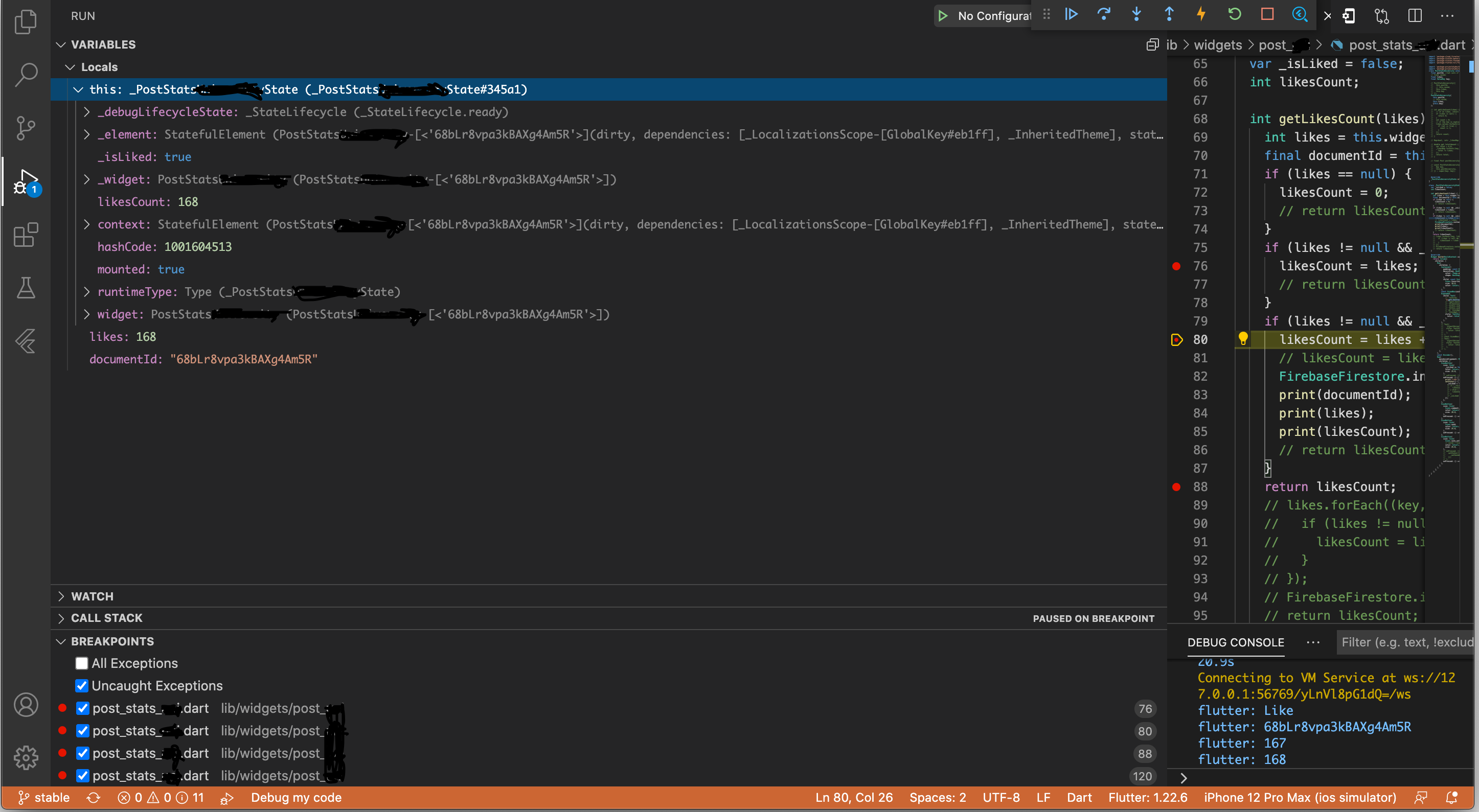
Hello! Attached you may see the debugger before I click on "like" (1 pic), and after I click on "like" (2 pics - they show the first 2 steps of the call stack)
Suzuki Tomohiro
Mar 2, 2021, 8:43:50 AM3/2/21
to Flutter Development (flutter-dev)
The stack trace tells why the addition is called multiple times.
Share the screenshots of stack trace when you stop at the line that unexpectedly increments the like count. I’ll tell you why the increments happens (just by reading the function names in there)
Alvaro Gonzalez Rico
Mar 2, 2021, 9:05:37 AM3/2/21
to Flutter Development (flutter-dev)
Hello! I really appreciate your patience. The stack trace has over 100 steps, which for the most part seem to be pretty repetitive: it seems to be calling "rebuild" and "update". I attached attached the step where I think it makes the unexpected increments ("perform rebuild"), a pic of the update, and a pic of the last step in the stack trace. I hope this helps you out, otherwise tell me what you need.
Suzuki Tomohiro
Mar 2, 2021, 9:18:52 AM3/2/21
to Alvaro Gonzalez Rico, Flutter Development (flutter-dev)
Please share the screenshots of stack trace when you stop at the line that unexpectedly increments the like count. I’ll tell you why the increments happens (just by reading the function names in there)
Very likely you increment like count when you “show” the likes.
To view this discussion on the web visit https://groups.google.com/d/msgid/flutter-dev/755c8a45-2ecb-46c6-90fd-ba15c8281ec1n%40googlegroups.com.
Alvaro Gonzalez Rico
Mar 2, 2021, 9:30:39 AM3/2/21
to Flutter Development (flutter-dev)
In this step (pic), is where I "show" the # of likes to the UI, when I do child: Text( '${getLikesCount(likesCount)}',). Otherwise, how can I know exactly at which step of the stack trace the unexpected increments of the like count is? The first 2 steps, the last step, and some steps in between were shared with you in my previous emails, so does the unexpected increments happen? Thanks
Suzuki Tomohiro
Mar 2, 2021, 9:36:57 AM3/2/21
to Alvaro Gonzalez Rico, Flutter Development (flutter-dev)
No, not that line. You wrote that likesCount was unexpectedly increased many times. Add breakpoint at that line.
To view this discussion on the web visit https://groups.google.com/d/msgid/flutter-dev/4bc1c317-a766-4424-afa1-78db31117a57n%40googlegroups.com.
Suzuki Tomohiro
Mar 2, 2021, 10:20:15 AM3/2/21
to Alvaro Gonzalez Rico, Flutter Development (flutter-dev)
Good. Now I know that you didn’t look at call stack. Open call stack. (see pic; red marker)

To view this discussion on the web visit https://groups.google.com/d/msgid/flutter-dev/cb2c530b-55fc-4689-8452-3d147ae55768n%40googlegroups.com.
Alvaro Gonzalez Rico
Mar 2, 2021, 10:26:31 AM3/2/21
to Flutter Development (flutter-dev)
Hello. Yes, I did look, the pictures sent in my previous emails were from the call stack. The only picture that was not, is the one sent in my last email. In my previous emails I shared pictures of my call stack: first 2 steps, the last step, and some steps in between. Please let me know what you think.
Suzuki Tomohiro
Mar 2, 2021, 11:31:10 AM3/2/21
to Alvaro Gonzalez Rico, Flutter Development (flutter-dev)
Attach the picture.
To view this discussion on the web visit https://groups.google.com/d/msgid/flutter-dev/d59453af-b800-473c-9e9d-bdfdfed90419n%40googlegroups.com.
Alvaro Gonzalez Rico
Mar 2, 2021, 11:36:51 AM3/2/21
to Flutter Development (flutter-dev)
Here go the pictures. Is this what you need?
Suzuki Tomohiro
Mar 2, 2021, 12:34:40 PM3/2/21
to Alvaro Gonzalez Rico, Flutter Development (flutter-dev)
Right. The call stack is showing that to to build the widget, your function is incrementing the like count. You shouldn’t do that because widgets are rebuilt repeatedly.

Solution: Do not increment like count when showing like count.
To view this discussion on the web visit https://groups.google.com/d/msgid/flutter-dev/872dcb50-7366-4ef8-8641-a9228b2cf4b1n%40googlegroups.com.
Alvaro Gonzalez Rico
Mar 2, 2021, 1:04:36 PM3/2/21
to Flutter Development (flutter-dev)
Oh I see what you are saying, thanks! So how would you show the count (instead of '${getLikesCount(likesCount)}',)?
Suzuki Tomohiro
Mar 2, 2021, 1:07:36 PM3/2/21
to Alvaro Gonzalez Rico, Flutter Development (flutter-dev)
GetLikesCount seems OK to show the like count. However, do not increment the like count within the function.
To view this discussion on the web visit https://groups.google.com/d/msgid/flutter-dev/37c07787-7368-437b-821b-6a3d631326efn%40googlegroups.com.
Alvaro Gonzalez Rico
Mar 2, 2021, 2:14:54 PM3/2/21
to Flutter Development (flutter-dev)
Do you mean writing $'getLikesCount'? Because it does not work if I write that. OR you are saying not incrementing the like count inside the actual GetLikesCount function? Thanks
Suzuki Tomohiro
Mar 2, 2021, 3:53:02 PM3/2/21
to Alvaro Gonzalez Rico, Flutter Development (flutter-dev)
> you are saying not incrementing the like count inside the actual getLikesCount function?
Yes, I’m saying this.
To view this discussion on the web visit https://groups.google.com/d/msgid/flutter-dev/2fed8ce0-64a8-4934-8779-7dfcdea82b62n%40googlegroups.com.
Alvaro Gonzalez Rico
Mar 2, 2021, 6:04:12 PM3/2/21
to Flutter Development (flutter-dev)
Hello! Thanks! It works! Now the only thing I'm not able to do is doing -1 to the # of likes on both firebase and the UI when you click on "unlike". Thanks
Suzuki Tomohiro
Mar 2, 2021, 8:13:48 PM3/2/21
to Alvaro Gonzalez Rico, Flutter Development (flutter-dev)
Glad to hear that you resolved the issue.
> "unlike"
I assume you know how to do that because you already know how to increment a number. Do you need help? If so, then explain the challenge / difficulty.
To view this discussion on the web visit https://groups.google.com/d/msgid/flutter-dev/1332257f-1c07-4a6f-be65-bb72ac8564f9n%40googlegroups.com.
Alvaro Gonzalez Rico
Mar 3, 2021, 9:10:40 AM3/3/21
to Flutter Development (flutter-dev)
Hello! It's not something difficult to do, but for some reason I am stuck. Here is what I am trying to do:
-when the post first appears in the screen, the # of likes has to be equal to the # of likes in firebase
-if the "like" button is clicked, then the # of likes is incremented by 1 (likes + 1)
-if it is "unlike" (meaning that was previously "liked"), the # of likes is decreased by 1 (likes - 1), but here the # of likes was already increased by 1 before, so you are just decreasing the # of likes to the # that was before it was "liked". You are still getting the # of likes from Firebase because the Firebase # of likes had been updated when you incremented the # of likes before. Here "unlike" is just UNdoing the increase in # of likes that took place when you previously clicked on "like"
My problem in this situation is that when I "unlike" I am not being able to decrease the # of likes by 1 (likes - 1). As you can see in my code (below), when "_isLiked == false", "likesCount = likes", but then when I "unlike", "_isLiked == false", so I never do the "likes - 1".
I think the solution would be to initialize the screen, so that when it first appears "likesCount = likes", and then when "_isLiked == false" do "likes - 1" and when "_isLiked == true" do "likes + 1". But I don't know how to do that. Thanks for the help!
class _PostStatsXState extends State<PostStatsX> {
var _isLiked = false;
int likesCount;
int newLikes;
int getLikesCount(likes) {
int likes = this.widget.likes;
final documentId = this.widget.key.value;
if (_isLiked == false) {
likesCount = likes;
FirebaseFirestore.instance.collection('post').doc('Post in X Feed').collection('posts').doc(documentId).update({'likes': likesCount});
}
if (_isLiked == true) {
likesCount = newLikes;
FirebaseFirestore.instance.collection('post').doc('Post in X Feed').collection('posts').doc(documentId).update({'likes': likesCount});
}
return likesCount;}
@override
Widget build(BuildContext context) {
.....
child: Text('${getLikesCount(likesCount)}',)
.....
IconButton(....
onPressed: () {
setState(() {
_isLiked = !_isLiked;
if (_isLiked == true) {
print('Like');
newLikes = this.widget.likes + 1;
} else { //the "else" is not being used right now
print('Unlike');
newLikes = this.widget.likes - 1;
}
});
},)}
Suzuki Tomohiro
Mar 3, 2021, 9:20:02 AM3/3/21
to Alvaro Gonzalez Rico, Flutter Development (flutter-dev)
That’s a valid problem to solve. About the current solution that holds an integer of a post, do you think Firebase (Firestore) needs to record users’ IDs of users who liked a post? (Not just an integer)
To view this discussion on the web visit https://groups.google.com/d/msgid/flutter-dev/ef24fe71-2402-46c4-bef4-1a697e5b348bn%40googlegroups.com.
Alvaro Gonzalez Rico
Mar 3, 2021, 9:53:57 AM3/3/21
to Flutter Development (flutter-dev)
Which one do you mean: "int likesCount" or "int newLikes"? Because none of them holds the user's ID.
Yes, I think that later on in the process I will integrate that (the fact that Firebase records which users liked a post), but for right now I do think I should overcomplicate myself.
Suzuki Tomohiro
Mar 3, 2021, 10:28:30 AM3/3/21
to Flutter Development (flutter-dev)
In general, the state of apps (such as _isLiked) are reset when they are restarted. Without saving user IDs for a post somewhere, how can your app remember which post the user liked before it was restarted?
To view this discussion on the web visit https://groups.google.com/d/msgid/flutter-dev/e2cb8024-73d6-4f52-91d8-0ba9ef7b686an%40googlegroups.com.
Alvaro Gonzalez Rico
Mar 3, 2021, 11:49:52 AM3/3/21
to Flutter Development (flutter-dev)
Yes, of course, I will add that later on, but for right now, I want to keep it simple. Without restarting the app, when the button "like" is unclicked, I am not able to do the -1 in the # of likes. Can you please help me with that. The code is in my previous email. Thanks!
Suzuki Tomohiro
Mar 3, 2021, 12:23:29 PM3/3/21
to Flutter Development (flutter-dev)
You know that you will need to change the logic later to include user IDs for likes. From my perspective, it sounds that you are now trying to solve the wrong problem that doesn’t take user IDs into account. I’m afraid that I cannot help this. I hope other folks in this mailing list have good solution.
To view this discussion on the web visit https://groups.google.com/d/msgid/flutter-dev/864ff9d7-95cd-42a4-8551-8d0c1ec01f60n%40googlegroups.com.
Alvaro Gonzalez Rico
Mar 4, 2021, 9:56:49 AM3/4/21
to Flutter Development (flutter-dev)
Hello, I understand what you are saying. What do you suggest is the best way to include the user IDs in the likes? Thanks
Suzuki Tomohiro
Mar 4, 2021, 10:13:23 AM3/4/21
to Alvaro Gonzalez Rico, Flutter Development (flutter-dev)
You’re welcome. Glad to hear you understand the problem of not saving the information of who liked what.
To view this discussion on the web visit https://groups.google.com/d/msgid/flutter-dev/859d0b52-a2ae-4b55-a716-5b101b77db1fn%40googlegroups.com.
Alvaro Gonzalez Rico
Mar 8, 2021, 9:58:29 AM3/8/21
to Flutter Development (flutter-dev)
Hello! I have been working on including the user IDs in the likes, but it seems that I am doing overwork for something that should not be too difficult to do. In your opinion, what do you suggest is the best way to include the user IDs in the likes (using Firebase Firestore)? Thanks a lot
Suzuki Tomohiro
Mar 8, 2021, 10:06:22 AM3/8/21
to Alvaro Gonzalez Rico, Flutter Development (flutter-dev)
“Like” implementation seems easy when you use Facebook and etc. but it’s difficult when implementing it by yourself.
My opinion is saving post IDs in a user’s document. It’s easy to list the posts a person liked.
Are you able to explain which part is difficult to you?
To view this discussion on the web visit https://groups.google.com/d/msgid/flutter-dev/1b68c02e-84b2-4cdb-8793-43c713e1caean%40googlegroups.com.
Alvaro Gonzalez Rico
Mar 8, 2021, 10:22:27 AM3/8/21
to Flutter Development (flutter-dev)
Hello! Yes, what I did is the following: each time a user clicks on "like", I created a database with all the posts a user has "liked" or "unliked" (if it was "liked" before). The next step I think is for each post to have access to whether a specific user has "liked" or not liked the post, so that the "like" button depends on that, and then we the app is restarted it changes according to what the user has done before restarting the app (if the user "liked" the post before restarting, then the button "like" would be turned on after the restart). The issue is that I am having problem getting the "user likes info for the posts" (from Firebase Firestore) for each post that is on the screen.
Suzuki Tomohiro
Mar 8, 2021, 2:51:37 PM3/8/21
to Alvaro Gonzalez Rico, Flutter Development (flutter-dev)
Nice. You are dealing with the right problem.
> The issue is that I am having problem getting the "user likes info for the posts" (from Firebase Firestore) for each post that is on the screen.
What do you think you need in “posts” documents?
To view this discussion on the web visit https://groups.google.com/d/msgid/flutter-dev/de3938af-c66a-4c09-a3e6-3d44c7b95f1bn%40googlegroups.com.
Alvaro Gonzalez Rico
Mar 8, 2021, 11:21:28 PM3/8/21
to Flutter Development (flutter-dev)
Hello! So in order to create the database I did: FirebaseFirestore.instance.collection('userFavorites').doc(userId).collection(documentId).doc(documentId).set({'isLiked': isLiked,});. Also, I know I am repeating when I say collection(documentId).doc(documentId), but I could not find a way to only do collection(documentId). So if you know of a better way, please tell me.
In order to get the likes that the user has completed, and see if it the user has liked a specific post, I was thinking of getting the data from the database in the same place where I get the text, username, image, etc of each post. I was thinking of using:
child: Container(
child: PostContainerX(
postDocs[index].data()['text'],
key: ValueKey(postDocs[index].id),
isLiked: FirebaseFirestore.instance.collection('userFavorites').doc(user.uid).collection(postDocs[index].id).doc(postDocs[index].id).get() == null ? false : FirebaseFirestore.instance.collection('userFavorites').doc(user.uid).collection(postDocs[index].id).doc(postDocs[index].id).get() ?? false, )),
I am pretty sure my error is in the last line because I do not really know how to get all the post IDs (where each of them is given a true/false depending on if the post is liked by the user), and then have the true/false as the value that goes in where the post is "liked" or blank (not liked yet). Thanks for the help






Jitendra Kumar Kumawat
Mar 9, 2021, 12:34:29 AM3/9/21
to Alvaro Gonzalez Rico, Flutter Development (flutter-dev)
Hello, My Dear Friend! Please like and subscribe to this youtube channel! Here you learn :
1: Creating a Modern Promo Video in After Effect
2: Modern Mobile Application Development in Flutter
3: Modern Web App with React-Hooks.
4: Modern Video Editing
5: Principle of Animation
6: Creating JavaScript Games.
https://youtu.be/cWnMXlFL_Qs
To view this discussion on the web visit https://groups.google.com/d/msgid/flutter-dev/94f494c4-50bb-424e-a8a0-1608911da733n%40googlegroups.com.
Suzuki Tomohiro
Mar 9, 2021, 12:50:09 AM3/9/21
to Alvaro Gonzalez Rico, Flutter Development (flutter-dev)
> Also, I know I am repeating when I say collection(documentId).doc(documentId
1. This is wrong way to specify collection. Name the collection such as :
collection('userFavorites').doc(userId).collection(‘posts’).doc(documentId)
2. Never query Firebase upon build method. The build method may be called many times in a second.
3. As you’re new to firebase, do not chain these operations. It obscures what you’re doing. So declare typed variables for the result of collection() and doc().
To view this discussion on the web visit https://groups.google.com/d/msgid/flutter-dev/94f494c4-50bb-424e-a8a0-1608911da733n%40googlegroups.com.
Alvaro Gonzalez Rico
Mar 9, 2021, 9:39:47 AM3/9/21
to Flutter Development (flutter-dev)
Hello. Thanks for the info. Do you suggest using the following code? I put this is the same document as where I handle the favorite posts of each user (where I sent it to the database).
currentUserLikes(BuildContext context) {
final likedResponse = FirebaseFirestore.instance.collection('userFavorites').doc(userId).collection('posts').doc(documentId);
return FutureBuilder<DocumentSnapshot>(
future: likedResponse.get(),
builder: (BuildContext context, AsyncSnapshot<DocumentSnapshot> snapshot) {
if (snapshot.connectionState == ConnectionState.done) {
Map<String, dynamic> data = snapshot.data.data();
return data['isLiked'];
}
},
);
}
Suzuki Tomohiro
Mar 9, 2021, 9:43:39 AM3/9/21
to Alvaro Gonzalez Rico, Flutter Development (flutter-dev)
It’s getting better.
Declare the return type of the method.
Declare the type of likedResponse.
To view this discussion on the web visit https://groups.google.com/d/msgid/flutter-dev/c4b06a00-a636-45d0-a95a-630e69085da6n%40googlegroups.com.
Alvaro Gonzalez Rico
Mar 9, 2021, 1:20:30 PM3/9/21
to Flutter Development (flutter-dev)
For "Declare the return type of the method" --> do you mean adding something here: "XXX currentUserLikes(BuildContext context) {"? The first 2 that come to my mind are "widget" and "future", but I am not sure.
For "Declare the type of likedResponse" --> do you mean adding something here: "final XXX likedResponse = FirebaseFirestore.instance"? What type could it be?
Thanks
Suzuki Tomohiro
Mar 9, 2021, 1:22:19 PM3/9/21
to Alvaro Gonzalez Rico, Flutter Development (flutter-dev)
Yes for both. Read their document. If that’s wrong it won’t compile (read error message).
To view this discussion on the web visit https://groups.google.com/d/msgid/flutter-dev/25c21b75-29aa-4b99-bf61-dd643ba080f0n%40googlegroups.com.
Alvaro Gonzalez Rico
Mar 11, 2021, 8:53:13 AM3/11/21
to Flutter Development (flutter-dev)
Hello, I think I am getting closer, but there is still something wrong with my code. I tried implementing what you said. Please let me know. Here is what I have:
bool currentUserLikes(String userId, String documentId) {
final likedResponse = FirebaseFirestore.instance.collection('userFavorites').doc(userId).collection('posts').doc(documentId);
FutureBuilder<DocumentSnapshot>(
future: likedResponse.get(),
builder: (_, AsyncSnapshot<DocumentSnapshot> snapshot) {
if (snapshot.connectionState == ConnectionState.done) {
Map<String, dynamic> data = snapshot.data.data();
userHasLiked = data['isLiked'];
print(userHasLiked);
}
}
);
return userHasLiked;
}
Suzuki Tomohiro
Mar 11, 2021, 9:01:00 AM3/11/21
to Alvaro Gonzalez Rico, Flutter Development (flutter-dev)
Every time. You need to explain the problem.
To view this discussion on the web visit https://groups.google.com/d/msgid/flutter-dev/57314c18-34bc-4952-854b-ec9bb819944an%40googlegroups.com.
Alvaro Gonzalez Rico
Mar 11, 2021, 9:36:03 AM3/11/21
to Flutter Development (flutter-dev)
Yes, here is where I think the problem is: when the the function is called,
builder: (_, AsyncSnapshot<DocumentSnapshot> snapshot) {
if (snapshot.connectionState == ConnectionState.done) {
Map<String, dynamic> data = snapshot.data.data();
userHasLiked = data['isLiked'];
print(userHasLiked);
the code above NEVER gets called, so when "return userHasLiked;" is called at the end, userHasLiked = null. So there is a problem with the code I put.
Also, the line (_, AsyncSnapshot<DocumentSnapshot> snapshot) { is underlined in blue, and flutter says "This function has a return type of 'Widget', but doesn't end with a return statement. Try adding a return statement, or changing the return type to 'void'" And if I add the void at the beginning of bool currentUserLikes, userHasLiked (in the return statement at the end) is underlined in red, and flutter says "A value of type 'bool' can't be returned from method 'currentUserLikes' because it has a return type of 'void'" and (_, AsyncSnapshot<DocumentSnapshot> snapshot) { is still underlined in blue. Based on this, what how should I changed my code from my last email? Thanks
Suzuki Tomohiro
Mar 11, 2021, 9:46:39 AM3/11/21
to Alvaro Gonzalez Rico, Flutter Development (flutter-dev)
Fix the function passed to the builder argument to return a widget.
To view this discussion on the web visit https://groups.google.com/d/msgid/flutter-dev/fbe047d5-72e8-4cdc-9bd6-d48c978fddc1n%40googlegroups.com.
Alvaro Gonzalez Rico
Mar 11, 2021, 10:18:09 AM3/11/21
to Flutter Development (flutter-dev)
And then if I want to get the bool value for userHasLiked, how would you do it? I currently have:
final docId = key.value;
final product = Provider.of<Product>(context);
final currentUserLikes = product.currentUserLikes(userId, docId);
bool userHasLiked = currentUserLikes.userHasLiked;
BUT the userHasLiked at the end is underlines in red, and flutter says the following: "The getter 'userHasLiked' isn't defined for the type 'bool'. Try importing the library that defines 'userHasLiked', correcting the name to the name of an existing getter, or defining a getter or field named 'userHasLiked'." My goal is just to get the bool value that currentUserLikes has (either true or false depending on whether the user has liked it in the past).
Suzuki Tomohiro
Mar 11, 2021, 10:27:19 AM3/11/21
to Alvaro Gonzalez Rico, Flutter Development (flutter-dev)
Declare all variables with types.
To view this discussion on the web visit https://groups.google.com/d/msgid/flutter-dev/765a99d7-8670-4414-ac5d-5b91430cb626n%40googlegroups.com.
Alvaro Gonzalez Rico
Mar 11, 2021, 8:59:55 PM3/11/21
to Flutter Development (flutter-dev)
Hello. I do not understand how declaring the type of variable will get rid of the error. Can you please explain?
Suzuki Tomohiro
Mar 11, 2021, 9:06:19 PM3/11/21
to Alvaro Gonzalez Rico, Flutter Development (flutter-dev)
Because the error is about the types. The error happens when you don’t know the types of the variables.
> "The getter 'userHasLiked' isn't defined for the type 'bool'.
To view this discussion on the web visit https://groups.google.com/d/msgid/flutter-dev/2f9e0600-712e-4f95-910d-602a1d1dcaccn%40googlegroups.com.
Alvaro Gonzalez Rico
Mar 12, 2021, 8:35:00 AM3/12/21
to Flutter Development (flutter-dev)
Ok makes sense. Thanks. I think I have stated all the variables I could, but I still get the error. What is it that I am missing? Here is the code I used:
In my provider file:
class Product with ChangeNotifier {
bool userHasLiked;
bool currentUserLikes(String userId, String documentId) {
print(userId);
print(documentId);
final likedResponse = FirebaseFirestore.instance.collection('userFavorites').doc(userId).collection('posts').doc(documentId);
FutureBuilder<DocumentSnapshot>(
future: likedResponse.get(),
builder: (context, AsyncSnapshot<DocumentSnapshot> snapshot) {
if (snapshot.connectionState == ConnectionState.done) {
Map<String, dynamic> data = snapshot.data.data();
userHasLiked = data['isLiked'];
print(userHasLiked);
notifyListeners();
}
return;
}
);
}
In the file where I want info from the provider:
Widget build(BuildContext context) {
final docId = key.value;
final product = Provider.of<Product>(context);
final currentUserLikes = product.currentUserLikes(userId, docId);
bool userHasLiked = currentUserLikes.userHasLiked;
return Container()....
What is it that I am missing? Thanks
Suzuki Tomohiro
Mar 12, 2021, 9:04:42 AM3/12/21
to Alvaro Gonzalez Rico, Flutter Development (flutter-dev)
Declare the type
> final currentUserLikes = product.currentUserLikes(userId, docId);
To view this discussion on the web visit https://groups.google.com/d/msgid/flutter-dev/1cc14842-2029-434f-92da-6a20d7c30a2dn%40googlegroups.com.
Alvaro Gonzalez Rico
Mar 12, 2021, 9:09:21 AM3/12/21
to Flutter Development (flutter-dev)
Even by declaring the type: final bool currentUserLikes = product.currentUserLikes(userId, docId);, I still get the error "The getter 'userHasLiked' isn't defined for the type 'bool'. Try importing the library that defines 'userHasLiked', correcting the name to the name of an existing getter, or defining a getter or field named 'userHasLiked'" for bool userHasLiked = currentUserLikes.userHasLiked;
Suzuki Tomohiro
Mar 12, 2021, 9:19:13 AM3/12/21
to Alvaro Gonzalez Rico, Flutter Development (flutter-dev)
Now the error is clear to me. currentUserLikes is a bool (true or false) variable. It does not have a method userHasLiked. Anything unclear to you?
(I don't know how to fix it, because I don't know why you want a bool variable to have userHasLiked method)
To view this discussion on the web visit https://groups.google.com/d/msgid/flutter-dev/e0e6953d-8f0d-40fc-81d1-4527df55edb4n%40googlegroups.com.
Alvaro Gonzalez Rico
Mar 12, 2021, 9:27:50 AM3/12/21
to Flutter Development (flutter-dev)
Thanks for the clarification! My objective is that once I call the function currentUserLikes (which probably has an error in the way I set it up), I get from Firebase the info regarding if the current user has liked the post or not. So that when the IU is initialized, the "like" button is either true/false depending if the current user has liked it or not before. And then when the current user likes/unlikes the post, the database with all the likes from the current user is also updated. The code below is the code I use to get the info regarding if the current user has liked the post or not:
Widget currentUserLikes(String userId, String documentId) {
print(userId);
print(documentId);
final likedResponse = FirebaseFirestore.instance.collection('userFavorites').doc(userId).collection('posts').doc(documentId);
FutureBuilder<DocumentSnapshot>(
future: likedResponse.get(),
builder: (context, AsyncSnapshot<DocumentSnapshot> snapshot) {
if (snapshot.connectionState == ConnectionState.done) {
Map<String, bool> data = snapshot.data.data();
bool userHasLiked = data['isLiked'];
print(userHasLiked);
notifyListeners();
}
return;
}
);
}
Suzuki Tomohiro
Mar 12, 2021, 9:37:20 AM3/12/21
to Flutter Development (flutter-dev)
To resolve the error (a bool variable does not have userHasLiked method), anything unclear to you?
To view this discussion on the web visit https://groups.google.com/d/msgid/flutter-dev/61bc004d-48ff-4bd8-849d-8d0a45de51cdn%40googlegroups.com.
Alvaro Gonzalez Rico
Mar 12, 2021, 9:46:57 AM3/12/21
to Flutter Development (flutter-dev)
How would you do it then? The userHasLiked is just the name of a variable that is a bool that turns true/false based on the info that is download from firebase for each specific post.
Suzuki Tomohiro
Mar 12, 2021, 2:21:01 PM3/12/21
to Alvaro Gonzalez Rico, Flutter Development (flutter-dev)
No, “userHasLiked” is not a variable name in “currentUserLikes.userHasLiked” where currentUserLikes is a bool variable.
To view this discussion on the web visit https://groups.google.com/d/msgid/flutter-dev/a0c608cf-d7f0-4959-a68e-f137d6b7e993n%40googlegroups.com.
Alvaro Gonzalez Rico
Mar 12, 2021, 2:36:52 PM3/12/21
to Flutter Development (flutter-dev)
Makes sense thanks! So if I want to use:
Widget currentUserLikes(String userId, String documentId) {
print(userId);
print(documentId);
final likedResponse = FirebaseFirestore.instance.collection('userFavorites').doc(userId).collection('posts').doc(documentId);
FutureBuilder<DocumentSnapshot>(
future: likedResponse.get(),
builder: (context, AsyncSnapshot<DocumentSnapshot> snapshot) {
if (snapshot.connectionState == ConnectionState.done) {
Map<String, bool> data = snapshot.data.data();
bool userHasLiked = data['isLiked'];
print(userHasLiked);
notifyListeners();
}
return;
}
);
}
--> to return a variable named userHasLiked that turns true/false based on the info that is download from firebase for each specific post, how would you modify the code above? Thanks for your patience
Suzuki Tomohiro
Mar 12, 2021, 3:13:35 PM3/12/21
to Alvaro Gonzalez Rico, Flutter Development (flutter-dev)
You cannot return a bool from a function that require Future. Learn how to use FutureBuilder.
To view this discussion on the web visit https://groups.google.com/d/msgid/flutter-dev/25cd9539-e022-49fa-93cd-fae31355a28an%40googlegroups.com.
Reply all
Reply to author
Forward
0 new messages