
DNS and connect timing are reported as blocking in FB Net Panel
49 views
Skip to first unread message

les.m...@eperformancegroup.com
Nov 10, 2014, 10:30:47 PM11/10/14
to fir...@googlegroups.com
I am trying to verify that the timings in the Network panel are accurate. This is for an application performance analysis utility I am developing for a client.
I am using a network emulator to force additional artificial latency into the network.
My test preconditions are to clear the windows DNS (ifconfig /flushdns), and set Firefox not to cache any DNS entries (network.dnsCacheExpiration and network.dnsCacheEntries both set to 0).
I am trying to validate what I see in the net panel is correct by using Wireshark to see the actual network traffic. The results prove that the DNS lookup and connect are being lumped into blocking time.
I am using a static image from my own website to test. I am adding about 225ms of RTT latency.
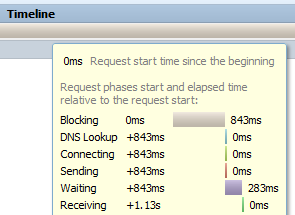
The FB network panel shows blocking of 843ms, waiting of 283ms
Wireshark shows DNS lookup time of 567ms
Wireshark shows TCP connect of 275ms. Add in DNS time and the total is 842ms.
Wireshark shows response time of 284ms
So - the total times match up - but the network panel lumped both the DNS time and the TCP connect time into blocking.
Can this be easily fixed / is there a workaround I might use? HAR file is attached.
FF 33.1, Firebug 2.0.6
In a repeat test, I can confirm that this is repeatable.
FB net panel shows blocking of 620ms, wait of 284ms
"timings": {
"blocked": 620,
"dns": 0,
"connect": 0,
"send": 0,
"wait": 284,
"receive": 0
},
For the repeat test:
Wireshark shows DNS of 341 ms
Wireshark TCP connect time of 274 ms - a total of 615ms
wireshark shows response time of 283 ms


Sebastian Zartner
Nov 11, 2014, 2:40:14 AM11/11/14
to fir...@googlegroups.com
Firefox has a hard time to provide Firebug with the correct timing info for DNS. See issue 7668 and bug 862856.
If you want to help, you should try to find the regression range using mozregression.
Sebastian
If you want to help, you should try to find the regression range using mozregression.
Sebastian
les.m...@eperformancegroup.com
Nov 12, 2014, 7:24:34 AM11/12/14
to fir...@googlegroups.com
Thanks Sebastian.
Just a minor clarification - the issue is with both Connect time and DNS.
It sounds like I might have to go back to a Firefox release that is about 2 years old in order to get a working version. That worries me! Is there another group I should post a message on to see if there is any hope of getting this fixed? I wonder if the W3C Navigation Timings are bogus too.
I realize that tracking performance when the platform includes things such as DNS prefetch and anticipatory connections can become very complex. I am hoping that the Firefox team considers providing accurate performance information as a priority.
- Les
Sebastian Zartner
Jan 15, 2015, 3:02:29 PM1/15/15
to fir...@googlegroups.com
Sorry for the late reply. Note that people actively work on fixing bug 862856. Let's see if the problem goes away once that issue is closed.
Sebastian
Sebastian
Reply all
Reply to author
Forward
0 new messages