
Find CSS-selectors which are involved in formatting an element
155 views
Skip to first unread message

Avenger
Nov 30, 2013, 3:37:11 AM11/30/13
to fir...@googlegroups.com
I am pretty sure, that FB once had a functionality to see exactly which CSS-selectors are involved in formatting the selected element (in the "Computed" tab???).
But I can't find this info any more...
Is my memory cheating me, or don't I just find it, or has this feature really been removed?
(IE has such a capability still.)
But I can't find this info any more...
Is my memory cheating me, or don't I just find it, or has this feature really been removed?
(IE has such a capability still.)

Sebastian Zartner
Nov 30, 2013, 5:27:57 PM11/30/13
to fir...@googlegroups.com
This feature still exists. The Style side panel shows you all CSS rules related to the selected element. And the Computed side panel provides you with info about which values make up the final computed value of each CSS property.
Sebastian
Sebastian

Francis Vila
May 24, 2016, 8:56:31 AM5/24/16
to Firebug
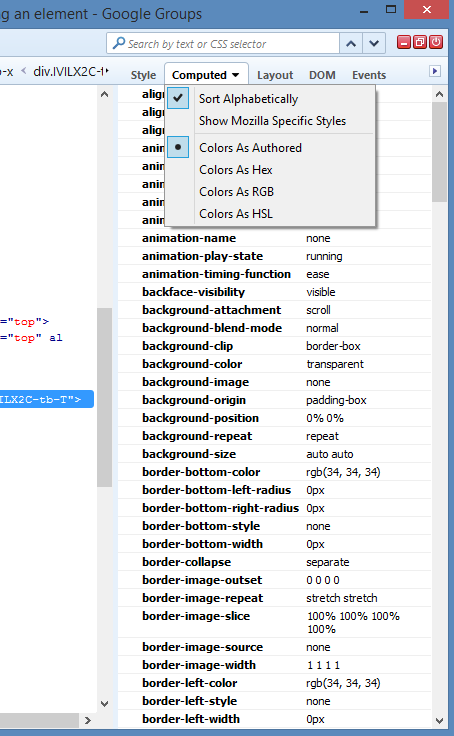
I have the same problem. Below is a screenshot of the Computed tab. It used to contain the list of user-modified styles, with for each one a list of all the links to the stylesheets attempting to modify the style, ending with the one that prevailed. Now it shows all the styles in the book, with no information as to whether they are user-modified or just have the default value. I included the drop-down menu to show there is no option there to change back to the old system.
Sebastian Zartner
May 24, 2016, 3:21:39 PM5/24/16
to Firebug
I've already fixed that in issue #8018. An official release is still pending, though you can already download a fixed build I have created.
Sebastian
Sebastian
Message has been deleted
Francis Vila
May 26, 2016, 3:12:30 AM5/26/16
to Firebug
Thanks Sebastian, that works!
Reply all
Reply to author
Forward
0 new messages