
HTML and CSS disappeard in firebug
Skip to first unread message

Muhammad Mutahhar Naseer
Jan 1, 2015, 3:24:22 AM1/1/15
to fir...@googlegroups.com
Hello all!
Firebug is acting weird in Firefox from yesterday it is not showing HTML and CSS code when I enable Console Panel. But when Console Panel is disabled it starts showing HTML and CSS code of page.
I tried removing and then again installing FireBug but no luck.
Can anyone help.....?

Jan Honza Odvarko
Jan 5, 2015, 5:20:52 AM1/5/15
to fir...@googlegroups.com
Seems to be working for me.
Do you have any other extensions installed?
Does it work if you install Firebug into a new fresh Firefox profile?
https://getfirebug.com/wiki/index.php/Install_Firebug_into_a_clean_profile
Honza
Do you have any other extensions installed?
Does it work if you install Firebug into a new fresh Firefox profile?
https://getfirebug.com/wiki/index.php/Install_Firebug_into_a_clean_profile
Honza
Message has been deleted
Muhammad Mutahhar Naseer
Jan 9, 2015, 4:38:06 AM1/9/15
to fir...@googlegroups.com
Thanks Honza for your help
Firebug in working fine in new firefox profile.
now how can I make it run fine in firefox old profile.
Firebug in working fine in new firefox profile.
now how can I make it run fine in firefox old profile.
Jan Honza Odvarko
Jan 12, 2015, 2:59:50 AM1/12/15
to fir...@googlegroups.com
> now how can I make it run fine in firefox old profile.
I'd try to disable all extensions first. If it helps
you can enable them again step by step and
check if there is an extension that's causing
the problem.
Honza
you can enable them again step by step and
check if there is an extension that's causing
the problem.
Honza
Muhammad Mutahhar
Jan 13, 2015, 8:03:58 AM1/13/15
to fir...@googlegroups.com
I Tried by disabling all other extensions, restarted the FF but issue was still there. HTML, CSS is now showing when Console Panel is enabled but appeared when I diabled the Console Panel.
Muhammad Mutahhar
Jan 13, 2015, 8:08:33 AM1/13/15
to fir...@googlegroups.com
By enabling Console Panel not only html, css got disappear but other tabs (script, DOM, net, cookies) are also not showing anything.

Sebastian Zartner
Jan 14, 2015, 4:22:30 PM1/14/15
to fir...@googlegroups.com
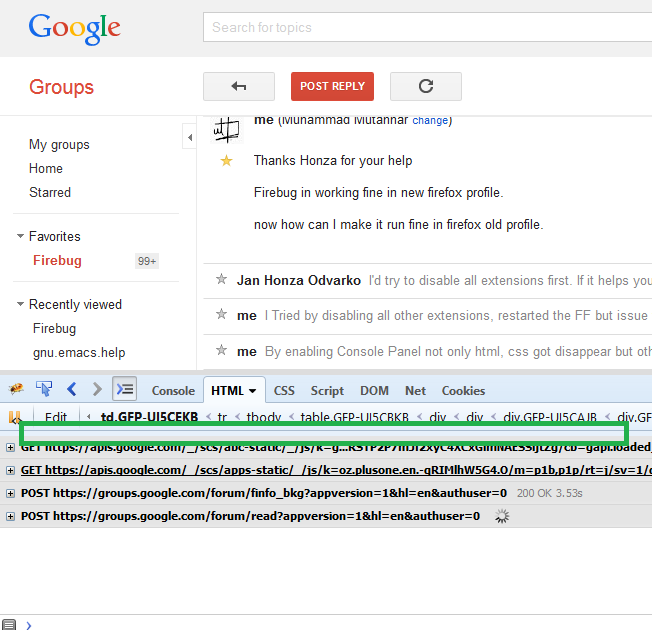
Could you please post a screenshot of what you see?
Sebastian
Sebastian
Muhammad Mutahhar
Jan 19, 2015, 2:58:11 AM1/19/15
to fir...@googlegroups.com


Sebastian Zartner
Jan 19, 2015, 7:05:44 AM1/19/15
to fir...@googlegroups.com
What you see is the Command Line Popup. It looks like you resized it to fill the whole panel height. You either need to drag its resizer down, which is located below the panel toolbar
or you need to click the following button to disable the Command Line Popup:

Muhammad Mutahhar
Jan 19, 2015, 5:27:54 PM1/19/15
to fir...@googlegroups.com
Sebastian Zartner thank you very much that actually worked. you are a life saver... :-)
Sebastian Zartner
Jan 20, 2015, 9:17:15 AM1/20/15
to fir...@googlegroups.com
You're welcome. I'm happy I could help.
Sebastian
Sebastian
Reply all
Reply to author
Forward
0 new messages