
SMV Movies - FFmpeg Documentation clarification
240 views
Skip to first unread message

Sean McCready
Apr 4, 2016, 10:51:32 AM4/4/16
to FDS and Smokeview Discussions
Folks,
I have downloaded and unzipped the static FFMpeg file and run the .bat.
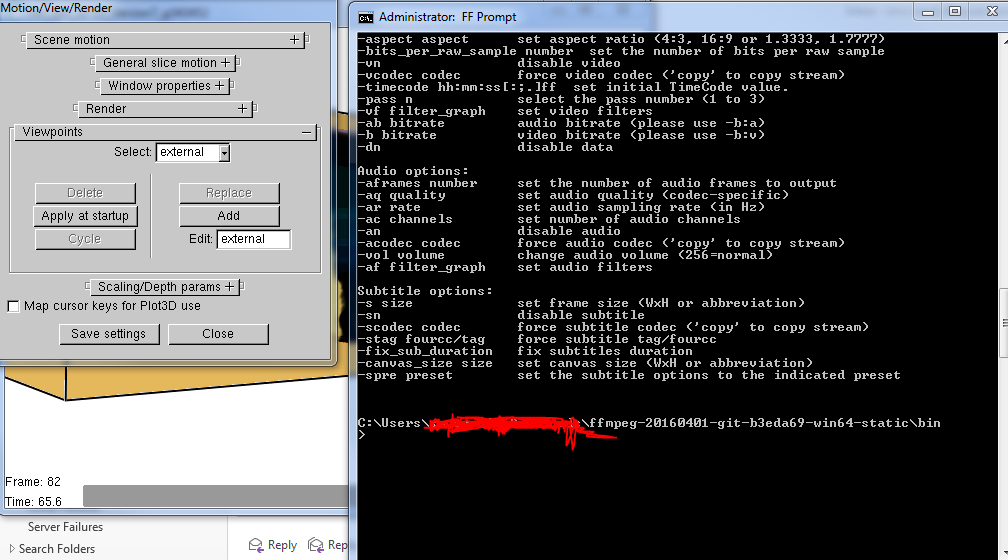
I open Smokeview and examine the options in the Motion/View/Render dialogue box and do not see the 'Movie' selection. The photo shows FFMpeg's command prompt & the Motion/View/Render window, with Smokeview Behind.
Is there some additional guidance on the process that I require that isn't included in Chapter 13 of the Smokeview User Guide, or the basic -h report from FFMpeg?
For instance, is the file location of the FFMpeg .bat file or the smokeview file relevant to the execution? Does some command in the FFMpeg command prompt window require execution? Do I need to assign specific codecs first? Nothing seemed immediately relevant from the -h report or SMV User Guide.
Thanks in advance,
Sean

Dave McGill
Apr 4, 2016, 10:55:09 AM4/4/16
to FDS and Smokeview Discussions
Sean,
Try adding, " C:\Program Files\ffmpeg_64_bit\bin "
to the Environmental Variable path.
Dave
to
Sean McCready
Apr 4, 2016, 11:02:49 AM4/4/16
to FDS and Smokeview Discussions
Thanks Dave.
I'm not sure I completely understand, please bear with me.
Is this a Smokeview or FFMpeg operation?
Could you clarify how to do that in practice?
Thanks,
Sean
Dave McGill
Apr 4, 2016, 11:14:43 AM4/4/16
to FDS and Smokeview Discussions
Sean,
Sorry, it involves getting your PC to recognize the new program. Here are more complete directions, originally provided by Glenn Forney.
-
Open a Command Prompt window, type ffmpeg, and press Enter. The program should open in the Command Prompt window. If it does, then close the Command Prompt. If it doesn’t, that indicates that the Path has not been modified successfully, and will have to be done manually.
Click the Start Button, in the Search Programs and Files text box, type Path.
From the list that appears, select Edit the System Environmental Variables.
In the System Properties dialog box, click Environmental Variables.
In the System Variables list, select Path, and click Edit.
Add the following at the end of the list, ;C:\Program Files\ffmpeg_64_bit\bin
Dave
Sean McCready
Apr 4, 2016, 11:26:59 AM4/4/16
to FDS and Smokeview Discussions
Thanks Dave for that direction!
Any ideas?
I've also made an assumption and moved all files unzipped from the FFMpeg pack into 'C:\Program Files\ffmpeg_64_bit\.'
If anyone is circling back to this topic in the future, I did this because FFmpeg does not seem to have a recommended default directory, and in order for the above Environmental Variable format to work, you must unzip the FFMpeg files to 'C:\Program Files\ffmpeg_64_bit\'
The cmd.exe now accepts 'ffmpeg' as a command. However, the option is still not appearing in the Motion/View/Render dialogue. I'm going to reboot and report back, but it seems like there may be some additional troubleshooting required.
If anyone is circling back to this topic in the future, I did this because FFmpeg does not seem to have a recommended default directory, and in order for the above Environmental Variable format to work, you must unzip the FFMpeg files to 'C:\Program Files\ffmpeg_64_bit\'
The cmd.exe now accepts 'ffmpeg' as a command. However, the option is still not appearing in the Motion/View/Render dialogue. I'm going to reboot and report back, but it seems like there may be some additional troubleshooting required.
Any ideas?
Cheers,
Sean
Sean McCready
Apr 4, 2016, 12:46:38 PM4/4/16
to FDS and Smokeview Discussions
Update: A reboot did not resolve this issue.
Dave McGill
Apr 4, 2016, 1:27:52 PM4/4/16
to FDS and Smokeview Discussions
Sean,
I'm having the same problem. I've emailed Glenn and asked him to have a look.
Dave

Glenn Forney
Apr 4, 2016, 1:45:49 PM4/4/16
to fds...@googlegroups.com
I'll take a look at it.
glenn
--
You received this message because you are subscribed to the Google Groups "FDS and Smokeview Discussions" group.
To unsubscribe from this group and stop receiving emails from it, send an email to fds-smv+u...@googlegroups.com.
To post to this group, send email to fds...@googlegroups.com.
To view this discussion on the web visit https://groups.google.com/d/msgid/fds-smv/05641922-2f9b-4cf6-adea-239b4633e5c7%40googlegroups.com.
For more options, visit https://groups.google.com/d/optout.
Glenn Forney
Glenn Forney
Apr 4, 2016, 2:06:53 PM4/4/16
to FDS and Smokeview Discussions
this is a long shot. try putting it in a directory name that doesn't have any blanks - for me that would be something like
c:\users\gforney\bin
add the directory to your path and reboot
On Monday, April 4, 2016 at 1:45:49 PM UTC-4, Glenn Forney wrote:
I'll take a look at it.glenn
--Glenn Forney
Glenn Forney
Apr 4, 2016, 2:32:43 PM4/4/16
to fds...@googlegroups.com
here is a link to the ffmpeg and ffmplay that I am using
To unsubscribe from this group and stop receiving emails from it, send an email to fds-smv+u...@googlegroups.com.
To post to this group, send email to fds...@googlegroups.com.
To view this discussion on the web visit https://groups.google.com/d/msgid/fds-smv/1e77c771-d6ec-4b7c-8b0b-52bd40a4a796%40googlegroups.com.
For more options, visit https://groups.google.com/d/optout.
Glenn Forney
Sean McCready
Apr 4, 2016, 2:43:47 PM4/4/16
to FDS and Smokeview Discussions
Thanks Glenn,
I will attempt using your version & a directory without spaces and report back.
Cheers,
Sean
Glenn Forney
Apr 4, 2016, 2:46:59 PM4/4/16
to fds...@googlegroups.com
also try running this from the command line
ffmpeg -version
this is how smokeview decides whether you have ffmpeg or not (using your version of ffmpeg also)
To view this discussion on the web visit https://groups.google.com/d/msgid/fds-smv/42c3a5f6-0b5c-4d46-9d12-f11b810ef461%40googlegroups.com.
For more options, visit https://groups.google.com/d/optout.
Glenn Forney
Reply all
Reply to author
Forward
0 new messages