Not able to login to Kie Workbench using 6.5.0.Final

1,945 views
Skip to first unread message

Lakshmi Mahabaleshwara

unread,
Nov 21, 2016, 7:09:00 PM11/21/16
to Drools Setup
Hi All,

I have setup the Kie Web and Kie server using 6.5.0.Final version. When I access http://localhost:8080/kie-wb/, I get the login page. After entering username and password, Blank page appears and gets stuck. I see below errors in the log file.

Nov 21, 2016 3:49:40 PM org.kie.server.services.impl.controller.DefaultRestControllerImpl connect

WARNING: Exception encountered while syncing with controller at http://localhost:8080/kie-wb/rest/controller/server/tomcat-kieserver error Error while sending PUT request to http://localhost:8080/kie-wb/rest/controller/server/tomcat-kieserver response code 500


Refreshing the page shows this error 

java.lang.NullPointerException
	java.util.HashSet.<init>(HashSet.java:116)
	org.jboss.errai.security.shared.api.identity.UserImpl.<init>(UserImpl.java:79)
	org.jboss.errai.security.shared.api.identity.UserImpl.<init>(UserImpl.java:68)
	org.uberfire.ext.security.server.ServletSecurityAuthenticationService.getUser(ServletSecurityAuthenticationService.java:115)
	org.uberfire.ext.security.server.ServletSecurityAuthenticationService$Proxy$_$$_WeldClientProxy.getUser(ServletSecurityAuthenticationService$Proxy$_$$_WeldClientProxy.java)
	org.jboss.errai.security.server.servlet.UserHostPageFilter.doFilter(UserHostPageFilter.java:70)
	org.uberfire.ext.security.server.SecureHeadersFilter.doFilter(SecureHeadersFilter.java:69)
	org.uberfire.ext.security.server.SecurityIntegrationFilter.doFilter(SecurityIntegrationFilter.java:57)

Can anyone please help to resolve the issue?
Thanks
Lakshmi

Lakshmi Mahabaleshwara

unread,
Nov 29, 2016, 4:29:02 PM11/29/16
to Drools Setup
Can anyone please help?

I am using Java 8 and Tomcat 8. Kie workbench page gets stuck after login with below errors

[KieServer-ControllerConnect] org.kie.server.services.impl.controller.DefaultRestControllerImpl.connect Exception encountered while syncing with controller at http://localhost:8080/kie-wb/rest/controller/server/tomcat-kieserver error Error while sending PUT request to http://localhost:8080/kie-wb/rest/controller/server/tomcat-kieserver response code 500

Michael Anstis

unread,
Nov 29, 2016, 4:33:36 PM11/29/16
to drools...@googlegroups.com

Have you followed the additional configuration steps for Tomcat contained in the Tomcat WAR (and referenced from the User Guide)?

--
You received this message because you are subscribed to the Google Groups "Drools Setup" group.
To unsubscribe from this group and stop receiving emails from it, send an email to drools-setup+unsubscribe@googlegroups.com.
To post to this group, send email to drools...@googlegroups.com.
To view this discussion on the web visit https://groups.google.com/d/msgid/drools-setup/ec27e458-4a21-4491-a3c8-d855625c0657%40googlegroups.com.
For more options, visit https://groups.google.com/d/optout.

Lakshmi Mahabaleshwara

unread,
Nov 29, 2016, 4:45:55 PM11/29/16
to Drools Setup
Hi Michael,
Thank you for replying.
I have followed below steps from README.TXT document. Are there any other steps I am missing?

Installation notes
==================


1. Install bitronix transaction manager into your tomcat 7
- copy following libs into TOMCAT_HOME/lib
    * btm-2.1.4.jar
    * btm-tomcat55-lifecycle-2.1.4.jar
    * h2-1.3.161.jar
    * jta-1.1.jar
    * slf4j-api-1.7.2.jar
    * slf4j-jdk14-1.7.2.jar

    NOTE: versions of the libraries can be different as these are the actual on the time of writing.

2. Create configuration files inside TOMCAT_HOME/conf
    * btm-config.properties
    ************************ sample btm-config.properties *************************
         bitronix.tm.serverId=tomcat-btm-node0
         bitronix.tm.journal.disk.logPart1Filename=${btm.root}/work/btm1.tlog
         bitronix.tm.journal.disk.logPart2Filename=${btm.root}/work/btm2.tlog
         bitronix.tm.resource.configuration=${btm.root}/conf/resources.properties

    *******************************************************************************


    * resources.properties
    ************************ sample resources.properties **************************
         resource.ds1.className=bitronix.tm.resource.jdbc.lrc.LrcXADataSource
         resource.ds1.uniqueName=jdbc/jbpm
         resource.ds1.minPoolSize=10
         resource.ds1.maxPoolSize=20
         resource.ds1.driverProperties.driverClassName=org.h2.Driver
         resource.ds1.driverProperties.url=jdbc:h2:file:~/jbpm
         resource.ds1.driverProperties.user=sa
         resource.ds1.driverProperties.password=
         resource.ds1.allowLocalTransactions=true
    *******************************************************************************

    NOTE: jdbc/jbpm is the JNDI name used by tomcat distribution of the application

3. Define system properties for btm.root, bitronix config file, JBoss logging provider and others.

    create setenv.sh (or setenv.bat) file inside TOMCAT_HOME/bin and add following:

    CATALINA_OPTS="-Xmx512M -XX:MaxPermSize=512m -Dbtm.root=$CATALINA_HOME \
    -Dbitronix.tm.configuration=$CATALINA_HOME/conf/btm-config.properties \
    -Djbpm.tsr.jndi.lookup=java:comp/env/TransactionSynchronizationRegistry \
    -Djava.security.auth.login.config=$CATALINA_HOME/webapps/kie-drools-wb/WEB-INF/classes/login.config \
    -Dorg.jboss.logging.provider=jdk"

    NOTE: On Debian based systems $CATALINA_HOME needs to be replaced with $CATALINA_BASE. ($CATALINA_HOME defaults to /usr/share/tomcat7 and $CATALINA_BASE defaults to /var/lib/tomcat7/)
    NOTE: this is an example for unix like systems for Windows $CATALINA_HOME needs to be replaced with windows env variable or absolute path
    NOTE: java.security.auth.login.config value includes name of the folder in which application is deployed by default it assumes kie-drools-wb so ensure that matches real installation.
    login.config file can be externalized as well meaning be placed outside of war file.


   *******************************************************************************

4. Configure JEE security for kie-wb on tomcat (with default realm backed by tomcat-users.xml)

   2a. Copy "kie-tomcat-integration" JAR into TOMCAT_HOME/lib (org.kie:kie-tomcat-integration)
   2b. Copy "JACC" JAR into TOMCAT_HOME/lib (javax.security.jacc:artifactId=javax.security.jacc-api in JBoss Maven Repository)
   2c. Copy "slf4j-api" JAR into TOMCAT_HOME/lib (org.slf4j:artifactId=slf4j-api in JBoss Maven Repository)
   2d. Add valve configuration into TOMCAT_HOME/conf/server.xml inside Host element as last valve definition:

      <Valve className="org.kie.integration.tomcat.JACCValve" />

   2e. Edit TOMCAT_HOME/conf/tomcat-users.xml to include roles and users, make sure there will be 'analyst' or 'admin' roles defined as it's required to be authorized to use kie-wb
To unsubscribe from this group and stop receiving emails from it, send an email to drools-setup...@googlegroups.com.

Michael Anstis

unread,
Nov 30, 2016, 3:14:34 PM11/30/16
to drools...@googlegroups.com
The README and WAR names suggest we target Tomcat 7.

IDK whether Tomcat 8 has significant changes compared to 7; but I would recommend trying the WAR on the correct version of the container it targets.

That said we have found our Tomcat WAR for our 7.x series needs fixing and I unfortunately would not be surprised if our Tomcat WAR for 6.5 was broken (it doesn't usually get a lot of attention, we mainly target Wildfly and EAP).

Please let me know how you get on.

With kind regards,

Mike

To unsubscribe from this group and stop receiving emails from it, send an email to drools-setup+unsubscribe@googlegroups.com.

To post to this group, send email to drools...@googlegroups.com.

Lakshmi

unread,
Nov 30, 2016, 4:05:28 PM11/30/16
to drools...@googlegroups.com
Hi Mike,

I did try in tomcat 7 and had the same issue; the page gets stuck after login. But 6.4.0.Final web and server war works perfectly fine with tomcat 7 and tomcat 8. 
For 6.5.0.final version, I replaced kie-tomcat-integration-6.5.0.Final in the lib folder and replaced kie-web and kie-server war files of 6.5.0 and restarted the server

I observed while logging into 6.4.0.Final we see http://localhost:8080/kie-wb/kie-wb.html whereas in 6.5.0.Final it's http://localhost:8080/kie-wb/kie-wb.jsp.
I extracted the kie-wb.war and saw some difference (screenshot attached. LHS marked is 6.5.0.Final, and RHS is 6.4.0.Final) 

Have any changes been done in 6.5.0.final in kie-wb?

Please let me know.
Thanks
Lakshmi

Inline image 2

--
You received this message because you are subscribed to a topic in the Google Groups "Drools Setup" group.
To unsubscribe from this topic, visit https://groups.google.com/d/topic/drools-setup/4XqPfdF-ouA/unsubscribe.
To unsubscribe from this group and all its topics, send an email to drools-setup+unsubscribe@googlegroups.com.

To post to this group, send email to drools...@googlegroups.com.

Michael Anstis

unread,
Nov 30, 2016, 4:12:37 PM11/30/16
to drools...@googlegroups.com

Hello,

Your left screenshot shows kie-drools-wb whereas your right screenshot shows kie-wb.. two quite different webapps.

We moved to JSPs for the "welcome/host" page to support i18n of the "Loading..." popup that first appears when accessing the application.

If you can verify kie-wb 6.5.0.Final does not work on Tomcat it'll confirm my fears that out Tomcat distribution has stopped working :-(

With kind regards,

Mike

Lakshmi Mahabaleshwara

unread,
Nov 30, 2016, 4:22:52 PM11/30/16
to Drools Setup
Hi Mike,
I did rename kie-web war as kie-drools-wb.war and tested, It get stuck.
Yes, 6.5.0.final doesn't work in Tomcat.

Can you please suggest an alternative to use 6.5.0.final ?

Thanks
Lakshmi

--
You received this message because you are subscribed to a topic in the Google Groups "Drools Setup" group.
To unsubscribe from this topic, visit https://groups.google.com/d/topic/drools-setup/4XqPfdF-ouA/unsubscribe.
To unsubscribe from this group and all its topics, send an email to drools-setup...@googlegroups.com.

To post to this group, send email to drools...@googlegroups.com.

--
You received this message because you are subscribed to the Google Groups "Drools Setup" group.
To unsubscribe from this group and stop receiving emails from it, send an email to drools-setup...@googlegroups.com.
To post to this group, send email to drools...@googlegroups.com.

Michael Anstis

unread,
Nov 30, 2016, 4:29:13 PM11/30/16
to drools...@googlegroups.com

Use Wildfly 10 or EAP 7 or Kie Workbench 6.4 :-(

To unsubscribe from this group and stop receiving emails from it, send an email to drools-setup+unsubscribe@googlegroups.com.

To post to this group, send email to drools...@googlegroups.com.

Murali S

unread,
Mar 25, 2017, 7:23:53 AM3/25/17
to Drools Setup
Hi Michael,

I am using JBoss EAP7.0 and trying to set up Kie Workbench 6.5 war. I downloaded kie-drools-wb-6.5.0.Final-eap7.war, renamed as Kiewb.war simply and added in deployments through JBoss admin console.
I tried <jboss>/ bin/ add-users.bat and two users. Still no lucks in logging Kie WB. Please help.
 
Kiewbwar.JPG
Kiewbloginerror.JPG
add_users.JPG

Murali S

unread,
Mar 25, 2017, 8:07:03 AM3/25/17
to Drools Setup
Hi,

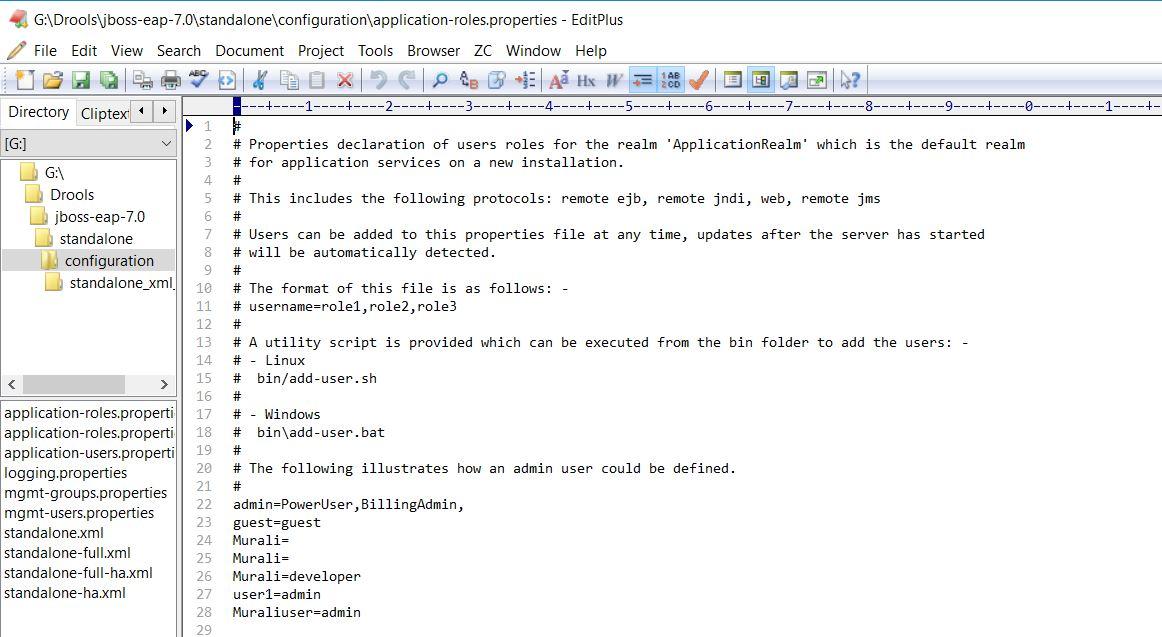
I tried adding user with a specific role group(admin,developer and so on)  through add-users.bat with group = admin and checked the standalone\configuration\application-roles.props. 

Luckily it works and I'm able to login KIE WB now.

:) :) :) 
user_Roles.JPG
application-roles-propertiesfile.JPG

Sachin Gupta

unread,
Mar 25, 2017, 11:55:26 AM3/25/17
to Drools Setup
Is there a limitation/requirement that Kie Drools Workbench can be setup only on Standalone configurations of JBOSS EAP 7?
I have been struggling with company provided Domain Server Group Server Configuration, where as the same WAR file works well with my local Server running in standalone configuration!

Please suggest if this is a known limitation/issue?

Regards
Sachin

Murali S

unread,
Mar 25, 2017, 3:12:52 PM3/25/17
to drools...@googlegroups.com
Dear Sachin,

No - There is no limitation in setting Kie Workbench as Stand alone or Domain server managed Specific. It is just a WAR file and will run on any deployments say Tomcat / Oracle Weblogic / IBM WebSphere. You just need to set up your JBoss as Domain server through some configuration files as below.

Check out  the folder --> jboss-eap-7.0\domain\configuration
1. You will be able to see 4 xml files, domain.xml, host.xml , host-master.xml, host-slave.xml

Please check out this referrence will be useful for server administration :


please paste me the screenshots if any,   if you are trying to access the KIe workbench in this below user case 
1)Domain managed server / JBOSS / Kie WB.war
2) 2 or 3 user creation

Regards
Murali

To unsubscribe from this group and all its topics, send an email to drools-setup+unsubscribe@googlegroups.com.

To post to this group, send email to drools...@googlegroups.com.

Murali Sridhar

unread,
Mar 25, 2017, 3:16:08 PM3/25/17
to Drools Setup
Dear Sachin,

No - There is no limitation in setting Kie Workbench as Stand alone or Domain server managed Specific. It is just a WAR file and will run on any deployments say Tomcat / Oracle Weblogic / IBM WebSphere. You just need to set up your JBoss as Domain server through some configuration files as below.

Check out  the folder --> jboss-eap-7.0\domain\configuration
1. You will be able to see 4 xml files, domain.xml, host.xml , host-master.xml, host-slave.xml

Please check out this referrence will be useful for server administration :


please paste me the screenshots if any,   if you are trying to access the KIe workbench in this below user case 
1)Domain managed server / JBOSS / Kie WB.war
2) 2 or 3 user creation for login

Regards
Murali Sridhar

Murali Sridhar

unread,
Mar 25, 2017, 3:21:49 PM3/25/17
to Drools Setup

++ Attaching the screens
Referrence_Drools_Expert_Guide.JPG
Domain_managed_Server_administration.JPG

Sachin Gupta

unread,
Mar 27, 2017, 1:15:26 AM3/27/17
to Drools Setup
Thanks Murali,

However i am facing a lot of issues trying to Install Kie-WB 6.5 Final on JBOSS EAP 7.0.4.
i was able to set it up on local system, but when trying to install on corporate Server, it fails to do.

Post a lot of research, found that the Setup tries to configure Maven on the system its installing on.
after installing and configuring Maven, i was able to proceed beyond that error, but now facing strange issues!!!

Once it showed, this message:

2017-03-24 17:55:35,869 ERROR [org.jboss.as.server] (ServerService Thread Pool -- 243) WFLYSRV0022: Deploy of deployment "kie-drools-wb-6.5.0.Final-eap7.war" was rolled back with no failure message

I tried re-installing, it showed this next time:


org.jboss.weld.exceptions.WeldException: WELD-000049: Unable to invoke public void org.kie.workbench.drools.backend.server.LuceneConfigProducer.setup() on org.kie.workbench.drools.backend.server.LuceneConfigProducer@37200c57
at org.jboss.weld.injection.producer.DefaultLifecycleCallbackInvoker.invokeMethods(DefaultLifecycleCallbackInvoker.java:100)
at org.jboss.weld.injection.producer.DefaultLifecycleCallbackInvoker.postConstruct(DefaultLifecycleCallbackInvoker.java:81)
at org.jboss.weld.injection.producer.BasicInjectionTarget.postConstruct(BasicInjectionTarget.java:126)

It keeps on toggling b/w these errors, an i am unable to proceed ahead.

The system/environment pre-requisites are quite scattered, needs research for a newbie to find, and has become a nightmare for me to get it running on the Server.

There has to be something missing, not getting a clue, what that is??

Guys - Please suggest

Best Regards
Sachin
Reply all
Reply to author
Forward
0 new messages