
errors in running step-18 within Xcode

Alberto Salvadori
bash-3.2$ ./step-18
Illegal instruction: 4
whereas the debugger provides some further notifications, as in figure, which I am not able to discern.
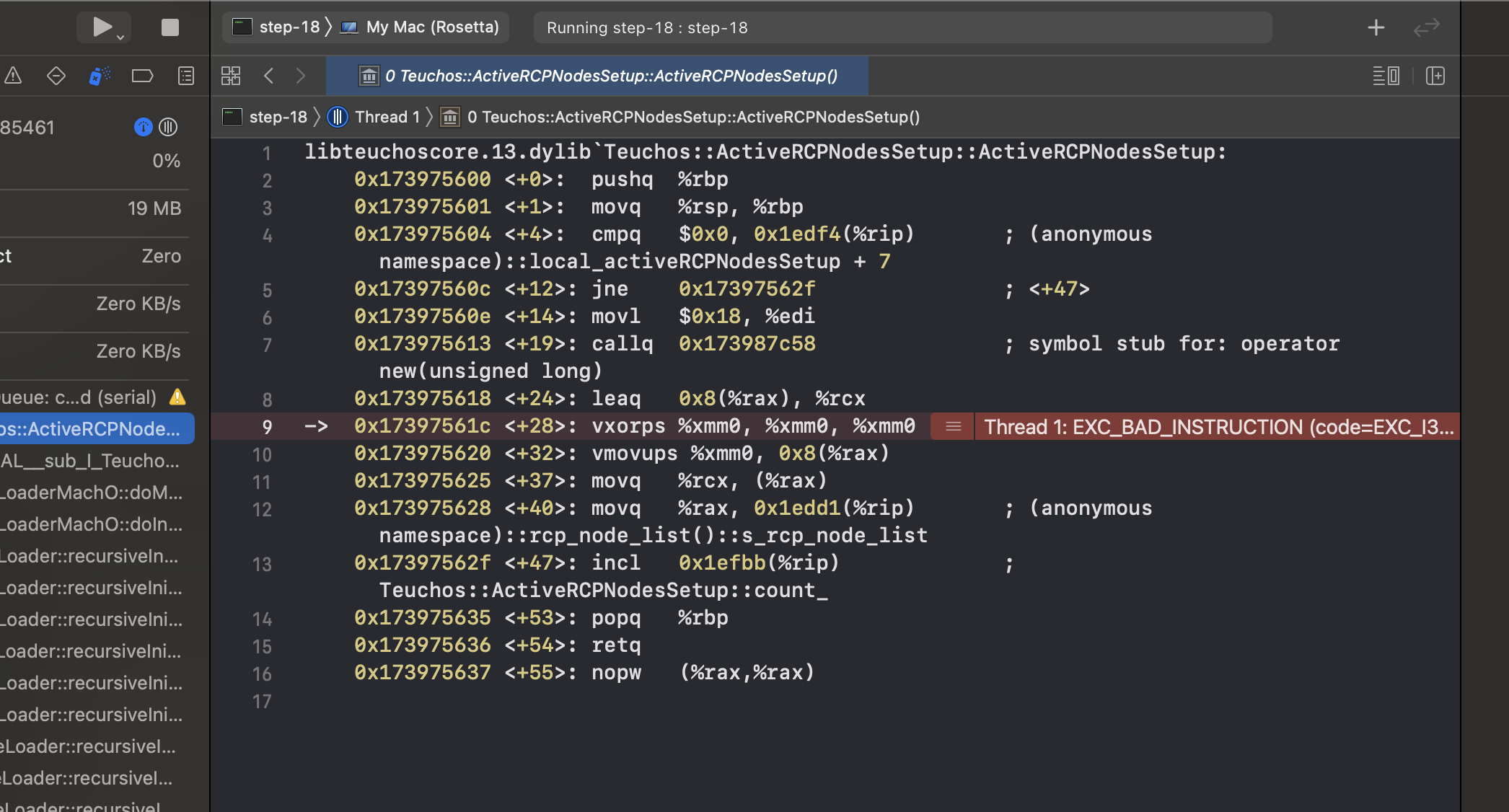
I had at my disposal a former installation of deal.ii.9.2, that I made with spack and gcc in a rosetta terminal. In such a case, within a rosetta terminal, the step-18 compiles and runs well. Note that deal.ii9.3 does not open a rosetta terminal.
Hope these evidences can be of help.
Best and thanks, as always!
Alberto

Luca Heltai
Il giorno 3 ago 2021, alle ore 11:28, Alberto Salvadori <alberto....@unibs.it> ha scritto:
Dear community
I successfully installed 9.3 on my mac M1 from the dmg . However, I am at present unable to run examples, as for the step-18. For this reason, I share my attempts.I am using Xcode 12.5.1 (12E507) on BigSur 11.2.3 (20D91).After opening a deal.ii terminal from deal.ii.app, the step-18 code compiles well both inside Xcode and from Makefile. When it comes to run the executable, neither of the two apparently work. The output message from terminal is
bash-3.2$ ./step-18
Illegal instruction: 4
whereas the debugger provides some further notifications, as in figure, which I am not able to discern.
<Screen Shot 2021-08-03 at 9.25.28 AM.png>
I had at my disposal a former installation of deal.ii.9.2, that I made with spack and gcc in a rosetta terminal. In such a case, within a rosetta terminal, the step-18 compiles and runs well. Note that deal.ii9.3 does not open a rosetta terminal.
Hope these evidences can be of help.
Best and thanks, as always!
Alberto
Informativa sulla Privacy: http://www.unibs.it/node/8155--
The deal.II project is located at http://www.dealii.org/
For mailing list/forum options, see https://groups.google.com/d/forum/dealii?hl=en
---
You received this message because you are subscribed to the Google Groups "deal.II User Group" group.
To unsubscribe from this group and stop receiving emails from it, send an email to dealii+un...@googlegroups.com.
To view this discussion on the web visit https://groups.google.com/d/msgid/dealii/9014a8cd-0df9-499d-8aa0-d1b0a3427cfcn%40googlegroups.com.
Alberto Salvadori
______ _ _____ _____
| _ \ | ||_ _|_ _|
| | | |___ __ _| | | | | |
| | | / _ \/ _| | | | | | |
| |/ / __/ (_| | |__| |_ _| |_
|___/ \___|\__,_|_(_)___/ \___/
This is a bash shell with CMAKE_PREFIX_PATH and DYLD_LIBRARY_PATH set to work
with Deal.II. A full spack installation with deal.II is available under
/Applications/deal.II.app/Contents/Resources/spack
If you want to set up your daily Terminal to work with deal.II, add these lines
to your ~/.profile (or ~/.zshrc, if you prefer zsh):
export DEAL_II_CONF_SILENT=ON # Turn off this message
. /Applications/deal.II.app/Contents/MacOS/dealii.conf
deal.II and all its dependencies were installed using spack, and are also
available through spack, e.g.:
spack find # Shows all installed packages
You can find the deal.II examples directory under
/Applications/deal.II.app/Contents/Resources/Libraries/share/deal.II/examples
Illegal instruction: 4
Dipartimento di Ingegneria Meccanica e Industriale (DIMI)
Universita` di Brescia, via Branze 43, 25123 Brescia
Italy
tel 030 3715426
e-mail:
alberto....@unibs.it
web-page:
http://m4lab.unibs.it/faculty.html
To view this discussion on the web visit https://groups.google.com/d/msgid/dealii/F3E122B8-F84B-406D-BC55-37144F3E6607%40gmail.com.
Luca Heltai
Il giorno 3 ago 2021, alle ore 13:28, Alberto Salvadori <alberto....@unibs.it> ha scritto:
To view this discussion on the web visit https://groups.google.com/d/msgid/dealii/CABcATpeRgfNDPcTh9u-bSTL-uhik_W9o9N%2BJsNE7fkaWkQuUxg%40mail.gmail.com.
Alberto Salvadori
______ _ _____ _____
| _ \ | ||_ _|_ _|
| | | |___ __ _| | | | | |
| | | / _ \/ _| | | | | | |
| |/ / __/ (_| | |__| |_ _| |_
|___/ \___|\__,_|_(_)___/ \___/
This is a bash shell with CMAKE_PREFIX_PATH and DYLD_LIBRARY_PATH set to work
with Deal.II. A full spack installation with deal.II is available under
/Applications/deal.II.app/Contents/Resources/spack
If you want to set up your daily Terminal to work with deal.II, add these lines
to your ~/.profile (or ~/.zshrc, if you prefer zsh):
export DEAL_II_CONF_SILENT=ON # Turn off this message
. /Applications/deal.II.app/Contents/MacOS/dealii.conf
deal.II and all its dependencies were installed using spack, and are also
available through spack, e.g.:
spack find # Shows all installed packages
You can find the deal.II examples directory under
/Applications/deal.II.app/Contents/Resources/Libraries/share/deal.II/examples
[ 50%] Building CXX object CMakeFiles/step-18.dir/step-18.cc.o
[100%] Linking CXX executable step-18
[100%] Built target step-18
albertosalvadori@uu-guest-150-117 step-18 unix % ./step-18
zsh: illegal hardware instruction ./step-18
albertosalvadori@uu-guest-150-117 step-18 unix % which cmake
/Applications/deal.II.app/Contents/Resources/Libraries/bin/cmake
albertosalvadori@uu-guest-150-117 step-18 unix %
Dipartimento di Ingegneria Meccanica e Industriale (DIMI)
Universita` di Brescia, via Branze 43, 25123 Brescia
Italy
tel 030 3715426
e-mail:
alberto....@unibs.it
web-page:
http://m4lab.unibs.it/faculty.html
To view this discussion on the web visit https://groups.google.com/d/msgid/dealii/D70E95C5-0FCA-427D-BFEF-C89AE7F4D3C2%40gmail.com.