
acorn.js error
151 views
Skip to first unread message

ahmad sulaibi
Aug 30, 2022, 6:13:53 PM8/30/22
to Blockly
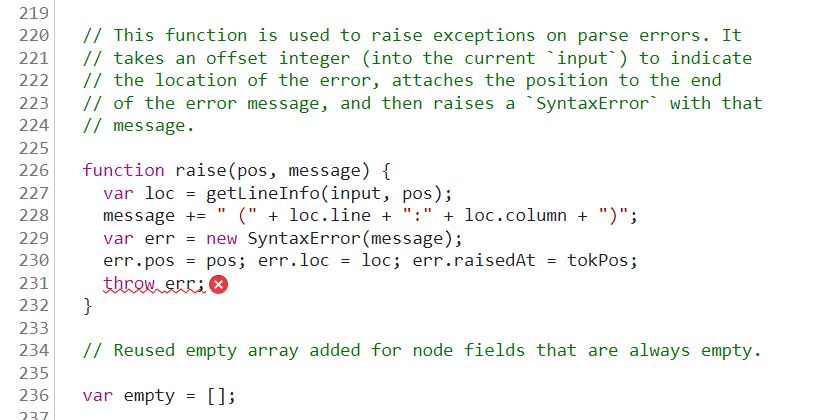
As we can see we have an issue with throw err;. Any solutions?
ahmad sulaibi
Aug 31, 2022, 1:05:12 PM8/31/22
to Blockly
I solved it!
The issue was with the acorn.js from https://neil.fraser.name/.
The solution I download the acorn.js from blockly website.
The solution I download the acorn.js from blockly website.


Neil Fraser
Aug 31, 2022, 1:32:43 PM8/31/22
to blo...@googlegroups.com
Could you be more specific about where you are getting these versions from?
The only instance of acorn.js on neil.fraser.name is an up to date copy (version 0.4.1) of Acorn in JS-Interpreter:
I'm not aware of any instance of acorn.js on any of Blockly's websites (which one?).
The error you showed appears to be Acorn throwing a Syntax Error due to malformed input.
--
You received this message because you are subscribed to the Google Groups "Blockly" group.
To unsubscribe from this group and stop receiving emails from it, send an email to blockly+u...@googlegroups.com.
To view this discussion on the web visit https://groups.google.com/d/msgid/blockly/5d3c00ea-b173-4bf4-9276-20d129709e38n%40googlegroups.com.
--
Neil Fraser
https://neil.fraser.name
https://neil.fraser.name
ahmad sulaibi
Aug 31, 2022, 2:09:22 PM8/31/22
to Blockly
In the topic Generating and Running JavaScript (https://developers.google.com/blockly/guides/app-integration/running-javascript) in the subtopic Add an API, there is a documentation link called
JS-Interpreter documentation which is your page. In it, I copied acorn.js and interpreter.js from GitHub and pasted them into my VS code. I added the codes from the topic into my code and run it. When pressed F12 (debugger) this issue came. I thought the same thing that I have a malformed input, up until yesterday I spoke with someone who knows JS who told me that my code is ok but the issue is with acorn.js and it is better to ask on the group. Today I thought to delete acorn.js and install it again, but this time I installed it from the blockly website and it worked. That is what I did.
Neil Fraser
Aug 31, 2022, 2:11:56 PM8/31/22
to blo...@googlegroups.com
Am Mi., 31. Aug. 2022 um 20:09 Uhr schrieb ahmad sulaibi <ahmadsu...@gmail.com>:
Today I thought to delete acorn.js and install it again, but this time I installed it from the blockly website and it worked. That is what I did
Thanks for the update. Where did you find Acorn on "the blockly website"? I'd like to figure out which copy that is and where it came from.
ahmad sulaibi
Aug 31, 2022, 2:13:12 PM8/31/22
to Blockly
I download it as Zip File.
ahmad sulaibi
Aug 31, 2022, 2:16:25 PM8/31/22
to Blockly
https://developers.google.com/blockly/guides/app-integration/running-javascript >> subtopic "JS-Interpreter"

Neil Fraser
Aug 31, 2022, 2:22:43 PM8/31/22
to blo...@googlegroups.com
Thanks for the clarification. That's actually the exact same file you downloaded the first time (same Github repo and there have been no recent updates to acorn.js). So I don't think anything changed.
I'm almost certain that the error was actually exactly what it claimed, a Syntax Error in the inputed code that Acorn was attempting to parse.
--
You received this message because you are subscribed to the Google Groups "Blockly" group.
To unsubscribe from this group and stop receiving emails from it, send an email to blockly+u...@googlegroups.com.
To view this discussion on the web visit https://groups.google.com/d/msgid/blockly/1266377e-375f-4bf5-b873-03b43b292289n%40googlegroups.com.
Reply all
Reply to author
Forward
0 new messages