
Recreate blocks connected to a input inside a compose/decompose mutator
176 views
Skip to first unread message

José Luiz
May 4, 2020, 8:10:18 AM5/4/20
to Blockly
Hi guys! Hope you're all fine =)
I would like your help with something I've been working the few past days without success. I have some blocks with mutator UI dialogs (have both compose/decompose functions), and one of them must recreate on the main workspace, a block with all blocks connected to the 'Where' input inside the mutato bubble, therefore, user may drag and drop many combinations of blocks inside this input, as you can see in the below animation.
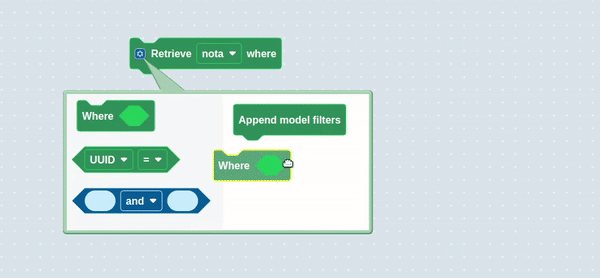
My first question is, using 'if-else' block mutator as basis, the updateShape()_ function must recreate this connections one-by-one, or there's a easier way to do that? If not, how can I do this? I was trying to resolve this using connectionDB, a attribute inside the input connector, but without success yet. On the docs, it's specified that this attribute is a vertcal database of connected blocks, but I didn't make success using it.
My approach is correct here?

Beka Westberg
May 4, 2020, 1:39:21 PM5/4/20
to blo...@googlegroups.com
Hello,
I'm sorry, but I'm a bit confused by your question.
Are you looking for a way to make updateShape_() easier on the computer? i.e. less computationally complex?
Or are you looking for a way to make updateShape_() easier on the programmer? i.e. more readable/understandable?
Either way I can tell you that the connectionDB will probably not be helpful :/ It is used for telling which connection is closest to a block, so that blocks connect when you stop dragging them. (Good job checking the docs though! Not many people actually dig into the reference hehe)
Sorry I can't be more help :/ Once we know a bit more about what you're looking for I'm sure someone here will be able to give you better advice =)
--Beka
--
You received this message because you are subscribed to the Google Groups "Blockly" group.
To unsubscribe from this group and stop receiving emails from it, send an email to blockly+u...@googlegroups.com.
To view this discussion on the web visit https://groups.google.com/d/msgid/blockly/178e6f40-1df9-4672-980c-51b627c6e0ff%40googlegroups.com.
José Luiz
May 4, 2020, 2:51:14 PM5/4/20
to Blockly
Hi Beka! Thanks for always helping us =)
So, I've noticed just now that my gif was interpreted as a common image rsrs I'll try uploading the image again. but if it shows an static image below, you can find the gif here (https://giphy.com/gifs/Z9o9iBEVZ9KfqdR2DZ).

I think I made a confused explanation before, I'll try again, i'm sorry xD. So, I have a few blocks in my Blockly with UI mutators (compose/decompose), and I'm making a new one (that you see in the image I've mentioned), but this one have a peculiarity (for me, obviosly). The sub block on the bubble will always have one (and just one) block appended. This block have a input, so user can make n combinations using the other blocks located inside bubble flyout, dragging them to the input inside the sub block (this behavior you can find in the image, again, you can see user dragging blocks and appending a different combination of blocks inside this input).
So, my problem is, I have to reconstruct the blocks that user appended in this input, outside the UI dialog, like if-else block does, when you append 'if', 'else if' or 'else' blocks, the 'updateShape_()' function reconstructs the expression outside the bubble. So, based on that, i've mentioned 'updateShape_()' function cause i'm wondering that I'll need this function to do this scenario with a input, instead of with a few blocks. I don't know if a made a clear explanation now, but let me know if it keeps dark, ok?
Again, thank you very much.
To unsubscribe from this group and stop receiving emails from it, send an email to blo...@googlegroups.com.
José Luiz
May 4, 2020, 2:54:11 PM5/4/20
to Blockly
And I mentioned ConnectionDB cause I've runned 'this.getInput('WHERE')', 'WHERE' beeing my input inside the bubble workspace, and this attribute shows me the blocks connected to this input. I would like to know if I'm in the correct approach by using this, and get some tips of you guys.
Beka Westberg
May 4, 2020, 6:54:28 PM5/4/20
to blo...@googlegroups.com
Oh ok! I think I get what you're looking for: You want to know how to re-compose your block, in the case that you're working with <and> blocks (which go inside eachother) instead of stack blocks, like the 'if' block?
If that's not the case, definitely correct me, but I'm gonna go ahead and try to give you an answer.
Firstly the updateShape_() function is not "special" like the compose, decompose, domToMutation, and mutationToDom functions are. It's just common because it helps separate out the shape-building logic. You can use it if you want, or you can keep all of your logic inside compose/domToMutation. (I recommend using it)
Now you have two problems: (1) figuring out what the mutated block should look like, based on what's in your bubble workspace, and (2) getting your block to look like that.
To figure out what your block should look like, you're going to need a way to "abstract" it. For example: the 'if' block has an elseif_ count to keep track of how many "else if" inputs it should have. Your block may need something different/more complex. Now you need to figure out what that value actually is. In your case, it looks like you'll need to traverse over your 'and' blocks. Some helpful functions/properties for that are: getInput (you've got this one down), getInputTargetBlock (I think this is what you wanted from the connectionDB), Input.connection, Connection.targetConnection, and connection.getSourceBlock. I'd recommend you do your best to stick to the first two, as they provide a better level of abstraction.
Now you've essentially "parsed" your mutator workspace, and you can go ahead and rebuild your block. The easiest strategy is usually to tear down your block completely, and then rebuild it from scratch. It can be a little more computationally complex, but it's a whole lot easier to code (your other option is to shuffle around inputs, which is hard). It is also advisable that you save any connections on the block being mutated using saveConnections, and then reconnect them at this stage.
---
That's probably not exactly the information you were looking for hehe, but I hope some of it can be useful! Other people here may have tips for you as well.
If that didn't answer your question, or you have any further questions, please reply!
--Beka
To unsubscribe from this group and stop receiving emails from it, send an email to blockly+u...@googlegroups.com.
To view this discussion on the web visit https://groups.google.com/d/msgid/blockly/405720b8-b447-4de5-896c-af209482b80e%40googlegroups.com.
José Luiz
May 6, 2020, 9:50:02 AM5/6/20
to Blockly
Hey Beka! So, i've made some advances on this issue, but now i have another =')
My mutator fill the blocks correctly like a wanted before, I used updateShape() like we talked before, but when I move (drag) my beautiful block, my blocks just disappear from my decomposed input, without any errors on console..
You can see a video of this behavior here https://gph.is/g/aRMe19N
I runned out of ideas.
To view this discussion on the web visit https://groups.google.com/d/msgid/blockly/405720b8-b447-4de5-896c-af209482b80e%40googlegroups.com.
José Luiz
May 6, 2020, 9:52:04 AM5/6/20
to Blockly
Here's a better view of this

Beka Westberg
May 6, 2020, 1:06:51 PM5/6/20
to blo...@googlegroups.com
Hello,
That is very weird! I've never seen a block do that before, so it sounds like you're gonna need to do some digging.
It looks like something is triggering your block to change shape, so first you need to figure out where that is coming from. I would start by adding a console.trace() call, or a breakpoint to your updateShape() function. If it doesn't seem like your updateShape() function is getting called, next I would try adding traces to your other mutator functions. I.E mutationToDom, domToMutation, compose, and decompose.
If none of those things look like they're getting triggered please post the full code of your block (if you can). A link to the source (e.g. github/bitbucket) works great as well. Being able to pull down the code and play with the block makes it a lot easier for people to help you with debugging.
Once you know where the call is coming from, it should be easier to stop those calls from coming, or add a check to ignore them.
Sorry I can't be more help :/ I hope with some logging it'll be easy to track down!
--Beka
To unsubscribe from this group and stop receiving emails from it, send an email to blockly+u...@googlegroups.com.
To view this discussion on the web visit https://groups.google.com/d/msgid/blockly/a62b8e04-ff4e-4830-94a5-d01f8f1a490b%40googlegroups.com.

Mark Friedman
May 6, 2020, 1:33:27 PM5/6/20
to blo...@googlegroups.com
I might consider taking a step back and ask why you need/want a mutator here at all? On the surface, it looks to me like you could just have Retrieve, Where, UUID and And blocks in your toolbox and connect them together on your workspace.
-Mark
To unsubscribe from this group and stop receiving emails from it, send an email to blockly+u...@googlegroups.com.
To view this discussion on the web visit https://groups.google.com/d/msgid/blockly/35d51eba-f5e2-486e-bfe9-47ab2e2267b2%40googlegroups.com.
José Luiz
May 6, 2020, 1:56:33 PM5/6/20
to Blockly
Yep Mark it would be nice and was my first idea for another similar block, but I have a behavior that leaded me to this mutator approach, here it is.
If you take a look in the block with the bubble closed, in the gif, you'll find the 'Retrieve FIELD_DROPDOWN' where', this field dropdown is a variable user have on his workspace with a type, and according to this type I fill the 'UUID' dropdown. So, making the blocks separated without a mutator connecting them, I felt that the blocks would be maybe 'loose', you know? Leaving the user to manipulate invalid options according to a type. I don't know if I made a clear explanation, so let me know if you want a deeper picture of my problem, but the point is, the dropdown inside the bubble is filled according to the option selected on the main block.
Like i said, I have another similar block with the exact same 'hard-typed variable' scenario that you guys helped me a lot and it's made with a mutator, and it's working like a charm, so I thought 'ok, i can do this again' rsrs.
To view this discussion on the web visit https://groups.google.com/d/msgid/blockly/35d51eba-f5e2-486e-bfe9-47ab2e2267b2%40googlegroups.com.
José Luiz
May 6, 2020, 1:58:57 PM5/6/20
to Blockly
I'm madding some digging in updateShape() and I think the problem might be there. When I have something more solid to work with, I let you know.
Again, thank you guys for your time.
To view this discussion on the web visit https://groups.google.com/d/msgid/blockly/a62b8e04-ff4e-4830-94a5-d01f8f1a490b%40googlegroups.com.
José Luiz
May 6, 2020, 2:57:38 PM5/6/20
to Blockly
Guys, i'll share my code with you.
mutationToDom(): Element{	if (this.getFieldValue('variable_model') && this.getFieldValue('variable_model') !== this.oldVariableModelFieldValue)	{		this.getField('variable_model').validator_(this.getFieldValue('variable_model'));		this.oldVariableModelFieldValue = this.getFieldValue('variable_model');		this.rebuildShape_();	}
	if (!this.horizontalConnectedBlocks.length)	{		return null;	}
	let mutationXmlElement = Blockly.utils.xml.createElement('mutation');	this.modelFieldsToFilterArray && mutationXmlElement.setAttribute('modelFieldsToFilterArray', this.modelFieldsToFilterArray);	this.horizontalConnectedBlocks && mutationXmlElement.setAttribute('horizontalConnectedBlocks', this.horizontalConnectedBlocks);	this.modelType && mutationXmlElement.setAttribute('modelType', this.modelType);
	return mutationXmlElement;},
domToMutation(a): void{	this.modelFieldsToFilterArray = a.getAttribute('modelFieldsToFilterArray').split(',');	this.horizontalConnectedBlocks = a.getAttribute('horizontalConnectedBlocks').split(',');	this.modelType = a.getAttribute('modelType');	this.rebuildShape_();},
rebuildShape_(): void{	// tslint:disable-next-line: one-variable-per-declaration	let a = [null],		b = [null],		c = null;	for (let d = 1; this.getInput('FILTER');)	{		// tslint:disable-next-line: one-variable-per-declaration		let e = this.getInput('FILTER');		a.push(e.connection.targetConnection);		d++;	}	this.updateShape_();	this.reconnectChildBlocks_(a);},
compose(topBlock): void{	topBlock = topBlock.nextConnection.targetBlock();	this.modelFieldsToFilterArray = [''];	let b = [];	let c = [];	let d;
	this.horizontalConnectedBlocks = [];	if (topBlock)	{		switch (topBlock.type)		{		case ModelSingleBlockType.FILTER_MODEL_FIELD:			b.push(topBlock.getInput('filter_condition').connection && topBlock.getInput('filter_condition').connection.targetConnection);
			this.mountHorizontalConnections(topBlock.getInputTargetBlock('filter_condition'), 0);
			c.push(topBlock.statementConnection_);			break;		default:			throw TypeError('Unknown block type: ' + topBlock.type);		}	}
	this.updateShape_();	this.reconnectChildBlocks_(b);},decompose(workspace: Blockly.WorkspaceSvg): Blockly.BlockSvg{	let topBlock = workspace.newBlock(ModelSingleBlockType.APPEND_MODEL_FILTERS) as Blockly.BlockSvg;	topBlock.initSvg();	let c: Blockly.Connection = topBlock.nextConnection;	let d: number = 1;
	if (this.horizontalConnectedBlocks.length)	{		let filterBlockFixed = workspace.newBlock(ModelSingleBlockType.FILTER_MODEL_FIELD) as Blockly.BlockSvg;		filterBlockFixed.initSvg();		c.connect(filterBlockFixed.previousConnection);		c = filterBlockFixed.nextConnection;
		let inputIn: Blockly.Connection = filterBlockFixed.getInput('filter_condition').connection;		this.reconnectHorizontalInputs(workspace, inputIn, this.horizontalConnectedBlocks[0], 0);	}	return topBlock;},
updateShape_(): void{	(this as Blockly.BlockSvg).removeInput('FILTER', true);
	let idx = 0;	while (SELF.workspace.getBlockById('FILTER' + idx))	{		SELF.workspace.getBlockById('FILTER' + idx).dispose(false);		idx++;	}
	if (this.horizontalConnectedBlocks.length)	{		this.appendValueInput('FILTER').appendField('Where');
		let inputIn: Blockly.RenderedConnection = this.getInput('FILTER').connection;		let childBlock = SELF.workspace.newBlock('LOGIC_COMPARE', 'FILTER0') as Blockly.BlockSvg;
		childBlock.initSvg();		childBlock.render();
		let childConnection = childBlock.outputConnection;		inputIn.connect(childConnection);		// this.reconnectHorizontalInputs(SELF.workspace, inputIn, this.horizontalConnectedBlocks[0], 0);	}},
It's a litte extense, I have simplificated updateShape_() function for debugging, and that still causes me the same error mentioned before. Inside 'if (this.horizontalConnectedBlocks.length)' statement, normally I dinamically plug the blocks user dragged inside the bubble, but I commented the function that does that to test, and connected just one 'LOGIC_COMPARE' block. So, whatever what block I drag into 'Where' input, updateShape_() should create, render and connect a 'LOGIC_COMPARE' inside this if statement on my code, right? So, debugging this code I found that, in the exact moment I drag my block, the domToMutation() function is called, then this function calls rebuildShape_(), and this one calls updateShape_(). There, this function gets inside that 'if' correctly, creates the 'LOGIC_COMPARE' block, render it correctly, but when I get to 'inputIn.connect(childConnection);' my block isn't beeing connected to the input, and just disappear from the editor, no errors throwed.
I'm sorry for the huge post, I choosed to simplify updateShape_() for debugging and even to get less code to throw here. I runned out of ideas :/
To view this discussion on the web visit https://groups.google.com/d/msgid/blockly/a62b8e04-ff4e-4830-94a5-d01f8f1a490b%40googlegroups.com.
Reply all
Reply to author
Forward
0 new messages