
Blockly Factory get block definition and generator stub
429 views
Skip to first unread message

Dominik Birtić
May 6, 2019, 9:36:19 AM5/6/19
to Blockly
Hello!
I'm interested in how can I get or pull the code that is generated automatically in the block definition and generator stub. I'm using nodejs. I saw that there is a separate index file for the block factory and there are some other javascript files used for block factory. I just need to pull that code with a script.
Thank you!
Dominik
I'm interested in how can I get or pull the code that is generated automatically in the block definition and generator stub. I'm using nodejs. I saw that there is a separate index file for the block factory and there are some other javascript files used for block factory. I just need to pull that code with a script.
Thank you!
Dominik

Erik Pasternak
May 6, 2019, 6:04:26 PM5/6/19
to Blockly
Hi Dominik,
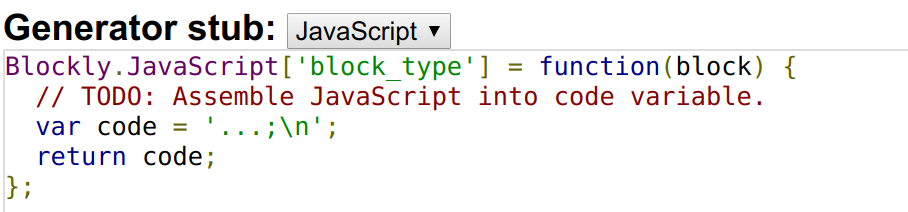
Just to clarify, do you mean the stubs that are generated when you create a new block using the factory?
Or the code for the Block Factory itself? The code for the factory it's included in Blockly's source code, so something like "npm install git://github.com/google/blockly.git#1.20181219.0" or "git clone https://github.com/google/blockly.git" will include it under demos/blockfactory. Note, the number at the end of the npm command is one of the release tags.
I'm not sure I understand your question, though, so please clarify if I've misunderstood.
Dominik Birtić
May 7, 2019, 4:28:35 AM5/7/19
to Blockly
Yes, I'm talking about the stubs that are generated when you create a new block using factory. I already have integrated Blockly Factory into my nodejs project. I want to get those stubs and block definition using a script so that user doesn't have to select it, copy and then paste it somewhere else.
Dominik
Dominik
Erik Pasternak
May 7, 2019, 11:34:03 AM5/7/19
to Blockly
The version that's live does have a Block exporter tab that will let you download a set of files with all the stubs and definitions (one file for definitions, one file for stubs). And here's the code that generates them.
We've also been slowly working on an update to the developer tools that would work outside a browser so that the block files could be saved/loaded locally on the filesystem without having to do an export pass. It's in a pretty rough state, though, and it's currently not one of our priorities.

Cheers,
Erik
Dominik Birtić
May 8, 2019, 4:15:56 AM5/8/19
to Blockly
Erik, you got me wrong there. What I'm asking is if there is a simple way to turn generator stub content and block definition content into string so that it is usable inside an nodejs application. I'm not really interested in downloading it from the block exporter or something similar.
I want to get generator stub and block definition content from Blockly Factory as shown in the picture and put it into variables as a string. Can I do that?
Erik Pasternak
May 8, 2019, 11:44:36 AM5/8/19
to Blockly
Sorry I wasn't clear, I don't think there's an already made way to do what you want. The code I pointed at might be a starting point for something custom.
I am a little confused on your use case though, are you trying to get all the stubs for a set of blocks you've designed or are you trying to generate stubs and definitions using some source other than the block factory? If the former, why do you need it to be scriptable?
Cheers,
Erik
Dominik Birtić
May 9, 2019, 4:42:34 AM5/9/19
to Blockly
Hi!
Since we have a "code" variable which represents what the block will do, I'm trying to put in a text area in which I will write some code and a button which will take my code and put it into the "code" variable inside the block. If there are some inputs then I need to parse them in a way so that when you click the button you get already made code inside the "code" variable. That is why I'm asking how can I pull the code from the block factory. The later block will be saved in a database. I have parsing and saving to a database part done as well as text area and a button.
I haven't used Blockly enough or studied the code enough to know if there is a function or a way to just pull already generated code from Blockly factory.
I thought of creating a variable which would save the code from block definition and generator stub and turn it into a string so that I could use it for the things that I've talked about.
Cheers!
Dominik
Dominik
Erik Pasternak
May 9, 2019, 11:21:30 AM5/9/19
to Blockly
Hmm, the code that does the stub generation might be good to look at then. It takes a block object and gives you back the stub snippet. This still assumes the block is defined already.
For block definitions, we don't have anything in Blockly that simplifies it other than the Block Factory UI. MakeCode has a custom definition syntax to make standard blocks easier to create along with generators. The docs are here and the code is here, but I'm not sure where the relevant pieces are.
Cheers,
Erik
Dominik Birtić
May 10, 2019, 7:12:39 AM5/10/19
to Blockly
Hi!
Isn't there anything to pull the already generated code? Because I'm not looking for a code generator, I'm simply looking for a way to get the code just like you can manually select and copy the code with your mouse from the Blockly Factory page. If there isn't, I guess I'll find another way to do this or I'll focus my attention to something else.
Thanks Erik!
Cheers!
Dominik
Cheers!
Dominik
Erik Pasternak
May 10, 2019, 12:20:04 PM5/10/19
to Blockly
The problem is that code snippet doesn't exist until you've defined a block and passed it to the stub generation function I linked. There's nothing to get before that point. If you aren't capturing the output of that function (which is a string with the snippet of stub code) I'm not sure what you'd be getting...
Am I missing something in your question?
Dominik Birtić
May 13, 2019, 4:50:36 AM5/13/19
to Blockly
So in other words, what I want to do isn't possible? I would have to access the output of that function through nodejs which I think I can't.
Thanks anyway!
Thanks anyway!


Coda Highland
May 13, 2019, 7:52:50 AM5/13/19
to blo...@googlegroups.com
Very few things are truly impossible. It's all a question of how much work you want to put into it.
What you want to do is going to require modifying the Block Factory source code. This, in and of itself, isn't a particularly difficult challenge. Since it's a demo and not part of the Blockly core, you don't even have to set up a Blockly build environment. Just copy the demos/blockfactory/ directory into your project and use it from there.
At that point, you can change how the Export button works. Trace through its control flow until you find the part where it presents the code to the user, and replace that with an AJAX call to your backend.
Forking the Block Factory app will have other advantages for you, too; it'll allow you to customize the interface in other ways to better suit your application, even if it's just as simple as putting some text in the header saying that it's integrated with your stuff.
/s/ Adam
--
You received this message because you are subscribed to the Google Groups "Blockly" group.
To unsubscribe from this group and stop receiving emails from it, send an email to blockly+u...@googlegroups.com.
To view this discussion on the web visit https://groups.google.com/d/msgid/blockly/4adc67d4-24ef-4cca-bbcd-a80759466c67%40googlegroups.com.
For more options, visit https://groups.google.com/d/optout.
Dominik Birtić
May 13, 2019, 1:07:49 PM5/13/19
to Blockly
Well, I already have Blockly Factory in my project. Can you point me to the files which I can edit to achieve what I want? I tried to write some code in factory_utils.js file but I couldn't do I wanted. That Export is in the Block Exporter tab, right? Isn't it used to download the code?
Anyways, thanks for the pointers!
Dominik
To unsubscribe from this group and stop receiving emails from it, send an email to blo...@googlegroups.com.
Coda Highland
May 13, 2019, 5:14:31 PM5/13/19
to blo...@googlegroups.com
It's a little outside of anything I've worked with personally, but taking a look at it I think you were on the right track.
Starting in factory_utils, I see a function named 'createAndDownloadFile'. That sounds promising! I searched the codebase for where that's called and discovered AppController.prototype.exportBlockLibraryToFile(), which is attached directly to 'localSaveButton'. This is where I'd start digging -- I'd try to fork the exportBlockLibraryToFile() function (perhaps call it exportBlockLibraryToServer()?) and attach that to the button instead.
/s/ Adam
To unsubscribe from this group and stop receiving emails from it, send an email to blockly+u...@googlegroups.com.
To view this discussion on the web visit https://groups.google.com/d/msgid/blockly/05674551-73c9-4e02-96ac-e327998303fe%40googlegroups.com.
Dominik Birtić
May 20, 2019, 6:58:19 AM5/20/19
to Blockly
I went into the block_exporter_controller file where there's a function
which downloads either block definition or generator stub and I tried to
manipulate it to take what I've written into the textarea on the Block
Exporter page but with no luck. It's like it ignores anything I write
and leaves it on default.

Can someone help?
Dominik Birtić
May 22, 2019, 6:26:39 AM5/22/19
to Blockly
I figured out what I needed. Thanks everyone who have helped me!
In this last post I had a problem where I wasn't serving the right file to the node js server but I fixed that.
In this last post I had a problem where I wasn't serving the right file to the node js server but I fixed that.
Reply all
Reply to author
Forward
0 new messages