
PocketBeagal Debian internet over macOS 10.13.2 USB host? (internet over USB)
70 views
Skip to first unread message

Jon Pellant
Dec 17, 2017, 11:07:15 PM12/17/17
to BeagleBoard
Environment:
- Host: MacBookPro
- OS: macOS 10.13.2
- board: pocketbeagle
- boardOS: Debian 9 IoT
I am able to 'screen' into the PB (pocketbeagle). I am loosely trying to follow this video; however, this video is 4+ years old and not my environment. For example, Debian does not have the 'udhcpc' command.
After a few minutes, the macOS network preferences shows a warning regarding the IP self assignment of the PB:
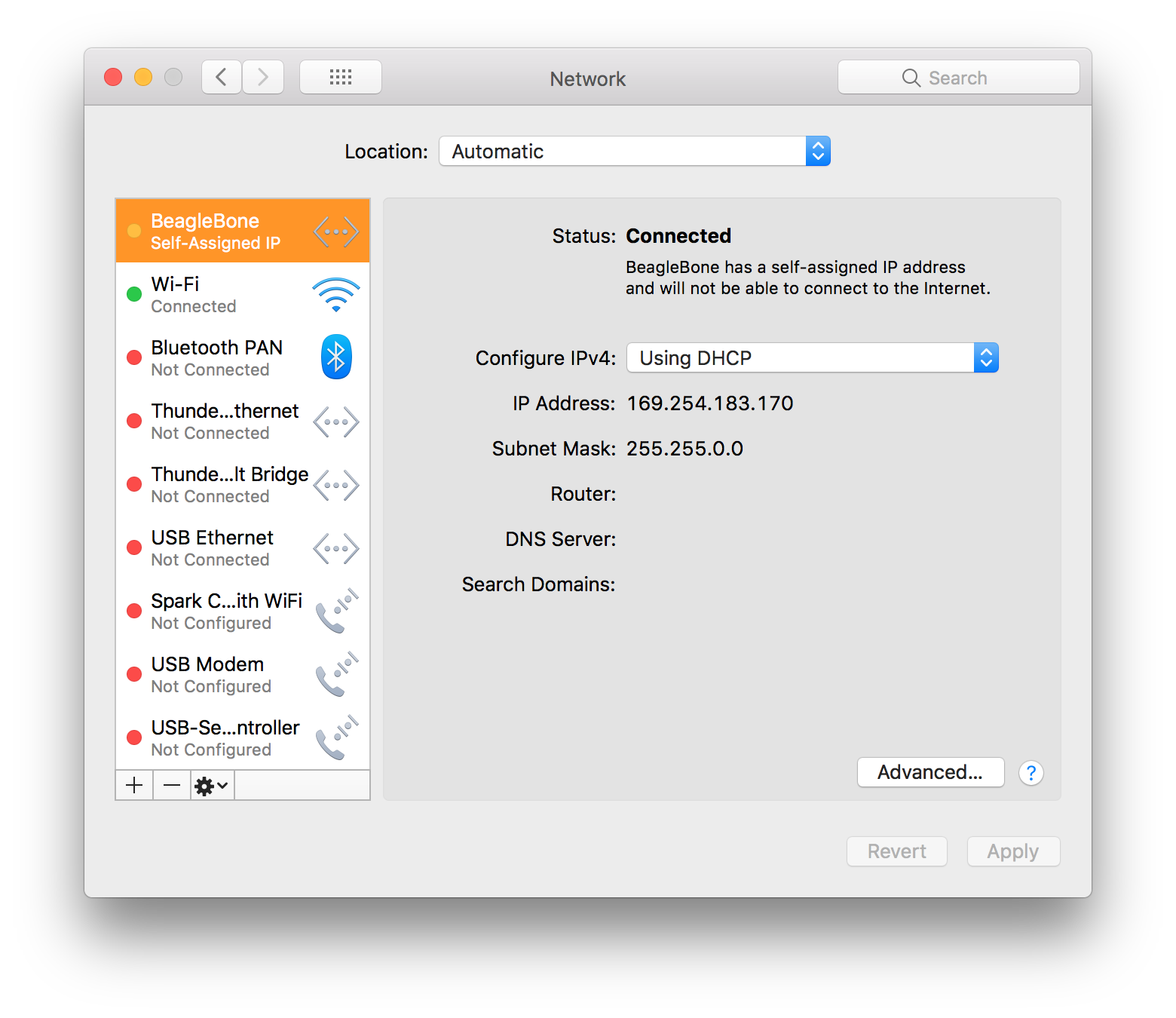
This is not consistent with the documentation. Also, the warning explicitly says that due to this, the PB will not be able to connect to the internet.
Also note that I have added a default route per instructions and still not ability to ping Google DNS.
Thoughts?

Stuart Longland
Dec 17, 2017, 11:10:33 PM12/17/17
to beagl...@googlegroups.com
On 18/12/17 01:57, Jon Pellant wrote:
> I am able to 'screen' into the PB (pocketbeagle). I am loosely trying to
> follow this video; however, this video <https://youtu.be/Cf9hnscbSK8> is
> I am able to 'screen' into the PB (pocketbeagle). I am loosely trying to
> 4+ years old and not my environment. For example, Debian does not have
> the 'udhcpc' command.
No expert on what you're trying to achieve, but it should be possible to
> the 'udhcpc' command.
substitute `udhcpc` for `dhclient`, which should be more standard.
IIRC `udhcpc` is a Busybox module, so if that's really a requirement,
you might be able to get by, by installing `busybox`.
--
Stuart Longland (aka Redhatter, VK4MSL)
I haven't lost my mind...
...it's backed up on a tape somewhere.
Jon Pellant
Dec 18, 2017, 9:32:58 AM12/18/17
to BeagleBoard
I think the DNS issue is next; however, thanks for the tip. I still need to get internet sharing before I can apt-get anything.
Stuart Longland
Dec 18, 2017, 10:17:16 AM12/18/17
to beagl...@googlegroups.com
On 19/12/17 00:32, Jon Pellant wrote:
> I think the DNS issue is next; however, thanks for the tip. I still need
> to get internet sharing before I can apt-get anything.
Are you able to ping any nameservers from the PocketBeagle? (e.g. 8.8.8.8)?
> I think the DNS issue is next; however, thanks for the tip. I still need
> to get internet sharing before I can apt-get anything.
If so, you might be able to bootstrap things:
# echo 'nameserver 8.8.8.8' >> /etc/resolv.conf

Robert Nelson
Dec 18, 2017, 10:23:19 AM12/18/17
to Beagle Board
On a mac you should get an 192.168.6.2 address thru the usb-cdc
interface. (with no external 3rd party drivers installed)
the 192.168.7.2 address is given thru a rndis interface (on windows systems).
This change allows us to use the built-in drivers of both systems...
Regards,
--
Robert Nelson
https://rcn-ee.com/
interface. (with no external 3rd party drivers installed)
the 192.168.7.2 address is given thru a rndis interface (on windows systems).
This change allows us to use the built-in drivers of both systems...
Regards,
--
Robert Nelson
https://rcn-ee.com/
Jon Pellant
Dec 18, 2017, 3:01:58 PM12/18/17
to BeagleBoard
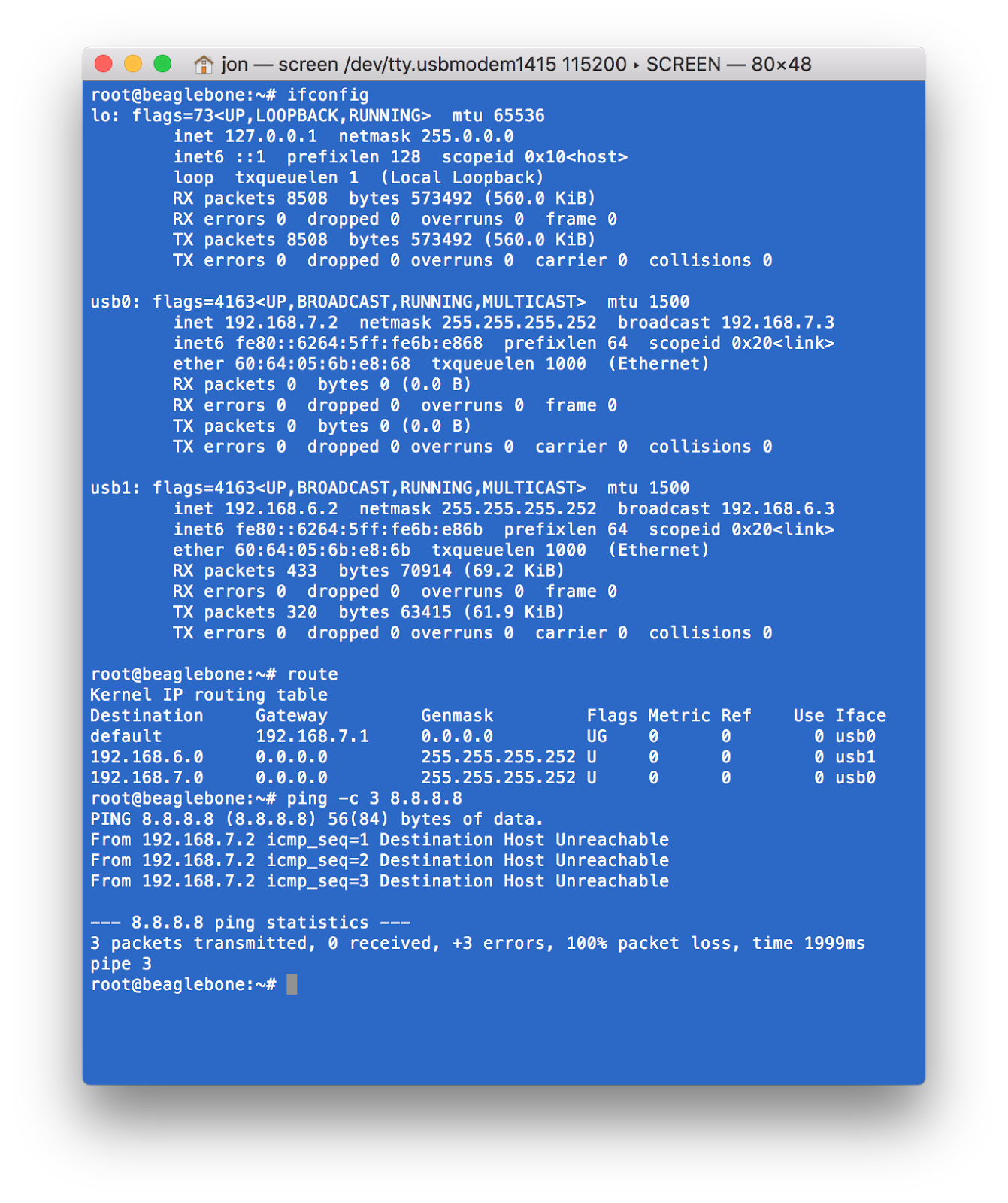
See the terminal image above. As you can see the ping times out...
I believe the issue is related to the IP address that you see in the macOS Network Preferences.
Jon Pellant
Dec 18, 2017, 3:04:19 PM12/18/17
to BeagleBoard
if you look at the console image, you will see the results of the 'ifconfig' showing both a usb0: 192.168.7.1 and a usb1: 192.168.6.1. You will also note the added route for the default gateway.
As I said above, there may be an issue with macOS and the network preferences and the IP disconnect shown there.
Stuart Longland
Dec 18, 2017, 5:10:12 PM12/18/17
to beagl...@googlegroups.com
On 19/12/17 06:04, Jon Pellant wrote:
> if you look at the console image, you will see the results of the
> 'ifconfig' showing both a usb0: 192.168.7.1 and a usb1: 192.168.6.1. You
> will also note the added route for the default gateway.
My apologies, the image was hosted elsewhere and so Thunderbird didn't
> if you look at the console image, you will see the results of the
> 'ifconfig' showing both a usb0: 192.168.7.1 and a usb1: 192.168.6.1. You
> will also note the added route for the default gateway.
show the image. Thus I didn't see it first up.
What happens if you manually set the IP address of the network interface
Mac-side? You'll probably also need to enable IP forwarding and IP
masquerade too: I do not know how this is done on MacOS X or if it's
even possible.

Yoda
Dec 18, 2017, 9:49:05 PM12/18/17
to BeagleBoard
I have been seeing the same thing with MacOS 10.13.2. I am able to ssh into the pocket beagle over the USB, but when I try to turn on Internet Sharing to be able to forward to the internet then the ssh connection hangs and I can no longer work on the ssh connection I had established. I vaguely remember something about Connection sharing on Mac but I can seem to find it.
Jon Robert Pellant
Dec 19, 2017, 9:18:39 AM12/19/17
to beagl...@googlegroups.com
@Yoda: System Preferences >> Sharing >> Internet Sharing and share with the Beaglebone.local is what I am doing. This has worked for me in past releases; however, not working for me in this configuration.

On Dec 18, 2017, at 20:49, Yoda <yo...@r2d2.org> wrote:
I have been seeing the same thing with MacOS 10.13.2. I am able to ssh into the pocket beagle over the USB, but when I try to turn on Internet Sharing to be able to forward to the internet then the ssh connection hangs and I can no longer work on the ssh connection I had established. I vaguely remember something about Connection sharing on Mac but I can seem to find it.
--
For more options, visit http://beagleboard.org/discuss
---
You received this message because you are subscribed to a topic in the Google Groups "BeagleBoard" group.
To unsubscribe from this topic, visit https://groups.google.com/d/topic/beagleboard/YGo43kfc_rY/unsubscribe.
To unsubscribe from this group and all its topics, send an email to beagleboard...@googlegroups.com.
To view this discussion on the web visit https://groups.google.com/d/msgid/beagleboard/dfd903a3-dc3c-4822-b032-55247943bf9f%40googlegroups.com.
For more options, visit https://groups.google.com/d/optout.
Yoda
Dec 19, 2017, 9:31:51 AM12/19/17
to BeagleBoard
Yep that is exactly my problem.

Tarmo Kuuse
Dec 19, 2017, 9:39:47 AM12/19/17
to BeagleBoard
On Tuesday, 19 December 2017 16:18:39 UTC+2, Jon Pellant wrote:
@Yoda: System Preferences >> Sharing >> Internet Sharing and share with the Beaglebone.local is what I am doing. This has worked for me in past releases; however, not working for me in this configuration.
On Dec 18, 2017, at 20:49, Yoda <yo...@r2d2.org> wrote:
I have been seeing the same thing with MacOS 10.13.2. I am able to ssh into the pocket beagle over the USB, but when I try to turn on Internet Sharing to be able to forward to the internet then the ssh connection hangs and I can no longer work on the ssh connection I had established. I vaguely remember something about Connection sharing on Mac but I can seem to find it.
Hi Jon,
I'm not an expert in anything Apple, however I strongly suspect that enabling Internet Sharing means your Mac will do the following:
1. create a private subnetwork on the selected interface with a semi-random address space (e.g. 192.168.XXX.0/24)
2. start a DHCP service to serve addresses from selected address space to client hosts
Unfortunately the BeagleBone's USB network emulation has already done steps 1 and 2 on _its_ side with pre-determined address spaces 192.168.6.0/24 and 192.168.7.0/24. This creates an address conflict between the BB and Mac which makes connectivity impossible.
I'd suggest connecting your BB and Mac via Ethernet (buy a cheap USB-Ethernet adapter if needed) and enabling Internet Sharing on that interface. In this case the sharing feature should work as intended. Plus you'll always have the same USB network emulation to ssh into the BB in a tight spot.
--
Kind regards,
Tarmo Kuuse
Jon Robert Pellant
Dec 19, 2017, 10:05:11 AM12/19/17
to beagl...@googlegroups.com
@Tarmo,
What you say sounds good. If that is the case, there should be a way to tell the BB to accept the DHCP config. On Ångstrom, that would be with udhcpc. I am trying to figure out how to do that with Debian. I am currently exploring ‘connman’ but I just have not found the time. If that works, I will definitely post the solution here.
--jon
--
For more options, visit http://beagleboard.org/discuss
---
You received this message because you are subscribed to a topic in the Google Groups "BeagleBoard" group.
To unsubscribe from this topic, visit https://groups.google.com/d/topic/beagleboard/YGo43kfc_rY/unsubscribe.
To unsubscribe from this group and all its topics, send an email to beagleboard...@googlegroups.com.
To view this discussion on the web visit https://groups.google.com/d/msgid/beagleboard/30549d61-697e-468c-ba12-a440a6602e4d%40googlegroups.com.
Tarmo Kuuse
Dec 19, 2017, 10:35:07 AM12/19/17
to BeagleBoard
On Tuesday, 19 December 2017 17:05:11 UTC+2, Jon Pellant wrote:
What you say sounds good. If that is the case, there should be a way to tell the BB to accept the DHCP config. On Ångstrom, that would be with udhcpc. I am trying to figure out how to do that with Debian. I am currently exploring ‘connman’ but I just have not found the time. If that works, I will definitely post the solution here.
Assuming you're using Robert's Debian images - the actual Ethernet interface requires zero effort to accept the DHCP config. It's configured as a DHCP client out of box. Just connect it to anything - a router, your Mac with Internet Sharing enabled, ... - and it'll be online immediately.
Only the network emulation on USB requires hacking boot scripts (/opt/scripts/boot/autoconfigure_usb(0|1).sh, around the last 20 lines) to disable hardcoded network configuration and switch from DHCP server to client. Frankly, I wouldn't bother.
Tarmo Kuuse
Dec 19, 2017, 10:38:35 AM12/19/17
to BeagleBoard
Oh, right. PocketBeagle. Sorry, I missed that.
Well, then happy hunting!
Reply all
Reply to author
Forward
0 new messages