
Ansible win_iis_website module
404 views
Skip to first unread message

phil.s...@gmail.com
Apr 25, 2018, 9:35:26 AM4/25/18
to Ansible Project
Hello,
I am having issues getting the Ansible win_iis_module to work. I've used it in the past on server 2012 but since trying on server 2016 i keep getting the following error:
The code for the task:
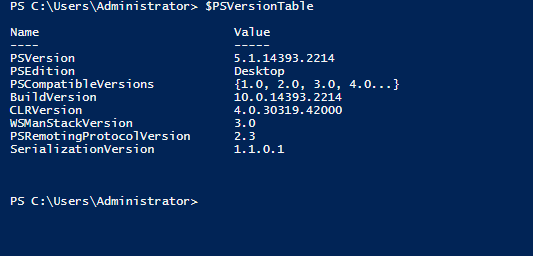
Powershell info on the target machine:
Ansible tasks
It was enough of a mess about yesterday trying to get the win_features working in the first place to install IIS (microsofts fault, apparently they dont think we need the required files to install windows features anymore.)
Every time i run my playbook i get the above error. Googling it just brings back many results about c# applications that are of no relevance to me. Have i missed something, being stupid or is it broken?
Is anyone else having or enountered this issue and how would i go about fixing it?
Hopefully someone can help!
Regards,
PhilB
I am having issues getting the Ansible win_iis_module to work. I've used it in the past on server 2012 but since trying on server 2016 i keep getting the following error:
fatal: [192.168.1.64]: FAILED! => {
    "changed": false,
    "msg": "Class not registered (Exception from HRESULT: 0x80040154 (REGDB_E_CLASSNOTREG))"
}
The code for the task:
- name: newWebsite
  win_iis_website:
    name: "webSite"
    state: started
    port: 80
    ip: 192.168.1.41
    hostname: website.local
    application_pool: DefaultAppPool
    physical_path: "{{ ansible_iis_root }}\\webSite"
  register: website
Powershell info on the target machine:
Ansible tasks
# Create temporary path to download IIS installer
- name: create path
 win_file: path=C:\\temp\\IIS\ state=directory

# Download Internet Information Services (10.0) from Microsoft
- name: Download IIS
 win_get_url:
 url: 'https://download.microsoft.com/download/C/E/8/CE8D18F5-D4C0-45B5-B531-ADECD637A1AA/iisexpress_amd64_en-US.msi'
 dest: 'C:\temp\IIS\iisexpress_amd64_en-US.msi'
# Once downloaded, install IIS
- name: Install IIS MSI
 win_msi:
 path: "C:\\temp\\IIS\\iisexpress_amd64_en-US.msi"
 state: present
 arguments: /install
 wait: yes
# Download and install IIS Managemetn Console.
- name: Install IIS Web Managemnt Console
 win_feature:
 name: Web-Mgmt-Console
 state: present
 register: win_feature_result

# Reboot if required.
- win_reboot:
 when: win_feature_result.reboot_required
 msg: "Rebooting server for changes to be applied. Set up will continue afterwards"

- name: Create direcotry to copy site to
 win_file: path={{ ansible_iis_root }}\\acme state=directory

- name: newWebsite
 win_iis_website:
 name: "webSite"
 state: started
 port: 80
 ip: 192.168.1.41
 hostname: website.local
 application_pool: DefaultAppPool
 physical_path: "{{ ansible_iis_root }}\\webSite"
 register: website

- name: Acme IIS site
 win_iis_website:
 name: "Acme"
 state: started
 port: 80
 ip: 127.0.0.1
 hostname: acme.local
 application_pool: "acme"
 physical_path: c:\inetpub\wwwroot\acme
 parameters: logfile.directory:c:\sites\logs
 register: website


- name: Copy index.html to site directory
 win_copy:
 src: files/index.html
 dest: "{{ ansible_iis_root}}\\{{ ansible_site_folder }}\\index.html"
It was enough of a mess about yesterday trying to get the win_features working in the first place to install IIS (microsofts fault, apparently they dont think we need the required files to install windows features anymore.)
Every time i run my playbook i get the above error. Googling it just brings back many results about c# applications that are of no relevance to me. Have i missed something, being stupid or is it broken?
Is anyone else having or enountered this issue and how would i go about fixing it?
Hopefully someone can help!
Regards,
PhilB

Jordan Borean
Apr 25, 2018, 5:55:52 PM4/25/18
to Ansible Project
Are you trying to install this on a server or desktop Windows OS. I'm pretty sure the error you are getting is because the COM objects the IIS cmdlets use are not registered correctly causing the error you see.
win_features working in the first place to install IIS (microsofts fault, apparently they dont think we need the required files to install windows features anymore.)
By default, the Windows image contains the files required for IIS it just isn't configured and installed, usually enabling them is pretty simple and quick. By default Windows will install from that offline cache unless it was removed manually beforehand. Windows should just source from Windows Update if you don't specify a source path but I found that Server 2016 has a potential bug where once it is removed you can't get it back. I've raised a question over on the MSDN forums but because I don't have an MSDN subscription they pretty much said yes we can replicate but can't do anything unless you pony up some money https://social.msdn.microsoft.com/Forums/en-US/2ad1c1d9-09ba-407e-ba03-951c6f2baa34/features-on-demand-server-2016-source-not-found?forum=ws2016.
Thanks
Jordan
Thanks
Jordan
phil.s...@gmail.com
Apr 26, 2018, 4:37:16 AM4/26/18
to Ansible Project
HI Jordan,
I'm working with Windows server 2016 with the desktop environment.
Having just read the topic you posted to MSDN i see your set up is pretty much the same as mine, ISO from the evalutaion centre, set up as a virtual machine the difference is i didnt try to remove a feature. I'd read about the files being missing and you could replace them with the ISO but it seemed futile as the ISO was the one i got from MS.
It definitely does seem like a 2016 issue as i was able to deploy to an older 2012 server i was working with before. That had been kept up to date though which made me think to check the 2016 server. That kept hanging on Windows Updates and failing so i reformatted and left it updating. This seems to have fixed it as i can deploy the new site now. I think if windows updates were working then i wouldn't have had the issue.
That's a typical microsoft response to be honest, we're an MS company and hear it a lot. I might have a word with our MS guy see if he can raise a ticket with them about the 2016 bug.
Anyway Jordan thanks for your time and for posting the topic to MSDN. It was a good read, very thorough!
Regards,
Phil
I'm working with Windows server 2016 with the desktop environment.
Having just read the topic you posted to MSDN i see your set up is pretty much the same as mine, ISO from the evalutaion centre, set up as a virtual machine the difference is i didnt try to remove a feature. I'd read about the files being missing and you could replace them with the ISO but it seemed futile as the ISO was the one i got from MS.
It definitely does seem like a 2016 issue as i was able to deploy to an older 2012 server i was working with before. That had been kept up to date though which made me think to check the 2016 server. That kept hanging on Windows Updates and failing so i reformatted and left it updating. This seems to have fixed it as i can deploy the new site now. I think if windows updates were working then i wouldn't have had the issue.
That's a typical microsoft response to be honest, we're an MS company and hear it a lot. I might have a word with our MS guy see if he can raise a ticket with them about the 2016 bug.
Anyway Jordan thanks for your time and for posting the topic to MSDN. It was a good read, very thorough!
Regards,
Phil
Jordan Borean
Apr 26, 2018, 5:22:37 AM4/26/18
to Ansible Project
If you have MS pull I would love for some feedback there, it was a very irritating issue and would be great to have a solution :)
I'm curious as to why it failed to install by default as it should be available. When running Get-WindowsFeature, there are 3 states that I know off
I'm curious as to why it failed to install by default as it should be available. When running Get-WindowsFeature, there are 3 states that I know off
- Installed - The feature/role is installed and activated
- Available - The feature is present but not installed and activated
- Removed - The feature is removed and to install it Windows either needs to source from the ISO or Windows Update
Can you install it manually in PowerShell or have you only tried it through win_feature? I definitely have an eval 2016 box and I was able to install IIS using win_feature without any issues.
Thanks
Jordan
phil.s...@gmail.com
Apr 26, 2018, 11:39:55 AM4/26/18
to Ansible Project
Hey Jordan,
I work for a MS CSP so i can definitely ask our MS guys if we can log a ticket with them. And i can point them straight to the topic you created where they can see the info which will help!
Me too, especially if you were able to install with the win_feature module on the eval version (build 14393.rs1_release_1.180402-1758). The fact that Microsoft can recreate the issue though makes it worth trying to report. We plan to use Ansible to provision virtual infrastructure from cluster to guest OS configuration so this would be a major problem with MS. If i get anywhere with Microsoft then i'll let you know the outcome!
As for trying to install using powershell, no i never considered it which is silly on my part really. I have just tried it now, but I'd already run the windows updates so i can't say for sure if it works or if it just worked due to the updates.
Phil
I work for a MS CSP so i can definitely ask our MS guys if we can log a ticket with them. And i can point them straight to the topic you created where they can see the info which will help!
Me too, especially if you were able to install with the win_feature module on the eval version (build 14393.rs1_release_1.180402-1758). The fact that Microsoft can recreate the issue though makes it worth trying to report. We plan to use Ansible to provision virtual infrastructure from cluster to guest OS configuration so this would be a major problem with MS. If i get anywhere with Microsoft then i'll let you know the outcome!
As for trying to install using powershell, no i never considered it which is silly on my part really. I have just tried it now, but I'd already run the windows updates so i can't say for sure if it works or if it just worked due to the updates.
Phil
Reply all
Reply to author
Forward
0 new messages