
Is there any way to get parsed data from stdout of each task on playbook?
14,843 views
Skip to first unread message

Jinsik Kim
Mar 19, 2014, 12:47:35 AM3/19/14
to ansible...@googlegroups.com
Hi,
I am a newbie in this wonderful tool Ansible.
I made a playbook script to test it.
But I found that sometimes I need to parse the stdout of each task.
For instance
- name : run and get the result in JSON format on stdout
shell : "/usr/local/something"
register : result
Let's see result.stdout
{u'name':u'test1', u'ipaddress':'xxx.xxx.xxx.xx', u'pass':'asdfasfd'}
Can I extract these three elements(name, ipaddress, pass) from stdout and use it on another task?
I think lot of users experienced this issue because the return values(stdout) of tools are not simple sometimes
Even if I have a plan to make another Module I think it's tough because I should pass the three elements.
(Unfortunately I am not good at Python yet)
Thanks in advance!
-Justin

Matt Martz
Mar 21, 2014, 8:29:23 AM3/21/14
to ansible...@googlegroups.com, Jinsik Kim
You should be able to use that json by doing something like:
- debug: msg="{{ (result.stdout|from_json).ipaddress }}"
If you wanted to try to turn the whole thing into an accessible data type, you could probably use set_fact:
- set_fact:
some_new_var: "{{ result.stdout|from_json }}"
--
You received this message because you are subscribed to the Google Groups "Ansible Project" group.
To unsubscribe from this group and stop receiving emails from it, send an email to ansible-proje...@googlegroups.com.
To post to this group, send email to ansible...@googlegroups.com.
To view this discussion on the web visit https://groups.google.com/d/msgid/ansible-project/0fff3282-8c63-41e2-83d5-297df7f85642%40googlegroups.com.
For more options, visit https://groups.google.com/d/optout.
Michael DeHaan
Mar 21, 2014, 9:09:38 AM3/21/14
to ansible...@googlegroups.com, Jinsik Kim
Sort of. set_fact doesn't have anything to coerce string inputs and will result in you storing a string.
However, you can use {{ result.stdout | from_json }} anywhere you want the datastructure.
To view this discussion on the web visit https://groups.google.com/d/msgid/ansible-project/etPan.532c30a3.3d1b58ba.11a12%40mobiletuvix.rackspace.corp.

Aviya Singh
May 7, 2019, 2:44:28 AM5/7/19
to Ansible Project
Hi,
This was helpful.
Meanwhile, I am trying to extract "PRETTY NAME" in a loop from below output. What should I use?

Can you look into this ?

Tharun Kumar
May 7, 2019, 12:42:55 PM5/7/19
to ansible...@googlegroups.com
You can use some thing like this.
- set_fact:
Name: (result.stdout | from_json).name
Ipaddress: similar to the above
--
You received this message because you are subscribed to the Google Groups "Ansible Project" group.
To unsubscribe from this group and stop receiving emails from it, send an email to ansible-proje...@googlegroups.com.
To post to this group, send email to ansible...@googlegroups.com.
To view this discussion on the web visit https://groups.google.com/d/msgid/ansible-project/0e165dde-e93a-43bf-a62f-a1a4c0a9821d%40googlegroups.com.
Aviya Singh
May 7, 2019, 1:29:04 PM5/7/19
to Ansible Project
Thank you for the time.
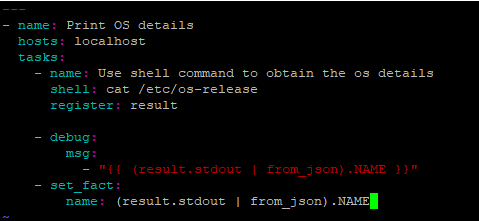
I tried the Ipaddess parttern for my case. Also, tried the case suggested by you. But did not receive positive results.
Below is the snip of my code and the output respectively.

To unsubscribe from this group and stop receiving emails from it, send an email to ansible...@googlegroups.com.
Message has been deleted
Tharun Kumar
May 7, 2019, 5:46:53 PM5/7/19
to ansible...@googlegroups.com

U can use system-release instead of os-release if you are just trying find the os name and version from all hosts.
This should return something like this.

To unsubscribe from this group and stop receiving emails from it, send an email to ansible-proje...@googlegroups.com.
To post to this group, send email to ansible...@googlegroups.com.
To view this discussion on the web visit https://groups.google.com/d/msgid/ansible-project/064c4c3e-bea2-456c-8b92-062f5f890194%40googlegroups.com.
Reply all
Reply to author
Forward
0 new messages