
Help running Androidx86 on HP Tablet 608 g1 (Cherry Trail)
899 views
Skip to first unread message

nova ans
Apr 29, 2020, 1:33:17 PM4/29/20
to Android-x86
First of all, as everyone else has already stated, thank you so much for all the work everyone has done with Androidx86, i hope i don't come off as pushy, I'm simply asking for a bit of help, not expecting anything from anyone.
I've been trying to boot my HP Pro Tablet 608 G1 for the past couple of days and have not been able to get a "functional" system going. I was wondering if there is any further info anyone would be able to provide to help me. Here are some things i've tried so far, first i've tried Androidx86 versions from 5.1 up to 9.0R2 inlcuding remixOS, PhoenixOS and BlissOS. Some boot most don't. 7.1-r3, and all the 9.0 ones boot but only with "nomodeset" present.
I've tried some other options such as:
https://groups.google.com/forum/#!searchin/android-x86/608$20g1|sort:date/android-x86/t8I2JER2C5g/CEuf_-N-BwAJ
but have had no luck, basically if i don't enter "nomodeset" the system does not boot. It gets stuck on: fb: switching to inteldrmfb from EFI VGA. Or it'll get stuck on a black screen as soon as i choose to boot either the live option or installing it to a partition and trying to boot it from there. PhoenixOS gets to the android logo (with nomodeset) and it'll remain there for a while (I left it overnight ~7hrs). I've also tried other options suggestions here on this group but still no dice.
I'm hoping someone has tried anything or maybe i'm doing something wrong and hoping for any possible info that may be able to help me. One thing that's not listed in the info below about the tablet is that it has a resolution of 2048x1536 (the below info was generated with Ubuntu 20.04) even if I'm able to have a working system with a lower res, I'll accept it. But as i mentioned based on the thread by Combeynot, i'm not sure if it's possible. Again, thank you so much, I have androidx86 running on an old laptop and it works awesome.
description: Notebook
product: HP Pro Tablet 608 G1
vendor: HP
version: 09A7000000000000000000000
serial:
width: 64 bits
capabilities: smbios-2.8 dmi-2.8 smp vsyscall32
*-firmware
description: BIOS
version: N70 Ver. 01.21
capabilities: pci upgrade shadowing cdboot bootselect edd int9keyboard int14serial int17printer int10video acpi zipboot biosbootspecification netboot
*-cpu
description: CPU
product: Intel(R) Atom(TM) x5-Z8550 CPU @ 1.44GHz
vendor: Intel Corp.
physical id: 4
bus info: cpu@0
version: Intel(R) Atom(TM) x5-Z8550 CPU @ 1.44GHz
serial: To Be Filled By O.E.M.
slot: CHV
size: 495MHz
capacity: 2400MHz
width: 64 bits
clock: 83MHz
capabilities: lm fpu fpu_exception wp vme de pse tsc msr pae mce cx8 apic sep mtrr pge mca cmov pat pse36 clflush dts acpi mmx fxsr sse sse2 ss ht tm pbe syscall nx rdtscp x86-64 constant_tsc arch_perfmon pebs bts rep_good nopl xtopology tsc_reliable nonstop_tsc cpuid aperfmperf tsc_known_freq pni pclmulqdq dtes64 monitor ds_cpl vmx est tm2 ssse3 cx16 xtpr pdcm sse4_1 sse4_2 movbe popcnt tsc_deadline_timer aes rdrand lahf_lm 3dnowprefetch epb pti ibrs ibpb stibp tpr_shadow vnmi flexpriority ept vpid tsc_adjust smep erms dtherm ida arat md_clear cpufreq
configuration: cores=4 enabledcores=4 threads=4
*-display
description: VGA compatible controller
product: Atom/Celeron/Pentium Processor x5-E8000/J3xxx/N3xxx Integrated Graphics Controller
vendor: Intel Corporation
physical id: 2
bus info: pci@0000:00:02.0
version: 34
width: 64 bits
clock: 33MHz
capabilities: pm msi vga_controller bus_master cap_list rom
configuration: driver=i915 latency=0
resources: irq:139 memory:90000000-90ffffff memory:80000000-8fffffff ioport:1000(size=64) memory:c0000-dffff
00:02.0 VGA compatible controller: Intel Corporation Atom/Celeron/Pentium Processor x5-E8000/J3xxx/N3xxx Integrated Graphics Controller (rev 34) (prog-if 00 [VGA controller])
Subsystem: Hewlett-Packard Company Atom/Celeron/Pentium Processor x5-E8000/J3xxx/N3xxx Integrated Graphics Controller
Control: I/O+ Mem+ BusMaster+ SpecCycle- MemWINV- VGASnoop- ParErr- Stepping- SERR- FastB2B- DisINTx+
Status: Cap+ 66MHz- UDF- FastB2B- ParErr- DEVSEL=fast >TAbort- <TAbort- <MAbort- >SERR- <PERR- INTx-
Latency: 0
Interrupt: pin A routed to IRQ 139
Region 0: Memory at 90000000 (64-bit, non-prefetchable) [size=16M]
Region 2: Memory at 80000000 (64-bit, prefetchable) [size=256M]
Region 4: I/O ports at 1000 [size=64]
Expansion ROM at 000c0000 [virtual] [disabled] [size=128K]
Capabilities: [d0] Power Management version 2
Flags: PMEClk- DSI+ D1- D2- AuxCurrent=0mA PME(D0-,D1-,D2-,D3hot-,D3cold-)
Status: D0 NoSoftRst- PME-Enable- DSel=0 DScale=0 PME-
Capabilities: [90] MSI: Enable+ Count=1/1 Maskable- 64bit-
Address: fee02004 Data: 4029
Capabilities: [b0] Vendor Specific Information: Len=07 <?>
Kernel driver in use: i915
Kernel modules: i915
I've been trying to boot my HP Pro Tablet 608 G1 for the past couple of days and have not been able to get a "functional" system going. I was wondering if there is any further info anyone would be able to provide to help me. Here are some things i've tried so far, first i've tried Androidx86 versions from 5.1 up to 9.0R2 inlcuding remixOS, PhoenixOS and BlissOS. Some boot most don't. 7.1-r3, and all the 9.0 ones boot but only with "nomodeset" present.
I've tried some other options such as:
https://groups.google.com/forum/#!searchin/android-x86/608$20g1|sort:date/android-x86/t8I2JER2C5g/CEuf_-N-BwAJ
but have had no luck, basically if i don't enter "nomodeset" the system does not boot. It gets stuck on: fb: switching to inteldrmfb from EFI VGA. Or it'll get stuck on a black screen as soon as i choose to boot either the live option or installing it to a partition and trying to boot it from there. PhoenixOS gets to the android logo (with nomodeset) and it'll remain there for a while (I left it overnight ~7hrs). I've also tried other options suggestions here on this group but still no dice.
I'm hoping someone has tried anything or maybe i'm doing something wrong and hoping for any possible info that may be able to help me. One thing that's not listed in the info below about the tablet is that it has a resolution of 2048x1536 (the below info was generated with Ubuntu 20.04) even if I'm able to have a working system with a lower res, I'll accept it. But as i mentioned based on the thread by Combeynot, i'm not sure if it's possible. Again, thank you so much, I have androidx86 running on an old laptop and it works awesome.
description: Notebook
product: HP Pro Tablet 608 G1
vendor: HP
version: 09A7000000000000000000000
serial:
width: 64 bits
capabilities: smbios-2.8 dmi-2.8 smp vsyscall32
*-firmware
description: BIOS
version: N70 Ver. 01.21
capabilities: pci upgrade shadowing cdboot bootselect edd int9keyboard int14serial int17printer int10video acpi zipboot biosbootspecification netboot
*-cpu
description: CPU
product: Intel(R) Atom(TM) x5-Z8550 CPU @ 1.44GHz
vendor: Intel Corp.
physical id: 4
bus info: cpu@0
version: Intel(R) Atom(TM) x5-Z8550 CPU @ 1.44GHz
serial: To Be Filled By O.E.M.
slot: CHV
size: 495MHz
capacity: 2400MHz
width: 64 bits
clock: 83MHz
capabilities: lm fpu fpu_exception wp vme de pse tsc msr pae mce cx8 apic sep mtrr pge mca cmov pat pse36 clflush dts acpi mmx fxsr sse sse2 ss ht tm pbe syscall nx rdtscp x86-64 constant_tsc arch_perfmon pebs bts rep_good nopl xtopology tsc_reliable nonstop_tsc cpuid aperfmperf tsc_known_freq pni pclmulqdq dtes64 monitor ds_cpl vmx est tm2 ssse3 cx16 xtpr pdcm sse4_1 sse4_2 movbe popcnt tsc_deadline_timer aes rdrand lahf_lm 3dnowprefetch epb pti ibrs ibpb stibp tpr_shadow vnmi flexpriority ept vpid tsc_adjust smep erms dtherm ida arat md_clear cpufreq
configuration: cores=4 enabledcores=4 threads=4
*-display
description: VGA compatible controller
product: Atom/Celeron/Pentium Processor x5-E8000/J3xxx/N3xxx Integrated Graphics Controller
vendor: Intel Corporation
physical id: 2
bus info: pci@0000:00:02.0
version: 34
width: 64 bits
clock: 33MHz
capabilities: pm msi vga_controller bus_master cap_list rom
configuration: driver=i915 latency=0
resources: irq:139 memory:90000000-90ffffff memory:80000000-8fffffff ioport:1000(size=64) memory:c0000-dffff
00:02.0 VGA compatible controller: Intel Corporation Atom/Celeron/Pentium Processor x5-E8000/J3xxx/N3xxx Integrated Graphics Controller (rev 34) (prog-if 00 [VGA controller])
Subsystem: Hewlett-Packard Company Atom/Celeron/Pentium Processor x5-E8000/J3xxx/N3xxx Integrated Graphics Controller
Control: I/O+ Mem+ BusMaster+ SpecCycle- MemWINV- VGASnoop- ParErr- Stepping- SERR- FastB2B- DisINTx+
Status: Cap+ 66MHz- UDF- FastB2B- ParErr- DEVSEL=fast >TAbort- <TAbort- <MAbort- >SERR- <PERR- INTx-
Latency: 0
Interrupt: pin A routed to IRQ 139
Region 0: Memory at 90000000 (64-bit, non-prefetchable) [size=16M]
Region 2: Memory at 80000000 (64-bit, prefetchable) [size=256M]
Region 4: I/O ports at 1000 [size=64]
Expansion ROM at 000c0000 [virtual] [disabled] [size=128K]
Capabilities: [d0] Power Management version 2
Flags: PMEClk- DSI+ D1- D2- AuxCurrent=0mA PME(D0-,D1-,D2-,D3hot-,D3cold-)
Status: D0 NoSoftRst- PME-Enable- DSel=0 DScale=0 PME-
Capabilities: [90] MSI: Enable+ Count=1/1 Maskable- 64bit-
Address: fee02004 Data: 4029
Capabilities: [b0] Vendor Specific Information: Len=07 <?>
Kernel driver in use: i915
Kernel modules: i915

Daniel Cheung
Apr 29, 2020, 4:13:25 PM4/29/20
to andro...@googlegroups.com
I had similar issues but that was back in 7.1. I had to add a flag in the boot command in grub to get it to work.
intel_idle.max_cstate=1
I haven't experience this issue with my Z8300 tablet since Android 8 using the default boot flags in grub.
--
You received this message because you are subscribed to the Google Groups "Android-x86" group.
To unsubscribe from this group and stop receiving emails from it, send an email to android-x86...@googlegroups.com.
To view this discussion on the web visit https://groups.google.com/d/msgid/android-x86/720a1c15-840d-43b0-8f23-2b746b5a724d%40googlegroups.com.
Message has been deleted
nova ans
Apr 30, 2020, 1:01:36 AM4/30/20
to Android-x86
No luck still, still got stuck at "fb: switching to inteldrmfb from EFI VGA"
On Wednesday, April 29, 2020 at 4:13:25 PM UTC-4, BrokenE39 wrote:
I had similar issues but that was back in 7.1. I had to add a flag in the boot command in grub to get it to work.intel_idle.max_cstate=1I haven't experience this issue with my Z8300 tablet since Android 8 using the default boot flags in grub.
To unsubscribe from this group and stop receiving emails from it, send an email to andro...@googlegroups.com.
Daniel Cheung
Apr 30, 2020, 1:25:21 AM4/30/20
to andro...@googlegroups.com
Have you tried making your own ISO? When I built my own ISO, in the kernel configurator, I disable all the frame buffer devices except the following:
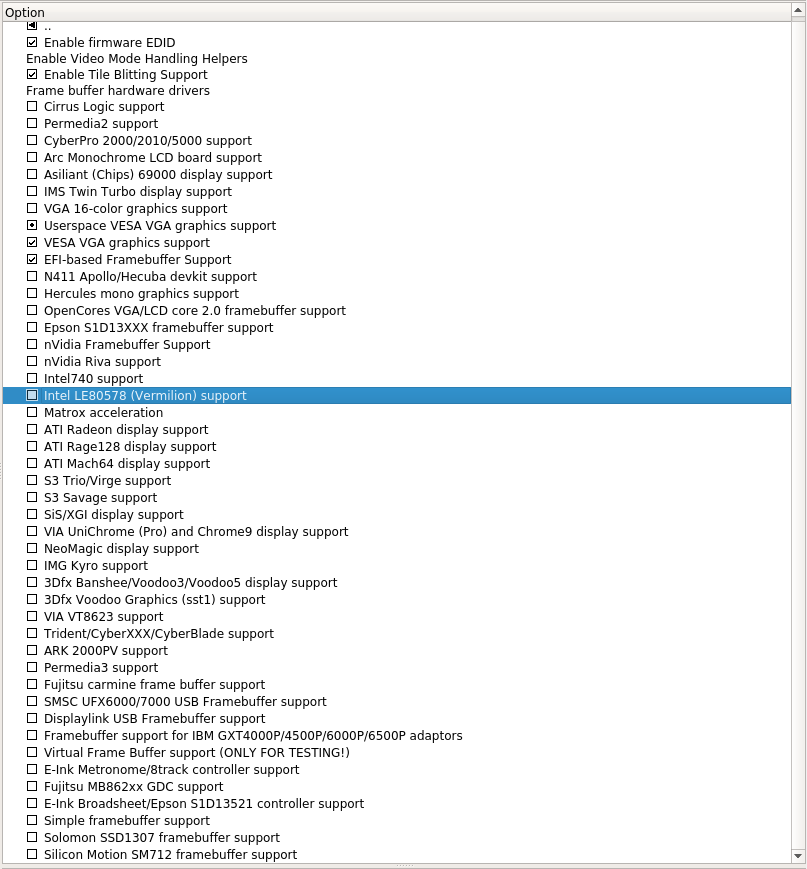
Or you can try patching i915 driver and see if it helps. It looks like it's not an Android problem but a Linux driver problem.
To unsubscribe from this group and stop receiving emails from it, send an email to android-x86...@googlegroups.com.
To view this discussion on the web visit https://groups.google.com/d/msgid/android-x86/45d40165-d840-4e43-b4c6-0b9bf9136d0b%40googlegroups.com.

Prajna Sariputra
Apr 30, 2020, 2:16:59 AM4/30/20
to andro...@googlegroups.com
That just looks like a more complicated version of nomodeset to me. Although, it is curious that Ubuntu 20.04 apparently does work according to the fact that the device info was retrieved from there, maybe the newer kernel and/or Mesa helps?
To view this discussion on the web visit https://groups.google.com/d/msgid/android-x86/CAFgJqCe%3Dcw6jBmKi7p%2BfLS%2BXOh5NRVKtK3GaCSu5NUF9xiGwzw%40mail.gmail.com.

youling 257
Apr 30, 2020, 2:29:52 AM4/30/20
to Android-x86
please run debug mode and provide data/log.txt
nova ans
Apr 30, 2020, 10:12:10 AM4/30/20
to Android-x86
I was able to gather the dmesg log, hopefully this can be a bit useful
nova ans
Apr 30, 2020, 10:15:35 AM4/30/20
to Android-x86
On Thursday, April 30, 2020 at 2:16:59 AM UTC-4, Prajna Sariputra wrote:
That just looks like a more complicated version of nomodeset to me. Although, it is curious that Ubuntu 20.04 apparently does work according to the fact that the device info was retrieved from there, maybe the newer kernel and/or Mesa helps?
On Thu, Apr 30, 2020, 3:25 PM Daniel Cheung <dwt....@gmail.com> wrote:
Have you tried making your own ISO? When I built my own ISO, in the kernel configurator, I disable all the frame buffer devices except the following:Or you can try patching i915 driver and see if it helps. It looks like it's not an Android problem but a Linux driver problem.

To view this discussion on the web visit https://groups.google.com/d/msgid/android-x86/45d40165-d840-4e43-b4c6-0b9bf9136d0b%40googlegroups.com.
--
You received this message because you are subscribed to the Google Groups "Android-x86" group.
To unsubscribe from this group and stop receiving emails from it, send an email to andro...@googlegroups.com.
To view this discussion on the web visit https://groups.google.com/d/msgid/android-x86/CAFgJqCe%3Dcw6jBmKi7p%2BfLS%2BXOh5NRVKtK3GaCSu5NUF9xiGwzw%40mail.gmail.com.
nova ans
Apr 30, 2020, 10:16:23 AM4/30/20
to Android-x86
Thanks for the heads up, I will see if i'm able to do that.
On Thursday, April 30, 2020 at 1:25:21 AM UTC-4, BrokenE39 wrote:
Have you tried making your own ISO? When I built my own ISO, in the kernel configurator, I disable all the frame buffer devices except the following:Or you can try patching i915 driver and see if it helps. It looks like it's not an Android problem but a Linux driver problem.

To view this discussion on the web visit https://groups.google.com/d/msgid/android-x86/45d40165-d840-4e43-b4c6-0b9bf9136d0b%40googlegroups.com.
youling 257
Apr 30, 2020, 11:44:28 AM4/30/20
to Android-x86
no useful, need data/log.txt
在 2020年4月30日星期四 UTC+8下午10:12:10,nova ans写道:
在 2020年4月30日星期四 UTC+8下午10:12:10,nova ans写道:
nova ans
Apr 30, 2020, 1:08:12 PM4/30/20
to Android-x86
Sorry for my confusion but i'm not sure how i would be able to do that. I can either boot with either the SD card or a USB flash drive but not both. I have to have my keyboard plugged in to boot and that takes up the slot for the USB flash drive. I don't own the keyboard for this tablet so I have to make due. The best I can do, that i can think of is to take pictures of the boot process with my phone of the DEBUG=2 param. My apologies, I think I may be a bit over my head at this point.
When I switch console before the boot process completes, I don't any /data/log.txt file.

Michael Goffioul
Apr 30, 2020, 1:59:06 PM4/30/20
to Android-x86
It's a very very very long shot, but try to add video=LVDS-1:d to the kernel command line. I used to need that on my hardware, otherwise it would switch to an non-wired display output and the whole device would freeze.
--
You received this message because you are subscribed to the Google Groups "Android-x86" group.
To unsubscribe from this group and stop receiving emails from it, send an email to android-x86...@googlegroups.com.
To view this discussion on the web visit https://groups.google.com/d/msgid/android-x86/cbfc151a-75cb-4529-b108-71b35b78b8be%40googlegroups.com.
nova ans
Apr 30, 2020, 2:43:25 PM4/30/20
to Android-x86
No luck either.
--
You received this message because you are subscribed to the Google Groups "Android-x86" group.
To unsubscribe from this group and stop receiving emails from it, send an email to andro...@googlegroups.com.
youling 257
Apr 30, 2020, 2:52:42 PM4/30/20
to Android-x86
on ubuntu 20.04,
ls -al /sys/class/drm
ls -al /sys/class/backlight
youling 257
Apr 30, 2020, 6:18:08 PM4/30/20
to Android-x86
video=DSI-1:e
在 2020年5月1日星期五 UTC+8上午3:44:16,nova ans写道:
在 2020年5月1日星期五 UTC+8上午3:44:16,nova ans写道:
youling 257
Apr 30, 2020, 6:20:40 PM4/30/20
to Android-x86
video=DSI-1:2048x1536@60
在 2020年5月1日星期五 UTC+8上午3:44:16,nova ans写道:
As requested
nova ans
Apr 30, 2020, 9:10:58 PM4/30/20
to Android-x86
With video=DSI-1:e it does the same thing, it gets to "fb: switching to inteldrmfb from EFI VGA" and it freezes
with "video=DSI-1:2048x1536@60" it goes past "fb: switching to inteldrmfb from EFI VGA" but only to a black screen. I tried it in conjunction with "
intel_idle.max_cstate=1" to the same outcome.
youling 257
May 1, 2020, 12:58:22 AM5/1/20
to Android-x86
test kernel 5.6, https://drive.google.com/drive/folders/1LI33bxJKFXllJaK1LW2cEPux28rmel9b
在 2020年5月1日星期五 UTC+8上午9:10:58,nova ans写道:
在 2020年5月1日星期五 UTC+8上午9:10:58,nova ans写道:

Ernest Crus
May 1, 2020, 9:22:47 AM5/1/20
to Android-x86
Hi BrokenE39,
Where can be found that iso builder posted by you?
On Thursday, 30 April 2020 06:25:21 UTC+1, BrokenE39 wrote:
Have you tried making your own ISO? When I built my own ISO, in the kernel configurator, I disable all the frame buffer devices except the following:Or you can try patching i915 driver and see if it helps. It looks like it's not an Android problem but a Linux driver problem.
To view this discussion on the web visit https://groups.google.com/d/msgid/android-x86/45d40165-d840-4e43-b4c6-0b9bf9136d0b%40googlegroups.com.
nova ans
May 1, 2020, 10:00:44 AM5/1/20
to Android-x86
Youling 257 - No luck with either the 5.6 or the 5.4, i get the same result. Thank you for the help so far.
Is there a guide somewhere that will allow me to rebuild the kernel like BrokenE39 suggested? Maybe i can try applying this patch https://patchwork.freedesktop.org/patch/216371/
youling 257
May 1, 2020, 10:50:42 AM5/1/20
to Android-x86
you can use ubuntu gcc9 build Androidx86 kernel and modules, replace kernel and modules with Androidx86 7/8/9/10.
在 2020年5月1日星期五 UTC+8下午10:00:44,nova ans写道:
apt-get install --no-install-recommends git gcc g++ build-essential libncurses5-dev libssl-dev bc flex libelf-dev bison nano autoconf automake
it's difficult for user do something on Android, user like the out of box ISO.
it's difficult for user do something on Android, user like the out of box ISO.
Androidx86 guide https://www.android-x86.org/documentation/customize_kernel.html
在 2020年5月1日星期五 UTC+8下午10:00:44,nova ans写道:
Message has been deleted

Chih-Wei Huang
May 5, 2020, 10:19:43 PM5/5/20
to Android-x86
nova ans <trust...@gmail.com> 於 2020年5月1日 週五 上午3:44寫道:
Please collect dmesg & lsmod on Ubuntu 20.04.
--
Chih-Wei
Android-x86 project
http://www.android-x86.org
--
Chih-Wei
Android-x86 project
http://www.android-x86.org

Mauro Rossi
May 6, 2020, 3:10:50 AM5/6/20
to Android-x86
Hi,
On Thursday, April 30, 2020 at 7:08:12 PM UTC+2, nova ans wrote:
Sorry for my confusion but i'm not sure how i would be able to do that. I can either boot with either the SD card or a USB flash drive but not both. I have to have my keyboard plugged in to boot and that takes up the slot for the USB flash drive. I don't own the keyboard for this tablet so I have to make due. The best I can do, that i can think of is to take pictures of the boot process with my phone of the DEBUG=2 param. My apologies, I think I may be a bit over my head at this point.When I switch console before the boot process completes, I don't any /data/log.txt file.
After having provided Ubuntu 20.04 requested logs,
you may use a 2nd ext4 formatted USB flash drive, plug it to see which sdX drive will appear
supposing it is sdc1, you could use DATA=/dev/block/sdc1 entry in grub cmdline,
in this way you should get /data/log.txt in the 2nd usb flash drive, even if there are errors by kernel, if the errors are not producing an hard reboot
I have also uploaded an experimental iso with kernel 5.7rc3 https://drive.google.com/drive/folders/1LI33bxJKFXllJaK1LW2cEPux28rmel9b
nova ans
May 9, 2020, 7:56:29 PM5/9/20
to Android-x86
Here you go.
On Tuesday, May 5, 2020 at 10:19:43 PM UTC-4, Chih-Wei Huang wrote:
nova ans <trus...@gmail.com> 於 2020年5月1日 週五 上午3:44寫道:
nova ans
May 9, 2020, 8:37:37 PM5/9/20
to Android-x86
I was able to get the log. Here is what i get with kernel 5.7rc3, it no longer boots even with 'nomodeset'.
On Wednesday, May 6, 2020 at 3:10:50 AM UTC-4, Mauro Rossi wrote:
Hi,
Chih-Wei Huang
May 10, 2020, 11:28:05 AM5/10/20
to Android-x86
nova ans <trust...@gmail.com> 於 2020年5月10日 週日 上午8:37寫道:
So probably it needs newer kernel.
If you test kernel 5.7rc3, you should not use 'nomodeset'
(which means disable GPU acceleration).
>
> https://drive.google.com/open?id=1yCZwjGNYIuNaRNaB7JEi6eAkMCW35CRr
> I was able to get the log. Here is what i get with kernel 5.7rc3, it no longer boots even with 'nomodeset'.
From the Ubuntu log, it uses kernel 5.4.
> https://drive.google.com/open?id=1yCZwjGNYIuNaRNaB7JEi6eAkMCW35CRr
> I was able to get the log. Here is what i get with kernel 5.7rc3, it no longer boots even with 'nomodeset'.
So probably it needs newer kernel.
If you test kernel 5.7rc3, you should not use 'nomodeset'
(which means disable GPU acceleration).
nova ans
May 10, 2020, 11:41:22 AM5/10/20
to Android-x86
My apologies, what i meant was that with nomodeset it gets past the "fb: switching to inteldrmfb from EFI VGA" line but then it gets stuck on a kernel panic (as it shows on the data.log), without nomodeset and with kernel 5.7rc3 it's back to stopping at the "fb: switching to inteldrmfb from EFI VGA" With 9.0r2 i can get into the android desktop, but it's unusable because of nomodeset but with the newer kernels >5.3 even with nomodeset i don't get to the desktop.
nova ans <trus...@gmail.com> 於 2020年5月10日 週日 上午8:37寫道:

Mitchel Stewart
May 10, 2020, 12:30:36 PM5/10/20
to Android-x86
try running the newest builds of bliss os built on the newer kernels, thats where I had the best luck, and if it does work, but don't want to use it, it's still usefull for debugging purposes
nova ans
May 10, 2020, 9:00:38 PM5/10/20
to Android-x86
Thank you for the suggestion, I had not checked back with BlissOS, so i was not aware they have new builds up. Well i was able to boot with BlissOS 11.10 but as soon as it gets to the desktop, not even a second after it goes automatically into power off. I am trying to find the data.log file on my usb drive but all i find is this syncmanager.log file. One more thing to note, if i try and boot with the SD card, it does not boot, it gets stuck in the detecting android..... part. I've tried removing the SD card and re-inserting it to no success. But if i boot with my USB flash drive it does boot directly into a poweroff as i stated above. I also tested their experimental Generic Q builds but that does get past the loading screen.
On Sunday, May 10, 2020 at 12:30:36 PM UTC-4, Mitchel Stewart wrote:
On Sunday, May 10, 2020 at 12:30:36 PM UTC-4, Mitchel Stewart wrote:
nova ans
May 10, 2020, 9:02:18 PM5/10/20
to Android-x86
nova ans
May 19, 2020, 2:12:19 PM5/19/20
to Android-x86
So i've had some success with with I had already tried before, PhoenixOS. No idea how is working now but it's working, I was even able to install it to the device storage. The funny thing is, I tried installing it 4 times today (frustration I guess, sometimes I think i have missed a certain parameter even though I didn't and I try again and again until i'm satisfied it doesn't work, compulsiveness i guess) and on the 4th try it actually booted into PhoenixOS. I was super surprised but ecstatic nonetheless.
PhoenixOS 3.6.1.64
Android Version 7.1.1
Linux localhost 4.14.15-PhoenixOS-x86_64 #1 SMP PREEMPT Mon Aug 26 19:10:40 CST 2019 x86_64
There are many things not working thought, which i figured, i'm hoping that with this thing on and actually inside Androidx86 i may be able to troubleshoot and maybe even boot other versions. Any help on what i may need to move up from 7.1.1 maybe even try and boot 9.0 instead of PhoenixOS?
Things that don't work:
screen rotation (tried a few things suggested in other threads to no avail)
sound
if i turn the screen off with the power button, it doesn't come back, i have to do a hard reboot.
mic
As usual, any help would be greatly appreciated.
Reply all
Reply to author
Forward
0 new messages