
Need Help with coding (Beginner level coder here)
240 views
Skip to first unread message

David Bruner
Aug 25, 2022, 6:12:25 PM8/25/22
to accelstepper
I have an Arduino UNO and am trying to run a stepper motor (0.9 degreee/step, 4 wire (blu,grn,red,blk)) based on 2 limit switches. I want the motor to step a few degrees every time a limit switch is contacted, until a full revolution is made. Then turn back to it's starting position the reverse direction (in one step). Start over.
I'm having a hard time determining how to declare the pins based on the motor (step or half step?). Also which Accelstepper commands to use for this. And I can't find anything online to help with this.

Jim Larson
Aug 25, 2022, 8:26:50 PM8/25/22
to accelstepper
To determine how to declare the driver and pins, you must know what type of driver you have.
You may find the following links helpful:
Please post if you still need help.
-jim
David Bruner
Aug 30, 2022, 4:00:07 PM8/30/22
to accelstepper
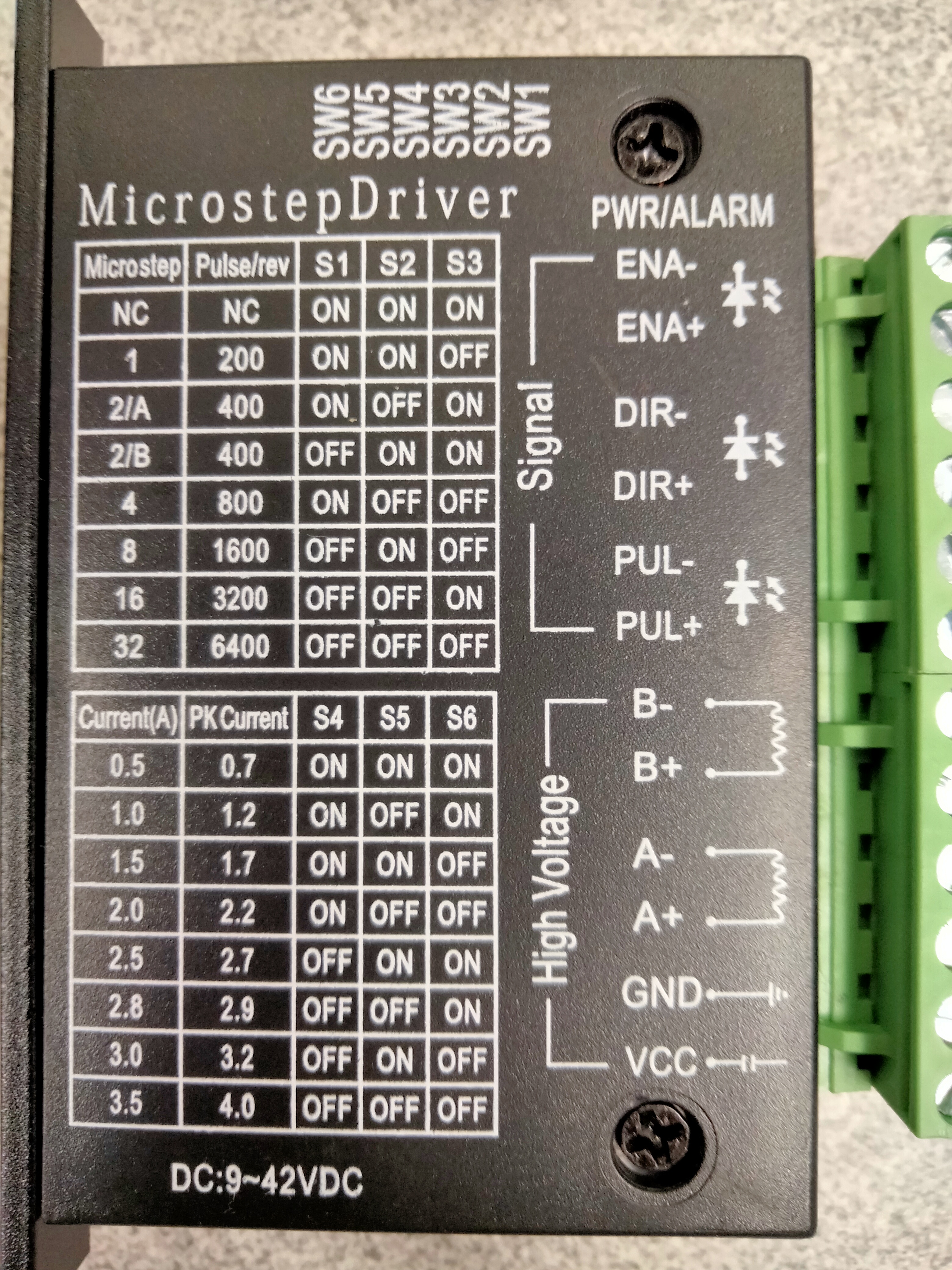
In the accelstepper missing manuals, I'm trying to identify the type of stepper motor and driver I have. Since it is 0.9 deg/step would that count the motor as "
AccelStepper::HALF4WIRE (4 wire half stepper, 4 motor pins required.)"???
Sorry, again, VERY new to this
Jim Larson
Aug 30, 2022, 9:00:14 PM8/30/22
to accelstepper
The spec on your motor just means it takes 400 steps per revolution (360/0.9). These would be full steps. Your driver appears to be a TB6600, so you can set it to various levels of microstepping if you like. But it takes step and direction inputs (called DIR and PUL) to actually command steps. For example, if you set S1-on, S2-on and S3-off; then give 400 steps, the motor will rotate once. With S1-on, S2-off and S3-off; you will have to give 1600 steps to cause one revolution.(And yes, these are double the numbers printed on the case - it assumes a 200 step per revolution motor.)
To use step and direction, your driver should be declared as
AccelStepper myStepper(AccelStepper::DRIVER, stepPin, dirPin);
As mentioned in other posts on this forum, you should also set the minimum pulse width to 20microseconds.
myStepper.setMinPulseWidth(20);
Then you can try some of the code in the tutorial (the second link I gave).
If you need help hooking up the TB600 to your motor and Arduino, Google should be able to help.
-jim
David Bruner
Sep 2, 2022, 8:08:14 PM9/2/22
to accels...@googlegroups.com
"To use step and direction, your driver should be declared as
AccelStepper myStepper(AccelStepper::DRIVER, stepPin, dirPin)"
- so declaring the driver is all that is necessary, correct? As long as I know and use the correct capabilities of the motor, it's the DRIVER that I need to designate in Arduino code?
--
You received this message because you are subscribed to a topic in the Google Groups "accelstepper" group.
To unsubscribe from this topic, visit https://groups.google.com/d/topic/accelstepper/mCYqPWGElMI/unsubscribe.
To unsubscribe from this group and all its topics, send an email to accelstepper...@googlegroups.com.
To view this discussion on the web visit https://groups.google.com/d/msgid/accelstepper/351e4fcd-19c0-417e-8a49-32f7be52c93dn%40googlegroups.com.
Jim Larson
Sep 2, 2022, 8:28:42 PM9/2/22
to accelstepper
That's correct. Again, the examples I offer should show you how.
You may find this link useful for connecting your motor and driver to the Arduino. Please ignore the example code offered and use the examples from the link above.
-jim
David Bruner
Sep 8, 2022, 6:02:30 PM9/8/22
to accelstepper
So while I am trying to get the hang of this, I have another set of questions.
When I am using the AccelStepper Library, will I still need to designate which of my Arduino pins are inputs and outputs? Or is that performed through the library commands?
Will "IF. . .Then" statements work ok? Or is it preferred to use "Do . . . while"?

Seth Perkins
Sep 8, 2022, 7:49:37 PM9/8/22
to accels...@googlegroups.com
The Accelstepper will take care of defining your pins for you. I would try to stick to IF statements because while statements will block all other processes in the while loop. Notice how it just checks the if statements and the run command adjusts accordingly. Blocking loops can be necessary but any polling for inputs and other processes will stop.
Sorta like this. Pseudocode
setup() {
AccelStepper stepper(AccelStepper::DRIVER,16,18); // 16 for step and 18 for dir
stepper.setMinPulseWidth(30);
stepper.setMaxSpeed(30000);
stepper.setSpeed(30000);
stepper.setAcceleration(5000);
stepper.setPinsInverted(0,0,0);
setCurrentPosition(0);
loop()
{
if( "Condition")
{
stepper.moveTo(800); This will set a target position 800 pulses away (typically 2 revolutions)
}
if( "Condition")
{
stepper.moveTo(-200); This will set a target position -200 pulses away (typically 1/2 revolution)
}
stepper.run(); // Everytime this is called it will see if your position is equal to your target and step the motor 1 time if it is not.
This runs continuously always keeping you on track
}
You received this message because you are subscribed to the Google Groups "accelstepper" group.
To unsubscribe from this group and stop receiving emails from it, send an email to accelstepper...@googlegroups.com.
To view this discussion on the web visit https://groups.google.com/d/msgid/accelstepper/05407559-500f-4d7a-aa36-942c3b7e7050n%40googlegroups.com.
Seth Perkins
Jim Larson
Sep 9, 2022, 12:14:22 AM9/9/22
to accelstepper
Seth is correct about initialization done by AccelStepper. You don't need to worry about pins it uses.
Regarding use of if/then or do/while statements with AccelStepper: You can use any C/C++ logic construct that you like. AccelStepper in no way restricts you.
Regarding the function of run(): As explained in the Missing Manual, run() will cause a step when it is called if a step is due. That is determined by the settings of acceleration, max speed, and the distance to the target position. If run() were to cause a step each time it is called, then the rate one calls run() would determine the stepping speed - NOTwhat happens. This is a widely held misconception.
-jim

Ralph Hulslander
Sep 9, 2022, 8:52:00 PM9/9/22
to accels...@googlegroups.com
First thing let me say I am not a programmer.
Now David Asked "When I am using the AccelStepper Library, will I still need to designate which of my Arduino pins are inputs and outputs? Or is that performed through the library commands?"
Seth said "The Accelstepper will take care of defining your pins for you."
and gave in his example: "AccelStepper stepper(AccelStepper::DRIVER,16,18); // 16 for step and 18 for dir"
I think the code is designating which of Arduino pins are inputs and outputs, not AccellStepper.
Be forewarned I am close to getting to work in my shop and running the code Jim did for me last year so I will be back with
videos showing it in operation and then questions.
Ralph
To view this discussion on the web visit https://groups.google.com/d/msgid/accelstepper/d154b527-96d1-4a1d-afe0-f37505703a10n%40googlegroups.com.
Jim Larson
Sep 9, 2022, 10:21:48 PM9/9/22
to accelstepper
Ralph, you are correct that the pins are specified in the code - in the instantiation of the AccelStepper object. But what I think the OP meant was whether or not pinMode() statements are required as well. They are not.
-jim
David Bruner
Sep 10, 2022, 10:45:13 PM9/10/22
to accels...@googlegroups.com
Jim,
I wanted to first tell you THANK YOU for the help you've given!
I have my code here, and am running into the "exit status 1 Error compiling for board Arduino Uno"
Again, all I am trying to do is get the stepper motor to turn a few degrees (calculated 3 steps) with each limit switch trip. Once the motor has made it around 360 degree (calculated 133.3 approx number of steps), it will turn back to start in the opposite direction and continue as such
#include <AccelStepper.h>
//Trying defining pins?
int stepPin = 13;
int LimitSwitchMOTOR = 11;
int LimitSwitchAWAY = 10;
int dirPin = 12;
AccelStepper myStepper(AccelStepper::DRIVER, stepPin, dirPin);
void setup() {
// put your setup code here, to run once:
myStepper.setCurrentPosition(0);
myStepper.setMaxSpeed(1600);
myStepper.setMinPulseWidth(20);
myStepper.setAcceleration(1);
pinMode(stepPin, OUTPUT);
pinMode(dirPin, OUTPUT);
pinMode(LimitSwitchMOTOR, INPUT);
pinMode(LimitSwitchAWAY, INPUT);
}
void loop() {
// put your main code here, to run repeatedly:
int Counter = 0;
if (LimitSwitchMOTOR = HIGH || LimitSwitchAWAY = HIGH)
{ Counter = Counter + 1;
if (Counter > 133)
{ myStepper.setSpeed(1600);
myStepper.move(-400);
Counter = 0;
}
myStepper.move(3);
myStepper.setSpeed(800);
}
}
//Trying defining pins?
int stepPin = 13;
int LimitSwitchMOTOR = 11;
int LimitSwitchAWAY = 10;
int dirPin = 12;
AccelStepper myStepper(AccelStepper::DRIVER, stepPin, dirPin);
void setup() {
// put your setup code here, to run once:
myStepper.setCurrentPosition(0);
myStepper.setMaxSpeed(1600);
myStepper.setMinPulseWidth(20);
myStepper.setAcceleration(1);
pinMode(stepPin, OUTPUT);
pinMode(dirPin, OUTPUT);
pinMode(LimitSwitchMOTOR, INPUT);
pinMode(LimitSwitchAWAY, INPUT);
}
void loop() {
// put your main code here, to run repeatedly:
int Counter = 0;
if (LimitSwitchMOTOR = HIGH || LimitSwitchAWAY = HIGH)
{ Counter = Counter + 1;
if (Counter > 133)
{ myStepper.setSpeed(1600);
myStepper.move(-400);
Counter = 0;
}
myStepper.move(3);
myStepper.setSpeed(800);
}
}
To view this discussion on the web visit https://groups.google.com/d/msgid/accelstepper/cde2dea7-ca2d-49d6-8096-4675b7e0816dn%40googlegroups.com.


Peter Wright
Sep 11, 2022, 5:36:52 AM9/11/22
to accels...@googlegroups.com
Code should read,
if (LimitSwitchMOTOR == HIGH || LimitSwitchAWAY == HIGH
Regards
Peter W
Sent from my iPad
if (LimitSwitchMOTOR == HIGH || LimitSwitchAWAY == HIGH
Regards
Peter W
Sent from my iPad
Jim Larson
Sep 11, 2022, 5:56:12 PM9/11/22
to accelstepper
David - If you follow Peter W's suggestion, your code will compile. However, it will almost certainly NOT do what you want. You may benefit from reading over the Missing Manual again - especially the part about calling run()!
If you don't call run frequently, nothing is going to happen. Calling move() simply sets a new target; it does NOT move the motor.
You may find it helpful to build your program in steps. First, just make the motor turn in one direction. Then have it wait for the switch to move. Etc. This is a better approach than trying to make everything work at once, especially whenyou're starting out.
I'll post a modified version of your code in a bit. It may be helpful.
-jim
Jim Larson
Sep 11, 2022, 9:06:29 PM9/11/22
to accelstepper
OK, here's some working code. Very few changes, just debouncing the button and adding a run() call.
Let me know if you have questions. I tried to indicate all my changes so you can see what I did. Be sure to put in your control pin numbers!! Also, I don't know what the LimitSwitchAWAY is to be used for. I didn't use it.
-jim
----------------------------------------- Code follows ----------------------------------------------
/*
* Requested action: "All I am trying to do is get the stepper motor to turn a few degrees (calculated 3 steps) with
* each limit switch trip. Once the motor has made it around 360 degree (calculated 133.3 approx number of steps), it
* will turn back to start in the opposite direction and continue as such."
* Modified 9/11/22 to do the requested action. Moves 4 steps (3.6 degrees) per button press. Reverses after one
* rotation (400 steps).
* -jkl
*/
* Requested action: "All I am trying to do is get the stepper motor to turn a few degrees (calculated 3 steps) with
* each limit switch trip. Once the motor has made it around 360 degree (calculated 133.3 approx number of steps), it
* will turn back to start in the opposite direction and continue as such."
* Modified 9/11/22 to do the requested action. Moves 4 steps (3.6 degrees) per button press. Reverses after one
* rotation (400 steps).
* -jkl
*/
#include <AccelStepper.h>
//Trying defining pins?
/*int stepPin = 13;
int LimitSwitchMOTOR = 11;
int LimitSwitchAWAY = 10;
int dirPin = 12;*/
// These are for my setup. !!!!! Change back to your values !!!!!!!
// note use of const - these values don't change so it's good to use const.
const int stepPin = 5;
const int LimitSwitchMOTOR = 8;
const int LimitSwitchAWAY = 9;
const int dirPin = 4;
// These are for my setup. !!!!! Change back to your values !!!!!!!
// note use of const - these values don't change so it's good to use const.
const int stepPin = 5;
const int LimitSwitchMOTOR = 8;
const int LimitSwitchAWAY = 9;
const int dirPin = 4;
AccelStepper myStepper(AccelStepper::DRIVER, stepPin, dirPin);
void setup() {
// put your setup code here, to run once:
//myStepper.setCurrentPosition(0); << not required - AccelStepper always starts at 0.
myStepper.setMaxSpeed(1600.);
myStepper.setMinPulseWidth(20);
//myStepper.setAcceleration(1); << This is really low! If using run(), it should be higher.
myStepper.setAcceleration(1000.);
//pinMode(stepPin, OUTPUT); << Not needed, AccelStepper does this.
//pinMode(dirPin, OUTPUT);
pinMode(LimitSwitchMOTOR, INPUT_PULLUP); // I made these INPUT_PULLUP for my set up. They go low when pressed.
pinMode(LimitSwitchAWAY, INPUT_PULLUP); // !!!!! change these back to just INPUT if your buttons pull high when pressed !!!!!!
myStepper.setMaxSpeed(1600.);
myStepper.setMinPulseWidth(20);
//myStepper.setAcceleration(1); << This is really low! If using run(), it should be higher.
myStepper.setAcceleration(1000.);
//pinMode(stepPin, OUTPUT); << Not needed, AccelStepper does this.
//pinMode(dirPin, OUTPUT);
pinMode(LimitSwitchMOTOR, INPUT_PULLUP); // I made these INPUT_PULLUP for my set up. They go low when pressed.
pinMode(LimitSwitchAWAY, INPUT_PULLUP); // !!!!! change these back to just INPUT if your buttons pull high when pressed !!!!!!
}
void loop() {
// put your main code here, to run repeatedly:
static int Counter = 0; // this must be declared static or it will be zeroed each time through the loop.
static int moveDir = 1; // this will control the direction of moves.
//if (LimitSwitchMOTOR == HIGH || LimitSwitchAWAY == HIGH) << What's LimitSwitchAWAY do? Not explained.
////////----------------- This section just checks for a button press and debounces it. ----------------//////////////
//// only uses one limit switch ///////
if (digitalRead(LimitSwitchMOTOR) == LOW) // the switch must be read as a digital input
{ bool flag = true;
while (flag) // waits for buttonto be released.
{ delay(40); // this is to debounce the button.
if (digitalRead(LimitSwitchMOTOR) == HIGH)
{ flag = false;
}
}
/////////////////----------------------- End of button debounce --------------------/////////////////
/* Counter = Counter + 1;
if (Counter > 100) // 100 counts at 4 steps per count is 400 steps - One revolution at 0.9 degrees per step.
static int moveDir = 1; // this will control the direction of moves.
//if (LimitSwitchMOTOR == HIGH || LimitSwitchAWAY == HIGH) << What's LimitSwitchAWAY do? Not explained.
////////----------------- This section just checks for a button press and debounces it. ----------------//////////////
//// only uses one limit switch ///////
if (digitalRead(LimitSwitchMOTOR) == LOW) // the switch must be read as a digital input
{ bool flag = true;
while (flag) // waits for buttonto be released.
{ delay(40); // this is to debounce the button.
if (digitalRead(LimitSwitchMOTOR) == HIGH)
{ flag = false;
}
}
/////////////////----------------------- End of button debounce --------------------/////////////////
/* Counter = Counter + 1;
if (Counter > 100) // 100 counts at 4 steps per count is 400 steps - One revolution at 0.9 degrees per step.
{ myStepper.setSpeed(1600);
myStepper.move(-400);
Counter = 0;
}
myStepper.move(3);
myStepper.setSpeed(800);*/
//!!!!!!!!!!!!! here's the replacement for that last bit of code.
if (++Counter >= 100) // 100 counts at 4 steps per count is 400 steps - One revolution at 0.9 degrees per step.
{ moveDir *= -1; //Change the direction of motion and reset Counter
Counter = 0;
}
myStepper.move(moveDir * 4); // relative movement - 4 steps
}
myStepper.run(); // this is needed to actually cause movement
}
//!!!!!!!!!!!!! here's the replacement for that last bit of code.
if (++Counter >= 100) // 100 counts at 4 steps per count is 400 steps - One revolution at 0.9 degrees per step.
{ moveDir *= -1; //Change the direction of motion and reset Counter
Counter = 0;
}
myStepper.move(moveDir * 4); // relative movement - 4 steps
}
myStepper.run(); // this is needed to actually cause movement
}
Reply all
Reply to author
Forward
0 new messages