
Petg/pla dense support printing

3D Printing Tips and Tricks
3D Printing Tips and Tricks

Kurt at VRFX
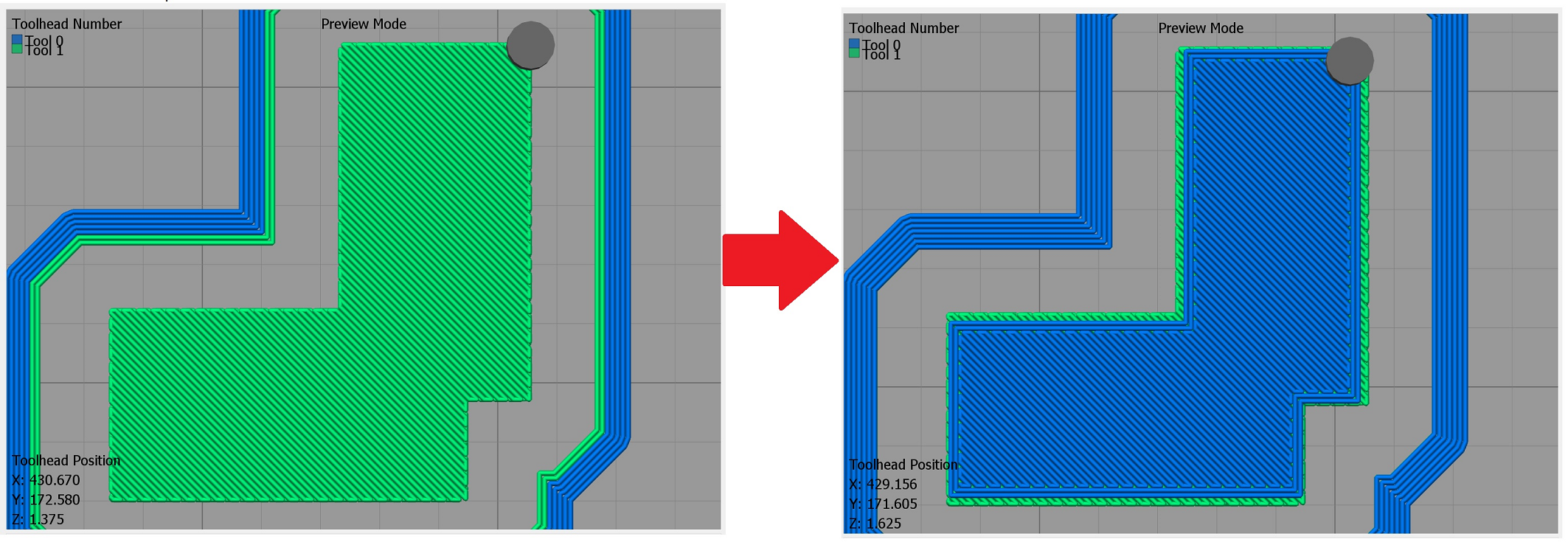
At Essentium, instead of printing in PETG - we are using PCTG - which is similar chemically. But, different enough that there is indeed a bit of a Stick between PCTG and the PLA support. And, yet - easy to separate the parts. My print test, using two 0.4mm nozzles, is 2 rectangles, as an "L" shape, they print together as one. And, I have the parts lifted up in the air - so that supports print under it. I've gotten GREAT Results. SUPER Smooth interface layer. The S3D Factory file is attached (yeah V4 version). In the following pic - you can see top dense layer of supports in Green, with the bottom of model layer in Blue on the right side:
I actually setup a print job, of several parts of a design of
mine - like 3-5 parts. I'm going in today to check on that print
job. I hope it turned out well!
If it DID - I may even post a pic of the completed parts - before
actually pulling them off the print bed.
-K
--
You received this message because you are subscribed to the Google Groups "3D Printing Tips and Tricks" group.
To unsubscribe from this group and stop receiving emails from it, send an email to 3d-printing-tips--...@googlegroups.com.
To view this discussion on the web visit https://groups.google.com/d/msgid/3d-printing-tips--tricks/92c2114d-7391-4bec-a341-e10a50ab74e4n%40googlegroups.com.
3D Printing Tips and Tricks


3D Printing Tips and Tricks


Kurt at VRFX
I gotta say - am surprised that the top of the of Smoke Stack
turned out so bad - as I thought that was Flat on the bed!
I really need to post some pics of the print test of the small
L-Shape, as I think the surface on the PLA AND on the PCTG - it
looked rather AMAZING!
-K
--
You received this message because you are subscribed to the Google Groups "3D Printing Tips and Tricks" group.
To unsubscribe from this group and stop receiving emails from it, send an email to 3d-printing-tips--...@googlegroups.com.
To view this discussion on the web visit https://groups.google.com/d/msgid/3d-printing-tips--tricks/9523db49-937d-4d5e-8509-26f4ebe8184en%40googlegroups.com.