
Piping MatchTags to jQueryUI/sortable
154 views
Skip to first unread message

Adam Sneller
Mar 2, 2013, 3:00:21 AM3/2/13
to tiddl...@googlegroups.com
I am trying to generate an unordered list (HTML) using Eric Shulman's TodoList template. I then want to make this sortable with the jQueryUI, so that I can manually reorder items via drag and drop.
I'm having trouble creating the html from MatchTags... and of course jQuery doesn't want to fire either.
Here's the link to the jQuery widget:
http://jqueryui.com/sortable/
This code is inside a Todolist tiddler:
<html>
<style>
#sortable { list-style-type: none; margin: 0; padding: 0; width: 60%; }
#sortable li { margin: 0 3px 3px 3px; padding: 0.4em; padding-left: 1.5em; font-size: 1.4em; height: 18px; }
#sortable li span { position: absolute; margin-left: -1.3em; }
</style>
<ul id="sortable">
</html>
<<matchTags {{"<html><li></html><<tiddler CheckboxToggleTag with: Done [[To Do]] %0\>\> %0<html></li></html>"}} "" sort:title To Do OR Done>>
<html></ul></html>
<script>
jQuery(function() {
jQuery( "#sortable" ).sortable();
jQuery( "#sortable" ).disableSelection();
});
</script>
This code is in MarkupPostHead:
<link rel="stylesheet" href="http://code.jquery.com/ui/1.10.1/themes/base/jquery-ui.css" />
<link rel="stylesheet" href="/resources/demos/style.css" />
And the jQueryUI-1.10.1 library is in its own tiddler, tagged with systemConfig.
Oh by-the-way (for anyone who could use this) I was able to get the Sortable widget to work in a separate tiddler, on a static unordered list. Here's the code:
<html>
<style>
#sortable { list-style-type: none; margin: 0; padding: 0; width: 60%; }
#sortable li { margin: 0 3px 3px 3px; padding: 0.4em; padding-left: 1.5em; font-size: 1.4em; height: 18px; }
#sortable li span { position: absolute; margin-left: -1.3em; }
</style>
<ul id="sortable">
<li class="ui-state-default"><span class="ui-icon ui-icon-arrowthick-2-n-s"></span>Item 1</li>
<li class="ui-state-default"><span class="ui-icon ui-icon-arrowthick-2-n-s"></span>Item 2</li>
<li class="ui-state-default"><span class="ui-icon ui-icon-arrowthick-2-n-s"></span>Item 3</li>
<li class="ui-state-default"><span class="ui-icon ui-icon-arrowthick-2-n-s"></span>Item 4</li>
<li class="ui-state-default"><span class="ui-icon ui-icon-arrowthick-2-n-s"></span>Item 5</li>
<li class="ui-state-default"><span class="ui-icon ui-icon-arrowthick-2-n-s"></span>Item 6</li>
<li class="ui-state-default"><span class="ui-icon ui-icon-arrowthick-2-n-s"></span>Item 7</li>
</ul>
</html>
<script>
jQuery(function() {
jQuery( "#sortable" ).sortable();
jQuery( "#sortable" ).disableSelection();
});
</script>
I appreciate any input—thanks!
I'm having trouble creating the html from MatchTags... and of course jQuery doesn't want to fire either.
Here's the link to the jQuery widget:
http://jqueryui.com/sortable/
This code is inside a Todolist tiddler:
<html>
<style>
#sortable { list-style-type: none; margin: 0; padding: 0; width: 60%; }
#sortable li { margin: 0 3px 3px 3px; padding: 0.4em; padding-left: 1.5em; font-size: 1.4em; height: 18px; }
#sortable li span { position: absolute; margin-left: -1.3em; }
</style>
<ul id="sortable">
</html>
<<matchTags {{"<html><li></html><<tiddler CheckboxToggleTag with: Done [[To Do]] %0\>\> %0<html></li></html>"}} "" sort:title To Do OR Done>>
<html></ul></html>
<script>
jQuery(function() {
jQuery( "#sortable" ).sortable();
jQuery( "#sortable" ).disableSelection();
});
</script>
This code is in MarkupPostHead:
<link rel="stylesheet" href="http://code.jquery.com/ui/1.10.1/themes/base/jquery-ui.css" />
<link rel="stylesheet" href="/resources/demos/style.css" />
And the jQueryUI-1.10.1 library is in its own tiddler, tagged with systemConfig.
Oh by-the-way (for anyone who could use this) I was able to get the Sortable widget to work in a separate tiddler, on a static unordered list. Here's the code:
<html>
<style>
#sortable { list-style-type: none; margin: 0; padding: 0; width: 60%; }
#sortable li { margin: 0 3px 3px 3px; padding: 0.4em; padding-left: 1.5em; font-size: 1.4em; height: 18px; }
#sortable li span { position: absolute; margin-left: -1.3em; }
</style>
<ul id="sortable">
<li class="ui-state-default"><span class="ui-icon ui-icon-arrowthick-2-n-s"></span>Item 1</li>
<li class="ui-state-default"><span class="ui-icon ui-icon-arrowthick-2-n-s"></span>Item 2</li>
<li class="ui-state-default"><span class="ui-icon ui-icon-arrowthick-2-n-s"></span>Item 3</li>
<li class="ui-state-default"><span class="ui-icon ui-icon-arrowthick-2-n-s"></span>Item 4</li>
<li class="ui-state-default"><span class="ui-icon ui-icon-arrowthick-2-n-s"></span>Item 5</li>
<li class="ui-state-default"><span class="ui-icon ui-icon-arrowthick-2-n-s"></span>Item 6</li>
<li class="ui-state-default"><span class="ui-icon ui-icon-arrowthick-2-n-s"></span>Item 7</li>
</ul>
</html>
<script>
jQuery(function() {
jQuery( "#sortable" ).sortable();
jQuery( "#sortable" ).disableSelection();
});
</script>
I appreciate any input—thanks!

Tobias Beer
Mar 2, 2013, 9:10:56 AM3/2/13
to tiddl...@googlegroups.com
Hi Adam,
Helping you becomes a whole lot easier when you upload a TiddlyWiki MTC (Minimal Test Case) somewhere which...
1) contains your desired setup
2) provides some failing example
3) points out the problem
This way, anyone here can much easier inspect your solution and try to fix problems.
Cheers, Tobias.

Arc Acorn
Mar 2, 2013, 2:51:18 PM3/2/13
to tiddl...@googlegroups.com
This might be a little off topic and pointless to ask, but even if you do get the list sortable UI to work since it's not actually editing the tiddler its self, just moving around DOM elements isn't it just going to un-sort its self every time you have to reload the document?
Tobias Beer
Mar 2, 2013, 4:56:04 PM3/2/13
to tiddl...@googlegroups.com
Hi Arc,
True that. I guess the eventual goal is to also write the sorted list back to the tiddler... which may prove difficult with possible transclusions and all. Some html2wiki function isn't something that's readily available in TiddlyWiki or is it?
Tobias.
Adam Sneller
Mar 2, 2013, 6:28:13 PM3/2/13
to tiddl...@googlegroups.com
Thank you both for your comments. I will try and get something posted online so you can see what I'm after. Basically, I'm looking to create a todo list, where each item maps to a tiddler (similar to Eric Shulman's TodoList example). But I want the ability to manually reorder todo items by drag & drop.
By-the-way, after I posted this, I discovered the TiddlyKanban plugin (which looks fantastic!). But I notice that per Arc's comment, this too is unable to save the ordering of the kanban cards... For some reason cookies and persistence appears to be an issue with TW? But maybe a shadow tiddler like SystemSettings could be used to store preferences?
By-the-way, after I posted this, I discovered the TiddlyKanban plugin (which looks fantastic!). But I notice that per Arc's comment, this too is unable to save the ordering of the kanban cards... For some reason cookies and persistence appears to be an issue with TW? But maybe a shadow tiddler like SystemSettings could be used to store preferences?
Tobias Beer
Mar 2, 2013, 9:51:31 PM3/2/13
to tiddl...@googlegroups.com
I guess the trouble is not so much one of cookies or persistence in general... it really is: to come to a decision on where to store the ordering information of the list and to eventually implement it.
To me it sounds like two things are required:
1) an unchangeable hash identifying a tiddler even after name changes
2) a "kanban board" tiddler that serves as the store for order as well as state information with respect to the hashes in 1)
1) is simply done by adding a "hash" field that is populated when first needed and reused throughout whichever use case requires a reliable identifier which the tiddler title is not... I guess a 'hash' should really become a(n potentially optional yet universal) property of the thing called a tiddler.
2) states and ordered lists could be stored into a single (custom) "kanban" field using json, whereas (references to the hashes of ) task items would be grouped into states along with the ordering information.
Cheers, Tobias.
Adam Sneller
Mar 3, 2013, 5:22:05 AM3/3/13
to tiddl...@googlegroups.com
Tobias,
Thank you for your advice! I started digging into the TiddlyKanban plugin and found that this relies on the jQuery List DragSort library. Turns out that there were a number of code examples for how to save and retrieve the sort order to a cookie.
So I put together this example file, which seems to work great. You can drag and reorder list elements, and when you refresh the page, your new ordering sticks (see attached zip file).
My next step was to move this into TiddlyWiki. Here's what I did:
Thank you for your advice! I started digging into the TiddlyKanban plugin and found that this relies on the jQuery List DragSort library. Turns out that there were a number of code examples for how to save and retrieve the sort order to a cookie.
So I put together this example file, which seems to work great. You can drag and reorder list elements, and when you refresh the page, your new ordering sticks (see attached zip file).
My next step was to move this into TiddlyWiki. Here's what I did:
- Save jquery.cookie.js and jquery.dragsort.js libraries to their own tiddlers and tag each as systemConfig.
- Move the example.html code to its own tiddler, removing the javascript portion and placing this in <script></script> tags at the bottom of the tiddler.
When I try to run this though, TW complains that $.cookie is 'not a function'. so I tried rewritting it as jQuery.cookie but same problem. Any ideas?
Adam Sneller
Mar 3, 2013, 5:43:11 AM3/3/13
to tiddl...@googlegroups.com
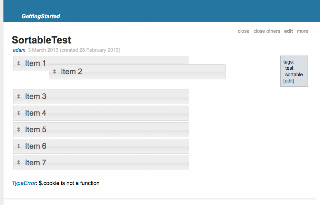
Here is the version that I adapted it for TW. For this test, I actually used jQuery.sortable() instead of the DragSort library, but it works fine. The only problem is that TW doesn't recognize the $.cookie function...
<html>
<style>
#sortable { list-style-type: none; margin: 0; padding: 0; width: 60%; }
#sortable li { margin: 0 3px 3px 3px; padding: 0.4em; padding-left: 1.5em; font-size: 1.4em; height: 18px; }
#sortable li span { position: absolute; margin-left: -1.3em; }
</style>
<ul id="sortable">
<li class="ui-state-default"><span class="ui-icon ui-icon-arrowthick-2-n-s"></span>Item 1</li>
<li class="ui-state-default"><span class="ui-icon ui-icon-arrowthick-2-n-s"></span>Item 2</li>
<li class="ui-state-default"><span class="ui-icon ui-icon-arrowthick-2-n-s"></span>Item 3</li>
<li class="ui-state-default"><span class="ui-icon ui-icon-arrowthick-2-n-s"></span>Item 4</li>
<li class="ui-state-default"><span class="ui-icon ui-icon-arrowthick-2-n-s"></span>Item 5</li>
<li class="ui-state-default"><span class="ui-icon ui-icon-arrowthick-2-n-s"></span>Item 6</li>
<li class="ui-state-default"><span class="ui-icon ui-icon-arrowthick-2-n-s"></span>Item 7</li>
</ul>
</html>
<script>
jQuery(function() {
jQuery( "#sortable" ).sortable({<style>
#sortable { list-style-type: none; margin: 0; padding: 0; width: 60%; }
#sortable li { margin: 0 3px 3px 3px; padding: 0.4em; padding-left: 1.5em; font-size: 1.4em; height: 18px; }
#sortable li span { position: absolute; margin-left: -1.3em; }
</style>
<ul id="sortable">
<li class="ui-state-default"><span class="ui-icon ui-icon-arrowthick-2-n-s"></span>Item 1</li>
<li class="ui-state-default"><span class="ui-icon ui-icon-arrowthick-2-n-s"></span>Item 2</li>
<li class="ui-state-default"><span class="ui-icon ui-icon-arrowthick-2-n-s"></span>Item 3</li>
<li class="ui-state-default"><span class="ui-icon ui-icon-arrowthick-2-n-s"></span>Item 4</li>
<li class="ui-state-default"><span class="ui-icon ui-icon-arrowthick-2-n-s"></span>Item 5</li>
<li class="ui-state-default"><span class="ui-icon ui-icon-arrowthick-2-n-s"></span>Item 6</li>
<li class="ui-state-default"><span class="ui-icon ui-icon-arrowthick-2-n-s"></span>Item 7</li>
</ul>
</html>
<script>
jQuery(function() {
stop: saveOrder,
create: retrieveOrder
});
jQuery( "#sortable" ).disableSelection();
});
/*-- save sort order to cookie --*/
function saveOrder() {
var data = $("#list li").map(function() { return $(this).html(); }).get();
var serialStr = data.join("|");
$.cookie("listSort", serialStr, {expires: 10000});
};
/*-- retrieve order from cookie --*/
function retrieveOrder() {
var order = $.cookie('listSort').split("|");
var el = $('#list');
var map = {};
$('#list li').each(function() {
var el = $(this);
map[el.html()] = el;
});
for (var i = 0, l = order.length; i < l; i ++) {
if (map[order[i]]) {
el.append(map[order[i]]);
}
}
};
</script>
And here is a screenshot of what it looks like it TW.
Still haven't figured out how to post my TW online (but I'll get there :)
Thanks!

PMario
Mar 3, 2013, 6:33:59 AM3/3/13
to TiddlyWiki
Hi Adam,
Following this topic, the following video may be of interest. 3:17 min
https://www.youtube.com/watch?v=jfXAACS2TGk
I did use tiddler custom fields to store the sort order. Having custom
fields makes it compatible to the default <<list>> macro and you can
have several fields. So one tiddler can be part of several different
lists.
I did load jQueryUI library remotely, because I didn't want to have it
inside my TW.
If I would rewrite the plugins I'd use: http://threedubmedia.com/code/event/drag
and http://threedubmedia.com/code/event/drop because they are much
smaller. jQueryUI contains much stuff, that is not needed, for my
usecase.
-m
Following this topic, the following video may be of interest. 3:17 min
https://www.youtube.com/watch?v=jfXAACS2TGk
I did use tiddler custom fields to store the sort order. Having custom
fields makes it compatible to the default <<list>> macro and you can
have several fields. So one tiddler can be part of several different
lists.
I did load jQueryUI library remotely, because I didn't want to have it
inside my TW.
If I would rewrite the plugins I'd use: http://threedubmedia.com/code/event/drag
and http://threedubmedia.com/code/event/drop because they are much
smaller. jQueryUI contains much stuff, that is not needed, for my
usecase.
-m
PMario
Mar 3, 2013, 6:43:23 AM3/3/13
to TiddlyWiki
This space may be of interest too, but as its name says its
experimental and about 3 years old. So using it with the latest jQuery
engine, may break it. http://a-pm-experimental.tiddlyspot.com/
The concept here is, that the list of tiddlers is stored as a seperate
"story" tiddler.
eg: http://a-pm-experimental.tiddlyspot.com/#PresentationIndex
You can drag and drop the stuff in the page. If you click the little
"disk / save" icon you can also temporarily save the stuff to test it.
If you reload the page everything is undone.
have fun!
-mario
experimental and about 3 years old. So using it with the latest jQuery
engine, may break it. http://a-pm-experimental.tiddlyspot.com/
The concept here is, that the list of tiddlers is stored as a seperate
"story" tiddler.
eg: http://a-pm-experimental.tiddlyspot.com/#PresentationIndex
You can drag and drop the stuff in the page. If you click the little
"disk / save" icon you can also temporarily save the stuff to test it.
If you reload the page everything is undone.
have fun!
-mario
Adam Sneller
Mar 3, 2013, 5:43:40 PM3/3/13
to tiddl...@googlegroups.com
Mario
Thanks! I haven't been able to find much documentation on the TiddlyWiki API. This code is a big help!
Best,
-Adam
Thanks! I haven't been able to find much documentation on the TiddlyWiki API. This code is a big help!
Best,
-Adam
Tobias Beer
Mar 5, 2013, 10:13:46 AM3/5/13
to tiddl...@googlegroups.com
Hi again, Adam,
While cookies could work somewhat, I really don't think that cookie based persistance is much good in this case. I hardly even find cookies useful when it comes to options, because usually I want my options persisted within TiddlyWiki.
So, from my perspective, it would be best to find a tiddler-based store for ordering data.
Cheers, Tobias
Adam Sneller
Mar 7, 2013, 3:19:05 AM3/7/13
to tiddl...@googlegroups.com
Yeah, I'm not crazy about cookies as a final solution. This was more of a quick and dirty fix so that I could test things out until I found something better...
Do you have a recommended method for storing metadata like this? In a shadow tiddler or in a hidden tiddler field perhaps?
By-the-way, I got your note about sending developer-related content to the other group. I'll be sure to do this for future threads (I'm not sure what to do about threads that I've already started here though..)
Best,
-Adam
Do you have a recommended method for storing metadata like this? In a shadow tiddler or in a hidden tiddler field perhaps?
By-the-way, I got your note about sending developer-related content to the other group. I'll be sure to do this for future threads (I'm not sure what to do about threads that I've already started here though..)
Best,
-Adam
Tobias Beer
Mar 7, 2013, 5:04:55 AM3/7/13
to tiddl...@googlegroups.com
Hi Adam,
By-the-way, I got your note about sending developer-related content to the other group. I'll be sure to do this for future threads (I'm not sure what to do about threads that I've already started here though..)
Keep them here, unless it's going to be a long new post that will trigger long developer focussed replies.
As I said, and in fact am about to implement in a new plugin...
- save an unchangeable hash (as a custom field) so as to be able to identify a tiddler even after name changes
- save order as well as state information in (a custom field of the) list tiddler containing references to hashes in 1)
- could be a simple field with multi-line content like...
- item order:
- hash1
- hash2
- hash3
Cheers, Tobias.
PMario
Mar 7, 2013, 5:55:37 AM3/7/13
to TiddlyWiki
On 7 Mrz., 11:04, Tobias Beer <beertob...@gmail.com> wrote:
> As I said, and in fact am about to implement in a new plugin...
>
> 1. save an unchangeable hash (as a custom field) so as to be able to
> As I said, and in fact am about to implement in a new plugin...
>
> identify a tiddler even after name changes
> 2. save order as well as state information in (a custom field of the)
> list tiddler containing references to hashes in 1)
> - could be a simple field with multi-line content like...
> - item order:
> - hash1
> - hash2
> - hash3
>
> Cheers, Tobias.
Hi Tobias,
I'd want to talk with you about this. I did similar things with my
XListPlugin [1], but made it compatible to core list macro, so it can
handle the sort order. There is no need for someone to use XListPlugin
to get the desired result. Which makes it good to use with eg:
TiddlySpace.
I did also contribute some code to the core, that was accepted, that
lets you do drag and drop sorting without any additional <<list>>
plugins like XListPlugin. There is enough information in the default
rendering now to get it to work.
For the @chat project (a year ago), I did introduce a uniqe id for
tiddlers, that isn't changed, even if you do change its name.
It would be nice, if we could make our stuff compatible, otherwise we
will end up having a lot of custom fields that don't play together,
and implement redundant functionality.
-m
[1] http://apm-plugins.tiddlyspot.com/#XListPlugin
[2] http://chat.tiddlyspace.com/
Tobias Beer
Mar 7, 2013, 8:07:15 AM3/7/13
to tiddl...@googlegroups.com
Hi Mario,
I opened a new discussion thread here...
Cheers, Tobias.
Reply all
Reply to author
Forward
0 new messages