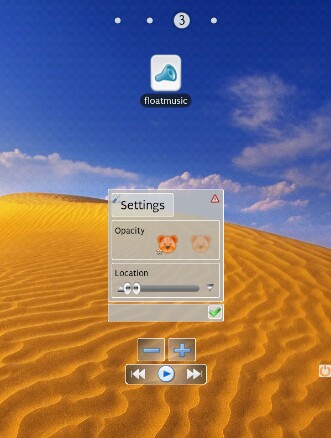
Wanted: User-Created Scene Screenshots

9,346 views
Skip to first unread message

Pent

unread,
Mar 27, 2012, 5:57:03 AM3/27/12
to Tasker
Hey folks,

I'm appalling at graphical design myself so I need some screenshots
for displaying on the website / Market etc.

If anyone wants to show off their creations, here's your chance, post
below :-)

Pent

p.s. please don't post here if you don't want me re-using the images.

V Oz

unread,
Mar 27, 2012, 7:19:53 AM3/27/12
to tas...@googlegroups.com
map view with POI and Notes on it. self designed Variable Query view (Yes/No Dialog Box with same style)

Jerry Newcastle

unread,
Mar 27, 2012, 2:48:35 PM3/27/12
to Tasker
Hi,

I like Your Yes/No Dialog very much. Are You willing to share it ?


On 27 mrt, 13:19, V Oz <v.ozzzz...@gmail.com> wrote:
> map view with POI and Notes on it. self designed Variable Query view
> (Yes/No Dialog Box with same style)
>
> <https://lh5.googleusercontent.com/-vATMA0ZKBxs/T3GiLR-O9LI/AAAAAAAAAH...><https://lh6.googleusercontent.com/-vHCwbKXp0Mk/T3GghpbmCGI/AAAAAAAAAG...><https://lh4.googleusercontent.com/-gTUwYZq2OHA/T3Gg0Xq9zqI/AAAAAAAAAH...>

Kevin Taylor

unread,
Mar 28, 2012, 1:29:05 AM3/28/12
to tas...@googlegroups.com
Another map scene, overlaying two Zoom widgets.

Kevin
2012-03-28_06-17-44.jpg

V Oz

unread,
Mar 28, 2012, 2:38:44 AM3/28/12
to tas...@googlegroups.com
Sure. here are both.
Their functionality based on native Variable Query scene. Invoke them via Variable Query action
In Yes/No dialog You'll got "yes" or nothing in requested  var.

DialogYesNo.scn.xml
Var_Query.scn.xml

V Oz

unread,
Mar 29, 2012, 6:11:15 AM3/29/12
to tas...@googlegroups.com

Simple scenes for driving.
Two are like buttons in MapApp (in red circles). Buttons appear in fixed positions and each can be moved and locked in new position.
1-st one "Printer" makes autofill predefined text into submit forms (predefined text changes depends on location, of course)
2-nd - "Car" invokes Car Menu scene (isn't native Menu). Each item is a simple Image Element with all events used to some action. Tap, Long Tap and Stroke (with directions in some cases)

V Oz

unread,
Apr 1, 2012, 1:52:21 PM4/1/12
to tas...@googlegroups.com
I think the most powerful scenes are almost not visible. You can find them on my previous screenshots as transparent rectangles with 1px gray border which lies over status bar in top left and right corners.
Both of them have Tap, Long Tap and Stroke functions for tuning Display parameters, setting wifi tx-power and launch Watch app. with slider scenes or just quietly (any other can be set) . That's all while scenes don't make mesh on screen and available whole the time.

Oon-Ee Ng

unread,
Apr 1, 2012, 7:25:18 PM4/1/12
to tas...@googlegroups.com


On Apr 2, 2012 1:52 AM, "V Oz" <v.ozz...@gmail.com> wrote:
>
> I think the most powerful scenes are almost not visible. You can find them on my previous screenshots as transparent rectangles with 1px gray border which lies over status bar in top left and right corners.
> Both of them have Tap, Long Tap and Stroke functions for tuning Display parameters, setting wifi tx-power and launch Watch app. with slider scenes or just quietly (any other can be set) . That's all while scenes don't make mesh on screen and available whole the time.
>>
>>

do they interfere with full screen games for example?

fubaya

unread,
Apr 1, 2012, 8:36:32 PM4/1/12
to tas...@googlegroups.com
http://img593.imageshack.us/img593/262/screenshot2012040120100.png

Here's mine. it pops up when I touch a certain spot in the screen (transparent zoom widget) and has 16 various tasks, a couple blocks of text that gets updated every 30 minutes and a controller for playing podcasts. Im not sure how much good it well be in a market screenshot. Would anyone even know it's a scene?

V Oz

unread,
Apr 2, 2012, 2:05:48 AM4/2/12
to tas...@googlegroups.com
full screen games ... what's it? :)
they work over camera screen also. think so, over full screen apps too.
You can place them any where if You need them, of course. Or simply hide them while those apps are in foreground and back'em when finish gaming using special profile.
It's just invisible helpers instead digging settings menu or used to replace special apps.

понедельник, 2 апреля 2012 г. 3:25:18 UTC+4 пользователь Oon-Ee Ng написал:

V Oz

unread,
Apr 2, 2012, 2:11:14 AM4/2/12
to tas...@googlegroups.com
Amazing ... wallpaper! :)
Why not a scene? That's cool replacement of some kind of minimalistic text widgets or somth. else. Good text style scene. Doesn't cover wallpaper. 
Please, send if for me :)

понедельник, 2 апреля 2012 г. 4:36:32 UTC+4 пользователь fubaya написал:
Message has been deleted

fubaya

unread,
Apr 2, 2012, 10:40:10 PM4/2/12
to tas...@googlegroups.com
Here is a clone with the tasks removed. They wouldn't be much use anyway. If you notice, the scene has a large transparent area below what is seen. You can use that to add text or whatever then move them up on top of the rectangle, or add a transparent "close" button there to destroy the scene.

<class cl="TaskerData" sr="">
<tv>1.2.1u1m</tv>
<class cl="Scene" sr="sceneControl2">
<backColour>16777215</backColour>
<cdate>1333293046048</cdate>
<edate>1333420419057</edate>
<gridSize>10</gridSize>
<heightLand>-1</heightLand>
<heightPort>610</heightPort>
<nme>Control2</nme>
<widthLand>-1</widthLand>
<widthPort>671</widthPort>
<class cl="RectElement" sr="elements0">
<ClickTask>47</ClickTask>
<flags>4</flags>
<heightPort>430</heightPort>
<widthPort>671</widthPort>
<xPort>0</xPort>
<yPort>0</yPort>
<class cl="StringArg" sr="arg0" ve="3">
<val>Rectangle1</val>
</class>
<class cl="IntArg" sr="arg1">
<val>0</val>
</class>
<class cl="StringArg" sr="arg2" ve="3">
<val>#77333333</val>
</class>
<class cl="StringArg" sr="arg3" ve="3">
<val>#77333333</val>
</class>
<class cl="IntArg" sr="arg4">
<val>5</val>
</class>
<class cl="StringArg" sr="arg5" ve="3">
<val>#FFBF7B2D</val>
</class>
<class cl="IntArg" sr="arg6">
<val>20</val>
</class>
<class cl="IntArg" sr="arg7">
<val>0</val>
</class>
</class>
<class cl="TextElement" sr="elements1" ve="2">
<flags>4</flags>
<heightPort>187</heightPort>
<widthPort>150</widthPort>
<xPort>9</xPort>
<yPort>113</yPort>
<class cl="StringArg" sr="arg0" ve="3">
<val>LText</val>
</class>
<class cl="StringArg" sr="arg1" ve="3">
<val>%LTEXT</val>
</class>
<class cl="IntArg" sr="arg2">
<val>13</val>
</class>
<class cl="IntArg" sr="arg3">
<val>100</val>
</class>
<class cl="StringArg" sr="arg4" ve="3">
<val>#FFD57F1C</val>
</class>
<class cl="IntArg" sr="arg5">
<val>3</val>
</class>
<class cl="IntArg" sr="arg6">
<val>0</val>
</class>
<class cl="IntArg" sr="arg7">
<val>0</val>
</class>
</class>
<class cl="TextElement" sr="elements2" ve="2">
<flags>4</flags>
<heightPort>187</heightPort>
<widthPort>150</widthPort>
<xPort>512</xPort>
<yPort>123</yPort>
<class cl="StringArg" sr="arg0" ve="3">
<val>RTEXT</val>
</class>
<class cl="StringArg" sr="arg1" ve="3">
<val>%RTEXT</val>
</class>
<class cl="IntArg" sr="arg2">
<val>13</val>
</class>
<class cl="IntArg" sr="arg3">
<val>100</val>
</class>
<class cl="StringArg" sr="arg4" ve="3">
<val>#FFD57F1C</val>
</class>
<class cl="IntArg" sr="arg5">
<val>4</val>
</class>
<class cl="IntArg" sr="arg6">
<val>0</val>
</class>
<class cl="IntArg" sr="arg7">
<val>0</val>
</class>
</class>
</class>
<class cl="Task" sr="task47">
<cdate>1333293346128</cdate>
<edate>1333293346128</edate>
<id>47</id>
<class cl="Action" sr="act0" ve="3">
<code>61</code>
<class cl="IntArg" sr="arg0">
<val>10</val>
</class>
</class>
</class>
</class>

Matt

unread,
Apr 3, 2012, 4:46:32 AM4/3/12
to tas...@googlegroups.com
This is a bit more simple than the others posted, it's just a simple SMS popup.

I've photoshopped the number so the font may be slightly out, not sure if that matters? If it does I'll re-create it.

Matt
Screen Grab.png

V Oz

unread,
Apr 3, 2012, 8:36:22 AM4/3/12
to tas...@googlegroups.com
sorry. I mean wallpaper itself :) sunset beach etc. ...


BTW, no need to paste xml. You can attach xml as file

RudeboyX

unread,
Apr 4, 2012, 7:54:26 AM4/4/12
to tas...@googlegroups.com

Here are a few I've been working on. As you can see i'm trying to maintain a theme throughout.


Hope their of some use.

RBX

Message has been deleted

Matt

unread,
Apr 5, 2012, 4:38:37 AM4/5/12
to tas...@googlegroups.com
OK I've overhauled mine a bit so it looks better!

Cheers


On Tuesday, 27 March 2012 10:57:03 UTC+1, Pent wrote:
Screen Final.jpg

David Stein

unread,
Apr 5, 2012, 11:59:54 AM4/5/12
to tas...@googlegroups.com

I actually posted this a couple of days ago and it appeared as though I accidentally double posted.  Guess I deleted both :/   This is a project I've been working on and maintaining for over a year now, but I am just now finishing up what turned into a complete re-write in order to take advantage of scenes, action labels, arrays, For loops, etc.  The action labels alone allow me to jump all over place by calling other tasks and putting the desired label in %par1.  What was nearing unacceptably slow before is now is about as snappy as you'd expect from an app in the market.  As much as I like scenes, they're not the best answer for every situation out there.  I think I'd prefer to have this as a widget made with Zoom, but I would need the ability to pass a parameter to a Task from Zoom before doing that.  Having spent as much time as I have in Zoom, I've come to appreciate the finer control over the elements and their placement.


This is a control screen for monitoring and controlling another phone (also running Tasker).  I'm using my Asus TP as the control unit but made the scene so it would fit on a phone.  So the screenshot is cropped which explains the border of green around edges.  In case anyone was wondering, you can make a really huge scene on a tablet.  I'll have to make an "HD" version as everyone seems to refer to tablet optimized interfaces these days.


David Stein

unread,
Apr 5, 2012, 12:12:59 PM4/5/12
to tas...@googlegroups.com

This is control screen I made for my own phone that I call up with long search.  The layout is probably self-explanatory, but green=on, red=off, yellow outline=forced.  A single tap toggles, long tap toggles forced on and off, and in some cases stroke performs some other function.  For the screen brightness, long tap toggles between 255 and whatever it should be.  For screen timeout, long tap toggles between always on and whatever the timeout should be.  The mixer button brings up another scene for adjusting volume levels.

The way it all works is that all of the setting get adjusted to where I am or what I'm doing -  at home, work, driving, sleeping, low battery, etc.  And I even subdivided work so that if I'm in the office all I have to do is slide to unlock.  If I'm around the west side of the building where all of the administrative offices are, a PIN is required.  Get the PIN wrong and a photo is taken and immediate emailed to the email addy I use for sign ups, registrations, etc.  Get the PIN wrong 5 times and the last front photo is displayed for the world to see while a ring tone of the most obnoxious sounding alarm is played at volume 14.


Matt

unread,
Apr 6, 2012, 8:34:05 AM4/6/12
to tas...@googlegroups.com
RudeboyX how did you get that effect with the lines under the headings? I've tried inserting an image of a 2px line but it just gets expanded and looks awful....

Cheers!

Matt

RudeboyX

unread,
Apr 7, 2012, 9:47:37 AM4/7/12
to tas...@googlegroups.com
I had the same issue. I ended up having to make a few dialog textures of different sizes with the highlight already in place. you can then resize any of the dialogs a little and the line doesn't change that much (not noticably). As with any graphic design, "Photoshop" is the key.
 
RBX

strictlyrude27

unread,
Apr 7, 2012, 4:17:56 PM4/7/12
to tas...@googlegroups.com
Matt - is this fully functional? I'd love to get the project for this to implement my own SMS popups.
Message has been deleted

krabbs

unread,
Apr 8, 2012, 6:44:27 AM4/8/12
to Tasker
hey david

hey im already working on a same project like you. also have one phone
one tablet. how did u manged to taskers talking (email?)
is it possible to share you scene and tasks...probally it isnt for you
according privacy so i will understand but yours looks great =)

may we have to start a new thread for sharing because thats probaly
not what pent wanted in here =)
> <https://lh3.googleusercontent.com/-GW1Tze3eeNw/T33EWHYNnNI/AAAAAAAAAj...>

Matt

unread,
Apr 9, 2012, 10:29:29 AM4/9/12
to tas...@googlegroups.com
Yep it's fully functional, I've updated it to the one a few posts down now that I could post if you'd like? To make all of the buttons on the popup work you'd also need SL4A installed along with the perl Interpreter in order to make it all work (I can post the script if you want though).

Let me know if you want it posting somewhere - it may take a few days though as I'll need to take out the sender specific parts to hide numbers etc (the new one displays different pictures for certain contacts based on sending number).

Matt

strictlyrude27

unread,
Apr 9, 2012, 12:46:32 PM4/9/12
to tas...@googlegroups.com
Matt - I would love that. I do have SL4A installed, along with Perl. Post anything you've got - or shoot me an email, or find me on XDA (strictlyrude27). Maybe make its own thread on XDA? I've been thinking of doing this project for ages but I've been getting out of the Tasker game lately (in terms of developing projects for it I mean). 

Matt

unread,
Apr 10, 2012, 5:36:08 AM4/10/12
to tas...@googlegroups.com
No problem I've sent the email (just in case I've not cleared out the numbers / contact names as well as I think I have).

As I've said in the email, any problems please let me know.

Matt

Matt

unread,
Apr 11, 2012, 10:27:43 AM4/11/12
to tas...@googlegroups.com
Brilliant thanks, never thouht of making the lines part of the background. Worked a treat!

strictlyrude27

unread,
Apr 11, 2012, 10:00:21 PM4/11/12
to tas...@googlegroups.com
Hi Matt - 

I never did receive your email.. try again? strictl...@gmail.com

Thanks!

Matt

unread,
May 1, 2012, 5:01:12 AM5/1/12
to tas...@googlegroups.com
This one might not be very good looking but it did take a fair amount of work.

Basically it calculates the carb total for a meal (for diabetic carb counting), the values are tied to the buttons with some automatically setting the quantity to 1 (Apples etc) and some asking for a quantity through a dialogue.

Most of the work is done in Variables in the background.

Regards
2012-04-30_20-37-36.jpg
2012-04-30_20-37-43.jpg
2012-04-30_20-37-57.jpg
2012-04-30_20-38-07.jpg
2012-04-30_20-38-32.jpg

Lucas Figueiró

unread,
May 25, 2012, 6:17:36 PM5/25/12
to Tasker
I have made very simple scenes as I don't have any ability to create
nice looking scenes! :-)
They are my statusbar replacement for fullscreen apps and games and
slow me to change brightness, control music playback and expand the
notifications drawer.

PS.: Is it possible to create scenes with only one or two pixels high?
So I could swipe down to activate my statusbar scene.
Also I change the tasker icon according to my active profile. Is
possible to add this icon to scenes? (the icon on the permanent
notification)

http://db.tt/EvvrYf0A
http://db.tt/JrZqObHN

Lucas Figueiró

unread,
May 26, 2012, 3:05:25 AM5/26/12
to Tasker
My scenes are very simple, just a statusbar replacement for fullscreen
apps and games. I can also expand the notifications drawer and control
music playback and display brightness from it.
I have 2 questions:
1) is possible to create a 1 or 2 pixel high scene? I can only create
40 pixels or higher. I want a thin scene only for making a swipe
gesture to enable my statusbar.
2) I use profiles to set the tasker icon on notifications drawer(the
permanent notification indicating tasker is active). Is possible to
display the current icon in a scene? I can't find the option.

http://db.tt/EvvrYf0A
http://db.tt/JrZqObHN

Cptnodegard

unread,
May 27, 2012, 12:58:16 AM5/27/12
to tas...@googlegroups.com
I've been using a Google Play app called Brightness Level for a while. It allowed me to add a shortcut (which I could then rename to nothing and add a blank PNG as the icon of, making it invisible) to my homescreen and have it pop-up a small box with brightness controls. Worked great, but I wanted to stuff more useful things in the same menu, so I set about creating a scene. The attached image shows the invisible trigger, what it used to do through Brightness Level, and what it now does. There's the same brightness buttons (except auto, which I don't use), buttons for various profiles I have, a TextEdit feed which I use to manually input URLs into a text file I have (where another Tasker setup also adds URLs automatically, this is for when the auto system doesn't apply), and a toggle switch for TeslaLED. 

A bonus is that while Brightness Level runs in the background after use, Destroy Scene prevents that here.  


SC20120527-063433.jpg

Hkb

unread,
May 29, 2012, 12:06:49 PM5/29/12
to tas...@googlegroups.com
I made a very minimal dialog box to ask user if they want to turn on wifi.

http://www.imgur.com/v8fGA.jpg

Or to turn on Screen filter
http://www.imgur.com/SokFf.jpg

Based on Holo theme.
Hope you like them.

Matt

unread,
Jun 1, 2012, 10:03:59 AM6/1/12
to tas...@googlegroups.com
Hi Cptnodegard do you mind me asking how you've gone about having the current profile displayed? Is it just an If as the scene is created or does it reference a variable?

Thanks

Cptnodegard

unread,
Jun 1, 2012, 11:51:52 PM6/1/12
to tas...@googlegroups.com
These profiles are Tasker profiles that are triggered by different values of the same variable, %Profile. The buttons Set Variable &Profile to Normal mode, Silent mode, or Movie mode. The text above then simply displays Profile: %Profile :)

Matt

unread,
Jun 2, 2012, 5:46:02 AM6/2/12
to tas...@googlegroups.com
Got you, thanks!

Debra

unread,
Jun 9, 2012, 9:11:52 PM6/9/12
to tas...@googlegroups.com
Here's my sms popup. I created them for my favorite contacts.
My sms popup.jpg

Olivier Gagnon

unread,
Jun 9, 2012, 11:35:22 PM6/9/12
to tas...@googlegroups.com
I use tasker and a scene to open a small edit box with a send button, opened from a shortcut.
It uses sendemail.py to send me an email - sort of like a quick notes taker.
shot_000001.jpg
Message has been deleted

Max Hodgson

unread,
Jun 10, 2012, 7:21:15 AM6/10/12
to tas...@googlegroups.com
On 10 June 2012 06:06, Olivier Gagnon <powe...@gmail.com> wrote:
> Here's a new one I just made, and the best thing about it, it saves you
> money!!
>
> Basically it's a scene with an image and 7 buttons
> Each button will change the main image, which is the parking spots around my
> appartment
>
> When it's red, I can't park that day.
>
> The image is just google maps with some lines drawn on.
Out of interest, why can't you park that day?

Olivier Gagnon

unread,
Jun 10, 2012, 8:02:50 AM6/10/12
to tas...@googlegroups.com
Sometimes the street cleaner passes, or in winter it's for snow removal.

On specific days, between specific times, if your car is there, you get a 50$ fine.

Matt

unread,
Jun 11, 2012, 5:43:42 AM6/11/12
to tas...@googlegroups.com
Hi Derba, out of curiosity what action does your Reply button perform? Is it compose an SMS to %SMSRN or do you do your replies through Tasker?

Thanks

Matt

Debbie Oatman

unread,
Jun 11, 2012, 7:32:44 AM6/11/12
to tas...@googlegroups.com
It responds to the text message directly by opening a quick reply. I
used the following tasks:

#1 Load app messaging

#2 Action
android.intent.action.VIEW
Data
sms:%SMSRF

This was posted by jmopolis here in this group somewhere.

:)

Cptnodegard

unread,
Jun 12, 2012, 5:25:23 AM6/12/12
to tas...@googlegroups.com
I think documentation lacks because it's not really needed. Scenes are created using a WYSIWYG editor which is pretty straight forward, and each button etc runs actions like a normal task would. The best way to get started is just to create a scene and start poking at it, see what happens when you press different things. 


On Tuesday, June 12, 2012 12:57:57 AM UTC+2, Greg Cobb wrote:
I've seen a few people mention making scenes.  I've been all over Youtube and Google.  I've yet to find anything that points me in the right direction.  Is there documentation that'll allow me to make a basic scene and learn from there?  Does anyone have something I can see that'll at least show me the steps needed to make things happen?  I registered a few years ago and have been using Tasker since.  I'm just ready to do something else with it.

Thanks! 

Matt

unread,
Jun 12, 2012, 6:16:59 AM6/12/12
to tas...@googlegroups.com
Hi Greg, for some basic guidance you could have a look at  http://zoom.dinglisch.net/  Zoom is a widget creator by the Pent (the same dev as for tasker) things like the editor are fairly similar (although you will run into some differences) to create a scene you go to the scenes section in your profile and then click the green + then give it a name and drag it out to the size you want, the magnifying glass to go into edit mode and then start adding element (green + again).

Have fun!

Matt

Matt

unread,
Jun 12, 2012, 6:21:17 AM6/12/12
to tas...@googlegroups.com, DebbieL...@gmail.com
Ah right thanks, HTC Sence must act differently then, that gives me the same screen as using Compose Message > %SMSRF.

Thanks for replying!

Matt
Message has been deleted

Debra

unread,
Jun 12, 2012, 6:59:42 AM6/12/12
to tas...@googlegroups.com
Hi Greg,

I have created a guide to creating a basic Text Message PopUp Scene. It's attached. It should get you started. I'm fairly new to using Tasker too, although I bought it  couple years ago. It took me a while to get up the nerve to learn to use it. Feel free to ask questions. I don't know a lot but I'm happy to share what I learn along the way.

Debbie
Creating a basic PopUp Scene in Tasker.doc

Greg Cobb

unread,
Jun 13, 2012, 12:15:49 AM6/13/12
to tas...@googlegroups.com
Thanks for the quick reply.  To say it's so simple it doesn't need instructions is a little off kilter.  I created a scene, task, profile and icon to launch the task.  It shows my last caller and last number that had sent me a text, along with 5 buttons for music apps I have installed.  I did this after I wrote my initial message.  I just sat here and played around with scenes.

I don't know how to add an image for the scene background or how to add something like a clock.  Are you able to or should you add more than one scene to a task?  Is there another process that I should be using rather than calling a task that calls a scene, etc?

Thank you

jmopolis

unread,
Jun 14, 2012, 12:51:14 AM6/14/12
to tas...@googlegroups.com
Debra,

You might not need the load app action. Unless you want to use a specific messaging app and don't have defaults set.
I used to use the intent thing but ever since I rooted my evo 4g and flashed an ics rom, the compose message goes straight to the thread.

jmopolis

Debbie Oatman

unread,
Jun 14, 2012, 1:08:37 AM6/14/12
to tas...@googlegroups.com
You're right. I just tested it without Load App and it went right to
the thread. I'll adjust my guide. Thanks for looking it over. :)

Matt

unread,
Jun 14, 2012, 6:58:52 AM6/14/12
to tas...@googlegroups.com
Hi Jamie,

No problem here's the project.

It's fairly tailored to what I eat (the buttons are hard coded to certain carb values ie bread = 16.6) so you'll need to play around with it quite a bit. also the quantity screen is set to different heights depending on which scene calls it so you might want to sort that!

I've been meaning to ask Pent if it's possible to do a VLOOKUP type search on the content of a file (so you could have a txt file on the SD card and get the carb values from that) I was going to wait for him to finish the create app work he's doing first though.

Let me know if you make any great breakthroughs with it :)

Matt

On Wednesday, 13 June 2012 15:06:58 UTC+1, Jamie wrote:
Matt - now that's something along the lines of what I've been thinking about doing...
 
Would you be interested in sharing your script for this?  I'm relatively new to Tasker, but got it with a plan to create a little (hopefully little) task which would take an input of BG and Carbs, and using some Carb Ratio numbers, suggest an insulin bolus dosage...   Nothing too technical, but sometimes my brain  just isn't up to doing it on the fly...
 
Jamie
Meal_Calc.prj (2).xml

jmopolis

unread,
Jun 14, 2012, 3:18:09 PM6/14/12
to tas...@googlegroups.com
No problem :)


On Thursday, June 14, 2012 1:08:37 AM UTC-4, Debra wrote:
You're right. I just tested it without Load App and it went right to
the thread. I'll adjust my guide. Thanks for looking it over. :)

kwest12

unread,
Jun 15, 2012, 3:22:06 PM6/15/12
to tas...@googlegroups.com
Here's a good one: 


LOL sorry I couldn't resist....

Matt

unread,
Jun 24, 2012, 2:35:42 PM6/24/12
to tas...@googlegroups.com
Hi Spiral have you tried overlay, blocking?

On Saturday, 23 June 2012 20:54:42 UTC+1, spiral wrote:
how is it possible to show a scene as overlay and still have interaction like tap, long tap and stroke? I am really confused here, when I try to show a selfmade icon in an application I can not navigate in the application itself. in other words I can't have both.

would love to hear the answer.

Am Sonntag, 1. April 2012 19:52:21 UTC+2 schrieb V Oz:
I think the most powerful scenes are almost not visible. You can find them on my previous screenshots as transparent rectangles with 1px gray border which lies over status bar in top left and right corners.
Both of them have Tap, Long Tap and Stroke functions for tuning Display parameters, setting wifi tx-power and launch Watch app. with slider scenes or just quietly (any other can be set) . That's all while scenes don't make mesh on screen and available whole the time.

Amer

unread,
Jun 24, 2012, 11:41:02 PM6/24/12
to tas...@googlegroups.com
wow, never know such thread exist.:) would love to share my current project too.

from what it look, it tell you right away that its a battery saver project. i steal the idea from some well known app in store.
there are two pics, the second with "pause" is when the power get connected and the app pause its process.


On Tue, Mar 27, 2012 at 4:57 PM, Pent <sup...@apps.dinglisch.net> wrote:
Hey folks,

I'm appalling at graphical design myself so I need some screenshots
for displaying on the website / Market etc.

If anyone wants to show off their creations, here's your chance, post
below :-)

Pent

p.s. please don't post here if you don't want me re-using the images.


--
Be first, be better, or cheat.™
2012-06-25_10-39-41.jpg
2012-06-25_10-39-50.jpg

spiral

unread,
Jun 25, 2012, 6:16:41 AM6/25/12
to tas...@googlegroups.com
Hey Matt, yes I have but overlay blocking doesn't allow interaction with the apply underneath. So the only solution I could think of would be showing a button as overlay non blocking and then trigger somehow to make it blocking for a short time. Problem is that no good trigger comes to mind. I want to use that in navigation and e.g. shaking is no solution when in car dock. Another easy trigger could be pulling the statusbar down, but I thought there would be maybe a more ellegant solution like watching keypress coordinates or something but that is not possible afaik.

easiuser

unread,
Jun 27, 2012, 10:37:00 AM6/27/12
to tas...@googlegroups.com
You could make a small (possibly) invisible, overlay blocking scene placed in an unused portion of the screen (edge, corner, etc.) that could act as a toggle to enable/disable the main scene. 

Thomas Bridgewater

unread,
Jul 16, 2012, 7:42:06 AM7/16/12
to tas...@googlegroups.com
I'm only using 2 very basic scenes but I think they are useful so I'll post them anyway.
The first just shows some basic music controls, some highly used apps, a brightness slider and the battery level and time. 

The second just allows me to type in an amount of time for music to play. It will auto-stop afterwards. Useful for timing.

fubaya

unread,
Jul 17, 2012, 12:50:11 AM7/17/12
to tas...@googlegroups.com
Here's one I meant to share a long time ago. It pops up when I long press the search button. It's a wifi toggle, screen rotation toggle, brightness toggle between 0, 1/3, 2/3 and full, and shows the weather forecast. I've since added a GPS toggle too. It's most of the things I might want to toggle or view without leaving whatever app I'm in.

http://img232.imageshack.us/img232/1896/screenshot2012051100115.png

Amer

unread,
Jul 20, 2012, 2:56:27 AM7/20/12
to tas...@googlegroups.com
would like to share another project :)

its a WiFi base on Sound Profile :)
main.png
list.png
edit.png
autooff.png
about.png
notif.png

Ariel Horwitz

unread,
Jul 23, 2012, 10:28:47 PM7/23/12
to tas...@googlegroups.com
So I can't quite explain what this app does (seeing as it's being written as a security feature for a small business), but attached are some screenshots of what I managed to pull together for a UI. I think it's not bad...

I'm loving app factory (really excellent job!), though I did find it very frustrating that I couldn't define exact sizes of elements by pixel or vector.
screenshot-1343095594666.png
screenshot-1343095607121.png
screenshot-1343095707213.png
screenshot-1343095730254.png
screenshot-1343095739160.png
screenshot-1343095753218.png

Amer

unread,
Jul 23, 2012, 10:37:21 PM7/23/12
to tas...@googlegroups.com

Hi Ariel, I'm curious you mention database in the UI. Can you share what kind of database to use.

Ariel Horwitz

unread,
Jul 23, 2012, 10:40:46 PM7/23/12
to tas...@googlegroups.com
lol, it's actually just a text file. I made this whole thing in like two days, so I'm not making anything sophisticated. The app has to store records of customers with a name, number and passcode. I save each to one line and repeat for every customer added. When the time comes, each three lines are read. Not much of a "database", but that what it's used for, and as far as the end user is concerned, it doesn't matter how it works.

Ariel Horwitz

unread,
Jul 23, 2012, 10:47:01 PM7/23/12
to tas...@googlegroups.com
I should mention most of the app works behind the scenes, and generally the end user doesn't really ever have to open the app except for adding new customers. This UI was not part of the original plan, but since app factory came out, I decided to take the app-making a little more seriously so I tried out scenes to see what I can make (this would be my first UI made in Tasker).

Amer

unread,
Jul 23, 2012, 10:57:22 PM7/23/12
to tas...@googlegroups.com

;D

Ok, Thx for the info. It gives some ideas actually ;)

RudeboyX

unread,
Aug 13, 2012, 12:17:50 PM8/13/12
to tas...@googlegroups.com
Wow, some really nice senes starting to appear in this thread.

Here's another scene I made for custom controling XBMC on my PC/TV. Its more of an addon scene for the official XBMC remote app.

The buttons simply send HTTPGET tasks to eventghosts webserver which in turn sends commands/keypresses to XBMC.

RudeboyX

unread,
Aug 13, 2012, 12:23:28 PM8/13/12
to tas...@googlegroups.com
Can I ask, how are people managing to get the "Activity windowed without title bar" effect. As I really want to get rid of the title from my scene without loosing my notification bar or the ability to hit the back button to close the scene.

as far as i'm aware there are:

1. Activity Windowed
2. Activity Full
3. Activity Full Without Title Bar

From what i'm seing in the above shots, it looks like a mixture between 1 & 3
Activity Windowed without Title Bar

Thanks
RBC

Nixx

unread,
Aug 13, 2012, 12:56:41 PM8/13/12
to tas...@googlegroups.com


Here some screenshots of the app I've been bugging everyone (especially Pent) with for the last few weeks.

Pent > Thanks for all the good support and the amazing app you've created!

cheafnebur

unread,
Aug 13, 2012, 4:18:37 PM8/13/12
to tas...@googlegroups.com
hello, could you send me your profile amd task which is for controlling a phone from your tablet? how do you made this? thx cheafnebur

sayling

unread,
Aug 13, 2012, 4:50:54 PM8/13/12
to tas...@googlegroups.com
It would be marvellous to see these added to the wiki :D

Rarry

unread,
Aug 13, 2012, 4:57:43 PM8/13/12
to tas...@googlegroups.com
Impressive screenshots. 

Vladimir Oz

unread,
Aug 14, 2012, 3:49:36 AM8/14/12
to tas...@googlegroups.com
settings scene. next one :)
Simple as 25 cents coin. Menu element with underlaying texts of vars - %BLUE, %GPS, %BRIGHT, %WiFi (not %WIFI). Last one is grep of 'iwlist' command with Tx-power level.
Tap on bright item shows Bright slider to tune brightness manually. Long tap - toggles auto brightness.
Tap on Wi-Fi item toggles wifi. Long tap shows WiFi slider to manual tune Tx-power level (depends on iwconfig)

Autorotate display and mobile data toggled by 4,5 items.
scene auto hided by tap on some items or Close button.

Lucas Abido Figueiro

unread,
Aug 17, 2012, 3:43:49 AM8/17/12
to tas...@googlegroups.com
Hi Pent, did you think about the 1 pixel scenes? Do you plan to implement them?

Andrew Slater

unread,
Sep 25, 2012, 10:00:55 PM9/25/12
to tas...@googlegroups.com
I developed a scene/application for my rescue squad using Tasker to query and display 911 call data. The buttons open google maps to the address of the call location.
20120918183213.png

RudeboyX

unread,
Oct 3, 2012, 12:59:08 PM10/3/12
to tas...@googlegroups.com
Heres a new scene/app im working on at the moment.
 
    I'm a telecoms engineer and specifically support one of the UKs largest pub chains. I made this app with the intention of having a quick handy accessible data reference tools as well as an ssh/telnet tool for maintaining the customers equipment.


I basically took a spreadsheet of all the customer site/hardware info and formatted it into a txt file specifically design to read and split into variables.
 
Simply type in the site reference code and hit search. all the details are parsed and displayed instantly. I can click the site address to initiate a "send intent" action with the address text, which automatically opens up "Maps" and searches for the address. (I can simply click navigate to find out distance/travel time etc). I can also click on any of the phone numbers to instantly open the dialer with the number already input ready for dialing. Clicking on either of the router boxes opens up a router specific scene which I am currently still working on but the intention here is to have some sort of terminal input/output so I can remotley manage the hardware.
 
I Hope this inspires people to create more great tasker projects. The abilty to do anything is right there at your finger tips.
 
RBX

Cptnodegard

unread,
Oct 4, 2012, 2:59:10 AM10/4/12
to tas...@googlegroups.com
Here's an overlay scene I'm pretty proud of how turned out: http://www.pocketables.com/images/2012/10/tasker-overlay-scene.png
(stock app - with scene respetively)

Amer

unread,
Oct 4, 2012, 8:08:54 PM10/4/12
to tas...@googlegroups.com

Hi, I'm curious, what context you use for creating an alarm? Afaik, time context can't use input/variable from child app. Cmiiw.

--
√ HTC Evo 3D
√ Android ICS 4.0.3
√ Sense 3.6 Cool ICS ROM v13
√ 4EXT Recovery Touch v1.0.0.5 RC5

Cptnodegard

unread,
Oct 5, 2012, 2:56:31 AM10/5/12
to tas...@googlegroups.com
I just realized how easily mistaken that screenshot of mine can be...

It's NOT 100% a scene. It's an actual alarm app, alarm clock plus, where I've used an Overlay scene to add my own UI elements down at the bottom. The screenshots show the stock app on the left and my augmented version on the right - you see the lock is replaced with a sunrise mode UI. Had to edit scene size in the XML file and photoshop a banner to use as a background to make it match that well. It didn't occur to my how much the rest of the app looks like a Tasker scene too until I read your post xD I really should stop posting stuff moments before I run out the door. 

But, I do actually have an alarm of sorts. The method I use is to check for a time in the alarm variable I have at 5:50 in the morning, calculate the difference in seconds between that time and 5:50, and then use a Wait for that many seconds. Reason being I don't have any alarms before that time, and that makes sure the running task isn't delayed by me doing anything with the phone after the alarm is set...which I'm not even sure would be a problem. 

Messi

unread,
Oct 6, 2012, 2:47:42 PM10/6/12
to tas...@googlegroups.com
Awesome creation..Yaa can you share your profile ?

On Sunday, April 1, 2012 8:36:32 PM UTC-4, fubaya wrote:
http://img593.imageshack.us/img593/262/screenshot2012040120100.png

Here's mine. it pops up when I touch a certain spot in the screen (transparent zoom widget) and has 16 various tasks, a couple blocks of text that gets updated every 30 minutes and a controller for playing podcasts. Im not sure how much good it well be in a market screenshot. Would anyone even know it's a scene?

Matt

unread,
Oct 8, 2012, 4:19:05 AM10/8/12
to tas...@googlegroups.com
Hi Rudeboy, would you mind sharing your "lookup" task, I've got one myself that works but instant is not a good word to describe it!

This is mine:

Util_VLOOKUP (26)
A1: Flash [ Text:Working Long:Off ] 
A2: Variable Set [ Name:%searchfor To:%par1 Do Maths:Off Append:Off ] 
A3: Variable Set [ Name:%file To:%par2 Do Maths:Off Append:Off ] 
A4: Variable Set [ Name:%line To:1 Do Maths:Off Append:Off ] 
A5: Variable Set [ Name:%searchcol To:2 Do Maths:Off Append:Off ] 
<Do>
A6: Read Line [ File:%file Line:%line To Var:%read ] 
A7: If [ %read ~ EOF ]
A8: Flash [ Text:Not Found Long:Off ] 
A9: Stop [ With Error:Off Task: ] 
A10: End If 
A11: Variable Split [ Name:%read Splitter:, Delete Base:Off ] 
A12: If [ %read(1) !~ %searchfor ]
A13: Variable Add [ Name:%line Value:1 Wrap Around:0 ] 
A14: Goto [ Type:Action Label Number:1 Label:Do ] 
A15: Else 
A16: Return [ Value:%read(2) Stop:On ] 
A17: End If 

Jos Quinten

unread,
Oct 14, 2012, 1:34:58 PM10/14/12
to tas...@googlegroups.com
Just some basic notification overlays :) al in the same styling for Facebook, Gmail, Whatsapp, Missed Calls, Messages etc

regards,

Jos

Op dinsdag 27 maart 2012 11:57:03 UTC+2 schreef Pent het volgende:
SC20121014-192444.png
SC20121014-192453.png
SC20121014-192527.png

RudeboyX

unread,
Oct 19, 2012, 11:32:12 AM10/19/12
to tas...@googlegroups.com
H Matt

   Im not quite sure what your task is trying to do there but I should clarify that first I have all the details stored in a spreadsheet CSV. Excel can then save it a a DOS compatible file. (basically uses commas as column seperaters and lines as rows.) this is then placed on my SDcard as a txt file

The start and end of every row in the spreadsheet/txt file is the sitecode followed by "@" simply because "@" wont be used anywhere in the main info. (if you have e-mail addresses in your info, use something else.)

my task is as follows
test scene element text input - store as "%sitecode" (what the user inputs for searching)
variable set - "%sitecode2" to "%sitecode@" (adds the "@" symbol to the sitecode)
read file - data.txt - to variable "%sitedata" (reads all of the .txt file to a variable "%sitedata")
variable split - "%sitedata" with "%sitecode2" (searches the %sitedata variable for "%sitecode@" and gives me 3 variables)
variable split - "%sitedata2" with "," ("%sitedata2" is the site information from the above split. we now split this again with a comma )

now all your data should be split into variables
eg
%sitedata21
%sitedata22
%sitedata23
%sitedata24
etc
I then just use element text actions to set elements to the above variables.

Hope that helps.

Regards
RBX

Nuno Mendes

unread,
Oct 29, 2012, 4:37:42 PM10/29/12
to tas...@googlegroups.com
Hey, didn't find a better topic to ask this(or should i create a new one?) I'm making a app in tasker to work like the reject style of ICS+ phones. But I need ICS graphics buttons etc. Anyone has or knows how to make a button look like ICS or smth? Tasker buttons seem pretty rudimentar..

Wes Stacey

unread,
Oct 29, 2012, 4:45:14 PM10/29/12
to tas...@googlegroups.com


On Monday, October 29, 2012 3:37:42 PM UTC-5, Nuno Mendes wrote:
(or should i create a new one?)

Yes make a new one.


Matt

unread,
Nov 7, 2012, 5:39:26 AM11/7/12
to tas...@googlegroups.com
Updated version of my carb calculator.

The biggest re design is that all of the information is pulled off txt files on the SD card making  it much slimmer coding wise (and much easier to create new buttons - just copy /paste and rename).

Cheers MattV
2012-11-07_09-21-56.jpg
2012-11-07_09-22-04.jpg
2012-11-07_09-30-27.jpg

Marek Štafl

unread,
Nov 10, 2012, 8:22:23 AM11/10/12
to tas...@googlegroups.com
Here are screenshots of my old project - but czech only :/ http://tasker.marextafl.cz/budik/ukazky-projektu-screenshots-video/

Dne úterý, 27. března 2012 11:57:03 UTC+2 Pent napsal(a):

Hagure

unread,
Nov 17, 2012, 6:45:05 PM11/17/12
to tas...@googlegroups.com
Just watched the video………OMG this is amazing.

Thank you for sharing this... you've created things that were still just in my head and in bits & pieces in "Testing" Projects!

Hagure

unread,
Nov 18, 2012, 1:35:58 PM11/18/12
to tas...@googlegroups.com
I've actually been meaning to incorporate your carb counter into my own food logging system for awhile now! Glad to see it improving!

mark jayvee Pabilonia

unread,
Jan 23, 2013, 10:27:01 AM1/23/13
to tas...@googlegroups.com

Brian

unread,
Jan 26, 2013, 9:51:07 AM1/26/13
to tas...@googlegroups.com
Here's a weather widget I made where if I tap on the widget it'll bring up detailed weather data.


doc

unread,
Jan 30, 2013, 2:45:04 PM1/30/13
to tas...@googlegroups.com
I second that request. Then I'll be able to delete my bloated weather program. Yours looks better anyway.

Mark Dixon

unread,
Feb 8, 2013, 8:06:07 AM2/8/13
to tas...@googlegroups.com
That looks amazing.. I hate it when people make my Tasker set-up look amateurish!

Don't know if this is one for the bug list or a blip during beta testing but in the last two days, I regularly get warnings from Tasker that the system is low on memory. If I click the alert my entire system freezes for a short while (i.e. it clears the alert, goes back to Home screen but locks up for a minute or two). I have had to force a reboot a couple of times buy holding power button down.
If I 'swipe' the alert away out of the Notification bar it seems ok. I had these warnings a while ago on non-beta release but figured it was a false alarm from Android as nothing ever happened.

Jusy FYI, Galaxy SIII, Nova Prime Launcher and UltimaROM 9.0/Root

Thanks

Mike Lierman

unread,
Feb 10, 2013, 5:11:46 PM2/10/13
to tas...@googlegroups.com
RudeboyX, would you be willing to share the background png that you created for these scenes? :)

On Wednesday, April 4, 2012 5:54:26 AM UTC-6, RudeboyX wrote:

Here are a few I've been working on. As you can see i'm trying to maintain a theme throughout.


Hope their of some use.

RBX

RudeboyX

unread,
Feb 11, 2013, 7:35:39 AM2/11/13
to tas...@googlegroups.com
Sure

    Heres my Holo folder containing popups, fonts, icons and elements. I beleive Pent will be addidng more holo style elements with the next scenes update but these should fill the void.

https://www.dropbox.com/s/2s261u4djic4o1a/Holo.zip

Regards
RBX

RudeboyX

unread,
Feb 11, 2013, 7:42:46 AM2/11/13
to tas...@googlegroups.com
Appologies

   I just noticed the backgrounds you were refering to, were my old style ones which I got rid off as I opted to maintain a "Holo" feel through out. However, you should still find popup backgrounds in the .zip file.

Regards
Scott
Message has been deleted
It is loading more messages.
0 new messages