
Font spacing issue

zetah
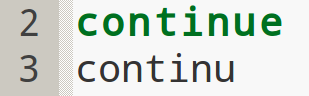
If selected monospaced font that does have separate file for bold version, spacing is correct as anyone would expected, (i.e. Courier New):

This observation is valid also for proportional fonts, although obviously more problematic for monospaced fonts

Neil Hodgson
> If I use fixed-width font (i.e. Droid Sans Mono) that does not have bold
> version in separate file, some kind of automatic weighting is done,
> and spacing between regular and bold font is ruined. This is obviously
> undesirable when user selects fixed-width font:
This is the normal behaviour. If you want fixed-width spacing then
you have to choose fonts and font attributes that match your
preference.
Neil
zetah
with a difference that "Courier New" typeset has bold font (as
separate file)
So "Droid Sans Mono" is algorithmically weighted to bold font, and
spacing is ruined. There is commercial "Droid Sans Mono Pro" typeset
with bold font, which would solve this issue I guess. And it's not
just "Droid Sans Mono" but any (monospaced or proportional) font that
does not have separate bold font file, but it's algorithmically turned
to bold.
I don't know details, but it seems like font rendering engine issue.
Also I'm curious, does this happen on Windows, if someone can reply

John Yeung
> I don't know details, but it seems like font rendering engine issue.
I guess "issue" is the best word for it. It's not exactly a bug (in
the sense that it seems to be working as designed), but I understand
how it could be seen as undesirable behavior. I believe Neil is
saying that it is either not possible to achieve what you're asking
for, or that it costs too much to implement (in terms of difficulty or
time) for the benefit it provides. So you've just got to make do with
the fonts that have the definitions you need. (Or I suppose you could
implement it yourself, or find a "champion" to implement it for you.)
> Also I'm curious, does this happen on Windows, if
> someone can reply
Yes, it happens in Windows.
John
zetah
responsible for font rendering, only wanted to hear other opinions on
subject
Thanks for confirming that it's not OS dependent

Philippe Lhoste
> I understood Neil the same, and I guess SciTE/Scintilla is not the one
> responsible for font rendering
Exactly. Windows (in my case at least) is responsible this behaviour, and it is logical,
otherwise it would have to add extra spacing to the non-bold version, or compress the bold
one, giving perhaps strange results (and it would need to find in a reliable way that this
font is fixed-width).
Special bold version of fixed-width fonts take this in account, perhaps making them
slightly more condensed.
I removed bold from most of the styles I used a long time ago, because of this issue.
There are similar issues with italics.
I started again to use them once I found good free monospaced fonts with separate bold and
italics versions. Envy Code R is one of them (it supplanted Andale Mono which lacks such
special versions).
--
Philippe Lhoste
-- (near) Paris -- France
-- http://Phi.Lho.free.fr
-- -- -- -- -- -- -- -- -- -- -- -- -- --
zetah
> Exactly. Windows (in my case at least) is responsible this behaviour, and it is logical,
> otherwise it would have to add extra spacing to the non-bold version, or compress the bold
> one, giving perhaps strange results (and it would need to find in a reliable way that this
> font is fixed-width).
>
> Special bold version of fixed-width fonts take this in account, perhaps making them
> slightly more condensed.
dimension is preserved, only that bold fonts are stroked. And they are
stroked according some designer decision, not automatically (evenly)
as rendering engine probably does. And what it does? I have no idea,
but I imagine something not as simple as I would think.
I thought it's just on Linux, but as it's same on Windows then I
believe it's impossible to do it otherwise
> I removed bold from most of the styles I used a long time ago, because of this issue.
> There are similar issues with italics.
> I started again to use them once I found good free monospaced fonts with separate bold and
> italics versions. Envy Code R is one of them (it supplanted Andale Mono which lacks such
> special versions).
commercial
Envy Code R is not my type ;)
John Yeung
through my e-mail archives to see if I ever compiled any lists of
monospaced fonts that I've tried, and guess what I found? This thread
from 2009 discussing this very SciTE issue:
[scite] What (monospaced) fonts are people using in Scite?
It started 2009-02-24, and mostly involved Windows users. (I don't
know a good permalink for that; you should be able to search for it.)
There are a lot of good links in that thread. Maybe you'll find
something you like in there.
John
John Yeung
> guess what I found? This thread
> from 2009 discussing this very SciTE issue:
By "this very SciTE issue" I meant the bold rendering of fonts with no
predefined bold version, and how to work around that.
John
zetah
IMHO Consolas is fine, it's free, has bold typeset, and looks good,
thou not as good as Droid (in my eyes). I've used Consolas in the past
as default fixed font on Windows and in Console (aka DOS terminal) but
later changed to Droid, so I guess it's not everything ugly just
because I'm used to something :)
Many notice 0 (zero) and O (letter O) issue with Droid and it's valid
critic and bad decision, I think. It's also made for small screen and
it's slightly condensed, but it's just so good on 1920px also
Even more, Droid Sans proportional font is my default Desktop font too
^_^
And I don't have Android device :D