Printer arrived - having problems - help!!

80 views
Skip to first unread message

Darren Griffin

unread,
Feb 13, 2013, 9:26:26 AM2/13/13
to gfr-p...@googlegroups.com
All the bits arrived today (as did the Razorlabs case) and I've assembled it temporarily but something is awry.

When I send a test print it's received the green LED illuminates, but when I press the button, the printer clicks and the paper doesn't feed properly so I just get a dark line.

If I try the test print, hold down button on printer and power on, that prints and paper feeds correctly so it's not the printer or the loaded paper.

Any suggestions?

Darren Griffin

unread,
Feb 13, 2013, 9:59:23 AM2/13/13
to gfr-p...@googlegroups.com

Hmm, dunno what changed but I connected to it using the Serial Monitor and when I tried again it worked!  Just waiting on some hardware to screw my Adafruit case (went for clear acrylic) together and a DC jack and button and then I'll look at integrating it all into the case.

James Adam

unread,
Feb 13, 2013, 10:35:23 AM2/13/13
to gfr-p...@googlegroups.com
On 13 Feb 2013, at 14:59, Darren Griffin <gri...@gmail.com> wrote:
> Hmm, dunno what changed but I connected to it using the Serial Monitor and when I tried again it worked! Just waiting on some hardware to screw my Adafruit case (went for clear acrylic) together and a DC jack and button and then I'll look at integrating it all into the case.

It's always more likely that the paper will stick when printing graphics than when printing ASCII characters (like the built-in test page), and any number of factors are involved!

I'm glad it's working for you now though, and the case looks great.

- James


Darren Griffin

unread,
Feb 13, 2013, 1:29:25 PM2/13/13
to gfr-p...@googlegroups.com
Blast it's doing it again now, nothing changed. Is this a common issue?  Everything seems to happen as normal except the print. And then it needs to have the power pulled before It will receive another print.

Darren Griffin

unread,
Feb 13, 2013, 1:36:24 PM2/13/13
to gfr-p...@googlegroups.com
And yet, re-upload sketch and it works again, something not right here.

Does the SD card need to be FAT or is FAT32 OK?

Is there any way to debug this?

James Adam

unread,
Feb 13, 2013, 6:13:42 PM2/13/13
to gfr-p...@googlegroups.com
The SD card should be FAT (not FAT32) I believe - really, whatever the Arduino SD library supports.

If you enable the debugging in the sketch[1], you should be able to use the Serial Monitor to see what's happening on the Arduino, and that might at least indicate where the problem is occurring.

- James


--
You received this message because you are subscribed to the Google Groups "Printer" group.
To unsubscribe from this group and stop receiving emails from it, send an email to gfr-printer...@googlegroups.com.
To post to this group, send an email to gfr-p...@googlegroups.com.
Visit this group at http://groups.google.com/group/gfr-printer?hl=en-GB.
For more options, visit https://groups.google.com/groups/opt_out.


Message has been deleted

Tjeerd Ytsma

unread,
Feb 19, 2013, 9:32:30 AM2/19/13
to gfr-p...@googlegroups.com
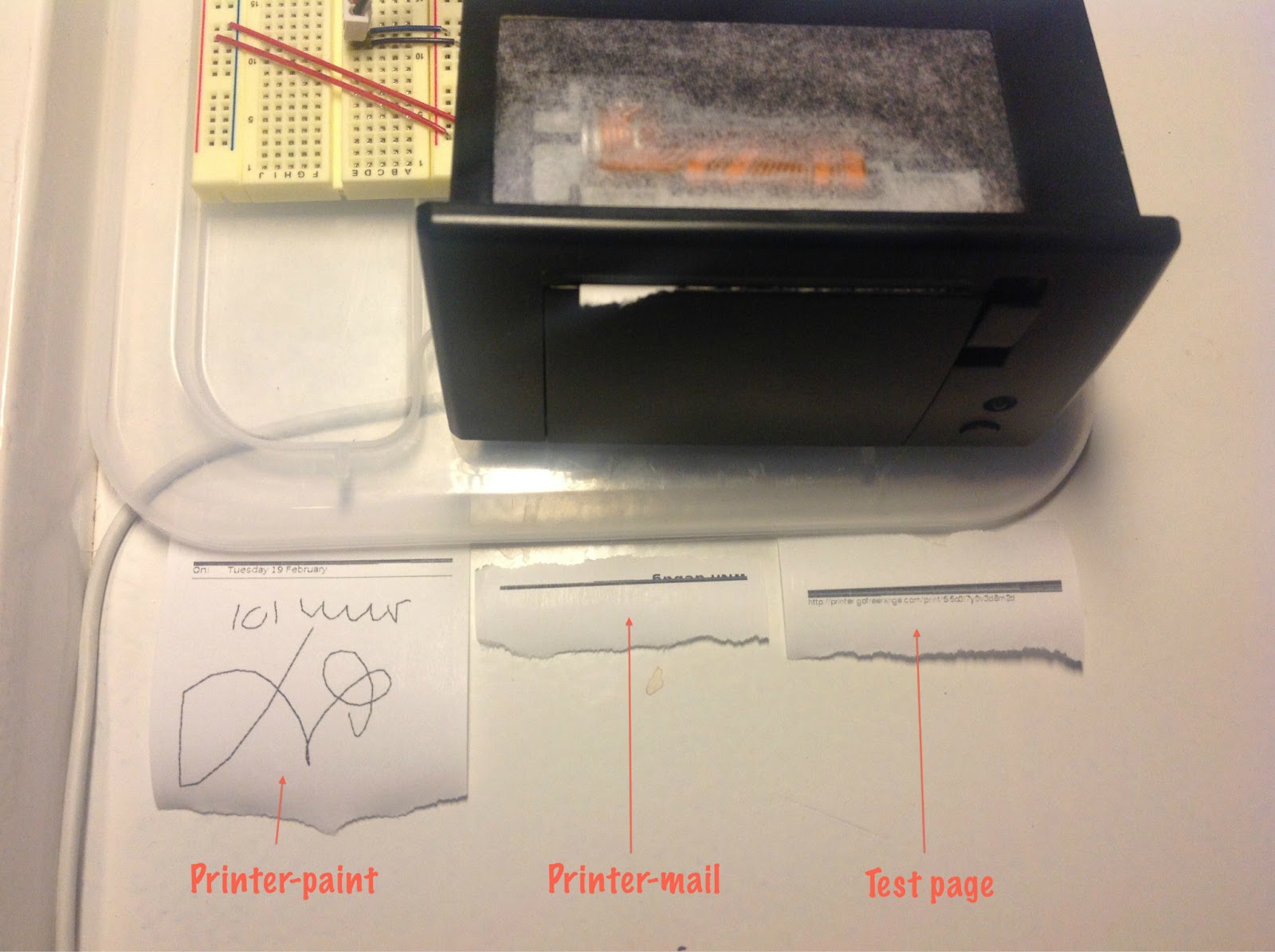
I experienced similar issues. Also noticed bad printing and that it regularly stopped accepting print jobs. But could not make sense why or when it happened. Finally I discovered a consistent difference in print behavior when the Arduino is connected though USB with the computer or not.

To test I used the 'Print test page' (on http://printer.gofreerange.com/my-printer), the Printer Mail (on http://printer-mail.herokuapp.com) and the Printer Paint (on http://printer-paint.herokuapp.com); these applications behave differently in the two described situations.

Case 1: Arduino connected to power (1.5A, 6V) and with USB to computer.

Prints are OK (print quality is a bit poor and sometimes the paper feeding 'hesitates', but prints are readable)


Case 2: Arduino only connected to power (1.5A, 6V).

- For 'Print test page' and the Printer Mail the first +/-5mm are printed correctly, but then it stops feeding the paper and prints a single black line (or sometimes multiple thin black lines close together). 

- For Printer Paint the image and the first +/-5mm of the text above the image are printed correctly, but then it also stops feeding the paper.

This happens with each print job of these 3 apps and always the Arduino needs 'reset' to be able to receive a new print job after this happens. With debug enabled, the red LED lights up when it receives a next print job. New print jobs keep showing up under 'View print archive' on http://printer.gofreerange.com/my-printer.


As the problem only occurs when it is not connected to the computer, it is impossible to check what happens inside the Arduino using the Serial Monitor.

Somebody got any ideas?

Tjeerd

James Adam

unread,
Feb 19, 2013, 11:26:46 AM2/19/13
to gfr-p...@googlegroups.com
On 19 Feb 2013, at 11:35, Tjeerd Ytsma <tyt...@gmail.com> wrote:

> I regular have the same issue: part of or my whole print turns into a gray line. Strange thing is that is seems to happen less frequent when I disable the debugging.

Can you post a picture of this? I don't think I've ever seen a "gray" line; black lines, sure, but "gray" would be new.

- James

Tjeerd Ytsma

unread,
Feb 19, 2013, 11:47:02 AM2/19/13
to gfr-p...@googlegroups.com

I think it is indeed more black than gray. These are my print results when it is not connected with my computer through USB, but only through the Arduino power (1.5A, 6V)
James Adam

unread,
Feb 19, 2013, 12:43:21 PM2/19/13
to gfr-p...@googlegroups.com
This also looks like paper sticking. There are a couple of ways to explore avoiding this:

1. Use a different brand of thermal paper. I've had the most success with the paper from a UK stationers called "Rymans". There's something about printing in bitmap mode with this model of thermal printer that means paper sticking happens much more than when printing in ASCII mode, and paper that's totally fine can stick every time when printing graphics like the GFR Printer platform does.

2. Reduce the darkness - either via the web interface, or by setting in it your Arduino sketch's "printer type" header. Less darkness should reduce the chance of paper sticking, but it's often hit-or-miss

3. Use a different power supply. It's possible that when your Arduino is plugged in to your laptop, there's more power available which lets the printer push through any sticking. The supplies we use here are 5V/2.0A, if that's any use.

If I had to pick one thing to try first, it would be different paper types - in my experience the paper is by far the biggest factor.

I appreciate how frustrating this can be - you have no idea how long I battled paper sticking while I was prototyping the platform! 

- James

Tjeerd Ytsma

unread,
Feb 20, 2013, 5:54:58 AM2/20/13
to gfr-p...@googlegroups.com
Good news, I'm making progress and getting some grip on it. Very nice that the results become less mysterious.


3. Use a different power supply.
This seemed to be the biggest factor for my printer setup. I used two other types of paper with the same adapter, but that made no difference. With a 5V/3.0A adapter only the paper that came with the printer gave problems, and the other two are working fine now. 

1. Use a different brand of thermal paper. 
This helped, but only after I used a more powerful adapter.

2. Reduce the darkness
This helped, but only after I used a more powerful adapter and other paper. With the new adapter and reduced darkness I can even get that last type of paper (that originally came with the printer) working.

I changed the darkness through the printer backend but was not able to change the darkness in the Arduino sketch.
When I added the dot and the number behind "A2-raw" value for "printerType" my printer does not print anymore. The yellow LED lights up for an unusual long time and then the red LED, flashes. The serial monitor shows:

14139: Attempting to connect to printer.gofreerange.com

14232: Waiting for data

14232: Waiting for data

14233: Waiting for data

14242: Waiting for data

14268: Waiting for data

14295: Waiting for data

14320: Waiting for data

14371: Content length: 153394

15070: Waiting for data

15070: Waiting for data

15071: Waiting for data

...

59463: Waiting for data

59463: Server disconnected

59489: Response code != 200

60546: Bytes: 153394

60547: Duration: 46415

What is going wrong here?

Thanks for the help so far,
Tjeerd

James Adam

unread,
Mar 6, 2013, 3:38:10 PM3/6/13
to gfr-p...@googlegroups.com
On 20 Feb 2013, at 10:54, Tjeerd Ytsma <tyt...@gmail.com> wrote:
> I changed the darkness through the printer backend but was not able to change the darkness in the Arduino sketch.
> When I added the dot and the number behind "A2-raw" value for "printerType" my printer does not print anymore. The yellow LED lights up for an unusual long time and then the red LED, flashes.

Hmm, that's very strange. I can't imagine why changing the printer type header would stop the download from working!

- James

Reply all
Reply to author
Forward
0 new messages