What font is this?

Kedar Mhaswade
selector (through the cascade) the font is selected and applied using
a linear search. Thus, if font-family of certain text (through the
cascade) is computed to be font-family: Monaco, Consolas, "Lucida
Console", sans, sans-serif; then the search for installed font starts
on the given computer with "Monaco" font and ends at "sans-serif"
font. Is my understanding right?
But looking at the computed style of an element (using say "Inspect
element"), it is not immediately clear what actual font-family is
being chosen to render the text. Is there a way to know that?
Regards,
Kedar

Astara (la walsh)
Kedar Mhaswade wrote:
> But looking at the computed style of an element (using say "Inspect
> element"), it is not immediately clear what actual font-family is
> being chosen to render the text. Is there a way to know that?
>
----
The 'font finder' Extension
'Font Finder'
Install Date: Sunday, July 03, 2011 13:45:22
ID: fontf...@bendodson.come
Works with application version 1.5 to 2.0.0.*
Get all CSS styles of selected text.
---
Works fine with 3.6...
Probably would work for other versions too just have to kick the version
Good thing everyone thinks all these extensions are on 5 & 6.x...
I'm sure this one will be fine...
If not, maybe you can debug how it works in firebug under
3.x...oh wait, firebug isn't supported under 3.x anymore...
oh well.. I'm sure you can wing it...
(Obviously, I have to do alot of that given the poor support from
current extensions for current FF versions...)...

Křištof Želechovski
> But looking at the computed style of an element (using say "Inspect
> element"), it is not immediately clear what actual font-family is
> being chosen to render the text. Is there a way to know that?
Depending on your desktop, it might help to paste the fragment into Writer.
HTH,
Chris
Astara (la walsh)
Why wouldn't you just select the text and invoke the extension:
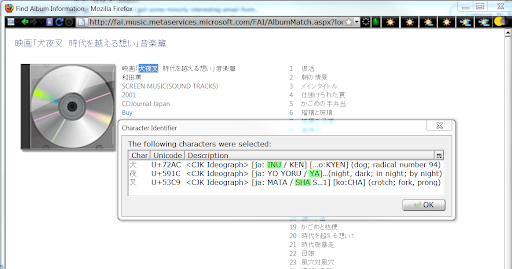
Here's an example of ID'ing chars from a music album. You can see from
the blue hi-lighted
chars I ID'ed, what the sound track is related to.. I hilighted in
Green the relevant meaning
of the kanji. i.e. 犬夜叉 = INU YA SHA ...
I find it invaluable for ID'ing Unicode chars and gleaning meaning from
japanese pronunciations...
(Hoping this pic posts:...)
Astara
Even more lame since the interface for typing here on the website sorta sucks..... great choice .. sucking interface w/more power or better interface with features stripped away...by google...hmmm...
sounds like a plot to make me post from on line!...woudln't that be surprising...