The DANGERS of labeling your chips with paper labels

614 views
Skip to first unread message

blueridgetiming

unread,
Nov 5, 2014, 4:12:06 PM11/5/14
to agee-rac...@googlegroups.com
In an effort to rid the saying, "to get blueridged" aka not 100% reads, and to help others avoid this possible error, I have been doing a lot of thinking. 

From my other post, "missed chip reads", I have had major difficulties achieving 100% rates. My read rates are more along the lines of 55-65%. 

What I came across is the following:
  • ALL of my races have been XC races.
  • They have ALL occurred in the rain (yes a bad omen, but nonetheless wet and muddy)
  • Initially I had bad read rates because coaches and athletes did not follow very clear directions and shoved the chip down their laces. (very tempting, but not good for read rates)
  • After most tests using the proper setup and proper way to attach tags to shoes, I still got bad read rates...but keep in mind it was still wet.
At my latest event, of the first 15 mens athletes, the system only picked up 6 athletes numbered 293 172 197 180 204 244. From the video's you can clearly see tags in the top 15 flopping away, but being missed. 


With this said and being a math professor, my hypothesis is that the labels (which cover the entire chip -- see picture attached) are getting wet, retaining water, and as we all know UFID does not like water, causing bad read rates. Not only are the labels wet, but they are also getting covered with mud, and then sticking to wet shoes. To sandwich a tag between a wet label and wet shoes leaves you with very poor read rates. 

I plan to test out my hypothesis on Friday when I have the time, but I'll be sure to share the results with everyone. In the meantime, I'd be skeptical about using labels on your tags.

Doug
label.jpg

Ohio Race Day

unread,
Nov 5, 2014, 5:13:27 PM11/5/14
to agee-rac...@googlegroups.com
We're rooting for you.  I watched the videos and aside from that one antenna looking sad and hanging downward the others are not terribly out of position.  Just make sure the stand's center post is extended fully and the legs are on the correct notch (See BA's set up).  Also use a good reader.  The Motorola FX9500 is more powerful than the FX7400.  Make sure you have the better antenna cables if you are stretching to the other side LMR195 cables are good to about 15'.  The LMR400 cables are good for the other side (I don't have any so verify this with others).  I can hear that generator in the back ground.  I'd get rid of that noisy thing and make sure you have something efficient.  Battery power with a good pure sine wave inverter.  In remote spots I run my pure sine inverter that is hard wired to my vehicle.  Nice clean power.  Also have a good laptop.  4GB of RAM is better than 2GB and a 2+ ghz processor is good, too.  I was surprised at how better things performed once I finally bought a new Lenovo laptop instead of the used Dell that I got from Craigslist.  :)  Wishing you luck.

http://youtu.be/2AkCiwESBd8?t=15s

rtspt.usa

unread,
Nov 6, 2014, 12:44:16 AM11/6/14
to agee-rac...@googlegroups.com
..i would also like to see your antennas spread out a tad.. they seem to be pointing in a relatively small window width. so open up that read window.
i think for you right now, the goal is to get everybody read chip wise (i know you are using Lynx for official results).

with 2 chips you should be getting 100%. my first xc outing a year ago was dismal as well although i used one chip and most kids tucked the chip under their laces.
since i have vast experience with rfid (AMB [active] and Ipico [dual low frequency]) i was determined to get this system (uhf) working at an acceptable level.
i have gone overboard (6 antennas) but i really think that mat antennas along with the side ones has been key.  i am also using dogbones on the front of the bib (or behind with foam) but i think i would be getting the same 100% read rates with shoe chips as well.
i prefer the bib chips since i can control better how an athlete is going to wear the chip.
fl1.JPG

info

unread,
Nov 6, 2014, 10:55:30 AM11/6/14
to agee-rac...@googlegroups.com
I use small labels (approx. 3/4" x 1") on my tags and I cover them with a piece of clear scotch tape.  Keeps the water off and the majority of the chip visible.  I haven't had an issue yet--100% over 20ish races this summer. 

Todd Gould

unread,
Nov 7, 2014, 10:11:09 AM11/7/14
to agee-rac...@googlegroups.com
Why would you put the label outside the lamination?  When you build your tags, print out the labels, stick an inlay to the label and then laminate a sheet of them.  You do not even need to use labels.  You can use plain paper but you have an additional step of cutting out the paper labels...  Then cut them out and hole punch them.  I donated my timing services to a school fundraiser 5k and got the PTSA women to make my shoe tags for me.  :)  

I personally do not label or number my laminated shoe tags.  I program them for every race.  I get 99+% read rates even when wet. 

You need to be very specific when you give out the tags to the coaches and participants to not mix them up.  If they do, I warn them they will not be timed correctly. 

Juan Botes

unread,
Nov 7, 2014, 10:14:18 AM11/7/14
to agee-rac...@googlegroups.com
Hi Doug, I agree with the suggestion of using Scotts tape (clear or white) both work (I am using it on the front of MTB number plates), but what I can not understand is how the water gets to the label? Is the tag not mlaminated in a sealed unit? No water will be able to get to it then. I have tags that are laminated and I tape (Scotts tape) them do the nose of a K1 Canoe which get a lot of water, but still give very good reads.

Regards
Juan

blueridgetiming

unread,
Nov 7, 2014, 10:22:28 AM11/7/14
to agee-rac...@googlegroups.com
I got the tags from Brian and they were already laminated. I mainly do xc meets so numerous tags are handed to coaches to distribute to kids. In order to keep track I put labels on the already laminated tags.

Also, as much as I want to threaten athletes and coaches with the thought, "if you don't put your tag on right, you don't get a time", I don't see this as an option. As the timer no matter what the case is, I am responsible for getting the athletes time.

In my experiences so far, athletes have done what was asked, but misses occured. In no way can I had out championship results with 30 athletes missing.

I'm going to test what I think is causing these errors tonight. I'll be sure to share my results so that everyone benefits from it!

Doug

blueridgetiming

unread,
Nov 10, 2014, 4:47:18 PM11/10/14
to agee-rac...@googlegroups.com
THE RESULTS ARE IN:

As promised I tested to see if attaching avery labels to the laminated tags would effect read rates and here is what I found:

First my setup:
 - used the motorola 7500 reader
 -  4 antennas (2 on each side, 1 higher and 1 lower, see attached pictures)

Case 1: Attaching labels as they should be attached. Dry tags on side of shoe. 
Result: 20/20 read rate even with jeans covering tags at times.

Case 2: Wet the label and shoe with watering container
Result: 26/60 read rate

Case 3: Dog bone vertically on bib (dry)
Result: 20/20 even with pretending to stop my watch

Case 4: Dog bone vertically on bib (soaking wet - see picture)
Result: 18/20.... 2 missis came when bib number was pressed against soaking wet shirt.

Be sure to look at the pictures attached and feel free to comment. At this point I think it is safe to say that using labels on tags (when the labels) might get wet could be a very bad idea.

I have my next event this weekend and plan to use a vertically positioned dog done on the front of the bib.

Hope you enjoy the results / pictures :)

Hopefully no more "Getting Blue Ridged"' with chips!

Doug
20141108_160222.jpg
20141108_154025.jpg
20141108_154011.jpg
20141108_155151.jpg
20141108_151254.jpg

Tim Irvine

unread,
Nov 10, 2014, 9:20:46 PM11/10/14
to agee-rac...@googlegroups.com
I like where your head was at Doug with the labels. It really cleans up the presentation. I use the Dymo thermo (and feel like tyvek) labels on the bibs. I tried to put the label on before the lamination, but the thermo paper turned black when it passed through the machine. If you labeled the chip and then laminated it with a paper label, it would take wet label out of the mix. Not sure if that helps. Rooting for your success!

Ohio Race Day

unread,
Nov 10, 2014, 9:27:42 PM11/10/14
to agee-rac...@googlegroups.com
Thanks for the follow up, Doug.  This is helpful for all of us.

Nick Preston

unread,
Nov 10, 2014, 9:35:49 PM11/10/14
to agee-rac...@googlegroups.com
I use the clear laser labels on my chips. I haven't had any problems with water and timed a 50K trail run without any difficulty. These are the labels, but probably not the best price on them:
http://m.staples.com/touch/product.html?sk_test=a#SS260281

rtspt.usa

unread,
Nov 10, 2014, 11:00:31 PM11/10/14
to agee-rac...@googlegroups.com
i am very surprised that the labels affected things that much (and that they retained that much mud) but it does make sense being that it is uhf...
i would make your antenna window wider and set all antennas up stomach height or so for dogbones on the bib.
you could also stick a piece of foam on the back of the bib (behind where the dog bone is stuck) if you REALLY want to nail things down..

Tim Irvine

unread,
Nov 11, 2014, 12:25:36 AM11/11/14
to agee-rac...@googlegroups.com
What kind of labels are you using? I think the tests you did were very revealing. I timed a marathon last year using vertical dogbone on the front of the bib covered by the Dymo (Tyvek like) labels. I only missed 5 reads the entire race. But that was single chip and oh yeah, it was a rainy day too. This year, I am doing double dogbone on the back of the bib with foam. That race is this Saturday. I will let you know how it goes this weekend. But good info for sure!!

rickcummins05

unread,
Aug 5, 2015, 2:29:35 PM8/5/15
to Agee Race Timing Users Group
What methods are others using to permanently label their tags?  pics?

Nick
Are you printing on the clear labels then sticking them to the tag?  or are you using a sharpie to write on the tag then applying the label over?


Thomas Osullivan

unread,
Aug 5, 2015, 6:11:11 PM8/5/15
to Agee Race Timing Users Group
I did a lapathon earlier this year and used removable file folder labels for the tags.  As with our other races, we had a 100% read rate and when the race was done, the labels came right off.  I did this as a test if you wanted to personalize labels for an event and then want to remove them afterwards so the tags can be used again.

Tim Irvine

unread,
Aug 6, 2015, 9:53:20 AM8/6/15
to agee-rac...@googlegroups.com

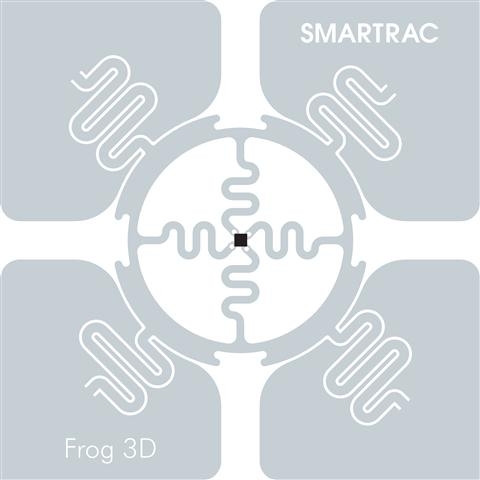
I just realized I never followed up after the marathon with the results of the double dogbone with foam on the back of the bibs. 100% reads. Maybe it was overkill, but it was great for peace of mind. I am testing another chip right now. Frog 3D. It's a square but pretty powerful. The cost is more than dogbone, but you would only have to use one chip. That will actually be a cost reduction for me since I use two dogbones.  I will use a square foam to cover it and if I can get these ordered and printed with my logo on them, all the better.

Brian Agee

unread,
Aug 6, 2015, 9:57:29 AM8/6/15
to Agee Race Timing Users Group
Awesome! Years ago when I was testing a bunch of different tags the two that really stood out to me was the DogBone and the Frog. Looking forward to see what you find!

Bruce B

unread,
Aug 6, 2015, 11:33:40 AM8/6/15
to Agee Race Timing Users Group
@Tim-
 If you care to share--Where did you find the foam?
Interested to see how the Frog performs also.

Tim Irvine

unread,
Aug 11, 2015, 12:04:54 PM8/11/15
to Agee Race Timing Users Group
Bruce, I found sheets of single side foam at Joann's which is a craft store. You could also get this at Hobby Lobby. I bought a simple cutter board and make my own custom foam backing. Thanks, Tim

Bruce B

unread,
Aug 11, 2015, 1:14:06 PM8/11/15
to Agee Race Timing Users Group
Thanks Tim,
I was going to try a similar method but foam tape.
Bruce

Brian Agee

unread,
Aug 11, 2015, 1:48:08 PM8/11/15
to Agee Race Timing Users Group
In case you haven't seen it, here is what I used as foam tape: https://groups.google.com/d/msg/agee-race-timing/_bKTePPacjc/Gd-E1DmnbJwJ

rtspt.usa

unread,
Aug 11, 2015, 1:48:44 PM8/11/15
to Agee Race Timing Users Group
Home Depot sells rolls of foam insulation tape.. There is a camper shell style that is perfect.

Tim Irvine

unread,
Aug 13, 2015, 6:11:01 PM8/13/15
to Agee Race Timing Users Group
Brian, I like that tape too, only it's messy to work with and double sided I believe. The Joann stuff comes in sheets, is single sided and works beautifully. The only downside it it's muti-colored sheets so you may get 50 white, 50 purple, 50 red, 50 blue and so on out of a single pack. This foam cuts easily too. I bought a roll of that tape from a tag vendor and I am assuming they bought the inexpensive roll from Home Depot too, yet I paid $75 for a roll. Lesson learned.

Ohio Race Day

unread,
Aug 13, 2015, 9:13:27 PM8/13/15
to Agee Race Timing Users Group
Remember that these guys sell 3,000 pre-cut spacers on a roll for $200.  Click the link below then scroll to the bottom:

pre-cut foam spacers

Tim Irvine

unread,
Aug 13, 2015, 10:15:20 PM8/13/15
to Agee Race Timing Users Group
This does save a lot of time Ohio. Thanks LOL

Brian Agee

unread,
Aug 13, 2015, 10:51:34 PM8/13/15
to Agee Race Timing Users Group
The tape isn't double sided, but of course you do have to cut each one out. I'm sure there are better options out there than what I used when I was expirmenting with different tags, but of course the more I tested tag placement the more I moved away from bib tags. So I haven't put much research at all in foam spacers since then.

SR Aaron

unread,
Aug 14, 2015, 12:53:58 AM8/14/15
to Agee Race Timing Users Group
You guys might be tired of me saying this, but I STILL don't believe the foam spacers do anything. Have you tried without foam? I've timed over 20 races this year without foam with 99-100% reads. Rain, snow, wind, water, mud, triathlon, paddle board, etc.. no foam, no problem. Why waist time and money?

rtspt.usa

unread,
Aug 14, 2015, 1:03:30 AM8/14/15
to Agee Race Timing Users Group
I agree. Although I cheat and put the tag on the front of the bib the foam is a pain in the rear.
If you are really worried just use two tags.. They are pretty cheap anyway.

Ohio Race Day

unread,
Aug 14, 2015, 8:58:16 AM8/14/15
to Agee Race Timing Users Group
I've never used a foam spacer (besides in a test) and have had good read rates in rain with one vertically oriented rfid inlay on the back of a bib.  My link to this thread was just informational since I never purchased the pre-cut spacers from Race Result myself.

Peak Performance Timing

unread,
Aug 14, 2015, 12:52:29 PM8/14/15
to Agee Race Timing Users Group
SR Aaron,

Couple of ?s about not using foam spacers....Speed of athletes at finish? I have found that faster runners are missed without spacers (bib tight against torso???).......Vertical or horizontal tag placement? And where on bib? Top , bottom, left, right?........And I can't remember if you use mat antennae or overhead truss mounted.

Thanks

SR Aaron

unread,
Aug 15, 2015, 3:46:35 AM8/15/15
to Agee Race Timing Users Group
We place the chip centered horizontal on the backside of the bib (most people don't even realize it's there). We use overhead truss and our basic setup is two antennas on top and one on each side (4 all together for a 10x10' finish). A few of our first races we timed we had some miss reads with the 1st couple people crossing (the sprinters), I figure its the position of their body blocking the antennas (because they are leaning forward), since then I position the top antennas nearly parallel with the ground (slightly facing the runners, see antenna in background of photo).

Chris Hubbard

unread,
Aug 16, 2015, 7:01:36 AM8/16/15
to Agee Race Timing Users Group
We use two Smartrac Dogbones vertically on the front (each side) of the bibs with a label over them and have 99% read rates at NCAA cross country meets. (NO FOAM SPACERS)

We did a 5k this weekend that had 200 runners including 150 high school cross country kids and had 1 miss. We had several dozen kids running 5-6:30 miles and picked up everyone of them. We use a Motorola FX9500 with 3 Impinj Threshold antennas overheard, 2 Motorola AN400 (One on each side), and a single tripod mounted antenna ten feet past the finish line as a backup. It's a bulletproof set-up. 

As far as speed goes, we used this set-up for a NCAA DII conference championship and had zero issues. This year we have the contract for a NCAA DII regional in part to the speed of results and zero issues at last years conference championship.

Peak Performance Timing

unread,
Aug 16, 2015, 12:59:24 PM8/16/15
to Agee Race Timing Users Group
@ chris

How do you protect the Impinj threshold antennas in rain? Or are they water tight?

wisdomandhealth

unread,
Aug 17, 2015, 10:46:48 AM8/17/15
to Agee Race Timing Users Group
Rick
I'm printing on clear labels.  If need be, they are easy to remove.  
IMG_6818.JPG

Nicholas Ireland

unread,
Sep 21, 2015, 9:55:33 PM9/21/15
to Agee Race Timing Users Group
Would there be any downside to using a sharpie to put the number on the tag?  It wipes off with alcohol if you really have to change the number.  Seems like you could avoid labels altogether.  Otherwise, plastic laser labels seem to be the way to go for a shoe tag.

blueridgetiming

unread,
Sep 21, 2015, 9:58:01 PM9/21/15
to Agee Race Timing Users Group
No downside at all. Just avoid paper products (which absorb water) and you'll be fine.

Ohio Race Day

unread,
Sep 21, 2015, 9:59:21 PM9/21/15
to Agee Race Timing Users Group

John Kirby

unread,
Sep 22, 2015, 9:51:40 AM9/22/15
to Agee Race Timing Users Group
I have used both sharpies and wet erase markers and although the wet erase wipes off much easier, the problem is they wipe off too easy. Just from myself handling the tags and registration personnel handing them out, they tend to smear very easily.
I prefer the using the sharpie to mark them since it usually remains legible until the participants have them attached to their shoes/shorts.
Coming from a cross country background, I have experienced too many instances of chips/tags getting mixed up between runners who are sitting next to one another, talking, not paying attention and  while putting tags on.
Yes, it takes me a couple extra minutes to wipe the sharpie numbered tag off afterward, I use alcohol on a rag or the Mr. Clean Magic Erase Sponge, but it lowers, not eliminates the probability of runners mixing up tags that are not clearly numbered.
 

Oscar's Race Results

unread,
Nov 10, 2019, 6:50:52 AM11/10/19
to Agee Race Timing Users Group
Revisited using horizontal bib tags yesterday.  Used 2 overhead TAC-60s and an MT 262006 at the side.  Reads were so good in testing that we did not bother to hook up the linear 6 element Yagi to try cherry picking for back up or catching someone the other antennas missed.  Got 57 out of 59 finishers like that.   Was using Alien 'G' 9654 tags.  Interesting programming them during the week using older ThingMagic and Universal Reader Assistant:  Procedure was to peel them off, put them on a bib and then program.  Several were weak (20 to 25 RSSI) or not read at all.  Removed / replaced a few at first and noticed the spec from the center of the chip was still on the bib on a couple.  Made me suspicious.  Cut 20 more off roll before programming and all were 30 to 36 RSSI.  We keep house at 67 this time of year.  Anybody else had similar experience with Alien chips or, for that matter, Monza chips?

Oscar

Peak Performance Timing

unread,
Nov 10, 2019, 1:33:00 PM11/10/19
to Agee Race Timing Users Group
Was 57 of 59 without foam? If so that is awesome with your setup, I think.

Oscar's Race Results

unread,
Nov 10, 2019, 2:03:43 PM11/10/19
to Agee Race Timing Users Group
No foam on the chips but it was 28 F with a 10 knot wind so not a lot of sweating going on. And, most folks had on a couple of layers.  

It got the first "coming in hot" ones we usually worry about too.  The misses were random and back in the pack.

Oscar  

-Kurt

unread,
Nov 23, 2019, 8:56:39 PM11/23/19
to Agee Race Timing Users Group
Oscar, curious how you're measuring the rssi.  -kurt

Oscar's Race Results

unread,
Jan 25, 2020, 4:13:20 PM1/25/20
to Agee Race Timing Users Group
Belatedly answering about RSSI:  Measurements were what it said on Universal Reader Assistant  which runs the ThingMagic.  Did not pay great attention to distance from reader though.  That could be it.  And OK, I thought lower was weaker.  

Program Tags.JPGJust got through programming more Alien 9654's with Univ Read. Assist and had a stretch of 30 where almost half would not read or program.  

Then came back to an old problem I have: programming chips with ART.   I do not think I have ever gotten it to work.  Using MTI MT242025 antenna and an FX7400 - 2.

Suggestions?

Thanks,
Oscar


Oscar's Race Results

unread,
Jan 25, 2020, 6:16:14 PM1/25/20
to Agee Race Timing Users Group
ART evidently wants 24 characters.  I was trying to redo chips with 4 or 8 digit codes. So kept trying improbable things. For a long time, there has been a nuisance security tag on something in my "RFID" room.  Had a big, long HEX code.  Kept popping up so I tried to program it a bunch of times today.  BUT once, I clicked and HELD the red "X" on it (by all rights the tag should be locked) and lo and behold, it programmed it!!  Suspicious, I ThingMagic'd in a 24 character code on a 9662 and bang, then it would program that too.  

Now all I have to do is dig through a mound of garments, find it and put some hex back in it so ART will ignore it! 

Oscar

Tim Irvine

unread,
Jan 27, 2020, 2:40:36 PM1/27/20
to Agee Race Timing Users Group
Oscar, 

  When I had the Thing Magic Reader, I only coded with 4 numbers (0001, 0002 and so on) Art would read those numbers, but when you code through ART it will automatically format it the ART way. I am not sure this could be changed. Are the coded chips from Thing Magic not reading into ART now?

Oscar's Race Results

unread,
Jan 27, 2020, 4:38:38 PM1/27/20
to Agee Race Timing Users Group
I tried some 4 and 8 character coded chips from your old ThingMagic and they would not work till I got them up to 24 with the ThingMagic.  Then they worked fine.   The ART program reads 4 or 8 characters just fine for timing.  You just can't (I can't anyway) reprogram a 4 or 8 character EPC with ART.

Just tried them again a second ago: 4 characters nothing happens, 24 and it is fine.

Brian had to make some decisions on which way to go.  No one right way.  Vast majority of of programming is on factory EPCs. Quite logical.  AND, once you set up to add a unique race number at far left, you are just going to make a mess tinkering. 

Oscar

Tim Irvine

unread,
Jan 30, 2020, 9:39:29 AM1/30/20
to Agee Race Timing Users Group
That was what happened with those Hu Tags I had to send you to reprogram for me that time. I had originally programmed them with Thing Magic and when I tried to program them in ART, it made them four zeros and basically, where I couldn't use them.

Oscar's Race Results

unread,
Jan 30, 2020, 10:42:09 AM1/30/20
to Agee Race Timing Users Group
Ahhhh!  Another ThingMagic victim. I accidentally reprogrammed a stray security tag this morning to all numerals and had to use the ThingMagic to get some HEX back in it so I would have a pristine environment in which to experiment.  

Oscar

Oscar's Race Results

unread,
Feb 1, 2020, 7:26:06 PM2/1/20
to Agee Race Timing Users Group
I tried Session One again and got it to program chips with only 4 characters.  Put the chip you want to fix out in front of antenna and read it.  Then STOP reading.  In the inventory list, click on chip # you want to reprogram.  On lower right is an EPC button with a box out to the left.  You should see the selected chip EPC in the box.  Retype whatever you want in the box as long as it is in blocks of 4.  Then, press enter.  In lower right hand box you should see "Write success..." To check it, click START button and you should see count increment for the new EPC.  

Oscar
Reply all
Reply to author
Forward
0 new messages