
Adding a PHP Library to a Site View
38 views
Skip to first unread message

Matthias Hilger
Jun 6, 2020, 2:28:32 PM6/6/20
to Joomla Component Builder
Hello,
I work with Joomla for many years now, but more as a user. I also more or less "hacked" into Joomla components code if I need to change something. So my knowledge about Joomla Coding is small.
However, I decided to go deeper into coding here and JCB is an impressive help with the demo components and all the tools it offer. Thanks a lot to deliver this for free! That's really amazing!
Now for my problem:
I would like to add a custom PHP library to a Site View soI can use the classes in there.
I watched this video several times but still couldnt get it to work: https://www.youtube.com/watch?v=rDjvgLYOt1o
What I've tryed so far:
- I added my files to the folder "administrator/components/com_componentbuilder/custom/mylib" so I could add the folder to my library
- I created a new library with target folder "library" and "always add"
- In the SideView, I cannot add this library, I guess since it's not a media library like bootstrap etc.
=> First dead end for me
- I saw the possibility to add "Libs & Helpers" to the component, however, non of the options here looked promising
- I tried to write a little plugin which adds the library but it also didnt work (https://docs.joomla.org/Using_own_library_in_your_extensions/en)
- I saw older methods to add libraries in the video, however, I also couldnt get them to work.
So, I'm kinda lost and dont know, where to get further support. I hope to get the following infos:
- If it is possible to add PHP Libraries an easy way with JCB. Looks like a part is still under dev (the part with target folder "libraries" instead of "media", an info about progress would surely be interesting
- Help where I can get more infos about how to add a PHP Library to a certain Site View or to the Component
Thanks a lot already for oyur help. Keep up the excellent work ^^

((ewe))yn
Jun 9, 2020, 5:39:12 PM6/9/20
to Joomla Component Builder
Yes you can indeed add PHP libraries to your component, JCB in fact added two libraries of its own this same way as I am going to explain.
But yes you are right, the current library area just work for media libraries, and not PHP. So you should for now use the Files and Folder area of the component:
This way you can add any library, so your entry should look like this under the advance tab, folder area:
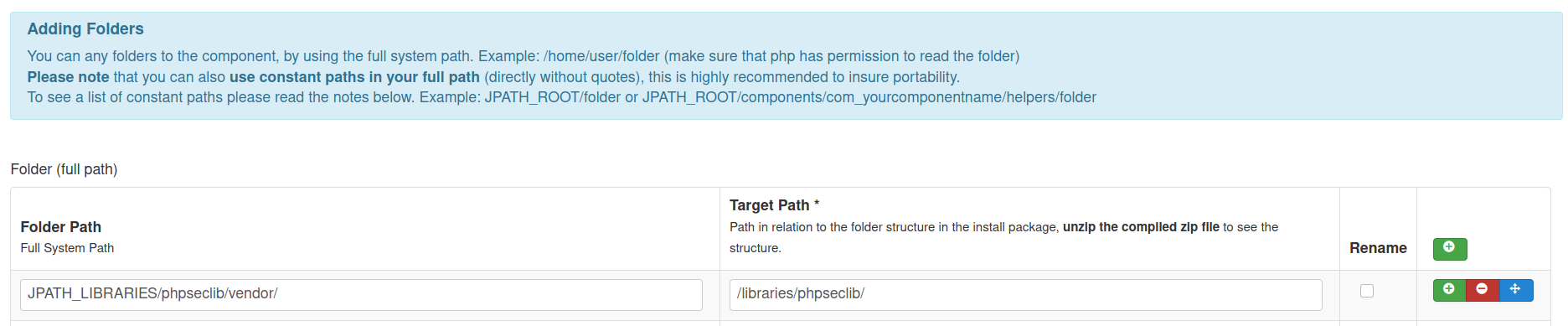
So the folder on my system is in the libraries area, and I am with this adding it back into the library area where it is going to be installed.
Hope you get it working now.
Matthias Hilger
Jun 10, 2020, 4:32:04 AM6/10/20
to Joomla Component Builder
yes i coud get it to work this way, thanks a lot ^^
Reply all
Reply to author
Forward
0 new messages