
pagination in custom site view
175 views
Skip to first unread message

Gianluca Gabella
Nov 30, 2018, 11:41:35 AM11/30/18
to Joomla Component Builder
Hello everyone, i have doubts about achieving this:
I've a custom site view called "search items" where i've put a simple search form with actions that points to an another custom site view called "search results". In "search results" custom admin view i read the POST parameters and make some queries on the database. The problem is: in some cases i have more than 7000 results so i get errors.
Question: how can I implement a custom "pagination" inside my custom site view?
I found this on the net: https://docs.joomla.org/J1.5:Using_JPagination_in_your_component#Implementing_Pagination_in_Front_End but it's for Joomla 1.5
Any clues on how to do this and set i up in Component Builder?
Thank you

Peter Evgeniev
Nov 30, 2018, 11:56:31 AM11/30/18
to g.ga...@gmail.com, Joomla Component Builder
Hey Gianluca, this topic is very interesting to me as well. In the near future i will have to implement similar search form with pagination etc. For now i know you could try to use the FooTable library if you have simple list of items. There was tutorial about it i think but can't recall which one.
Alternatively you could do jQuery search like this one:
Regarding pagination in your case will be interesting. Since you have a lot of entries it will be hard for the client to receive them all and then group them into pages with any javascript.
I hope this information helps but i will be trying it myself soon and will let you know if i come up with something else.
Regards
Peter
--
You received this message because you are subscribed to the Google Groups "Joomla Component Builder" group.
To unsubscribe from this group and stop receiving emails from it, send an email to jcb+uns...@vdm.io.
To view this discussion on the web visit https://groups.google.com/a/vdm.io/d/msgid/jcb/4c7634ff-bba8-4fbc-a9b9-34f31c7722f5%40vdm.io.
Peter Evgeniev
Nov 30, 2018, 11:59:23 AM11/30/18
to g.ga...@gmail.com, Joomla Component Builder
This looks primissing:
Peter
Gianluca Gabella
Nov 30, 2018, 12:44:39 PM11/30/18
to Joomla Component Builder, g.ga...@gmail.com
This works!!!! Wow! Thank you!
But now i enter a whole new problem, but maybe this is caused by my lack of knowledge of the joomla framework:
In the "SEARCH ITEMS" site view my form is like:
<form action="<?php echo JRoute::_('index.php'); ?>" id="ricerca_circolare_dynamic" method="post">
<?php echo JHtml::_( 'form.token' ); ?>
<input type="hidden" name="option" value="com_circolari" />
<input type="hidden" name="view" value="risultatiricercaricolari" />
<input type="hidden" name="task"/>
<input type="hidden" name="itemId" value="855" />

and so on...

</form>
It works, as the view answers correctly (it displays the results) BUT my URL does not change.
The URL of the form (search view) is this:
If i click on the search button the browser changes the page but the URL remains this:
How can i force the page change? So Joomla actually goes to the new page instead of just change the component area? Because now if i press F5 i return to the search form, and do not stay in the result page.
Thank you!
Peter Evgeniev
Nov 30, 2018, 12:53:11 PM11/30/18
to g.ga...@gmail.com, Joomla Component Builder
You can't since you are using POST. if you use GET that would be able to refresh. Even if you manage to get the page with post properly done it will ask the user every time if they want to re-submit the data to the page.
I hope it helps.
Regards
Peter
To view this discussion on the web visit https://groups.google.com/a/vdm.io/d/msgid/jcb/914b9b1d-bfe4-4f88-b04d-97983e5fa358%40vdm.io.
Gianluca Gabella
Nov 30, 2018, 1:42:00 PM11/30/18
to Joomla Component Builder, g.ga...@gmail.com
Umh... it seems that my own form is removed by Component Builder:
But when i compile and install i get this:
That points to the page itself... am I missing something?
Thank you
Peter Evgeniev
Nov 30, 2018, 2:11:54 PM11/30/18
to g.ga...@gmail.com, Joomla Component Builder
Actually you are correct. I've seen that too. I thought i was doing something wrong but it seems it does it. I need to investigate it as well.
Peter
To view this discussion on the web visit https://groups.google.com/a/vdm.io/d/msgid/jcb/a567b8aa-89ba-4e32-827a-b32d70e1291f%40vdm.io.
Peter Evgeniev
Nov 30, 2018, 3:03:18 PM11/30/18
to g.ga...@gmail.com, Joomla Component Builder
So i did a quick test and the form is not being re-generated or overwritten. There is something else at play there. Do you have any additional buttons on that view? Or if you could send me the form you have currently without the input fields but with the submit button i could continue investigating. I do have it on one of my components so i will look there as well. Still if you can send me the details i asked for and i will continue looking at it.
Regards
Peter
Gianluca Gabella
Nov 30, 2018, 4:47:11 PM11/30/18
to Joomla Component Builder, g.ga...@gmail.com
No Ajax nor additinal buttons:
It's linked to a getCircolari which is a getListQuery (on an admin view) and the structure is like this:
- form at the top of the page to search specific items
- list of all the items at the bottom:
<?php JHtml::_('formbehavior.chosen', 'select'); ?>

<form action="<?php echo JRoute::_('index.php'); ?>" id="ricerca_circolare_dynamic" method="get">
<?php echo JHtml::_( 'form.token' ); ?>
<input type="hidden" name="option" value="com_circolari" />
<input type="hidden" name="view" value="risultatiricercaricolari" />
<input type="hidden" name="task"/>
<input type="hidden" name="itemId" value="855" />
<h3>Ricerca circolari</h3>
<p>Per la ricerca delle circolari compilare almeno un campo.</p>
<input name="oggetto" id="oggetto" type="text" placeholder="Oggetto" />
<input type="image" src="images/lente.png" value="cerca" id="modulocerca_btn" class="btn btn-primary" />
</form>
<hr/>
<h2>Tutte le circolari</h2>

<?php foreach ($this->items as $item): ?>

<b><?php

$newdate = new DateTime($item->data);
echo $newdate->format('d-m-Y');

?></b><br/>
<b>Circolare nr. </b><?php echo $item->numerocircolare; ?><br/>
<b>Oggetto: </b><?php echo $item->oggetto; ?><br/>
<b>Fonte: </b><?php echo $item->circolari_fonte_fonte; ?><br/>
<b>Tags: </b>

<?php
$tags = new JHelperTags;
$tags->getItemTags('com_circolari.circ', $item->id);
echo JLayoutHelper::render('joomla.content.tags', $tags->itemTags);
?>

<a href="/<?php echo $item->filecircolare; ?>"class="download_button_circolare" download><img src="/images/pdf.png" style="width:20px;margin-right:5px;"></img><strong>Download</strong></a><br/><hr/>

<?php endforeach; ?>
Thank you very much for your help!
Gianluca
Gianluca Gabella
Nov 30, 2018, 4:49:45 PM11/30/18
to Joomla Component Builder, g.ga...@gmail.com
Side question: is possible to have a site view without any get? In this case my site view "search results" just print the query result on screen, do not need any main get i guess...
Peter Evgeniev
Nov 30, 2018, 4:55:22 PM11/30/18
to g.ga...@gmail.com, Joomla Component Builder
To my knowledge so far - you can't. However what you could do is to create an empty get, maybe a custom one even. I done that because i needed completely different thing for a front view. So i have a blank get which selects from a blank table. Still it makes a query but i don't use it anywhere. Then i guess you could create custom query in the view to list the results properly. Try it and let me know if it works for you. I will still test on my end.
Back to the main question - what was the version of JCB you created that admin view?
Also just had an idea. Can you check also if your get is based on a backend view? Just a hunch about it. Maybe if the get is custom it will not link the admin form properties. Not sure but i will try it.
Peter
To view this discussion on the web visit https://groups.google.com/a/vdm.io/d/msgid/jcb/d62932aa-8f07-4124-8762-049e82fed5be%40vdm.io.
Gianluca Gabella
Dec 1, 2018, 5:06:41 AM12/1/18
to Joomla Component Builder, g.ga...@gmail.com
Found the problem: if I set "add pagination" to NO in my Get then my form is not overwritten.
Problem is that now i cannot have a paginated list and a form together in the same view... My aim is to do this:
But as I can see now it's impossible, because the "pagination form" override my "search form".
Maybe i can solve inserting the search form in a module, but not having forms inside view is a big limitation i think.

((ewe))yn
Dec 1, 2018, 8:00:52 AM12/1/18
to j...@vdm.io, g.ga...@gmail.com
Well I have not tried this kind of internal search in a component besides with footable of course... We would usualy use a search module and adapt the views model to catch the modules post values and filter the list of items on that bases like the article manager. But they way to deal with more then one form on a page is to post the forms via javaScript, that is the only way I know, because in simple terms there should only be one form, but since there is more than one, how would they know what is being posted. So if you look at the compiler page of JCB, it is doing just that, it is in the back-end I know but is basically a site view in the back-end or what we call a custom admin view. You will see here how we post the values and even it you install the JCB package of JCB on your JCB system you can open the custom admin view of the compiler and go over the code, to see how I build it and how why it works so well :)
I would think to get your search form to work in a site view you would also need to same kind of JavaScript to take the values and post them.
Gianluca Gabella
Dec 1, 2018, 10:41:03 AM12/1/18
to Joomla Component Builder, g.ga...@gmail.com
Thank you for you answer, ok i can try with Joomla.submitbutton (where can i find some documentation about this? what var do i have to pass?).
The thing is that i can't have a form inside a form: after compiling the pagination form deletes every other form inside so, even with javascript, i cannot tell what form and what parameters to pass.
In my defalut view i have:
<h1>Hello!</h1> <form id="#something" action="something">
 <input>
 <select>
 <send button>
</form>
<p>bottom of the page</p>
But after compile i get
<form action="***" method="post" name="adminForm" id="adminForm">
 <input>
 <select>
 <send button>
 <p>bottom of the page</p>
 <pagination>
</form>
It literally deletes all forms... now i guess that the only way to achieve this is use a module.. but i cannot load it inside the view becouse i think it will be deleted too.. right?
((ewe))yn
Dec 1, 2018, 1:20:37 PM12/1/18
to j...@vdm.io, g.ga...@gmail.com
Hmmm you will have the give exact code... since this does not look like JCB code, remember it all is in the details.
I just for fun dumped a form in the SD component list view, which also has pagination... this is how it comes out.
Gianluca Gabella
Dec 1, 2018, 1:55:07 PM12/1/18
to Joomla Component Builder, g.ga...@gmail.com
Ok i made a video about my problem:
- 0.00 : show you the form in my site view
- 0.37 : frontend -> only one form in it, my form disappeared
- 1.08 : adding dummy text before and after my <form> tag
- 1.30 : frontend -> dummy text is there, but <form> tag disappeared
- 2.04 : change the "get" and set pagination to NO
- 2.25 : dummy text is there and so the <form> tag
maybe i'm making mistakes somewhere but really don't know where :(
Il giorno sabato 1 dicembre 2018 19:20:37 UTC+1, ((ewe))yn ha scritto:
Hmmm you will have the give exact code... since this does not look like JCB code, remember it all is in the details.I just for fun dumped a form in the SD component list view, which also has pagination... this is how it comes out.
https://youtu.be/BcyunEt37Ms (side note I placed the code in the Custom Script area of the PHP tab... I see that part was not recorded)
((ewe))yn
Dec 1, 2018, 2:52:47 PM12/1/18
to Joomla Component Builder, g.ga...@gmail.com
You will need to look at the code (produced by JCB) in a code editor (IDE), not the browser, and just a quick look at your code shown in the video tels me your basic HTML is not well formed (no closing tags for the form), so your browser is dumping the code...
You are also doing model work in the view, which is never a good idea. You could with a custom dynamicGet add those values to the page, since you can add many custom dynamicGets to one site view. Then to loop those values will be much easier.
Why are you adding the formbehaviour.chosen again... hmmm you are not looking at the code in an IDE, if you were you will see that the document already has that. To me it looks like you are not very sure of what you are doing, I am not able to help you resolve this, since the problem is not a JCB problem, but a HTML problem, and I just can't help you with that at this time, sorry.
The only way to know how to do this, is to know HTML well, and to know JavaScript beyond the basics.
Then at the end of my little tutorial I took the code out of the default view area and placed it into the Custom Script area of the PHP tab. Doing that will also help remove this confusion from the view. Breaking problems up into containable blocks always helps, there could be more then one issue here to why things don't work... and you will never know until you start doing some segregation.
This is not a simple task, as you have to lineup many things, getting the page to load the form is just one small step, there is many other steps to do in the controller, in the model before things will work. Give me a few days and I will see it I can get some time to do a more comprehensive tutorial on all that must be done and how to do it. But realize the problem you are having is simple HTML... or so it seems.
Gianluca Gabella
Dec 1, 2018, 3:34:15 PM12/1/18
to Joomla Component Builder, g.ga...@gmail.com
Thank you very much for your help. You are right, the form is there but the browser delete it. I've checked and seems well formed. I will paste them here
With pagination OFF:
<?php
/*----------------------------------------------------------------------------------|  www.vdm.io  |----/
                Pixed
/-------------------------------------------------------------------------------------------------------/

    @version        1.0.7
    @build            1st Dicembre, 2018
    @created        14th Ottobre, 2018
    @package        Circolari FFBO
    @subpackage        default.php
    @author            Gianluca Gabella <http://www.pixed.it>
    @copyright        Copyright (C) 2015. All Rights Reserved
    @license        GNU/GPL Version 2 or later - http://www.gnu.org/licenses/gpl-2.0.html
  ____  _____  _____  __  __  __      __       ___  _____  __  __  ____  _____  _  _  ____  _  _  ____
 (_  _)(  _  )(  _  )(  \/  )(  )    /__\     / __)(  _  )(  \/  )(  _ \(  _  )( \( )( ___)( \( )(_  _)
.-_)(   )(_)(  )(_)(  )    (  )(__  /(__)\   ( (__  )(_)(  )    (  )___/ )(_)(  )  (  )__)  )  (   )(
\____) (_____)(_____)(_/\/\_)(____)(__)(__)   \___)(_____)(_/\/\_)(__)  (_____)(_)\_)(____)(_)\_) (__)

/------------------------------------------------------------------------------------------------------*/

// No direct access to this file
defined('_JEXEC') or die('Restricted access');

?>
<?php echo $this->toolbar->render(); ?>
<?php JHtml::_('formbehavior.chosen', 'select'); ?>
<form action="<?php echo JRoute::_('index.php'); ?>" id="ricerca_circolare_dynamic" name="ricerca_circolare_dynamic" method="get">
    <?php
    $db =& JFactory::getDBO();
    ?>
    <?php echo JHtml::_( 'form.token' ); ?>
    <input type="hidden" name="option" value="com_circolari" />
    <input type="hidden" name="view" value="risultatiricercaricolari" />
    <input type="hidden" name="task"/>
    <input type="hidden" name="itemId" value="855" />
    <h3>Ricerca circolari</h3>
    <p>Per la ricerca delle circolari compilare almeno un campo.</p>
    <input name="oggetto" id="oggetto" type="text" placeholder="Oggetto" />
    <button id="modulocerca_btn" class="btn btn-primary btn-success" onclick="Joomla.submitbutton('compiler.compiler')" ><span class="icon-cog icon-white"></span>Cerca</button>
    <p></p><br/>
    <h3>Ricerca filtrata</h3>
    <p>Puoi filtrare la tua ricerca per AREA, TAG o PERIODO. Lascia vuoti questi campi per cercare indistintamente tra tutte le circolari</p>
    <h4>1) AREA:</h4>
    <select data-placeholder="Area" class="chosen-select" id="area_select"   tabindex="4" name="area[]" multiple="multiple">
        <?php
        $query = "SELECT id, fonte FROM #__circolari_fonte WHERE published=1 ORDER BY fonte ASC";
        //echo $query;
        $db->setQuery($query);
        $data = $db->loadObjectList();
         foreach($data as $tipo){
            $title = $tipo->fonte;
            $idfonte = $tipo->id;
            echo "<option value=\"$idfonte\" id=\"item_$idfonte\">$title</option>";
        }
    ?>
    </select>
    <br/>
    <h4>2) TAGS:</h4>
    <select data-placeholder="Tags" class="chosen-select" id="tags_select" tabindex="4" name="tags[]" multiple="multiple">
    <?php
        //$query = "SELECT DISTINCT tag_id FROM #__contentitem_tag_map WHERE type_alias LIKE 'com_circolari.circ' INNER JOIN #__tags  ";
        //echo $query;

        $query = $db->getQuery(true);
        //$query->select(array('a.tag_id', 'b.title'));
        $query->select('DISTINCT a.tag_id, b.title');
        $query->from($db->quoteName('#__contentitem_tag_map', 'a'));
        $query->join('INNER', $db->quoteName('#__tags', 'b') . ' ON (' . $db->quoteName('a.tag_id') . ' = ' . $db->quoteName('b.id') . ')');
        $query->where($db->quoteName('a.type_alias') . ' LIKE "com_circolari.circ"');
        $query->order($db->quoteName('b.title') . ' ASC');

        $db->setQuery($query);
        $data = $db->loadObjectList();

        foreach($data as $tipo){
            $tagid = $tipo->tag_id;
            $tagname = $tipo->title;
            echo "<option value=\"$tagid\" id=\"id_$tagid\">$tagname</option>";
        }
    ?>
    </select>
    <br/>
    <h4>3) PERIODO:</h4>
    <label for="datadal">Dal:</label> <input type="date" id="datadal" name="datadal" min="2009-01-01"  /><br/>
    <label for="dataal">Al</label> <input type="date" id="dataal" name="dataal" min="2009-01-01" />
    <p></p>
    <button id="modulocerca_btn"  class="btn btn-primary btn-success" onclick="Joomla.submitbutton('compiler.compiler')"><span class="icon-cog icon-white"></span>Cerca</button>
</form>
<hr/>
<h2>Tutte le circolari</h2>
<?php foreach ($this->items as $item): ?>
<b>
<?php
    $newdate = new DateTime($item->data);
    echo $newdate->format('d-m-Y');
?>
</b><br/>
<b>Circolare nr. </b><?php echo $item->numerocircolare; ?><br/>
<b>Oggetto: </b><?php echo $item->oggetto; ?><br/>
<b>Fonte: </b><?php echo $item->circolari_fonte_fonte; ?><br/>
<b>Tags: </b>
<?php
    $tags = new JHelperTags;
    $tags->getItemTags('com_circolari.circ', $item->id);
    echo JLayoutHelper::render('joomla.content.tags', $tags->itemTags);
?>
<a href="/<?php echo $item->filecircolare; ?>"class="download_button_circolare" download><img src="/images/pdf.png" style="width:20px;margin-right:5px;"></img><strong>Download</strong></a><br/><hr/>
<?php endforeach; ?>
With pagination ON:
<?php
/*----------------------------------------------------------------------------------|  www.vdm.io  |----/
                Pixed
/-------------------------------------------------------------------------------------------------------/

    @version        1.0.7
    @build            1st Dicembre, 2018
    @created        14th Ottobre, 2018
    @package        Circolari FFBO
    @subpackage        default.php
    @author            Gianluca Gabella <http://www.pixed.it>
    @copyright        Copyright (C) 2015. All Rights Reserved
    @license        GNU/GPL Version 2 or later - http://www.gnu.org/licenses/gpl-2.0.html
  ____  _____  _____  __  __  __      __       ___  _____  __  __  ____  _____  _  _  ____  _  _  ____
 (_  _)(  _  )(  _  )(  \/  )(  )    /__\     / __)(  _  )(  \/  )(  _ \(  _  )( \( )( ___)( \( )(_  _)
.-_)(   )(_)(  )(_)(  )    (  )(__  /(__)\   ( (__  )(_)(  )    (  )___/ )(_)(  )  (  )__)  )  (   )(
\____) (_____)(_____)(_/\/\_)(____)(__)(__)   \___)(_____)(_/\/\_)(__)  (_____)(_)\_)(____)(_)\_) (__)

/------------------------------------------------------------------------------------------------------*/

// No direct access to this file
defined('_JEXEC') or die('Restricted access');

?>
<form action="<?php echo JRoute::_('index.php?option=com_circolari'); ?>" method="post" name="adminForm" id="adminForm">
    <?php echo $this->toolbar->render(); ?><?php JHtml::_('formbehavior.chosen', 'select'); ?>

    <form action="<?php echo JRoute::_('index.php'); ?>" id="ricerca_circolare_dynamic" name="ricerca_circolare_dynamic" method="get">
        <?php
        $db =& JFactory::getDBO();
        ?>
        <?php echo JHtml::_( 'form.token' ); ?>
        <input type="hidden" name="option" value="com_circolari" />
        <input type="hidden" name="view" value="risultatiricercaricolari" />
        <input type="hidden" name="task"/>
        <input type="hidden" name="itemId" value="855" />
        <h3>Ricerca circolari</h3>
        <p>Per la ricerca delle circolari compilare almeno un campo.</p>
        <input name="oggetto" id="oggetto" type="text" placeholder="Oggetto" />
        <button id="modulocerca_btn" class="btn btn-primary btn-success" onclick="Joomla.submitbutton('compiler.compiler')" ><span class="icon-cog icon-white"></span>Cerca</button>

         <p></p><br/>
        <h3>Ricerca filtrata</h3>
        <p>Puoi filtrare la tua ricerca per AREA, TAG o PERIODO. Lascia vuoti questi campi per cercare indistintamente tra tutte le circolari</p>
        <h4>1) AREA:</h4>
        <select data-placeholder="Area" class="chosen-select" id="area_select"   tabindex="4" name="area[]" multiple="multiple">
            <?php
        $query = "SELECT id, fonte FROM #__circolari_fonte WHERE published=1 ORDER BY fonte ASC";
        //echo $query;
        $db->setQuery($query);
        $data = $db->loadObjectList();
         foreach($data as $tipo){
            $title = $tipo->fonte;
            $idfonte = $tipo->id;
            echo "<option value=\"$idfonte\" id=\"item_$idfonte\">$title</option>";

        }
        ?>
        </select>
        <br/>
        <h4>2) TAGS:</h4>
        <select data-placeholder="Tags" class="chosen-select" id="tags_select" tabindex="4" name="tags[]" multiple="multiple">
            <?php
        //$query = "SELECT DISTINCT tag_id FROM #__contentitem_tag_map WHERE type_alias LIKE 'com_circolari.circ' INNER JOIN #__tags  ";
        //echo $query;

        $query = $db->getQuery(true);
        //$query->select(array('a.tag_id', 'b.title'));
        $query->select('DISTINCT a.tag_id, b.title');
        $query->from($db->quoteName('#__contentitem_tag_map', 'a'));
        $query->join('INNER', $db->quoteName('#__tags', 'b') . ' ON (' . $db->quoteName('a.tag_id') . ' = ' . $db->quoteName('b.id') . ')');
        $query->where($db->quoteName('a.type_alias') . ' LIKE "com_circolari.circ"');
        $query->order($db->quoteName('b.title') . ' ASC');

        $db->setQuery($query);
        $data = $db->loadObjectList();

        foreach($data as $tipo){
            $tagid = $tipo->tag_id;
            $tagname = $tipo->title;
            echo "<option value=\"$tagid\" id=\"id_$tagid\">$tagname</option>";

        }

        ?>
        </select>
        <br/>
        <h4>3) PERIODO:</h4>
        <label for="datadal">Dal:</label> <input type="date" id="datadal" name="datadal" min="2009-01-01"  /><br/>
        <label for="dataal">Al</label> <input type="date" id="dataal" name="dataal" min="2009-01-01" />
        <p></p>
        <button id="modulocerca_btn"  class="btn btn-primary btn-success" onclick="Joomla.submitbutton('compiler.compiler')"><span class="icon-cog icon-white"></span>Cerca</button>
    </form>
    <hr/>
    <h2>Tutte le circolari</h2>
    <?php foreach ($this->items as $item): ?>
    <b><?php
    $newdate = new DateTime($item->data);
    echo $newdate->format('d-m-Y');
    ?></b><br/>
    <b>Circolare nr. </b><?php echo $item->numerocircolare; ?><br/>
    <b>Oggetto: </b><?php echo $item->oggetto; ?><br/>
    <b>Fonte: </b><?php echo $item->circolari_fonte_fonte; ?><br/>
    <b>Tags: </b>
    <?php
    $tags = new JHelperTags;
    $tags->getItemTags('com_circolari.circ', $item->id);
    echo JLayoutHelper::render('joomla.content.tags', $tags->itemTags);
    ?>
    <a href="/<?php echo $item->filecircolare; ?>"class="download_button_circolare" download><img src="/images/pdf.png" style="width:20px;margin-right:5px;"></img><strong>Download</strong></a><br/><hr/>
    <?php endforeach; ?>
    <?php if (isset($this->items) && isset($this->pagination) && isset($this->pagination->pagesTotal) && $this->pagination->pagesTotal > 1): ?>
        <div class="pagination">
            <?php if ($this->params->def('show_pagination_results', 1)) : ?>
                <p class="counter pull-right"> <?php echo $this->pagination->getPagesCounter(); ?> <?php echo $this->pagination->getLimitBox(); ?></p>
            <?php endif; ?>
            <?php echo $this->pagination->getPagesLinks(); ?>
    </div>
    <?php endif; ?>
    <input type="hidden" name="task" value="" />
<?php echo JHtml::_('form.token'); ?>
</form>About your advices you are totally right. I'm doing it in a bad, fast way beacuse i need a working demo asap. As soon as i figured out how this system can works i will build it correctly.
Anyway thank you very much for your help and time.
p.s: <?php JHtml::_('formbehavior.chosen', 'select'); ?> is added becouse otherwise i don't get chosen on frontend (removing it will give normal select)
Gianluca Gabella
Dec 1, 2018, 3:36:25 PM12/1/18
to Joomla Component Builder, g.ga...@gmail.com
Umh.. message seems truncated, but in the email it's ok,
Anyway I don't want to waste your time. I'll try to figure out the problem,
Thank you very much for your help!
Gianluca
((ewe))yn
Dec 1, 2018, 4:29:03 PM12/1/18
to Joomla Component Builder, g.ga...@gmail.com
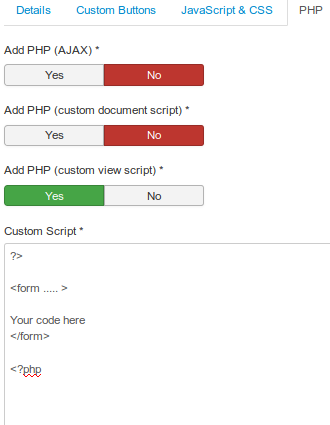
So you did not try to add the new form outside the other form like I mentioned in the little tutorial... that could be the missing part. Move the whole for out of the default view area, into the php tab->Add PHP (custom view script) area and start wit ?> then the HTML and then <?php
It should look like this:
Gianluca Gabella
Dec 2, 2018, 3:31:48 AM12/2/18
to ((ewe))yn, j...@vdm.io
Yes, i missed that part. That works perfectly. Thank you!
G.
Copyright © Vast Development Method | Terms of Service | Privacy Policy | Company
((ewe))yn
Dec 2, 2018, 12:04:50 PM12/2/18
to Joomla Component Builder, llew...@vdm.io
Okay great, I will need to update that tutorial to show this more clearly :)
((ewe))yn
Dec 2, 2018, 3:46:47 PM12/2/18
to Joomla Component Builder, llew...@vdm.io
Here is a more full tutorial, that will be more helpful... let me know what you think.
Gianluca Gabella
Dec 3, 2018, 4:46:48 AM12/3/18
to Joomla Component Builder, llew...@vdm.io
It's perfect! Thank you very much.
Side question: i'm writing this simple search for a list of items. About the search form we are now ok. About the results now i put a search query based on the $_GET variables i recieve from the form, and the output them. Is there a smart way to do this in the Dynamic Get? I was thinking about adding a "where": a.title LIKE JRequest::getVar('title');
I don't know if this is possible, i don't see the operator LIKE and i don't know if this is the right place to put the code to achieve my goal. I'm still studying the MVC pattern in general and related to Joomla.
I see in yout tutorial here: https://youtu.be/OPuCoxPW35s?list=PLQRGFI8XZ_wtGvPQZWBfDzzlERLQgpMRE&t=1531 that you can add a JRequest as filter, is this the right place?
Thank you!
((ewe))yn
Dec 3, 2018, 12:29:43 PM12/3/18
to Joomla Component Builder, llew...@vdm.io
Just heads-up Never access the $_GET variables directly always use the Joomla way (in the JCB model $this->input), since it helps with sanitation, and is much more secure.
Then since it is a search query and not always active, I would instead use some custom script that firs checks if the search value exist, and then only add the filter. This can be done in the dynamicGet area under the Custom Script Tab -> Add PHP (getListQuery - JModelList)
You will see it even says: used to add custom filtering. Which is what you are doing with a search.
The code could look like this:
$search_string = $this->input->get('search_name', null, 'STRING');
if ([[[Component]]]Helper::checkString($search_string))
{
 $search = $db->quote('%' . $db->escape($search_string, true) . '%');

 $query->where('(a.name LIKE '.$search.' OR a.name_code LIKE '.$search.' OR a.short_description LIKE '.$search.' OR a.getbuilder LIKE '.$search.' OR g.name LIKE '.$search.')');

}
So if there is no string, it will not filter by a search query.
Gianluca Gabella
Dec 3, 2018, 5:06:32 PM12/3/18
to Joomla Component Builder, llew...@vdm.io
Wonderful, works like a charm. Thank you very much again.
Gianluca

o...@utsch.biz
Oct 28, 2020, 2:35:12 PM10/28/20
to Joomla Component Builder, g.ga...@gmail.com, ((ewe))yn
All,
seems you have dived into pagination quite deeply..., but I could not find a solution for me: I want the total number of hits from a (total) query to be display to the user and not the number of the "paginated query". So when I have 80 matches and set pagination to 20, I will have 4 pages, but each respective "page query" surely has only 20 records.
Is there any simple way to retriev the "true" hit number?
Oliver
Reply all
Reply to author
Forward
0 new messages