
Problem to access MERRA2 data with MATLAB via OPENDAP server

Jamal Chioua
Hi,
I’m interested in hourly MERRA-2 data (M2T1NXSLV), and I tried to download it with MATLAB from the OPENDAP server (https://goldsmr4.gesdisc.eosdis.nasa.gov/opendap/MERRA2/M2T1NXSLV.5.12.4/). I can get information about the NC4 files with ncdisp, but ncread returns the following error
Error using netcdflib
The NetCDF library encountered an error during execution of 'getVarDouble' function - 'Authorization failure (-78)'.
When I try to download the whole nc file from the data server (https://goldsmr4.gesdisc.eosdis.nasa.gov/data/MERRA2/M2T1NXSLV.5.12.4/), there’s no problem. But I need to download a subset for a long period. Could you help me?
I’m using Matlab R2017a. The NetCDF library version is 4.3.3.1 and the Operating system is Windows 10 Enterprise 1803 (17134.48).
Thanks in advance.
Jamal

Nathan Potter
Hi Jamal,
The errors you are encountering are probably due to the fact that NASA now requires a login step in order to access data. This isn’t typically a problem for a browser as you (a user) are on hand to navigate the authentication steps. In order for Matlab to work you have to do some extra configuration.
We have general instructions in section 6.3 of our Hyrax Guide:
https://opendap.github.io/hyrax_guide/Master_Hyrax_Guide.html#_authentication_for_dap_clients.
For NASA data you will be utilizing their Earthdata Login system so you will need to read and perform the tasks outlined in section 6.3.2
Once that is completed you should follow the specific instructions for Matlab in section 6.3.9 (more details in section 6.3.5 - because Matlab utilizes the NetCDF-C library to perform it’s DAP day access steps)
Pleas let me know whether or not this resolves your issue.
Sincerely,
Nathan
Nathan Potter ndp at opendap.org
OPeNDAP, Inc. +1.541.231.3317
Jamal Chioua
Thanks for your answer.
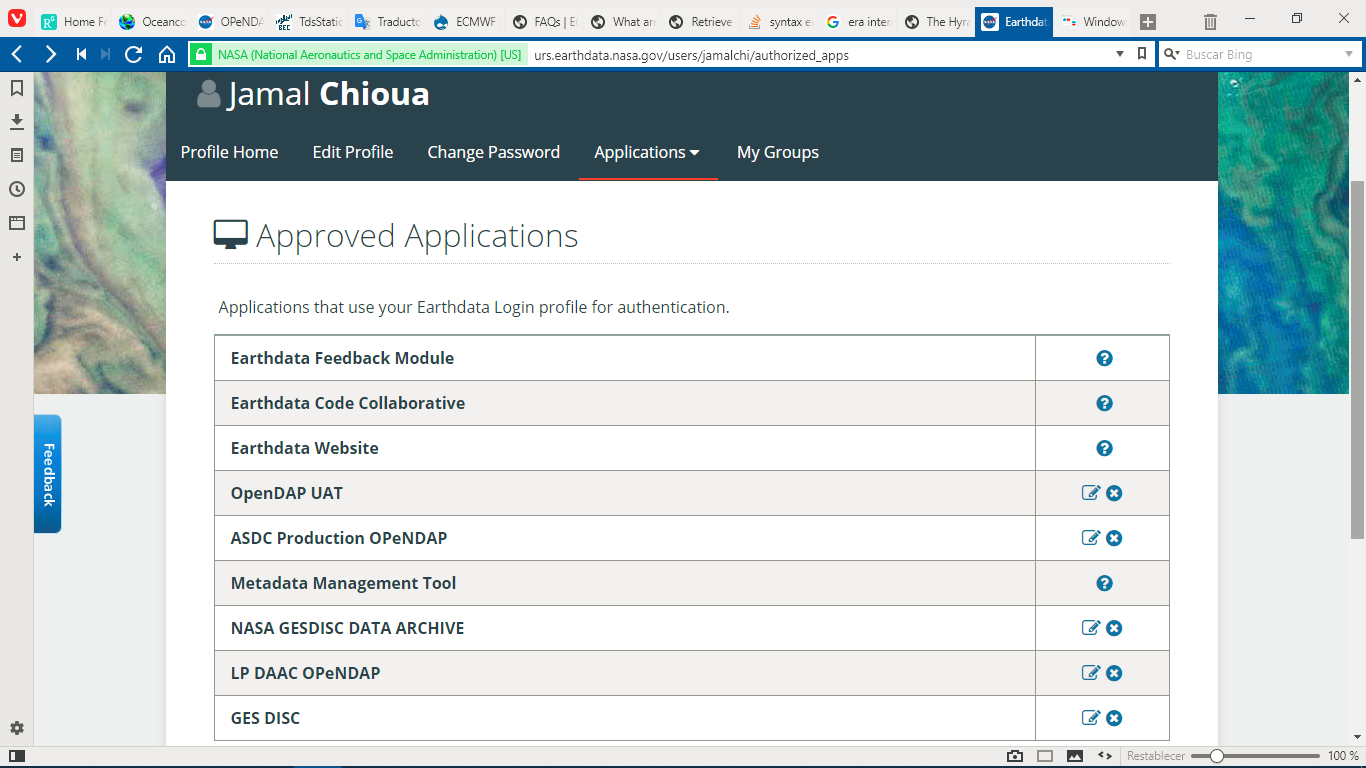
In what refers to section 6.3.2, I have already Earthdata credentials. I've approved NASA GESDISC DATA ARCHIVE and GES DISC (attached picture). In the whole applications list, i can't find any mention of a DAP server for the GES DISC.
As for the section 6.3.9, the .netrc file in my home directory contains:
machine urs.earthdata.nasa.gov
login jamalchi
password *****
machine goldsmr4.gesdisc.eosdis.nasa.gov
login jamalchi
password *****
and the .dodsrc file contains:
HTTP.COOKIEJAR=C:\Users\Jamal\.urs_cookies
HTTP.NETRC=C:\Users\Jamal\.netrc
The .urs_cookies file is empty.
in spite of that, I'm still receiving the Authorization failure error.
Thanks again for your help.
Jamal
-----Mensaje original-----
De: Nathan Potter [mailto:n...@opendap.org]
Enviado el: martes, 19 de junio de 2018 12:46
Para: Jamal Chioua <jama...@gmail.com>
CC: Nathan Potter <n...@opendap.org>; sup...@opendap.org
Asunto: Re: [support] Problem to access MERRA2 data with MATLAB via OPENDAP server
Jamal Chioua
Thanks for your answer.
In what refers to section 6.3.2, I have already Earthdata credentials. I've approved NASA GESDISC DATA ARCHIVE and GES DISC (attached picture). In the whole applications list, i can't find any mention of a DAP server for the GES DISC.
As for the section 6.3.9, the .netrc file in my home directory contains:
machine urs.earthdata.nasa.gov
login jamalchi
password *****
machine goldsmr4.gesdisc.eosdis.nasa.gov
login jamalchi
password *****
and the .dodsrc file contains:
HTTP.COOKIEJAR=C:\Users\Jamal\.urs_cookies
HTTP.NETRC=C:\Users\Jamal\.netrc
The .urs_cookies file is empty.
in spite of that, I'm still receiving the Authorization failure error.
Thanks again for your help.
Jamal
-----Mensaje original-----
De: Nathan Potter [mailto:n...@opendap.org]
Enviado el: martes, 19 de junio de 2018 12:46
Para: Jamal Chioua <jama...@gmail.com>
CC: Nathan Potter <n...@opendap.org>; sup...@opendap.org
Asunto: Re: [support] Problem to access MERRA2 data with MATLAB via OPENDAP server
Nathan Potter
What you have seems like it should work.
One thing I noticed is that in .netrc you have an entry for goldsmr4.gesdisc.eosdis.nasa.gov
I don’t think you need it.
The only server that you would need to send URS credentials to is urs.earthdata.nasa.gov
Here are some thing to check for the authentication issue:
The file system permissions for the .netrc should be set to rw for your user and none everywhere else:
-rw-------@ 1 ndp staff 474 Jun 19 09:38 /Users/ndp/.netrc
If that looks ok (or if you correct it and Matlab still doesn’t work)then I think we should try some command line stuff.
First with curl (if you ghave it) and then with the netcdf-lib.
If you can, run this curl command:
curl -k -n -c ursCookies -b ursCookies -L --url "https://goldsmr4.gesdisc.eosdis.nasa.gov/opendap/MERRA2/M2T1NXSLV.5.12.4/1996/07/MERRA2_200.tavg1_2d_slv_Nx.19960708.nc4.ascii?lat"
If your .netrc contains valid URS credentials and it’s permissions are set as indicated above, this really should work.
If the curl thing fails there must be an issue with .netrc.
If it works that’s a good sign.
Then I think try the netcdf-lib utility “ncdump”.
Try this:
ncdump "https://goldsmr4.gesdisc.eosdis.nasa.gov/opendap/MERRA2/M2T1NXSLV.5.12.4/1996/07/MERRA2_200.tavg1_2d_slv_Nx.19960708.nc4?lat”
That should return metadata regardless, but fail at the “data:” section if the authentication doesn’t work.
Please let me know how that goes.
Sincerely,
Nathan
Jamal Chioua
Using the curl command, i get
HTTP Basic: Access denied.
Using the ncdump command, I get
curl error details:
ncdump: https://goldsmr4.gesdisc.eosdis.nasa.gov/opendap/MERRA2/M2T1NXSLV.5.12.4/1996/07/MERRA2_200.tavg1_2d_slv_Nx.19960708.nc4?lat: NetCDF: I/O failure
I'm sure that the .netrc file is rw for me (only user).
It's strange because i can download data with this credentials with the browser.
Regards,
Enviado el: jueves, 21 de junio de 2018 14:13
Nathan Potter
I think understanding the problem with curl is going to lead us to the Matlab issue. Let’s see if curl will tell us anything of value.
Try clearing any cookies, add “-v” to the curl command, and capture the output (stdin & stderr) in a file like this:
rm -f ursCookies
curl -v -k -n -c ursCookies -b ursCookies -L --url "https://goldsmr4.gesdisc.eosdis.nasa.gov/opendap/MERRA2/M2T1NXSLV.5.12.4/1996/07/MERRA2_200.tavg1_2d_slv_Nx.19960708.nc4.ascii?lat" > curl.log 2>&1
(Not sure if all that translates in Windows. The idea is to get all the verbose curl output in a file.)
Please send me the file.
Hopefully curl will say why it’s unhappy.
I’ve attached the log from my successful attempt to this message.
Cheers,
Nathan
Jamal Chioua
You have attached the log file.
Thank you so much for your patience.
Enviado el: jueves, 21 de junio de 2018 16:21
CC: Nathan Potter <n...@opendap.org>; sup...@opendap.org
Asunto: Re: [support] Problem to access MERRA2 data with MATLAB via OPENDAP server
Nathan Potter
In your log files I see this:
* Couldn't find host urs.earthdata.nasa.gov in the _netrc file; using defaults
Which is surely the source of at least the curl headache and possibly Matlab too.
The name of the file “_netrc” got me thinking so I googled and found this:
https://stackoverflow.com/questions/6031214/git-how-to-use-netrc-file-on-windows-to-save-user-and-password
(Note the second line of the first reply)
It looks to me that if you rename your .netrc file to _netrc and then retry the curl command we might get further.
Let me know.
Nathan
Jamal Chioua
I've renamed the file to _netrc. After, I used the command
setx HOME %USERPROFILE%
finally, i've run the cmd as administrator and worked out of my home directory (in C:\), and now it's working.
I tried with curl and wget and it's working fine with both, but not with Matlab.
I tried to put _netrc, _dodsrc and the ursCookies in my Matlab work folder, but without result.
Thanks so much.
Kind regards,
Enviado el: jueves, 21 de junio de 2018 18:16
Nathan Potter
So you where able to use curl and wget, but only as the administrator?
If that’s the case then it's probably not a good sign, as I suspect Matlab runs as your user.
I am wondering about this:
> setx HOME %USERPROFILE%
I think you might try being very specific. Try doing this:
setx HOME C:\Users\Jamal
And see if that makes it so that you can run curl without being the administrator.
Nathan
Nathan Potter
> On Jun 21, 2018, at 2:17 PM, Nathan Potter <n...@opendap.org> wrote:
>
> Hi Jamal,
>
> So you where able to use curl and wget, but only as the administrator?
>
> If that’s the case then it's probably not a good sign, as I suspect Matlab runs as your user.
>
> I am wondering about this:
>
>> setx HOME %USERPROFILE%
>
>
> I think you might try being very specific. Try doing this:
>
> setx HOME C:\Users\Jamal
>
Nathan Potter
Begin forwarded message:From: "Jamal Chioua" <jama...@gmail.com>Subject: RE: [support] Problem to access MERRA2 data with MATLAB via OPENDAP serverDate: June 22, 2018 at 1:46:21 AM PDTTo: "'Nathan Potter'" <n...@opendap.org>Good morning Nathan,
You were right. Now, curl and wget are working good without need to run it as administrator.
Yesterday I tried to make Matlab use the cookies file created with curl to connect to the opendap server. it could easily be done in the case of a conventional HTTP, using the urlread or webread command. But, to read netcdf files on an opendap server, you can only use the ncread command, and don't have the option to use a cookies file, nor to use username and password directly in the command.
with the previous security configuration, one could use, for example: 'http://',username':'password,'@site/', but not anymore.
Can you think of another method?
Cheers,
Enviado el: jueves, 21 de junio de 2018 22:19
Nathan Potter
Begin forwarded message:From: Nathan Potter <n...@opendap.org>Subject: Re: [support] Problem to access MERRA2 data with MATLAB via OPENDAP serverDate: June 22, 2018 at 3:26:44 AM PDTTo: Jamal Chioua <jama...@gmail.com>Cc: Nathan Potter <n...@opendap.org>Hi Jamal,
What I think I know is that Matlab uses the netcdf-c library underneath the hood.
If we can get the netcdf command line utility “ncdump" working like wget and curl then I think Matlab will work.
Now that you have wget and curl working, have you tried ncdump on the same request URL?
From a shell/commandline try this:
ncdump https://goldsmr4.gesdisc.eosdis.nasa.gov/opendap/MERRA2/M2T1NXSLV.5.12.4/1996/07/MERRA2_200.tavg1_2d_slv_Nx.19960708.nc4?lat
This works on my system and I think it will work for you if you have HOME set correctly and the .netrc and .dodsrc files organized as discussed previously.
Let me know if that works, if it does then we can sort out Matlab
Sincerely,
Nathan
Nathan Potter
Begin forwarded message:From: "Jamal Chioua" <jama...@gmail.com>Subject: RE: [support] Problem to access MERRA2 data with MATLAB via OPENDAP serverDate: June 22, 2018 at 4:05:12 AM PDTTo: "'Nathan Potter'" <n...@opendap.org>
Hi Nathen,
Ncdump is giving the same error:
curl error details:
ncdump: https://goldsmr4.gesdisc.eosdis.nasa.gov/opendap/MERRA2/M2T1NXSLV.5.12.4/1996/07/MERRA2_200.tavg1_2d_slv_Nx.19960708.nc4?lat: NetCDF: I/O failure
Enviado el: viernes, 22 de junio de 2018 11:27
e -on-windows-to-save-user-and-password
Nathan Potter
Begin forwarded message:From: Nathan Potter <n...@opendap.org>Subject: Re: [support] Problem to access MERRA2 data with MATLAB via OPENDAP serverDate: June 22, 2018 at 4:22:37 AM PDTTo: Jamal Chioua <jama...@gmail.com>Cc: Nathan Potter <n...@opendap.org>
Hi Jamal,
There are some version differences between our systems (I have netcdf library version 4.4.1.1 of May 21 2018, you have 4.3.3.1) but I don’t think that’s an issue.
When I run this:
ncdump https://goldsmr4.gesdisc.eosdis.nasa.gov/opendap/MERRA2/M2T1NXSLV.5.12.4/1996/07/MERRA2_200.tavg1_2d_slv_Nx.19960708.nc4?lat
I get the correct response, no error.
This is pretty clearly about the netcdf library code not being able to locate the .netrc and .dodsrc files.
From the command line are you able to issue a command that will show you the currently set environment variables?
Can you see if HOME is set correctly in your current shell?
Because ncdump should work fine and since it is using the same underlying API that Matlab is I think that if we can get ncdump sorted then we will be very close to getting Matlab too.
Here’s what I am thinking - When you run curl from the command line it runs in the current shell “environment”, so if HOME is set correctly in your current shell everything should be fine.
And that seems to be the case based on what we have seen so far.
But when you launch Matlab it’s not being launched from your shell, but rather by the OS and the “environment” that it inherits is set by the OS from your “default” profile, not from the “environment” from an open shell window.
I think what has to happen for Matlab is that you have to set “HOME” using the Control Panel application.
This should cause HOME to be set for applications launched by the system on your behalf.
Does that make sense?
Here’s something that might be of use:
https://winaero.com/blog/how-to-see-names-and-values-of-environment-variables-in-windows-10/
Don’t despair, I am pretty sure we can sort this out.
Sincerely,
Nathan
Nathan Potter
Begin forwarded message:From: "Jamal Chioua" <jama...@gmail.com>Subject: RE: [support] Problem to access MERRA2 data with MATLAB via OPENDAP serverDate: June 22, 2018 at 5:01:22 AM PDTTo: "'Nathan Potter'" <n...@opendap.org>
Hi Nathan,
The netcdf library version 4.3.3.1 is what i'm using under Matlab R2017a.
To use ncdump, I've installed netCDF 4.6.1 from https://www.unidata.ucar.edu/downloads/netcdf/index.jsp. Once installed, I've added the netcdf 4.6.1 path to the environment variables, so I can execute ncdump everywere.
When I type >%HOME% from cmd, I get "C:\Users\Jamal".
Same thing if typing
echo %userprofile%
echo %home%
the result is always C:\Users\Jamal
In Matlab, typing
getenv('HOME')
ans =
'C:\Users\Jamal'
And surprise!!!! Matlab is working when i execute it without administrator privileges.
I will run the whole script in Matlab that I prepared to download and analyse MERRA-2 Data and i tell you
Enviado el: viernes, 22 de junio de 2018 12:23
Para: Jamal Chioua <jama...@gmail.com>
CC: Nathan Potter <n...@opendap.org>
Asunto: Re: [support] Problem to access MERRA2 data with MATLAB via OPENDAP server
Hi Jamal,
l e -on-windows-to-save-user-and-password
Nathan Potter
Begin forwarded message:From: "Jamal Chioua" <jama...@gmail.com>Subject: RE: [support] Problem to access MERRA2 data with MATLAB via OPENDAP serverDate: June 22, 2018 at 10:34:11 AM PDTTo: "'Nathan Potter'" <n...@opendap.org>
Hi Nathan,
Finally, I can confirm that is working well in Matlab right now.
I've been a bit slow to confirm since I've been setting up other computers following all the steps we have taken, and now I think I already know what the problem was.
Under normal conditions, changing the .netrc to _netrc should be enough for it to work, but I've seen that to define HOME in the environnement variables using set, it disappears with every cmd restart, so you need to define it again. This is arranged using setx instead of set, but it does not work on all computers (possibly different versions of cmd).
This problem is not completely resolved on computers that do not accept setx, and for the script to work, the necessary steps are:
- Start cmd and type set HOME= C:\Users\Jamal,
- keeping cmd open, start Matlab
- type setenv('HOME','C:\Users\Jamal')
-run the script
Thanks for everything.
Jamal
-----Mensaje original-----
De: Nathan Potter <n...@opendap.org>
Enviado el: Friday, June 22, 2018 2:31 PM
Para: Jamal Chioua <jama...@gmail.com>
CC: Nathan Potter <n...@opendap.org>
Asunto: Re: [support] Problem to access MERRA2 data with MATLAB via OPENDAP server
So it seems to work, nice!
On Jun 22, 2018, at 5:01 AM, Jamal Chioua <jama...@gmail.com> wrote:
Hi Nathan,
2 .4/1996/07/MERRA2_200.tavg1_2d_slv_Nx.19960708.nc4?lat
i l e -on-windows-to-save-user-and-password
Nathan Potter
Great news! Thanks for the detailed information. I don’t have access to a Windows 10 system which means this kind of information (now in our support email system) can be very helpful to others down the road.
I’m glad we got it sorted out.
Cheers,
Nathan
> I've been a bit slow to confirm since I've been setting up other computers following all the steps we have taken, and now I think I already know what the problem was.
> Under normal conditions, changing the .netrc to _netrc should be enough for it to work, but I've seen that to define HOME in the environnement variables using set, it disappears with every cmd restart, so you need to define it again. This is arranged using setx instead of set, but it does not work on all computers (possibly different versions of cmd).
> This problem is not completely resolved on computers that do not accept setx, and for the script to work, the necessary steps are:
> - Start cmd and type set HOME= C:\Users\Jamal,
> - keeping cmd open, start Matlab
> - type setenv('HOME','C:\Users\Jamal')
> -run the script
>
> Thanks for everything.
>
> -----Mensaje original-----
>
>
>
>
>> To use ncdump, I've installed netCDF 4.6.1 from https://www.unidata.ucar.edu/downloads/netcdf/index.jsp. Once installed, I've added the netcdf 4.6.1 path to the environment variables, so I can execute ncdump everywere.
>>
>> When I type >%HOME% from cmd, I get "C:\Users\Jamal".
>> Same thing if typing
>> echo %userprofile%
>> echo %home%
>> the result is always C:\Users\Jamal
>>
>> In Matlab, typing
>> getenv('HOME')
>>
>> ans =
>>
>> 'C:\Users\Jamal'
>>
>> And surprise!!!! Matlab is working when i execute it without administrator privileges.
>> I will run the whole script in Matlab that I prepared to download and
>> analyse MERRA-2 Data and i tell you
>>
>>
>>
>>
>> -----Mensaje original-----
>> De: Nathan Potter [mailto:n...@opendap.org] Enviado el: viernes, 22 de
>> junio de 2018 12:23
>> OPENDAP server
>>
>> Hi Jamal,
>>
>>> ncdump:
>>> 2
>>> .4/1996/07/MERRA2_200.tavg1_2d_slv_Nx.19960708.nc4?lat: NetCDF: I/O
>>> failure
>>>
>>>
>>> -----Mensaje original-----
>>> OPENDAP server
>>>
>>> Hi Jamal,
>>>
>>>
>>> If we can get the netcdf command line utility “ncdump" working like wget and curl then I think Matlab will work.
>>>
>>> Now that you have wget and curl working, have you tried ncdump on the same request URL?
>>>
>>> From a shell/commandline try this:
>>>
>>> ncdump
>>> https://goldsmr4.gesdisc.eosdis.nasa.gov/opendap/MERRA2/M2T1NXSLV.5.1
>>> 2 .4/1996/07/MERRA2_200.tavg1_2d_slv_Nx.19960708.nc4?lat
>>>
>>> This works on my system and I think it will work for you if you have HOME set correctly and the .netrc and .dodsrc files organized as discussed previously.
>>>
>>> Let me know if that works, if it does then we can sort out Matlab
>>>
>>>
>>> Sincerely,
>>>
>>> Nathan
>>>
>>>
>>>
>>>> On Jun 22, 2018, at 1:46 AM, Jamal Chioua <jama...@gmail.com> wrote:
>>>>
>>>> Good morning Nathan,
>>>>
>>>> You were right. Now, curl and wget are working good without need to run it as administrator.
>>>> Yesterday I tried to make Matlab use the cookies file created with curl to connect to the opendap server. it could easily be done in the case of a conventional HTTP, using the urlread or webread command. But, to read netcdf files on an opendap server, you can only use the ncread command, and don't have the option to use a cookies file, nor to use username and password directly in the command.
>>>> with the previous security configuration, one could use, for example: 'http://',username':'password,'@site/', but not anymore.
>>>>
>>>> Can you think of another method?
>>>>
>>>> Cheers,
>>>>
>>>> -----Mensaje original-----
>>>> De: Nathan Potter [mailto:n...@opendap.org] Enviado el: jueves, 21 de
>>>>>> i l e -on-windows-to-save-user-and-password
Jamal Chioua
It would have been impossible without your help. Thanks again
Sincerely,
Enviado el: Friday, June 22, 2018 6:39 PM
Para: Jamal Chioua <jama...@gmail.com>
CC: Nathan Potter <n...@opendap.org>; User Support <sup...@opendap.org>

johan.a...@gmail.com
The NetCDF library encountered an error during execution of 'getVarDouble' function - 'Authorization failure (-78)'.


Maryam Salim
Nathan Potter
Hi Maryam,
I think you will need to configure your client software to authenticate with the OPeNDAP service.
This will require different steps, depending in which client software you are using.
This page:
https://opendap.github.io/hyrax_guide/Master_Hyrax_Guide.html#_authentication_for_dap_clients
Has instructions on how to go about that for a number of clients.
Please let us know if you need more help getting that connection configured.
Sincerely,
Nathan