New Project Structure Incomplete and has Duplicate Folders

295 views
Skip to first unread message

dori...@yahoo.com

unread,
Aug 25, 2017, 6:26:02 PM8/25/17
to Illuminated Cloud General Discussion
Using Windows 10 Enterprise, IntelliJ IDEA 2017.2.2 Community Edition
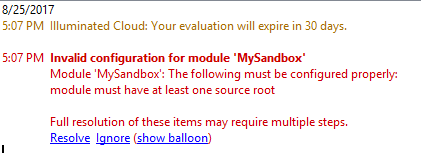
I'm following the video http://www.illuminatedcloud.com/gettingstarted setting up my project. This is the project structure that is created (no src folder):


Event log message:


Settings (Ctrl+Alt+S):


I've been using IntelliJ for many years, lately for Grails/Groovy development. I'm new to Salesforce. There seems to be some duplication and incomplete setup going on that I can't figure out how to fix?

I plan to have an IntelliJ project for each of our sandboxes, each with its own connection.

Thanks,
Doris

sc...@illuminatedcloud.com

unread,
Aug 25, 2017, 8:44:02 PM8/25/17
to Illuminated Cloud General Discussion
Hi, Doris.  That video is actually quite dated now and needs to be updated.  Nonetheless, if you created a new project from scratch it should have created a src directory for you and properly configured it as the source root for the project.  Can you explain the steps you took to create the project?

Regards,
Scott Wells

dori...@yahoo.com

unread,
Aug 28, 2017, 11:28:34 AM8/28/17
to Illuminated Cloud General Discussion
Hi Scott, thank you for the quick response. So I decided to repeat the process. I deleted the IdeaProjects directory and re-created the project, just to make sure I’m not missing anything.

Using Illuminated Cloud 1.7.9.9-idea14, installed by with “Browse repositories”


Importing my personal sandbox:

“Create New Project” in the IntelliJ welcome screen

Click on Illuminated Cloud and select connection. IntelliJ starts populating contents

In subscription I take the default “Selected” and the default selection, in addition selecting everything custom.

Taking the default on project name, location, and “More Settings”. “Retrieve metadata from Force.com” and “Generate offline symbol table” are checked.

Retrieved 810 components with status “SUCCEEDED”.

Restarted IntelliJ to rebuild caches and indices.

Setting the project SDK to Illuminated Cloud (MySandbox/MySandbox).


Repeat the process for Salesforce instance Devpro: File -> New Project


Retrieved 844 components with status “SUCCEEDED”.

Restarted IntelliJ to rebuild caches and indices.

Setting the project SDK to Illuminated Cloud (Devpro/Devpro).


This time it created the src directory for each. 


For "MySandbox" it created an additional entry under "Languages & Frameworks". It did not do that for Devpro. The only difference in the creation. MySandbox was created from the IntelliJ welcome screen, Devpro was created using file -> new -> project:


Both projects have an "External Libraries" folder that is a duplication of the OfflineSymbolTable.zip, Folder structure in Windows: IdeaProjects\MySandbox\IlluminatedCloud\MySandbox. Structure in IntelliJ:


I'm assuming the SDK setting is correct. 


Keyboard shortcuts are working, which are super, btw.! I'm looking into this because our team currently does not use any IDE. From reading some of your doc, I understand changesets are not supported at this time. Is that still the case? Any changes in the near future? Or are you going to let Salesforce DX and the "Single Source of Truth" using source control tale the lead on this?


Thanks,

Doris


sc...@illuminatedcloud.com

unread,
Aug 28, 2017, 11:48:07 AM8/28/17
to Illuminated Cloud General Discussion
Okay, sounds like things are working properly this time around.  I can't explain why it went south the first time, so if you do ever see that again, please let me know and we'll take a close look.

As for having the OST showing up twice, once is just showing in the filesystem (top entry) and the other is showing it being used in the associated SDK (bottom entry).  It doesn't represent any duplication of config.  It's just because the SDK is stored in the project's root directory.

Right now there are no plans for IC to support change sets directly.  Note that it does support deployments and retrievals against another connection, and many use that to push metadata back and forth between environments including sandboxes and production.  Obviously you have to exercise EXTREME caution when doing that!  If/when SFDX provides support for change sets in a first-class manner, I'll take a look at how IC's SFDX integration should support it.

I hope that helps.

Regards,
Scott Wells

Doris Gammenthaler

unread,
Aug 28, 2017, 1:04:35 PM8/28/17
to Illuminated Cloud General Discussion
Yes. thank you. Using IC's ability to push metadata, as you state, is very risky, a definite no-go in production. Besides, we need to have a change audit trail. 

Salesforce change sets have limited functionality. They cannot delete anything. We need to cleanup some objects no longer in use.

We are looking at the Ant-based Force.com Migration Tool. Everything I've read talks about the .xml and how to deploy it. But nowhere do I find a way to create a diff xml? Let's say I use version control and would like to create an .xml based on the difference in meta data between my code base and the repository. Then deploy the difference through the instances to production using the Force.com Migration Tool. Hand-crafting .xml files is a bitter pill to swallow?

On second though, being new at this: Does the package.xml track all local meta data changes? We could then do a diff between the repository package.xml and the local package.xml to get the .xml we need?

Regards,
Doris


sc...@illuminatedcloud.com

unread,
Aug 28, 2017, 1:27:15 PM8/28/17
to Illuminated Cloud General Discussion
Totally understood.  As for a diff package.xml, in my experience it's not quite as easy as that.  You often need to deploy certain metadata in conjunction with other metadata in order to keep things whole, so creating a diff-only package.xml would be quite challenging.  What I typically do when pushing to a "sacred environment" is the following:
  1. With the full set of metadata I want to be in the local filesystem, I first do a retrieval of everything from the target org and compare it to what I have locally.  I verify that the differences between the two are what I'd expect based on the changes I've made.  If not, I obviously do work to understand the unexpected differences.  That can vary widely based on the nature of those differences.
  2. Once I feel confident that the differences are correct, I deploy the entire set of local metadata into the target org.
  3. I then retrieve again and compare to make sure that things deployed properly.  If there are remaining differences, they either represent changes made automatically by the server (most often benign changes to XML files), or they represent something that didn't deploy properly or completely.  If there are instances of the latter, I resolve those.  Again, the nature of those can vary so there's no one rule on how to resolve them.
  4. If necessary, I go through a wash/rinse/repeat cycle of the above until the target org and local metadata match as expected.
  5. Note that I also look for items in the target org that aren't present locally and represent removed/outdated metadata.  I then use destructive changes to remove that metadata from the target org if necessary to "keep the house clean".  Obviously some metadata cannot be removed due to external references, inclusion in a released managed package, etc., but whenever possible I try to remove obsolete metadata.
I haven't yet found any tool that automates this for you.  Some make it easier than others.  I find IC incredibly useful for this process, in particular the retrieve & diff part and the obsolete metadata removal part, but it's just one part of an overall toolset that I use for bringing sacred orgs up-to-date.

I wish I had a better answer.  I'd certainly be curious to know if anyone else has found a considerably better way to do this!

Regards,
Scott

Doris Gammenthaler

unread,
Aug 28, 2017, 2:27:19 PM8/28/17
to Illuminated Cloud General Discussion
How about IC giving us the difference between the local file system and the target org in form of the package.xml? We could then migrate that across the other instances. 

sc...@illuminatedcloud.com

unread,
Aug 30, 2017, 9:37:35 AM8/30/17
to Illuminated Cloud General Discussion
Doris, feel free to log it in the issue tracker as an enhancement request, though what comes to mind immediately is that seems more like a feature for a system configuration/replication tool such as Gearset than a feature for an IDE.

Regards,
Scott
Reply all
Reply to author
Forward
0 new messages